eBay Handling Time: Can You Promise One Business Day?

One-business-day handling is a carrier-scan promise, not a label-printing target. Before selecting it on eBay, confirm that the exact SKU can move from paid order to an acceptance scan by the end of the next business day under your selected working-day schedule. A ready-to-pack laptop and an untested laptop may look identical in a listing draft, but they do not carry the same preparation risk.
This guide is written for eBay US sellers. The safest decision comes from testing one representative SKU, one real staffing calendar, and one actual carrier handoff before applying a shorter handling time across multiple listings.
One business day does not mean a rolling 24 hours
eBay’s current delivery-date guidance for sellers says handling time begins when payment is received and ends when the shipping carrier scans the package. Handling time is measured in business days, and sellers can choose to include Saturday and/or Sunday if they ship on those days.
For one-day handling, eBay describes the deadline as the end of the next business day rather than 24 hours after payment. Its example says a Monday payment needs a scan by Tuesday at 11:59 p.m. The account’s working days, local time zone, actual order deadline, holidays, and carrier operating schedule still need to agree.
The eBay US Seller Center handling-time page reinforces the payment-to-scan definition. Printing or saving a label may upload tracking, but it does not prove the carrier accepted the parcel. Handling time also is not the buyer’s full delivery estimate; carrier transit is a separate part of that estimate.

Build a handoff record before selecting the setting
Consider a fictional seller with one used laptop, a compatible charger, and a weekday pickup arrangement. The device is tested and its included accessories are recorded. The seller still needs to prove that packaging, staffing, and pickup fit the selected promise. “We usually ship quickly” is not useful evidence when the day’s collection has already left.
| Record | Question to answer | If you cannot answer |
|---|---|---|
| Actual item | Is the correct device located, tested, and ready with every stated accessory? | Resolve readiness before listing; unfinished work does not fit a short promise. |
| Payment | What paid-order date and time does the actual order show? | Read the order rather than a cart event or remembered message. |
| Calendar | Which working days and time zone are selected, and is a holiday involved? | Inspect account settings and the order’s ship-by information. |
| Packaging | Are suitable materials and a trained packer available? | Arrange them before choosing a faster setting. |
| Handoff | Which pickup or drop-off can produce a timely carrier scan? | Confirm the handoff; label creation is not the answer. |
| Exception owner | Who catches a missing accessory, missed pickup, or absent scan? | Assign an owner and an honest fallback before the order is late. |
Keep this record internal. Do not paste order numbers, addresses, serial numbers, or tracking records into the public listing. The buyer needs an accurate shipping promise, not your operating log.
Check the weekday example against your own calendar
Suppose payment arrives on Wednesday and the seller uses a Monday–Friday handling schedule with no holiday. Thursday is the next business day, so the seller should compare the actual order’s ship-by information with a Thursday handoff capable of producing a scan—not merely a Thursday evening label.
If payment arrives Friday under those same assumptions, the next business day is Monday. That shortcut stops being reliable when the seller includes weekend handling, a holiday changes the deadline, or the actual order shows something different. Recheck the order rather than hard-coding “Friday means Monday” into a team checklist.
Same-day handling has an additional cutoff setting. Confirm the selected working days, local time zone, cutoff, packing window, and carrier collection before offering it. A tutorial’s cutoff is not your account setting.
Decide whether one-day handling fits the SKU
| Observed workflow | Practical decision | Next check |
|---|---|---|
| Item is tested, accessories are confirmed, packaging is stocked, and a dependable scan-producing handoff exists. | One-day handling may be realistic. | Run a representative order through the full workflow and monitor scans. |
| Final testing, cleaning, personalization, or accessory matching happens after payment. | Use a longer promise until preparation is moved earlier. | Measure the slowest repeatable preparation step. |
| Pickup is inconsistent or parcels frequently receive a late first scan. | Do not rely on label time; fix the handoff first. | Compare pickup, drop-off, and acceptance-scan records. |
| Only some SKUs are ready for immediate packing. | Segment listings instead of forcing one setting across the catalog. | Tag the eligible SKU group and test a small batch. |
Change processing time in a controlled batch
If you manage connected eBay listings in Maxmerce, the eBay listing tools can help you filter the intended listings before editing. In Listing > eBay > Active Listing, processing time is available as a filter and an editable field. Start with a representative SKU group rather than selecting the entire catalog.
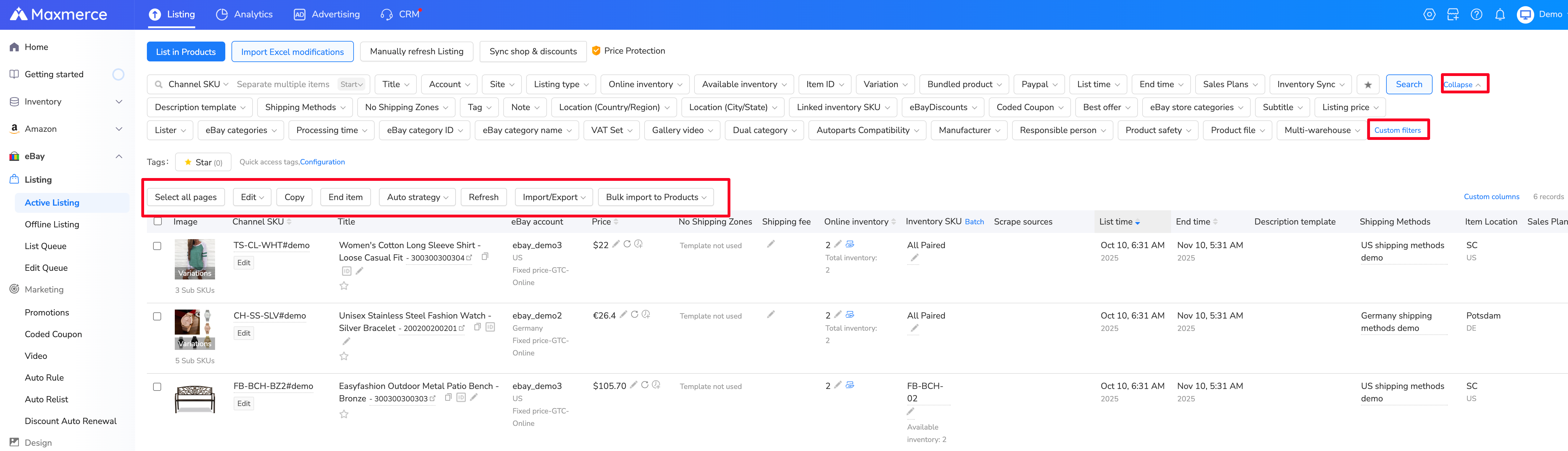
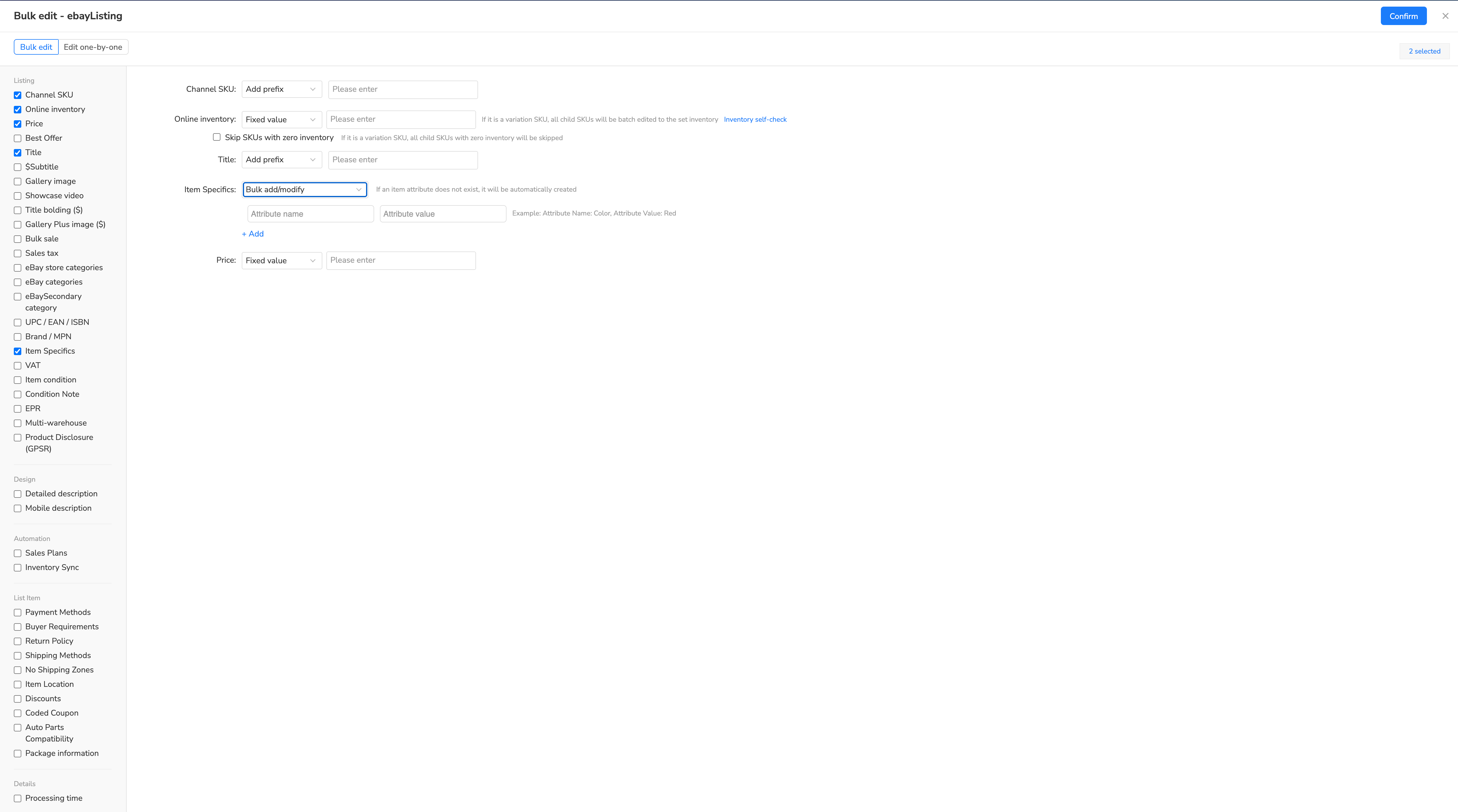
Select the test listings, choose Edit > Edit listings, and change only the intended processing-time field. Review the selection carefully before confirming; a faster number should follow an operational test, not replace one.
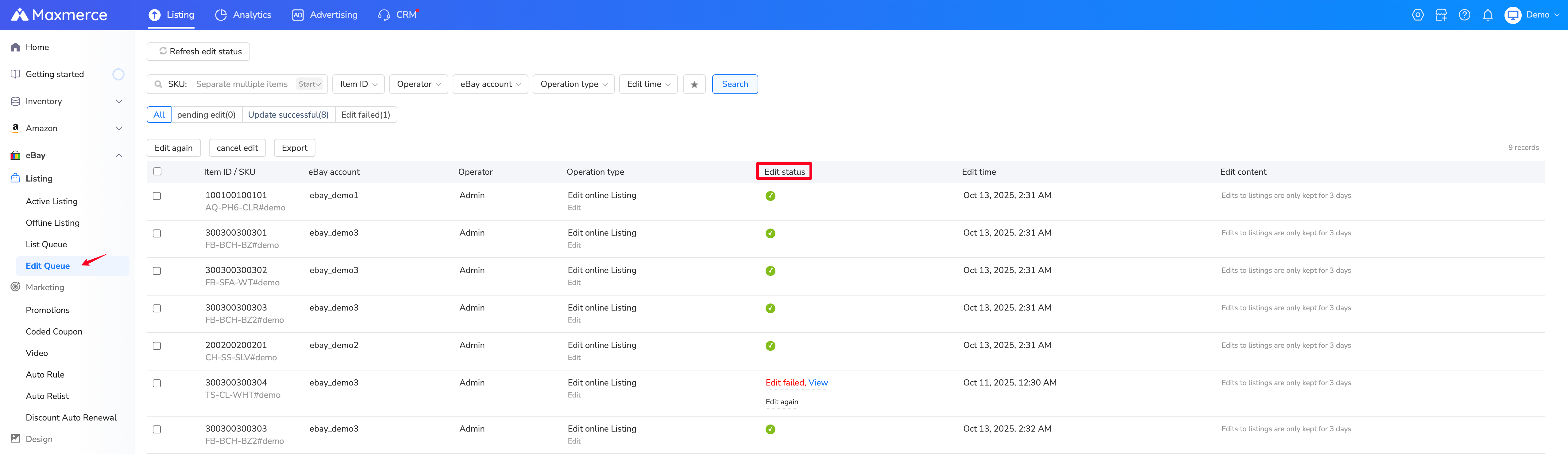
After submitting, open Edit Queue and confirm each listing succeeded. A failed queue item means the intended handling-time change may not be live. Verify a sample listing on eBay before expanding the batch.
Fix the preparation gap, not just the dropdown
- The item still needs testing. Finish physical checks and disclosure first. For used devices, this used-electronics description template can help record tested functions, accessories, and untested limits. Better copy does not complete the test.
- The parcel will miss pickup. Confirm another suitable handoff or choose an achievable handling promise. Do not assume a saved label fixes the schedule.
- The weekend setting and staff schedule disagree. Align the listing promise with days when someone can prepare and hand over that SKU.
- No scan is visible. Check the physical parcel and carrier record. Do not invent a scan, backdate a note, or promise an arrival date you cannot support.
- The item needs special packaging. Review the actual carrier and eBay requirements. A short handling-time worksheet does not establish that batteries, restricted goods, or oversized items are eligible for a particular service.
Run one real handoff before expanding the promise
Walk one representative SKU through locating, checking, packing, and the planned handoff. Record who performs each step and what could interrupt it. This is an internal rehearsal—not a fake order, test transaction, or platform certification.
If the workflow works only when one person is present, name the backup. If a missing charger consumes the packing window, fix the accessory record. If pickup depends on an unconfirmed arrangement, confirm it before shortening handling time.

Frequently asked questions
Does a buyer placing an item in the cart start handling time?
No. eBay says handling time starts when the seller receives payment. Use the paid-order record rather than a cart event or buyer message.
Does printing an eBay shipping label satisfy one-day handling?
Not by itself. eBay defines handling time as ending when the package is scanned by the shipping carrier. A printed label or uploaded tracking number is not the same evidence as a carrier acceptance scan.
Should every SKU use the same handling promise?
No. Group listings only when their preparation work, staffing, packaging, and carrier handoff can reliably support the same promise. A shared setting is convenient, but it does not prove every SKU is ready.
Does one-day handling mean the buyer receives the item tomorrow?
No. Handling time covers payment through carrier scan. Carrier transit, disruptions, and the buyer-facing estimated delivery date are separate parts of the schedule.
Before publishing: make item readiness, the selected working-day calendar, and the real carrier handoff tell the same story. A credible promise is better than a shorter number supported only by unfinished work.