How to End an eBay Listing: Revise, End or Relist?

Before learning how to end an eBay listing, check whether revising it would solve the problem with less disruption. End the listing when the item is unavailable, materially wrong, duplicated, or unsafe to keep live. Revise it when the offer is still valid and the needed field can be changed. If the item has already sold, ending the listing is no longer the right workflow.
Fixed-price listings can generally be ended at any time. Auction listings have tighter rules based on bids, the reserve price, and the time remaining. Ending early can disappoint buyers, leave some listing charges in place, and sometimes create additional fees, so use it as a corrective action rather than a routine optimization tactic.
Should you revise, end, or wait?
| Situation | Safer first action | Why |
|---|---|---|
| A title typo, incomplete description, weak photo order, or permitted price change | Revise | Keep the valid offer active and change only what eBay currently allows. |
| The item is lost, damaged, duplicated, or no longer available | End | Leaving an unavailable item live can create a worse buyer experience. |
| An auction has bids | Check eligibility before acting | Time remaining, reserve status, and bids affect whether the listing can be ended and what fees may apply. |
| A buyer has already purchased the item | Use the transaction-cancellation workflow if necessary | The listing has produced an order; ending an active listing is not the same as canceling a transaction. |
| A Good ‘Til Cancelled item is temporarily out of stock | Evaluate the out-of-stock option | Eligible listings can stay active while buyers no longer see an available quantity. |
| eBay removed the listing for a policy or catalog issue | Read the notice and correct the cause | Relisting unchanged can repeat the violation or create another removal. |
This matrix is a triage tool, not a substitute for the controls shown in your account. Start with eBay’s current Ending a listing guidance and the specific message attached to your listing.

How to end a fixed-price listing
For an active fixed-price listing, eBay’s current help flow is:
- Open Active listings in Seller Hub.
- Select the listing you need to stop.
- Choose End item from the available action menu.
- Select the accurate reason and confirm the action.
You can select several fixed-price listings and use the bulk action when the same verified inventory problem affects each one. Do not bulk-end listings merely because performance is weak. Check price, photos, title, item specifics, category, shipping, and demand first; some of those issues can be corrected without discarding the listing.
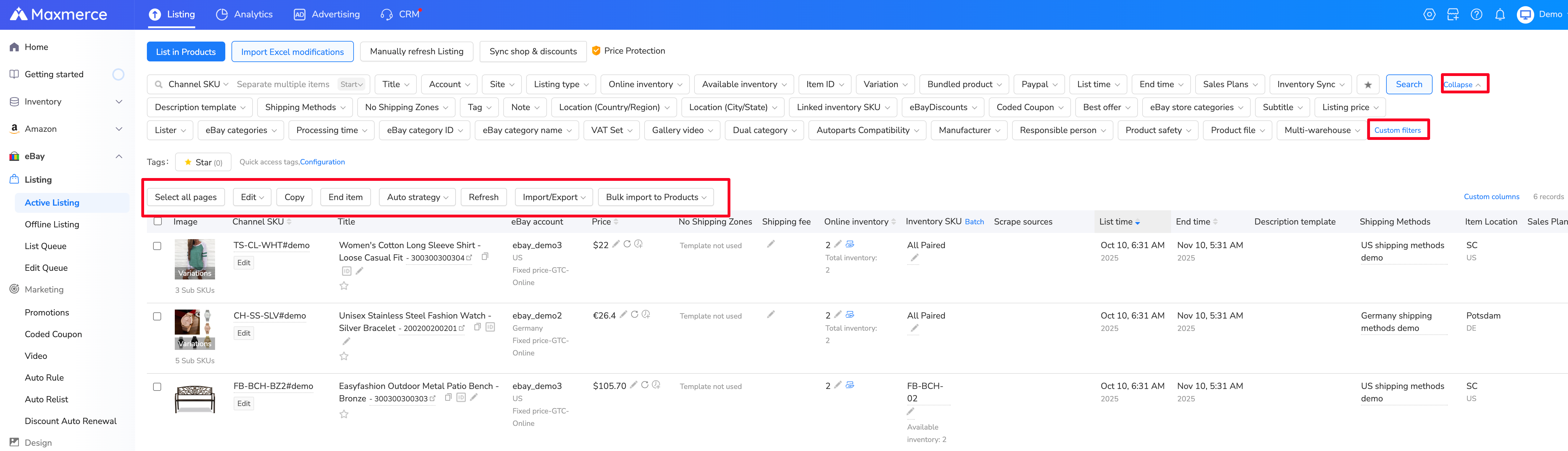
Teams using Maxmerce eBay listing tools can open Listing > eBay > Active Listing, select the verified listing, and choose End Item. After a successful action, the item moves to the Offline Listing view. eBay still controls eligibility and fees, so test a small batch first and review the result before applying the same action broadly.
When can you end an auction early?
Auction rules depend on bids and time remaining. The practical summary below paraphrases eBay’s current US help page; verify the live listing before relying on it.
| Auction state | What to expect | Seller check |
|---|---|---|
| No bids | Ending early is generally available. | Use a truthful reason and confirm any charges shown before submitting. |
| At least 12 hours remain and bids exist | Options depend on whether the reserve is met; canceling bids or selling to the high bidder may be offered. | Review the fee warning and the buyer impact before choosing. |
| Fewer than 12 hours remain, bids exist, and the reserve is met or no reserve is set | You generally cannot simply end the listing without completing the sale to the high bidder. | Use the action eBay presents; do not promise a result the listing is not eligible for. |
eBay warns that fees may apply when an auction with bids is ended early. It may also restrict accounts that repeatedly disappoint bidders. Ending an auction because the price is lower than hoped is not a safe workaround for choosing the wrong format or reserve strategy.
Revise the listing when the offer is still valid
A revision is usually better when you still have the exact item and can make the listing accurate without changing its identity. eBay’s revision rules vary with listing format, time remaining, purchase history, bids, and the field being changed.
- Photos: reorder or replace images when permitted, but keep the first image aligned with the actual offer. Use the eBay photo requirements checklist before changing the set.
- Item specifics: correct values you can verify and complete relevant required fields. The item specifics guide explains how to avoid guesses.
- Category: change it only when the current category misrepresents the item and the listing is eligible. Use the eBay category checklist for ambiguous products.
- Price or format: confirm that eBay permits the change in the current listing state. Auction timing and bids can narrow your options.
Do not end and recreate a listing solely to chase an assumed “new listing boost.” That theory is not a stable substitute for fixing buyer-facing accuracy, offer economics, or inventory availability.
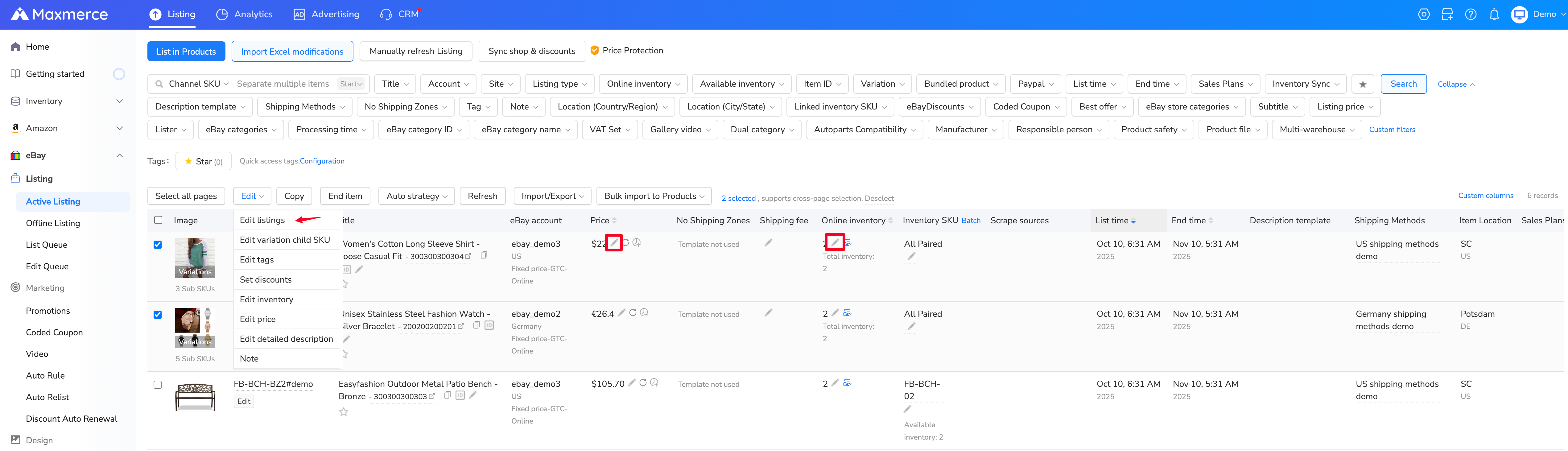
For eligible active listings, the Maxmerce edit menu supports individual or batch changes to fields such as title, inventory, price, item specifics, categories, and descriptions. The change is still subject to eBay’s current revision restrictions for bids, offers, purchases, and time remaining.
What happens after you end a listing?
The listing stops accepting purchases or bids under the ended state. Depending on its status, it may appear among unsold or inactive listings, where eBay may offer relist or similar-listing actions. Ending does not guarantee that insertion fees, optional upgrade fees, or auction-related fees disappear.
Keep an internal note of:
- the item or SKU;
- the exact reason for ending;
- whether buyers had offers or bids;
- the correction required before any relist; and
- where the physical inventory is now stored.
This small record prevents a duplicate or unchanged listing from being recreated later by another team member.

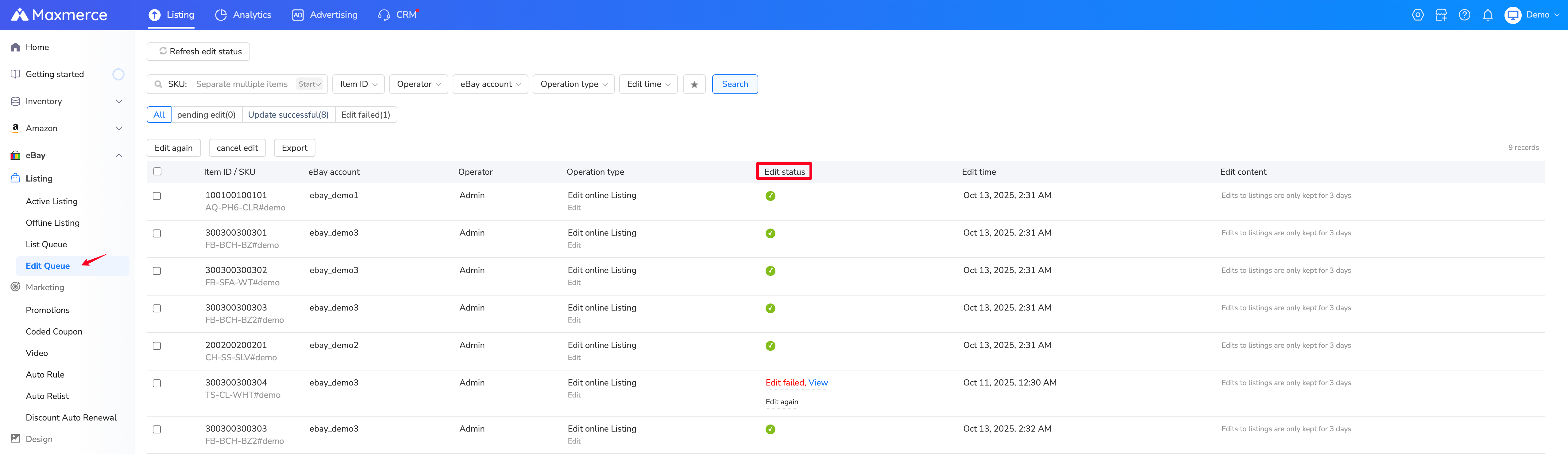
After an edit or end action in Maxmerce, check the Edit Queue. A failed task should be opened for its specific error and corrected rather than submitted repeatedly.
Relist only after the root cause is fixed
Before relisting, re-check the item as if it were a new offer. Confirm that the title, category, condition, item specifics, photos, included parts, quantity, price, shipping, and returns all describe the same inventory. If the old listing was removed by eBay, follow the notice or appeal path rather than copying it back unchanged.
When a replacement listing is genuinely needed, Maxmerce’s eBay AI listing tool can organize verified photos or a supported product link into an editable draft. It does not decide whether an active listing should be ended, resolve policy enforcement, or publish without seller review.
Ending an eBay listing FAQ
Can I end an eBay fixed-price listing at any time?
eBay currently allows a fixed-price listing to be ended with or without open offers. Check the confirmation screen for the effect on offers and charges, and use a truthful reason.
Can I end an auction after someone bids?
Sometimes, but not in every state. The available action depends on the time remaining, reserve status, and bids. A fee based on the highest bid may apply, and late auctions with a qualifying bid may have to be sold to the high bidder.
Should I end a listing just to change the title or photos?
Usually not. First check whether eBay lets you revise the needed field. Ending is more appropriate when the offer cannot remain active accurately or safely.
Is ending a listing the same as canceling an order?
No. Ending stops an active listing. If a buyer has already completed a purchase, use eBay’s transaction-cancellation workflow and its buyer communication requirements.
Will ending a listing remove all fees?
No. Insertion and optional listing fees may remain, and an auction ended early with bids may trigger an additional fee. Review the amount eBay shows before confirming.
Can I relist immediately after ending?
You may be able to relist an eligible ended item, but first correct the reason it was ended. Do not relist unchanged after a policy removal, inventory mismatch, wrong category, or inaccurate condition.