eBay Out of Stock Option: Check Before Restocking
The eBay out-of-stock option keeps an eligible Good ‘Til Canceled listing active when its quantity reaches zero, while hiding it from search until stock is added again. It is useful for repeatable inventory, but it does not prove that the next shipment matches the original offer or that every unit is available to sell.

What does the eBay out-of-stock option actually do?
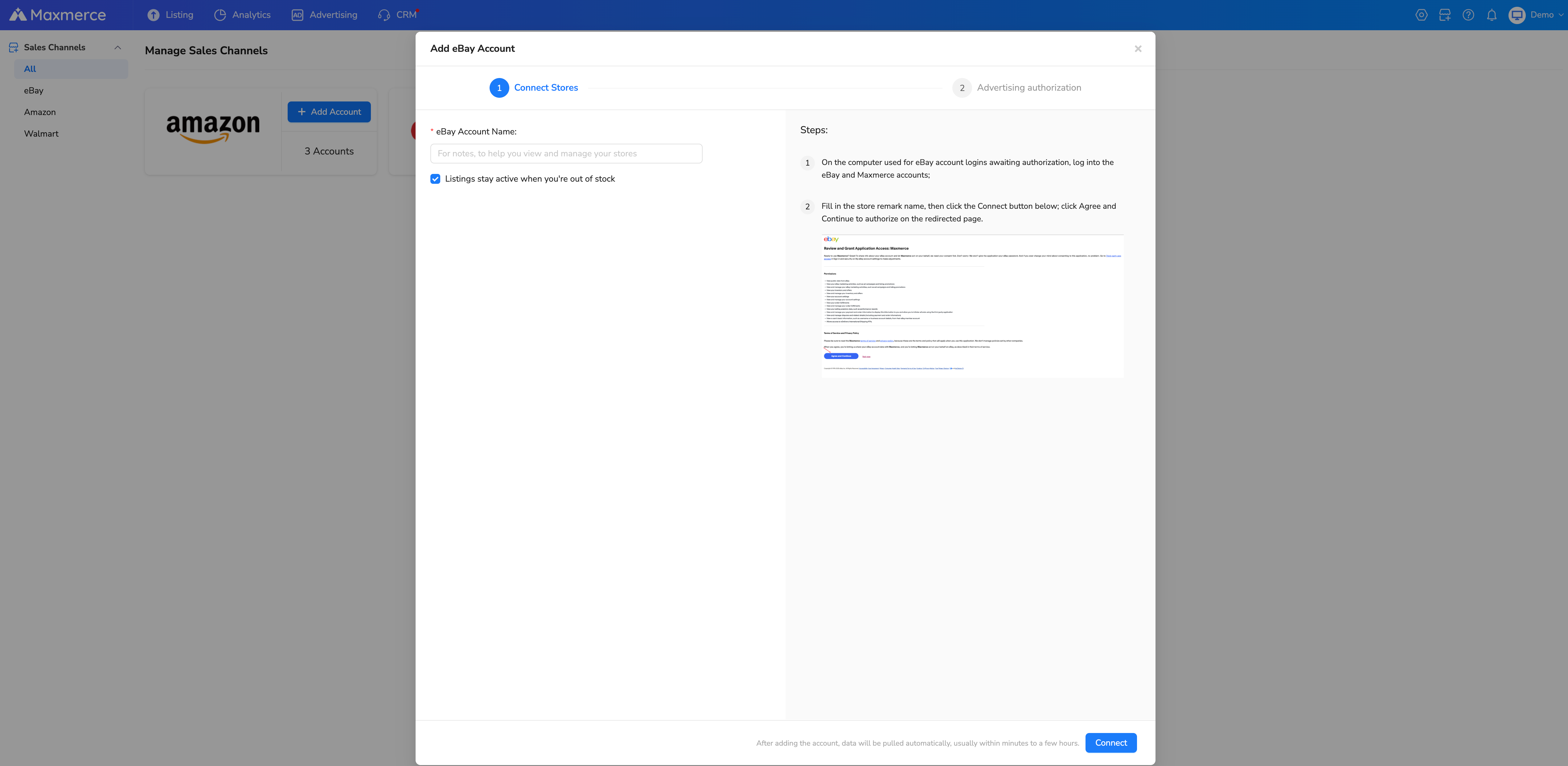
For current US seller accounts, eBay places the setting under Selling preferences in the Multi-quantity listings section. The toggle is labeled Listings stay active when you’re out of stock. According to eBay’s current multi-quantity listing guidance, the preference applies to existing and future bulk listings until the seller disables it.
When an eligible listing reaches zero, it stays active but is hidden from search. Increasing available quantity can make it appear again. Sellers can still end a Good ‘Til Canceled listing manually. This behavior is different from an ended listing, a policy removal, or an order problem; adding inventory does not resolve those states.
Use the option only for products you genuinely restock
The setting fits repeatable products: the same model, condition, bundle, and included parts return to stock under the same offer. It is a poor fit for a unique used item when the next unit has different wear, accessories, capacity, or other buyer-relevant facts.
Before using an existing offer, answer one identity question: Would a buyer reasonably receive the same product represented by this listing? If the answer depends on changing the title, photos, condition description, variation values, or package contents, pause before treating the shipment as a simple refill.
| Situation | Recommended check | Do not assume |
|---|---|---|
| Same new mug, same color and pack size | Count sellable units and confirm the exact SKU | Every delivered carton is available |
| One color variation returns | Increase only that child variation | Parent-level stock can be spread across colors |
| Replacement unit has different wear or accessories | Recheck offer identity, condition and photos | A similar-looking used item is interchangeable |
| Listing is ended or removed | Follow the workflow for its actual status or notice | Restocking automatically relists or restores it |
Count available stock, not warehouse stock
A receiving total is not always the number that should be offered to a new buyer. Count only complete, usable units assigned to that exact SKU, then subtract damaged goods, quality-control holds, replacements, and units reserved for existing orders or another offer.
Suppose four white mugs arrive. One has a chipped rim and one is already reserved for a replacement shipment. The available quantity is two, not four. If the navy variation remains empty, do not transfer the white quantity to navy just to make every option selectable.

Check the exact listing before changing quantity
Start with the eBay item ID and your channel SKU rather than a shortened title. Confirm the listing format, account, site, variation, current online quantity, and status. If you manage an authorized eBay account in Maxmerce, the Listing > eBay > Active Listing view can filter by item ID, channel SKU, account, site, listing type, variation, and inventory fields. Use Refresh when you need the latest listing status from eBay before editing.
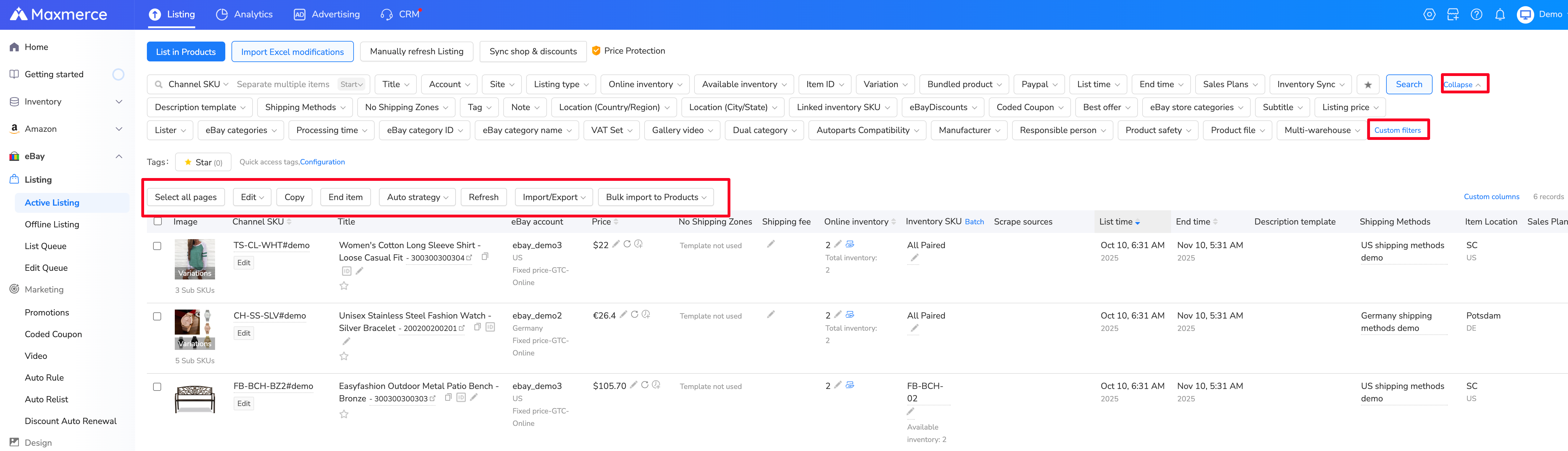
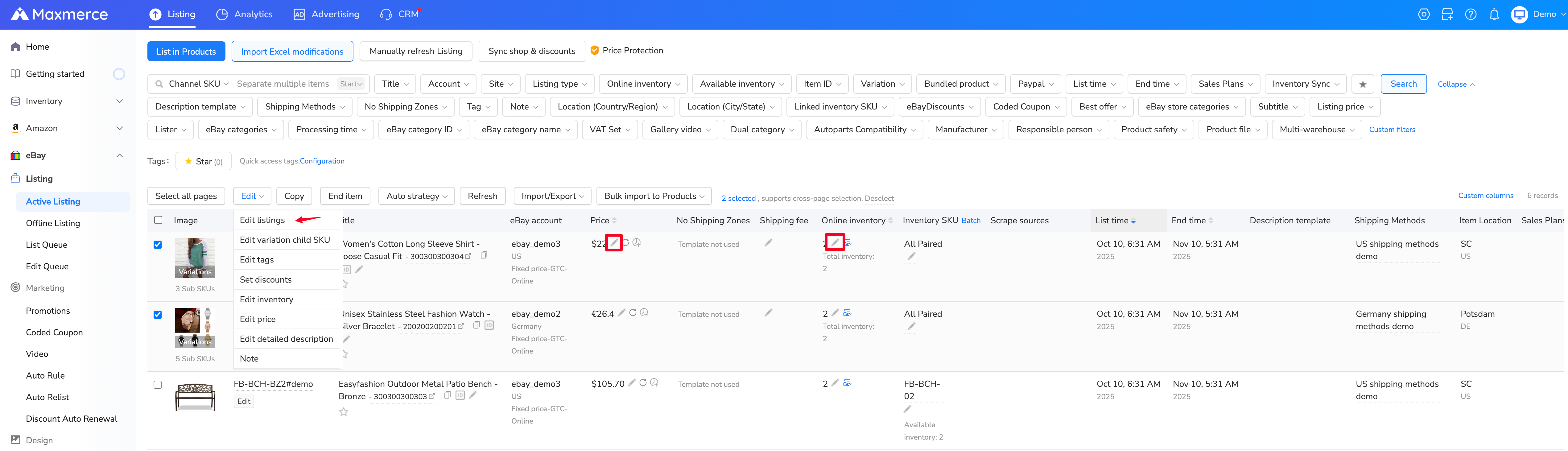
After selecting the correct record, the edit menu includes inventory controls. Change only the field and variation you have verified. A bulk selection can magnify a small identification mistake, so use narrow filters and test a small change before applying inventory edits to many listings.
Verify the result instead of trusting the submit button
Record the quantity before the change, the physical count, the adjustment, the person who checked it, and the time. After saving, review the operation result and refresh the listing status. In Maxmerce, inventory changes enter the Edit Queue, where the result may be successful, pending, or failed. A submitted task is not yet proof that the buyer can purchase the correct option.
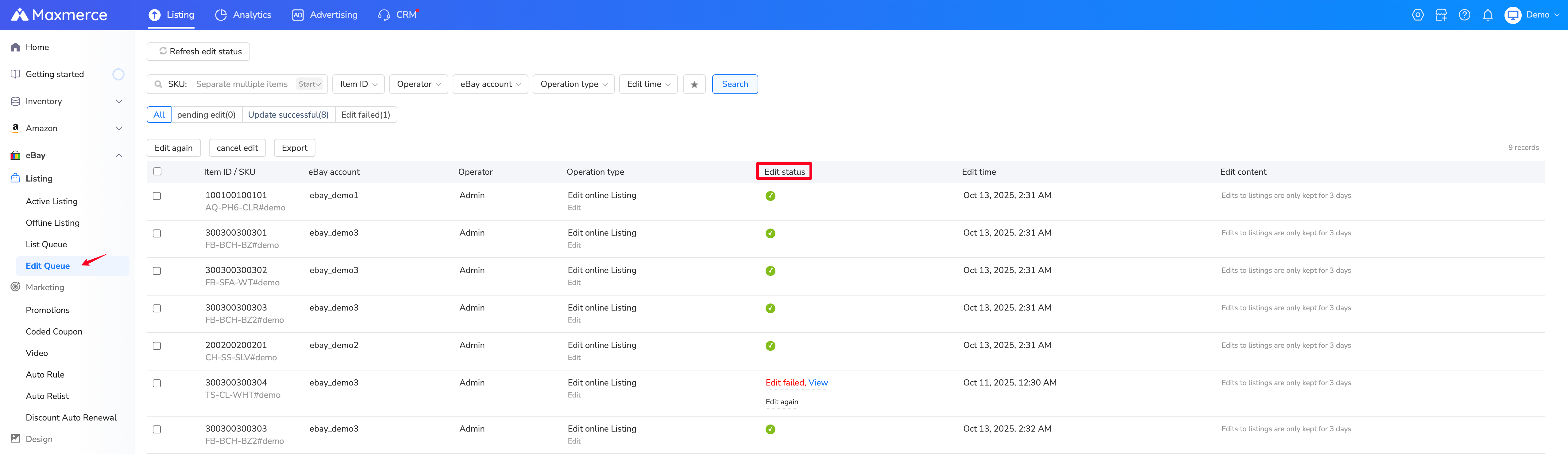
Finally, inspect the corresponding buyer-facing selection. A direct item URL may still be reachable while a zero-quantity listing is hidden from search, so page access alone does not prove availability. For variation listings, eBay’s out-of-stock operation guide distinguishes between one child variation at zero and every variation at zero.
| Observed result | Next action |
|---|---|
| Edit succeeded and correct option is purchasable | Close the check and retain the before-and-after record |
| Edit is pending | Wait for a final result; do not submit repeated changes blindly |
| Edit failed | Read the error, correct the actual field or listing state, and retry once verified |
| Quantity saved but buyer option is still unavailable | Confirm account, site, item ID, child variation, listing status and any platform notice |
Remember renewals, fee credits and the 180-day limit
Good ‘Til Canceled listings normally renew monthly. eBay says that when the out-of-stock option is enabled and quantity remains zero for an entire billing period, the listing may qualify for an insertion-fee credit and applicable advanced listing-upgrade fee credits for that period. This is conditional language, not an automatic promise for every account.
eBay also states that a listing held at zero quantity for 180 consecutive days will be ended. Assign an owner and review date to long stock gaps. A dormant offer should not remain unattended simply because the setting can preserve it temporarily.
Pre-restock checklist
- Confirm the listing is active, fixed price and eligible for the out-of-stock preference.
- Match the item ID, account, site, SKU and exact child variation.
- Verify that the replenished product still matches the photos, condition, specifics and included parts.
- Count complete sellable units and subtract damaged, held and reserved stock.
- Record the before quantity and the reason for the adjustment.
- Change only the verified inventory field or child variation.
- Check the edit result, refresh status and inspect the buyer-facing option.
If you manage several eBay listings, the Maxmerce Listing module can help you locate records, edit inventory fields and review queue results in one workflow. The physical count and final seller review still determine what quantity is safe to offer.
FAQ
Why is my eBay listing active but not visible in search?
If an eligible Good ‘Til Canceled listing reaches zero while the out-of-stock option is enabled, eBay keeps it active but hides it from search. Confirm the saved quantity and listing state rather than assuming the offer was removed.
Does one sold-out variation hide the whole listing?
Not necessarily. When another child variation still has stock, the listing can remain searchable while the sold-out option is unavailable. If every variation reaches zero, the out-of-stock behavior applies to the full offer.
Should I create a new listing when stock arrives?
Not automatically. For the same repeatable product under an eligible active listing, eBay recommends adding stock to the existing listing rather than recreating it. If the product identity or condition changed, review whether the original offer is still accurate.
Does setting quantity to zero cancel an existing order?
No assumption should be made. Listing availability and completed orders are separate workflows. Handle the buyer’s order according to its actual status and applicable eBay process.
US official guidance reviewed October 10, 2026. Product counts in the mug example are instructional. AI-assisted editorial images are illustrative and do not show customer or marketplace records.