Walmart Seller Order Cancellation: Check Status First
For a Walmart seller order cancellation, check both the status in Seller Center and the parcel’s physical location before confirming anything. Walmart’s cancellation guide says cancellations cannot be reversed. It provides separate paths for an entire order and an unshipped item in a partially shipped order; an order already marked as shipped cannot be canceled.
A customer message, a printed label and a parcel in the carrier’s possession describe different situations. Match the actual Purchase order# and affected item to the right situation first. This guide covers the US Seller Center workflow, not the buyer’s Walmart.com cancellation screen or an API integration.

Compare recorded status with physical custody
Seller best practice: use this decision table before opening the confirmation screen. It combines Walmart’s documented branches with a private physical-handoff check. The table is an editorial review aid, not a replacement for the current order details.
| Situation | What to verify | Next step |
|---|---|---|
| Entire order needs cancellation | Correct Purchase order#; check every affected item and whether the order is already marked shipped. | For an eligible unshipped order, use the whole-order path below. Verify alternatives before canceling. |
| One item remains unshipped in a partially shipped order | Identify that unshipped item; do not assume the shipped line can also be canceled. | Use the unshipped-item cancellation path documented by Walmart. |
| Seller Center says Shipped, parcel still with seller | Confirm the recorded status and physical location independently. | Do not try to cancel. Walmart directs sellers who still have the item to its adjustments/non-standard refunds instructions. |
| Carrier already has the item | Confirm actual handoff rather than relying only on label creation. | For a customer cancellation request, Walmart says the customer should initiate a return from their account when the order arrives. |
| Status or custody is uncertain | Resolve the discrepancy with the responsible team and actual order record. | Do not confirm an irreversible action based on an assumption. |
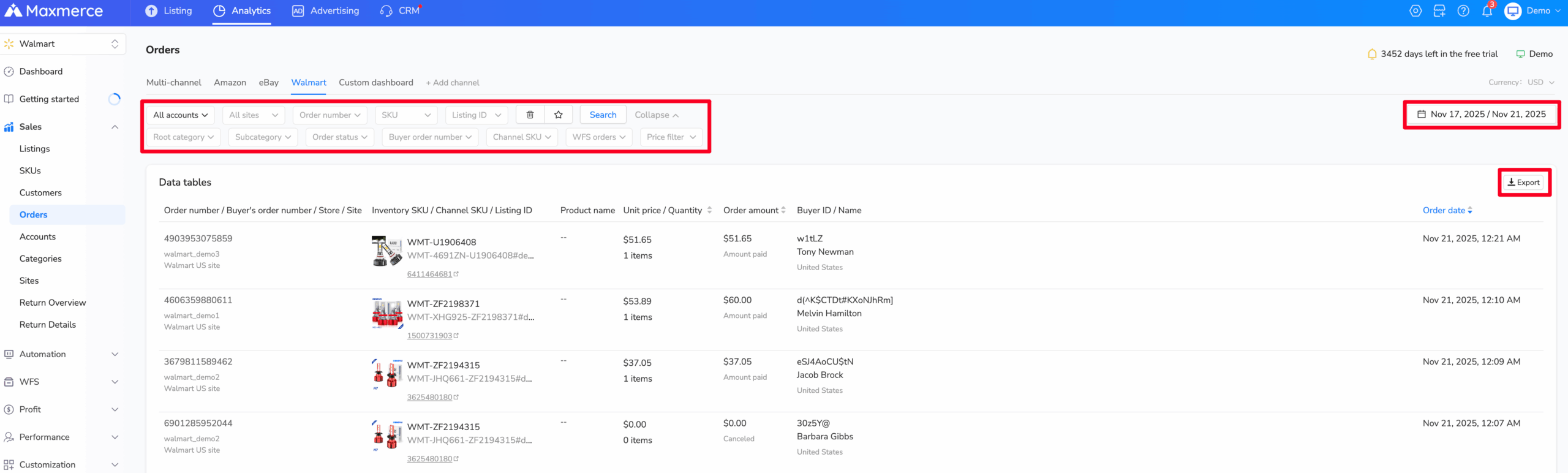
Maxmerce Analytics can help a team locate Walmart orders by account, order number, SKU, order status and date before it investigates a pattern. Treat this report as a retrieval and analysis layer: the actual cancellation still belongs in Walmart Seller Center, and the saved Seller Center record remains the source of truth.
Use the correct cancellation path in Seller Center
Documented workflow: go to the Orders dashboard and locate the matching Purchase order#. Confirm the item and quantity, particularly if the customer ordered several products or the order has already been split.
- For the entire order: open the Purchase order# and choose Cancel order.
- For an unshipped item within a partially shipped order: select the three horizontal dots to the right of the order, then choose Cancel on the order details page that opens.
- Before confirming: select the appropriate Cancel reason from the available dropdown. Check the selected scope again, then choose Cancel order.
If the selection is wrong or you decide not to proceed, choose Do not cancel order to close the action screen. Do not use a convenient reason to disguise what happened. Walmart’s current Seller Performance Standards define seller Cancellation Rate as orders canceled by the seller after Walmart sends the order and require a rate of 2% or below; seller-accountable drivers include out-of-stock, pricing errors, an expired ship window and an incorrectly used address-not-serviceable reason.
That threshold is not a promise that any particular cancellation is consequence-free. This article does not calculate your account’s metric, claim an exclusion for a reason code or tell you to choose a different reason to change the outcome.
Work through a partially shipped example
Suppose one purchase order contains a mug and a notebook. The mug has shipped; the notebook has not. The seller cannot fulfill the notebook. These are fictional items used to explain selection scope, not actual customer data.
| Line | Current finding | Review decision |
|---|---|---|
| Mug | Already shipped | Keep this line distinct. Do not include it in an unshipped-item cancellation decision. |
| Notebook | Unshipped and cannot be fulfilled | Check the notebook line and actual reason, then use the documented unshipped-item path. |
Before submitting, compare the confirmation screen with the notebook line you intended to cancel. Afterward, reopen the purchase order and check what the record actually shows. A customer message saying “cancel the notebook” is not a saved cancellation result, and closing a dialog does not prove the intended line changed.
Keep the shipped-order branch separate
Walmart’s FAQ says an order marked Shipped cannot be canceled. If you still physically hold the item, the guide points to adjustments or non-standard refunds in Seller Center. That is a separate process with its own item, quantity, amount and reason selections, not a way to undo the shipped status.
The adjustments guide describes searching by Purchase Order Number or Order Number, adjusting items separately, choosing the quantity and adjustment type, and supplying the reason before selecting Adjust. Check whether the case belongs under the standard returns process instead. Do not assume that canceling, making an adjustment and completing a return are interchangeable financial events.
If a customer asks to cancel after the carrier has the parcel, Walmart’s cancellation FAQ says the customer should initiate a return through their Walmart account when they receive it. Do not promise that the package can be recalled or that the customer will receive funds by a particular date based on this cancellation guide.
Verify the result before releasing more work
Seller best practice: keep this short record in your approved private workspace. The purpose is to connect the intended action with the saved result, without putting customer details in a shared article or public tool.
| Record | What to keep |
|---|---|
| Identity and scope | Purchase order#, affected item and quantity; whole order or a particular unshipped line. |
| State before action | Seller Center status and whether the parcel is physically with the seller or carrier. |
| Actual reason | Verified issue and selected dropdown reason; supporting internal evidence where appropriate. |
| Requested action | Cancellation, adjustment inquiry or return guidance; keep these distinct. |
| Saved result | The order/line status seen after reopening the record, and any unresolved discrepancy. |
| Next owner | Who checks fulfillment holds, customer communication or the underlying stock/pricing issue. |
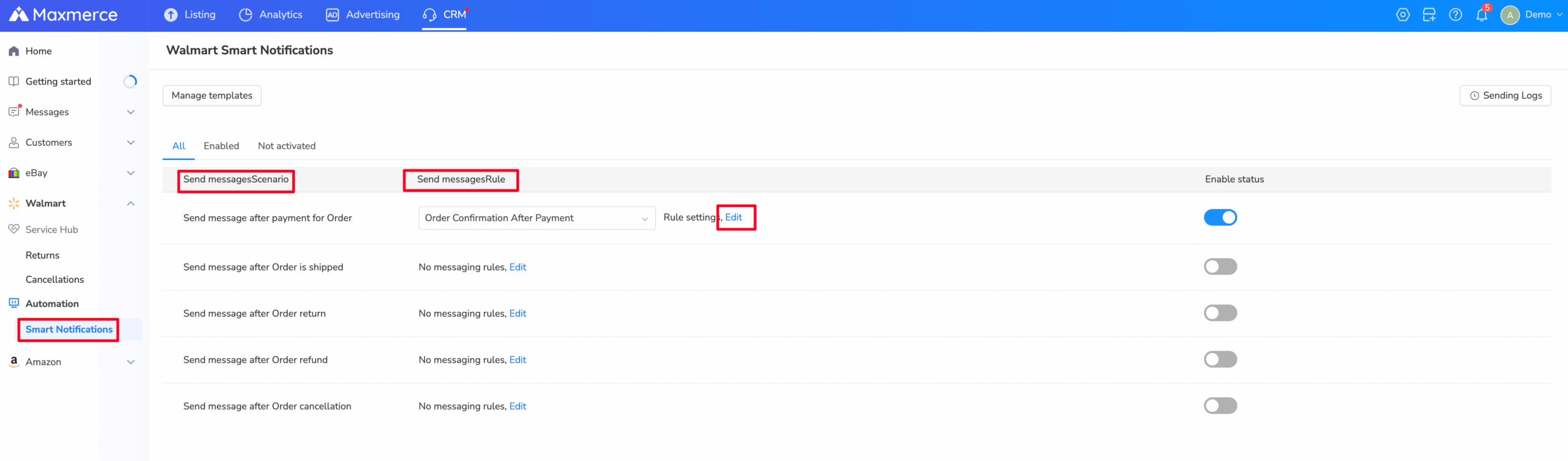
Maxmerce CRM includes Walmart Smart Notifications and sending logs for configured order events. A message or log can support customer communication, but it does not replace the Seller Center cancellation result or prove that the selected line and quantity were canceled.
Walmart says canceled orders are closed and cannot be updated or edited. Its FAQ also says reimbursement will not be provided if a canceled order is subsequently shipped in error. Make sure the fulfillment team sees the saved cancellation before sending the parcel. Do not interpret an unresolved screen or uncertain response as permission to submit the same action repeatedly.
Address the cause before accepting more orders
An out-of-stock cancellation can also affect availability. Walmart says the item becomes unavailable and non-sellable in the affected warehouse, while stock in other warehouses may remain available. Its FAQ explains that a positive inventory quantity alone does not settle the issue: replenish or update inventory for the specific item to restore its in-stock status, after verifying the actual stock situation.
For orders already canceled because of incorrect pricing, the official FAQ tells sellers with questions to contact Support immediately through Help in Seller Center and include the list of canceled orders. A new price calculation does not resolve those existing orders or replace that support step.
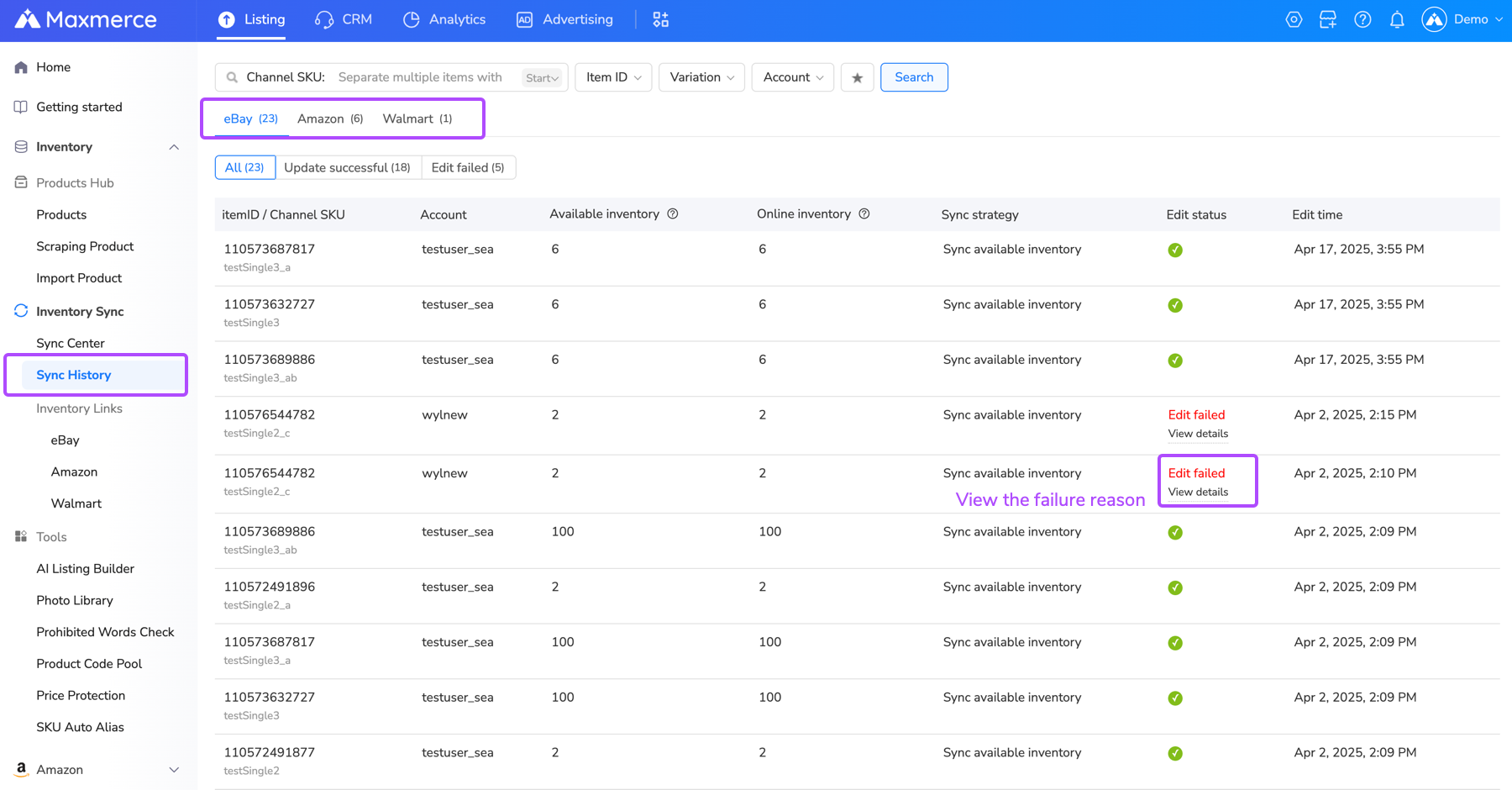
Maxmerce Listing provides inventory linking, sync strategies and a Sync History view across supported channels, including Walmart. Reviewing failed updates can help address an inventory cause before another order arrives; it cannot reverse a Walmart cancellation or override Seller Center status.
For future offers, use verified cost and inventory inputs before allowing more orders. Maxmerce reporting and inventory tools are designed to help teams review operating data, but they are not cancellation, refund or order-processing tools, and their records do not establish Walmart’s final decision.
Frequently asked questions
Can I reverse a Walmart seller cancellation?
No. Walmart’s guide says cancellations cannot be reversed and canceled orders are closed. Check identity, scope and alternatives before confirming rather than relying on a later correction.
What if the customer requests cancellation?
Walmart says you will be notified in Seller Center and should follow its cancellation steps. Check the order’s current state first. If the carrier already has the item, its FAQ instead directs the customer to initiate a return from their Walmart account after receiving it.
Can I cancel an order marked shipped if it is still on my desk?
No. The recorded Shipped status prevents cancellation under the guide’s FAQ. If you still hold the item, review Walmart’s separate adjustments/non-standard refunds instructions for the applicable case; do not represent that process as reversing a cancellation.
Why can an item show out of stock when the warehouse has a positive quantity?
Walmart says an out-of-stock cancellation marks the item out of stock in that warehouse. Verify the affected item and warehouse, then replenish or update that inventory as appropriate. Do not assume another warehouse’s available stock proves this warehouse is ready to fulfill.
Walmart US cancellation, refund and Seller Performance guidance reviewed October 28, 2026. Check the linked official guidance and the live order record before acting. Decision tables, the fictional example and the private record are original editorial aids.