eBay Listing Optimization 2025: Automation & SEO

eBay listing optimization combines strategic keyword placement, complete item specifics, and automation tools to rank higher in Cassini search results and convert more browsers into buyers. Sellers who optimize listings properly see 40-60% more views and 25-35% higher conversion rates compared to generic listings.
However, most eBay sellers face the same frustrating reality when approaching eBay listing optimization: manual optimization is incredibly time-consuming, requires constant keyword research, and leaves room for human error. With eBay hosting over 1.7 billion live listings at any given time, standing out requires more than basic product descriptions. You need a systematic approach to eBay listing optimization that balances search algorithm requirements with buyer psychology while scaling efficiently across your entire catalog.
This comprehensive eBay listing optimization guide reveals proven eBay SEO strategies used by top-performing sellers in 2025, shows you how to leverage eBay listing optimization automation tools to scale your efforts, and demonstrates how Maxmerce’s listing features help sellers achieve professional-grade eBay listing optimization in minutes instead of hours.
Understanding eBay’s Cassini Search Algorithm in 2025
eBay’s search engine, called Cassini, fundamentally determines which listings appear at the top of search results. Unlike Google, Cassini optimizes for one primary goal: matching buyers with listings most likely to result in completed transactions. Understanding how Cassini evaluates and ranks your listings is essential for effective eBay listing optimization success in 2025.
The Three Pillars of eBay SEO
Cassini evaluates every listing based on three weighted factors. First, relevance measures how well your listing matches the buyer’s search query. eBay analyzes title keywords, item specifics, category placement, and description content to determine relevance scores. Second, seller performance evaluates your track record as a seller, including feedback ratings, shipping speed, return rates, and customer service quality. Top Rated Sellers receive significant ranking boosts. Third, listing quality assesses completeness—how many photos you include, whether item specifics are filled out, description depth, and whether you’ve added product identifiers like UPC or ISBN codes.
Why Best Match Prioritizes Conversion History
Here’s what many sellers don’t realize: Cassini heavily favors listings with proven conversion histories. If your listing consistently converts views into sales at a high rate, eBay interprets this as strong buyer relevance and rewards you with higher placement. This creates a powerful positive feedback loop—optimized listings rank higher, receive more views, convert better, and subsequently rank even higher.
Conversely, listings with high bounce rates (buyers clicking away quickly) or low conversion rates gradually sink in search rankings regardless of keyword optimization. This is why eBay listing optimization must focus on both discovery (SEO) and conversion (buyer engagement).
Recent Algorithm Updates for 2025
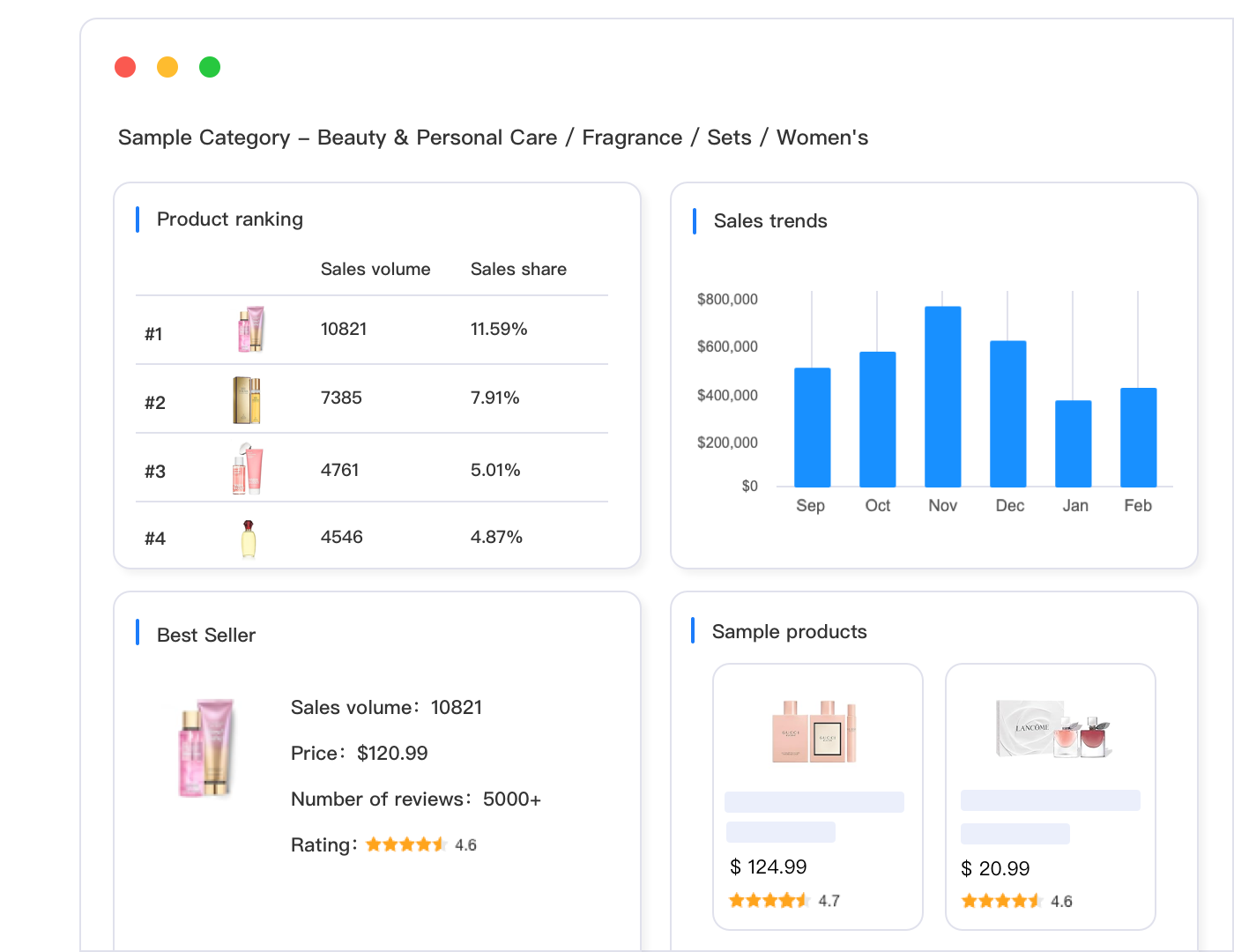
eBay introduced several significant Cassini updates in late 2024 and early 2025. The algorithm now places greater weight on mobile user experience, prioritizing listings with mobile-optimized images and descriptions. Additionally, eBay implemented AI-powered title optimization for Promoted Listings, automatically rewriting titles for Google Shopping ads to improve quality scores and performance. The algorithm also increased emphasis on complete item specifics, particularly for categories like electronics, fashion, and automotive parts where detailed attributes drive buyer decisions.
The Manual eBay Listing Optimization Challenge
Creating a single well-optimized eBay listing manually involves dozens of individual tasks, each requiring research, decisions, and precise execution. Let’s break down exactly where time disappears when optimizing listings without automation.
Time Breakdown: Creating One Optimized Listing
Keyword research alone consumes 5-7 minutes per listing. You need to identify primary keywords buyers actually search for, check search volume using tools like eBay’s auto-suggest, analyze competitor titles to find effective keyword patterns, and discover long-tail keyword variations that reduce competition. Then title creation takes 3-4 minutes as you strategically arrange keywords within eBay’s 80-character limit, ensure front-loading of important keywords, avoid prohibited terms that trigger listing violations, and balance keyword density with readability.
However, the most time-intensive task is filling out item specifics, which requires 5-10 minutes per product. Most categories require 20-40 item specific fields, from basic attributes like brand and color to technical specifications like dimensions, materials, and compatibility information. Manually completing these fields for hundreds of products becomes overwhelming quickly.
Description writing adds another 5-7 minutes per listing. You must incorporate keywords naturally for SEO, highlight key features and benefits, address common buyer questions proactively, format content for mobile readability, and maintain consistent brand voice. Photo optimization requires 2-3 minutes for cropping images to eBay’s recommended dimensions, adding descriptive alt text for accessibility, arranging photos in order of importance, and ensuring all images meet quality standards. Finally, pricing research and setup takes 2-3 minutes to analyze competitor pricing, calculate profit margins after fees, set competitive shipping costs, and consider promotional pricing strategies.
Total time investment: 15-25 minutes per listing manually.
The Scaling Problem for Multi-Product Sellers
These time requirements create severe bottlenecks for sellers managing substantial product catalogs. Consider a seller with 500 SKUs needing optimization. At 20 minutes per listing, that’s 167 hours of work—equivalent to four full work weeks. For sellers adding new products regularly, optimization becomes a full-time job, preventing focus on sourcing, customer service, and business growth.
Moreover, manual optimization suffers from consistency problems. When you’re optimizing your 300th listing, quality inevitably degrades. You might skip “non-essential” item specifics to save time, use generic descriptions instead of customized content, reduce keyword research depth, or forget to update pricing based on market changes. These small compromises compound across your catalog, reducing overall search visibility and conversion performance.
How Listing Automation Solves the Time Problem
This is precisely where automation tools designed to help eBay sellers make dramatic differences. Rather than spending 20 minutes researching keywords, writing descriptions, and filling item specifics manually, automated listing solutions can complete these tasks in under 60 seconds while maintaining professional quality standards.
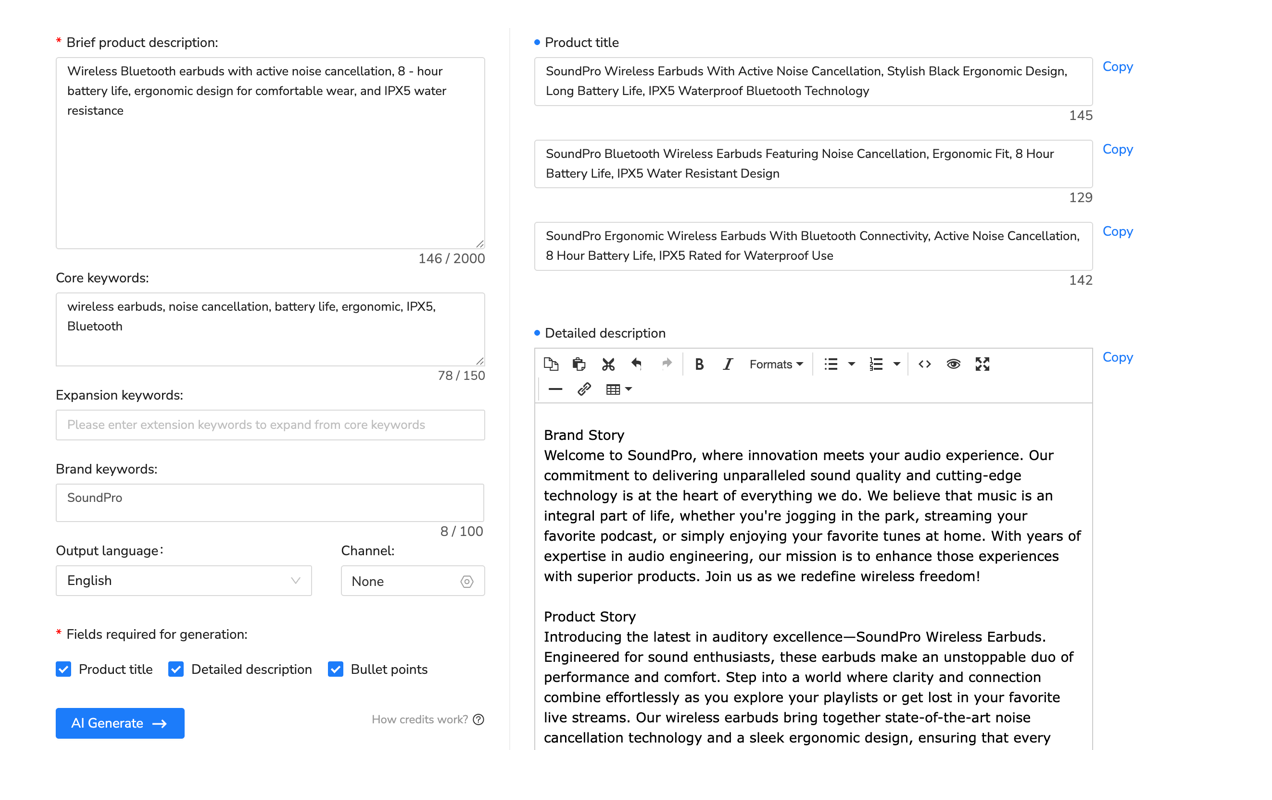
Tools like Maxmerce’s AI Listing Generator analyze product data, identify optimal keywords automatically, generate SEO-optimized titles using proven patterns, fill dozens of item specifics based on product category, create compelling descriptions highlighting key features, and ensure compliance with eBay’s listing policies—all in a single automated workflow.
Here’s the specific process: You provide basic product information like brand, model, and category. The AI system then analyzes eBay’s top-performing listings in that category to identify successful keyword patterns and popular item specifics. It generates an optimized title incorporating high-volume keywords naturally within the 80-character limit. The system populates 30-50 item specific fields automatically based on product type, pulling from eBay’s catalog when available. It creates a structured description with bullet points highlighting features, specifications, and benefits in mobile-friendly format. Finally, it suggests competitive pricing based on current marketplace data.
The transformation is remarkable: 125 hours of manual work collapses into just 8 hours for a 500-product catalog—a 93% time reduction. But speed isn’t the only benefit. Automation ensures consistency across your entire catalog, maintains high completion rates for item specifics, applies current keyword research to every listing, reduces human errors that cause listing violations, and allows you to focus strategic time on high-value activities like customer relationships and product sourcing.
Try Automated eBay Listing Creation
Experience how automation transforms your listing workflow. Maxmerce’s AI-powered listing tools help you create fully optimized eBay listings with complete item specifics in under 60 seconds—95% faster than manual creation.
Start your 14-day free trial—no credit card required.
Essential eBay Listing Optimization Strategies for 2025
Effective eBay listing optimization requires implementing proven strategies across multiple elements simultaneously. Here are the critical eBay listing optimization tactics that drive measurable results for sellers in 2025.
Title Optimization: Maximizing Your 80 Characters
Your listing title serves as the primary ranking signal for Cassini’s relevance algorithm. eBay gives you exactly 80 characters to communicate what you’re selling and capture relevant search queries. Every character matters. Start with your most important keyword—the exact term buyers search most frequently. Don’t waste characters on unnecessary words like “WOW!” or “L@@K!” that buyers never search for.
Structure effective titles using this proven formula: [Brand] [Product Type] [Key Features] [Model/Variation] [Size/Color]. For example, “Nike Air Max 270 React Running Shoes Men’s Size 10 Black White Sneakers New” uses 76 characters efficiently, incorporates the brand name, product category, specific model, gender, size, colors, and condition—all searchable terms.
Include long-tail keyword variations when space permits. These longer, more specific phrases like “men’s running shoes size 10” attract highly qualified buyers with clear purchase intent, even though they have lower search volume than generic terms like “shoes.” Research shows long-tail keywords convert 2-3 times better than broad terms because they match specific buyer needs precisely.
Avoid common title mistakes that hurt rankings. Never use keyword stuffing like “shoes sneakers footwear trainers runners athletic”—eBay penalizes repetitive synonyms. Don’t include subjective claims like “Best Quality” or “Fast Shipping”—save these for descriptions. Never use ALL CAPS for the entire title—it reduces readability and looks spammy. Finally, don’t include condition or shipping information in the title—eBay has specific fields for these details.
Item Specifics: The Hidden eBay Listing Optimization Factor
Item specifics represent one of the most underutilized eBay listing optimization opportunities. These structured attribute fields directly feed Cassini’s relevance algorithm and enable buyers to filter search results precisely. Yet sellers frequently leave half of available item specifics empty, significantly reducing their search visibility and undermining their eBay listing optimization efforts.
eBay provides category-specific item specifics ranging from 15-50 fields depending on product type. Electronics require technical specifications like screen size, processor type, storage capacity, and connectivity options. Clothing needs size, color, material, style, and fit information. Automotive parts demand year, make, model, and engine compatibility details. Completing 90%+ of available item specifics dramatically improves your listing’s discoverability.
Here’s why item specifics matter so much: When buyers use eBay’s left-sidebar filters, they’re searching within item specific fields. If you haven’t filled out “Brand,” your listing won’t appear when buyers filter by brand. If you’re missing “Size,” you disappear when size filters activate. Each incomplete item specific represents lost opportunities for qualified buyer traffic.
Additionally, eBay increasingly uses item specifics for AI-powered product matching and catalog integration. Listings with complete, accurate item specifics qualify for automatic enhancements like product identifiers, manufacturer specifications, and enhanced search features that incomplete listings never receive.
Description Optimization: Beyond Basic Details
While eBay’s algorithm weighs description content less heavily than titles and item specifics, descriptions significantly impact conversion rates once buyers view your listing. Effective descriptions answer buyer questions proactively, build confidence in your product and service, incorporate semantic keywords naturally, and format content for mobile-first consumption.
Structure your descriptions with a clear hierarchy. Start with a compelling headline that reinforces your title’s key selling points. Follow with 4-6 bullet points highlighting the most important features, benefits, and specifications. Then provide detailed product information including dimensions, materials, usage instructions, and warranty details. Include condition notes explaining any imperfections honestly. Finally, close with shipping and return information even though eBay displays this elsewhere—buyers appreciate having all details in one place.
Optimize descriptions for mobile users, who represent over 70% of eBay traffic. Use short paragraphs (2-3 sentences maximum), create visual breaks with bullet points and spacing, front-load important information that appears above the fold, and avoid HTML tables that break on mobile screens. Test how your descriptions render on smartphones before publishing.
Image Optimization: Visual Ranking Signals
eBay’s algorithm considers image quality and quantity when ranking listings because visual content directly correlates with conversion rates. Listings with 8-12 high-quality photos convert significantly better than those with 1-3 basic images. However, image optimization extends beyond simply uploading more photos.
Use eBay’s recommended image dimensions of 1600×1600 pixels minimum, ensuring sharp detail when buyers zoom. Include multiple angles showing front, back, sides, top, and bottom views. Add close-up shots highlighting key features, materials, or unique details. For clothing, show items both flat and on mannequins or models. For electronics, photograph all included accessories and packaging.
Your first image (the gallery thumbnail) is absolutely critical. It appears in search results and determines whether buyers click through to your listing. Use a clean white background that makes your product stand out, ensure the product fills 80-90% of the frame without appearing cramped, show the product’s best angle or most recognizable view, and include all main components for bundled items.
Additionally, add descriptive alt text to images for accessibility and SEO benefits. While eBay doesn’t explicitly confirm that image alt text affects rankings, Google indexes eBay listings and alt text contributes to image search visibility. Use natural language like “Nike Air Max 270 black and white men’s running shoe size 10” rather than keyword-stuffed phrases.
Category and Product Identifier Optimization
Selecting the correct category seems straightforward, but many sellers choose categories based on convenience rather than buyer search behavior. Always select the most specific applicable category. For example, don’t list Nike Air Max shoes in “Men’s Shoes” when “Men’s Athletic Shoes > Running Shoes” provides more precise targeting.
Use eBay’s category research tools to identify where top sellers in your niche list similar products. Search for your product type as a buyer would and examine which categories dominate the top results. This reveals where Cassini expects to find your product type and where buyer traffic concentrates.
Product identifiers like UPC, EAN, ISBN, and MPN codes provide powerful SEO benefits. When you add these identifiers, eBay can automatically match your listing to its product catalog, populate additional item specifics automatically, enable catalog-based search features, and improve relevance for brand-specific searches. Additionally, product identifiers help prevent duplicate listings and protect against counterfeit claims by verifying authentic product data.
Bulk eBay Listing Optimization with Automation Tools
Individual eBay listing optimization techniques work well for small inventories, but scaling these eBay listing optimization strategies across hundreds or thousands of SKUs requires automation. Manual eBay listing optimization simply can’t keep pace with growing product catalogs while maintaining quality and consistency.
The Bulk Optimization Workflow
Effective bulk listing optimization follows a systematic workflow. First, audit your current listings to identify optimization gaps—which listings lack complete item specifics, which titles underperform in search, where descriptions need enhancement, and which images fail quality standards. This diagnostic phase reveals priorities for bulk improvements.
Next, segment your catalog into logical groups for optimization. Group products by category, brand, condition, or pricing tier. This segmentation allows you to apply appropriate optimization strategies efficiently. Electronics might prioritize technical specifications, while fashion items focus on style and size variations.
Then, prepare optimization templates that define standardized elements like description structure and formatting, item specific completion requirements, keyword research sources and tools, pricing strategies, and photo quality standards. Templates ensure consistency even when processing large batches.
Finally, implement bulk changes using automation tools that can process hundreds of listings simultaneously, apply standardized optimizations consistently, verify changes before publishing, and track performance improvements post-optimization.
Excel-Based Bulk Listing Management
Many sellers start with Excel-based bulk listing workflows. You export existing listings to spreadsheet format, make bulk edits using Excel formulas and find-replace functions, add missing item specifics across multiple rows simultaneously, update pricing with percentage calculations, and re-import the modified spreadsheet to update live listings.
However, Excel-based workflows face significant limitations. First, they’re error-prone—one incorrect formula or misplaced column can corrupt hundreds of listings. Second, they lack validation—Excel won’t warn you if you’ve exceeded eBay’s character limits or used prohibited terms. Third, they’re time-intensive—even with Excel skills, processing 500 listings takes hours of careful work. Fourth, they require constant manual oversight to prevent costly mistakes.
Advanced Automation: Rule-Based Bulk Editing
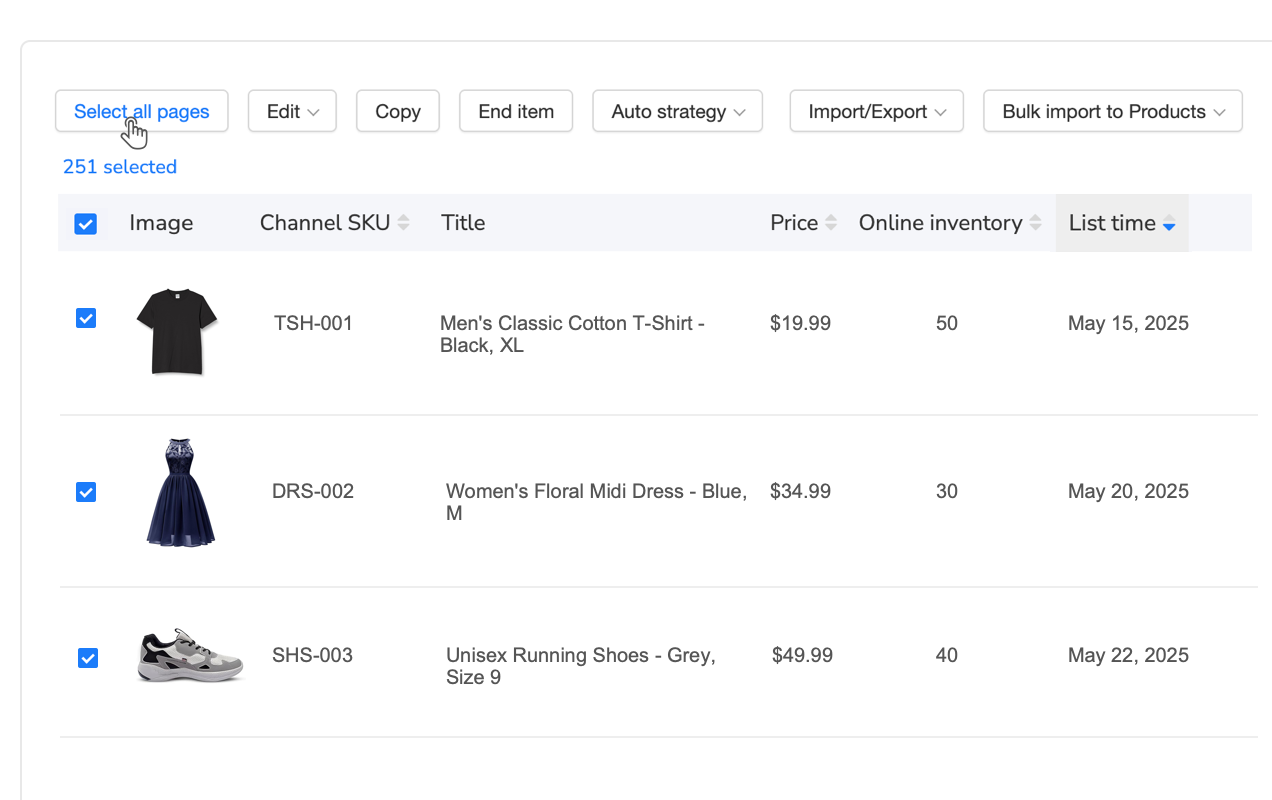
Modern listing management platforms offer rule-based bulk editing that dramatically improves on Excel workflows. Rather than manually editing spreadsheet cells, you define conditional rules that automatically identify and update specific listings based on criteria you set.
Tools like Maxmerce’s Rule-Based Bulk Listing Editing allow you to create sophisticated automation rules using over 30 filter options. For example, you can automatically update all listings in the “Electronics” category priced between $50-$100 to add “Free Shipping” to their descriptions. Or identify all listings missing brand names in their item specifics and populate this field based on title keywords. Or find listings with view counts below 10 in the past 30 days and automatically refresh their titles with new keyword variations.
The workflow is straightforward but powerful: First, define your filter criteria selecting which listings to target based on category, price range, sales performance, incomplete fields, or dozens of other parameters. Second, specify the changes to apply, whether updating specific item specifics, modifying titles or descriptions, adjusting pricing, changing shipping settings, or updating photos. Third, preview the changes before applying them, reviewing exactly which listings will be affected and how. Finally, execute the bulk update, where the system processes hundreds or thousands of listings in minutes.
The efficiency gains are dramatic. What previously required 8-10 hours of Excel work now completes in 20-30 minutes. Additionally, rule-based systems prevent errors by validating all changes against eBay’s requirements before applying them. They maintain audit trails showing exactly what changed and when. They allow easy rollback if you need to reverse updates. And they enable scheduled updates to run automatically without manual intervention.
For a seller managing 1,000 eBay listings, this represents a transformation from spending 15-20 hours monthly on bulk updates to just 2-3 hours—an 85% time savings that frees you to focus on higher-value activities like product sourcing, customer service, and strategic planning.
Automated Listing Creation from Product Data
Creating new listings from scratch represents the most time-intensive aspect of eBay selling. For sellers who regularly add new products, the hours required for listing creation quickly become unsustainable. This is where AI-powered listing generation and product scraping tools create transformational efficiency gains.
AI-Powered Listing Generation
Modern AI listing generators analyze successful listing patterns across eBay to create optimized listings automatically from minimal input data. Rather than manually researching keywords, writing descriptions, and filling item specifics, you provide basic product information and let AI handle the optimization.
The process begins with inputting core product details like brand, model number, category, and key features. The AI then analyzes top-performing listings in your product category to identify successful keyword patterns, popular item specific combinations, effective description structures, competitive pricing ranges, and optimal photo presentation styles.
Next, the system generates a complete optimized listing including an 80-character SEO title using high-volume keywords, 30-50 populated item specific fields matching your product category, a structured description highlighting features and benefits in mobile-friendly format, suggested pricing based on current market data, and recommended categories for maximum visibility.
Tools like Maxmerce’s AI Listing Generator complete this entire workflow in 30-60 seconds per product—compared to 15-25 minutes manually. The speed advantage is obvious, but quality improvements are equally significant. AI systems access current keyword data you might miss in manual research, ensure consistent completion of item specifics across all listings, apply proven description formats that drive conversions, eliminate human errors like typos or incorrect categories, and maintain optimization quality even when creating dozens of listings daily.
Product Scraping for Rapid Catalog Building
For sellers sourcing products from suppliers or competitors, product scraping tools dramatically accelerate catalog building. These tools extract product information from any website or marketplace, transform raw data into eBay-optimized listings, and publish directly to your eBay store—all in automated workflows.
The typical scraping workflow works as follows: First, identify source URLs for products you want to list, whether supplier websites, competitor eBay listings, Amazon product pages, or manufacturer catalogs. Second, configure the scraper to extract specific data fields like product titles and descriptions, images and specifications, pricing information, and category data. Third, transform scraped data to eBay format by adapting titles to eBay’s 80-character limit, filling eBay-specific item specifics, optimizing descriptions for eBay buyers, and sizing images to eBay’s requirements. Finally, publish listings in bulk to your eBay store.
Maxmerce’s Online Product Scraper automates this entire pipeline, allowing you to scrape complete product catalogs in minutes, transform scraped data into eBay-optimized formats automatically, add your pricing markup and shipping details, and publish hundreds of listings with a single click.
A practical example illustrates the power: Imagine you’ve identified 100 trending products from a supplier’s website that you want to add to your eBay store. Manually, this would require 25-40 hours of work—copying product details, rewriting descriptions, finding images, creating individual listings for each product. With automated scraping, the same task completes in 2-3 hours total. You configure the scraper once, set your pricing rules and markup percentages, run the automated extraction and transformation, review the generated listings for accuracy, and publish the entire batch. The time savings enable you to test new products rapidly, respond to market trends quickly, and scale your catalog without proportionally scaling your time investment.
Template-Based Listing Acceleration
For sellers with consistent product lines, listing templates provide another powerful automation layer. Templates standardize recurring elements across similar products, dramatically reducing repetitive work.
Create product-specific templates that pre-define shipping policies and return terms, description formatting and structure, recurring item specifics for that product type, standard photo arrangements, and pricing calculation formulas. When creating new listings in that product category, simply select the appropriate template and fill in product-specific variables like model number, color, or size. Everything else populates automatically.
Tools like Maxmerce’s Template Management allow you to maintain a library of reusable templates for different product types, quickly create new listings by selecting templates and customizing variables, ensure brand consistency across your entire catalog, update templates centrally and propagate changes to all associated listings, and share templates across team members for collaborative listing creation.
A fashion seller might maintain templates for different clothing categories—one for t-shirts, another for jeans, a third for dresses. Each template includes category-appropriate item specifics like size charts for that clothing type, standard care instructions, return policies specific to apparel, and description formatting optimized for fashion buyers. Creating a new t-shirt listing then requires only inputting the specific color, size, and style details—everything else auto-populates from the template.
Accelerate Your Listing Creation
Stop spending hours creating individual listings manually. Maxmerce’s automated listing tools help you generate optimized eBay listings from product data in under 60 seconds, scrape and transform supplier catalogs into ready-to-publish listings, and maintain template libraries for consistent brand presentation.
Start your 14-day free trial—no credit card required.
Compliance and Quality Protection
eBay listing optimization isn’t just about ranking higher and selling more—it’s also about protecting your seller account from policy violations, listing suppressions, and buyer complaints that can damage your reputation and search standing. Automated compliance checking ensures your optimized listings don’t accidentally violate eBay’s complex policies.
Prohibited Words and Policy Violations
eBay maintains extensive lists of prohibited words and phrases that trigger automatic listing violations or removals. These include trademark terms you’re not authorized to use, excessive capitalization or punctuation considered “keyword spamming,” medical or health claims requiring certification, words associated with counterfeit products, contact information in titles or descriptions, and restricted comparison claims about competitors.
Manually reviewing every listing for these violations is impractical at scale. Miss a single prohibited term buried in a product description, and your listing gets suppressed or removed. Accumulate enough violations, and eBay restricts your selling privileges or suspends your account entirely.
Tools like Maxmerce’s Prohibited Words Check automatically scan listings before publication against eBay’s prohibited term databases, platform-specific policy requirements, trademark registries, and custom blacklists you define. The system flags potential violations in titles, descriptions, or item specifics before you publish, explains why each term is problematic, suggests compliant alternatives, and creates violation reports for batch fixing across your catalog.
For example, if you’re listing refurbished electronics and include the term “OEM” in your title, the compliance checker might flag this because eBay restricts how refurbished items can reference original manufacturers. Or if you’re selling vitamin supplements and claim they “cure disease,” the system alerts you that medical claims violate eBay’s health product policies. These automatic checks prevent up to 90% of accidental policy violations that would otherwise harm your account standing.
Price Protection Against Errors
Pricing errors represent another critical risk, especially when using bulk editing or automated repricing tools. Accidentally setting a product at the wrong price due to a decimal point error, or using an incorrect markup formula that prices items below cost, can cost hundreds or thousands in lost profit before you notice.
Maxmerce’s Price Protection establishes safety guardrails preventing catastrophic pricing mistakes. The system allows you to set minimum price floors below which listings cannot be priced, define maximum discount percentages from cost basis, create category-specific pricing rules, establish margin protection to ensure profitability, and receive alerts when prices fall outside safe ranges.
For instance, you might configure a rule that prevents any listing from being priced below 120% of its cost, ensuring at least 20% gross margin after accounting for eBay fees. Or set minimum pricing thresholds for different product categories regardless of market conditions. These automated safeguards work continuously in the background, protecting profit margins even when you’re not actively monitoring listings.
eBay-Specific Optimization Features
Beyond general listing optimization, eBay offers platform-specific features that require specialized optimization strategies. Leveraging these features effectively can provide significant competitive advantages.
Promoted Listings and Automatic Relisting
eBay’s Promoted Listings program allows you to pay for higher visibility in search results through a cost-per-sale model. You set an ad rate percentage (typically 2-20%), and when buyers purchase through promoted placements, eBay takes that percentage as an advertising fee. However, not all listings benefit equally from promotion.
Optimize your promoted listings strategy by focusing promotion budget on high-margin products where ad costs still maintain profitability, items with proven conversion rates that turn traffic into sales efficiently, listings already ranking on page 2-3 that promotion can push to page 1, and products in competitive categories where organic ranking is difficult.
Additionally, eBay’s search algorithm gives temporary visibility boosts to newly listed items. This “newly listed” status typically lasts 7-14 days. Once listings age beyond this window, they gradually lose ranking position if they’re not actively converting. Strategic relisting refreshes this newly listed status, potentially regaining search visibility.
Tools like Maxmerce’s Auto Relist automate strategic relisting for maximum impact. The system identifies underperforming listings that could benefit from relisting based on declining views, sales velocity, or time since last sale. It then automatically ends and relists these items on optimized schedules to maximize the newly listed boost, makes minor title variations to test different keywords, tracks performance before and after relisting to measure effectiveness, and avoids relisting high-converting items that don’t need refreshing.
A clothing seller might configure auto-relist to refresh any item that hasn’t sold in 30 days, automatically ending the listing and creating a fresh version with a slightly modified title testing new keyword combinations. This strategy can improve visibility for slow-moving inventory without requiring manual relisting work.
Promotional Discount Automation
eBay promotions attract price-conscious buyers and trigger eBay’s “SALE” badges that increase click-through rates. However, manually managing promotions across large catalogs becomes complex—setting promotional pricing, scheduling start and end dates, ensuring discounts remain profitable, and renewing expired promotions all require ongoing attention.
Maxmerce’s Discount Auto Renewal maintains continuous promotional status automatically. When eBay promotions expire (typically after 30-90 days), the system automatically creates new promotions with refreshed discount percentages, ensuring your listings maintain “SALE” badge visibility. You define the parameters like acceptable discount ranges and profit margin protections, and the automation handles ongoing execution.
This continuous promotion approach helps you maintain the conversion rate benefits of sale badges, attract deal-seeking buyers consistently, compete effectively in price-competitive categories, and preserve seller resources by eliminating manual promotion management—all while ensuring promotional pricing never erodes profitability below your protected margins.
eBay Motors Parts Compatibility
For sellers in the automotive parts category, compatibility information is absolutely critical for eBay SEO. Buyers search for parts by year, make, and model—”2018 Honda Civic brake pads” rather than generic “brake pads.” Without complete compatibility data, your listings disappear from these specific searches.
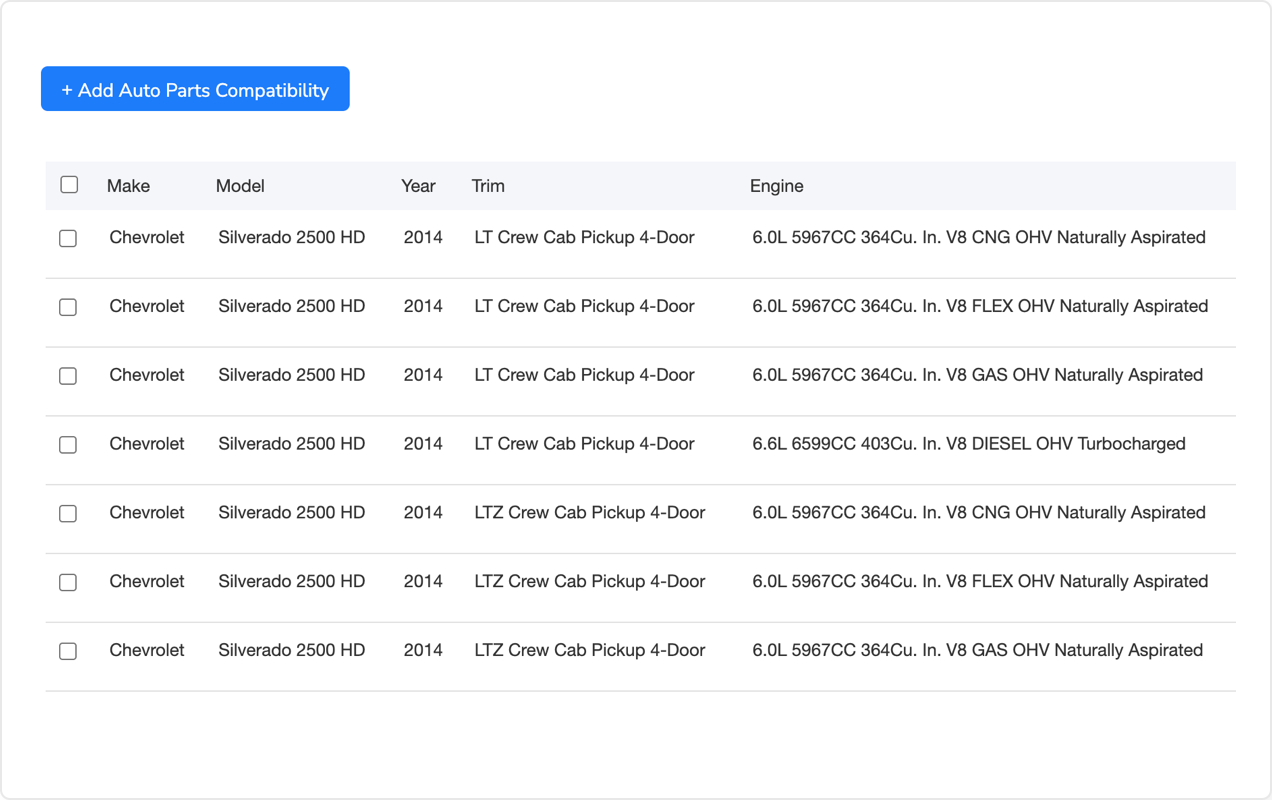
However, building comprehensive fitment tables manually is extraordinarily time-consuming. A single brake pad SKU might fit 47 different vehicle configurations requiring individual year/make/model entries. Manually creating these compatibility tables for hundreds of parts consumes days of tedious data entry.
Maxmerce’s Auto Parts Compatibility Tool streamlines this process through automated fitment data management. Import compatibility information from supplier databases in bulk, copy fitment data from similar listings, auto-generate year ranges for long production runs, and maintain reusable fitment templates for common parts. What previously required 10-15 minutes per part now completes in under 60 seconds.
An auto parts seller with 500 SKUs might spend 125 hours building compatibility tables manually. With automated fitment tools, this reduces to approximately 8 hours—a 93% time savings while ensuring accurate, complete compatibility data that maximizes search visibility for specific vehicle searches.
Multi-Channel Listing Management
Many successful eBay sellers expand to multiple marketplaces—Amazon, Walmart, their own Shopify stores—to diversify revenue and reduce platform dependency. However, managing listings across multiple channels multiplies complexity exponentially. Each platform has different title length limits, category structures, required attributes, and listing formats.
The Cross-Platform Listing Challenge
Creating a listing optimized for eBay doesn’t automatically work on Amazon or Walmart. eBay allows 80-character titles while Amazon permits 200 characters. eBay uses item specifics while Amazon requires bullet points. eBay’s category taxonomy differs entirely from Walmart’s structure. Creating and maintaining separate optimized listings for each platform manually means 3-4 times the work.
Additionally, keeping inventory synchronized across platforms prevents overselling. If you sell a product on eBay, you need to immediately update stock levels on Amazon and Walmart to avoid selling the same unit twice. Manual inventory management across platforms leads to frequent overselling incidents, angry customers, and damaged seller metrics.
Centralized Multi-Channel Management
Modern multi-channel management platforms solve these challenges through centralized listing and inventory control. You create a master product record once, and the system automatically transforms it into platform-optimized listings for eBay, Amazon, Walmart, and other channels.
Tools like Maxmerce’s Bulk Product Publish enable single-source multi-channel publishing where you create one master product entry with comprehensive details, and the system automatically generates eBay listings with 80-character titles and item specifics, Amazon listings with 200-character titles and bullet points, Walmart listings formatted to Item Spec requirements, and Shopify listings optimized for your website theme.
The platform handles category mapping automatically, translating your product category into the equivalent category structure for each marketplace, ensuring listings appear in the correct browse nodes everywhere. It adapts title formats to each platform’s character limits and ranking factors. It transforms your master product description into the format each platform prioritizes, and it maintains consistent brand messaging across all channels while respecting platform-specific conventions.
Additionally, real-time inventory synchronization through Maxmerce’s Inventory Sync ensures accurate stock levels across all platforms. When a product sells on eBay, the system instantly updates available quantity on Amazon, Walmart, Shopify, and other channels, preventing overselling. When you receive new inventory, a single stock level update propagates everywhere automatically.
The efficiency transformation is dramatic. A seller managing 500 SKUs across three platforms (eBay, Amazon, Walmart) faces 1,500 individual listing management tasks manually. With centralized multi-channel management, you maintain just 500 master product records—a 67% reduction in listing management work while ensuring optimal listings on every platform.
Measuring eBay Listing Optimization Success
Effective optimization requires measuring results to identify what’s working and what needs adjustment. Without data-driven performance tracking, you’re optimizing blindly.
Key eBay SEO Metrics to Track
Monitor these critical metrics to evaluate your eBay listing optimization effectiveness. First, impressions measure how many times your listing appeared in search results, indicating search visibility strength. Second, click-through rate (CTR) shows what percentage of impressions resulted in listing views, reflecting title and image effectiveness in search results. Third, view duration indicates how long visitors spend viewing your listing, suggesting content quality and relevance. Fourth, conversion rate tracks what percentage of views result in sales, measuring overall listing effectiveness. Finally, organic vs. promoted traffic breakdown shows how much traffic comes from unpaid search versus paid promotions, indicating organic SEO strength.
eBay Seller Hub provides basic analytics for these metrics, but third-party tools offer more sophisticated tracking and historical comparisons. Track metrics before and after optimization changes to quantify improvement.
A/B Testing Listing Elements
Systematic A/B testing reveals which optimization strategies drive the best results for your specific products and target buyers. Test one variable at a time to isolate causation: Create two versions of a listing with a single difference like title keyword variations, different primary photos, alternative description structures, or varied pricing points. Split traffic between versions or run them sequentially, measure performance differences over at least 100 views for statistical significance, implement the winning variation, and repeat with the next variable to test.
For example, you might test whether including product dimensions in the title improves CTR. Create version A with dimensions (“Leather Sofa 84 inches Wide”) and version B without (“Premium Leather Sofa Couch”). After each version receives 200 impressions, compare CTR. If the version with dimensions achieves 8.5% CTR versus 6.2% for the version without, you’ve identified a 37% improvement—apply dimensional information to all relevant listings.
Competitive Benchmarking
Comparing your listing performance against top competitors reveals optimization opportunities. Identify the top 5-10 sellers in your category and analyze their title keyword patterns, item specific completion rates, photo quantity and quality standards, pricing strategies, and description structures. Look for patterns among high-performing listings and test incorporating similar elements into your optimization approach.
However, don’t copy competitors blindly. What works for an established Top Rated Seller with 10,000 feedback might not work identically for a newer seller. Instead, identify successful patterns and adapt them to your unique value proposition and target audience.
| Task/Challenge | Manual Approach | Maxmerce Solution | Time Savings |
|---|---|---|---|
| Create optimized listing | 15-25 minutes per listing (keyword research, writing, item specifics) | AI Listing Generator creates complete listing in 60 seconds | 95% faster |
| Bulk update 500 listings | 8-10 hours using Excel export/import | Rule-Based Bulk Editor with filters and preview | 85% reduction |
| Build compatibility tables for auto parts | 10-15 minutes per part (125 hours for 500 SKUs) | Auto Parts Compatibility Tool with bulk import | 93% time saved |
| Check listings for policy violations | Manual review, reactive fixes after violations | Prohibited Words Check scans before publishing | 90% violations prevented |
| Multi-channel listing management | Create separate listings for each platform (3-4x work) | Bulk Product Publish creates platform-optimized listings from one source | 67% reduction |
| Inventory synchronization | Manual stock updates across platforms (frequent overselling) | Inventory Sync updates all channels instantly | Eliminates overselling |
Common eBay Listing Optimization Mistakes to Avoid
Even experienced sellers make optimization mistakes that harm search rankings and conversion rates. Avoid these common pitfalls.
Keyword Stuffing and Over-Optimization
Some sellers believe cramming every possible keyword into titles improves SEO. They create titles like “Shoes Sneakers Footwear Trainers Running Athletic Sports Basketball Tennis.” This keyword stuffing actually hurts rankings because eBay’s algorithm detects and penalizes repetitive synonyms. Moreover, stuffed titles confuse buyers and reduce click-through rates.
Instead, use focused, natural titles that incorporate your primary keyword and 2-3 important modifiers. “Nike Air Max 270 Running Shoes Men’s Black White Size 10” communicates clearly what you’re selling using searchable terms without repetitive padding.
Incomplete Item Specifics
Many sellers complete only required item specifics, leaving optional fields blank to save time. However, “optional” fields often contain the attributes buyers use to filter searches. An electronics listing missing “Screen Size” won’t appear when buyers filter for 15-inch laptops. A clothing item without “Material” disappears from cotton-specific searches.
Aim for 90%+ completion of all available item specifics, not just required fields. The visibility gains far exceed the minimal extra time investment—especially when using automated tools that populate item specifics in seconds.
Neglecting Mobile Optimization
Over 70% of eBay traffic comes from mobile devices, yet many sellers optimize listings for desktop viewing. They create HTML tables that break on mobile screens, use tiny fonts that require zooming, bury important information below the fold where mobile users don’t scroll, and upload images that don’t display properly on smartphones.
Always preview listings on mobile devices before publishing. Use short paragraphs and bullet points instead of dense text blocks, front-load critical information in the first 100 words, ensure images display clearly on small screens, and test descriptions on both iOS and Android to catch formatting issues.
Ignoring Seasonal and Trend Updates
Product keywords and buyer search behavior shift with seasons and trends. A listing perfectly optimized for “winter boots” in December needs adjustment by April when searches shift to “hiking boots” and “summer footwear.” Sellers who set-and-forget listings miss these trends and gradually lose visibility as their keywords fall out of alignment with current searches.
Review and refresh your top listings quarterly. Update keywords to match current search trends, adjust titles for seasonal relevance, modify descriptions to highlight timely features, and refresh photos for seasonal appropriateness. This ongoing optimization maintains search visibility as buyer behavior evolves.
Duplicate Listings Competing Against Yourself
Some sellers create multiple listings for the same product thinking this increases visibility—listing the same item in slightly different categories or with varied titles. However, eBay’s algorithm detects duplicates and consolidates or suppresses them. Even worse, duplicate listings split your traffic and performance data, making each listing appear less successful than a single consolidated listing would be.
Maintain one optimized listing per unique product. If you have multiple quantities, use eBay’s quantity field rather than creating duplicates. If a product genuinely fits multiple categories, choose the single best category where top competitors list similar items rather than cross-posting duplicates.
Advanced eBay Listing Optimization Techniques
Once you’ve mastered fundamental optimization strategies, these advanced techniques can further differentiate your listings and drive incremental performance improvements.
Semantic Keyword Optimization
Beyond primary keywords, semantic variations help your listings appear in related searches. For example, if you sell “laptop computers,” semantic variations include “notebook computers,” “portable computers,” “ultrabooks,” and “chromebooks.” Incorporating these naturally in descriptions helps you rank for multiple related search terms without keyword stuffing titles.
Research semantic keywords by analyzing eBay’s autocomplete suggestions when typing product terms, reviewing “Related Searches” at the bottom of search result pages, examining competitor titles and descriptions for term variations, and using keyword research tools that identify related search queries. Then weave these variations naturally throughout your descriptions.
Leveraging eBay’s Product Catalog
When you add product identifiers like UPC, EAN, or ISBN codes, eBay can match your listing to its product catalog. Catalog-matched listings receive enhanced features including pre-populated item specifics from eBay’s database, product information pages with aggregated reviews, improved visibility in catalog-based searches, and automatic updates when eBay refines product data.
Maximize catalog matching by always including product identifiers when available, verifying that auto-populated item specifics match your actual product, and adding catalog matches even for used or refurbished items when applicable. While not all products have catalog entries, those that do benefit from significant SEO advantages.
Cross-Promotion and Related Product Links
eBay allows linking related products within listings through cross-promotions and markdown links. Strategic internal linking can increase total order value and reduce customer acquisition costs by directing buyers to complementary products.
For example, a laptop listing might cross-promote laptop bags, external mice, and software. A camera listing could link to lenses, tripods, and memory cards. These internal promotions keep buyers in your store ecosystem, increasing the likelihood of multi-item purchases and building customer lifetime value.
Listing Quality Score Optimization
eBay’s internal systems assign quality scores to listings based on completeness, accuracy, and compliance. While eBay doesn’t publicly share exact quality scores, you can infer relative quality through eBay’s Listing Quality Report available in Seller Hub.
This report identifies listings needing improvement in specific areas like missing product identifiers, incomplete item specifics, low-quality photos, unclear return policies, and policy compliance issues. Systematically addressing these quality flags improves your overall catalog strength and likely provides ranking benefits as eBay’s algorithm favors higher-quality listings.
Schedule monthly quality audits reviewing your Listing Quality Report, prioritizing fixes for high-traffic listings first, addressing systemic issues (like missing product identifiers across categories) with bulk updates, and tracking quality score improvements over time. Sellers who maintain high listing quality across their catalogs often see 15-25% better overall search visibility compared to those with inconsistent quality.
Frequently Asked Questions
What is eBay listing optimization?
eBay listing optimization is the strategic process of enhancing product listings to rank higher in eBay’s Cassini search algorithm. This includes optimizing titles with relevant keywords, adding complete item specifics, using high-quality images, competitive pricing, and maintaining excellent seller performance metrics. Proper optimization increases visibility, attracts more qualified buyers, and drives higher conversion rates. Think of it as SEO specifically for eBay’s marketplace environment—you’re making your listings more discoverable and more compelling to potential buyers.
How does eBay’s Cassini algorithm rank listings?
eBay’s Cassini algorithm ranks listings based on three primary factors: relevance (title keywords, item specifics, category placement), seller performance (feedback score, shipping speed, Top Rated Seller status), and listing quality (complete descriptions, multiple photos, detailed attributes). Listings that convert well historically receive priority placement, creating a positive feedback loop for optimized sellers. Additionally, Cassini considers buyer engagement signals like click-through rates, time spent viewing listings, and conversion rates to continuously refine rankings and surface the most relevant, highest-quality listings.
How long does it take to manually create and optimize an eBay listing?
Creating and optimizing a single eBay listing manually typically takes 15-25 minutes per product. This includes researching keywords (5 minutes), writing optimized titles and descriptions (8 minutes), filling out item specifics (5-10 minutes), uploading and editing photos (3 minutes), and setting pricing and shipping (2 minutes). For sellers with hundreds of products, this adds up to hundreds of hours monthly—creating unsustainable bottlenecks that prevent scaling. The time investment becomes particularly burdensome when you need to regularly update listings to maintain competitive positioning and search visibility.
Can automation tools help with eBay listing optimization?
Yes, automation tools dramatically reduce eBay listing optimization time while improving quality. Tools like Maxmerce’s AI Listing Generator can create fully optimized listings with complete item specifics in under 60 seconds—95% faster than manual creation. Automation ensures consistent keyword usage, completes all required attributes, and applies proven SEO best practices across your entire catalog. Additionally, automation tools eliminate human errors, maintain listing quality even at scale, and free your time for higher-value activities like product sourcing and customer relationships.
What are item specifics and why do they matter for eBay SEO?
Item specifics are detailed product attributes like brand, size, color, condition, and model number that eBay requires for most categories. They matter tremendously for SEO because eBay’s algorithm uses them for search matching and filtered results. Listings with 90%+ complete item specifics rank significantly higher than those with missing attributes. They also appear in more buyer searches, especially when shoppers use filters. Moreover, complete item specifics help eBay match your listings to its product catalog, unlocking enhanced features like aggregated reviews and improved visibility.
How often should I update my eBay listings?
Review and update eBay listings monthly to maintain optimal performance. Update pricing when market conditions shift, refresh titles with trending keywords quarterly, verify item specifics match current eBay requirements (which change periodically), and improve underperforming listings with low views. Additionally, eBay’s algorithm favors recently updated listings, so strategic periodic updates can boost visibility. However, avoid unnecessary updates that don’t add value—make changes purposefully based on performance data or market shifts rather than updating arbitrarily.
Does eBay penalize duplicate listings?
Yes, eBay’s algorithm detects and suppresses duplicate listings to prevent catalog pollution and ensure buyers see diverse product options. Creating multiple listings for the same product actually hurts your visibility because each duplicate receives only a fraction of the impressions the single consolidated listing would receive. Instead of duplicates, use eBay’s multi-quantity field if you have multiple units available, or create proper variation listings if you’re selling the same product in different colors or sizes. This consolidates your performance data and strengthens your single listing’s ranking signals.
How important are photos for eBay listing optimization?
Photos are critically important for both search rankings and conversion rates. eBay’s algorithm considers photo quantity and quality as ranking factors because visual content directly correlates with conversion performance. Listings with 8-12 high-quality photos convert significantly better than those with 1-3 basic images. Your first image (gallery thumbnail) is especially critical because it appears in search results and determines whether buyers click through. Use high-resolution images (minimum 1600×1600 pixels), show products from multiple angles, include close-ups of important details, and use clean white backgrounds for primary product shots.
What’s the difference between organic eBay SEO and Promoted Listings?
Organic eBay SEO refers to unpaid search rankings achieved through listing optimization—using the right keywords, completing item specifics, maintaining seller performance, and driving conversions. Promoted Listings is eBay’s paid advertising program where you pay a percentage of the sale price for higher visibility in search results. Both strategies work together effectively: strong organic SEO provides your foundation, while Promoted Listings accelerate visibility for competitive keywords or new products. The key is ensuring your listings are well-optimized before promoting them—paid traffic to poorly optimized listings wastes budget on low-converting views.
Can I use the same listing optimization strategy for Amazon and eBay?
No, Amazon and eBay have different search algorithms, listing formats, and buyer behaviors that require platform-specific optimization strategies. Amazon allows 200-character titles while eBay limits you to 80 characters. Amazon emphasizes bullet points while eBay uses item specifics. Amazon’s A9 algorithm weighs different factors than eBay’s Cassini. While some general principles apply across platforms (use relevant keywords, complete all attributes, use quality images), effective multi-channel selling requires adapting your optimization approach to each marketplace’s unique requirements and buyer expectations.
Master eBay Listing Optimization with Maxmerce
Stop losing visibility to competitors with better-optimized listings. Maxmerce’s comprehensive listing tools help you create SEO-optimized eBay listings in seconds, manage bulk catalog updates efficiently, ensure policy compliance automatically, and synchronize inventory across multiple sales channels seamlessly.
Join thousands of successful eBay sellers who’ve transformed their listing workflows with automation. Start your 14-day free trial—no credit card required.
Conclusion: Building a Sustainable eBay Optimization Strategy
eBay listing optimization isn’t a one-time project—it’s an ongoing process that evolves with algorithm updates, market trends, and competitive dynamics. The sellers who succeed long-term build systematic optimization workflows rather than relying on sporadic manual improvements.
Start by establishing your optimization foundation through comprehensive keyword research identifying primary and semantic keyword variations, complete item specific population across your catalog, high-quality photo standards consistently applied, competitive pricing strategies based on data, and compliance checking preventing policy violations.
Then implement automation to scale these practices across growing catalogs. Use AI-powered listing generation for new product additions, rule-based bulk editing for catalog-wide updates, automated compliance scanning for risk prevention, multi-channel synchronization for diversified selling, and performance tracking to measure optimization effectiveness.
Finally, maintain continuous improvement through monthly listing quality audits, quarterly keyword and trend updates, ongoing A/B testing of listing elements, competitive benchmarking against top sellers, and strategic relisting for underperforming items.
The difference between sellers who struggle to gain visibility and those who consistently rank at the top of search results often comes down to systematic optimization processes. Manual optimization works for small catalogs but quickly becomes unsustainable as you scale. Automation tools like Maxmerce’s listing management platform enable you to maintain professional-grade optimization across thousands of SKUs with minimal time investment.
By implementing the strategies outlined in this guide—from fundamental title optimization to advanced bulk automation workflows—you can dramatically improve your eBay search visibility, increase qualified buyer traffic, boost conversion rates, and ultimately grow your sales while reducing the time you spend on listing management. The choice is yours: continue optimizing manually at unsustainable time costs, or leverage automation to scale your optimization efforts efficiently and focus your expertise where it matters most—building your business.