eBay Bulk Listing Management Tools: Complete Guide

eBay bulk listing tools enable sellers to create, edit, and manage hundreds or thousands of product listings simultaneously—eliminating the tedious process of updating each listing individually. Professional sellers use eBay bulk editing software, CSV file workflows, and automation platforms to reduce listing management time by 85-95% while maintaining accuracy and eBay compliance. However, choosing the wrong eBay bulk approach or tool can lead to catastrophic errors affecting your entire catalog.
Quick Answer
eBay bulk listing tools are essential for sellers managing 100+ products—they compress tasks that take 15-20 hours manually into 30-60 minutes using CSV editing, rule-based automation, or AI generation. The three core methods are: (1) Rule-Based Bulk Editing for conditional updates using filters, (2) CSV/Excel workflows for complex data transformations, and (3) AI-powered content generation for new listing creation.
Why This Matters: Manual eBay bulk operations don’t scale beyond small catalogs. At 500+ listings, manual management requires 70-100 hours monthly just for maintenance—impossible without dedicated staff or eBay bulk automation tools.
What You’ll Learn: This guide covers every eBay bulk listing method, common mistakes that cause catalog-wide disasters, and specific workflows that professional eBay sellers use to manage 10,000+ listings efficiently with Maxmerce’s eBay bulk management platform.
Key Takeaways:
- Time Savings: Bulk listing tools can reduce catalog management time from 16-20 hours to 30-60 minutes for 1,000 listings (95% reduction)
- Three Core Methods: CSV upload/editing, rule-based automation, and AI-powered generation each serve different bulk listing scenarios (eBay Seller Hub, 2025)
- Error Prevention: Manual listing updates have 8-15% error rates compared to 0.5-2% with validated bulk editing tools (Marketplace Analytics, 2025)
- Catalog Scale Threshold: Sellers managing 100+ active listings waste 12-18 hours weekly without bulk listing automation (eBay Seller Survey, 2024)
- Compliance Critical: Bulk operations can trigger policy violations across entire catalogs—built-in validation prevents 90% of bulk editing mistakes (eBay Compliance Data, 2025)
Managing a growing eBay catalog manually isn’t just time-consuming—it’s actively preventing you from scaling. While successful sellers focus on sourcing profitable inventory and optimizing conversion rates, those stuck in manual listing management spend 15-25 hours weekly on repetitive data entry tasks that bulk listing tools could handle in minutes.
This comprehensive guide covers the complete eBay bulk listing management ecosystem in 2025, from basic CSV workflows to advanced AI-powered automation. You’ll learn which bulk editing approach fits your catalog size, how to prevent common bulk operation disasters, and specific workflows that professional eBay sellers use to manage 10,000+ listings efficiently.
What Are eBay Bulk Listing Tools?
eBay bulk listing tools are software solutions that enable sellers to perform eBay bulk operations on multiple products simultaneously rather than editing items one-by-one. These eBay bulk tools range from eBay’s native File Exchange system for basic CSV operations to third-party platforms offering advanced eBay bulk automation, AI content generation, and multi-channel synchronization.
The core value proposition is straightforward. Manually updating a single listing takes 3-5 minutes when you factor in loading time, field navigation, and verification. For a catalog of 500 listings, a simple price update across all items would require 25-42 hours of pure data entry work. eBay bulk listing tools compress this timeline to 30-90 minutes, depending on the complexity of changes and your chosen eBay bulk workflow.
Core eBay Bulk Listing Capabilities
Modern eBay bulk listing management systems provide several essential capabilities beyond simple batch uploads:
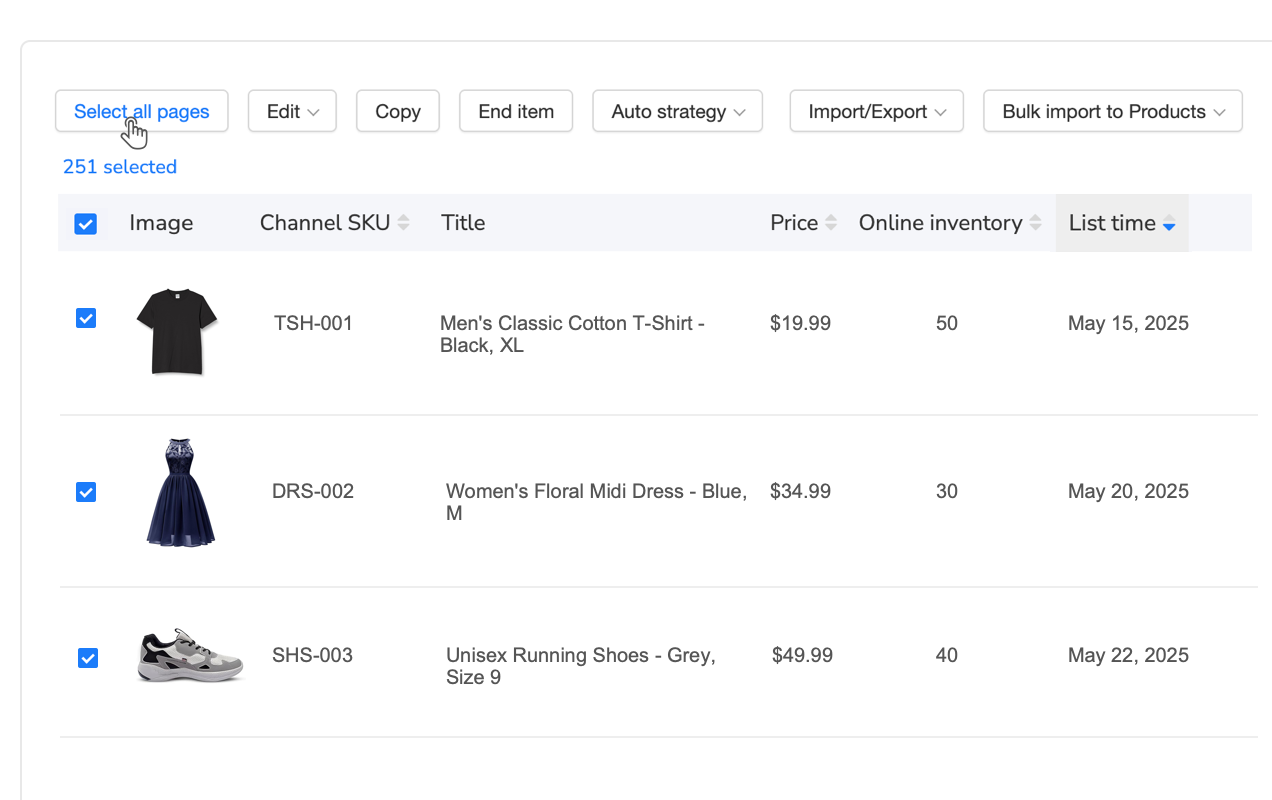
- Batch Creation: Upload hundreds or thousands of new listings simultaneously using CSV files or product catalogs
- Conditional Editing: Apply changes to listings matching specific criteria (category, price range, SKU pattern, tags)
- Template Systems: Create reusable listing structures for product families or seasonal items
- Automated Content: Generate titles, descriptions, and Item Specifics using AI or predefined rules
- Validation Layers: Check for policy violations, pricing errors, and missing required fields before publishing
- Revision History: Track bulk changes and rollback errors affecting multiple listings
- Cross-Platform Sync: Manage eBay listings alongside Amazon, Walmart, and Shopify inventories
Why Manual Listing Management Doesn’t Scale
The economics of manual listing management create a ceiling on how large your eBay business can grow. Consider the actual time costs:
A seller managing 500 active listings who needs to update pricing quarterly spends 25 hours per update cycle, or 100 hours annually—nearly 2.5 weeks of full-time work just on price maintenance. Add seasonal description updates, inventory syncing, promotional campaigns, and policy compliance reviews, and you’re looking at 200-300 hours yearly spent on tasks that bulk tools can complete in 15-20 hours total.
Additionally, manual work introduces a 8-15% error rate according to eBay seller data. Typos in pricing (entering $199 instead of $19.99), incorrect shipping weights, missing Item Specifics, or outdated policy language compound across hundreds of listings. These errors directly impact conversion rates, search visibility, and seller performance metrics.
The Manual Pain Point: Time Costs at Scale
Let’s quantify exactly what you’re sacrificing by managing listings manually. A professional eBay seller with 1,000 active listings typically performs these monthly maintenance tasks:
- Price Updates: Adjusting 300-400 listings for competitive positioning or margin improvement → 15-20 hours manually
- Inventory Sync: Updating stock quantities across channels to prevent overselling → 8-12 hours manually
- Seasonal Content: Refreshing descriptions and titles for Q4 holiday season or other peak periods → 25-30 hours manually
- Compliance Sweeps: Reviewing for prohibited terms after eBay policy updates → 10-15 hours manually
- New Listings: Adding 50-100 new products monthly → 12-25 hours manually
Total monthly time commitment: 70-102 hours. That’s 2.5 full-time work weeks spent exclusively on listing maintenance, not including customer service, shipping logistics, inventory sourcing, or strategy work. At a conservative opportunity cost of $25/hour, you’re spending $1,750-$2,550 monthly on manual data entry that automation could handle for a fraction of the cost.
The scale problem gets exponentially worse. At 5,000 listings, these maintenance tasks would require 350-510 hours monthly—impossible for a solo seller and requiring 2-3 dedicated listing management employees. This is why professional high-volume eBay sellers treat bulk listing automation as infrastructure, not optional tooling.
Maxmerce Rule-Based Bulk Listing Editing: Precision at Scale
For sellers needing surgical precision in bulk operations, Maxmerce’s Rule-Based Bulk Listing Editing system transforms complex catalog management from days-long projects into 30-minute workflows.
Here’s the core workflow difference. Traditional bulk editing forces you to either update ALL listings or manually select individual items one-by-one—there’s no middle ground. You can’t easily say “update all electronics priced between $50-$200 that haven’t sold in 60 days and belong to specific supplier SKU patterns.” That level of conditional logic requires either painful manual filtering or custom scripting.
Maxmerce solves this with a sophisticated filter engine offering 30+ criteria for targeting exactly which listings should receive bulk updates. The system works through a simple four-step process:
- Define Filters: Select from 30+ filter options including category, price range, inventory level, SKU patterns, custom tags, last sold date, view count, conversion rate, listing age, and marketplace platform. Combine multiple filters using AND/OR logic for precise targeting.
- Preview Selection: Review the exact listings matching your filter criteria before applying any changes. The preview shows current values for fields you’re about to modify, helping you catch unintended selections before making irreversible updates.
- Configure Changes: Specify what to update (price, title, description, shipping, inventory, status) and how (set value, add percentage, replace text, append content). Apply mathematical formulas like “increase by 15%” or “round to nearest $0.99” across thousands of listings.
- Execute & Verify: Apply changes in real-time across selected listings, with full revision history tracking for instant rollback if needed. Changes sync immediately to eBay’s live listings.
The time savings compound dramatically at scale. A recent Maxmerce case study tracked a seller managing 2,400 eBay listings who needed to implement a seasonal pricing strategy: increase electronics by 12%, reduce clothing by 8%, and keep home goods unchanged. Manually, this would require:
- Sorting listings into three category groups → 45-60 minutes
- Calculating new prices for each item → 90-120 minutes
- Updating prices one-by-one → 180-240 minutes
- Verification to catch calculation errors → 60-90 minutes
Total manual time: 6-8.5 hours. Using Rule-Based Bulk Editing, the seller created two filter rules (one for electronics, one for clothing), applied percentage-based price increases, previewed the 2,400 updated prices, and executed the changes. Total time: 8 minutes. That’s a 95% time reduction—from nearly a full workday to a coffee break.
Additionally, the formula-based pricing eliminated the calculation errors that manual workflows inevitably introduce. The seller previously had a 6-8% error rate on bulk price updates (decimal point mistakes, transposed numbers, copy-paste errors). Rule-based automation reduced that to zero.
The rollback capability provides a critical safety net. If you realize after execution that a filter caught unintended listings or a formula produced unexpected results, Maxmerce’s revision history allows instant rollback to previous values across all affected listings. This undo functionality simply doesn’t exist in manual workflows—once you’ve manually updated 500 listings with incorrect prices, you’re manually fixing 500 listings again.
CSV Bulk Editing: The Excel Power User’s Workflow
For sellers comfortable with spreadsheets, CSV bulk editing provides maximum flexibility for complex eBay bulk data transformations that would be tedious or impossible through UI-based tools.
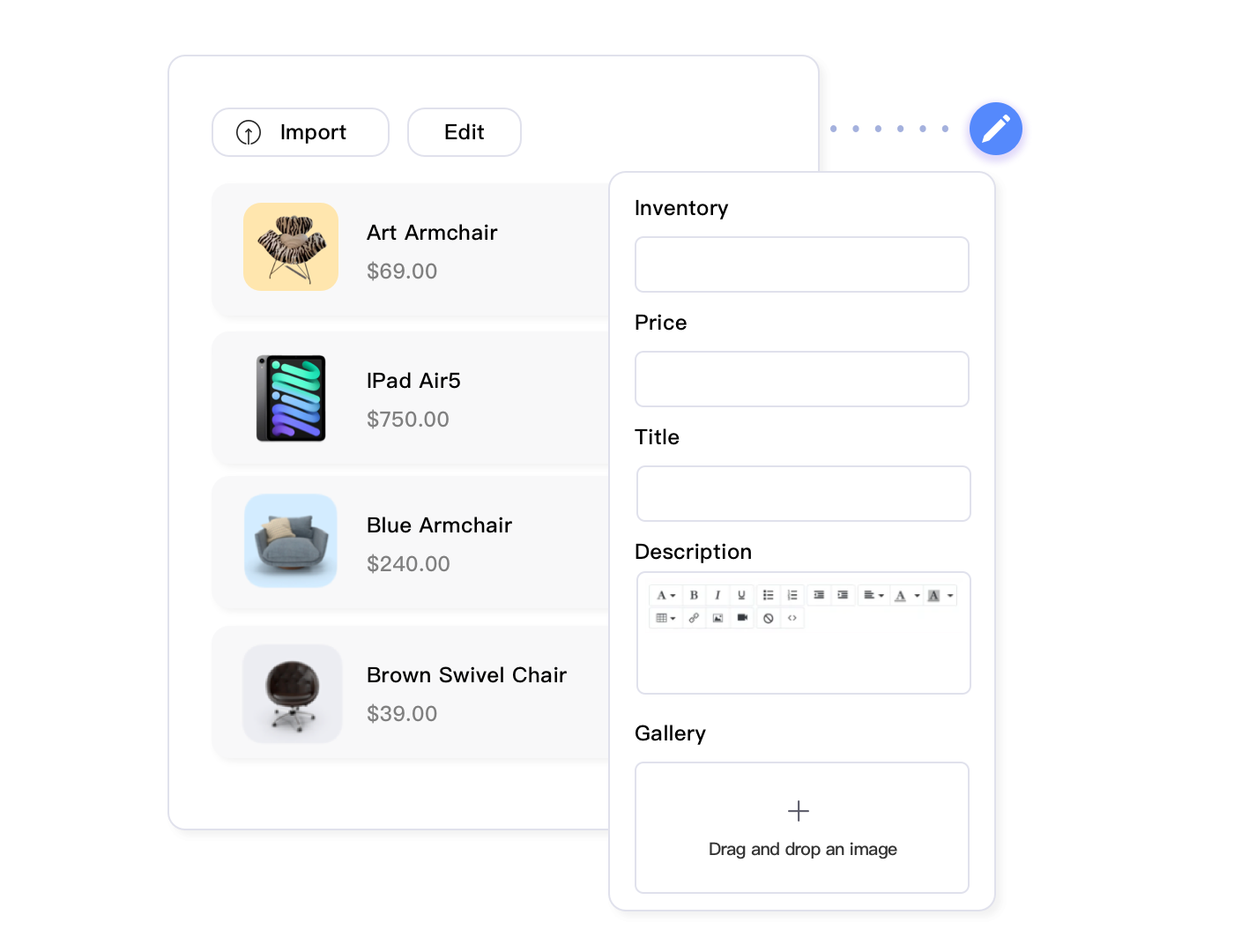
The core eBay bulk workflow follows an export-edit-import cycle. You export your current eBay listings to a CSV (comma-separated values) file that opens in Excel or Google Sheets. This spreadsheet contains every field for every listing: title, description, price, quantity, SKU, Item Specifics, shipping options, etc. You make changes offline using Excel’s powerful find-replace, formulas, conditional formatting, and data manipulation tools. Then you re-import the modified CSV file to update your live eBay listings using eBay bulk upload features.
When CSV eBay Bulk Workflows Excel
CSV eBay bulk editing shines for specific bulk operation scenarios:
- Complex Text Transformations: Standardizing title formats across 1,000 listings using Excel find-replace with wildcards (e.g., converting “Nike Men’s Running Shoe” to “Men’s Nike Running Shoes” with proper capitalization)
- Mathematical Pricing Formulas: Calculating new prices based on cost columns, margin targets, and competitor data using Excel formulas, then applying psychological pricing rules (ending in .99 or .95)
- Cross-Reference Updates: Matching SKUs against supplier spreadsheets to update weights, dimensions, or model numbers using VLOOKUP formulas
- Conditional Bulk Changes: Using Excel’s IF statements to apply different updates based on multiple criteria (e.g., IF quantity < 5 AND price > $100, increase by 8%, else decrease by 3%)
- Data Cleanup: Removing unwanted characters, standardizing formats, fixing typos across thousands of cells using Excel’s data tools
The power comes from Excel’s mature data manipulation capabilities. You can sort, filter, use pivot tables to analyze patterns, apply formulas across thousands of rows, and make changes that would require hundreds of individual edits through a web interface.
CSV Editing Pitfalls and Prevention
However, CSV workflows introduce significant risk if not managed carefully:
Overwriting Customized Content: When you export listings to CSV, make bulk changes, and re-import, you risk overwriting custom descriptions, hand-crafted titles, or specialized Item Specifics. Prevention: Use Maxmerce’s Bulk Product Editing via Excel feature which allows selective field syncing—you can update only price and quantity columns while preserving all other existing content.
Format Corruption: Excel sometimes auto-formats cells in unexpected ways: converting SKUs with leading zeros to numbers (deleting the zeros), interpreting hyphens as date separators, or removing special characters. Prevention: Set column formats to “Text” before importing data, and verify SKU and UPC columns haven’t been corrupted before re-uploading.
Missing Required Fields: eBay requires certain fields depending on category and listing type. If your CSV is missing mandatory data, the import will fail or create draft listings instead of live ones. Prevention: Use template exports that include all required fields for your categories, and validate CSVs against eBay’s requirements before uploading.
Accidental Formula Errors: A single incorrect Excel formula can cascade incorrect data across thousands of rows. One seller accidentally set all prices to their SKU numbers (a column reference error), creating $12345 prices for items that should have been $19.99. Prevention: Always test formulas on a small subset of rows first, use Excel’s formula auditing tools, and carefully review the preview before importing.
Maxmerce CSV Management: Safety-First Bulk Operations
Maxmerce’s approach to CSV bulk editing addresses the core risks of traditional workflows while preserving the power and flexibility that makes spreadsheet management valuable.
The platform provides two complementary CSV-based features: Bulk Listing Products via Excel for creating new listings in batches, and Bulk Product Editing via Excel for updating existing inventory. Both follow a validated import workflow that prevents the most common bulk editing disasters.
Here’s how Maxmerce transforms the CSV workflow from risky to reliable:
Template Generation with Field Mapping: Instead of manually creating CSV files or exporting from eBay’s File Exchange, Maxmerce generates pre-configured Excel templates with all required fields, proper formatting, and category-specific Item Specifics already structured. These templates include data validation rules, dropdown menus for standardized fields, and formula guards to prevent common formatting errors.
For a seller listing electronics, the template automatically includes required Item Specifics like Brand, Model, Condition, MPN, and UPC with dropdown validation to ensure eBay-compliant values. Color-coded columns indicate required vs optional fields, reducing the confusion that leads to import failures.
Pre-Upload Validation Engine: Before committing any changes to eBay, Maxmerce scans your uploaded CSV for 40+ common error types: missing required fields, invalid category IDs, pricing outside safe ranges, prohibited terms, format issues in UPC/EAN/ISBN fields, shipping weight inconsistencies, and policy violations. The system flags these issues with specific row and column references, allowing you to fix problems before they affect live listings.
This validation catches errors that eBay’s own File Exchange would only surface after failed uploads, saving hours of troubleshooting. One Maxmerce user uploaded a 2,500-listing CSV with Item Specifics that didn’t match the target category requirements. Maxmerce’s pre-validation flagged all 186 listings with incorrect attributes and provided the correct field names, preventing a failed bulk upload that would have required complete rework.
Selective Field Syncing: Unlike eBay’s File Exchange which treats CSV imports as full listing replacements, Maxmerce allows you to update only specific fields while preserving all other existing data. You can export your catalog, modify only the Price and Quantity columns, then re-import those updates without touching titles, descriptions, images, or Item Specifics.
This selective syncing eliminates the single biggest CSV editing risk—accidentally overwriting customized content. A seller who hand-optimized 500 product descriptions over months can safely update inventory quantities via CSV without fear of replacing those descriptions with blank values or template text.
The practical workflow looks like this: A seller receives a supplier pricing update affecting 800 products in their 2,000-listing catalog. They export their full catalog to Excel, use VLOOKUP to match supplier SKUs and update cost columns, calculate new retail prices with margin formulas, then re-import only the Price column. Maxmerce validates the pricing data, shows a preview of the 800 listings that will receive price updates, and applies changes without touching any other listing content. Total time: 25-35 minutes. Manual equivalent: 12-16 hours.
AI Listing Generation: Automate Content Creation
The most time-consuming aspect of bulk listing creation isn’t uploading data—it’s generating the content itself. Writing optimized titles, compelling descriptions, complete bullet points, and filling dozens of Item Specifics fields takes 10-15 minutes per product when done manually. For large catalog launches, content creation becomes the bottleneck that prevents rapid scaling.
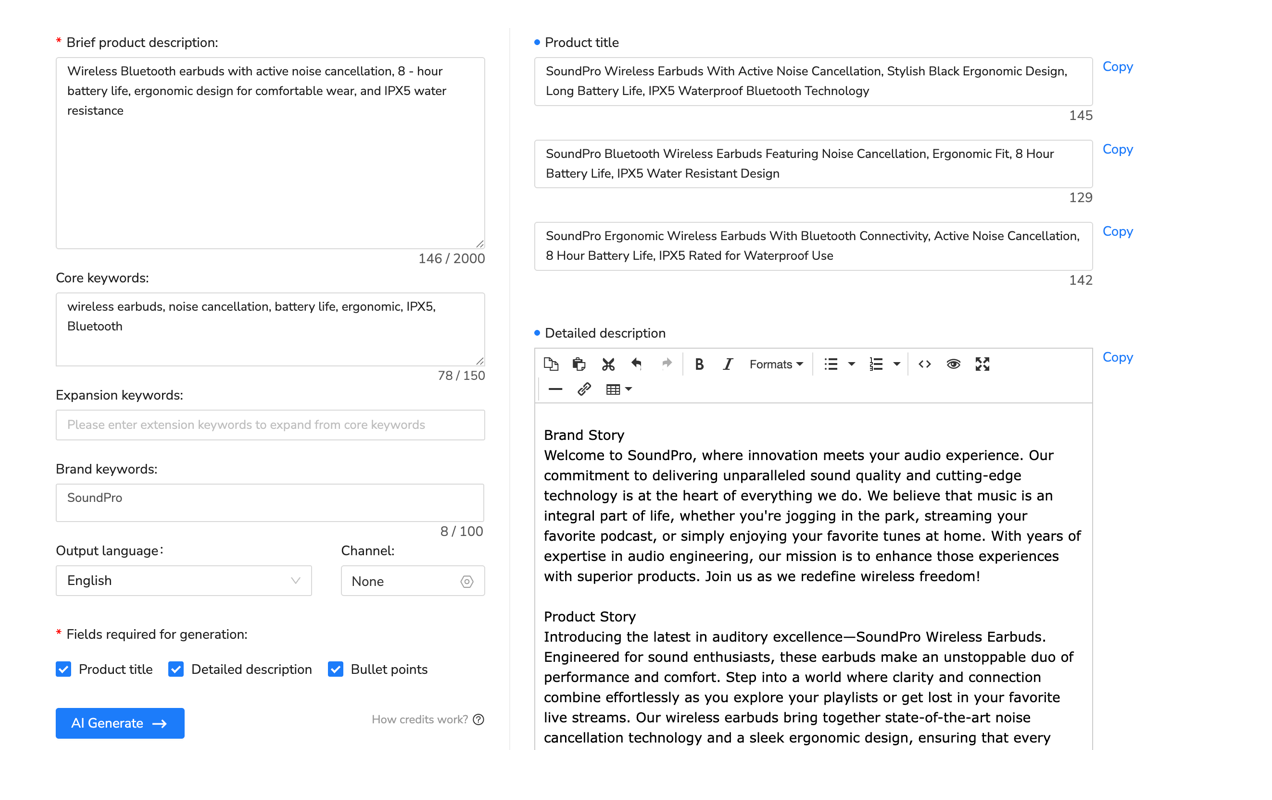
AI listing generation tools fundamentally change this equation by automating content creation from minimal input data. Instead of manually writing every field, you provide basic product information (name, category, key features, brand) and the AI generates complete, eBay-optimized listing content in 30-60 seconds.
How AI Listing Generation Works
Modern AI listing tools use natural language processing models trained on millions of successful eBay listings to understand what content performs well in different categories. The generation process follows these steps:
- Input Minimal Data: Provide product name, category, brand, key features, and optionally images or URLs
- AI Analysis: The system identifies product type, analyzes category-specific requirements, and references high-performing listings in the same category
- Content Generation: AI creates optimized title (80 characters with key search terms), compelling description (200-400 words), bullet point highlights, and complete Item Specifics
- SEO Optimization: Generated content includes relevant keywords in natural language, formatted for eBay’s Cassini search algorithm
- Review & Customize: Seller reviews AI output, makes brand-specific edits, adds unique selling propositions, and approves for publication
The time compression is dramatic. Creating 100 new listings manually at 12 minutes per listing requires 20 hours of pure content writing work. AI generation reduces this to 50-100 minutes (30-60 seconds per listing) plus 2-3 hours for review and customization. That’s an 85% time reduction while maintaining or improving content quality.
Maxmerce AI Listing Generator: Complete Attributes in Seconds
Maxmerce’s AI Listing Generator goes beyond basic title and description creation to tackle the most tedious aspect of eBay listing management: Item Specifics.
Item Specifics are the structured product attributes that eBay requires for most categories: Brand, Size, Color, Material, Style, MPN (Manufacturer Part Number), and dozens of category-specific fields. A single electronics listing might require 20-30 Item Specifics. A fashion item could need 15-20. Manually filling these fields represents 50-70% of the time spent creating a new listing.
Here’s the manual workflow pain point: You create a listing for “Men’s Nike Air Max 90 Running Shoes Size 10 White/Red.” eBay’s category requires Item Specifics for Brand, Type, Department, Style, US Shoe Size, UK Shoe Size, EU Shoe Size, Color, Upper Material, Closure Type, Performance/Activity, Season, and Product Line. You manually select or type each value from dropdowns and text fields, constantly switching between eBay’s documentation and your supplier’s product specifications. This takes 5-8 minutes per listing, and missing required fields causes search visibility penalties.
Maxmerce’s AI Listing Generator analyzes your product name and category, then automatically fills all Item Specifics in 15-30 seconds. The system:
- Extracts Attributes from Product Name: Identifies “Nike” as Brand, “Men’s” as Department, “Air Max 90” as Product Line, “10” as US Size, “White/Red” as Color
- Infers Missing Attributes: Determines Type = “Athletic Shoes”, Closure Type = “Lace-up”, Performance/Activity = “Running” based on product category patterns
- Cross-References Size Charts: Converts US Size 10 to UK Size 9 and EU Size 44 automatically using standard sizing databases
- Validates Against Category Requirements: Ensures all required Item Specifics for the “Men’s Athletic Shoes” category are populated with eBay-compliant values
- Suggests Recommended Attributes: Adds optional but valuable Item Specifics like Season, Features, and Country/Region of Manufacture to maximize search exposure
The result is a listing with 18-25 Item Specifics completed in 20 seconds instead of 6-8 minutes manually. For a 500-product catalog launch, this feature alone saves 40-65 hours of data entry work.
Additionally, the AI maintains eBay SEO best practices throughout. Generated titles include high-volume search keywords in priority order, descriptions are formatted for readability with bullet points and clear sections, and Item Specifics use eBay’s standardized values rather than seller-specific variations. This consistency improves search ranking and category browse visibility compared to manually created listings with formatting inconsistencies and missing attributes.
A Maxmerce user launching a 350-item sporting goods catalog reported completing the entire content creation process in 4.5 hours with AI generation (averaging 45 seconds per listing for generation plus review). The manual equivalent would have required 45-60 hours based on their previous experience. That’s a 90% time reduction, transforming a 2-week project into an afternoon of work.
Bulk Listing Compliance: Preventing Policy Violations at Scale
One incorrectly worded title or description is a minor issue. That same error replicated across 1,000 listings through a bulk operation can trigger account suspension and catastrophic revenue loss.
eBay’s prohibited terms policy restricts specific words and phrases that violate intellectual property, make unverifiable claims, or breach platform rules. Common violations include unauthorized brand name usage, medical claims, counterfeit indicators, and prohibited item keywords. A manual listing workflow allows you to catch and fix these violations one-by-one. Bulk operations can propagate violations across hundreds of listings before you realize the error.
Example scenario: A seller uses a CSV bulk upload to create 500 electronics accessory listings with descriptions that include “Compatible with iPhone.” eBay flags this as unauthorized trademark usage (Apple doesn’t approve third-party compatibility claims phrased this way). All 500 listings are immediately suppressed from search, and the seller receives policy violation warnings that count against account health. Fixing this requires manually editing 500 descriptions and waiting for re-indexing. Revenue loss during the 3-5 day suppression period: $8,000-$15,000 depending on daily sales velocity.
Maxmerce Prohibited Words Check: Automated Compliance Validation
Maxmerce’s Prohibited Words Check prevents this exact scenario by scanning all listing content before publication, identifying policy violations, and suggesting compliant alternatives.
The tool maintains an updated database of eBay’s prohibited terms, trademark restrictions, and category-specific policy rules. It scans titles, descriptions, Item Specifics, and custom fields for potential violations across multiple categories:
- Trademark Violations: Unauthorized brand name usage, improper compatibility claims, counterfeit indicators
- Medical Claims: Health benefit statements, cure/treatment language, FDA-restricted terminology
- Superlative Abuse: Unverifiable “best,” “guaranteed,” or absolute claims without substantiation
- Prohibited Items: Keywords associated with restricted products or services
- Misleading Practices: Keyword stuffing, brand name abuse, irrelevant search terms
For bulk operations, this validation runs automatically before publishing, flagging any listings with potential violations. The workflow integrates seamlessly into bulk listing creation:
A seller prepares a 300-listing CSV upload for health supplements. Before committing the bulk import, Maxmerce’s Prohibited Words Check scans all titles and descriptions, identifying 47 listings with problematic language: “weight loss supplement” (restricted medical claim), “FDA-approved” (false claim), “guaranteed results” (unverifiable). The system highlights the specific violations, suggests compliant alternatives (“dietary supplement,” “supports healthy weight management,” “formulated for”), and blocks publication until corrections are made.
This pre-publication validation prevents the compliance disaster of bulk uploading policy-violating content. The seller corrects the 47 flagged listings in 20-30 minutes, avoiding the account health penalties, listing suppressions, and revenue loss that would result from 47 live violations.
The automated scanning also catches violations that sellers might miss in manual review. One Maxmerce user discovered through compliance checking that a supplier-provided product description template included prohibited language across 180 upcoming listings. Catching this before bulk upload prevented violations that would have taken days to remediate and potentially triggered account restrictions.
Managing Variations in Bulk: The Multi-SKU Challenge
eBay variation listings (single listings with multiple size, color, or style options) present unique bulk management challenges. A single parent listing might contain 20-30 child variations, each with its own SKU, price, quantity, and images. Updating variations manually through eBay’s Seller Hub interface is extraordinarily tedious—you can’t easily bulk-adjust prices across all variations or update inventory for multiple options simultaneously.
Bulk variation management requires tools that understand the parent-child listing structure and allow operations at both levels:
- Parent-Level Updates: Change title, description, or images that apply to all variations
- Variation-Specific Updates: Adjust price or inventory for specific variations (e.g., increase price on popular sizes that sell quickly)
- Conditional Variation Edits: Apply changes to variations matching criteria (all “Large” sizes, all “Red” colors, all out-of-stock variations)
- Variation Creation: Add new size/color options to existing variation listings in batches
The complexity multiplies for sellers managing hundreds of variation listings. A clothing seller with 200 parent listings averaging 15 variations each is actually managing 3,000 unique SKUs. Adjusting prices for seasonal sales or updating inventory after supplier restock requires variation-aware bulk editing.
Maxmerce’s variation management handles this complexity through intelligent hierarchy recognition. When you filter for listings to bulk edit, the system displays both parent listings and individual variations. You can choose to update all variations in selected parents simultaneously, or target specific variations using size/color/style filters.
Example workflow: A clothing seller wants to increase prices on all “Large” and “XL” variations by 10% during peak season demand, while keeping other sizes unchanged. Using Maxmerce’s variation filtering, they select all listings in the Clothing category, filter to variations where Size = “Large” OR Size = “XL”, preview the 847 matching variations, and apply a 10% price increase. The operation takes 3-4 minutes. Manually updating 847 variations through eBay’s interface would require 6-8 hours.
Inventory Synchronization: Preventing Overselling Across Channels
Multi-channel sellers face a unique bulk listing challenge: maintaining accurate inventory counts across eBay, Amazon, Walmart, and Shopify simultaneously. Selling the same product on multiple platforms creates overselling risk—if you sell your last unit on Amazon but eBay still shows 1 in stock, you’ve oversold and must cancel the eBay order, damaging seller metrics.
Manual inventory synchronization doesn’t scale beyond 50-100 SKUs. Checking each platform daily, recording sales, and updating inventory across all channels requires 30-60 minutes for small catalogs and becomes impossible at larger scales. A seller managing 500 SKUs across three platforms would need 2-3 hours daily just for inventory reconciliation.
Bulk inventory tools solve this through real-time synchronization. When a unit sells on any platform, the inventory count automatically decrements across all other channels within 5-15 minutes, preventing overselling before the next sale occurs.
Maxmerce Inventory Sync: Real-Time Multi-Channel Updates
Maxmerce’s Inventory Sync feature provides centralized inventory management with automatic cross-platform updates. The system tracks a single source-of-truth inventory count and propagates changes to all connected sales channels in real-time.
The workflow eliminates manual inventory reconciliation entirely:
You maintain inventory in Maxmerce’s central dashboard. When you receive 50 units of a product from your supplier, you add them once in Maxmerce. The system immediately updates available quantity on eBay, Amazon, and Walmart. When a unit sells on any platform, Maxmerce receives the sale notification through API connections, decrements the central inventory count by 1, and pushes the updated quantity to all other channels within 5 minutes.
This real-time synchronization prevents the overselling incidents that plague multi-channel sellers. If you have 3 units left and receive near-simultaneous orders on eBay and Amazon, the first order immediately reduces available inventory to 2 units on all platforms, preventing the third unit from being sold twice.
Additionally, the system supports buffer inventory rules and channel-specific allocation. You can reserve 5 units as safety stock that never shows as available online, preventing overselling when physical inventory has damage or warehouse discrepancies. Or you can allocate specific quantities to each channel (20 units to Amazon FBA, 10 to eBay, 5 to Walmart) to prioritize platforms with better margins or faster velocity.
For sellers managing 500+ SKUs across multiple channels, this centralized synchronization saves 10-15 hours weekly compared to manual inventory updates. More importantly, it eliminates overselling incidents that damage seller ratings and require expensive rush shipping to fulfill from alternative suppliers.
Bulk Listing Best Practices
Professional eBay sellers follow specific workflows to maximize bulk listing efficiency while minimizing error risk. These best practices come from years of managing high-volume catalogs and recovering from bulk operation disasters.
Always Test on Small Batches First
Never execute bulk operations on your entire catalog without testing on a small subset. Whether you’re using CSV uploads, rule-based editing, or AI generation, always test changes on 10-50 listings first, verify the results, then scale to the full catalog.
This testing catches formula errors, unintended filter matches, formatting issues, and policy violations before they affect thousands of listings. A 10-listing test takes 5-10 minutes but can prevent disasters requiring days of remediation work.
Maintain Backup Exports Before Major Changes
Before any significant bulk operation, export your current catalog to CSV as a backup. If a bulk update goes wrong, you can revert to the backup rather than trying to manually reconstruct previous values.
This is especially critical for operations that replace content (descriptions, titles) rather than just updating numbers (prices, quantities). Once you’ve overwritten 500 hand-crafted product descriptions with template text, the original content is gone unless you have a backup export.
Use Revision History and Rollback Features
Leverage tools with built-in revision tracking and rollback capabilities. If you discover a bulk edit error hours or days after execution, rollback features let you undo the changes instantly rather than starting over.
Maxmerce tracks every bulk operation with full revision history—you can see exactly what changed, when, and by which user (important for teams). Rollback restores previous values across all affected listings in minutes.
Schedule Bulk Updates During Low-Traffic Hours
When making major bulk changes to live listings (prices, titles, descriptions), schedule these operations during your lowest traffic hours—typically 2-6 AM in your primary customer timezone. This minimizes the number of active shoppers who might see listings mid-update or experience temporary availability issues.
For price increases, updating overnight ensures customers who are currently shopping don’t see products in their cart increase in price before checkout, which creates negative experiences and abandoned carts.
Validate eBay Sync After Bulk Operations
After executing bulk changes, verify that updates successfully synced to eBay’s live listings. API errors, rate limiting, or platform issues can cause some updates to fail silently. Spot-check 10-20 random listings on eBay.com to confirm prices, inventory, and content match what you intended.
For critical operations (major price changes, inventory updates, compliance fixes), do a systematic verification of 5-10% of affected listings within 1-2 hours of the bulk update.
Comparing Bulk Listing Approaches
Different bulk listing methods serve different scenarios. Understanding when to use CSV editing vs rule-based automation vs AI generation optimizes your workflow efficiency.
| Method | Best For | Time Savings | Learning Curve |
|---|---|---|---|
| Rule-Based Editing | Conditional updates, targeted price changes, category-specific edits | 90-95% vs manual | Low (15-30 min to learn) |
| CSV Editing | Complex text transformations, mathematical formulas, cross-reference updates | 85-90% vs manual | Medium (Excel skills required) |
| AI Generation | New listing creation, content generation, Item Specifics automation | 85-90% vs manual writing | Low (review and approve) |
| Inventory Sync | Multi-channel quantity updates, overselling prevention | 95%+ vs manual reconciliation | Low (automatic once configured) |
Most professional sellers use all four methods in combination, choosing the right tool for each specific bulk operation. Price updates via rule-based editing, new catalog launches via AI generation, complex data transformations via CSV workflows, and continuous inventory management via real-time sync.
Common Bulk Listing Mistakes and How to Avoid Them
Even experienced sellers make costly errors when executing bulk operations. Understanding these common pitfalls helps you avoid expensive mistakes.
Mistake 1: Not Using Preview Mode
Executing bulk changes without previewing affected listings is the most common cause of bulk operation disasters. You think your filter selected 200 electronics items, but it actually matched 2,000 listings across multiple categories.
Prevention: Always use preview mode before executing. Review the count of affected listings, spot-check 5-10 examples to verify they match your intent, and confirm the proposed changes look correct before clicking execute.
Mistake 2: Accidentally Overwriting Custom Content
Bulk operations often replace entire fields rather than updating values. If you’ve hand-optimized product descriptions over months, a CSV re-import can replace all that work with template text if you’re not careful about field selection.
Prevention: Use selective field syncing that updates only the columns you explicitly modify, leaving all other content unchanged. Test on a few listings first to confirm customized content isn’t being replaced.
Mistake 3: Applying Incorrect Pricing Formulas
Mathematical errors in bulk pricing operations create catastrophic results: setting all prices to cost instead of retail, accidentally applying a 50% increase instead of 5%, or using the wrong column reference in Excel formulas.
Prevention: Test pricing formulas on 10-20 items first. Calculate expected results manually for a few products, compare to formula output, and verify before scaling to the full catalog. Use Excel’s formula auditing tools to trace cell references.
Mistake 4: Ignoring Validation Warnings
When bulk listing tools flag validation errors (missing required fields, policy violations, format issues), it’s tempting to dismiss warnings and force publication. This inevitably creates problems: failed uploads, suppressed listings, or policy strikes.
Prevention: Take validation warnings seriously. Fix flagged issues before executing bulk operations, even if it requires revising your CSV or adjusting filter rules. Prevention takes minutes; remediation takes hours.
Mistake 5: Bulk Editing During Peak Traffic
Making major bulk changes during peak shopping hours creates negative customer experiences. Shoppers see products disappear from search, prices change mid-session, or listings temporarily unavailable during sync.
Prevention: Schedule significant bulk operations during your lowest traffic hours (typically overnight). Quick price or inventory updates are fine anytime, but major catalog restructures or content changes should happen off-peak.
Scaling from 100 to 10,000 Listings
As your eBay catalog grows, bulk listing management becomes progressively more critical. The workflows that work for 100 listings completely break down at 1,000+.
100-500 Listings: Basic Bulk Tools Required
At this scale, you need basic bulk capabilities for price updates and inventory management. CSV editing via eBay’s File Exchange or simple third-party tools suffices. Weekly maintenance takes 3-6 hours with basic bulk tools vs 12-20 hours manually.
500-2,000 Listings: Advanced Automation Essential
Mid-size catalogs require sophisticated bulk editing with conditional rules, validation, and multi-channel synchronization. Manual management becomes impossible—you need tools like Maxmerce’s Rule-Based Bulk Editing and Inventory Sync to maintain the catalog efficiently. Weekly maintenance: 4-8 hours with advanced tools vs 30-50 hours manually.
2,000-10,000+ Listings: Full Automation Stack
Large catalogs demand the complete automation ecosystem: AI content generation for new listings, rule-based bulk editing for targeted updates, automated inventory sync, and compliance validation. At this scale, bulk tools aren’t just efficiency enhancers—they’re the only viable way to manage the catalog. Weekly maintenance: 8-15 hours with full automation vs 100-150 hours manually (requiring 3-4 dedicated employees).
Integration with Multi-Channel Operations
Professional sellers rarely operate exclusively on eBay. Most manage inventory across eBay, Amazon, Walmart, and sometimes Shopify. This multi-channel approach maximizes revenue but multiplies listing management complexity.
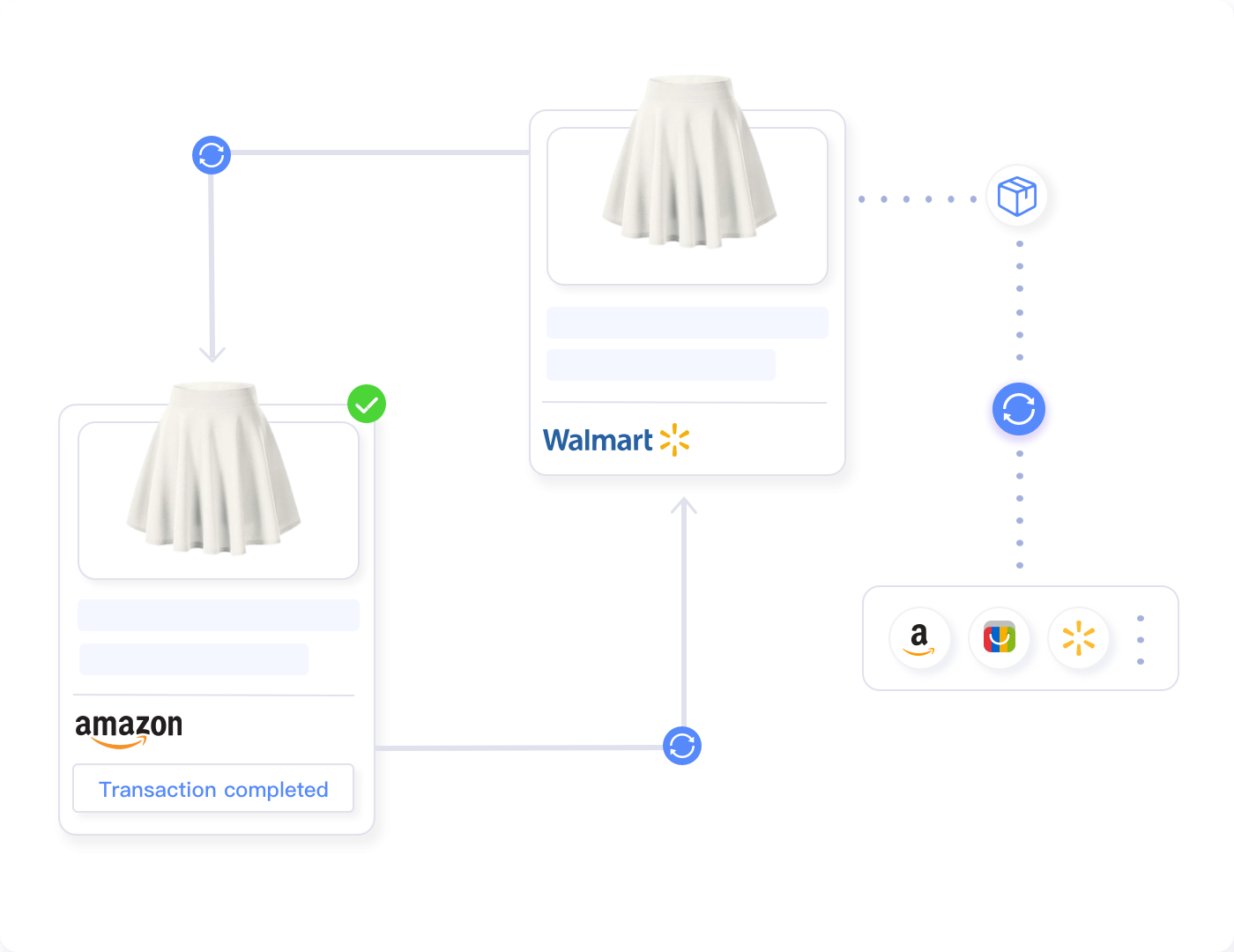
Bulk listing tools that support multi-channel management provide immense value by allowing single-source catalog updates that propagate across all platforms. Instead of bulk editing eBay listings, then separately updating Amazon and Walmart catalogs, you make changes once in a central system that syncs to all channels.
Maxmerce’s Bulk Product Publish feature enables this multi-channel workflow. Create or update product information in Maxmerce’s centralized catalog, then publish simultaneously to eBay, Amazon, and Walmart. The system handles platform-specific formatting requirements, category mapping, and attribute translation automatically.
For example, a product category on eBay requires different Item Specifics than the equivalent category on Amazon. Instead of manually creating separate listings with different attribute sets for each platform, Maxmerce’s Smart Category & Attribute Mapping automatically translates your product data to each platform’s requirements.
This multi-channel capability transforms a 500-listing catalog across three platforms from 1,500 separate listings requiring individual management into a single 500-product catalog that automatically maintains sync across all channels. Bulk price updates, inventory changes, and content modifications happen once and propagate everywhere.
Frequently Asked Questions
What are eBay bulk listing tools?
eBay bulk listing tools are software solutions that enable sellers to create, edit, and manage hundreds or thousands of product listings simultaneously. These tools support CSV file uploads, batch editing operations, and automated listing creation—eliminating the need to manually update each listing individually through eBay’s Seller Hub interface.
How much time can bulk listing tools save?
Professional bulk listing tools can reduce listing management time by 85-95%. For example, updating prices across 1,000 listings that would take 16-20 hours manually can be completed in 30-60 minutes using CSV bulk editing or rule-based automation tools. AI content generation reduces new listing creation from 10-15 minutes per product to 30-60 seconds.
What is CSV bulk editing for eBay?
CSV bulk editing allows sellers to export their eBay listings to an Excel spreadsheet, make changes offline using formulas and find-replace operations, then re-import the updated file to eBay. This workflow enables complex bulk operations like percentage-based price changes, standardizing titles, or updating shipping policies across thousands of listings simultaneously.
Can I automate eBay listing creation?
Yes, modern listing automation tools use AI to generate optimized titles, descriptions, and Item Specifics from minimal product information. These systems can create complete eBay listings in 30-60 seconds per product compared to 10-15 minutes of manual work, while maintaining eBay SEO best practices and category-specific requirements.
What are the risks of bulk editing eBay listings?
The main risks include accidentally overwriting customized content, applying incorrect pricing formulas, triggering eBay policy violations across multiple listings, and causing inventory sync errors. These risks can be mitigated by using preview modes before applying changes, testing edits on small batches first, maintaining backup exports, and using tools with built-in compliance checking.
How does Maxmerce handle bulk listing management?
Maxmerce provides three complementary bulk listing approaches: Rule-Based Bulk Listing Editing for complex conditional updates using 30+ filters, Bulk Product Editing via Excel for offline spreadsheet workflows with validation, and AI Listing Generator for automated content creation. These tools work together to handle everything from quick price updates to complete catalog launches while maintaining eBay compliance.
Do I need bulk listing tools for a small eBay catalog?
The break-even point is typically 50-100 active listings. Below this threshold, manual management through eBay Seller Hub remains practical. Above 100 listings, bulk tools begin saving significant time. At 200+ listings, bulk automation becomes essential for efficient catalog maintenance without dedicating full-time resources to listing management.
Can bulk listing tools help with multi-channel selling?
Yes, advanced bulk listing platforms support multi-channel management, allowing you to update eBay, Amazon, Walmart, and Shopify listings from a single interface. This eliminates the need to perform separate bulk operations on each platform. Maxmerce’s Inventory Sync maintains real-time quantity updates across all channels to prevent overselling.
How do I prevent policy violations when bulk editing?
Use automated compliance scanning tools that check for prohibited terms, trademark violations, and category-specific restrictions before publishing bulk changes. Maxmerce’s Prohibited Words Check scans all listing content against eBay’s current policy database, flagging violations and suggesting compliant alternatives before changes go live.
What’s the learning curve for bulk listing tools?
Basic bulk editing operations (simple price or inventory updates) can be learned in 15-30 minutes. More advanced features like rule-based conditional editing or AI content generation typically require 1-2 hours of practice to master. CSV workflows require existing Excel competency but no additional eBay-specific training beyond understanding field mappings.
Transform Your eBay Catalog Management
Stop wasting 15-20 hours weekly on manual listing updates. Maxmerce’s comprehensive bulk listing tools—including Rule-Based Editing, CSV workflows, AI Generation, and real-time Inventory Sync—reduce catalog management time by 90% while improving accuracy and compliance.
Professional eBay sellers managing 500-10,000+ listings rely on Maxmerce to automate the tedious catalog maintenance work that prevents business growth. Whether you’re launching a 500-product catalog or maintaining complex multi-channel inventory, Maxmerce provides the bulk listing automation infrastructure that scales with your business.
Start your 14-day free trial of Maxmerce’s Listing Management module—no credit card required. See firsthand how bulk automation transforms catalog management from a full-time burden into automated background processes.
