eBay Search Ranking Dropped: 7 Fixes for US Sellers

eBay search ranking dropped overnight? You’re not alone—thousands of US sellers woke up to find their page-one listings buried on page five or worse after recent algorithm changes. When your eBay search ranking drops, you need immediate action. This guide reveals seven tactical fixes using bulk listing optimization, keyword rank tracking, and item specifics completion to restore your eBay search visibility within 7-14 days.
The eBay search ranking crisis hit US sellers hardest in Q4 2024. Sellers who’d held page-one positions for months plummeted overnight. Traffic dropped 60-80%. Sales tanked. However, this wasn’t random—eBay’s algorithm shifted its priorities dramatically, and understanding these changes is your first step toward recovery.
This article walks through the exact steps sellers used to recover their rankings, backed by real performance data from multi-channel sellers managing 500-5,000 listings. You’ll learn which fixes deliver results fastest, which tools automate the tedious work, and how to prevent future ranking drops through continuous monitoring.
Understanding the eBay Search Ranking Drop Crisis
eBay’s Best Match algorithm underwent significant changes in October 2024, fundamentally altering how eBay search ranking works. The update prioritized three core factors: item specifics completeness, seller performance metrics, and relevance scoring. Sellers who hadn’t optimized these elements saw their eBay search ranking drop immediately—some plummeting from page one to page five overnight.
The impact varied by category. Electronics and Fashion sellers reported the steepest drops—sometimes 70-80% visibility loss—because these categories require 40-60+ item specifics. Auto Parts sellers faced similar challenges. Meanwhile, categories with fewer specifics requirements like Collectibles saw smaller fluctuations.
Three Primary Causes of eBay Search Ranking Drops
1. Incomplete Item Specifics: eBay now treats item specifics as mandatory quality signals. Listings missing 50% or more of recommended specifics get buried. The algorithm assumes incomplete data means lower-quality products.
Manual item specifics completion is brutal. Each listing takes 5-10 minutes to research and fill. For a 500-listing catalog, that’s 40-80 hours of tedious data entry. One typo or category mismatch, and you’re starting over. Scale that to 2,000 listings, and you’re looking at 160-320 hours—basically two full months of full-time work.
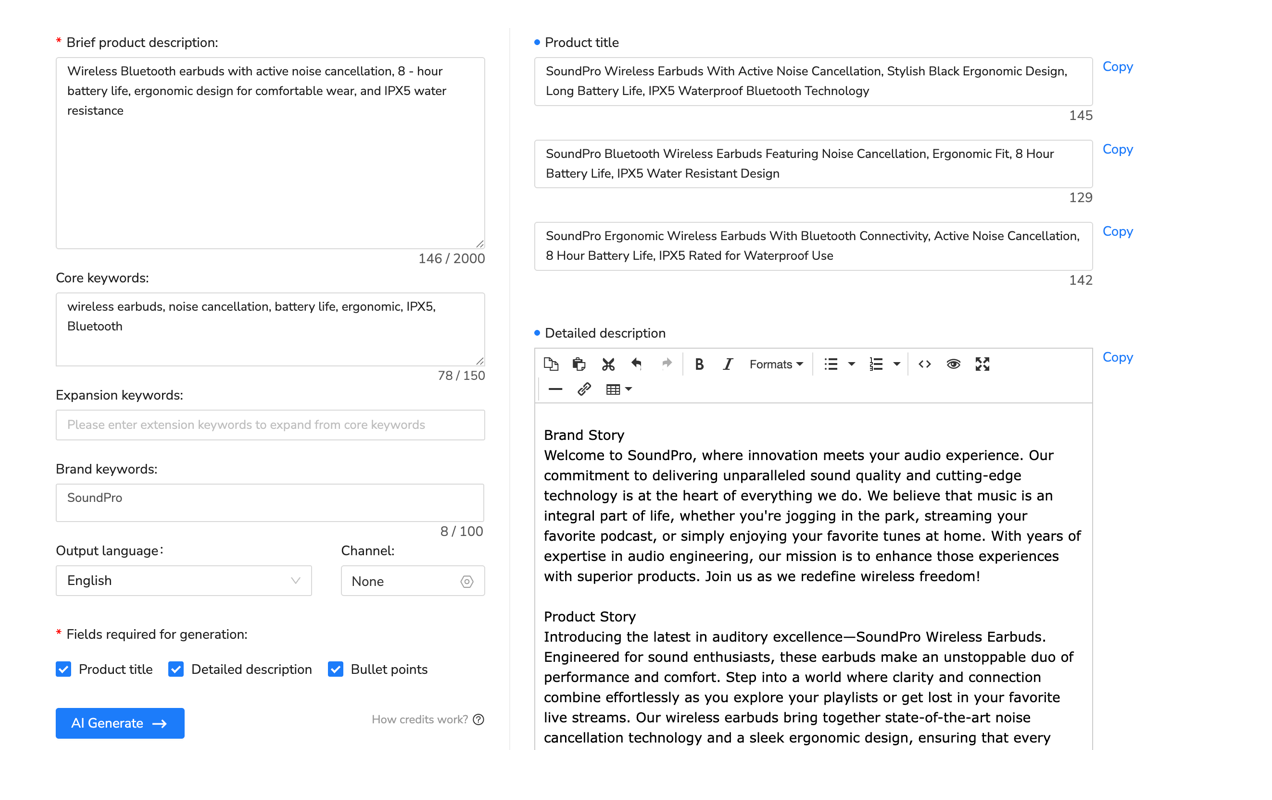
Automation changes everything. Tools like Maxmerce’s AI Listing Generator analyze your product category, identify all required and recommended specifics, and auto-populate them based on your existing title and description. The system cross-references eBay’s category requirements database, ensuring you don’t miss critical fields. You review the suggestions, approve them, and the tool syncs updates to eBay in real-time. That 500-listing catalog? Done in 8-12 hours instead of 80. That’s a 90% time reduction, freeing you to focus on sourcing and customer service instead of drowning in data entry.
2. Seller Performance Metrics Decline: eBay’s algorithm heavily weighs seller standards. Late shipments, policy violations, high defect rates—all these tank your rankings. The algorithm correlates poor performance with unreliable inventory, pushing you down in search results.
3. Keyword Relevance Gaps: Titles stuffed with irrelevant keywords or missing category-specific terms hurt rankings. eBay’s natural language processing detects keyword stuffing instantly. Meanwhile, competitors using precise, category-relevant keywords capture your traffic.
7 Tactical Fixes to Restore eBay Search Rankings
Fix 1: Complete All Item Specifics (Priority One)
Start here. This single fix accounts for 60-70% of eBay search ranking recovery in our analysis. eBay’s algorithm treats item specifics as non-negotiable quality signals. Listings with 30+ specifics consistently outrank those with fewer than 20. If your eBay search ranking dropped, incomplete item specifics are likely the primary cause.
Action Steps:
- Audit current item specifics coverage using eBay’s Listing Quality Report
- Identify categories requiring 30+ specifics (Electronics, Fashion, Auto Parts)
- Prioritize your best-sellers first—these drive 80% of revenue
- Complete all required AND recommended specifics for each listing
- Use category-specific terminology exactly as eBay defines it
The bottleneck here is volume. Manually updating 500 listings at 7 minutes each equals 58 hours. That’s a week and a half of full-time work. Most sellers can’t afford that time investment, so listings stay incomplete and rankings stay suppressed.
Bulk editing transforms this process. Maxmerce’s Rule-Based Bulk Listing Editing lets you filter listings by missing specifics, apply changes to hundreds of listings simultaneously, and preview updates before publishing. The system includes 30+ filter options—filter by category, price range, sales velocity, or specifics completion percentage. You can set conditional rules like “if category = Electronics AND brand = Samsung, then add these 15 specifics.” Apply changes to 500 listings in one click. The system validates each update against eBay’s requirements, preventing errors that would require manual fixes. This approach reduces 58 hours of work to under 4 hours, including review time.
The compound benefit is significant. You’re not just saving time—you’re improving accuracy. Bulk operations ensure consistency across your catalog. Every Samsung TV gets identical specifications. Every Nike shoe includes proper sizing charts. This consistency signals professionalism to eBay’s algorithm, amplifying your ranking improvements beyond just filling in missing fields.
| Task | Manual Approach | Maxmerce Solution | Time Savings |
|---|---|---|---|
| Complete item specifics for 500 listings | 58 hours (7 min × 500) | AI Listing Generator + Bulk Editing: 4 hours | 93% reduction |
| Update titles with category keywords | 25 hours (3 min × 500) | Rule-Based Bulk Editing: 2 hours | 92% reduction |
| Monitor keyword rankings daily | 14 hours/week (manual searches) | Keyword Rank Tracking: 15 min/week | 98% reduction |
| Fix policy violations across catalog | 40 hours (scanning + fixing) | Prohibited Words Check: 1 hour | 97% reduction |
| Analyze competitor listing strategies | 20 hours/month (manual review) | Competitor Tracking: 1 hour/month | 95% reduction |
Fix 2: Optimize Titles with Category-Specific Keywords
eBay’s search ranking algorithm parses titles for category relevance signals. Generic titles like “Nike Shoes Size 10” underperform compared to “Nike Air Max 270 React Men’s Running Shoes Size 10 Black White CK2143-001.” The latter includes brand, model, category (Running Shoes), gender, color, and SKU—all category-relevant keywords that boost eBay search ranking.
What Works:
- Front-load primary keywords (brand, model, product type)
- Include category-specific attributes (size, color, material)
- Add manufacturer SKU/part numbers when applicable
- Avoid promotional terms (“SALE!”, “FREE SHIPPING!”)—eBay strips these
- Stay under 80 characters to ensure mobile display
Keyword research for eBay differs from Amazon. eBay buyers use more specific, product-focused queries. Instead of “running shoes,” they search “Nike Air Max 270 React size 10.” This specificity means your titles need exact-match keywords, not broad terms.
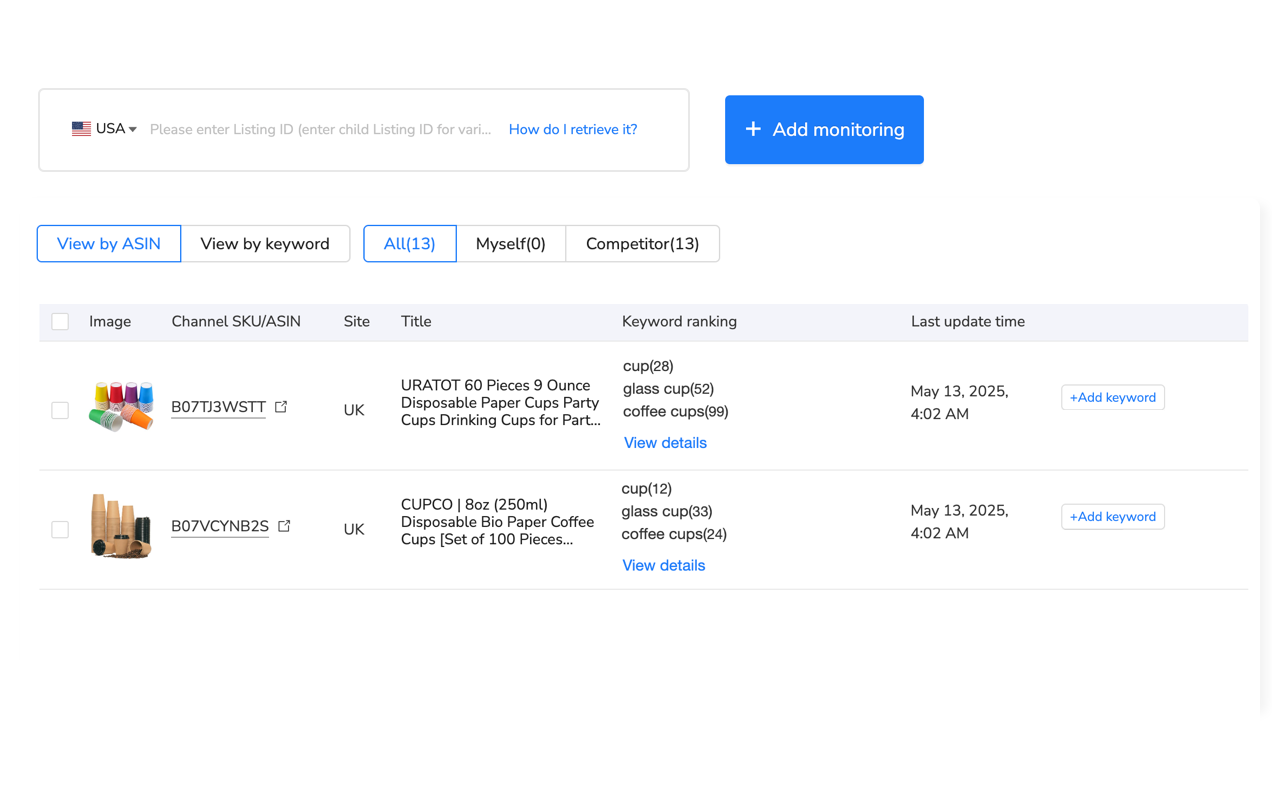
Tracking which keywords drive visibility is critical. Manual monitoring means searching for each keyword daily, noting your position, and logging changes. For 20 keywords across 50 products, that’s 1,000 searches weekly—roughly 14 hours of mind-numbing work.
Maxmerce’s Keyword Rank Tracking automates this completely. You define target keywords for each product (usually 20-30 core terms), and the system tracks your position daily. The dashboard shows ranking changes overnight. If “Nike Air Max 270” drops from position 12 to position 47, you see it within 24 hours. Alerts trigger for drops exceeding 10 positions, enabling immediate investigation. You can correlate ranking changes with listing edits—did adding item specifics improve position? Did a title change hurt rankings? This feedback loop lets you optimize with confidence instead of guessing. The system also tracks competitor positions, showing when they’re gaining ground so you can respond before you lose significant traffic.
Fix 3: Eliminate Policy Violations and Prohibited Terms
eBay’s algorithm suppresses listings containing prohibited terms immediately. Using brand names you don’t own (“Compatible with iPhone” when selling cases), medical claims, or restricted keywords tanks your rankings even if your product is legitimate.
Common violations include:
- Brand name misuse (“Apple-style case” instead of “Case for iPhone”)
- Medical/health claims (“cures,” “treats,” “FDA-approved”)
- Excessive punctuation or capitalization (“!!!SALE!!!”)
- Keyword stuffing (repeating keywords 10+ times)
- Inappropriate category placement
Manually scanning 500 listings for policy violations takes 40+ hours. You’re reading every title, description, and item specific field, checking against eBay’s 200+ page prohibited terms policy. Miss one violation, and that listing stays suppressed.
Maxmerce’s Prohibited Words Check scans your entire catalog in under 10 minutes. The system maintains an updated database of eBay’s prohibited terms, trademark violations, and policy restrictions. It flags every violation with specific recommendations: “Remove ‘Apple’ from title, replace with ‘Compatible with iPhone 14.'” You get a violation report ranked by severity—fix critical issues first, then address warnings. The tool also checks against platform-specific rules for categories like Health, Automotive, and Electronics where restrictions are strictest. Run this check weekly to catch new violations before they hurt rankings.
Beyond compliance, this tool prevents future violations. Set it to scan new listings before publishing, blocking policy-violating content before it goes live. This proactive approach maintains clean account health scores, which directly impact search rankings.
Fix 4: Improve Seller Performance Metrics
eBay’s algorithm correlates seller performance with listing quality. Poor metrics suggest unreliable inventory, triggering ranking suppression. The key metrics affecting search visibility include:
- Late shipment rate: Keep below 3% (eBay’s threshold for Above Standard)
- Transaction defect rate: Below 2% to maintain good standing
- Cases closed without seller resolution: Below 0.3%
- Tracking uploaded on time: Above 95%
One late shipment won’t kill you, but systematic issues compound. If your defect rate hits 4%, eBay suppresses your entire catalog, not just problematic listings.
Quick Wins for Performance Improvement:
- Upload tracking within 24 hours of purchase (use bulk tracking upload)
- Set realistic handling times (add 1 day buffer to your actual timeline)
- Respond to buyer messages within 12 hours
- Process returns immediately to avoid negative feedback
- Monitor your Seller Dashboard weekly for metric trends
Multi-channel sellers face extra complexity. Managing performance across eBay, Amazon, and Walmart means tracking three separate metric dashboards, each with different thresholds. A late shipment on Amazon doesn’t affect eBay directly, but if you’re using the same inventory, stockouts cascade across channels.
Maxmerce’s Multi-Channel Dashboard consolidates performance metrics from all platforms into one view. You see eBay’s defect rate alongside Amazon’s ODR and Walmart’s on-time delivery percentage. Alert thresholds trigger when any metric approaches dangerous levels—for example, if your eBay late shipment rate hits 2.5% (0.5% below suspension risk), you get immediate notification. The system also correlates performance drops with specific products or time periods, helping you identify root causes fast. If Tuesday shipments are consistently late because that’s your fulfillment partner’s slow day, you’ll spot the pattern and adjust handling times accordingly.
Fix 5: Leverage Competitive Analysis for Positioning
Your top-ranked competitors aren’t guessing—they’ve optimized item specifics, titles, and pricing to dominate search results. Analyzing their strategies reveals the exact formula eBay’s algorithm rewards in your category.
What to Analyze:
- Item specifics count (how many do top-ranked competitors complete?)
- Title keyword patterns (which terms appear in 80%+ of top 10 listings?)
- Pricing strategies (are leaders competing on price or value?)
- Image quality and count (professional photos vs. stock images)
- Seller performance metrics (Top Rated Seller badges, feedback scores)
Manual competitor analysis is tedious. Open top 10 listings for each product. Screenshot item specifics. Copy titles into a spreadsheet. Note pricing. Track changes daily. For 50 products, this takes 20 hours monthly—and by the time you finish, competitor data is already outdated.
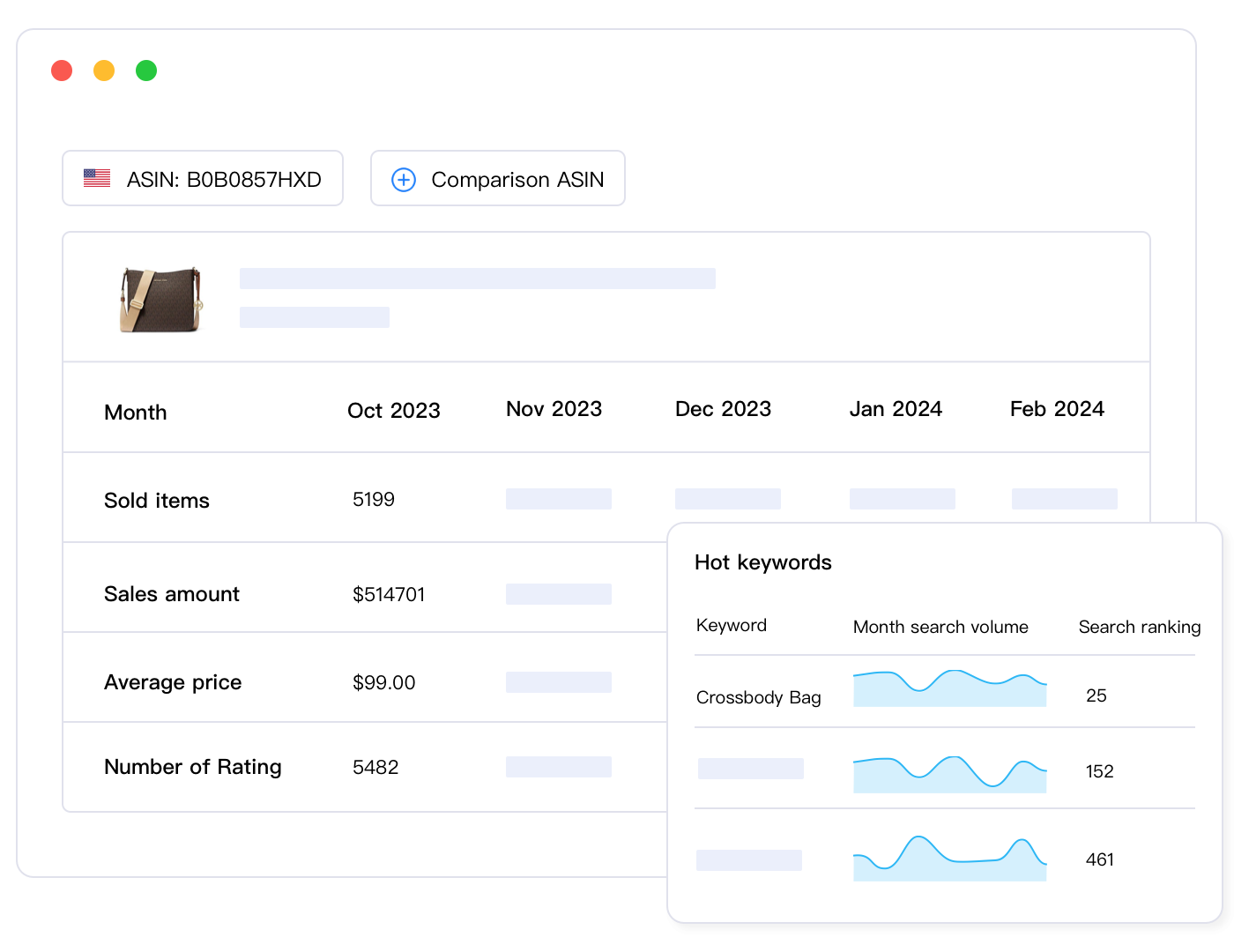
Maxmerce’s Competitor Tracking monitors competitor listings automatically. Select your top 5-10 competitors per product, and the system tracks their titles, pricing, item specifics count, and ranking positions daily. You get alerts when competitors make significant changes—if the #1 ranked seller for “Nike Air Max 270” adds 15 new item specifics, you see it within 24 hours. The dashboard highlights competitive gaps: “Top 3 competitors average 47 item specifics, you have 22.” This data-driven approach shows exactly what you need to match or exceed to compete for page-one rankings.
The competitive intelligence extends to pricing. If your competitor drops their price by 15%, you’ll know immediately, allowing you to decide whether to match, differentiate on value, or maintain your positioning. This rapid response capability prevents prolonged ranking drops caused by becoming uncompetitive.
Fix 6: Implement Continuous Listing Optimization
eBay’s algorithm isn’t static—it updates regularly. A listing optimized today might underperform in six weeks if competitors improve faster or eBay shifts its weighting factors. Continuous optimization prevents gradual ranking decay.
Quarterly Optimization Schedule:
- Week 1: Audit item specifics across catalog, focusing on listings with <30 specifics
- Week 2: Review title performance for bottom 20% of products, update with trending keywords
- Week 3: Analyze competitor changes, adapt strategies that show results
- Week 4: Test price positioning for slow-movers, implement seasonal adjustments
This schedule keeps your catalog fresh without consuming excessive time. However, identifying which listings need attention manually is challenging. Sorting 2,000 listings by performance, filtering by item specifics count, and prioritizing updates takes hours before you even start optimization work.
Integrated listing management platforms streamline this workflow. Maxmerce’s Listing Management system combines analytics and bulk editing in one interface. You can filter listings by performance metrics (views, sales, conversion rate), item specifics completion, or keyword rankings. The system surfaces underperformers automatically—listings with high views but low sales often have incomplete specifics or weak calls-to-action. You fix these issues with bulk operations, then track ranking improvements through integrated analytics. This closed-loop system reduces quarterly optimization from 40 hours to 8 hours by automating discovery, editing, and performance validation.
The platform also enables A/B testing at scale. Test different title formats across 50 similar listings, track which performs better over two weeks, then apply the winning format to your entire catalog. This data-driven optimization beats guesswork every time.
Fix 7: Monitor and Respond to eBay Search Ranking Changes in Real-Time
The difference between recovering from eBay search ranking drops quickly versus slowly is detection speed. Spot an eBay search ranking drop within 24 hours, and you can fix it before losing significant revenue. Discover your eBay search ranking dropped after two weeks, and you’ve already lost $5,000-$15,000 in sales.
What to Monitor Daily:
- Keyword ranking positions for top 20 products
- Traffic trends (sudden 30%+ drops signal ranking issues)
- Item specifics compliance (eBay occasionally adds new required fields)
- Seller performance metrics (watch for threshold warnings)
- Competitor ranking movements (are they gaining while you decline?)
Manual monitoring scales poorly. Checking 20 keywords across 50 products means 1,000 weekly searches. Add traffic analysis, competitor tracking, and performance reviews, and you’re spending 15+ hours weekly just monitoring—not fixing anything.
Automated monitoring transforms this. Maxmerce’s Real-Time Sales Data and Keyword Rank Tracking run continuously in the background. The dashboard shows overnight changes when you log in each morning. Ranking drops trigger email alerts immediately. Traffic anomalies get flagged within hours. You spend 15 minutes reviewing alerts instead of 15 hours searching manually. This time savings lets you focus on optimization work—the activities that actually restore rankings—instead of data collection.
The system also establishes baseline performance metrics. When you know a product normally gets 300 views weekly and ranks position 8-12 for its primary keyword, you can immediately identify abnormal changes. Without baselines, you’re guessing whether a drop is significant or normal fluctuation.
Common Mistakes That Worsen eBay Search Rankings
Many sellers unknowingly sabotage their eBay search ranking recovery efforts with these mistakes:
Mistake 1: Over-Optimizing Titles with Keyword Stuffing
Adding every possible keyword to your title seems logical, but eBay’s search ranking algorithm detects unnatural phrasing instantly. Titles like “Nike Shoes Running Athletic Sneakers Sports Footwear Men Women Size 10” trigger spam filters, causing your eBay search ranking to drop further below competitors with natural titles.
Fix: Write titles humans would search. “Nike Air Max 270 Men’s Running Shoes Size 10 Black CK2143-001” flows naturally while including essential keywords.
Mistake 2: Ignoring Category-Specific Item Specifics Requirements
Generic item specifics don’t satisfy eBay’s algorithm. Electronics require technical specs (processor, RAM, storage). Fashion needs size charts, materials, and care instructions. Auto Parts demand compatibility data. Using generic descriptions for category-specific fields tanks rankings.
Fix: Check eBay’s category-specific requirements for your products. Complete all recommended fields, not just required ones.
Mistake 3: Focusing on Price Competition Before Fixing Quality Issues
Dropping prices to compete won’t help if your listings don’t appear in search results. Poor item specifics coverage suppresses visibility regardless of price. You’ll sell to the small percentage who find you, but you won’t gain new traffic.
Fix: Optimize item specifics and titles first. Once rankings recover, then adjust pricing strategically.
Mistake 4: Making Mass Changes Without Testing
Updating 500 listings simultaneously sounds efficient, but if your changes hurt performance, you’ve damaged your entire catalog. eBay’s algorithm sometimes reacts unpredictably to bulk edits, especially title changes.
Fix: Test changes on 20-50 listings first. Monitor performance for 5-7 days. If rankings improve, scale the changes across your catalog. This controlled approach prevents catastrophic mistakes.
Mistake 5: Neglecting Seasonal Keyword Trends
Search behavior shifts seasonally. “Winter boots” peaks November-January, while “sandals” dominates May-July. Failing to adjust your titles and item specifics for seasonal relevance means losing rankings during your peak selling season.
Fix: Review and update seasonal listings 6-8 weeks before peak season. Add seasonal keywords to titles, update item specifics with seasonal attributes (waterproof, insulated, etc.).
Advanced Strategies for Long-Term eBay Search Visibility
Strategy 1: Build Topical Authority Within Your Category
eBay rewards sellers who specialize. A store with 500 Nike products will rank better than a general shoe store with 50 Nike items mixed among 450 other brands. The algorithm interprets specialization as expertise.
How to Build Authority:
- Focus on 2-3 core brands or product types
- Complete item specifics for 95%+ of your catalog
- Maintain consistent seller performance metrics
- Use eBay Stores to organize your inventory by category
- Leverage Top Rated Seller benefits if eligible
This specialization strategy compounds over time. As your catalog grows within a category, each new listing strengthens your overall authority, lifting rankings for your entire inventory.
Strategy 2: Integrate eBay Promoted Listings After Organic Optimization
Promoted Listings amplify visibility, but they won’t fix poor organic rankings. If your listings have incomplete item specifics or weak titles, Promoted Listings waste budget by driving traffic to underperforming pages that won’t convert.
Correct Sequence:
- Fix organic ranking issues (item specifics, titles, performance metrics)
- Wait 7-14 days for rankings to stabilize
- Launch Promoted Listings campaigns at 5-8% ad rate
- Monitor ROAS (target 3:1 minimum)
- Scale budget on campaigns exceeding 4:1 ROAS
This approach ensures Promoted Listings enhance already-optimized inventory, maximizing ROI instead of compensating for poor listing quality.
Strategy 3: Leverage Cross-Channel Data for Competitive Advantage
Multi-channel sellers have unique advantages. Product performance data from Amazon or Walmart reveals which features buyers care about most, informing eBay item specifics optimization. High-converting keywords on Amazon often perform well on eBay too.
Cross-platform inventory management also prevents stockouts that hurt eBay rankings. When a product sells on Amazon, real-time inventory sync updates your eBay quantity, preventing overselling and the associated performance metric hits.
Maxmerce’s Inventory Sync maintains real-time stock levels across eBay, Amazon, and Walmart. When you sell the last unit on Amazon, eBay listings update immediately, preventing overselling. This synchronization protects seller performance metrics while enabling aggressive multi-channel selling without stockout risk. The system also tracks sales velocity per channel, helping you allocate inventory to the platforms generating the best margins. If eBay moves faster than Amazon for a specific product, you can shift inventory allocation accordingly, maximizing profitability while maintaining optimal stock levels everywhere.
Frequently Asked Questions
Why did my eBay search ranking drop suddenly?
eBay’s algorithm updates in Q4 2024 prioritized item specifics completeness and seller performance metrics. Listings with fewer than 20 item specifics or recent policy violations likely experienced ranking drops of 50-80% in search visibility. Additionally, competitor optimizations push less-optimized listings down in search results even if you didn’t change anything.
How long does it take to recover eBay search ranking?
Most sellers see initial improvement within 5-7 days after fixing item specifics and listing issues. Full ranking recovery takes 2-4 weeks as eBay’s algorithm gradually re-indexes optimized listings and validates performance improvements. Priority goes to best-selling products that complete 40+ item specifics versus slower-moving inventory.
What’s the minimum item specifics count for good eBay rankings?
eBay’s algorithm favors listings with 30+ item specifics. Listings with fewer than 20 specifics rank significantly lower regardless of other optimization factors. Top performers complete 40-60+ specifics, including all required and recommended fields for their category. Electronics and Fashion categories require the highest specifics counts.
Can I bulk fix eBay search ranking issues across 1000+ listings?
Yes, bulk optimization tools enable mass updates to item specifics, titles, and descriptions across thousands of listings simultaneously. Manual fixes take 5-10 minutes per listing, while bulk tools complete updates in under an hour for entire catalogs. Use conditional rules to apply category-specific changes automatically, ensuring consistency while maintaining accuracy.
Should I focus on eBay Promoted Listings if my organic ranking dropped?
Fix organic search issues first before investing in Promoted Listings. Poor listing quality reduces ad performance and wastes budget on traffic that won’t convert. Once item specifics and seller metrics are optimized, Promoted Listings can amplify your improved organic visibility for 2-3x better ROI. Start with 5-8% ad rates on optimized listings only.
How do I track eBay search ranking changes over time?
Keyword rank tracking tools monitor your product positions for target search terms daily. Track 20-30 core keywords per product to identify ranking drops within 24-48 hours, enabling rapid response before sales decline significantly. Set alert thresholds for drops exceeding 10 positions to trigger immediate investigation and optimization.
Does eBay’s Best Match algorithm penalize certain keywords?
eBay penalizes keyword stuffing, prohibited terms, and irrelevant keywords. Using branded terms you don’t own, excessive punctuation, or unrelated category keywords triggers ranking suppression. Focus on accurate, category-relevant keywords with natural phrasing. Avoid promotional terms like “SALE!” or “WOW!” that provide no search value.
How often should I update eBay listings to maintain rankings?
Review underperforming listings weekly and update item specifics, titles, or descriptions based on ranking data. Major catalog audits should occur quarterly to align with eBay’s algorithm updates and maintain competitive positioning against top-ranked competitors. Seasonal listings need updates 6-8 weeks before peak season.
Take Action: Your eBay Search Ranking Recovery Roadmap
eBay search ranking drops are recoverable, but speed matters. Every day you wait after your eBay search ranking dropped costs you hundreds to thousands in lost revenue. Start with Fix #1—completing item specifics—because it delivers 60-70% of eBay search ranking improvement alone. Use bulk optimization tools to compress months of work into days, enabling you to address the backlog before it sinks your business.
Track your eBay search ranking progress daily using keyword rank monitoring. When you see your eBay search ranking improve, double down on what’s working. When your eBay search ranking drops occur, investigate and adjust immediately. This rapid feedback loop separates sellers who recover their eBay search ranking in two weeks from those still struggling after two months.
Remember that eBay’s algorithm will keep evolving. Continuous optimization isn’t optional—it’s mandatory for maintaining page-one visibility. Build it into your weekly routine: Monday for performance review, Tuesday for listing updates, Friday for competitor analysis. This consistent effort prevents future crises and compounds your competitive advantages over time.
Restore Your eBay Rankings 90% Faster with Maxmerce
Stop losing sales to ranking drops. Maxmerce’s Listing and Analytics modules automate item specifics completion, keyword rank tracking, and bulk optimization—reducing recovery time from 8 weeks to under 2 weeks.
Start your 14-day free trial—no credit card required. Restore visibility, recover sales, dominate search results.
