Amazon to eBay Listing Tool: What to Review

An Amazon to eBay listing tool should give you a structured starting point, not a finished listing you publish without checking. An Amazon product page can supply visible product facts for a new eBay draft, but the page is evidence to review—not an inventory record or permission to reuse its content. You still need to confirm that the draft describes the exact item and offer you will sell on eBay.
The safest workflow separates source facts from eBay decisions. Bring over facts you can verify, rewrite the buyer-facing content for eBay, and make seller-owned decisions such as condition, price, shipping, returns and quantity yourself.
What can move from an Amazon product page to an eBay draft?
A public product page may contain useful identity details: brand, model, part number, dimensions, color, pack count and other visible specifications. Treat those details as inputs. Do not assume every page exposes the same fields or that every visible value describes the exact unit in your possession.
| Field | Useful starting point | What the seller must verify |
|---|---|---|
| Product identity | Brand, model, part number, color and size visible on the source page | Match every identifier to the physical item or authorized inventory record |
| Title | Recognizable product nouns and distinguishing attributes | Rewrite for the exact eBay offer and remove unsupported claims or filler |
| Description | Organized product facts and feature clues | Use original, accurate wording that reflects condition and included parts |
| Photos | Clues about which angles and details buyers may need | Use images you are allowed to publish and show the actual item when required |
| Category | A draft category suggestion based on the available product details | Confirm the eBay category fits what you are selling, not merely the source page |
| Item specifics | Candidate values for brand, type, material, dimensions and compatibility | Complete required eBay specifics and remove values you cannot substantiate |
| Variation | Color, size or pack-count clues | Select the exact variation and make sure one listing does not mix unrelated products |
| Condition | None unless the source truthfully describes your exact inventory | Inspect the item and disclose wear, defects, missing parts and packaging condition |
| Offer | No automatic decision | Set quantity, price, listing format, shipping, handling time and returns |
This split follows eBay’s listing guidance: a listing needs a clear title, useful photos, item specifics, a description and a price. eBay also says item specifics vary by category and distinguishes Required, Required Soon, Recommended and Additional fields. A source page cannot decide which current eBay fields apply to your exact listing.

Use a three-pass Amazon-to-eBay review
Pass 1: prove the product identity
- Put the physical item, supplier-authorized record or packaging in front of you.
- Confirm the brand, model, part number, color, size and pack count one field at a time.
- Delete a value when the source page shows a range, a family of variations or an unverified compatibility claim.
- Record what is actually included: cables, adapters, manuals, spare parts, cases or original packaging.
For example, imagine a public page for an unbranded desk lamp that includes several colors and two plug types. Your inventory is one white lamp with a US plug and no retail box. The draft should describe that exact combination. The family page is evidence to review, not permission to advertise every option.

Pass 2: translate the facts into eBay fields
Do not copy one block of source text into every eBay field. Each field has a separate job.
- Title: keep the product type and verified differentiators. Use the available space for buyer-recognizable facts, not promotional phrases.
- Category: choose by the item being sold. If the draft suggests an accessory category for the main product, correct it before continuing. Compare the item against the current eBay category tree when it could plausibly fit more than one branch.
- Item specifics: complete the current required fields first, then relevant recommended fields. Keep verified facts and guesses in separate notes until the required fields are complete.
- Description: explain the exact item, condition, included parts and limitations in original wording.
- Photos: make the first image show the whole offer, then document labels, dimensions, included parts and flaws. Check eBay’s current photo requirements before publishing.
Pass 3: build the offer
The source page describes a product. Your eBay listing describes both a product and an offer. Finish the decisions that cannot be inferred safely from a URL:
- new, used, open-box, refurbished or another supported condition;
- one unit, a multi-quantity offer, a variation or a lot;
- fixed price or auction;
- your independent price and offer settings;
- item location, handling time, shipping service and returns; and
- any category-specific disclosure the buyer needs.
Read the listing as a buyer before you publish. The title, first photo, item specifics, description, condition and included parts should all tell the same story.
Do not copy source images or text without rights
A public page is not automatically a content license. eBay’s images, videos and text policy says sellers should take their own photos and write their own descriptions, or use content available through the eBay product catalog. It also states that third-party content generally requires permission from the rights owner.
That creates a practical boundary for link-based drafting:
- Use accessible facts to identify what needs review.
- Use your own accurate listing copy.
- Use your own photos, authorized assets or eligible eBay catalog content.
- Do not assume an image can be republished because a tool can access its URL.
A worked review: white desk lamp
| Draft value | Evidence checked | Final action |
|---|---|---|
| White LED desk lamp | Item and source page both show a white lamp | Keep as the product type and color |
| Three brightness modes | The controls and manual show three modes | Keep; mention the control location |
| USB-C charging | The exact unit has a barrel connector, not USB-C | Delete the unsupported value |
| New in retail box | The item is unused but the retail box is missing | Select the appropriate eBay condition and disclose missing packaging |
| Lamp plus power adapter | Both pieces are physically present | Show both in photos and list them under included parts |
The useful part of this record is not the lamp. It is the repeatable decision: keep a value only when it matches the exact item and the field’s purpose on eBay.
Create the eBay draft only after the facts are verified
Once the source facts match the item in front of you, use the Maxmerce eBay AI Listing Tool to turn verified product photos and product details into a review-ready eBay draft. The verified workflow can help draft the title, description, category, item specifics, attributes and condition notes. It is not described here as an Amazon inventory import, price sync or automatic republishing workflow.
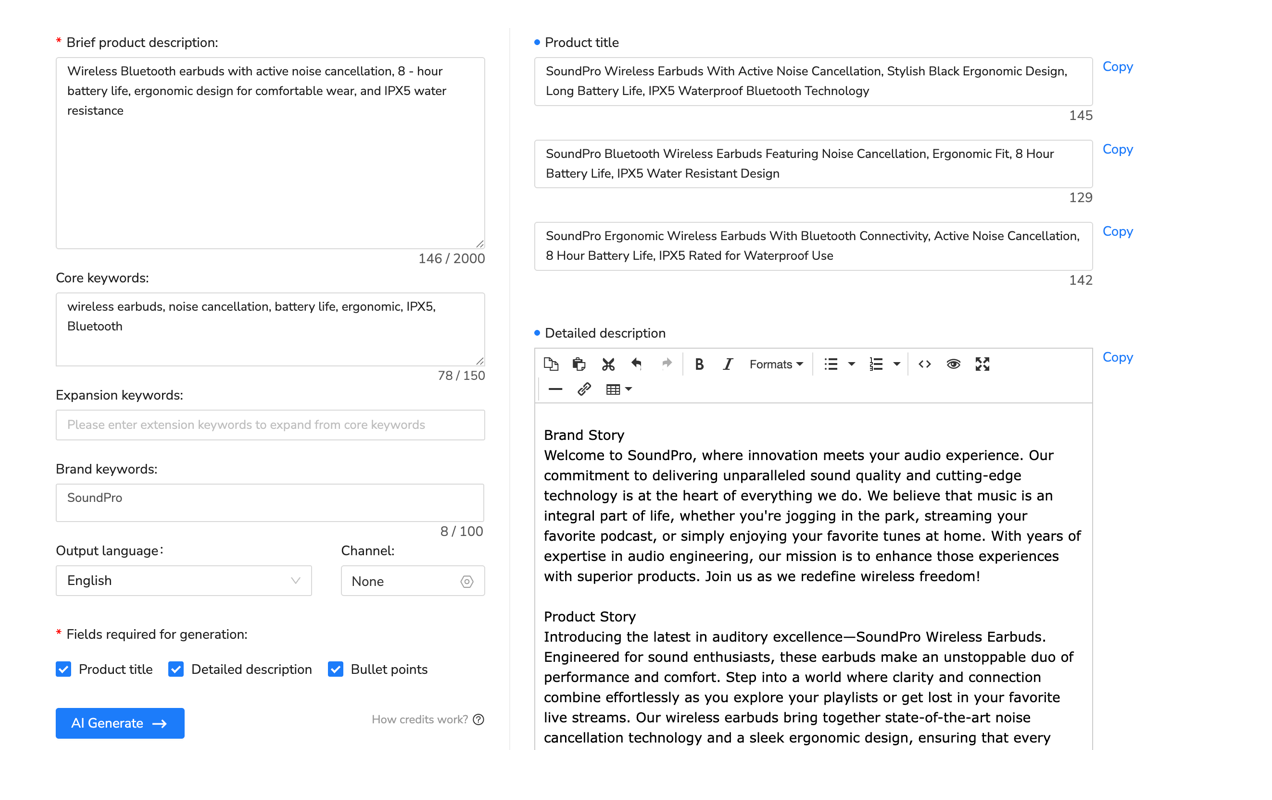
Review every generated field against the physical item and the chosen eBay category. Correct identifiers, remove unsupported benefits, complete required item specifics and rewrite any text that sounds broader than the evidence. A draft saves setup time; it does not transfer responsibility for accuracy.
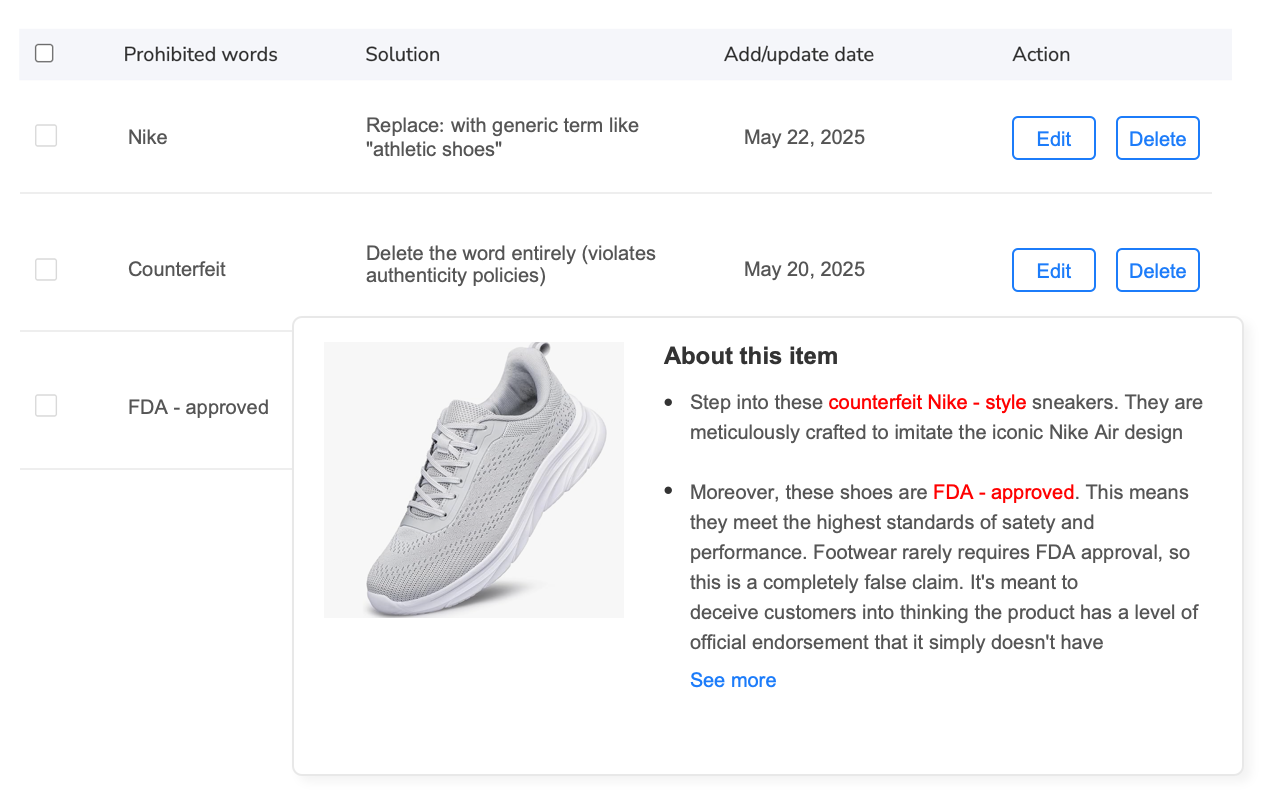
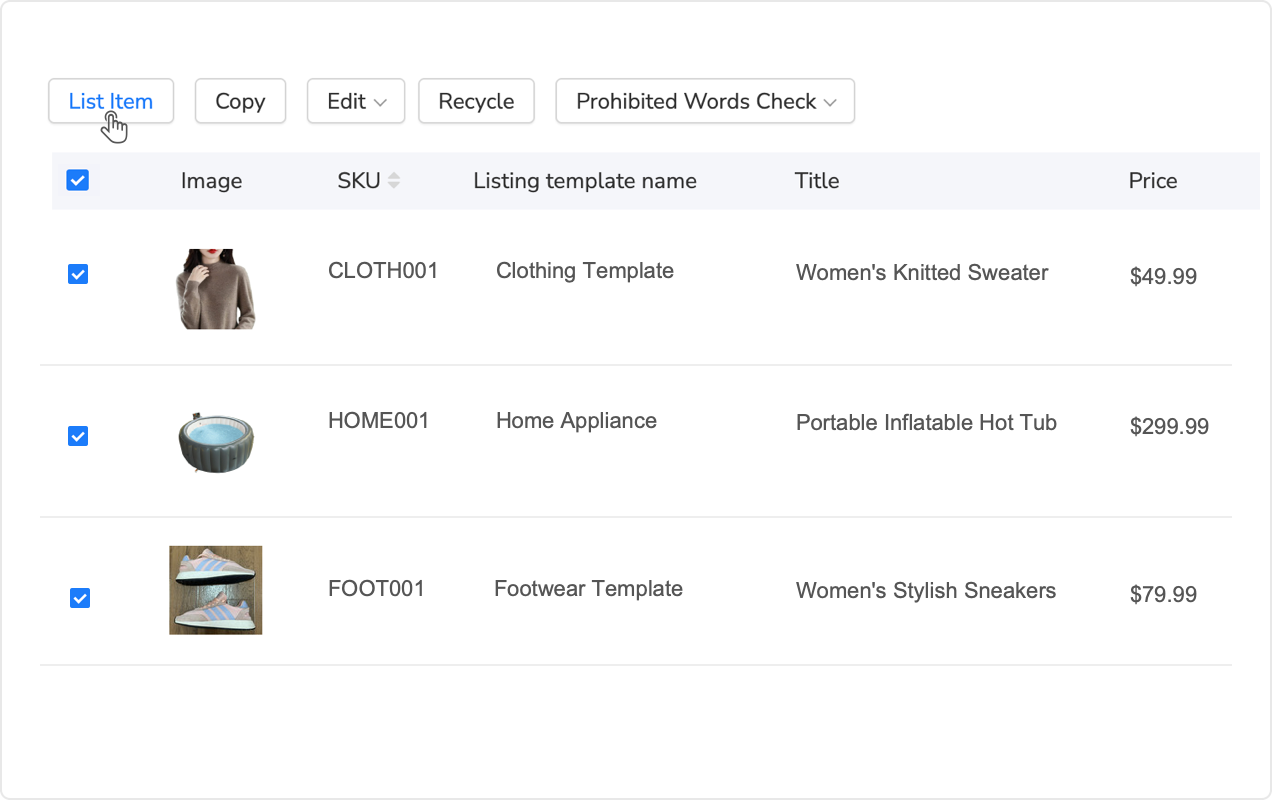
Run the pre-publish scan for prohibited terms, sensitive wording and potential compliance issues, then make a seller judgment about every warning. For multiple verified SKUs, Maxmerce can support bulk eBay draft and publishing workflows, but each SKU still needs its own product, condition, photo and offer check.
Amazon to eBay listing tool FAQ
Does an Amazon to eBay listing tool publish automatically?
Do not assume it does. Tool behavior varies, so treat generated content as a draft until you have reviewed the eBay-specific fields and deliberately chosen to publish. In the Maxmerce workflow described here, verified product photos and details are used to create a review-ready eBay draft.
Can I copy Amazon product photos into an eBay listing?
Only when you have the right to use them on eBay. Public availability is not permission. eBay recommends using your own images and text, authorized content or eligible content from its product catalog.
Will an Amazon category map directly to an eBay category?
No direct match should be assumed. Category structures differ, and eBay may suggest categories from listing details. Confirm that the final eBay category describes the exact item; change a draft suggestion when it does not.
Which fields should I always review manually?
Review product identity, images, title, category, required item specifics, variation, condition, included parts, quantity, price, shipping and returns. Give extra attention to any fact the physical item does not prove.
Does the tool synchronize Amazon inventory or prices with eBay?
Do not assume that link-based drafting also synchronizes inventory, prices or fulfillment. This article does not claim those functions. Confirm the exact tool scope, then manage quantity, price and fulfillment as separate seller decisions.