How to Create Walmart Listings With an AI Listing Tool
August 12, 2026 · Maxmerce
Quick answer: To create a Walmart listing with an AI listing tool, first collect the product facts that the tool cannot safely invent: brand, identifiers, materials, dimensions, units, pack count, included components, variant data, and documented features. Select the appropriate Walmart product type, then use AI to draft the product title, Key Features, description, and reviewable attribute values. Compare every generated field with the source record before submitting the item in Walmart Seller Center.
Creating a Walmart Marketplace listing is not just a writing job. The customer-facing copy matters, but much of the work sits behind it: categorization, identifiers, product attributes, units, pack configuration, variants, fulfillment details, and submission checks.
That is why a good AI workflow should not begin with “write me a great Walmart listing.” It should begin with a product data packet that gives the system enough reliable evidence to produce useful content. This guide follows one new retail product—a six-container glass food-storage set—from source data to a Walmart-ready draft.
Why Walmart Item Setup Takes More Than Product Copy
Walmart’s current single-item Full Setup guide separates the process into required listing information, categorization, fulfillment, and relevant attributes. After the seller selects a category, subcategory, and product type, the remaining fields depend on that classification.
The tool can reduce blank-page work and repeated typing. It cannot turn unknown facts into trustworthy attributes. If the source team does not know whether “piece count” means six containers or twelve total pieces including lids, the AI does not know either.
Step 1: Build a Verified Product Fact Sheet
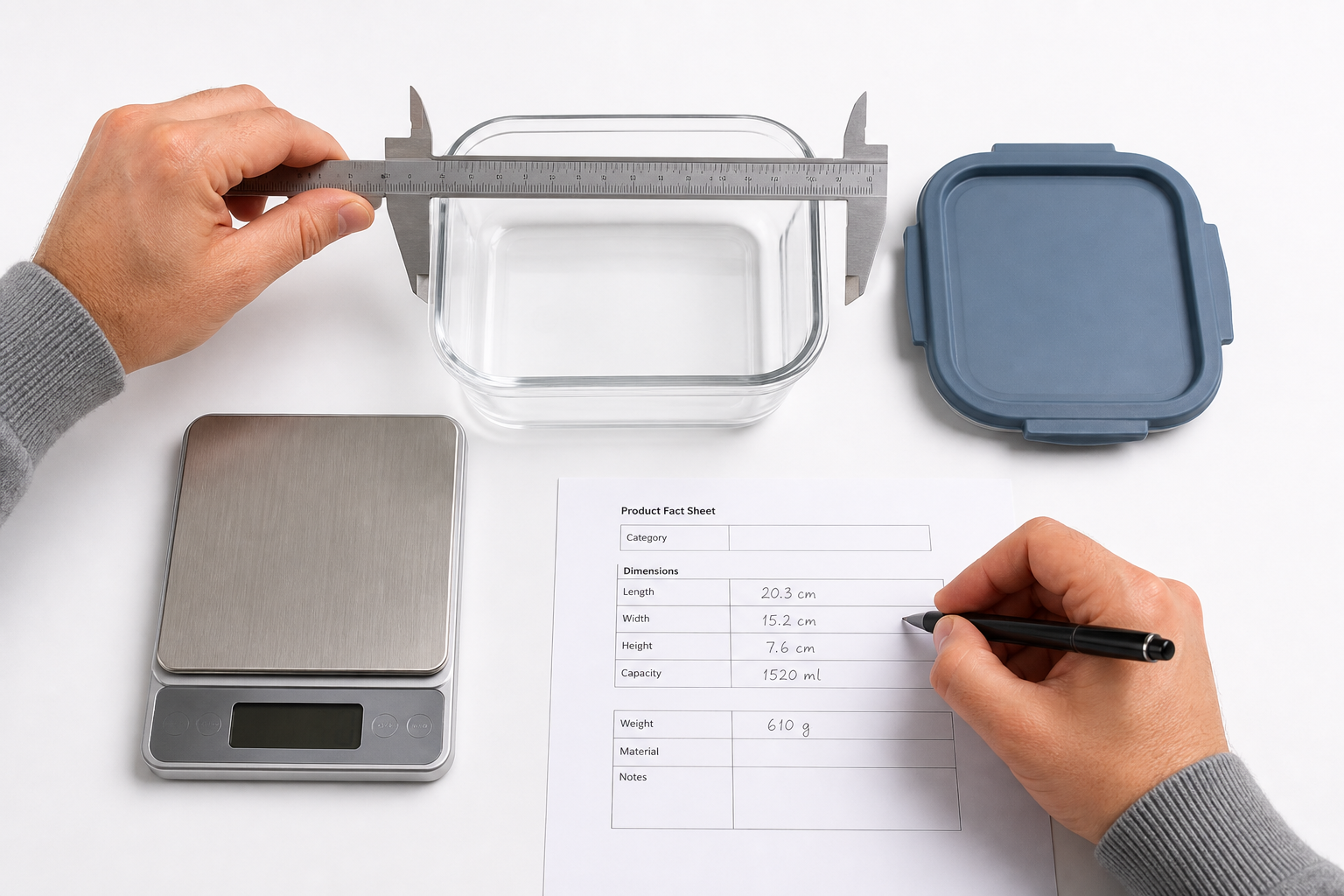
Before opening a generator, create one source record. For the HarborNest example, the verified facts are deliberately modest:
- New food-storage set under the HarborNest sample brand
- Six clear borosilicate glass containers
- Six matching slate-blue polypropylene snap lids
- Three rectangular sizes
- Measured dimensions and capacities for each size
- SKU and valid product identifier from the brand’s records
- Actual product and packaging images
Notice what is absent: “leakproof,” “oven safe,” “BPA-free,” and other claims that have not been supported in the source record. A plausible feature is still an unsupported feature until the brand has evidence for it.
Practical rule: If a fact would affect a customer’s use, safety, compatibility, quantity, or buying decision, require a source. Acceptable sources may include the approved specification sheet, packaging copy, test documentation, supplier records, or direct measurements—depending on the field.
Step 2: Choose the Product Type Before Mapping Attributes
Category and product type are not cosmetic fields. They determine which attributes Walmart asks for and how an item is organized. Walmart’s current Listing Quality guidance also points sellers toward the correct category and relevant back-end attributes as part of content and discoverability work.
Choose the most accurate current product type in Seller Center. Then divide the fields into three groups:
| Field group | Examples | How to handle it |
|---|---|---|
| Known and verified | Material, color, dimensions, count | Provide to the AI, then compare the output with the source. |
| Required but missing | A required measurement not on the supplier sheet | Stop and obtain the fact; do not generate a placeholder. |
| Controlled or sensitive | Identifier, compliance field, accepted dropdown value | Use the exact seller/Walmart record and validate manually. |

Step 3: Generate the Walmart Title, Key Features, and Description
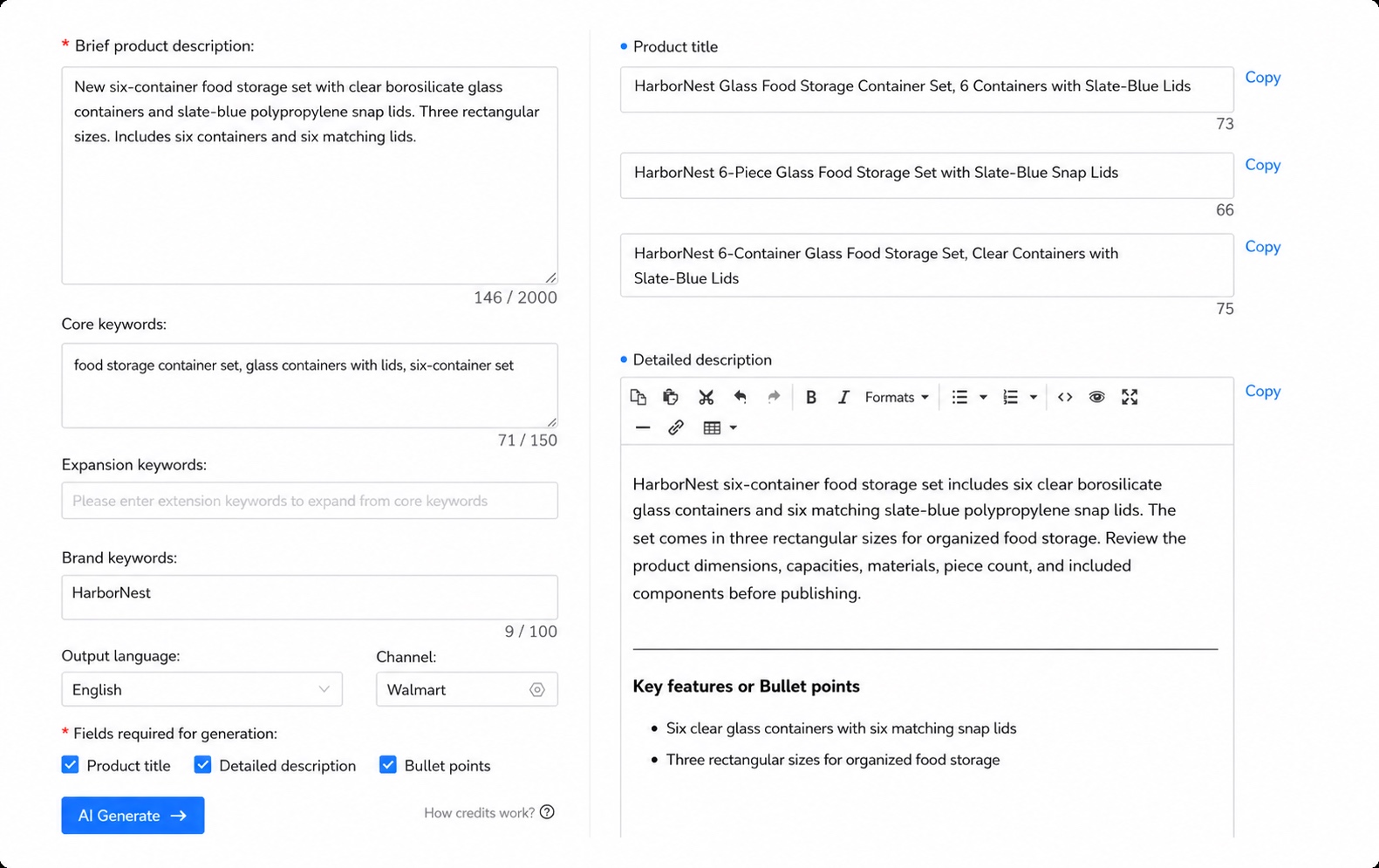
The Maxmerce Walmart AI Listing Tool can help generate product titles, descriptions, and bullet points from product information. It can also assist with product attribute completion. The useful part is not merely producing more words; it is organizing the same verified facts across multiple listing fields.
Draft the product title
A clear starting title is:
HarborNest Glass Food Storage Container Set, 6 Containers with Slate-Blue Lids
HarborNest Glass Food Storage Container Set, 6 Containers with Slate-Blue Lids
This gives shoppers the brand, product type, container count, material, and distinguishing lid color. It does not repeat every synonym or insert claims that belong elsewhere.
Build Key Features from verified differences
- Six clear glass containers with six matching snap lids
- Three rectangular sizes for organized food storage
- Slate-blue polypropylene lids paired with clear borosilicate glass containers
- Set contents and size-specific measurements shown in the product details
Key Features should clarify what the customer receives. They should not become a parking lot for unverifiable superlatives.
Use the description to connect facts
The description can explain the set as a whole, but it should remain consistent with the title, attributes, images, and package contents. If the title says six containers, a description that calls it a “12-piece set” needs a deliberate counting convention and consistent disclosure—not an accidental rewrite.
Step 4: Review AI-Assisted Attributes as Data, Not Copy
Attributes are structured values, so a fluent answer can still be wrong. Check each generated suggestion against the source record and the current Walmart field definition.
| Attribute | Evidence | Review question |
|---|---|---|
| Brand | Approved brand record and packaging | Is the spelling exact and authorized? |
| Material | Specification sheet | Does the field describe the container, lid, or complete set? |
| Color | Physical sample and approved color name | Is the value specific to the visible component? |
| Piece count | Pack configuration | Does Walmart’s field count containers, all components, or selling units? |
| Dimensions | Measured product and packaging data | Are length, width, height, and units mapped correctly? |
| Product ID | GS1/brand record or applicable identifier source | Was the exact valid identifier supplied rather than generated? |
Walmart’s item setup error guide lists missing required attributes, incorrect data types, invalid product-ID check digits, closed-list selections, and spreadsheet formatting as common sources of rework. An AI draft can help prepare data, but Seller Center still applies Walmart’s validation.
Step 5: Remove Unsupported and Marketplace-Endorsement Claims
Maxmerce can scan listing wording for prohibited terms, sensitive language, and potential compliance issues. Treat a flag as a reason to inspect the evidence—not as a guarantee that every Walmart policy or category rule has been checked.
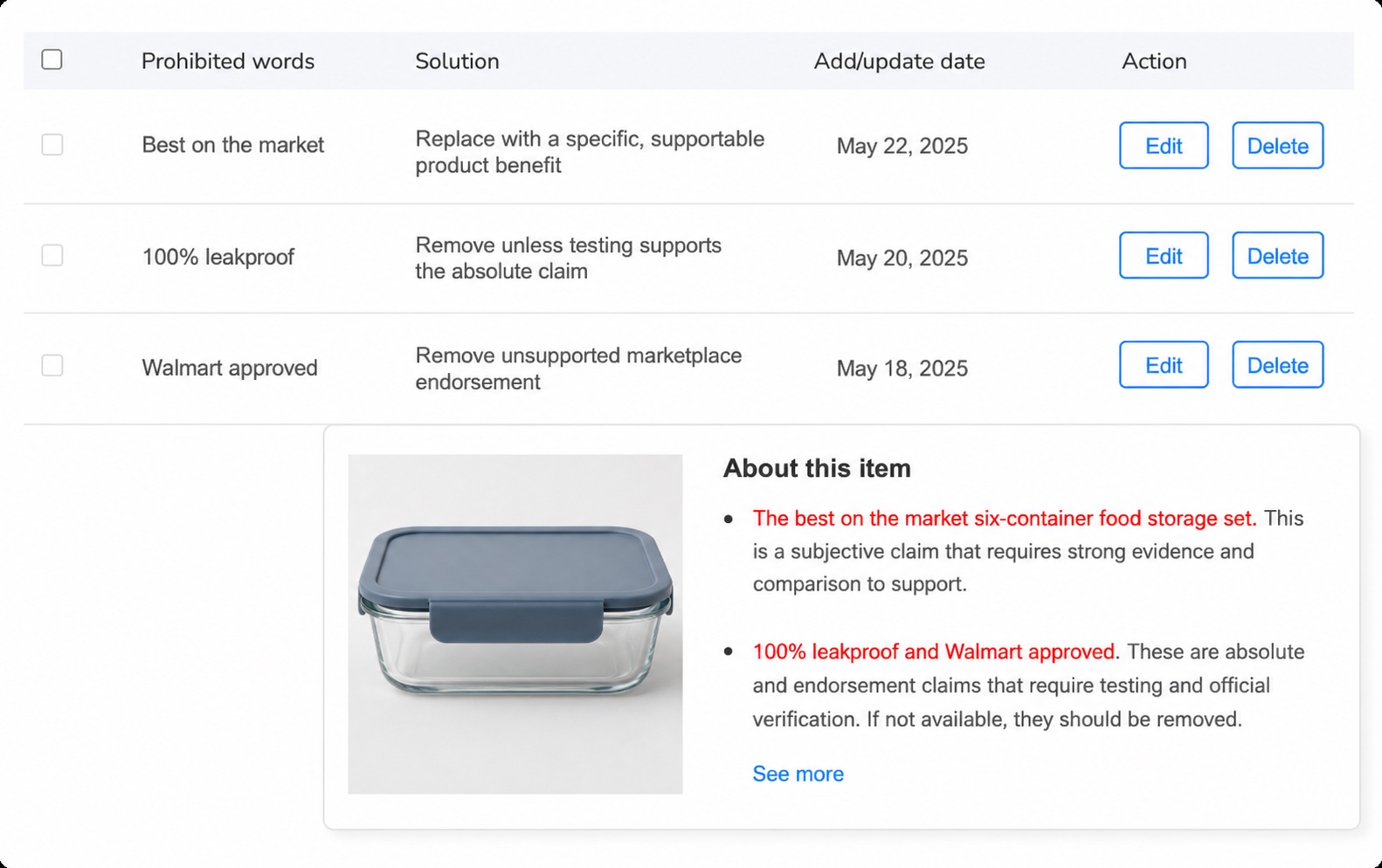
For this example:
- Replace “best on the market” with a specific, supportable feature.
- Remove “100% leakproof” unless the exact product configuration has appropriate evidence for that absolute claim.
- Remove “Walmart approved.” Listing on a marketplace is not permission to imply marketplace endorsement.
Step 6: Complete the Seller-Controlled Fields
Some fields should remain outside the generative-copy step. Confirm them from authoritative records:
- SKU and valid GTIN, UPC, EAN, or ISBN, as applicable
- Correct category, subcategory, and product type
- Price, inventory, shipping, and fulfillment information
- Variant Group ID, primary variant, unique variant values, and identifiers when applicable
- Country of origin, dimensions, WFS information, and compliance fields when required
- Actual product images that match the item and its key attributes
Keep the boundary simple: use AI to organize verified facts into listing content and suggested attributes. Use seller records and Walmart’s current fields for identity, classification, variants, fulfillment, compliance, and final validation.
Step 7: Submit, Track, and Correct the Actual Walmart Result
After submission, check the Activity Feed rather than assuming the listing is complete. Walmart says updates may take up to 24 hours and that detected data errors may add processing time. If the item shows an error or Action Needed status, use the Walmart report to identify the affected field, correct it, and resubmit.
This is where preparation pays off. A shared fact sheet lets the team trace an error back to a source instead of debating which version of the title, spreadsheet, package copy, or supplier file is correct.
Final Walmart AI Listing Checklist
- Confirm the product record and approved packaging information are current.
- Collect approved brand, product, package, measurement, and identifier data.
- Select the correct Walmart category and product type.
- Mark required attributes that are still missing.
- Generate the title, Key Features, description, and suggested attributes.
- Remove any facts or claims that did not come from the source record.
- Verify piece count, units, dimensions, materials, colors, and included components.
- Enter seller-controlled identifiers, variants, offer, fulfillment, and compliance data.
- Run the wording review and resolve uncertain claims.
- Submit in Seller Center and inspect Activity Feed results.

Frequently Asked Questions
Can AI create a complete Walmart Marketplace listing?
AI can draft the title, Key Features, description, and some attribute values from verified inputs. The seller still needs to verify product type, identifiers, measurements, attributes, variants, compliance data, and the actual Walmart submission result.
What should I prepare before using a Walmart AI listing tool?
Prepare the brand, product name, product type, SKU, valid product identifier, materials, colors, dimensions and units, capacity, pack count, included components, verified features, images, variant data, and any required compliance information.
Can an AI listing tool choose every product attribute correctly?
No. It can assist with attribute completion from the information supplied. Review every value against the source record, physical product, accepted Walmart value, and selected product type.
Does Maxmerce guarantee that Walmart will accept the listing?
No. Maxmerce helps prepare listing content, attributes, and wording for review. Walmart performs its own validation, and sellers handle any required corrections in Seller Center.
Should I copy another marketplace listing directly into Walmart?
Reuse verified product facts, not another marketplace’s wording or fields. Build a Walmart title, Key Features, description, and attribute set for Walmart’s structure and current requirements.
Create a Walmart Draft From Better Source Data
If repeated writing and attribute preparation slow your catalog team down, use the Maxmerce Walmart AI Listing Tool to create a reviewable starting point. Supply verified product facts, inspect every generated field, and complete the seller-controlled Walmart data before submission.
Sources reviewed: Walmart Marketplace Learn Full Setup, item setup error, Listing Quality, and image/content guidance; and the current Maxmerce Walmart Listing Tool page. Walmart fields and policies can change, so confirm the current Seller Center workflow for the selected product type before submission.