How to Write eBay Item Specifics That Help Buyers
To write good eBay item specifics, start by choosing the most accurate category, then fill the required and recommended fields with facts a buyer can verify from the item: brand, model, size, color, material, type, condition, measurements, and included parts. Do not treat item specifics as a keyword dump. They should make the listing easier to filter, compare, and trust.
The tricky part is that item specifics are different for every category. A used jacket needs size, style, material, department, closure, and measurements. A used speaker may need brand, model, connectivity, color, power source, condition, and included accessories. The workflow is less glamorous than writing a title, but it often decides whether the listing feels complete enough for a buyer to keep reading.
Quick answer: Fill eBay item specifics in this order: category, required fields, recommended fields, buyer-filter fields, condition-sensitive fields, variation fields, then final review. Required fields keep the listing eligible. Recommended fields help buyers understand and filter the item. Seller judgment still matters, especially for used items.
What Are eBay Item Specifics?
eBay item specifics are structured fields attached to a listing. They are not the same as the title or description. They are the drop-downs, text fields, and attribute values that describe exactly what the item is: brand, type, model, size, color, material, capacity, style, compatible product, or other category-specific details.
eBay’s own guidance says item specifics help buyers find listings through search and filters. The fields also give eBay a cleaner way to understand the product than a paragraph of description text alone. For policy-sensitive or technical products, they can also reduce confusion because buyers can compare structured facts instead of hunting through a long description.
Two official eBay resources are worth bookmarking: the eBay Seller Center item specifics guide and eBay’s Help page on adding item specifics. Check them when a category requirement changes or when a listing fails because a required field is missing.
Why Item Specifics Matter More Than Sellers Expect
A buyer who searches for “women’s navy wool coat size 10” is not only scanning titles. They may filter by size, color, department, material, style, and condition. If your title says the right thing but the item specifics are empty or inconsistent, the listing can feel unreliable. Worse, it may not appear in the filtered view the buyer is using.
Item specifics also protect the seller’s time. Clear fields reduce repetitive buyer messages like “What size is it really?”, “Is the charger included?”, “Does it work with this model?”, or “Is this leather or faux leather?” You will still get questions, of course. eBay buyers have a gift for asking the one thing nobody photographed. But the better your structured fields are, the fewer avoidable questions you invite.
The 7-Step Workflow for Writing eBay Item Specifics
1. Choose the most precise category first
Category comes before item specifics because the category determines which fields eBay shows. If you place a vintage windbreaker in a broad or wrong category, the item-specific options may not match how buyers filter that product. Start narrow, then check whether the required and recommended fields make sense for the actual item.
If more than one category looks plausible, work through the eBay listing category checklist before completing the item-specific fields.
If the field list feels strange, do not force the listing through. Recheck the category. A category mismatch can create missing fields, irrelevant attributes, or weak filter coverage.
2. Fill every required item specific
Required fields are not optional polish. They can block listing creation or revision when missing. Fill them before you spend time on description wording. For many categories, required fields include brand, type, size, color, model, department, condition-related attributes, or identifiers such as MPN when applicable.
Do not guess required fields. If the brand is unbranded, use the correct eBay-supported value when available. If the model is unknown, say so where eBay allows it or leave non-required fields blank rather than inventing a model number.
3. Add recommended fields that affect buyer filters
Recommended fields are where many sellers get lazy. They are also where buyers often filter. For apparel, recommended fields might include fit, sleeve length, fabric type, pattern, or closure. For electronics, they might include connectivity, compatible product, included accessories, features, or color.
Ask a simple question: would a serious buyer use this field to narrow results or confirm fit? If yes, fill it when you can support it with the item, packaging, manual, label, or manufacturer information.
4. Separate searchable facts from condition notes
Item specifics should identify the product. Condition notes should explain the exact unit. A used speaker may have item specifics such as brand, model, color, connectivity, and power source. Its condition notes should say whether it was tested, whether the battery holds charge, whether a cable is included, and whether there are scuffs or missing accessories.
Do not hide wear by leaving fields vague. Used-item buyers are often comfortable with imperfections when the listing is clear. They get nervous when the structured fields sound new but the photos tell another story.

5. Use consistent wording across title, specifics, photos, and description
Buyers notice contradictions. If the title says “leather,” item specifics say “faux leather,” and the description says “vegan material,” the listing creates doubt. The same problem happens when a title says “tested,” but condition notes never explain what was tested.
When the title cannot hold every verified detail, use the eBay title character limit guide to decide what to keep in the title and what belongs in item specifics.
Before publishing, compare the four places a buyer checks: title, item specifics, photos, and description. They should tell the same story, just at different levels of detail.
6. Treat variations as their own item-specific problem
Variation listings need clean attribute logic. Size and color should be distinct, consistent, and easy to select. Avoid mixing dimensions in a single value such as “Blue Large” if eBay provides separate Color and Size fields. For multi-SKU listings, each child SKU should match the correct photo, quantity, price, and variation value.
This is especially important for clothing, accessories, and repeatable products. A buyer who chooses “Black / Medium” expects that exact combination, not a generic parent listing with unclear child details.
If a variation control, attribute or size/color option is missing, use the eBay variations-not-showing checks to separate category eligibility, saved values and stock before changing the listing.
7. Run a final seller review before publishing
Item specifics are easy to approve too quickly because they look like form fields. Slow down for one pass. Check the physical product, then check the draft. If the field came from memory, supplier copy, or AI-generated text, verify it against the item before publishing.
Pre-publish item specifics checklist:
- The selected category is the most precise fit.
- All required fields are complete.
- Recommended fields are filled when the fact is known and useful.
- Brand, model, size, material, color, and measurements match the item.
- Condition-specific facts are not overstated.
- Variation values match child SKUs and photos.
- Title, item specifics, description, and photos do not conflict.
Item Specifics Examples by Category
Exact fields vary by eBay category and site, but the thinking pattern is consistent. Start with buyer filters, then add facts that prevent misunderstandings.
| Category | High-value item specifics | Seller review notes |
|---|---|---|
| Clothing | Brand, size, department, color, style, material, pattern, fit, measurements | Measure flat, photograph labels, and describe wear, stains, alterations, or missing tags. |
| Electronics | Brand, model, type, color, connectivity, storage/capacity, included accessories | Check the model label, test basic functions, and state whether chargers, cables, remotes, or manuals are included. |
| Collectibles | Brand or maker, era, material, subject, edition, size, production style, condition | Avoid unsupported rarity claims. Use photos and provenance only when you can back them up. |
| Home goods | Brand, type, material, color, dimensions, room, style, care instructions | Measure carefully and note chips, cracks, odors, missing parts, or surface wear. |
Before and After: A Weak vs Strong Item-Specific Set
Here is a simplified example for a used navy jacket. The stronger version is not longer for the sake of being longer. It gives buyers the fields they would actually use.
| Weak item specifics | Stronger item specifics |
|---|---|
| Jacket, blue, used, medium | Men’s bomber jacket, navy, size M, nylon shell, zip closure, ribbed cuffs, lightweight lining, pit-to-pit and length measurements included |
| Good condition | Used condition with light sleeve wear shown in photos; zipper tested; no hood included |
The stronger version helps the listing appear in more relevant filters and gives buyers fewer reasons to pause. It also avoids a classic seller mistake: using the description to compensate for missing structured fields.
How Maxmerce Helps Draft Item Specifics Faster
If item specifics slow down your listing workflow, the Maxmerce eBay AI Listing Tool can help create a stronger starting point. Based on the verified eBay AI Listing Tool workflow, Maxmerce can help generate complete eBay listing drafts from product photos and details, including titles, descriptions, categories, item specifics, attributes, and condition notes.
The important word is draft. A tool can reduce blank-page work and fill obvious fields faster. It cannot physically inspect the jacket on your table, confirm a speaker battery’s real behavior, or know whether a tag was removed unless you provide that information. Use AI to draft, then use seller judgment to approve.
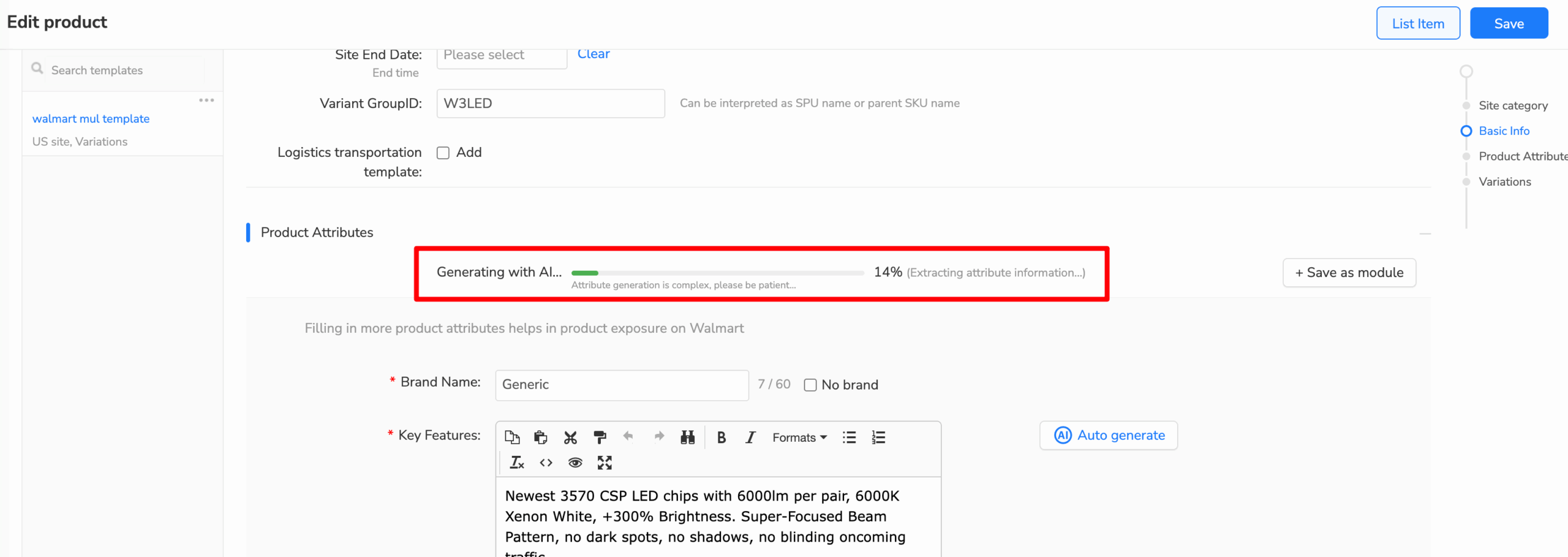
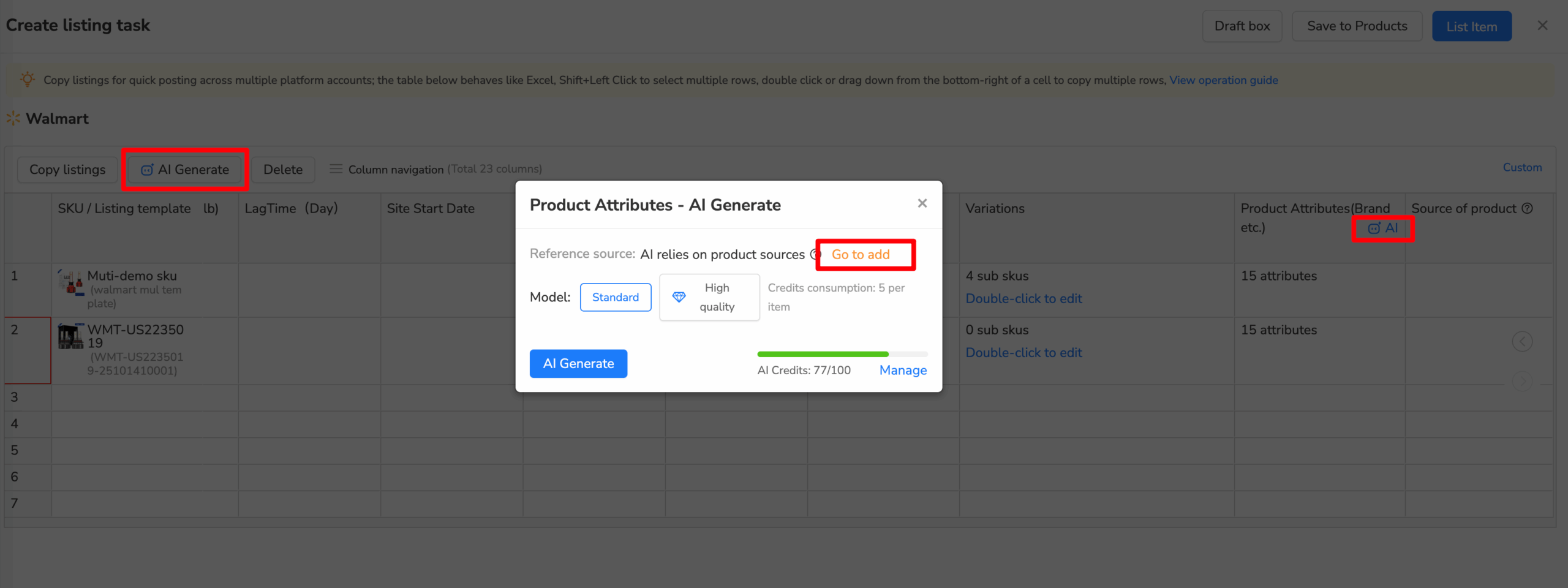
A practical Maxmerce-assisted workflow looks like this:
- Choose the eBay site and the best-fit category.
- Add product photos and known details.
- Generate a listing draft with title, description, category, item specifics, attributes, and condition notes.
- Compare the draft against the physical item, label, packaging, photos, and measurements.
- Adjust fields that are guessed, incomplete, category-sensitive, or condition-sensitive.
- Review the final listing before publishing to eBay.
If title wording is also part of the bottleneck, use the Maxmerce eBay keyword research tool to collect buyer-language ideas before writing the title. Keep the title readable, and put supporting facts in item specifics where they belong.

Common Item Specifics Mistakes to Avoid
Keyword-stuffing structured fields
Do not turn item specifics into a second title. If the field is Material, answer the material. If the field is Color, answer the color. Extra phrases that do not belong in the field can make the listing look spammy and harder to trust.
Using “does not apply” too casually
Sometimes a field truly does not apply. But using that answer because you do not want to check the product can weaken the listing. Before choosing a fallback value, ask whether the information is on a label, packaging, manual, model plate, or official product page.
Letting the title and item specifics disagree
This is one of the fastest ways to make a buyer hesitate. If the item specifics say one size and the title says another, fix the mismatch before publishing. If photos show an accessory that is not included, remove the photo or explain the exclusion clearly.
Skipping condition-sensitive details on used items
Used-item buyers expect some imperfection. What they dislike is surprise. If a collectible has a chip, a jacket has a stain, or a device has battery wear, make the listing consistent across photos, condition notes, and description.
FAQ
What are eBay item specifics?
They are structured listing fields such as brand, size, color, material, model, type, capacity, and other category-specific attributes. They help buyers filter and understand listings.
Do item specifics matter for eBay search?
Yes. eBay says item specifics help listings match buyer searches and filters. They also make listings easier to compare, especially in categories where buyers narrow results by exact attributes.
Should I fill every item specific?
Fill every required field and the recommended fields that are factual, useful, and supportable. Do not guess or add unsupported details just to make a listing look complete.
Can AI write eBay item specifics for me?
AI can help draft item specifics, attributes, categories, and condition notes, but you should verify the output before publishing. The seller remains responsible for the final listing accuracy.
What should I do if eBay asks for an item specific I do not know?
Check the product label, packaging, manufacturer information, original manual, and your own measurements. If the field is required and you still cannot verify it, use the most accurate eBay-supported value available rather than inventing a detail.
Want a faster starting point? Use the Maxmerce eBay AI Listing Tool to generate a review-ready eBay listing draft with categories, item specifics, attributes, and condition notes. Then check the draft against the actual item before publishing.
Source notes: This article uses eBay’s official item specifics guidance and current Maxmerce product scope for the eBay AI Listing Tool. Sellers should verify category-specific requirements in eBay before publishing policy-sensitive, technical, or condition-sensitive listings.