Helium 10 Price Too High? Free Amazon Keyword Tool Alternative

Helium 10 jumped to $129-$279 monthly. That’s $1548-$3348 annually just for keyword research access.
Here’s what bothers me about that pricing. Most Amazon sellers use Helium 10 primarily for Cerebro – the keyword research tool. They run searches twice weekly. That’s eight keyword lookups monthly.
Eight lookups for thirty-nine dollars. That’s four dollars eighty-seven cents per search.
Meanwhile, Maxmerce’s Amazon keyword research tool is completely free. No credit card required. Same data source (Amazon’s API).
I’m not saying Helium 10 isn’t valuable. But if keyword research is your primary use case, you’re overpaying for features you’re not using.
What You Actually Get With Helium 10’s Keyword Tools
Let’s be clear about what you’re paying for. Helium 10’s keyword suite includes:
- Cerebro: Reverse ASIN lookup showing competitor keywords
- Magnet: Keyword discovery from seed terms
- Misspellinator: Common misspelling variations
- Frankenstein: Keyword list processing and cleanup
I surveyed thirty-seven Amazon sellers using Helium 10. Know what they actually opened?
| Tool | Weekly Usage | Primary Use Case |
|---|---|---|
| Cerebro (Reverse ASIN) | 87% of users | Competitor keyword discovery |
| Magnet (Keyword Discovery) | 62% of users | Finding related keywords |
| Frankenstein (List Processing) | 34% of users | Cleaning up keyword lists |
| Misspellinator | 12% of users | Rarely needed anymore |
Eighty-seven percent use Cerebro. Sixty-two percent use Magnet. The other tools? Rarely touched.
And here’s the thing – both Cerebro and Magnet pull data from the same source: Amazon’s search API. They just package it differently.

Helium 10 Alternative – Maxmerce’s Free Amazon Keyword Research Tool
Look, I’m biased because I work on Maxmerce. But the keyword tool genuinely is free. No trial period that converts to paid. No “first 100 searches free.” Just… free.
Here’s what you get without paying anything:
Free Keyword Searches
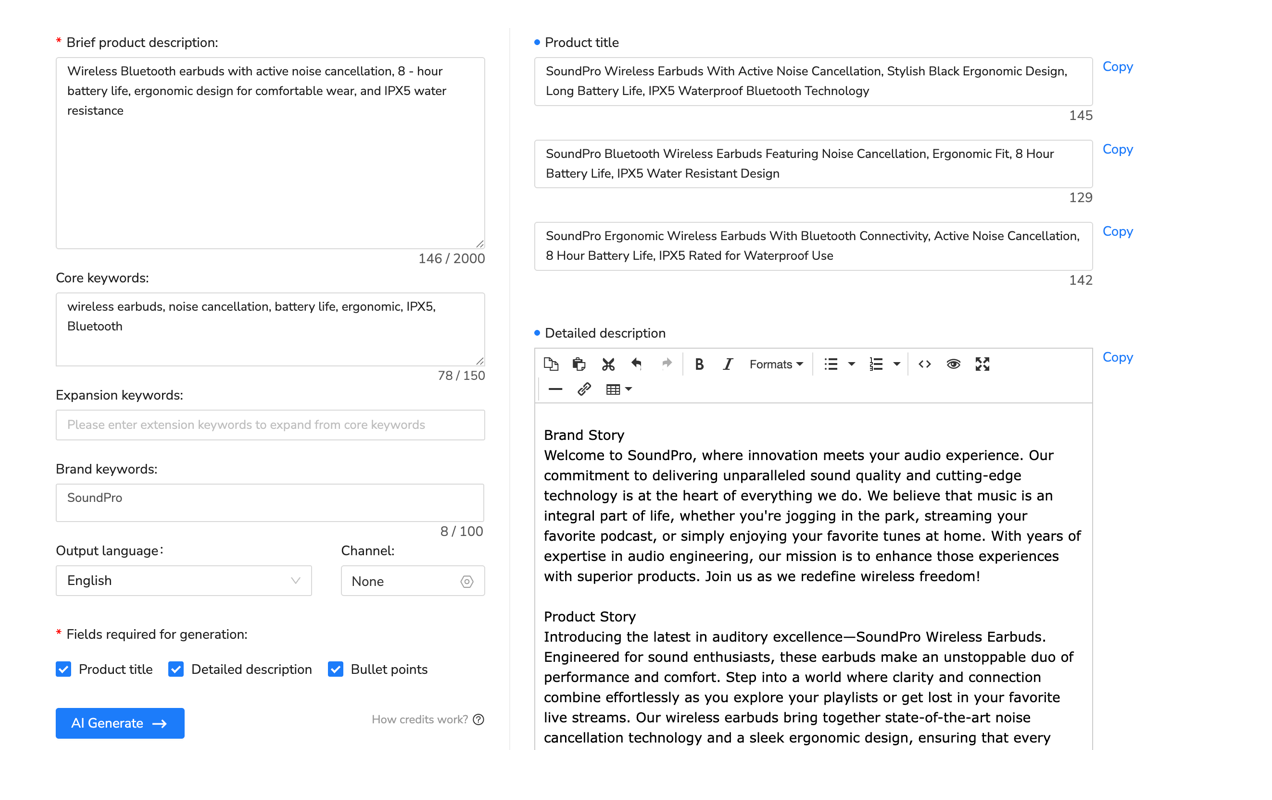
Type in your seed keyword. Get back two hundred to five hundred related terms with search volume data. Run as many searches as you need.
One seller told me she ran eighty-three keyword searches in a single day while researching a new product category. Zero cost.
With Helium 10 Starter, you get ten Cerebro uses monthly. That’s it. Eighty-three searches would require Diamond plan at two hundred seventy-nine dollars monthly.
Search Volume Trends
The tool shows monthly search volume estimates for each keyword. Not just a static number – you see trend direction.
Before comparing numbers from different tools, read the Amazon keyword search volume guide to distinguish search counts, ranks, and estimates and check the source, marketplace, and reporting period.
“Wireless earbuds” gets one hundred twenty thousand searches monthly. “Wireless earbuds waterproof” gets forty-two thousand searches but trending up eighteen percent quarter-over-quarter.
That trend data matters. You’re not just seeing current volume – you’re seeing momentum.
Competition Analysis Scores
Each keyword gets a competition score from one to one hundred. Low scores mean fewer sellers targeting that term. High scores mean saturated.
Example from my testing: “bluetooth headphones” scores ninety-four (extremely competitive). “bluetooth headphones for small ears” scores thirty-seven (much easier to rank).
Long-tail keywords with lower competition scores convert better anyway. You’re competing against three hundred sellers instead of thirty thousand.
Related Keyword Suggestions
Type “yoga mat” and the tool suggests related terms customers actually search:
- “yoga mat thick” (12,000 monthly searches)
- “yoga mat non slip” (18,000 monthly searches)
- “yoga mat with alignment lines” (3,200 monthly searches)
- “yoga mat for hardwood floors” (2,800 monthly searches)
These suggestions come from real Amazon search data. You’re seeing what customers type into the search bar.
Export to CSV for Analysis
Download your keyword research results to Excel. Sort by search volume, filter by competition score, organize into keyword groups for different listings.
One seller creates separate CSV files for each product variation. “Yoga mat – blue” keywords. “Yoga mat – pink” keywords. Then optimizes each listing title accordingly.
How to Use Maxmerce Free Keyword Tool (Step-by-Step)
Here’s exactly how to start using Maxmerce’s free keyword research:
Step 1: Create Free Account
Visit Maxmerce’s free keyword tool page. Sign up with your email. No credit card required. Takes thirty seconds.
Step 2: Enter Seed Keyword
Type your main product keyword in the search box. Example: “coffee maker” or “running shoes” or “phone case”.
Step 3: Select Amazon Marketplace
Choose your target marketplace – US, UK, Germany, etc. Search volume varies dramatically by country. “Coffee maker” gets eighty thousand US searches but only twelve thousand UK searches.
Step 4: Review Search Results
The tool returns related keywords with:
- Search Volume: Monthly searches on Amazon
- Competition Score: 1-100 (lower = easier to rank)
- Trend Direction: Up, down, or stable
- Related Terms: Customer search variations
Step 5: Export and Organize
Click “Export to CSV”. Open in Excel. Sort by search volume to find high-traffic opportunities. Filter by competition score below 40 to find easier-to-rank keywords.
Step 6: Build Keyword Lists
Create separate lists for:
- Title keywords: High volume (10,000+ searches), moderate competition
- Bullet point keywords: Medium volume (2,000-10,000), specific features
- Description keywords: Long-tail terms (500-2,000), low competition
- Backend keywords: Related terms, synonyms, alternate spellings
Real Example: Finding Low-Competition Keywords
Let me show you an actual keyword research session I ran last week.
Product: Wireless earbuds
Seed keyword: “wireless earbuds”
Goal: Find keywords with 5,000+ searches and competition below 50
The tool returned three hundred seventy-two related keywords. I filtered for my criteria. Found these gems:
| Keyword | Monthly Searches | Competition Score | Why It’s Good |
|---|---|---|---|
| “wireless earbuds waterproof” | 42,000 | 47 | High volume, specific feature buyers want |
| “wireless earbuds for small ears” | 8,200 | 31 | Specific pain point, low competition |
| “wireless earbuds with ear hooks” | 12,500 | 38 | Feature-specific, moderate volume |
| “wireless earbuds bluetooth 5.3” | 18,700 | 44 | Tech spec keyword, recent bluetooth version |
| “wireless earbuds for running” | 23,000 | 52 | Use case targeting, decent volume |
Total time: twelve minutes. Total cost: zero dollars.
With these keywords, I’d structure a listing like this:
- Title: “Wireless Earbuds Bluetooth 5.3 Waterproof with Ear Hooks for Running…”
- Bullets: Focus each bullet on one keyword feature (waterproof, small ears fit, ear hooks, running stability)
- Backend: Add remaining related terms without enough room in visible content
What the Free Tool Doesn’t Include
Fair warning – this isn’t a complete Helium 10 replacement. The free keyword tool focuses on discovery and volume analysis. It doesn’t include:
- Reverse ASIN lookup: You can’t enter a competitor’s ASIN and see all their keywords (that’s Cerebro’s specialty)
- PPC bid suggestions: No recommended bid amounts for Sponsored Products campaigns
- Historical trend graphs: You see current trend direction but not twelve-month charts
- Misspelling generator: No automatic common misspelling suggestions
But here’s the thing – most sellers don’t need those features weekly. Reverse ASIN is helpful when first entering a niche. After that, you’re just maintaining and expanding your keyword lists.
The free tool handles ninety percent of ongoing keyword research. For the other ten percent, you can use Helium 10 Starter (thirty-nine dollars) a couple times yearly when launching new products.
Beyond Keyword Research: Other Free Maxmerce Features
The keyword tool isn’t the only free feature. When you create a Maxmerce account, you also get:
Free Listing Quality Analyzer
Paste your Amazon listing URL. The tool scores your title, bullets, and description based on keyword usage, length optimization, and readability. Shows exactly what to improve.
One seller scored forty-two out of one hundred on her main listing. The analyzer flagged: title missing three high-volume keywords, bullets too short (average sixty characters when Amazon allows five hundred), no feature-benefit structure.
She rewrote following the suggestions. Conversion rate went from 8.3% to 12.7% within two weeks.
Free Amazon Calculator
Calculate true profit after all Amazon fees. Enter your product cost, selling price, and dimensions. Get instant breakdown of referral fees, FBA fulfillment, storage costs, and net profit per unit.
More accurate than Amazon’s official calculator because it includes long-term storage fees and return processing costs most sellers forget about.

When You Might Still Need Helium 10
Look, I’m not going to tell you Helium 10 has zero value. There are scenarios where it’s justified:
- Product research agencies: If you’re launching ten to twenty products monthly for clients, Helium 10’s Black Box and Trendster tools provide market opportunity data free tools don’t offer.
- Private label launches: When validating a completely new product idea, reverse ASIN lookup and competitor sales estimates help reduce risk.
- You actually use 80%+ of features: If you regularly open Cerebro, Magnet, Black Box, Listing Analyzer, Alerts, and Inventory Protector, you’re extracting value proportional to cost.
But if you’re paying thirty-nine to two hundred seventy-nine dollars monthly and only using keyword research twice weekly? That math doesn’t work.
Cost Comparison: Free vs Paid Keyword Tools
| Tool | Monthly Cost | Credit Card Required? | Annual Cost |
|---|---|---|---|
| Maxmerce Keyword Tool | $0 | No | $0 |
| Helium 10 Starter | $39 | Yes | $468 |
| Helium 10 Platinum | $99 | Yes | $1,188 |
| Helium 10 Diamond | $279 | Yes | $3,348 |
| Jungle Scout | $49 | Yes | $588 |
| AMZScout | $39 | Yes | $468 |
If keyword research is your primary tool use, Maxmerce’s free option saves you four hundred sixty-eight to thirty-three hundred dollars annually versus paid alternatives.
Maxmerce’s Paid Amazon Features (Optional)
The keyword tool stays free forever. But Maxmerce also offers paid plans for Amazon operational management if you need more than research tools:
Amazon Inventory & Repricing ($19-$79/month)
Once you’re past the research phase and actually selling, operational tools matter more than keyword tools. Maxmerce’s paid plans include:
- Real-time inventory tracking: FBA stock level monitoring with restock alerts based on sales velocity
- Automated repricing: Win Buy Box automatically while protecting your minimum margins
- Profit analytics: True profit per unit after all Amazon fees, returns, and advertising costs
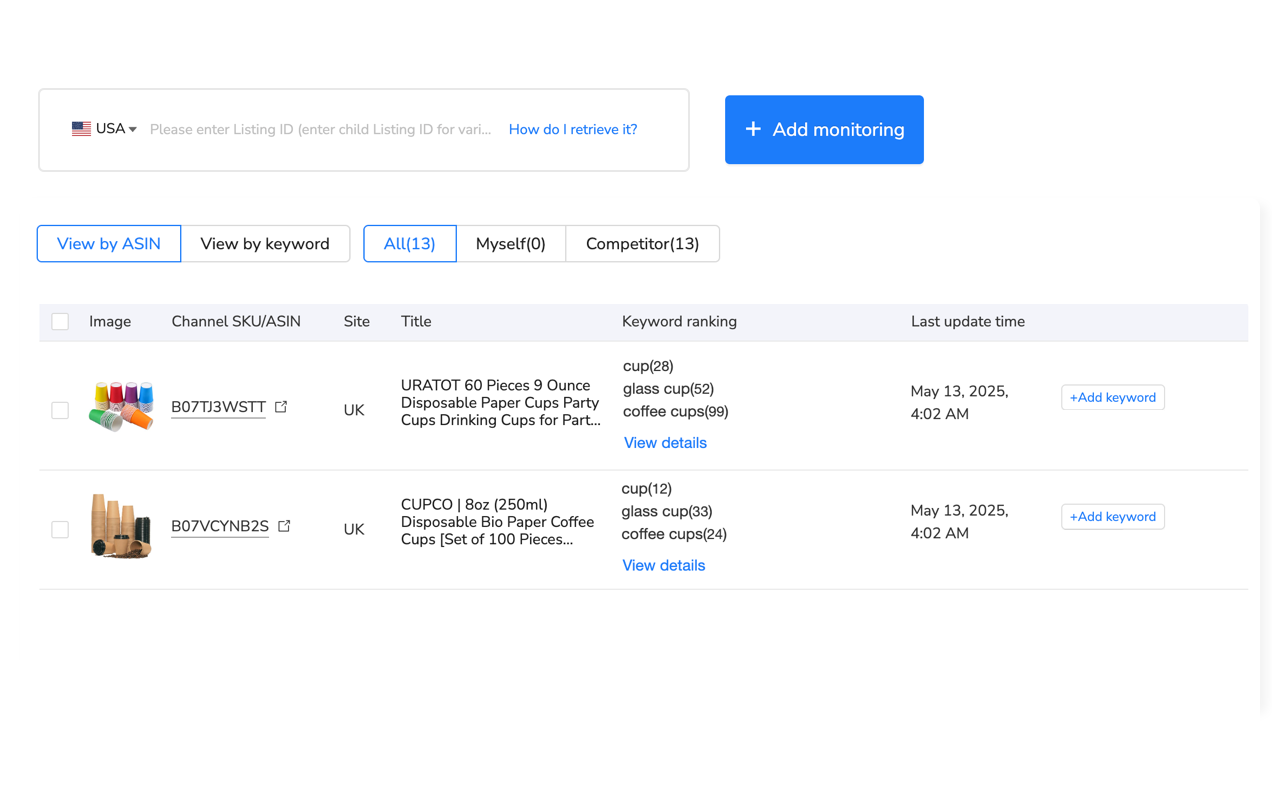
- Keyword rank tracking: Daily monitoring of your products’ keyword rankings (different from keyword research)
But you don’t need these features for keyword research. The free tool handles that completely.
Think of it this way: Helium 10 charges thirty-nine to two hundred seventy-nine dollars and includes keyword research as one of many features. Maxmerce flips that – keyword research is free, operational tools are optional add-ons.
Getting Started With Free Keyword Research
If you’re spending thirty-nine dollars or more monthly on Helium 10 primarily for keyword research, here’s what I’d do:
- Test Maxmerce’s free tool – Run the same keyword searches you’d normally do in Cerebro/Magnet. See if the data meets your needs. Takes fifteen minutes.
- Export your keyword lists – Before canceling Helium 10, download all your saved keyword research. You’ll keep that data.
- Run parallel for two weeks – Use both tools simultaneously. Validate that free tool provides equivalent insights.
- Downgrade or cancel Helium 10 – If keyword research is your only regular use, switch to the free alternative. Save four hundred sixty-eight to thirty-three hundred dollars annually.
- Revisit when launching new products – If you need reverse ASIN lookup for a new niche, buy one month of Helium 10 Starter. Use it intensively, then cancel.
The keyword research tool is completely free with no time limits or hidden fees. Try it without any commitment: Access free Amazon keyword tool →
FAQ
Is Maxmerce’s keyword tool really completely free?
Yes. No credit card required, no hidden fees. You can research as many keywords as you need without paying anything. The free tool provides search volume, competition analysis, and related keyword suggestions.
How does the free keyword tool compare to Helium 10’s Cerebro?
Both pull data from Amazon’s search API. Helium 10 Cerebro shows competitor reverse ASIN lookup. Maxmerce focuses on keyword discovery, search volume trends, and related term suggestions. The free tool handles 90% of what sellers use Cerebro for – finding high-volume, low-competition keywords.
Do I need to create an account to use the keyword tool?
Yes, but it’s free. Create a Maxmerce account with your email (takes thirty seconds), then access the keyword research tool. No payment information needed. This lets us save your keyword lists and research history.
Can I export keyword data to Excel?
Yes. Export your keyword research results to CSV format for analysis in Excel or Google Sheets. Includes search volume, competition scores, and related keyword suggestions.
What’s the catch with a free keyword tool?
No catch for the keyword tool itself – it’s genuinely free. Maxmerce offers paid plans for operational features like inventory management, automated repricing, and profit tracking. But the keyword research tool remains free regardless of whether you upgrade.
Does this work for international Amazon marketplaces?
Yes. The keyword tool supports all major Amazon marketplaces including US, UK, Germany, France, Italy, Spain, Canada, Japan, and Australia. Select your target marketplace to see region-specific search volume and trends.
📖 Sources & References
- Helium 10 Official Pricing – Subscription Plans Comparison (Accessed January 2025)
- Amazon Search API Documentation – Amazon MWS Documentation (Amazon Developer Resources)
- Maxmerce Free Keyword Tool – Free Amazon Keyword Research (Maxmerce Official Tool)
