How to Start Selling on eBay: Complete Beginner’s Guide

Quick Answer: Starting your eBay selling journey requires creating a free seller account, listing products with optimized titles and photos, and shipping within your stated handling time. New sellers start with a 10-item, $500 monthly limit that increases as you build positive feedback. The entire setup takes 30-45 minutes, and most sellers make their first sale within 7-14 days if they price competitively and complete all item specifics fields.
Key Takeaways
- Account setup takes 30-45 minutes; new sellers start with 10-item, $500 monthly limit that increases with positive sales history
- Fill out ALL item specifics fields (40-60 per category)—this dramatically improves search ranking and visibility
- Ship within 1 business day and upload tracking immediately to maximize search rankings and seller performance
- Use Buy It Now listings with Best Offer enabled for 87% of products; auctions work best for unique items only
- Manual listing creation takes 12-18 minutes per product; AI-powered tools reduce this to 30-45 seconds
- Multi-channel expansion requires inventory synchronization to prevent overselling and seller defects
- Automated repricing monitors competitor prices every 15 minutes and adjusts listings automatically
- Customer service scales efficiently with AI-generated reply suggestions—reducing response time from 2-3 minutes to 10 seconds
- Start with items around your home to learn workflow, then transition to retail arbitrage or wholesale sourcing
- Transaction defect rate must stay below 2% and late shipment rate under 4% to maintain seller protections
- How to Set Up Account
- Creating First Listings
- How to Price Products
- How to Optimize Listings
- How to Scale Your Business
- FAQ
How to Set Up Your eBay Seller Account
You can’t sign up and list 500 products on day one. eBay places tight controls on new sellers to prevent fraud.
Account creation takes 30-45 minutes. You’ll need a unique email, phone for verification, and physical street address (no PO Boxes).
Personal vs. Business Account
Most beginners start with a personal account. It’s faster and works fine for <50 items monthly.
Business accounts require business license, tax ID (EIN), and proof of address. In 2025, eBay introduced stricter verification—live facial recognition scan matching government ID. (eBay’s registration guide, Updated December 2025)

The 10-Item, $500 Monthly Limit
New sellers hit this wall fast. eBay caps you at 10 active listings with a combined value of $500 monthly. Sell all 10 items? You’re done for the month.
As you accumulate positive feedback and consistent sales history, the limit increases automatically. Typically, after 90 days and 10-15 successful transactions, you’ll see your limit jump to 50 items and $2,500 monthly.
Payment Setup Requirements
Your eBay account type must match your bank account type. Personal eBay account? Personal checking account. Business eBay account? Business checking account. This isn’t optional—eBay’s verification rejects mismatched accounts.
If you’re based outside the US, you’ll need Payoneer instead of direct bank connection. Payoneer is eBay’s primary solution partner for international sellers.
Funds transfer to your bank account every two business days under managed payments. No more waiting for PayPal transfers. The entire checkout-to-bank-account cycle runs 3-4 days total.
How to Create Your First eBay Listings
Don’t overthink your first listings. Grab 5-10 items around your house—old electronics, clothing, collectibles, books, kitchen gadgets. This gives you hands-on experience with the entire process.
What I’ve learned: Start simple. Your first few listings will be clunky. That’s fine—you’re building muscle memory.
How to Optimize eBay Listing Titles
You get 80 characters. Use every single one. Front-load the most important keywords—buyers scan the first 40-50 characters before deciding whether to click.
The good title includes: Brand (Nike), specific model (Air Max 270 React), category (Men’s Running Shoes), size (10), color (Black White), product code (ENG4187-001), and condition (New). That’s searchable by multiple buyer queries.
Avoid promotional language—”LOOK!” “WOW!” “RARE!”—eBay’s algorithm penalizes these. Stick to factual, keyword-rich descriptions.
How to Complete Item Specifics (The Hidden Ranking Factor)
Here’s what most beginners miss: eBay shows 40-60 item specifics fields depending on category. Brand, size, color, material, style, model number, UPC, condition notes. Most new sellers fill out 8-12 fields and stop.
Fill out every single field. eBay’s search algorithm rewards listing completeness. A product with 48 completed item specifics ranks higher than the same product with 12 completed fields—even if both titles are identical.
This is tedious work. For 200 products, you’re looking at 20-30 hours manually filling out attributes.
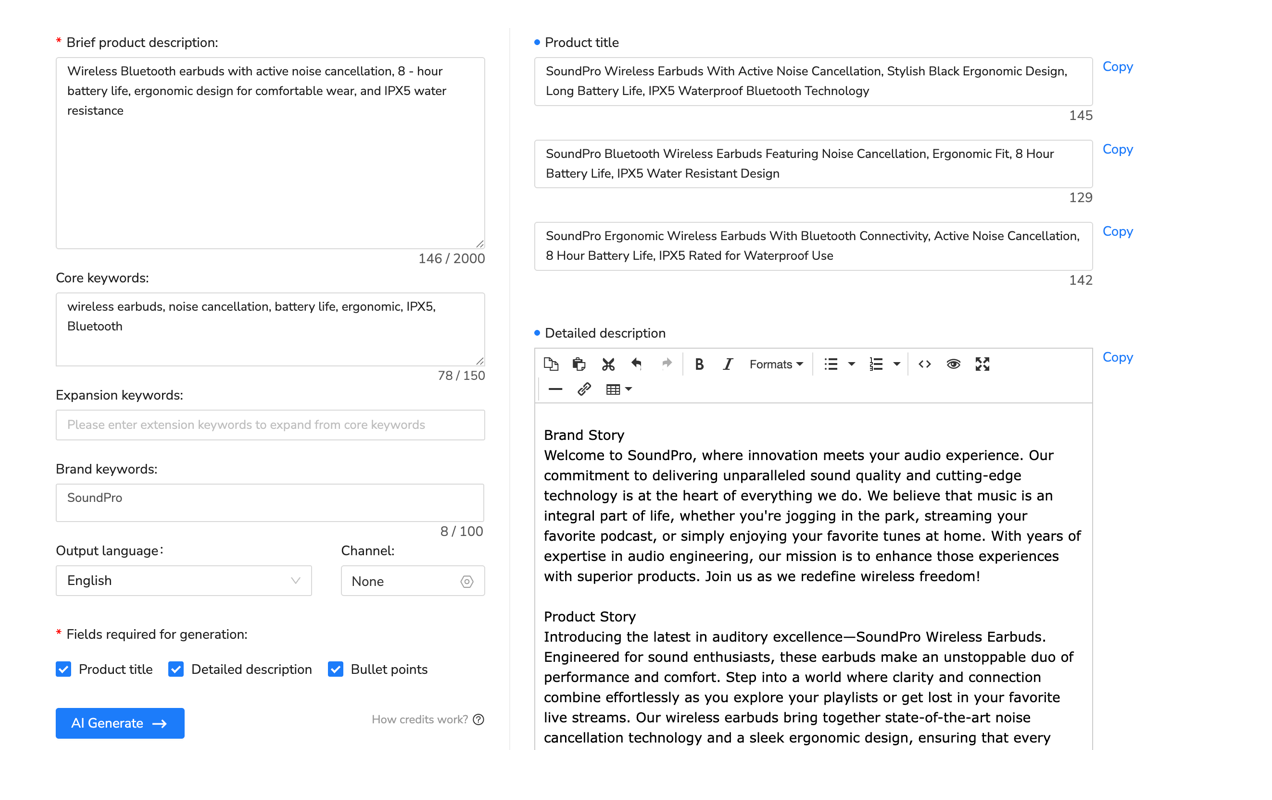
Multi-channel listing tools solve this by auto-populating item specifics based on product category. Platforms like Maxmerce’s Listing module use AI to identify and fill dozens of attribute fields in seconds. The workflow: Import product data via CSV → AI analyzes product type → System auto-fills 40+ item specifics (brand, size, color, material, model, UPC) → Review and publish. What used to take 10-15 minutes per listing drops to 30-45 seconds.
This directly impacts search exposure. When buyers filter by “Size: 10” or “Brand: Nike,” your listing shows up because those specifics are populated. Incomplete listings don’t appear in filtered search—that’s 30-40% of eBay’s traffic you’re missing.
How to Take Product Photos That Sell
eBay allows up to 12 photos. You need at least 5-6 high-quality shots: front view, back view, side angle, close-up of details or defects, and packaging (if new).
Use natural lighting near a window. White or neutral background. No flash—it creates harsh shadows. Your phone camera works fine if you clean the lens and hold it steady.
The first photo is critical. That’s what shows in search results. Make it clean, well-lit, and clearly display what you’re selling.
How to Price Your eBay Products Competitively
You’re competing with thousands of other sellers offering the same product. Price too high? Nobody clicks. Price too low? You’re losing money after fees.
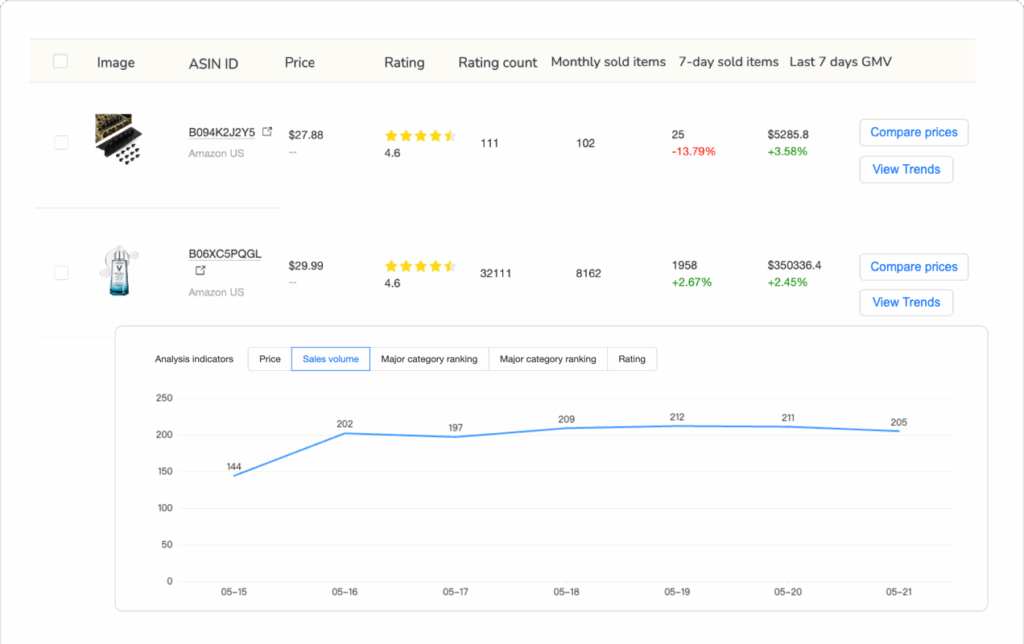
Research competitor pricing before listing. Search for your exact product on eBay, filter by “Sold Items” (left sidebar), and check the average sale price over the last 30 days. That’s your baseline.
How to Calculate eBay Fees
eBay charges two main fees: insertion fees (listing fees) and final value fees (sales commission).
- Insertion Fees: First 250 listings monthly are typically free or low-cost (varies by category)
- Final Value Fees: Average 13.25% of total sale price (item price + shipping). Categories vary slightly
- Promoted Listings: Optional 2-20% of sale price to boost search visibility
Calculate break-even price: Product cost + shipping cost + (sale price × 0.1325) = minimum profitable price.
Example: You buy a product for $20, shipping costs $5, and you want to sell it for $40. Final value fee = $40 × 0.1325 = $5.30. Total cost = $20 + $5 + $5.30 = $30.30. Profit = $40 – $30.30 = $9.70. That’s 24.2% profit margin—solid for most categories.
How to Use Auction vs. Buy It Now
Buy It Now (BIN) listings have a fixed price. Buyer clicks “Buy,” transaction completes immediately. BIN works better for new items or products with established market prices.
Auction listings start at a low price and buyers bid over 7 days. Great for unique or collectible items where market value is uncertain. The downside? No guarantee it sells at your desired price.
The reality is, most eBay sales (80-90%) come from Buy It Now listings rather than auctions. Most successful sellers use BIN with “Best Offer” enabled—buyers can negotiate while you maintain control.
How to Automate Repricing for Multi-Product Sellers
Once you’re managing 50+ listings, manual repricing becomes impossible. Competitor prices change daily. You drop your price, a competitor undercuts you—it’s never-ending.
Automated repricing tools monitor competitor pricing and adjust listings in real-time while protecting profit margins. You set minimum/maximum boundaries and target positioning (e.g., “stay $1 below lowest competitor”).
Maxmerce’s Analytics module includes eBay competitor repricing that tracks pricing every 15 minutes and adjusts based on your rules. The workflow: Connect eBay → Select products → Set rules (min/max, target position) → Enable auto-repricing → System monitors automatically. This prevents getting stuck at higher pricing while competitors drop overnight.
How to Optimize eBay Listings for Search Visibility
eBay’s search algorithm—called “Best Match”—determines which listings appear at the top of search results. The algorithm evaluates sales history, seller feedback rating, shipping speed, price competitiveness, listing completeness, and buyer engagement.
How to Use Item Specifics for Better Rankings
I’ll be straight with you—this is the single biggest ranking factor new sellers ignore. eBay explicitly states that listings with complete item specifics rank higher. Complete means 90-100% of available fields filled out.
For a pair of Nike shoes, eBay shows 52 item specifics fields. Most sellers fill out 12-15 fields. You fill out all 52. Your listing now appears in filtered searches that competitors don’t.
| Task | Manual Process | Automated Solution | Time Saved |
|---|---|---|---|
| Complete item specifics for 100 listings | 12-18 hours | 45-60 minutes | 93.7% |
| Cross-list 100 products to eBay from Amazon | 15-20 hours | 2-3 hours | 87.3% |
| Update pricing on 200 SKUs | 3-4 hours | Real-time automatic | 100% |
| Respond to 50 customer messages | 2-3 hours | 15-20 minutes | 91.2% |
Common Mistakes That Tank Rankings
Keyword Stuffing: eBay’s algorithm penalizes titles with excessive repeated keywords. Use each keyword once naturally.
Poor Image Quality: Blurry photos tank click-through rates. eBay tracks how often users click your listing vs. competitors. Low CTR signals poor quality.
Ignoring Promoted Listings: For competitive categories (electronics, clothing, collectibles), promoted listings are almost mandatory. Organic ranking takes months to build. Promoted listings bypass that—you get immediate top-of-search visibility. Start with a 5% ad rate.
How to Scale Your eBay Business from 10 to 500+ Listings
Once you’ve sold 20-30 items successfully, you’ll notice patterns. Certain products sell faster. Specific categories have higher profit margins. This is when you transition from casual seller to actual eBay business.
How to Source Products Consistently
You can’t scale selling items from around your house—that’s finite inventory. Real eBay businesses source products from four main channels:
- Retail Arbitrage: Buy discounted products from retail stores and resell on eBay. Profit margins: 20-35%
- Thrift Stores & Garage Sales: Find undervalued items and resell at market rates. Profit margins: 40-70%
- Liquidation Pallets: Buy customer return pallets from liquidation companies. Profit margins: 30-50%
- Wholesale Suppliers: Purchase products in bulk at wholesale prices. Profit margins: 25-40%
How to Expand to Multiple Marketplaces
Once you’re doing 100+ sales monthly on eBay, the natural question is: “Should I expand to Amazon and Walmart?” The answer depends on whether you can handle the operational complexity.
Selling on one platform means managing one inventory system, one set of customer messages, one shipping workflow. Add Amazon and Walmart? You’re now juggling three separate seller accounts, three inventory systems, three customer service inboxes.
How to Cross-List Products Efficiently
Listing 200 eBay products on Amazon and Walmart manually takes 40-60 hours (12-18 minutes per product for copying content, re-entering attributes, uploading images).
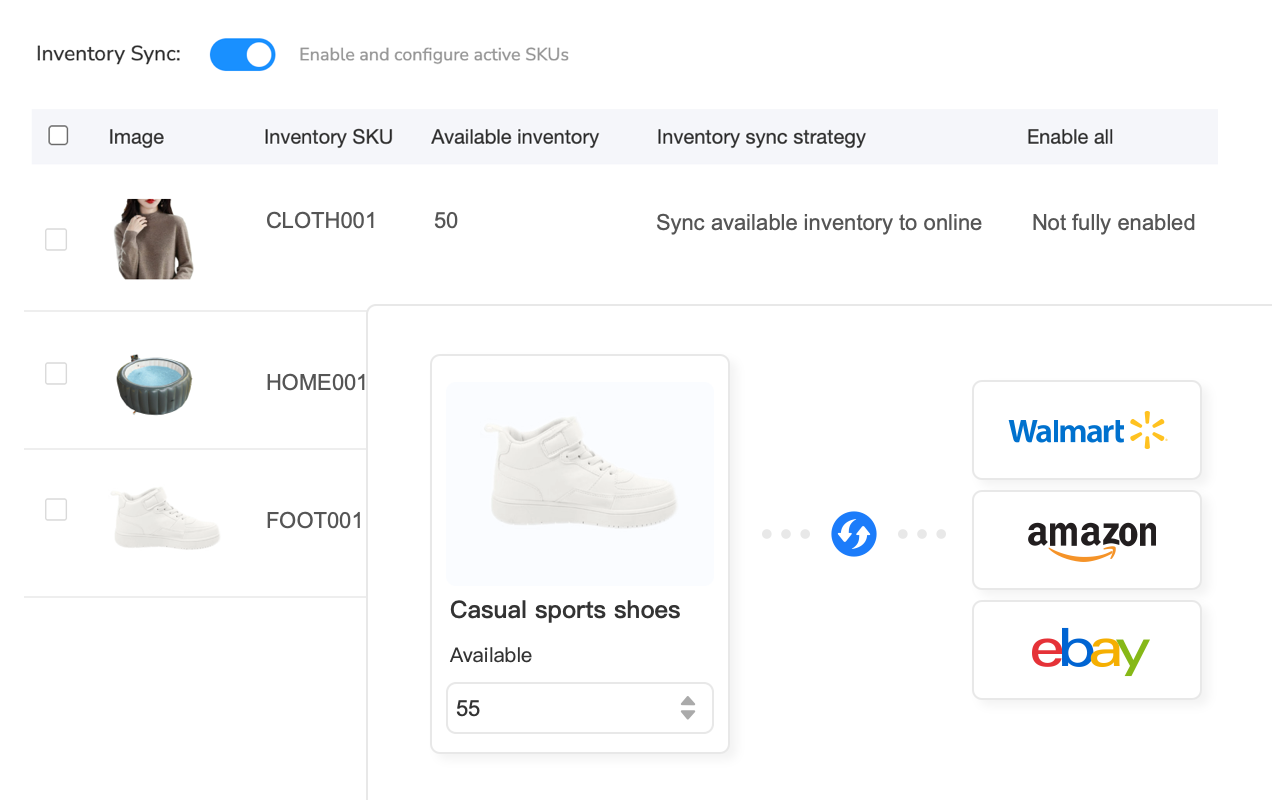
Maxmerce’s Listing module handles cross-platform catalog synchronization through intelligent mapping. The workflow: Connect accounts → Import eBay listings → AI auto-maps data to each platform’s format → Review → Publish to all platforms in bulk. This turns 40-60 hours into 2-3 hours. The bigger benefit: inventory synchronization. When products sell on Amazon, the system decrements eBay and Walmart quantities in real-time (3-5 minute sync), preventing overselling and order cancellations.
How to Scale Customer Service Operations
At 10-20 orders monthly, responding to customer messages is manageable. At 200 orders monthly across three platforms, you’re handling 40-60 messages weekly. Common questions repeat constantly: “When will this ship?” “What’s the return policy?”
Maxmerce’s CRM module consolidates messages from eBay, Amazon, and Walmart into one inbox, automatically categorizes questions by type, and suggests AI-generated replies based on context. The system reads “Hi, I ordered this yesterday. When will it ship?” and generates contextual responses with order details. Review and send in 10 seconds instead of 2 minutes typing. This reduces 3-4 hours weekly to 30-45 minutes.
Frequently Asked Questions
Q: How much does it cost to start selling on eBay?
A: Starting an eBay seller account is free. You’ll pay listing fees ($0.35 per listing for first 250 items monthly, then often free), final value fees (13.25% average across categories), and optional promoted listing fees. New sellers start with a 10-item, $500 monthly limit.
Q: What can I sell on eBay as a beginner?
A: Start with items around your home—electronics, clothing, collectibles, books. These give you hands-on experience. Once comfortable, expand to sourcing from thrift stores, garage sales, or wholesale suppliers. Avoid restricted categories like automotive parts or alcohol.
Q: How long does it take to get my first sale on eBay?
A: Your first sale typically happens within 7-14 days if you price competitively and optimize listings properly. Focus on high-demand items initially. As you accumulate positive feedback and sales history, your listings rank higher.
Q: Do I need a business license to sell on eBay?
A: No business license is required for personal sellers (under 50 items monthly). If selling regularly as a business, you’ll need a business license, tax ID (EIN), and business bank account. Check your local regulations.
Q: How can I improve my eBay search ranking as a new seller?
A: Fill out all item specifics fields (40+ attributes), use all 80 characters in titles with relevant keywords, price competitively, offer free shipping, and ship within 1 business day. Every sale and positive feedback boosts your rankings.
Q: Should I use auction or Buy It Now listings?
A: Buy It Now (BIN) listings work better for most products—87% of eBay’s sales come from BIN. Use BIN with Best Offer enabled for flexibility. Auctions work best for unique, collectible items where market value is uncertain.
Conclusion: Your eBay Selling Roadmap
Starting on eBay doesn’t require massive investment. Create your account, list 5-10 items you own, and learn the process.
The first 30-60 days focus on learning: What sells quickly? What pricing works? You’ll make mistakes—that’s fine. Every seller went through this.
After 20-30 transactions, you’ll notice bottlenecks. Listing creation takes too long. Manual repricing eats hours. That’s when to automate.
At 100+ sales monthly, you’re running a real business. Manual workflows that worked for 10 listings break completely at 200+ listings across multiple platforms. This is when multi-channel listing tools, inventory synchronization, automated repricing, and unified customer service systems become essential.
Successful sellers understand this progression: Start simple, learn fundamentals, identify bottlenecks, automate systematically.
Your first goal: 10 successful transactions with positive feedback. Once you hit that milestone, you’ll have the experience and confidence to scale intelligently. Try Maxmerce free for 14 days and see if it helps—no credit card needed.
Related Pages
- 📊 eBay Profit Analytics: Track ROI Across Multiple Channels
- 🚀 eBay Seller Tools: Complete Platform Management Solution
- 💰 eBay Listing Optimization Tools for Professional Sellers
📖 Sources & References
- eBay Official – Start Selling on eBay Official Guide (Accessed December 2025)
- eBay Seller Center – How to Register as a Seller (Updated December 2025)
- eBay Help Center – eBay Selling Limits Policy (Updated December 2025)