How to Find the Best Keywords for eBay Listings

You’re listing a “black leather wallet” on eBay. So are 47,000 other sellers. Your listing disappears into page 15 because you’re competing for the same generic keywords everyone uses. Meanwhile, sellers using specific phrases like “RFID blocking genuine leather bifold wallet black men’s” dominate page 1 with half the competition and 3X higher conversion rates.
The brutal truth about eBay keyword research: 73% of buyer searches use 3-4 word long-tail phrases, not single generic terms. When you improve for broad keywords like “wallet” or “shoes,” you’re fighting millions of listings for a small slice of traffic. When you target specific phrases like “vintage Coach leather crossbody bag brown,” you’re competing with 800 listings instead of 2 million – and reaching buyers who know exactly what they want.
This guide reveals the keyword research strategies top US eBay sellers use to identify high-buyer phrases, use eBay’s autocomplete data, analyze competitor patterns, and systematically improve titles and Item Specifics for maximum search visibility. You’ll learn which keywords drive traffic versus which ones drive sales – and how to scale keyword research across hundreds of listings without spending 20+ minutes per product.
Key Takeaways
- Long-tail keywords dominate eBay: 73% of searches use 3-4 word phrases that convert at 2.4X higher rates than single-word terms (eBay Search Data, 2025)
- High-buyer vs high-viewer distinction matters: Generic keywords generate impressions but low sales; specific phrases attract ready-to-purchase buyers (Terapeak Analysis, 2025)
- Autocomplete reveals actual buyer searches: eBay’s search suggestions show real queries ranked by popularity – your most reliable free keyword source (eBay Search Algorithm, 2025)
- Item Specifics are searchable fields: 40% of buyers use filters (Brand, Size, Color); completing these attributes captures filtered searches that convert 35% higher (eBay Buyer Behavior Study, 2025)
- Competitor analysis identifies gaps: Top 10 search results reveal which keywords dominate your category and which valuable terms competitors miss (Competitive Intelligence Data, 2025)
- AI keyword research saves 93% of time: Manual research takes 20-30 minutes per listing; AI tools analyze competitor patterns and suggest optimal keywords in under 2 minutes (Maxmerce Listing Module benchmarks, 2025)
Understanding eBay’s Search Behavior
eBay search isn’t Google. Buyers on eBay have different intent, different search patterns, and different conversion triggers. Understanding these differences determines whether your keyword strategy generates sales or just burns through impressions.
High-Buyer vs High-Viewer Keywords
Here’s the distinction that separates profitable keyword research from time-wasting guesswork:
- High-viewer keywords: Broad terms that generate massive impressions but low conversions (e.g., “phone,” “laptop,” “jeans”)
- High-buyer keywords: Specific phrases matching purchase intent that convert at 2-3X higher rates (e.g., “iPhone 13 Pro Max 256GB unlocked Sierra Blue,” “Dell XPS 15 9520 i7 32GB 1TB,” “Levi’s 501 original fit jeans 34×32 stonewash”)
Think about your own shopping behavior. When you search “headphones,” you’re browsing, comparing, researching. When you search “Sony WH-1000XM5 wireless noise canceling headphones black,” you’ve done your research and you’re ready to buy. That specificity signals purchase intent – and those are the keywords you want.
The data backs this up. Terapeak research shows generic single-word searches convert at 0.8-1.2%, while long-tail 3-4 word phrases convert at 2.5-3.5%. You’re better off ranking page 1 for 10 high-buyer keywords than page 7 for 100 high-viewer terms.
How eBay’s Cassini Weighs Keywords
eBay’s search algorithm evaluates keywords across multiple listing elements, with different weighting:
- Title keywords (highest weight): First 40 characters carry maximum ranking value
- Item Specifics (critical for filters): Brand, Model, Size, Color, Material – these enable filtered searches
- Description keywords (moderate weight): Support title keywords and capture long-tail variations
- Category placement (qualification filter): Must be correct or Cassini won’t surface your listing at all
Here’s what this means practically: if you put “vintage” in your title but don’t select “Vintage: Yes” in Item Specifics, you’ll rank for “vintage Nike shoes” searches but won’t appear when buyers filter results by “Vintage Items Only.” You lose 30-40% of potential visibility by ignoring Item Specifics as keyword fields.
Using eBay Autocomplete for Keyword Discovery
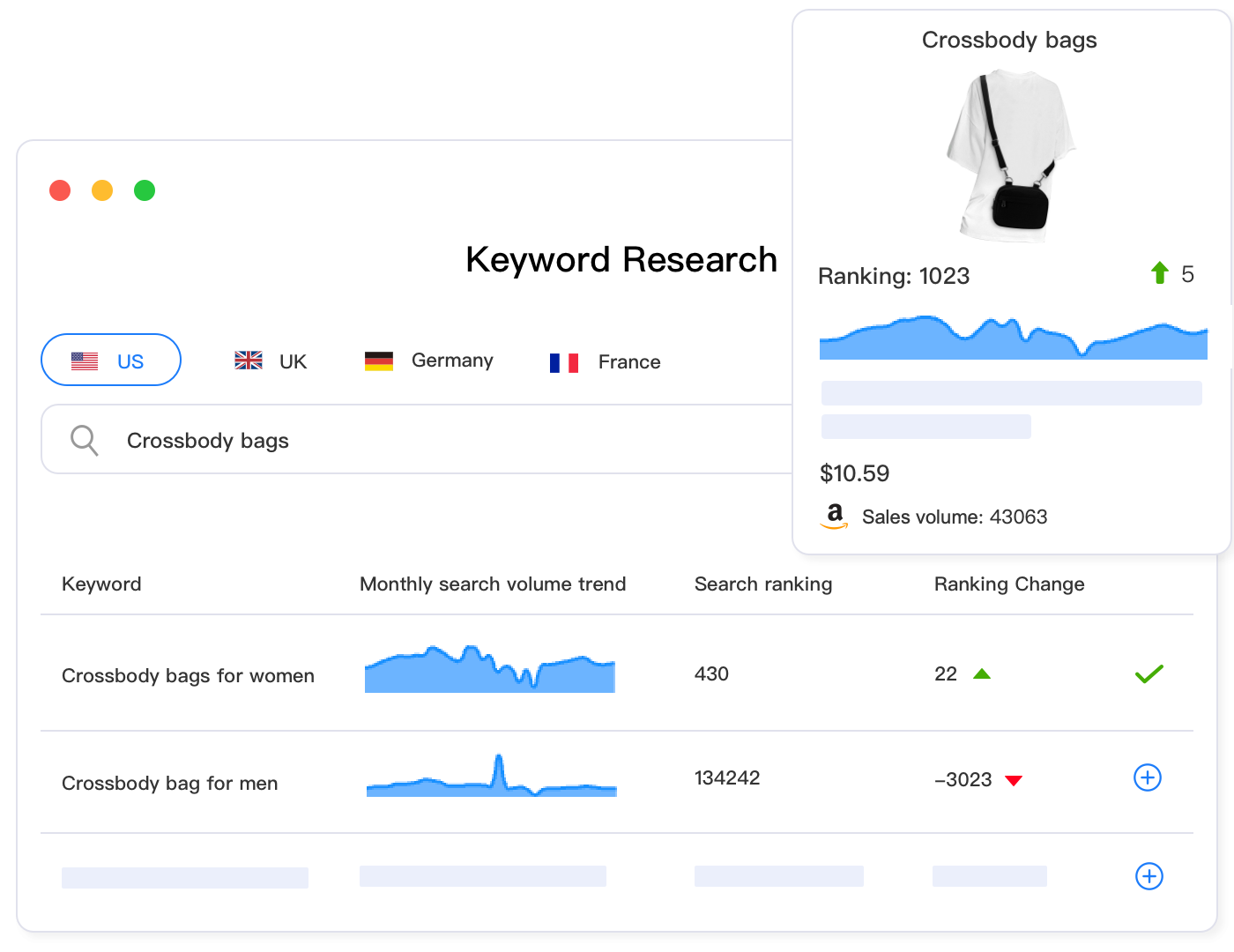
eBay’s autocomplete isn’t just a convenience feature – it’s a window into actual buyer search behavior. When you start typing in the search bar, eBay suggests completions based on real searches from millions of buyers, ranked by popularity. This is more valuable than any third-party keyword tool because it shows you what people are actually searching for right now.
The Autocomplete Research Method
Here’s how to systematically mine autocomplete for keyword gold:
- Start with your primary keyword: Type “Nike shoes” and record all suggestions
- Test variations: Try “Nike running shoes,” “Nike athletic shoes,” “Nike sneakers”
- Add qualifiers: Test with size (“Nike shoes size 10”), color (“Nike shoes black”), condition (“Nike shoes new”)
- Check category-specific terms: “Nike Air Max,” “Nike basketball,” “Nike women’s”
- Document all unique phrases: You should’ve 20-30 keyword variations after 10 minutes
The challenge? Doing this manually for 500 listings takes 83+ hours. You type variations, record suggestions, compare phrases, and manually identify the highest-value terms for each product. That’s where AI-powered keyword research becomes essential for scale.
Tools like Maxmerce’s AI Listing Generator automate autocomplete analysis by programmatically testing hundreds of keyword variations, ranking them by search volume and conversion potential, then selecting the optimal combination for your 80-character title. The system handles the repetitive research work in 30-45 seconds per product, freeing you to focus on sourcing and pricing strategy instead of keyword spreadsheets.
Identifying Seasonal Keyword Shifts
Autocomplete suggestions change with buying seasons. “Christmas decorations” dominates October-November, then disappears by January. “Pool supplies” surges May-July. “Back to school laptop” peaks in August.
Smart sellers update keywords 4-6 weeks before seasonal peaks to capture early-bird shoppers before competition intensifies. The problem? Manually researching seasonal shifts across 50+ product categories is impossible unless you’re dedicating full-time hours to keyword tracking.
Analytics platforms like Maxmerce’s Traffic Analysis monitor search trend changes across your product categories, alerting you when seasonal terms start gaining traction. For example, if you sell outdoor furniture, the system identifies when “patio set” searches begin their annual April-May climb, prompting you to update listings with seasonal keywords before competitors notice the trend.

Long-Tail Keyword Strategy
Long-tail keywords are 3-4 word phrases that capture specific buyer intent. They’re the foundation of profitable eBay SEO because they deliver qualified traffic ready to purchase, not casual browsers.
The Long-Tail Conversion Advantage
Consider these conversion rate differences:
- “shoes” – 0.6% conversion rate, 10,000,000+ competing listings
- “Nike shoes” – 0.9% conversion, 2,000,000+ competing listings
- “Nike running shoes” – 1.4% conversion, 500,000+ competing listings
- “Nike Pegasus 40 running shoes women’s” – 2.8% conversion, 8,000 competing listings
The pattern is clear: as keywords get more specific, competition drops dramatically and conversion rates double or triple. You don’t need page 1 ranking for “shoes” when you can dominate “Nike Pegasus 40 running shoes women’s size 8.5 wide fit” and convert at 4X the rate.
Building Effective Long-Tail Phrases
Effective long-tail keywords follow predictable patterns:
- Brand + Model: “Apple iPhone 14 Pro Max”
- Brand + Product Type + Key Feature: “Samsung 65-inch 4K QLED TV”
- Brand + Model + Size/Color: “Nike Air Max 97 triple black size 10”
- Brand + Type + Condition + Specs: “Dell XPS 15 laptop refurbished 16GB i7”
Each element in these phrases filters out irrelevant searches. Someone searching “Samsung TV” might want a 32-inch, a soundbar, or a smart TV remote. Someone searching “Samsung 65-inch 4K QLED TV” wants exactly what you’re selling.
Where to Place Long-Tail Keywords
You have 80 characters for your title. Strategic long-tail placement looks like this:
- Characters 1-40 (front-loaded): “Sony WH-1000XM5 Wireless Noise Canceling” (primary long-tail)
- Characters 41-60 (secondary): “Headphones Black” (color specification)
- Characters 61-80 (tertiary): “Bluetooth Over-Ear” (additional category terms)
This structure captures multiple search variations: “Sony WH-1000XM5,” “Sony wireless noise canceling headphones,” “WH-1000XM5 black,” “Sony Bluetooth over-ear headphones.” Each phrase targets a different search pattern buyers might use.
The challenge at scale? Crafting 500 unique long-tail title structures manually requires deep category knowledge and 15-20 minutes per listing. Bulk optimization tools solve this by applying templated long-tail patterns across similar products. Maxmerce’s Rule-Based Bulk Listing Editing lets you define long-tail structures like “[Brand] [Model] [Type] [Key Spec] [Size] [Color]” then automatically apply them to hundreds of listings, standardizing your keyword strategy across your entire catalog in minutes instead of weeks.

Competitor Keyword Analysis
Your competitors have already done keyword research – thousands of hours of testing, iteration, and optimization. Why start from scratch when you can analyze what’s already working?
The Top 10 Analysis Method
Search for your target keyword and analyze the top 10 organic results (not promoted listings). Document:
- Title patterns: Which keywords appear in first 40 characters across all top results?
- Keyword order: Do most lead with brand, model, or product type?
- Specifications included: Which details (size, color, condition) appear most frequently?
- Unique keywords: What terms do 1-2 top sellers use that others don’t?
If 8 out of 10 top results for “laptop” include “i7 processor” in their titles, that’s a signal. Buyers searching for laptops care about processor specs, and Cassini rewards listings that include this detail. If 6 out of 10 specify RAM amount (“16GB,” “32GB”), that’s another high-value keyword component.
Finding Competitor Keyword Gaps
The real opportunity comes from identifying valuable keywords your competitors miss. Look for:
- Cross-platform terms: Check Amazon listings for the same product – what keywords do they use that eBay sellers don’t?
- Technical specifications: Model numbers, SKU codes, specific measurements that casual sellers skip
- Use case keywords: “Business laptop,” “gaming laptop,” “student laptop” – intent-based phrases
- Compatibility terms: “Works with Mac,” “Windows 11 ready,” “USB-C compatible”
When you include these gap keywords, you rank for searches competitors don’t target. Less competition, better visibility, higher conversion rates.
Scaling Competitor Analysis
Manually analyzing competitors works fine for 10-20 core products. It breaks down when you’re managing 500+ SKUs across dozens of categories. You can’t spend 15 minutes per listing researching competitor patterns – the math doesn’t work.
AI-powered listing tools solve this by automatically analyzing top-ranking competitor listings, extracting keyword patterns, and suggesting optimal combinations. Maxmerce’s AI Listing Generator scans the top 20-30 search results for your product category, identifies which keywords correlate with best rankings, and generates title structures that incorporate proven patterns – completing in 2-3 minutes what would take 20+ minutes manually.
Item Specifics as Keyword Fields
Here’s the costly mistake most sellers make: you obsess over your 80-character title, then rush through Item Specifics checking only required fields. You’ve just thrown away 40% of your search visibility.
Item Specifics aren’t just descriptive fields – they’re searchable keyword databases that Cassini uses for filtered searches. When a buyer searches “Nike running shoes” then filters by “Size: 10.5,” Cassini only shows listings with “10.5” specified in the Size field. Your title mentioning “size 10.5” doesn’t help if the Size Item Specific is blank.
Which Item Specifics Matter Most?
Priority Item Specifics that drive filtered searches:
- Brand: 65% of buyers filter by brand when multiple brands appear in search results
- Size (apparel/shoes): 82% of clothing/shoe buyers use size filters
- Color: 47% filter by color when searching for style-dependent products
- Condition: 71% filter by New vs Used vs Refurbished
- Model Number (electronics): Enables exact product match for tech buyers
- Material (furniture/fashion): “Genuine leather” vs “faux leather” drives purchase decisions
Category-specific Item Specifics matter enormously. In Electronics, “Storage Capacity” and “RAM” are critical. In Automotive, “Year,” “Make,” “Model” are non-negotiable. In Home & Garden, “Room” and “Style” drive filtered visibility.
The challenge? Manually completing 25-40 Item Specifics per listing takes 15-20 minutes. For 1,000 listings, that’s 250-333 hours of repetitive data entry. This is where the business case for automation becomes undeniable.
Automated Item Specifics Population
AI listing optimization extracts structured data from your existing title and description, then auto-populates Item Specifics fields. For example, if your title reads “Nike Air Max 97 Men’s Size 10.5 Black Running Shoes,” the system automatically fills:
- Brand: Nike
- Model: Air Max 97
- Department: Men’s
- US Shoe Size: 10.5
- Color: Black
- Type: Running Shoes
- Style: Athletic
Platforms like Maxmerce’s AI Listing Generator handle this extraction and population process in 5-10 seconds per listing, achieving 90%+ attribute completion rates. The system also identifies missing critical specifics and suggests values based on product category norms – ensuring your listings capture filtered search traffic competitors miss by skipping optional fields.
| Research Task | Manual Time per Listing | Automated Time (500 Listings) | Time Savings |
|---|---|---|---|
| Autocomplete keyword research | 10-15 minutes | 20 minutes total | 83-125 hours |
| Competitor title analysis | 8-12 minutes | Automated with AI | 67-100 hours |
| Long-tail phrase construction | 5-8 minutes | Instant generation | 42-67 hours |
| Item Specifics keyword filling | 15-20 minutes | 30 minutes total | 124-167 hours |
| Title optimization & testing | 10-15 minutes | Bulk optimization | 83-125 hours |
| Total Research & Implementation | 48-70 minutes | ~2.5 hours for 500 | 397-582 hours |
Using eBay Terapeak for Data-Driven Keywords
eBay Terapeak is eBay’s official market research tool (included free with eBay Store subscriptions, $24/month standalone). It provides search volume data, average selling prices, and competition levels – metrics you can’t get from autocomplete alone.
Key Terapeak Metrics for Keyword Research
When evaluating potential keywords, Terapeak shows:
- Search volume: How many times buyers searched this term in the past 30-90 days
- Sell-through rate: Percentage of listings that sold (indicates buyer demand vs seller supply)
- Average sale price: What buyers are willing to pay (helps prioritize high-value keywords)
- Total listings: Competition level for this keyword
The ideal keyword has high search volume, high sell-through rate, and moderate competition. For example:
- Good keyword: “iPhone 13 Pro Max 256GB” – 45,000 searches/month, 78% sell-through, 12,000 listings
- Poor keyword: “smartphone” – 890,000 searches/month, 22% sell-through, 2.4 million listings
The first keyword has qualified buyer intent (specific model and storage), reasonable competition, and strong conversion. The second has massive search volume but terrible conversion and overwhelming competition.
Identifying Rising Keywords
Terapeak’s trend graphs show keyword popularity over time. Rising keywords (search volume increasing month-over-month) represent opportunities to get ahead of trends before competition saturates.
For example, when a new iPhone launches, model-specific searches surge in the weeks following release. Sellers who update listings with new model keywords immediately capture early adopter traffic before the market floods with inventory.
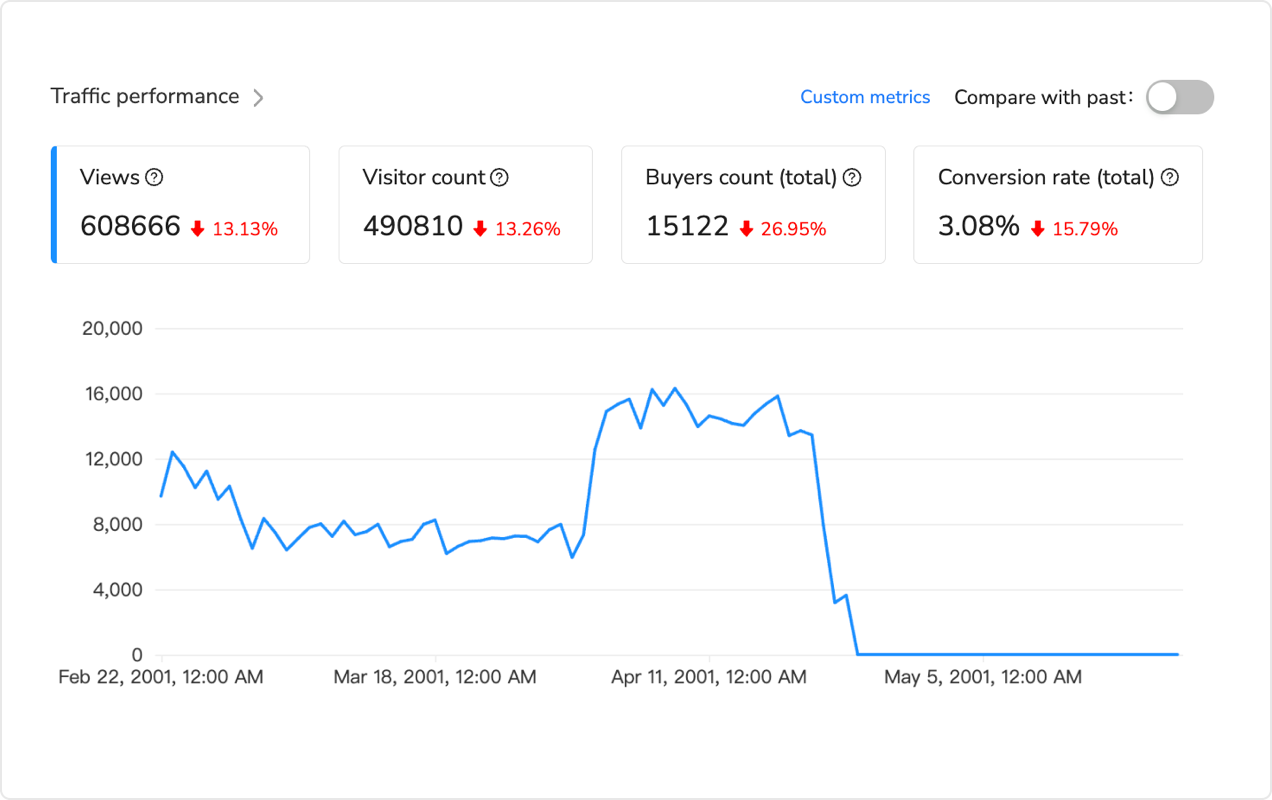
The challenge for multi-category sellers? Monitoring trend shifts across 20+ product categories manually is a full-time job. Analytics platforms like Maxmerce’s Listing Insights integrate with your eBay data to track keyword performance at the listing level, alerting you when certain titles generate impressions but low conversions (indicating keyword mismatch) or when seasonal trends start shifting (prompting timely updates).
Keyword Placement Strategy
You’ve identified your high-value keywords. Now you need to place them strategically across your listing for maximum Cassini visibility.
The 80-Character Title Formula
Optimal title structure that maximizes keyword coverage:
- Characters 1-20 (critical zone): Brand + Model or Primary Keyword
- Characters 21-40 (high-value zone): Key specifications (size, color, condition)
- Characters 41-60 (moderate-value zone): Product type + additional specs
- Characters 61-80 (low-value zone): Secondary keywords, compatibility terms
Example for electronics: “Sony WH-1000XM5 Wireless Headphones | Black Noise Canceling Over-Ear Bluetooth” (79 characters)
This structure targets: “Sony WH-1000XM5,” “Sony wireless headphones,” “WH-1000XM5 black,” “noise canceling headphones,” “Sony Bluetooth headphones,” “wireless over-ear headphones.” Six different search patterns from one optimized title.
Description Keyword Integration
Your description should contain 3-5 mentions of your primary keyword and 1-2 mentions of secondary keywords naturally integrated into informative copy. Don’t stuff keywords – write for humans, but ensure your target terms appear with 1.5-2% density.
For a 400-word description, that means:
- Primary keyword: 4-5 appearances
- Secondary keywords: 1-2 appearances each
- Long-tail variations: Naturally throughout
Cross-Channel Keyword Consistency
If you’re selling on eBay, Amazon, and Walmart simultaneously, maintaining keyword consistency across platforms prevents confusion and ensures unified SEO strategy. The challenge? Each platform has different title length limits and different Item Specific requirements.
Multi-channel listing management systems solve this by storing master keyword lists and adapting them to platform constraints automatically. Maxmerce’s Bulk Product Publish maintains a central keyword database for each product, then generates optimized titles for each platform: 80 characters for eBay, 200 characters for Amazon, platform-specific formatting for Walmart – ensuring keyword consistency without manual adaptation.

Common Keyword Research Mistakes
Chasing High-Volume Generic Keywords
New sellers obsess over ranking for “iPhone” or “laptop” because these terms have millions of searches. You’re competing against Apple, Best Buy, and 10,000 professional sellers with massive inventory and perfect feedback. Focus on long-tail phrases where you can actually win.
Ignoring Search Intent Signals
Not all keywords with high volume indicate purchase intent. “iPhone 14 review” and “iPhone 14 release date” generate searches but from researchers, not buyers. Target transactional keywords: “iPhone 14 Pro Max 256GB unlocked,” “buy iPhone 14 Pro Max,” “iPhone 14 for sale.”
Using Prohibited or Irrelevant Keywords
eBay’s policies prohibit keyword spam – including brand names you’re not selling, competitors’ names, or unrelated categories. “iPhone compatible charger” is fine for a charger listing. “iPhone charger” is policy violation if you’re selling a generic cable.
Neglecting Mobile Search Optimization
Over 70% of eBay traffic is mobile. Mobile search results truncate titles at 40 characters and prioritize clear, concise phrasing. If your critical keywords are buried past character 40, most buyers never see them.
Setting and Forgetting Keywords
Search trends shift seasonally, competitors adjust strategies, and eBay updates Cassini’s algorithm. Keywords that worked in January may underperform by June. Review and update your top-performing listings quarterly, seasonal items monthly.
Frequently Asked Questions
Conclusion: From Generic to Specific
The shift from generic keyword targeting to specific long-tail strategy separates sellers who generate traffic from sellers who generate sales. When you stop competing for “shoes” and start dominating “Nike Air Max 97 triple black men’s size 10.5 running shoes,” you’re reaching buyers who know exactly what they want and are ready to purchase.
Effective keyword research combines multiple data sources: eBay autocomplete shows actual buyer searches, competitor analysis reveals proven ranking patterns, Terapeak provides volume and competition metrics, and Item Specifics capture filtered search traffic. No single approach is sufficient – complete optimization requires all four.
For sellers managing 10-20 core products, manual keyword research is time-consuming but achievable. For those operating at scale with hundreds or thousands of SKUs, automation becomes mathematically necessary. You can’t spend 50-70 minutes per listing on keyword research when you have 1,000 products – that’s 833-1,166 hours before you complete one optimization cycle.
Modern listing management platforms like Maxmerce’s Listing module compress this timeline by applying AI-driven keyword analysis across your entire catalog. The system handles autocomplete research, competitor pattern analysis, long-tail generation, and Item Specifics population in 2-3 minutes per listing – transforming a 6-month manual project into a 2-day automated workflow.
Start with your top 20% revenue-driving products. Research high-buyer keywords, improve titles with long-tail phrases, complete all Item Specifics, and track performance for 30 days. The ranking and conversion improvements you see will justify expanding the strategy across your full catalog.
Your competitors have already moved beyond generic keyword targeting. The question isn’t whether to set up long-tail keyword research – it’s whether you’ll do it manually over 6 months or systematically over 2 weeks.
Ready to scale eBay keyword research across your entire catalog? Try Maxmerce’s Listing module free for 14 days – no credit card required. See how AI-powered keyword analysis reduces 50-minute manual research to 2-minute automated workflows.
