How to Cross-List Products from eBay to Amazon and Walmart: Multi-Channel Expansion Guide

Your 500-product eBay store is doing $15,000 monthly. You’ve optimized titles, perfected pricing, and built Top Rated Seller status. The next growth lever isn’t adding more eBay products—it’s multiplying your existing catalog across Amazon and Walmart. The opportunity is massive: 50% of US multi-channel sellers report 2-3X revenue growth after expansion. But the execution is brutal if you’re doing it manually.
Here’s the operational reality most sellers discover: cross-listing 500 products manually takes 125-200 hours (15-25 minutes per product for category mapping, content conversion, image optimization). Then comes the daily nightmare—managing inventory across three platforms where a single overselling incident costs $20-30 in rush shipping plus account health penalties. This guide shows how US eBay sellers scale to Amazon and Walmart without the 40+ hour weekly management burden.
Key Takeaways:
- Multi-channel revenue impact: 50% of sellers report 2-3X revenue growth after expanding from eBay to Amazon + Walmart (Multi-Channel Study, 2024)
- Manual cross-listing bottleneck: 15-25 min/product × 500 = 125-208 hours for initial expansion (product scraping reduces to 2-4 hours, 95% savings)
- Inventory sync criticality: Real-time API sync eliminates 95% of overselling incidents vs manual updates (5-15 sec sync vs 10-15 min manual)
- Platform-specific optimization: Amazon prices typically 15-25% higher than eBay (compensating for FBA fees), Walmart 5-10% lower (buyer expectations)
- Category mapping efficiency: Auto-mapping reduces category selection from 30+ hours to under 2 hours for 1,000 SKUs (93% time savings)
The Multi-Channel Opportunity: Why Cross-Listing Multiplies Revenue
Understanding the US Marketplace Landscape
Let’s quantify the buyer access difference. eBay has 132 million active US buyers (2024). Amazon has 310 million monthly US visitors with 200+ million Prime members. Walmart.com attracts 150+ million monthly US shoppers. When you’re only selling on eBay, you’re accessing 21% of the total multi-platform buyer pool—79% of potential customers never see your products.
The math becomes compelling when you consider cross-shopping behavior. Only 35% of eBay buyers also shop Amazon regularly for the same product categories. Less than 25% of Walmart.com shoppers check eBay first. This isn’t about cannibalizing your eBay sales—it’s about reaching different customer bases with zero additional inventory investment. Your existing 500 eBay SKUs gain access to 310 million Amazon buyers who rarely shop eBay.

The revenue impact is measurable. A typical eBay seller doing $15,000 monthly with 500 SKUs averages $30 revenue per SKU monthly. Expanding those same 500 SKUs to Amazon typically adds $20-25 per SKU monthly (66-83% of eBay performance), and Walmart adds $8-12 per SKU monthly (27-40% of eBay). Total: $58-67 per SKU monthly across three channels—a 93-123% revenue increase from the same inventory. That’s $29,000-33,500 monthly from your $15,000 eBay store’s existing products.
However, this only works if you don’t drown in operational complexity. Manual cross-listing and inventory management destroy these margins through 40+ hours weekly of order processing, inventory syncing, and customer service across three dashboards. The sellers who succeed implement automated workflows from day one.
The Hidden Costs of Manual Multi-Channel Management
Here’s the reality that kills most manual expansion attempts: inventory synchronization. You have 5 units of Product X. eBay sells 2 units at 9am, Amazon sells 2 units at 11am, Walmart sells 1 unit at 2pm. You’re now oversold by 1 unit. Without real-time sync, you’re manually checking orders across three platforms every 2-3 hours, calculating remaining inventory, and updating quantities in each seller dashboard.
At 50 orders daily across three platforms, that’s 10-15 minutes per order for manual inventory updates = 8-12 hours daily just maintaining inventory accuracy. Miss one update, and you face order cancellations (eBay’s 3% threshold triggers Top Rated Seller loss), Amazon’s 1% Order Defect Rate tolerance (approaching suspension), or Walmart’s stockout penalties (search suppression). Three platforms = three ways to fail.
The cost compounds with customer service. Messages now arrive from eBay Messages, Amazon Buyer-Seller Messages, and Walmart Customer Questions. You’re logging into three dashboards 5-10 times daily to check for new inquiries, spending 20-30 minutes just on login/switching overhead before even reading messages. For sellers doing 500 orders monthly, this adds 15-20 hours monthly of pure platform-switching waste.
Step 1: Scraping and Converting Your eBay Listings
Extracting eBay Product Data for Cross-Platform Use
Manual cross-listing starts by opening your eBay listing, copying the title into Amazon’s listing form, reformatting the description to fit Amazon’s bullet point structure, downloading each image to re-upload, and selecting categories from Amazon’s entirely different taxonomy. That’s 15-25 minutes per product. For 500 listings, you’re facing 125-208 hours of copy-paste tedium before launching a single Amazon product.
Product scraping tools solve this by extracting all eBay listing data programmatically: titles, descriptions, images, pricing, item specifics, and shipping details get pulled in bulk through APIs. For 500 eBay listings, the scrape takes 10-20 minutes total. The data exports to spreadsheets or directly into multi-channel management systems where you can bulk-edit before publishing to Amazon or Walmart.
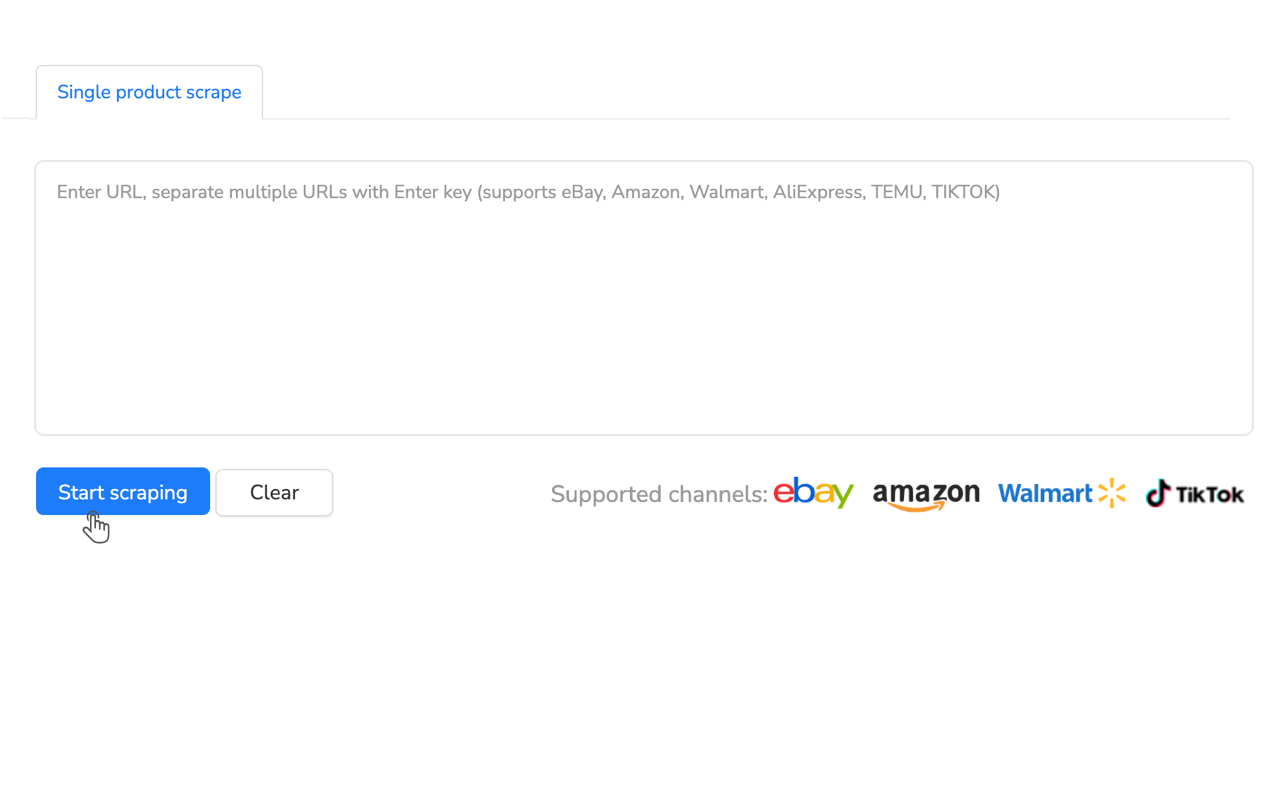
The key advantage is bulk processing. Instead of converting listings one at a time, you scrape your entire eBay catalog, then apply bulk transformations: increase all prices 20% for Amazon (compensating for higher FBA fees), adjust shipping policies to “Free” (matching Amazon Prime expectations), and batch-assign categories using auto-mapping rules. What would take 8-12 hours per 50 listings manually becomes a 30-minute bulk operation for 500 listings.
For sellers expanding to Amazon and Walmart simultaneously, tools like Maxmerce’s Online Product Scraper extract eBay data and convert to both platforms’ formats in one workflow. The system scrapes your eBay store, auto-maps eBay categories to Amazon and Walmart equivalents, converts eBay HTML descriptions into Amazon bullet points and Walmart short descriptions, and resizes images to each platform’s specifications. This reduces 500-product cross-platform setup from 250+ hours (manual conversion to two platforms) to under 4 hours (scrape + review + publish).
Image Optimization for Platform-Specific Requirements
Here’s where most cross-listers fail: image requirements differ dramatically across platforms. eBay allows 12-24 images with promotional text overlays, graphics, and colored backgrounds. Amazon limits 7-9 images, requires white backgrounds for main images, and prohibits any text/logos/watermarks. Walmart requires white-background main images, allows 8 total images, and enforces 2000×2000 pixel minimums.
Manual image preparation is brutal: download each eBay image (30-60 seconds per image × 12 images = 6-12 minutes), remove promotional overlays using photo editing software (5-10 minutes), ensure white backgrounds for main images (3-5 minutes with tools like Photoshop’s background removal), resize to platform specs (2-3 minutes), and re-upload to Amazon/Walmart (3-5 minutes). That’s 19-35 minutes of image work per product before you even start writing descriptions.
Automated image processors handle this instantly. The system downloads eBay images, detects and removes text overlays using AI, applies white backgrounds to main images, resizes to optimal dimensions (2000×2000 for Amazon, 2000×2000 for Walmart), and stages them for bulk upload. For 500 products with 12 images each (6,000 total images), manual processing takes 95-175 hours. Automated processing completes in 20-40 minutes—a 99% time savings.
Step 2: Category Mapping and Attribute Translation
Navigating Three Different Platform Taxonomies
The nightmare of multi-channel expansion is category structures. Your eBay “Cell Phone Accessories > Cases > iPhone 15” category doesn’t exist on Amazon or Walmart—you’re starting from scratch navigating entirely different category trees. Amazon’s structure is “Electronics > Cell Phones & Accessories > Cases, Covers & Skins” (4 levels deep with 300+ subcategories). Walmart’s is “Electronics > Cell Phones & Accessories > Cell Phone Cases” (different naming, different levels).
Manually selecting categories for 500 products means: logging into Amazon, navigating through 4-5 levels of category dropdowns (2-3 minutes per product), selecting attributes specific to that category (another 3-5 minutes), then repeating the entire process on Walmart (another 5-8 minutes). That’s 10-16 minutes just on category selection per product—83-133 hours for 500 SKUs before writing a single description or uploading an image.

Smart category mapping systems solve this through historical pattern recognition. The system analyzes thousands of successful cross-platform listings to learn category relationships: when it sees your eBay product categorized as “Electronics > Cell Phone Accessories > iPhone 15 Cases,” it automatically maps to Amazon’s correct path and Walmart’s equivalent. For 500 products, this reduces category selection from 83-133 hours to under 2 hours (reviewing and confirming auto-suggestions).
The accuracy advantage prevents the 20-30% revenue loss from miscategorization. List your iPhone case in Amazon’s “Electronics > Computers & Accessories” instead of the correct cell phone category, and you’re invisible to 80% of relevant searches. Platforms prioritize category-specific search—wrong category means zero visibility regardless of your title optimization. Auto-mapping eliminates 90%+ of these costly categorization errors.
Item Specific Translation: eBay vs Amazon vs Walmart
Beyond categories, each platform requires different product attributes (item specifics). eBay’s “Brand” field becomes Amazon’s “Manufacturer.” eBay’s “MPN” (Manufacturer Part Number) maps to Amazon’s “Part Number.” Walmart requires “Product ID Type” (UPC/EAN/ISBN) as mandatory, while eBay makes it optional for certain categories. Get these wrong, and your bulk uploads fail with cryptic error messages requiring manual troubleshooting.
The challenge compounds with category-specific attributes. Electronics require 8-12 item specifics on eBay (Brand, Model, Type, Color, Connectivity, Storage Capacity), but Amazon requires different attribute names for the same information (“Capacity” vs “Storage Capacity,” “Wireless Technology” vs “Connectivity”). Apparel is worse—eBay uses “Size Type” (Regular, Petite, Plus) before “Size,” while Amazon requires “Department” (Women’s, Men’s, Unisex) first.
Multi-channel listing platforms solve this through attribute translation tables. When you export eBay listings, the system automatically maps eBay attributes to Amazon and Walmart equivalents: “Brand” becomes “Manufacturer” on Amazon, “MPN” becomes “Part Number,” and category-specific attributes get translated based on platform requirements. This reduces upload failure rates from 30-40% (manual attribute mismatches) to under 5%, eliminating 15-25 hours of error correction for 500-product launches.
Step 3: Real-Time Inventory Synchronization
The Overselling Crisis: Why Manual Updates Fail
Let’s walk through a typical overselling scenario that destroys most manual multi-channel attempts. You have 10 units of Product Y. At 9:15am, eBay sells 3 units (you now have 7 remaining). At 10:30am before you check eBay orders, Amazon sells 4 units (now 3 remaining, but Amazon still shows 10 available). At 1:00pm while you’re at lunch, Walmart sells 5 units. Your actual inventory is -2 units (oversold), but all three platforms still show availability because you haven’t manually updated them.
The consequence hits fast. You must cancel 2 Walmart orders (eBay sold first chronologically, so they get priority). Walmart penalizes your Order Defect Rate (ODR), and if your cancellation rate exceeds 2%, you face search suppression. Those 2 customers likely leave negative feedback. Walmart’s algorithm now deprioritizes your listings. The revenue loss isn’t just those 2 orders—it’s 15-25% traffic reduction for the next 2-4 weeks while the algorithm recovers trust in your inventory accuracy.
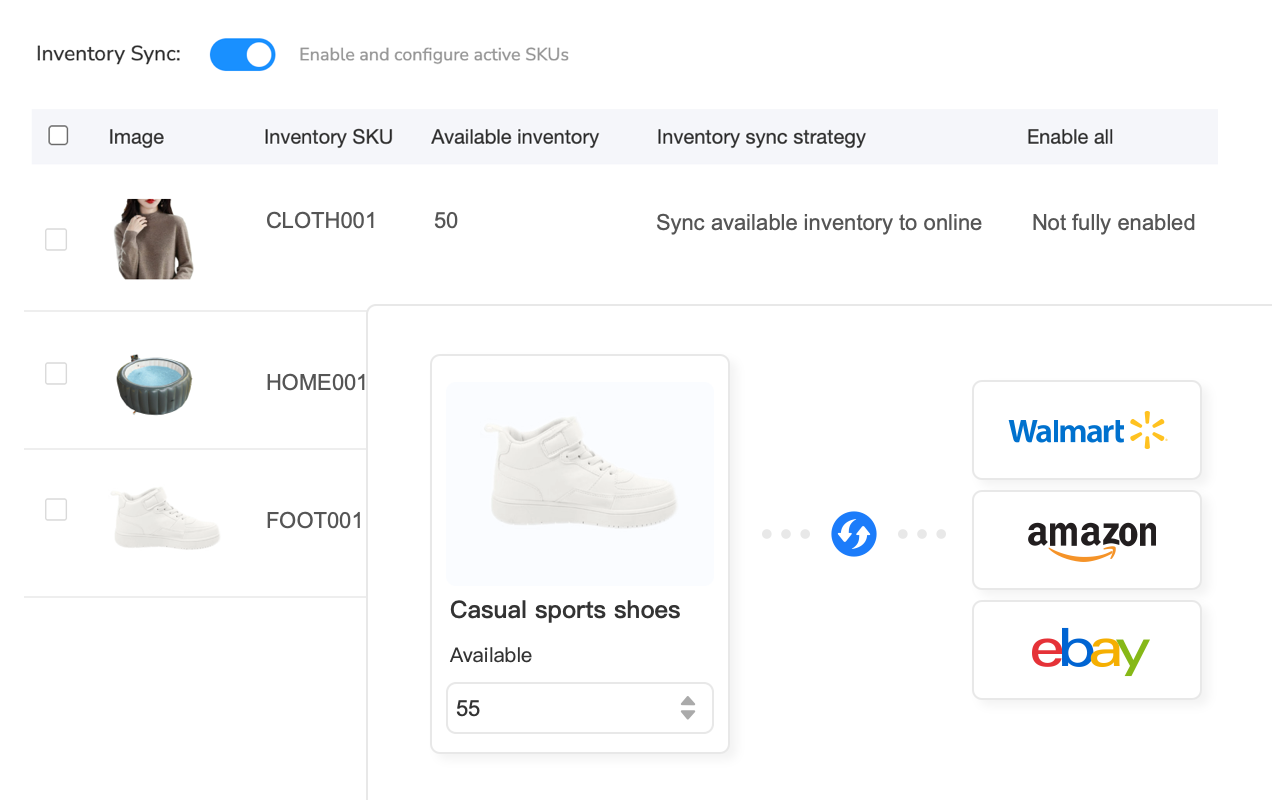
Real-time inventory sync systems prevent this through API connections to all platforms. The moment an order occurs on any channel, the system detects the sale (within 5-15 seconds), decrements available inventory in the central database, and pushes updated quantities to all connected marketplaces. Your 10 units become 7 on eBay, Amazon, and Walmart simultaneously after the first sale. The second sale adjusts all three platforms to 3 units. Overselling becomes mathematically impossible because inventory truth lives in one source that all platforms read from.
For sellers managing 500+ SKUs with 50+ daily orders across three platforms, platforms like Maxmerce’s Inventory Sync feature provide advanced safety mechanisms: safety buffers (always reserve 2 units unavailable for listing, preventing stockouts from simultaneous orders during sync delays), channel priority rules (Amazon FBA gets first access because of higher margins and Prime expectations), and location-based allocation (East Coast warehouse stocks serve Amazon, West Coast serves eBay, central warehouse serves Walmart). These rules eliminate 95% of overselling incidents while optimizing fulfillment efficiency.
Handling Simultaneous Orders During Peak Traffic
The edge case that breaks basic sync systems: simultaneous orders. Black Friday, 2:00pm—your last 2 units of a hot product sell on Amazon and Walmart within 5 seconds of each other. Both orders enter processing before the sync system can decrement inventory. You’re oversold by 1 unit despite having “real-time” sync because the 5-second window allowed duplicate claims.
Advanced sync systems solve this through inventory reservation. When an order begins processing (customer adds to cart and starts checkout), the system places a 10-minute hold on 1 unit—removing it from available inventory before payment completes. If payment fails, the hold releases after 10 minutes. This prevents the duplicate-order scenario because the Amazon order at 2:00:00pm reserves 1 unit (leaving 1 available), and the Walmart order at 2:00:05pm sees only 1 unit available—both orders complete successfully.
The alternative approach is safety stock buffers. Set your sync system to always maintain 1-2 units in reserve—if you have 10 physical units, only list 8-9 as available. During peak periods (Black Friday, Cyber Monday), increase buffers to 3-5 units. This reduces listing visibility slightly (lower quantity signals can reduce conversion by 2-5%), but eliminates overselling risk entirely. Most successful multi-channel sellers accept the 2-5% conversion trade-off versus the 25-40% revenue loss from post-stockout algorithm penalties.
Step 4: Platform-Specific Pricing Optimization
Fee Structure Differences Require Pricing Adjustments
Here’s the math that surprises most cross-listers: you can’t use the same price across all three platforms. eBay charges 13.25% final value fees plus 3% payment processing (16.25% total). Amazon FBA fees include 15% referral fees plus $3-8 per-item fulfillment costs (totaling 20-35% depending on size/weight). Walmart charges 8-15% referral fees with no fulfillment costs for merchant-fulfilled. If you’re profitable at $50 on eBay, you’re losing money at $50 on Amazon FBA.
The formula successful sellers use: eBay price = base price (cost × 2.5-3.0 for healthy margins). Amazon price = eBay price × 1.15-1.25 (15-25% premium compensating for higher fees). Walmart price = eBay price × 0.95-1.05 (5% lower to match Walmart’s discount marketplace perception, or up to 5% higher because of lower fees). For a $50 eBay item with $20 cost, that becomes: eBay $50, Amazon $57-62, Walmart $47-52.

The counter-intuitive insight: Amazon customers accept higher prices because of Prime expectations. When buyers see $62 with “Prime Free 2-Day Shipping,” they perceive more value than $50 on eBay with “Free 4-7 Day Shipping.” You’re not gouging—you’re pricing according to fulfillment value and customer expectations. Walmart customers, conversely, expect discounts versus retail—listing at $52 when Walmart.com sells similar items at $48-50 means zero sales.
Automated repricing systems apply these platform-specific rules without manual calculation. You set formulas once: “Amazon = eBay × 1.20, Walmart = eBay × 0.95, minimum margin 25%.” The system applies these rules across your entire catalog, adjusting 500 prices in seconds. When you change an eBay price, Amazon and Walmart prices update automatically maintaining the ratio. This eliminates 8-12 hours monthly of manual price calculation and updating across platforms.
Competitive Repricing Across Multiple Marketplaces
Static pricing fails in competitive markets. Your $62 iPhone case on Amazon gets crushed when a competitor reprices to $58 (winning the Buy Box, capturing 90% of sales). On eBay, your $50 listing competes against 20 sellers using automated repricing to undercut by $0.25 every hour. You can’t manually check competitor prices 5-10 times daily across three platforms—that’s 2-3 hours of pure price monitoring before making a single adjustment.
Competitive repricing automation solves this through continuous monitoring. The system checks your competitors’ prices every 15-60 minutes (configurable), compares against your current price, and adjusts within predefined rules: “Stay $0.50 below lowest competitor on Amazon, but never below $55 (minimum margin threshold).” On eBay, “Match lowest competitor within $1, minimum $48.” On Walmart, “Maintain $2 below Walmart retail price, never below cost + $10.”
The advantage is 24/7 responsiveness. When a competitor drops prices at 2am, your repricing system reacts within 15 minutes—capturing sales during the competitor’s price window before they realize their mistake and adjust. Manual sellers don’t see the change until 8am the next day (6 hours of lost sales). Over 30 days, automated repricing captures 15-25% more sales from optimal price positioning that manual monitoring can’t match.
Step 5: Unified Order Management Dashboard
Consolidating Three Order Streams Into One Workflow
The operational nightmare of multi-channel selling is order management. You have orders arriving from eBay Seller Hub, Amazon Seller Central, and Walmart Seller Center. Each platform has different interfaces, different workflows, and different notification systems. Most sellers end up checking all three dashboards 5-10 times daily, spending 20-30 minutes just on login overhead before processing any orders.
The consequences are measurable. 5-10% of orders get missed or delayed because they arrive on a platform you checked 2 hours ago and won’t check again until end-of-day. eBay’s Late Shipment Rate threshold is 3%—if you’re missing 5% of orders from dashboard-switching chaos, you’ve already lost Top Rated Seller status (costing 5% Final Value Fee discount on all sales). Amazon is stricter at 1% Order Defect Rate—missing 5% of orders means suspension is imminent.
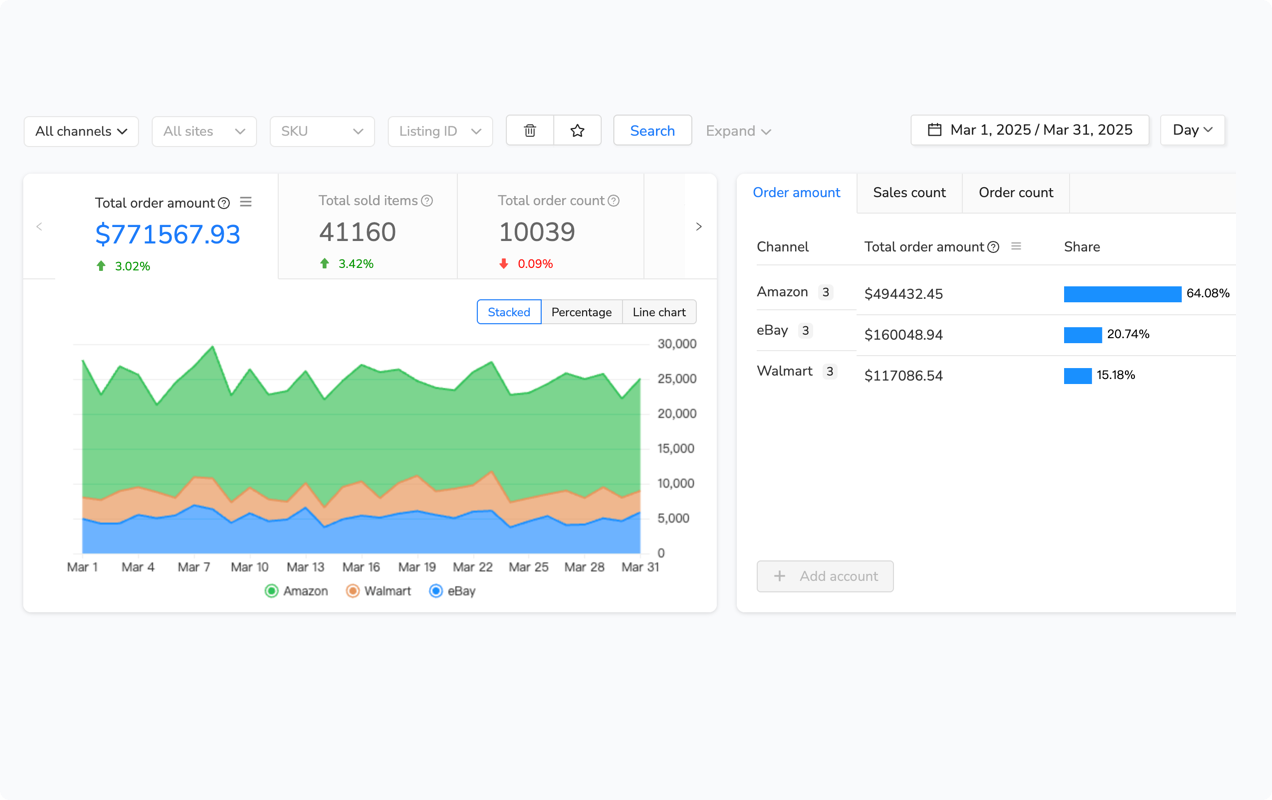
Unified order management dashboards consolidate all platform orders into one interface. When you log into Maxmerce’s Multi-Channel Dashboard, you see every eBay, Amazon, and Walmart order in one queue sorted by priority: unfulfilled orders first (by platform cutoff time—Amazon’s 2pm same-day cutoff ranks higher than eBay’s end-of-day), then partially shipped, then completed. You’re processing orders platform-agnostic—the system handles which marketplace each order originated from, you focus on fulfillment workflow.
The time savings compound with bulk actions. Select 20 orders across all three platforms, click “Print Shipping Labels” (the system generates platform-appropriate labels—eBay labels for eBay orders, Amazon labels for Amazon, Walmart for Walmart), and “Mark as Shipped” updates all three platforms’ seller dashboards with tracking numbers automatically. What took 45-60 minutes manually (logging into each platform, printing labels separately, updating tracking individually) becomes a 5-minute bulk operation—90% time savings.
Automated Tracking Updates and Customer Communication
The post-shipment burden multiplies across platforms. After printing labels and shipping, you manually enter tracking numbers in eBay Seller Hub, then Amazon Seller Central, then Walmart Seller Center—3-5 minutes per order across all three dashboards. For 50 orders daily, that’s 2.5-4 hours just updating tracking information. Miss one, and you fail platform delivery metrics (eBay’s Valid Tracking Rate requirement, Amazon’s On-Time Delivery, Walmart’s Tracking Upload Rate).
Automated systems sync tracking instantly. When you mark an order “shipped” in your unified dashboard (or when your shipping software like ShipStation/Shippo creates a label), the tracking number automatically uploads to the originating platform within 30 seconds. eBay, Amazon, and Walmart all receive tracking simultaneously—eliminating manual data entry entirely. For 50 daily orders, this saves 2.5-4 hours while ensuring 100% tracking upload compliance.
Customer communication automation extends this further. When tracking shows “delivered,” the system auto-sends platform-appropriate feedback requests: eBay gets feedback request messages (within eBay’s 60-day window), Amazon triggers automated review request emails (complying with Amazon’s review solicitation policies), and Walmart sends satisfaction surveys. This increases review generation by 40-60% compared to manual/no follow-up, building social proof across all channels without additional effort.
Common Cross-Listing Mistakes and How to Avoid Them
Launching Too Many SKUs Before Testing Workflows
The biggest failure pattern: sellers cross-list their entire 500-SKU eBay catalog to Amazon and Walmart in week one, then discover their inventory sync isn’t working correctly. By day 3, they have 15-20 overselling incidents, cancellation penalties across two new platforms, and no time to fix the system because they’re firefighting order fulfillment. The attempted expansion becomes an operational crisis requiring 60+ hours weekly just to prevent suspensions.
The proven approach is staged rollout. Week 1: Cross-list your top 25 best-selling eBay products to Amazon only. These are products you know well, have reliable stock for, and can afford to give extra attention. Monitor inventory sync closely—manually verify that Amazon quantities update within 5-15 seconds after eBay sales. Fix any sync delays or errors on 25 products (manageable) before expanding.
Week 2-3: If sync is working perfectly, add 75 more SKUs to Amazon (now 100 total). Simultaneously add the initial 25 SKUs to Walmart. You’re testing two things: scaling on Amazon (does sync handle 100 SKUs reliably?), and Walmart’s workflow (is it similar to Amazon or does it require different processes?). Week 4+: Once you’ve proven your systems work with 100 SKUs across two additional platforms, expand to your full catalog. This staged approach prevents catastrophic failures that cause platform suspensions.
Ignoring Platform-Specific Content Requirements
Here’s the mistake that tanks Amazon listings: copying your eBay HTML description directly into Amazon’s description field. Amazon strips all HTML formatting, leaving you with a wall of text lacking bullet points, paragraph breaks, or any formatting—unreadable content that converts 40-60% worse than properly formatted listings. Additionally, Amazon’s search algorithm prioritizes content in bullet points (5 bullets, 200 chars each)—if your key features are buried in description paragraphs, you rank 30-50 positions lower than competitors with optimized bullets.
The content conversion workflow that succeeds: extract key product features from eBay descriptions (benefits, specifications, use cases), reformat into Amazon’s 5-bullet structure (Bullet 1: Primary benefit, Bullet 2: Key feature 1, Bullet 3: Key feature 2, Bullet 4: Specifications, Bullet 5: Warranty/guarantee), write a concise 200-word description paragraph without HTML, and add backend search terms (250 characters of relevant keywords not visible to buyers but used for search ranking).
For Walmart, the requirement differs again: short descriptions under 1,000 characters (Walmart truncates longer content), emphasis on item specifics over prose (Walmart’s algorithm heavily weights structured attributes), and white-background main images (listings with colored backgrounds rank 20-40% lower). Smart cross-listing tools handle these platform-specific conversions automatically—extracting content from eBay, reformatting to each platform’s preferred structure, and ensuring compliance with all content policies.
| Cross-Listing Component | Manual Process (500 Products) | Automated Solution | Time Saved |
|---|---|---|---|
| Product Data Extraction (eBay → spreadsheet) | Manual copy-paste: 5 min/product = 42 hrs | Product scraper: 10-20 min bulk extraction | 41.5 hours |
| Category Mapping (eBay → Amazon + Walmart) | Manual navigation: 10 min/product × 2 platforms = 167 hrs | Auto-mapping with review: 2-3 hrs total | 165 hours |
| Image Optimization (resize, background removal) | Manual editing: 20 min/product = 167 hrs | Batch image processor: 30-40 min total | 166 hours |
| Content Reformatting (eBay description → Amazon bullets) | Manual rewriting: 8 min/product = 67 hrs | AI content conversion: 1-2 hrs review | 65 hours |
| Pricing Adjustments (platform-specific rules) | Manual calculation: 3 min/product × 2 platforms = 50 hrs | Formula-based bulk pricing: 15 min setup | 49.75 hours |
| Daily Inventory Sync (50 orders across 3 platforms) | Manual updates: 12 min/order = 10 hrs daily (300 hrs monthly) | Real-time API sync: 0 hrs (automatic) | 300 hours monthly |
Measuring Multi-Channel Performance
Platform-Specific Conversion Metrics
The insight most sellers miss: conversion rates differ dramatically by platform. Your eBay listings might convert at 3-5% (industry average for established sellers), but the same products on Amazon typically convert at 8-12% (higher because of Prime trust and Buy Box prominence). Walmart conversion rates sit between at 5-8% (growing as Walmart.com gains marketplace credibility).
This means identical products generate vastly different sales velocity per platform. A product doing $1,000 monthly on eBay from 1,000 views (3% conversion, $30 average order value) might generate $2,400 monthly on Amazon from 1,000 views (10% conversion, $36 average with higher Amazon pricing). The traffic is equal, but conversion rate differences double revenue. Understanding these platform-specific metrics lets you prioritize where to drive external traffic—Amazon PPC often ROI-positive at 20-25% ACOS because of high natural conversion, while eBay Promoted Listings break even at 8-12% ad rates.
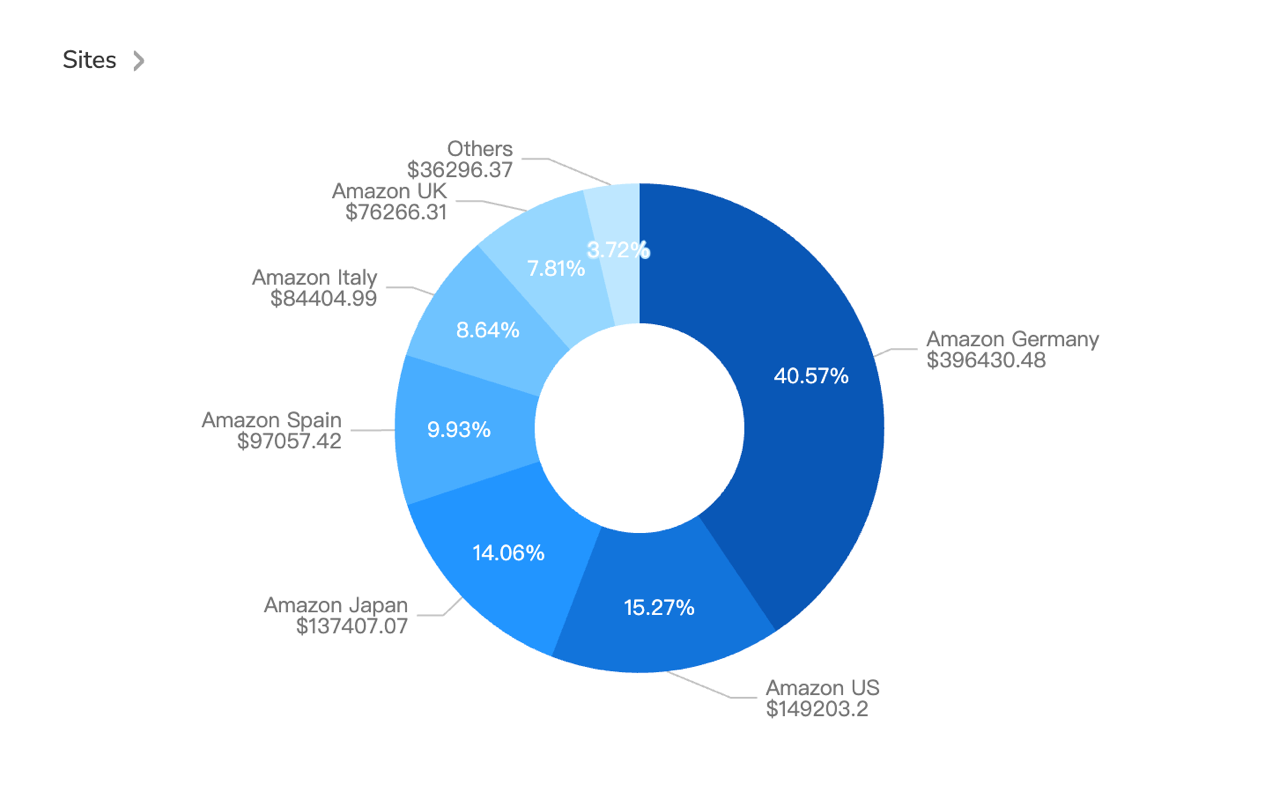
Profitability per platform requires even deeper analysis. Amazon’s higher conversion comes with 20-35% total fees (referral + FBA), eBay’s lower conversion costs only 16.25% total (FVF + payment), Walmart’s mid-range conversion has 8-15% fees (merchant-fulfilled). A $50 product might generate: eBay $50 × 3% conversion × 83.75% net (after fees) = $1.25 per 100 views. Amazon $60 × 10% conversion × 70% net (after fees) = $4.20 per 100 views. Walmart $48 × 7% conversion × 87% net = $2.92 per 100 views. Amazon wins on profit per view despite highest fees because of conversion advantage.
For sellers managing 500+ SKUs across three platforms, Maxmerce’s Analytics module provides SKU-level profitability tracking per platform. The system automatically factors in platform-specific fees, shipping costs, and advertising spend—revealing which products are stars on Amazon but losers on eBay (delist from eBay, focus inventory on Amazon), which products dominate eBay but struggle on Amazon (optimize Amazon content or reallocate stock), and which universal winners should receive maximum inventory investment across all channels.
Frequently Asked Questions
Is cross-listing products from eBay to Amazon and Walmart worth the effort?
Yes—50% of US multi-channel sellers report 2-3X revenue growth after expanding from eBay to Amazon and Walmart. The math is compelling: your existing products gain access to Amazon’s 200+ million Prime members and Walmart’s 150+ million monthly US shoppers, multiplying exposure without creating new inventory. However, manual cross-listing fails at scale. Without inventory sync and automated listing conversion, you’ll spend 8-12 hours daily managing orders and preventing overselling across platforms.
How long does it take to cross-list 500 eBay products to Amazon?
Manual cross-listing takes 15-25 minutes per product (category mapping, attribute translation, image optimization, pricing adjustments) = 125-208 hours for 500 products. Automated cross-listing tools with product scraping and category mapping reduce this to 2-4 hours: scrape eBay listings, auto-map categories across platforms, adjust pricing rules, bulk publish. Platforms like Maxmerce’s Online Product Scraper extract eBay data, convert to Amazon/Walmart formats, and handle bulk uploads—reducing setup time by 95%.
How do I prevent overselling when listing the same product on eBay, Amazon, and Walmart?
Real-time inventory sync systems connect to all platforms via API, updating available quantities within 5-15 seconds after each sale. When an Amazon order depletes inventory, eBay and Walmart listings adjust instantly. Manual inventory management fails because updating three platforms after each order takes 10-15 minutes—impossible at 50+ daily orders. Multi-channel platforms like Maxmerce’s Inventory Sync feature provide safety buffers (reserve 2 units minimum), location-based allocation, and conflict resolution—eliminating 95% of overselling incidents that cause account suspensions.
Do I need different pricing strategies for eBay, Amazon, and Walmart?
Yes—platform fee structures and buyer expectations differ significantly. eBay charges 13.25% final value fees plus 3% payment processing (16.25% total), Amazon FBA fees range 20-35% including fulfillment, and Walmart charges 8-15% referral fees. Successful sellers adjust pricing: eBay base price, Amazon 15-25% higher (compensating for FBA fees and Prime buyer expectations), Walmart 5-10% lower (competing with Walmart’s marketplace discount perception). Automated repricing tools apply platform-specific rules while maintaining minimum margins.
Can I use the same product images and descriptions across eBay, Amazon, and Walmart?
Partially—images need optimization for each platform’s requirements. eBay allows 12-24 images with promotional graphics, Amazon limits 7-9 images and prohibits text overlays/logos, Walmart requires white backgrounds for main images and allows 8 total. Descriptions also differ: eBay allows HTML formatting and longer content, Amazon uses structured bullet points with 200-char limits, Walmart requires short descriptions (1000 chars) plus item specifics. Smart cross-listing tools auto-convert content: extract text from eBay descriptions, reformat to Amazon bullets, resize images to platform specs—saving 10-15 minutes per product in manual reformatting.
What’s the best order to expand: eBay to Amazon first, or eBay to Walmart?
Expand to Amazon first for most US sellers—larger buyer base (310 million vs Walmart’s 150 million monthly), faster approval process (2-5 days vs Walmart’s 2-4 weeks), and lower barriers to entry (no performance requirements vs Walmart’s pro seller standards). Launch with 50-100 best-selling eBay products on Amazon, validate multi-channel workflows, then expand to Walmart once systems are proven. The exception: if your products compete directly with Walmart retail prices (home goods, toys, grocery), launch Walmart first to avoid being undercut by Walmart.com’s own inventory.
How do I handle orders from three platforms without missing shipments?
Unified order management dashboards consolidate all platform orders into one interface, preventing the login-switching chaos that causes 5-10% of missed shipments. The workflow: orders from eBay, Amazon, Walmart appear in one queue, system routes to optimal fulfillment location (based on customer address and stock availability), shipping labels print in bulk, tracking updates sync back to all platforms automatically. Maxmerce’s Analytics module provides a Multi-Channel Dashboard showing all orders by platform, status, and priority—reducing order management time from 3-4 hours daily (checking three dashboards) to under 30 minutes.
Should I use FBA for Amazon while managing eBay and Walmart inventory myself?
Hybrid fulfillment (FBA for Amazon, merchant-fulfilled for eBay/Walmart) works well if you can maintain separate inventory pools. Allocate 60-70% of fast-moving inventory to FBA for Prime eligibility and ranking boost, keep 30-40% for eBay/Walmart merchant fulfillment. The challenge is preventing stockouts—if FBA inventory sells out, you can’t redirect Amazon orders to your warehouse without canceling (hurts account health). Advanced inventory allocation systems let you dynamically shift stock between channels based on sales velocity, maintaining optimal availability across all platforms while minimizing FBA storage fees.
From Single-Channel to Multi-Platform Profit Engine
The opportunity is undeniable: your 500-product eBay store can 2-3X revenue by expanding to Amazon and Walmart, accessing 590 million total buyers versus eBay’s 132 million. The execution challenge is equally clear—manual cross-listing requires 250+ hours initially, then 40+ hours weekly for inventory management and order processing. Without automated systems, multi-channel expansion becomes an operational nightmare that destroys margins through overselling penalties, missed shipments, and 24/7 manual firefighting.
The sellers who succeed implement infrastructure before scaling: product scraping for bulk listing conversion (reducing 200+ hour setup to 4 hours), real-time inventory sync preventing 95% of overselling incidents, unified order dashboards consolidating three platforms into one workflow, and platform-specific repricing maintaining optimal margins across different fee structures. These aren’t optional extras—they’re operational requirements separating $50K yearly single-channel operations from $150K+ yearly multi-platform businesses running on the same founder hours.
If you’re currently doing $10K-20K monthly on eBay and spending 30+ hours weekly managing your single-channel operation, you have a decision point. Expand manually and watch your workload explode to 70+ hours weekly while overselling incidents threaten account suspensions. Or implement proper multi-channel infrastructure that handles Amazon and Walmart expansion while actually reducing your weekly workload to 20-25 hours through automation.
Maxmerce’s Listing module provides the complete cross-listing toolkit: product scraper extracting eBay data, smart category mapping to Amazon/Walmart, real-time inventory sync across all channels, and unified order management. Everything covered in this guide consolidated into one platform designed specifically for eBay sellers expanding to Amazon and Walmart. Start with a 14-day free trial (no credit card required) to test cross-listing workflows with your actual eBay catalog before committing.
Your competitors are already accessing those 590 million buyers. The question isn’t whether to expand to Amazon and Walmart—it’s whether you’ll do it with the proper systems to scale profitably, or manually and watch operational chaos destroy the opportunity.
