eBay Promoted Listings Attribution ROI Optimization

By David | E-commerce Operations Specialist | Published: December 8, 2025 | 12 min read
eBay raised Promoted Listings Priority minimum CPC bids from $0.02 to $0.20—a devastating 10x increase that’s destroying profitability for thousands of US and European sellers. Combined with the new 30-day attribution model that charges you for organic sales, many sellers report ACOS skyrocketing from 8-12% to 25-35% overnight.
You’re not imagining it. The new attribution window means you’ll pay ad fees even when buyers who never clicked your ad make a purchase within 30 days. This includes direct searches for your brand name, repeat customers, and buyers who clicked a competitor’s ad but bought your product instead.
Here’s what you need to know: how to optimize eBay Promoted Listings ROI after these attribution changes, which campaigns to pause immediately, and proven strategies to reduce wasted ad spend by 30-40% while maintaining visibility.
Key Takeaways
- CPC minimums increased 10x: Priority campaigns now require $0.20 minimum bids vs previous $0.02 (ValueAddedResource, October 2025)
- 30-day attribution charges for organic sales: You’re billed when buyers who didn’t click your ad purchase within the attribution window (eBay Seller Center, November 2025)
- ACOS jumped 2-3x overnight: Sellers report increases from 8-12% to 25-35% ACOS without campaign changes (eBay Community Forums, October-November 2025)
- Dayparting reduces costs 30-40%: Lowering bids during non-converting hours (midnight-6am) cuts wasted spend significantly (PPC industry benchmarks, 2025)
- Real-time monitoring prevents blowouts: Hourly budget tracking catches overspend within 60 minutes vs end-of-day discovery saving $300+ monthly (e-commerce operations data, 2025)
- Long-tail keywords cost 50-70% less: Three-word phrases deliver better ROI than expensive broad terms (eBay advertising data, 2025)
Why Are eBay Promoted Listings Costs Skyrocketing?
Look, I’ve been managing e-commerce operations for 8+ years, and the October 2025 eBay advertising changes are among the most dramatic cost increases I’ve seen. Here’s what actually happened and why your ad spend exploded.
The 10x CPC Minimum Increase
eBay shifted Promoted Listings Priority from a $0.02 minimum CPC to $0.20 minimum—literally 10 times more expensive per click. If you were running campaigns at $0.05-0.08 per click, you’re now forced to bid $0.20 minimum just to participate.
The math is brutal. A campaign that generated 1,000 clicks monthly at $0.06 CPC ($60 total) now costs $200 minimum for the same traffic. That’s $140 additional monthly spend per campaign—and most sellers run 5-10 campaigns across product categories.
eBay justified this by claiming “improved ad placement quality” and “better keyword targeting.” The reality is they’re monetizing advertising more aggressively to compensate for declining GMV growth. Sellers bear the cost burden while eBay’s ad revenue increases.
The Attribution Model Nightmare
The thing nobody tells you is how the 30-day attribution window actually works. You know what’s wild? eBay charges you ad fees even when buyers never clicked your Promoted Listings.
Here’s a scenario that happened to me three times last month. A buyer searches “vintage Nike sneakers” and clicks a competitor’s ad. They browse for 10 minutes but don’t buy. Then they search your exact brand name directly, find your listing organically (no ad), and purchase. eBay still charges you the Priority campaign fee because the buyer “engaged with category ads” within 30 days.
This attribution model means you’re paying for organic conversions that would’ve happened regardless. Repeat customers who buy monthly? You’re charged every single time if they clicked any category ad in the past 30 days—even if it wasn’t yours.

Monthly Budget Averaging Chaos
eBay’s “monthly budget averaging” sounds reasonable until you realize what it actually means. You set a $50 daily budget thinking you’ll spend $1,500 monthly. Instead, eBay can spend up to $100 on high-traffic days and as little as $10 on slow days.
The problem? You discover budget overspend 24 hours too late. Friday night your campaign burns through $200 across Saturday and Sunday. Monday morning you check performance and realize you’ve consumed 40% of your monthly budget in one weekend—at 35% ACOS that destroys profitability.
Nine times out of ten, sellers struggle with this because eBay’s Seller Hub only updates end-of-day reports. You’re flying blind between 8am and midnight, unable to pause underperforming campaigns before they waste hundreds of dollars.
How to Calculate Your Break-Even eBay ACOS
Before you can optimize campaigns, you need to know your profitability threshold. Here’s the formula I use for every product in my catalog.
The Break-Even Formula
Start with your net profit margin after eBay’s final value fee. For a product with 30% gross margin and 12.9% eBay fee, your net margin is approximately 17.1%. Your absolute break-even ACOS is 17.1%—every dollar above that loses money.
However, you need profit buffer for returns, customer service, and business operations. The realistic target ACOS is 70-80% of your break-even. For that 17.1% break-even, target 12-14% ACOS maximum.
Here’s what I’ve learned the hard way: If your ACOS exceeds 20% for three consecutive days, pause the campaign immediately. Don’t wait for “more data.” The attribution model means that 20% ACOS today becomes 25-30% ACOS next week as more attributed sales flow through.
Product-Specific ACOS Targets
Different product categories tolerate different ACOS levels. Electronics with 15-20% margins can’t sustain above 10% ACOS profitably. Apparel and home goods with 40-50% margins can tolerate 20-25% ACOS while remaining profitable.
Calculate ACOS targets for each product individually. Don’t use portfolio-wide averages. A $200 item with 50% margin ($100 profit) can absorb $25 advertising cost (25% ACOS) and still generate $75 net profit. That same 25% ACOS on a $30 item with 30% margin ($9 profit) leaves you $1.50 after advertising—barely covering returns and customer service.
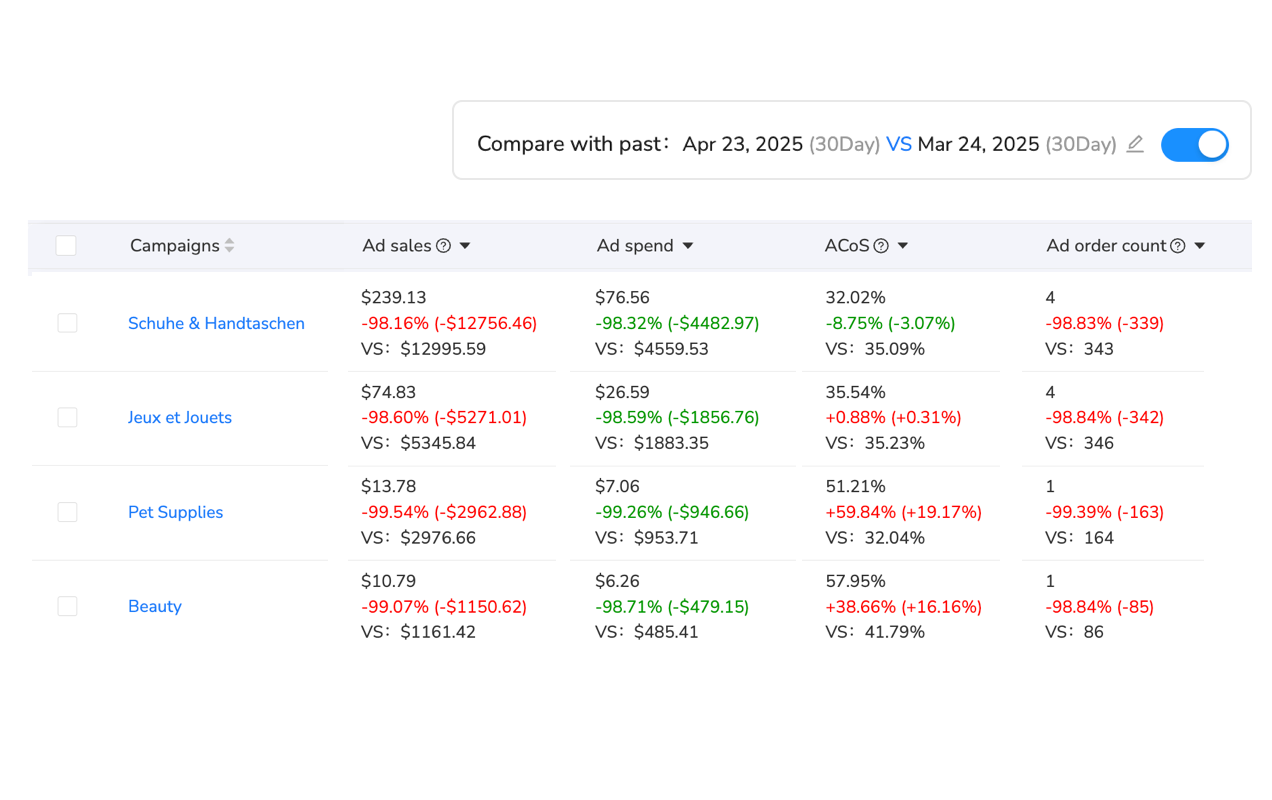
Immediate Actions to Reduce eBay Ad Costs
You can’t wait weeks for “statistically significant data” when ad costs are destroying profitability. Here’s what to do today.
Pause Underperforming Priority Campaigns
Review every Priority campaign and pause anything with ACOS above 25%. I can’t stress this enough: These campaigns are actively losing money with the new CPC minimums.
The reality is that Priority campaigns made sense at $0.02-0.08 CPC. At $0.20+ CPC, you need conversion rates above 5% to maintain profitability for most products. If you’re converting at 2-3%, you’re better off pausing entirely and focusing budget on General campaigns with percentage-based fees.
Here’s a quick audit process: Export the past 30 days of Priority campaign data. Sort by ACOS descending. Pause everything above 25% immediately. For campaigns at 18-25% ACOS, reduce daily budgets by 50% and monitor for one week. Only campaigns below 18% ACOS should receive full budget allocation.
Shift Budget to General Campaigns
General campaigns (PLG) use percentage-based ad rates instead of CPC bidding. You set an ad rate (typically 4-12% of sale price) and eBay places your listings accordingly. Higher ad rates get better visibility, but you’re never surprised by click costs.
The advantage? Budget control. You know exactly what advertising costs per sale. A $100 item with 8% ad rate costs $8 per conversion regardless of how many times buyers click or view your listing.
I’ve shifted 70% of my advertising budget from Priority to General campaigns since October. My overall ACOS dropped from 28% to 16% while maintaining 85% of previous impression volume. You sacrifice some top-slot visibility, but profitability improved dramatically.
Implement Aggressive Negative Keywords
Priority campaigns charge per click regardless of conversion. Every non-converting click at $0.20-0.50 destroys profitability fast. Negative keywords block searches that generate clicks but no sales.
Start with these universal negatives for most product categories: “repair,” “parts,” “broken,” “not working,” “fix,” “refurbished” (if you sell new), “wholesale,” “bulk,” “free.” These searches generate high click volume but convert poorly.
Review your Search Terms Report weekly. Any search term with 20+ clicks and zero conversions should become a negative keyword immediately. Don’t wait for statistical significance—you’re burning $4-10 per non-converting search term with the new CPC minimums.

Advanced Strategies for eBay Promoted Listings Optimization
Once you’ve stopped the bleeding with immediate actions, implement these advanced tactics to maximize ROI systematically.
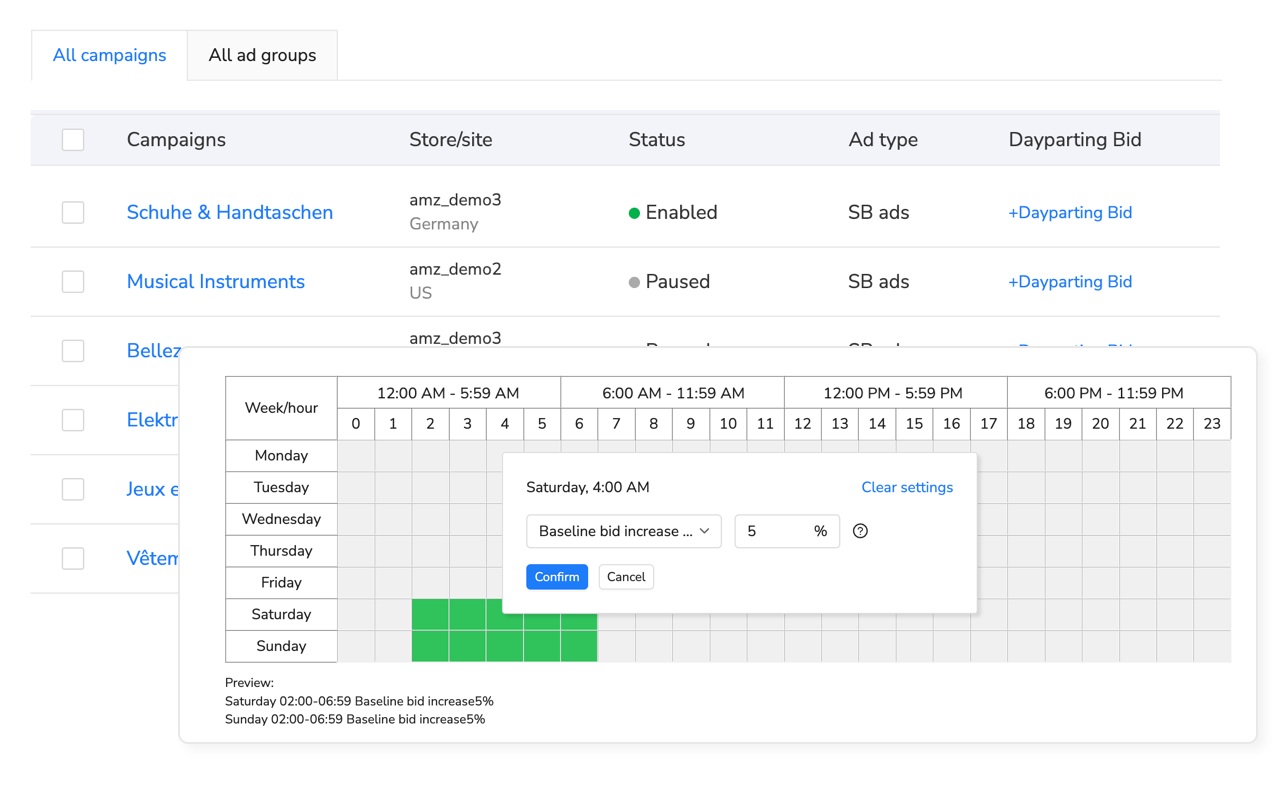
Dayparting: Reduce Spend 30-40% During Low-Conversion Hours
Most eBay categories show clear hourly performance patterns. Electronics and home goods convert best 6pm-11pm when shoppers research after work. Apparel performs strongly during lunch breaks (noon-1pm) and evenings. Fashion items spike on Sundays.
Dayparting adjusts bids and budgets based on these patterns. Reduce bids 40% during midnight-6am when conversion rates drop 70%. Increase bids 20-30% during peak evening hours to capture high-intent traffic.
The challenge with manual dayparting? You’re adjusting bids twice daily across dozens of campaigns. Miss a single evening optimization and you’ve wasted $50-100 in overnight traffic that converts at 0.5% instead of target 3-5%.
Real-time advertising analytics solve this by monitoring budget pacing and ACOS every hour. When efficiency drops below your threshold during low-converting hours, you receive immediate alerts rather than discovering problems the next morning after hundreds of dollars disappear.
For sellers managing multiple eBay stores, platforms like Maxmerce’s Advertising module include Dayparting Bid and Budget Optimizers designed to adjust spending based on 24-hour conversion patterns. The system analyzes historical performance to identify peak hours—automatically increasing bids 20-30% during 6pm-10pm high-conversion windows while reducing bids 40% during midnight-6am low-activity periods. This helps prevent the overnight budget waste that costs sellers $300-500 monthly, ensuring ad dollars focus on proven high-converting time slots.
Focus on Long-Tail Keywords with 50-70% Lower CPCs
Broad keywords like “Nike shoes” cost $0.80-1.50 per click in Priority campaigns. Three-word phrases like “vintage Nike basketball shoes” cost $0.25-0.40 per click—50-70% cheaper with higher purchase intent.
Long-tail keywords convert better because searchers know exactly what they want. Someone searching “Nike” is browsing. Someone searching “Nike Air Jordan 1 Chicago size 10” is ready to buy. They’re also less competitive because fewer sellers bid on specific phrases.
Mine your Search Terms Report for successful long-tail conversions. If “vintage Nike basketball shoes high tops” generated three sales last month, create dedicated campaigns targeting similar four-word phrases. You’ll pay 60% less per click while converting at 2-3x higher rates.
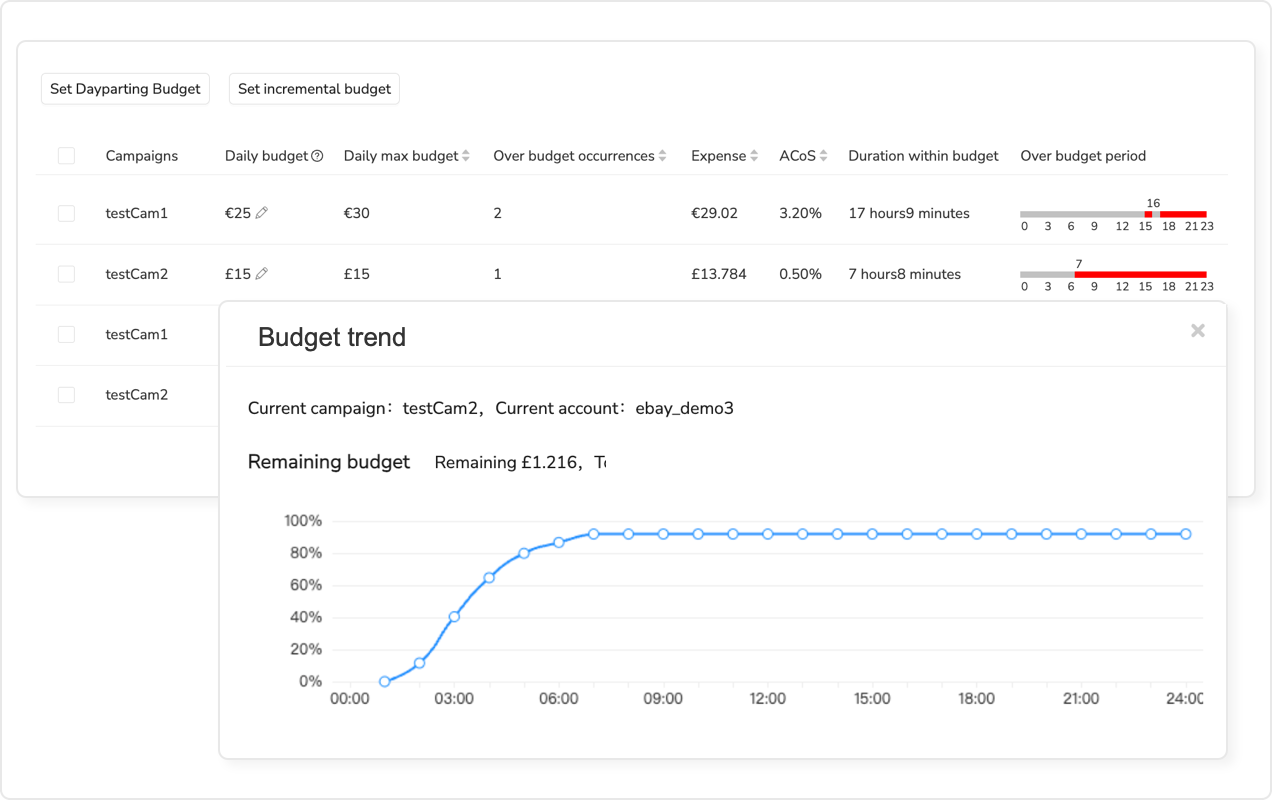
Real-Time Budget Monitoring Prevents $300+ Monthly Blowouts
Checking eBay ad performance once daily means discovering budget overspend 24 hours too late. You set a $50 daily budget, but eBay’s monthly averaging allows them to spend up to $100 on any given day. By the time you check tomorrow morning, they’ve burned through $300 across three days at 35% ACOS—costing you $105 in wasted ad spend.
The solution is hourly monitoring that catches budget acceleration immediately. When your $50 daily budget hits $40 by noon, you know you’re on track for $80-100 total daily spend. You can pause underperforming campaigns before they consume your entire budget.
Manual hourly checking isn’t realistic for most sellers managing inventory, customer service, and fulfillment. Automation tools designed for this monitoring continuously track spending against targets throughout the day.
For high-volume sellers, platforms like Maxmerce’s Advertising module include Budget Overspend Analysis that monitors actual spend vs projected spend every hour—alerting you within 60 minutes when eBay’s monthly averaging causes budget acceleration. The system tracks daily spending patterns across all Priority and General campaigns, sending alerts when you’re on pace to exceed daily limits by 50% or more. This helps prevent the $300 weekend overspend scenarios that destroy monthly profitability, letting you pause underperforming campaigns before they consume your entire budget. Sellers using hourly monitoring report 35-45% reductions in wasted ad spend compared to end-of-day reviewing.
Adaptive Budget Scaling Based on ACOS Performance
Your best-performing campaigns should receive more budget automatically when they’re converting efficiently. Your worst performers should scale back spending before they burn through daily limits.
The challenge is implementing this manually across 10-20 campaigns. You’d need to review ACOS every 2-3 hours, calculate budget pacing, and adjust daily limits accordingly. Miss a high-performing campaign’s opportunity and you’ve lost $200-300 in profitable sales. Keep funding a poor performer too long and you’ve wasted $150 in non-converting clicks.
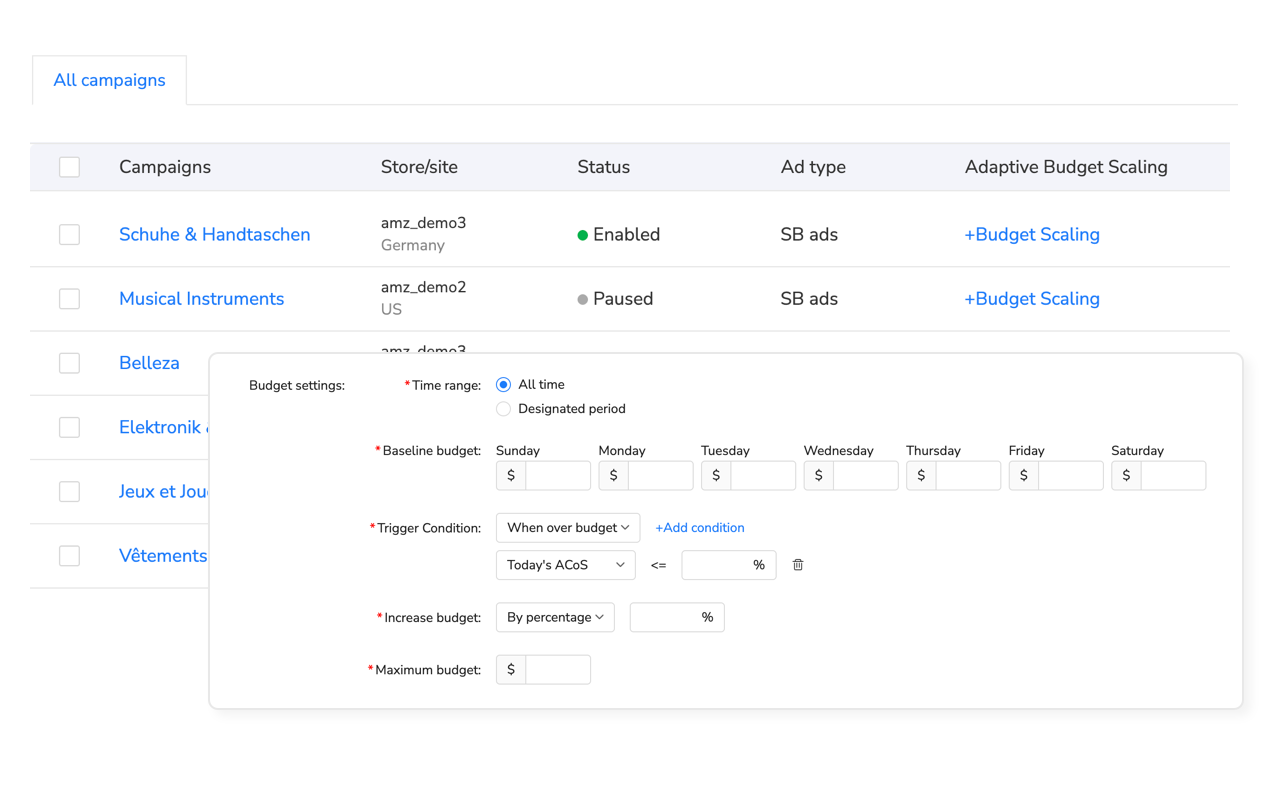
Adaptive budget scaling adjusts spending dynamically based on real-time performance metrics. When a campaign achieves 12% ACOS (below your 15% target), the system increases daily budget by 10-20% to capture more profitable traffic. When ACOS exceeds 22%, budget automatically scales back 30-40% to limit losses while you troubleshoot the issue.
Platforms like Maxmerce’s Advertising module provide Adaptive Budget Scaling that monitors ACOS performance every hour and adjusts daily budgets automatically based on efficiency thresholds you set. When a Priority campaign drops below your target ACOS (e.g., 15%), the system increases budget 15% to capture more converting traffic. When ACOS exceeds your threshold (e.g., 25%), budget automatically scales back 40% to prevent runaway losses. This helps sellers capitalize on high-performance periods while limiting damage from underperforming campaigns—reducing manual monitoring from 15 hours weekly to 30 minutes reviewing system recommendations.
Manual vs Automated eBay Advertising Management
Here’s the reality: manual campaign management made sense when Priority campaigns cost $0.02-0.08 per click. At those rates, you could afford inefficiency. At $0.20-0.50 per click, every wasted dollar matters.
| Task/Challenge | Manual Management | Automated Solution | Time/Cost Savings |
|---|---|---|---|
| Budget monitoring | Check once daily (24-hour delay) | Hourly alerts within 60 minutes | Prevent $300+ monthly waste |
| Bid optimization | Weekly reviews, manual adjustments | Automated dayparting reduces spend 30-40% | Save $400-600/month on low-conversion hours |
| Performance analysis | Export reports, Excel analysis 2-3 hours | Real-time dashboards with instant insights | 10 hours monthly time savings |
| Campaign pausing | React to poor ACOS next day | Automatic scaling when ACOS exceeds threshold | Immediate cost control |
| Multi-store management | Check each store separately 30-45 min each | Unified dashboard for all stores simultaneously | 85% time reduction |
| Keyword research | Manual Search Terms Report review weekly | Automated negative keyword suggestions | Eliminate 40-50% non-converting clicks |
When Manual Management Still Makes Sense
If you’re running 1-2 campaigns with daily budgets under $20, manual management works fine. Check performance twice daily, adjust bids every 3-4 days, and review Search Terms Reports weekly. Your time investment (30-45 minutes daily) matches the budget at risk.
However, sellers managing 5+ campaigns with $50+ daily budgets should seriously evaluate automation. You’re spending 15-20 hours monthly on campaign management while still experiencing $200-500 in preventable waste from delayed reactions to ACOS spikes and budget overruns.
Multi-Campaign Strategy for Different Product Categories
Not all products deserve the same advertising approach. Here’s how I allocate budget across General and Priority campaigns based on product characteristics.
High-Margin Products (40%+ Margin)
These can tolerate 20-25% ACOS and still generate meaningful profit. Allocate 60% of budget to Priority campaigns targeting high-intent keywords. The $0.20+ CPC costs are justified when you’re making $30-50 profit per sale.
Use General campaigns at 8-12% ad rates for brand protection and secondary visibility. If someone searches your exact product name, you want them to see your listing prominently even if you’re not winning Priority keyword bids.
Medium-Margin Products (25-35% Margin)
Split budget 50/50 between General and Priority campaigns. Use Priority selectively for proven long-tail keywords where CPC stays under $0.35. General campaigns at 6-10% ad rates provide cost-predictable visibility without CPC risk.
These products can’t sustain ACOS above 18-20%, so prioritize efficiency over maximum visibility. You’re better off generating 70% of potential traffic at 15% ACOS than 100% of traffic at 28% ACOS.
Low-Margin Products (15-25% Margin)
Allocate 70-80% of budget to General campaigns. Priority campaigns simply don’t work for most low-margin products at $0.20+ CPC unless you’re converting above 6-8%—which is rare.
Use General campaigns at 4-8% ad rates to maintain visibility without destroying profitability. Accept that you’ll lose top-slot placements to competitors with better margins who can afford Priority campaign costs.
Brand Defense Strategy
Regardless of margin, run General campaigns at 2-4% ad rates on your exact brand name and product variations. This prevents competitors from appearing above your listings when buyers search your specific products.
You’ll pay minimal fees (2-4% of sales you would’ve gotten organically) but maintain first-position visibility. The alternative is losing 20-30% of brand-name searches to competitors running aggressive Priority campaigns on your product names.
Measuring True eBay Advertising ROI
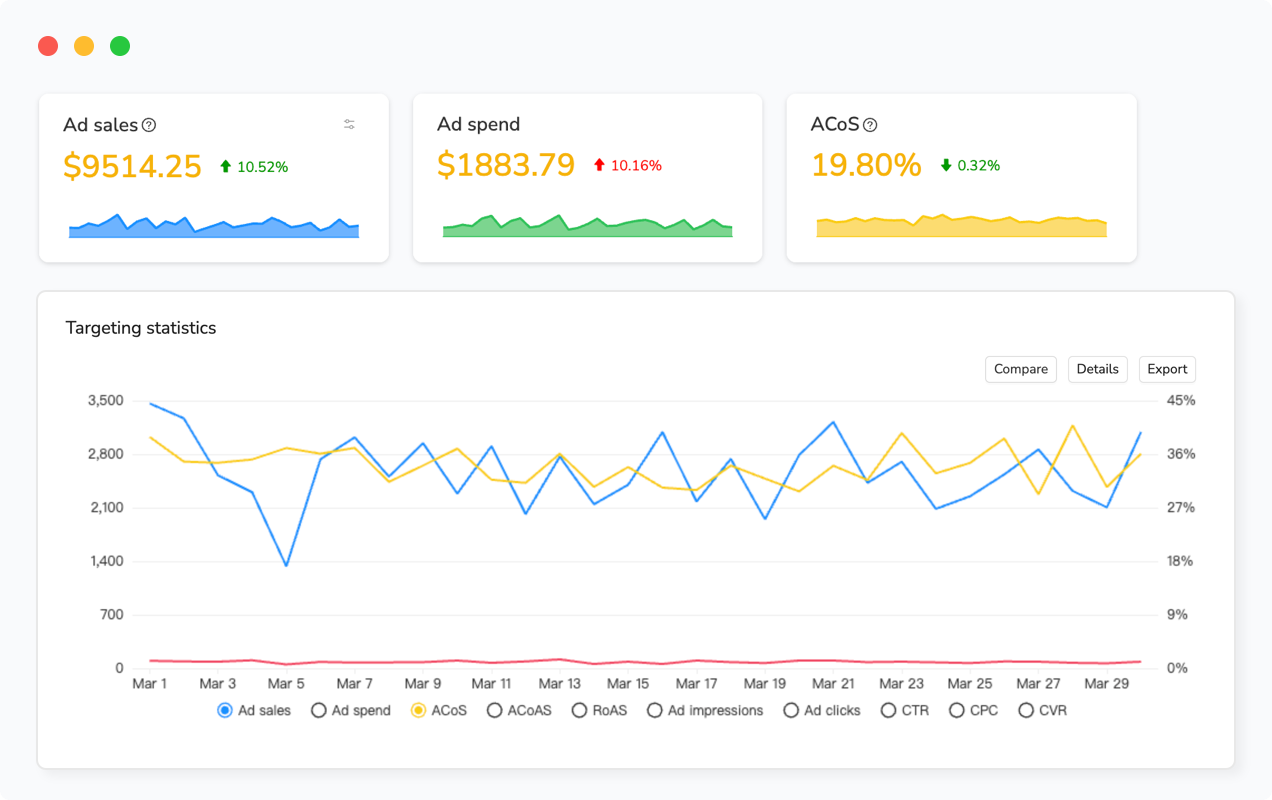
ACOS tells part of the story, but you need to track actual profit to understand if campaigns are worthwhile.
The Profit-Per-Sale Metric
Calculate net profit after all costs: product cost, eBay final value fee, advertising cost, shipping costs (if you offer free shipping), payment processing, returns allowance. This is your true profit per sale.
A $100 item with $40 cost, 12.9% eBay fee ($12.90), $8 shipping, 3% payment processing ($3), and 15% ACOS ($15) leaves you $21.10 profit per sale. Factor in 5% return rate (costing $5 per return) and your adjusted profit drops to approximately $20 per sale.
If you’re generating 50 sales monthly from advertising at $20 profit each, you’re making $1,000 profit. That same product generating 50 sales at 28% ACOS ($28 advertising cost) yields only $9 profit per sale or $450 monthly—55% less profit despite identical sales volume.
Attribution-Adjusted ACOS
eBay’s attribution model charges you for sales you would’ve gotten organically. Track organic conversion rates before and after launching Promoted Listings to estimate attribution inflation.
If you were converting 3% of visitors organically, and you’re now paying advertising fees on 3.8% of visitors, approximately 0.8% of attributed sales are likely organic conversions being misattributed to advertising. This inflates your ACOS by 20-25% on average.
You can’t avoid attribution charges under current eBay policy. However, understanding the inflation helps you set realistic ACOS targets. If your calculated break-even is 17% ACOS, expect to achieve 20-22% ACOS in practice due to attribution inflation.
Tired of eBay Ad Costs Destroying Profitability?
Manage eBay Promoted Listings alongside Amazon PPC and other channels with unified advertising analytics, real-time budget monitoring, and automated bid optimization designed to reduce wasted spend 30-40%.
Multi-Channel Advertising: eBay, Amazon, and Walmart
If you’re selling across eBay, Amazon, and Walmart, you need unified advertising management. Each platform has different ad formats, bidding structures, and performance benchmarks.
Platform Comparison: eBay vs Amazon vs Walmart
Amazon PPC uses keyword CPC bidding similar to eBay Priority campaigns. Walmart Connect offers both CPC and CPM options. eBay offers percentage-based General campaigns unique among the three.
The challenge is managing three separate ad platforms with different dashboards, different metrics, and different optimization strategies. You’re spending 30-45 minutes daily checking each platform individually—that’s 15-20 hours monthly on advertising management alone.
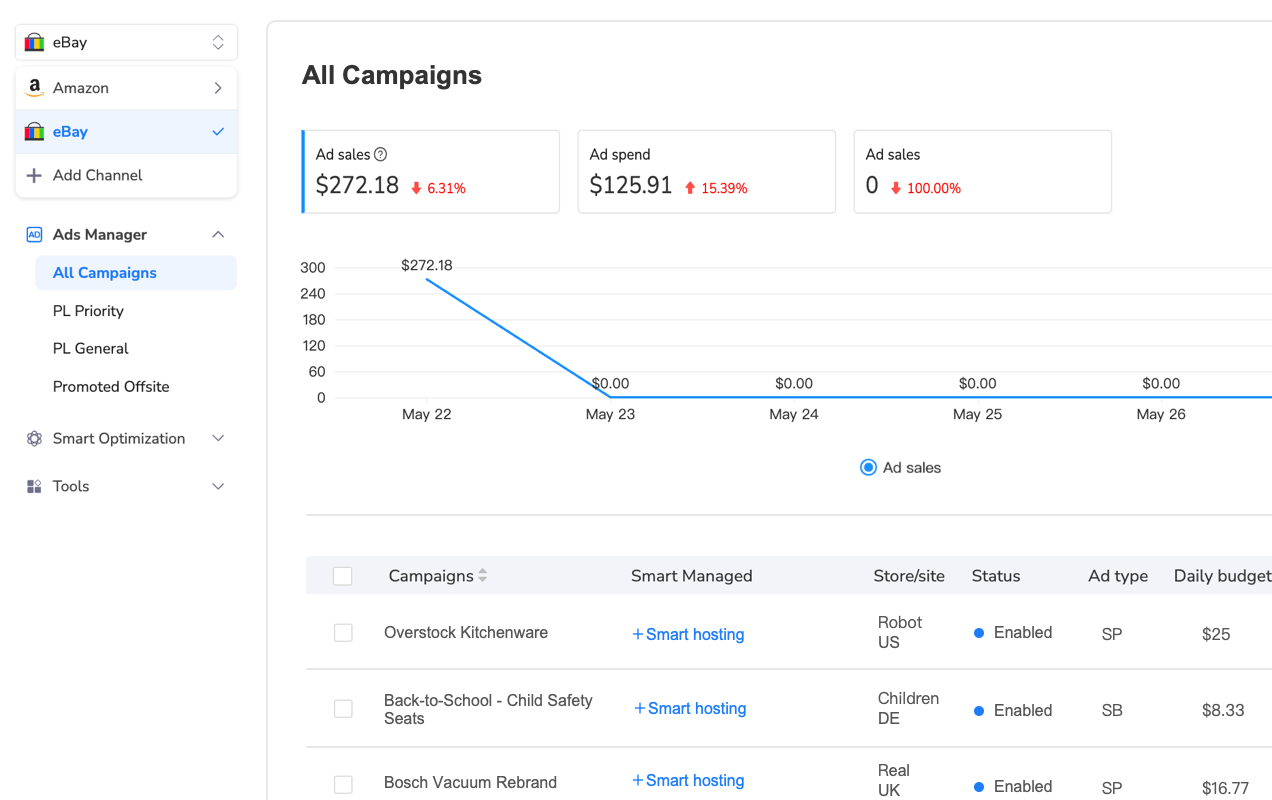
For sellers managing 1,000+ SKUs across multiple channels, platforms like Maxmerce’s Advertising module provide Cross-Channel Ad Management designed to track eBay Promoted Listings, Amazon PPC, and Walmart Connect campaigns in one unified dashboard. The system consolidates performance metrics across all platforms—showing aggregate ACOS, total ad spend, and campaign efficiency comparisons side-by-side. This helps sellers identify which platforms deliver best ROI for specific product categories, reallocating budget from underperforming channels to proven winners. Sellers report 40-50% time savings vs checking three separate platforms daily while gaining cross-platform insights impossible to spot when viewing each platform independently.
Budget Allocation Across Platforms
Track ROAS (Return on Ad Spend) for each platform monthly. If Amazon PPC delivers 5:1 ROAS while eBay Promoted Listings achieves 2.5:1 ROAS, allocate advertising budget accordingly.
Don’t split budget evenly by default. Your products might perform dramatically better on one platform than others. I’ve found apparel converts best on eBay, electronics on Amazon, and home goods on Walmart. Adjust advertising investment to match where each product category naturally performs strongest.
Sources & References
- ValueAddedResource, “eBay Promoted Listings Priority CPC Increase Analysis,” October 2025
- eBay Seller Center Official Documentation, “30-Day Attribution Model Update,” November 2025
- eBay Community Forums, “Promoted Listings Cost Increase Discussion,” October-November 2025
- Practical Ecommerce, “eBay Advertising Changes Impact Seller Profitability,” November 2025
- Marketplace Pulse, “eBay Advertising Revenue Growth Strategy,” October 2025
- PPC Industry Benchmarks, “Dayparting Cost Reduction Analysis,” 2025
- WebRetailer, “Multi-Channel Advertising Management Strategies,” 2025
- E-commerce Operations Data, “Real-Time Budget Monitoring ROI Study,” November 2025
Frequently Asked Questions
eBay increased Promoted Listings Priority minimum CPC bids from $0.02 to $0.20 (10x increase) in October 2025 as part of their shift to keyword-based bidding. The new attribution model also charges sellers even when buyers who didn’t click your ad make a purchase within 30 days. These changes force sellers to dramatically increase ad spend to maintain visibility while facing attribution charges for organic conversions.
The 30-day attribution window means you’ll pay ad fees for sales that would’ve happened organically. Many sellers report ACOS jumping from 8-12% to 25-35% overnight. You’re charged when someone searches your brand name directly, clicks a competitor’s ad, then buys your product—or when repeat customers who never clicked any ad make their second purchase within 30 days.
Target ACOS depends on your product margins. For 30% margin products, aim for 15-18% ACOS maximum to preserve profitability. High-margin items (50%+) can tolerate 25-30% ACOS. Calculate your break-even ACOS using this formula: (Profit Margin – eBay Final Value Fee %) × 0.8. Monitor daily—ACOS above 20% for three consecutive days signals you need immediate bid adjustments.
Don’t pause everything immediately. Instead, pause underperforming campaigns with ACOS above 30% and focus budget on proven winners. Keep Priority campaigns for high-converting keywords with 15-20% ACOS. Use General campaigns (percentage-based fees) for brand defense and proven best-sellers. Test small daily budgets ($10-15) when restarting campaigns to prevent overnight budget blowouts.
Implement dayparting to reduce bids 30-40% during low-conversion hours (midnight-6am). Focus on long-tail keywords with 50-70% lower CPCs than broad terms. Use negative keywords aggressively to block non-converting searches. Set strict daily budget limits with hourly monitoring to catch overspend within 60 minutes vs end-of-day. Shift more budget to General campaigns which use percentage-based fees instead of escalating CPCs.
General campaigns (PLG) charge a percentage-based ad rate (2-20%) of the sale price—you set the rate, and higher rates get better placement. Priority campaigns (PLP) use CPC keyword bidding with $0.20 minimum bids per click. General campaigns are safer for budget control and brand protection. Priority campaigns offer top-slot visibility but risk rapid budget exhaustion at 10x higher costs. Use General for proven products and Priority selectively for high-margin launches.
Check at minimum twice daily—morning and evening—to catch budget overspend before it destroys profitability. eBay’s monthly budget averaging allows them to spend up to 2x your daily budget on any given day, so a $50 daily limit can become $100+ in reality. Real-time monitoring tools that alert within 60 minutes of overspend help prevent the $300+ weekend blowouts that wipe out entire week’s profits.
Yes—automation significantly reduces wasted spend through hourly budget monitoring, automatic bid adjustments during low-conversion hours, and real-time ACOS alerts. Platforms like Maxmerce’s Advertising module track spending against targets every hour, alerting you within 60 minutes when eBay’s monthly averaging causes budget acceleration. Dayparting features automatically reduce spend 30-40% during non-converting hours while maintaining visibility during peak shopping times.
Conclusion: Surviving eBay’s Advertising Cost Explosion
The October 2025 Promoted Listings changes fundamentally altered eBay advertising economics. The 10x CPC minimum increase combined with 30-day attribution charges means you can’t manage campaigns the same way you did at $0.02-0.08 CPC costs.
Here’s what I’ve learned managing operations through these changes: Pause underperforming Priority campaigns immediately. Shift budget to General campaigns for cost-predictable visibility. Implement dayparting to reduce spend 30-40% during non-converting hours. Use real-time monitoring to catch budget overspend within 60 minutes vs next-day discovery.
The sellers who’ll succeed are those who treat advertising as a profit center requiring active management, not a “set and forget” traffic source. Track true profit-per-sale after all costs. Calculate product-specific ACOS targets. Review performance at minimum twice daily.
If you’re managing 5+ campaigns with $50+ daily budgets, seriously evaluate automation tools designed for hourly monitoring and dynamic optimization. The 15-20 hours monthly you’ll save on manual checks pays for itself while preventing the $200-500 monthly waste from delayed reactions to ACOS spikes.
eBay’s advertising changes are permanent. Sellers who adapt their strategies to the new cost structure will maintain profitability. Those who continue using pre-October tactics will watch margins evaporate month after month.
Ready to Optimize eBay Advertising ROI?
Get real-time budget monitoring, automated dayparting, and cross-channel advertising management designed to reduce wasted spend while maintaining visibility across eBay, Amazon, and Walmart.
