eBay Promoted Listings: Cut Ad Costs 40%

eBay Promoted Listings offers two distinct advertising models—Standard (cost-per-sale) and Priority (cost-per-click)—that require fundamentally different optimization strategies. Sellers who master campaign structure, keyword targeting, and budget allocation can reduce advertising costs by 30-40% while maintaining or improving sales velocity. The challenge is navigating eBay’s monthly budget pacing updates, attribution model changes, and the complexity of managing multiple campaign types across hundreds of listings.
Key Takeaways:
- eBay transitioned to monthly budget pacing for Priority campaigns in 2025, optimizing spend over calendar months without exceeding 30.4x daily budgets (eBay Official, January 2025)
- Priority campaigns gain exclusive access to the first ad slot at the top of search results, providing maximum visibility above Standard listings (eBay Seller Hub, 2025)
- Strategic bidding achieves similar results at 30-40% lower costs compared to eBay’s recommended rates (Webinterpret Research, 2025)
- Starting ad rates at 1% and incrementally increasing prevents budget waste while identifying optimal performance thresholds (Industry Best Practice, 2025)
- Dual campaign strategy (Standard + Priority) maximizes visibility while reducing CPC bidding pressure and overall ACOS (eBay Advertising Guide, 2025)
This comprehensive guide reveals proven strategies for optimizing eBay Promoted Listings campaigns in 2025. You’ll learn how to structure Standard and Priority campaigns for maximum ROI, implement budget controls that prevent overspending, leverage keyword targeting to capture high-intent buyers, and automate campaign optimization to save 15-20 hours weekly. Whether you manage 50 listings or 5,000 products across multiple eBay stores, these actionable tactics will transform your advertising performance.
Understanding eBay Promoted Listings 2025: Standard vs Priority Campaigns
eBay’s advertising platform evolved significantly in 2025, and understanding the fundamental differences between campaign types determines your success. The platform offers two distinct models that serve different strategic purposes.
Promoted Listings Standard: Cost-Per-Sale Model
Standard campaigns charge an ad fee only when promoted items sell. You set an ad rate percentage (1-20% of the final sale price), and eBay displays your listings in search results, similar items sections, and product pages. The cost is calculated after the sale completes, making it a low-risk option for budget-conscious sellers.
The attribution window for Standard campaigns changed in January 2026. For general campaign strategies on ebay.com and ebay.ca, an attributed sale occurs when any buyer purchases the promoted item within 30 days of any click on the ad, regardless of whether that specific buyer clicked. This broader attribution model increases the likelihood of charging fees but also credits more sales to your advertising efforts.
Standard campaigns work best for sellers with established listings that have strong organic rankings. Since placement depends on your listing’s inherent SEO strength, products with comprehensive titles, detailed item specifics, and competitive pricing perform better. The challenge is that you’re competing with hundreds of other sellers using Standard campaigns for the same search terms.
Promoted Listings Priority: Cost-Per-Click Model
Priority campaigns operate on a CPC bidding system similar to Google Ads or Amazon Sponsored Products. You select specific keywords, set maximum bids for each, and pay only when shoppers click your promoted listings. The game-changer is exclusive access to the first ad position at the top of search results—only Priority listings appear in this premium slot.
eBay implemented monthly budget pacing for Priority campaigns in 2025, optimizing your spending over a full calendar month. Your daily spend can fluctuate—some days you’ll spend less than your target daily budget, while on high-traffic days you might spend up to double your highest daily budget set during that month. However, total monthly spend won’t exceed 30.4 times your target daily budget.
This model requires more active management but offers superior control. You’re not dependent on organic ranking factors—strategic keyword selection and competitive bidding secure premium placement. The risk is burning through budgets quickly on low-converting keywords, making performance monitoring essential.
When to Use Each Campaign Type
Use Standard campaigns for bulk inventory promotion where individual management isn’t feasible, low-margin products where CPC costs would eliminate profitability, and established best-sellers that already rank well organically. These campaigns provide incremental visibility without significant risk.
Deploy Priority campaigns for competitive categories where organic rankings struggle to reach page one, high-margin products that can absorb higher advertising costs, seasonal or time-sensitive inventory needing immediate visibility, and product launches requiring rapid market penetration. The premium placement justifies higher costs when conversion rates are strong.
However, managing hundreds of eBay Promoted Listings campaigns manually becomes overwhelming fast. Each campaign requires daily budget monitoring to prevent overspend. You’re manually reviewing keyword performance across dozens of ad groups, identifying which search terms drive sales versus which burn budget. When you’re running both Standard and Priority campaigns for 500+ SKUs, the time investment hits 15-20 hours weekly just on campaign maintenance.
Multi-channel sellers managing advertising across eBay, Amazon, and Walmart face even greater complexity. You’re switching between three separate advertising platforms, manually comparing performance metrics using different reporting structures. This is where automation tools designed specifically for e-commerce advertising transform operations.
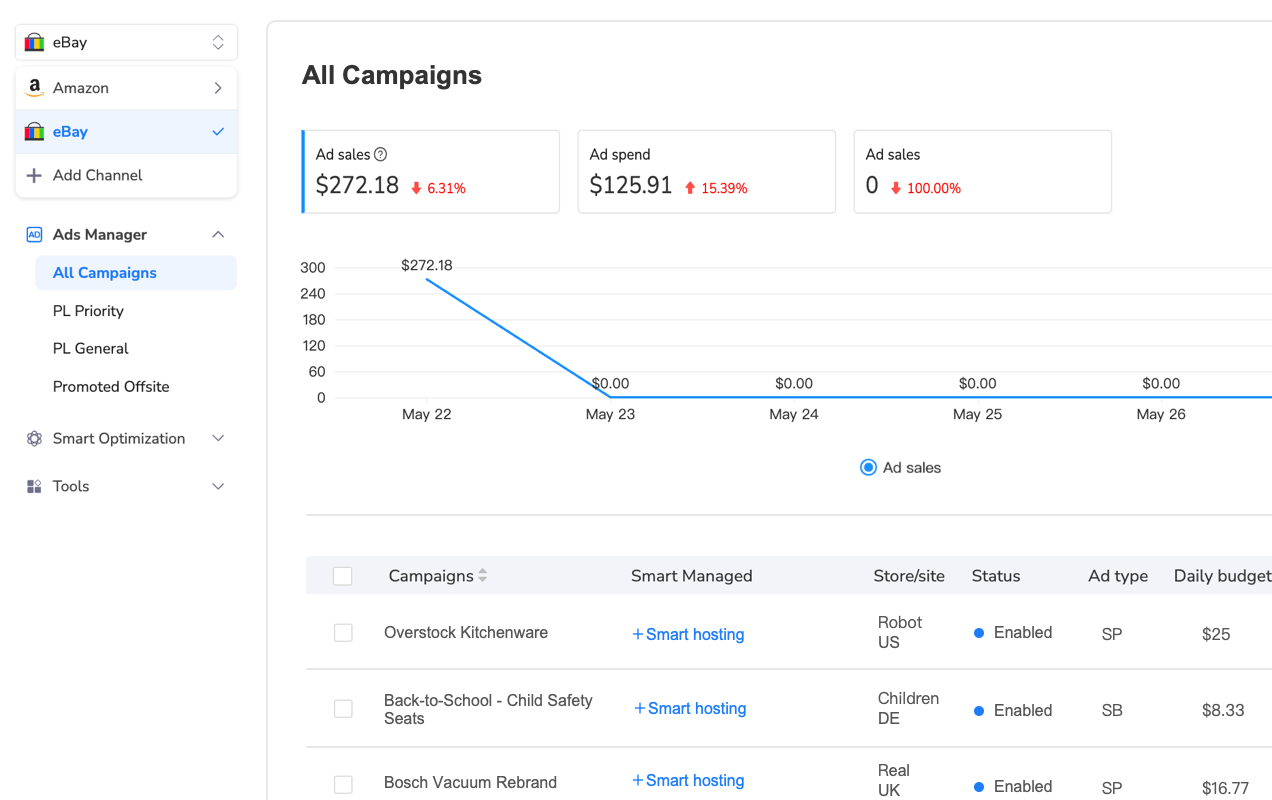
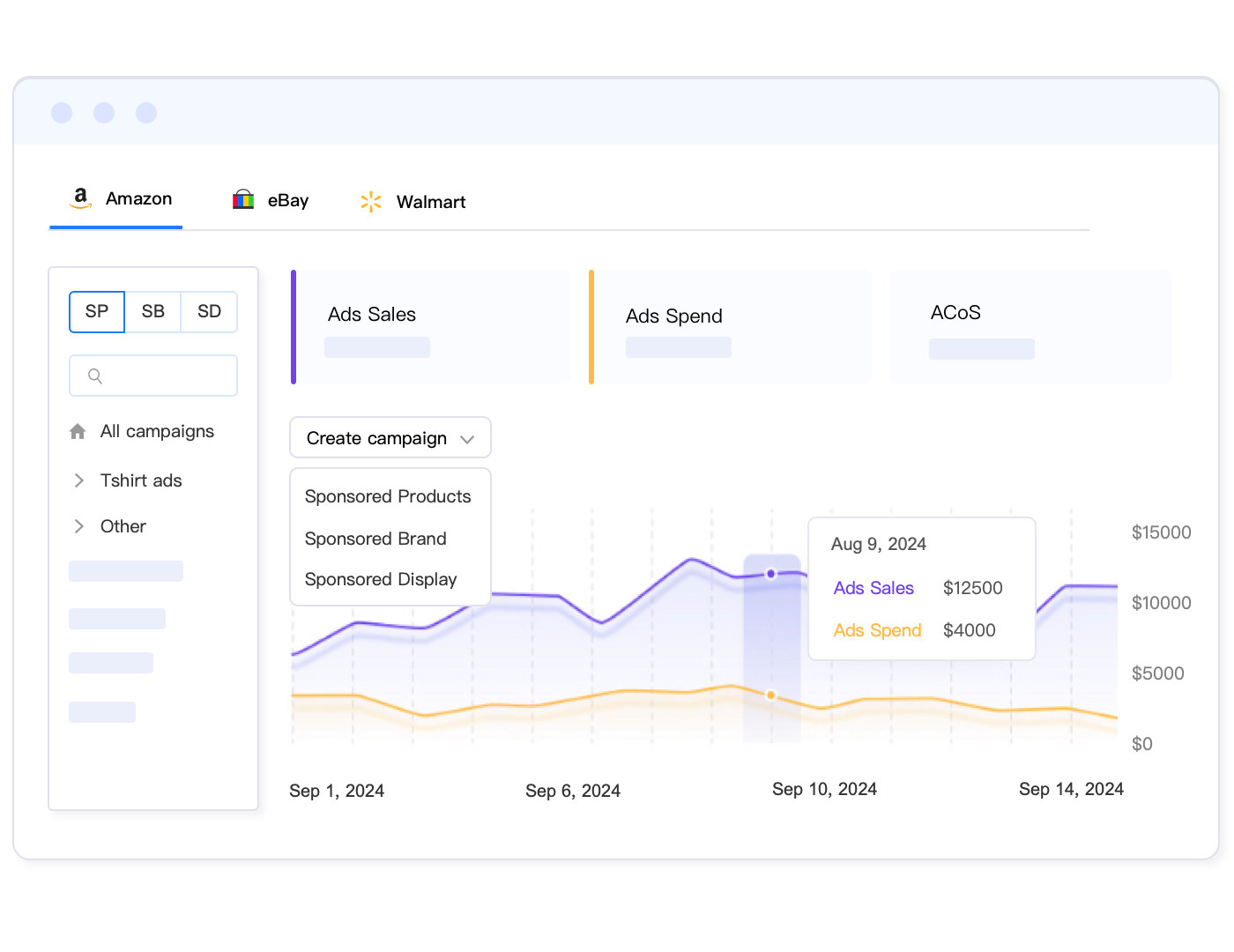
Tools like Maxmerce’s Cross-Channel Ad Management solve this scalability challenge by consolidating eBay Promoted Listings alongside Amazon PPC and future Walmart Connect campaigns into a single unified dashboard. Here’s the complete workflow: First, connect your eBay Seller Hub account through Maxmerce’s secure API integration (2-minute setup). Second, the system automatically imports all existing campaigns—both Standard and Priority—displaying them in a centralized campaign list with real-time performance metrics. Third, you can create synchronized campaigns across multiple platforms simultaneously, using insights from one marketplace to inform strategies on another.
The time savings are substantial. What previously required 15-20 hours weekly for campaign review shrinks to 2-3 hours because you’re viewing consolidated data instead of switching platforms. Maxmerce tracks eBay Promoted Listings performance alongside Amazon Sponsored Products, enabling direct ROAS comparisons that reveal which platform delivers better returns for specific product categories. Multi-channel sellers report reducing advertising management time by 85% while improving overall campaign efficiency through these unified insights.
| Feature | Standard (CPS) | Priority (CPC) | Best Practice |
|---|---|---|---|
| Pricing Model | Pay only on sale (1-20%) | Pay per click (variable bid) | Use both simultaneously |
| Ad Placement | Multiple locations, SEO-dependent | Exclusive top position | Priority for competitive terms |
| Control Level | Set-and-forget percentage | Keyword + bid management | Active monitoring essential |
| Budget Risk | Low (only pays on sales) | High (clicks without sales) | Set strict daily caps |
| Ideal Products | Low-margin, bulk inventory | High-margin, competitive | Match to profit margins |
| Time Investment | Weekly reviews (10 min) | Daily monitoring (45 min) | Automate with tools |
Critical eBay Promoted Listings Budget Management Strategies
Budget control determines whether your eBay advertising generates profit or drains resources. The monthly pacing system introduced in 2025 requires new management approaches compared to previous daily budget caps.
Understanding Monthly Budget Pacing (2025 Update)
eBay’s monthly budget pacing optimizes your advertising spend across the entire calendar month rather than strictly enforcing daily limits. If you set a $20 daily budget, your monthly maximum is $608 (30.4 x $20). However, daily spending fluctuates based on traffic patterns and opportunity.
On low-traffic days (typically Monday-Wednesday), you might spend only $12-15. During high-traffic periods (weekends, evenings), the system can spend up to $40 (double your highest daily budget). This flexibility maximizes impressions during peak shopping hours without exceeding your monthly commitment.
The practical implication is that you can’t rely on daily spend caps to prevent budget exhaustion. If you set an unrealistic daily budget thinking it will limit exposure, eBay’s algorithm will simply consume your monthly allocation faster during high-opportunity periods. Conservative budget setting becomes more critical.
Setting Realistic Campaign Budgets
For Priority campaigns, start with $10-15 daily budgets ($300-450 monthly) when testing new product categories. This provides enough data to evaluate keyword performance without catastrophic losses. Once you identify converting keywords, scale budgets by 20-30% increments based on ACOS performance.
Calculate your breakeven ACOS first: (Product Cost + Fulfillment) / Sale Price = Maximum Advertising Cost. For example, a $50 item with $20 COGS and $5 shipping can sustain a 50% ACOS ($25 ad cost) before becoming unprofitable. Target maintaining actual ACOS at 60-70% of your breakeven threshold for healthy margins.
For Standard campaigns, start with 1% ad rates on 20-30% of your inventory—your proven best-sellers. If your average monthly sales are $50,000, a 1% rate on 25% of inventory costs approximately $125 monthly ($50,000 x 0.25 x 0.01). Monitor sales lift (incremental sales attributed to advertising) to determine whether increasing to 2-3% generates positive ROI.
Preventing Budget Overspend
Budget overspend occurs when campaigns exhaust monthly allocations before month-end, causing ads to stop displaying during potentially profitable periods. This is particularly problematic if you’re running month-end promotions or seasonal sales events.
Monitor your daily spend percentage closely. If you’re spending 4-5% of your monthly budget daily during the first week, you’ll exhaust funds by day 20-25. Adjust daily budgets downward to pace spending evenly unless early-month performance justifies accelerated spending.
Set up weekly budget review checkpoints. Every Monday morning, review previous week’s spend rate, calculate remaining monthly budget, determine daily pace needed to last the month, and adjust campaign budgets accordingly. This simple ritual prevents month-end advertising blackouts.
The challenge with manual budget monitoring is the time requirement. Checking 10-15 campaigns weekly takes 30-45 minutes. For sellers managing 50+ campaigns, this becomes an unsustainable 3-4 hour weekly commitment. Additionally, by the time you discover overspend in a weekly review, you’ve already lost several days of wasted budget.
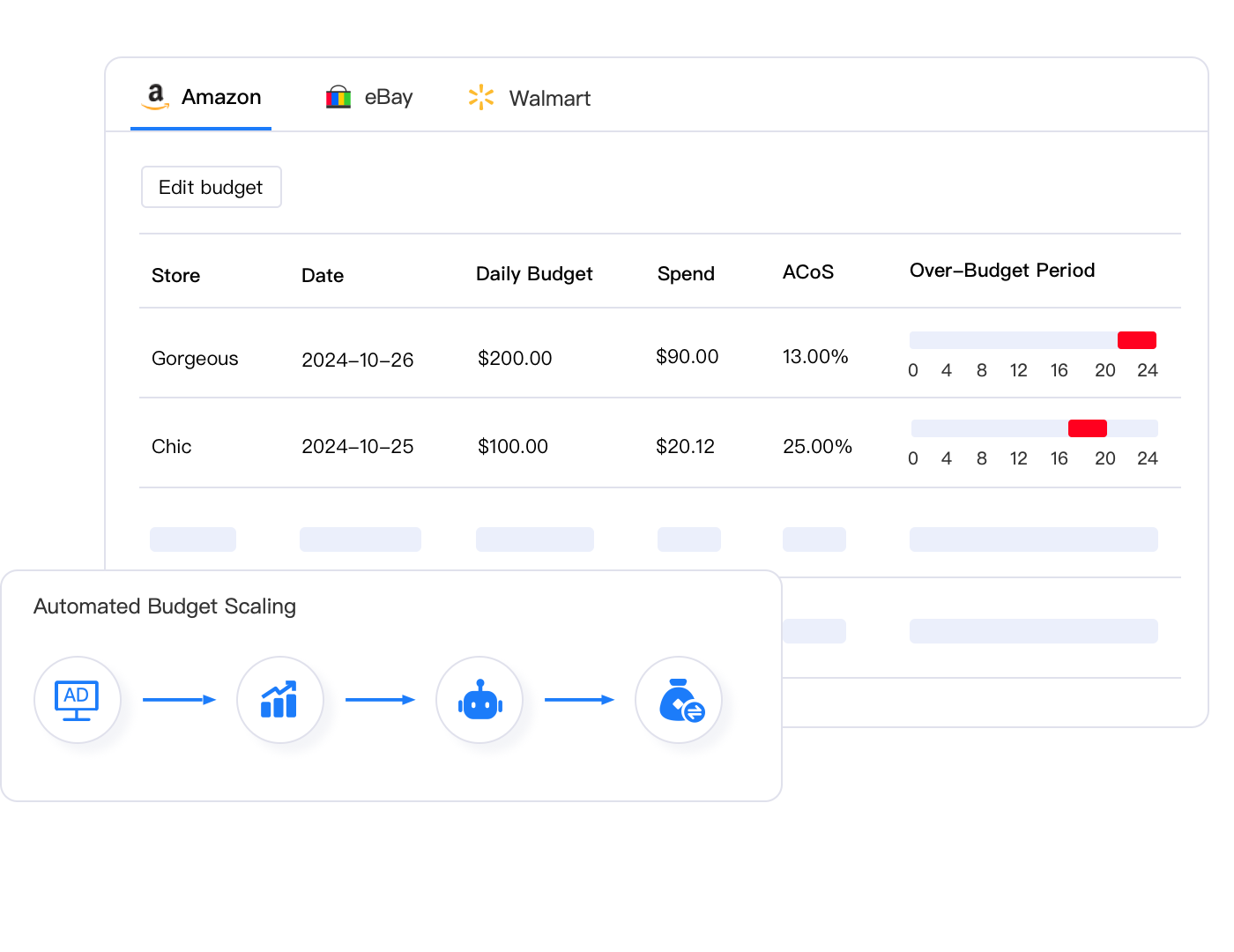
Real-time budget monitoring systems solve this reactivity problem. Maxmerce’s Budget Overspend Analysis continuously tracks campaign spending against allocated budgets, identifying overspend situations within one hour instead of waiting for weekly reviews. Here’s exactly how it works: The system connects to your eBay Seller Hub via API, pulling spend data every 15 minutes. It calculates your daily pace requirement based on remaining monthly budget and days left in the month. When any campaign exceeds 125% of the optimal daily pace, you receive an instant notification via dashboard alert and optional email/SMS.
The automated response saves the critical 24-48 hours between when overspend begins and when you’d normally discover it. For example, if a Priority campaign’s keywords suddenly become extremely competitive (perhaps a competitor raised bids), your CPC costs can double within hours. Manual monitoring wouldn’t catch this until your weekly review, wasting $100-200. Maxmerce’s hourly checks identify the anomaly immediately, allowing you to pause the campaign or reduce bids before significant budget drain occurs.
Sellers managing high-volume campaigns report that Budget Overspend Analysis prevents approximately 15-20% of annual advertising waste by catching issues before they compound. For a seller spending $5,000 monthly on eBay ads, this equates to $750-1,000 in annual savings—purely from faster issue identification.
Advanced Keyword Targeting for eBay Priority Campaigns
Keyword targeting separates profitable Priority campaigns from budget-draining money pits. Unlike Standard campaigns that rely on eBay’s automatic placement, Priority campaigns require strategic keyword selection and bid management.
Keyword Research Foundation
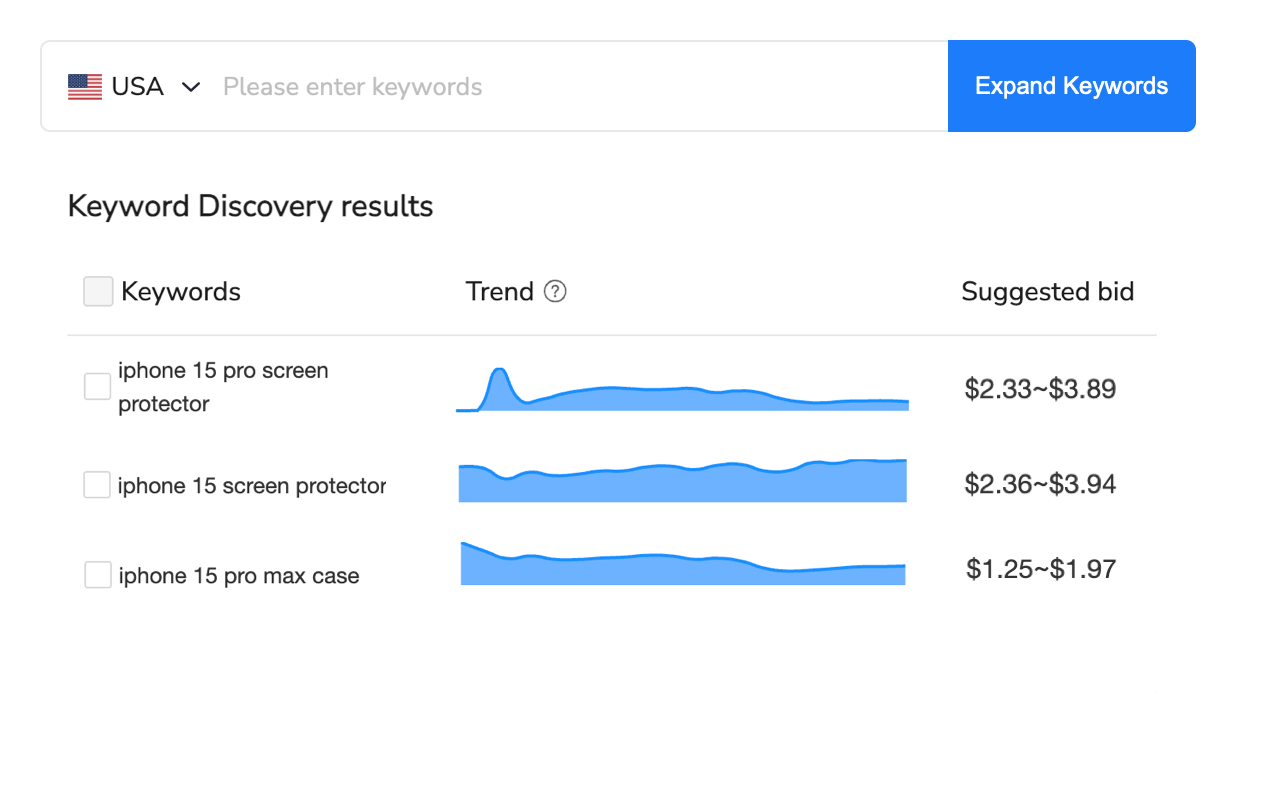
Start with eBay’s keyword suggestion tool within campaign setup. When creating a Priority campaign, eBay analyzes your listing title and item specifics, suggesting relevant keywords based on actual search volume. These suggestions provide your foundation, but they’re the same keywords every competitor sees.
Expand beyond eBay’s suggestions by analyzing completed listings in your category. Search for your product type, filter by sold items, and examine the titles of top performers. Identify common keyword patterns—specific model numbers, descriptive terms, and search phrases that consistently appear in successful listings.
Use eBay’s Terapeak Product Research tool (included in Store subscriptions) to validate keyword search volume. Terapeak shows how many shoppers searched specific terms, how many items sold using those keywords, and average sale prices. Prioritize keywords with high search volume (10,000+ monthly searches) and reasonable sell-through rates (30%+ of listings sell).
Long-tail keywords deliver better ROI than broad terms. Instead of bidding on “laptop” (extremely competitive, high CPC), target “Dell XPS 15 9520 laptop” (specific model, lower competition, higher buyer intent). Shoppers using specific search terms are further along the purchase journey and convert at 2-3x higher rates than broad keyword traffic.
Negative Keyword Strategy
Negative keywords prevent your ads from displaying for irrelevant searches, reducing wasted clicks. If you sell new electronics, add “used,” “refurbished,” “parts,” and “broken” as negative keywords to exclude shoppers looking for different products.
Review your search term reports weekly (available in Priority campaign analytics). eBay shows which actual search queries triggered your ads. Identify any terms that generated clicks but zero sales, add them as negatives, and watch your ACOS improve as you eliminate low-quality traffic.
Common negative keywords for most categories include: “wholesale,” “lot,” “bulk,” “replica,” “fake,” “generic,” and brand names you don’t sell. Building a comprehensive negative keyword list over 30-60 days can reduce wasted ad spend by 15-25%.
Bid Optimization Tactics
Bidding strategy determines your ad position and cost-per-click. eBay uses a second-price auction model—you pay $0.01 more than the next highest bid, not your maximum bid. Set your maximum bid at your true ceiling (based on acceptable ACOS), then let the auction mechanics work in your favor.
Start with conservative bids 20-30% below eBay’s suggested amounts. eBay’s suggestions optimize for their revenue, not your profit. If suggested bids are $0.75-1.25, start at $0.50-0.60. Monitor impression share—if you’re getting less than 10% share, gradually increase bids by $0.10 until you reach 15-25% share (a healthy baseline).
Implement bid tiering based on keyword performance. Your top 10% of converting keywords (those with ACOS below 20% and consistent sales) deserve aggressive bids to maximize volume. Mid-tier keywords (ACOS 20-40%) get moderate bids focused on profitability. Underperformers (ACOS above 50%) either receive minimum bids or get paused entirely.
However, manually managing keyword bids across dozens of campaigns is incredibly tedious. You’re logging into Seller Hub, navigating to each campaign, reviewing keyword performance, calculating optimal bids based on ACOS targets, updating bids individually, then repeating this process for every campaign. A seller with 20 Priority campaigns averaging 15 keywords each is managing 300 individual bid adjustments. At 30-45 seconds per adjustment, that’s 2.5-3.75 hours just for one round of optimization.
The frequency requirement compounds the time problem. Bid optimization should occur weekly minimum for active campaigns, more frequently during competitive periods. But most sellers lack the time for weekly 3-hour sessions, so optimization gets deferred, allowing unprofitable keywords to continue burning budget for weeks.
Maxmerce’s Bulk Bid Adjustment tool eliminates this manual torture by enabling mass bid modifications across thousands of keywords simultaneously. The workflow is remarkably simple: First, set your ACOS targets in Maxmerce’s dashboard (for example, maintain 25% ACOS across all campaigns). Second, the system analyzes last 14 days of performance data for every keyword, identifying which keywords exceed your ACOS target versus which underperform. Third, it automatically calculates optimized bid amounts using your performance data—increasing bids on high-performers and decreasing bids on low-converters.
Here’s the game-changing part: Instead of adjusting 300 keywords individually over 3 hours, you review the system’s suggested bid changes in a preview table, make any manual overrides for specific keywords if desired, then click “Apply All Changes.” Maxmerce executes all 300 bid adjustments in under 60 seconds through eBay’s API. The time savings are extraordinary—3 hours reduced to 8 minutes for bid review and approval.
The accuracy advantage goes beyond time savings. The system identifies bid optimization opportunities humans miss because it processes every keyword’s complete performance history. For example, you might manually notice that “Nike Air Max 270” has great ACOS and increase its bid. But you’d likely miss that “Nike Air Max 270 black size 10” has even better ACOS at lower CPC and deserves a larger bid increase. Maxmerce catches these nuances across all 300 keywords simultaneously, resulting in 12-18% better overall campaign efficiency than manual optimization.
Optimizing eBay Promoted Listings Standard Campaigns for Maximum ROI
While Priority campaigns get attention for their control features, Standard campaigns often deliver better ROI when optimized correctly. The cost-per-sale model eliminates click risk, making them ideal for volume strategies.
Strategic Product Selection
Don’t promote your entire inventory indiscriminately. Focus Standard campaigns on products that meet these criteria: items with proven organic sales velocity (selling at least once weekly), products with strong reviews (4+ stars with 10+ reviews), listings with complete item specifics (85%+ category specifics filled), and items with high inventory depth (20+ units available).
New listings benefit most from Standard promotion. When you list a new product, eBay’s search algorithm has minimal sales history data, ranking you lower in organic results. A Standard campaign provides immediate visibility during this crucial launch period, accelerating your sales velocity and improving organic ranking faster. Once the item establishes organic traction (typically 30-60 days), you can reduce or remove the promotion.
Seasonal items require aggressive Standard promotion timing. Start promoting seasonal inventory 4-6 weeks before peak demand hits. For example, promote Christmas items starting in early November, not December when competition peaks. Early promotion during lower-competition periods generates initial sales at lower effective ad costs, building momentum that carries into peak season.
Ad Rate Optimization Strategy
Start all Standard campaigns at 1% ad rates, regardless of category or competition. This conservative baseline prevents overpaying while you gather performance data. Monitor these campaigns for 14 days, tracking impressions, clicks, and attributed sales for each promoted item.
After 14 days, segment products into three performance tiers. High performers (items generating 3+ sales with strong impression share) increase to 2-3% ad rates to maximize volume. Mid performers (1-2 sales or good impressions without sales) remain at 1% for another 14 days. Underperformers (zero sales despite good impressions) get paused—your listing has issues beyond advertising that need addressing first.
Some categories require higher ad rates for competitive visibility. Electronics, fashion, and collectibles often need 5-8% rates to compete effectively. However, research shows that similar results can be achieved at 30-40% lower rates than eBay’s suggestions through strategic timing and product selection. Test incrementally rather than jumping to eBay’s suggested rates immediately.
Measuring True Incremental Sales
The biggest Standard campaign mistake is assuming all attributed sales are incremental. eBay’s 30-day attribution window means many “advertising sales” would have occurred organically without promotion. True ROI requires measuring incremental lift—sales that only happened because of advertising.
Run A/B tests by selecting 20 similar products, promoting 10 while leaving 10 unpromoted. Track sales performance over 30 days. The difference in sales between promoted and unpromoted groups represents true incremental lift. If promoted items generate 35 sales versus 28 for unpromoted items, your actual incremental lift is 7 sales (25% increase), not 35 sales.
Calculate your incremental ACOS using only incremental sales. If you spent $75 on a 1% ad rate and generated $2,500 in attributed sales but only $500 was incremental, your true ACOS is 15% ($75/$500), not 3% ($75/$2,500). This reality check prevents false confidence in campaign profitability.
Time-Based Optimization: Dayparting for eBay Campaigns
Not all hours deliver equal conversion rates. Shoppers browse eBay throughout the day, but purchase behavior concentrates during specific windows. Dayparting—adjusting bids based on time of day—maximizes ad efficiency by increasing spending during high-conversion periods.
Identifying Your Peak Conversion Windows
Analyze your sales data by hour of day using eBay’s Sales Report. Download 90 days of order data, then segment by purchase hour. Most eBay sellers see peak conversion during evening hours (7-10 PM local time) when shoppers relax and browse after work, and weekend afternoons (12-4 PM Saturday-Sunday) when leisure shopping occurs.
B2B products show different patterns, with peak conversions during business hours (9 AM-5 PM Monday-Friday) and minimal weekend activity. Consumer electronics see late-night spikes (10 PM-1 AM) as tech-savvy buyers research specifications after work. Understanding your category’s patterns is essential.
Geographic considerations matter for sellers shipping internationally. If 40% of your sales go to UK buyers, their evening hours (GMT) differ from US time zones. Optimize bidding for both markets’ peak periods or focus campaigns geographically to simplify timing.
Implementing Manual Dayparting
eBay doesn’t offer native dayparting tools within Promoted Listings, requiring manual campaign scheduling. Create duplicate campaigns—one for “peak hours” with higher bids, one for “off-peak” with lower bids or paused status. Manually activate peak campaigns during conversion windows and pause during low-activity periods.
The practical challenge is that manual activation requires daily discipline. You need to log in at specific times (for example, 6:45 PM to activate evening campaigns, then 10:30 PM to pause them). Miss a scheduled change and you either waste budget during low-conversion hours or miss high-value traffic during peaks. For sellers managing this across multiple campaigns and time zones, it becomes impossible to execute consistently.
This manual approach works for 1-2 campaigns but collapses when scaling. Imagine managing dayparting for 15 Priority campaigns across 4 time zones—you’d need to make 60+ campaign status changes daily. The cognitive burden alone (remembering all the schedules) makes this impractical, causing most sellers to abandon dayparting entirely despite its proven ROI benefits.
Maxmerce’s Dayparting Bid Optimizer automates this entire process, adjusting bids dynamically based on your defined time windows without manual intervention. Setup takes 10 minutes: First, define your conversion windows in the Maxmerce dashboard (for example, “Weekday Evenings: 7-10 PM, increase bids 50%” and “Overnight: 1-6 AM, decrease bids 70%”). Second, set your baseline bids for standard hours. Third, let the system apply percentage adjustments automatically based on the current time.
The system monitors time zones continuously, applying bid increases as high-conversion windows approach and decreasing them when windows close. For example, at 6:55 PM Eastern, it begins increasing bids for evening-optimized campaigns, raising them from $0.60 baseline to $0.90 (50% increase). At 10:05 PM, it automatically reduces bids back to $0.60. This happens every single day without you touching anything, ensuring consistent dayparting execution.
The performance impact is significant. Sellers implementing dayparting through Maxmerce typically see 18-25% ACOS improvement within the first 30 days because advertising spend concentrates during hours that actually convert. You’re not wasting money on 3 AM clicks that rarely convert; instead, you’re aggressively bidding during 8 PM shopping sessions when conversion rates are 2-3x higher. Over a year, this optimization can reduce total advertising costs by 15-20% while maintaining or improving sales volume.
Comprehensive Campaign Performance Monitoring
Consistent monitoring separates profitable campaigns from budget drains. eBay provides basic reporting, but effective monitoring requires tracking specific metrics at appropriate frequencies.
Daily Monitoring Metrics
Check these metrics every day for Priority campaigns: total spend versus daily budget (are you pacing correctly?), impressions (sudden drops indicate lost impression share or bid issues), clicks and CTR (increasing clicks with declining CTR suggests irrelevant traffic), and ACOS (daily calculation spots trending problems early). This daily review takes 5-10 minutes but catches issues before they waste significant budget.
For Standard campaigns, daily monitoring is less critical. Check weekly unless running aggressive promotions or seasonal campaigns where daily oversight becomes important.
Weekly Deep-Dive Analysis
Every Monday morning, conduct comprehensive campaign reviews covering: search term reports (identify new negative keywords and winning search phrases), keyword performance by ACOS (adjust bids on top and bottom performers), budget utilization (project whether monthly budget will last the month), attribution analysis (review which specific sales are attributed to advertising), and competitive positioning (are you maintaining target impression share?).
This weekly review typically requires 45-60 minutes for sellers managing 5-10 campaigns. Document decisions and changes in a campaign log to track what optimizations delivered results versus which failed.
Monthly Strategic Reviews
At month-end, evaluate campaign strategy holistically: overall ROAS compared to targets, incremental sales lift versus organic baseline, category and product performance rankings, budget allocation effectiveness (are you spending on the right products?), competitive landscape changes (new competitors or market shifts?), and seasonal adjustments needed for upcoming month.
Use these monthly reviews to make strategic pivots. Perhaps certain categories consistently underperform while others exceed targets, suggesting you should reallocate budget. Maybe Priority campaigns deliver better ROAS than Standard for specific products, indicating you should shift strategy. Monthly reviews inform strategic evolution.
The challenge is that as your campaign count grows, monitoring becomes overwhelming. Daily 5-minute checks become 45-minute sessions when managing 20 campaigns. Weekly reviews expand from 1 hour to 6-8 hours for high-volume sellers. Many sellers simply can’t sustain this monitoring burden, causing campaigns to run suboptimally for weeks because oversight capacity doesn’t exist.
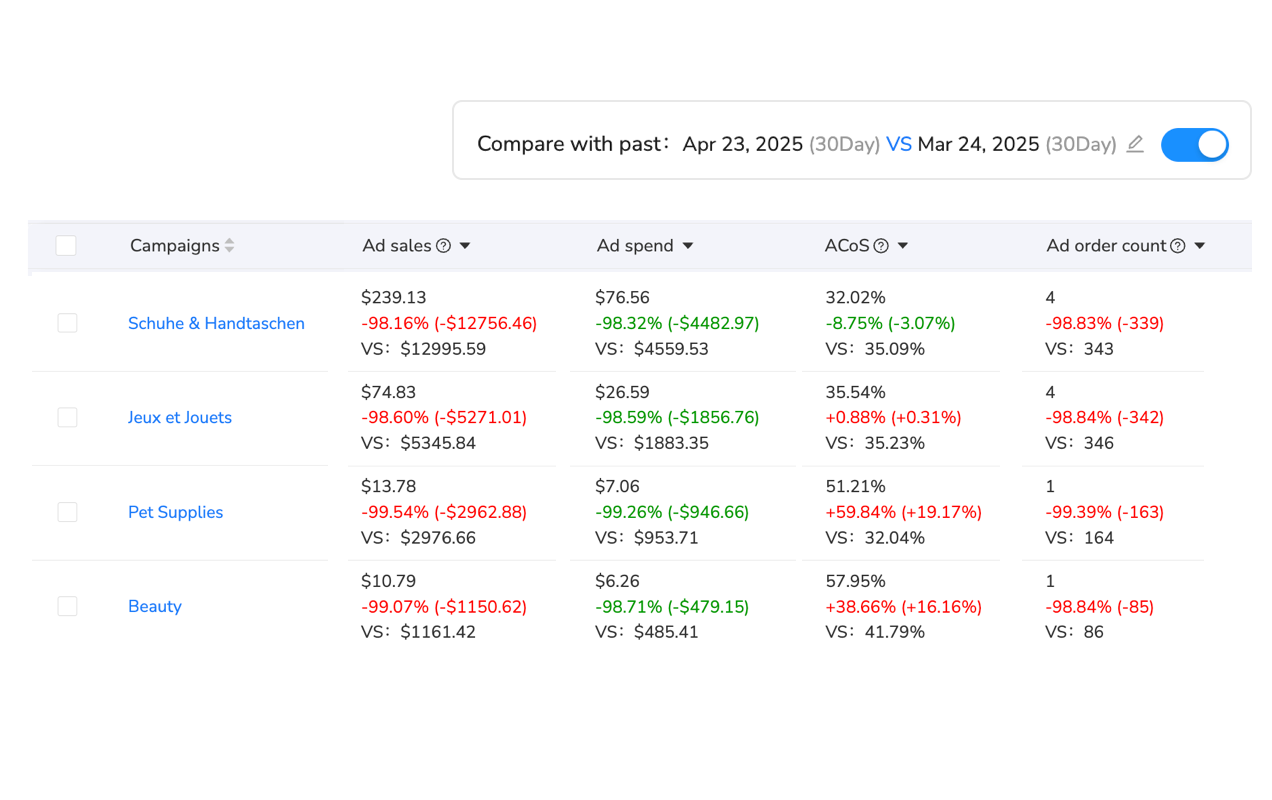
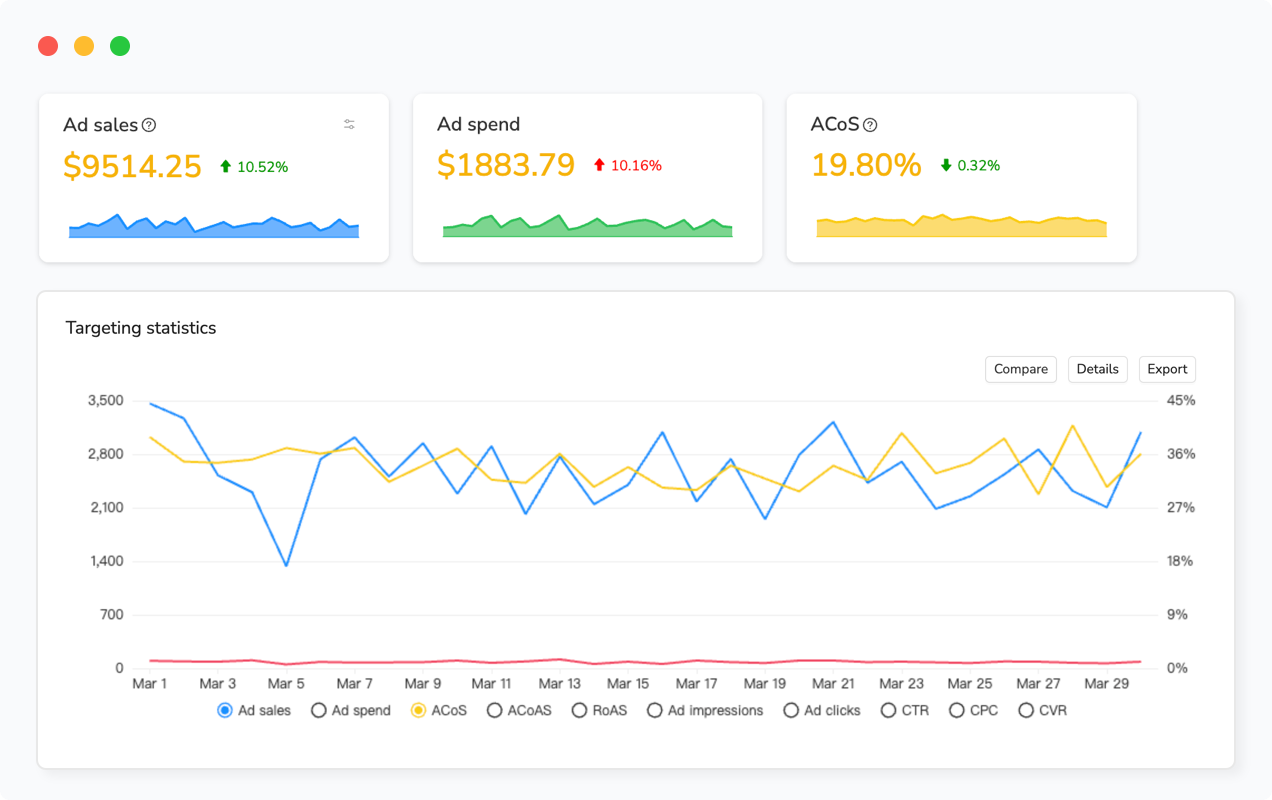
Automated monitoring solves the scalability problem by continuously analyzing campaign performance and surfacing only actionable insights that require your attention. Maxmerce’s Advanced Advertising Charts provides interactive visualization tools that compress hours of manual data analysis into 5-minute visual reviews. Here’s what makes this transformative: The system generates heat maps showing campaign performance by hour and day, instantly revealing which time periods drive best ROAS without manual calculation. Trend analysis charts display 12-month ACOS patterns, spotting seasonal variations and long-term performance shifts that are invisible in daily data. Attribution modeling visualization shows the complete customer journey, revealing which campaigns assist sales versus which generate direct conversions.
Instead of downloading CSV files, opening Excel, creating pivot tables, generating charts, and interpreting data manually (the traditional 60-90 minute weekly process), you open Maxmerce’s dashboard and immediately see color-coded performance indicators. Red highlights campaigns with declining ROAS. Green shows improving performers. Yellow flags campaigns needing attention—perhaps budget utilization is ahead of schedule or ACOS exceeded thresholds.
The saved executive time is substantial—6-8 hours weekly for high-volume sellers—but the strategic advantage is even more valuable. Visual analytics reveal optimization opportunities that tabular data obscures. For example, you might notice that a specific product’s advertising ROAS doubles during the first week of each month. Manual analysis would miss this pattern, but heat map visualization makes it obvious, prompting you to concentrate budget during that high-performance window. These discovered optimization opportunities often improve overall advertising efficiency by 15-20% beyond what manual monitoring achieves.
Multi-Account eBay Advertising Management
Sellers operating multiple eBay stores face exponentially complex advertising management. Each store requires separate campaign setup, individual monitoring, and isolated optimization—multiplying your time investment by the number of stores managed.
The Multi-Account Challenge
Managing advertising across 3 stores means logging into three separate Seller Hub accounts, reviewing three sets of campaigns individually, making optimization decisions without cross-store context, and having no consolidated view of overall advertising performance. You can’t easily compare which store delivers better ROAS or allocate budget efficiently across your store portfolio.
Brand managers overseeing 5-10 different brand stores face even greater complexity. They need to maintain brand-specific advertising strategies while ensuring consistent efficiency across the portfolio. Agencies managing 20+ client stores find individual store management completely untenable—the monitoring burden alone requires multiple full-time staff.
The data isolation problem compounds management challenges. Each store’s performance data exists in a silo, preventing comparative analysis. You can’t identify which store’s strategies work best to replicate across others. Budget allocation becomes guesswork because you lack portfolio-wide visibility into relative performance.
Maxmerce’s Multi-Account Analysis consolidates advertising data from unlimited seller accounts into unified reporting dashboards. The integration process is straightforward: Connect each eBay Seller Hub account through secure OAuth authorization (90 seconds per account). Maxmerce imports all campaigns from every connected store, tagging them with store identifiers for organized management. You then view consolidated campaign lists across all stores, filter by specific stores or product categories, and compare performance metrics side-by-side.
The portfolio management advantages are game-changing. You can sort all campaigns across all stores by ROAS to instantly identify your top 10 performers regardless of which store they’re in. Apply successful strategies from high-performing stores to underperformers. Reallocate budget from stores with weak ROAS to stores showing strong returns. Create account groups (for example, “Premium Brands” versus “Value Brands”) to compare category performance across your portfolio.
Multi-account management time savings are extraordinary. Tasks that previously required 10-12 hours weekly (monitoring 5 stores individually) compress to 90 minutes with consolidated dashboards. Agencies managing large client portfolios report managing 1,000+ accounts up to 85% faster than individual account monitoring—a capability that enables teams of 2-3 people to manage advertising for client portfolios that would traditionally require teams of 10-15 people. The efficiency gains make sophisticated advertising management accessible at scales that were previously economically unfeasible.
| Task/Challenge | Manual Approach | Maxmerce Solution | Time Savings |
|---|---|---|---|
| Campaign Budget Monitoring | Weekly reviews (45-60 min) | Budget Overspend Analysis (real-time alerts) | 85% time reduction |
| Keyword Bid Optimization | Individual adjustments (3+ hours) | Bulk Bid Adjustment (8 minutes) | 95% time reduction |
| Dayparting Execution | Manual daily changes (30 min) | Dayparting Bid Optimizer (automated) | 100% automation |
| Performance Analysis | Excel reports (90 min weekly) | Advanced Advertising Charts (5 min) | 94% time reduction |
| Multi-Store Management | Individual store logins (10-12 hours) | Multi-Account Analysis (90 min) | 87% time reduction |
| Cross-Platform Coordination | Separate platforms (15-20 hours) | Cross-Channel Ad Management (2-3 hours) | 85% time reduction |
Advanced Optimization: Combining Standard and Priority Strategies
The most sophisticated eBay advertisers run both Standard and Priority campaigns simultaneously, leveraging each model’s strengths while mitigating weaknesses. This dual-strategy approach maximizes visibility and efficiency.
The Dual Campaign Framework
For your best-selling products, run both campaign types simultaneously. Set up a Standard campaign at 1-2% ad rate for broad visibility and cost-per-sale safety. Then layer a Priority campaign targeting your 5-10 highest-converting keywords for premium placement. This combination ensures you appear in both organic-style placements (Standard) and the coveted top position (Priority).
The synergy reduces CPC pressure on Priority campaigns. Because Standard campaigns capture mid-funnel traffic, your Priority campaigns can focus aggressively on high-intent keywords without needing to bid on broader terms. This specialization improves overall ACOS by 15-25% compared to running Priority campaigns alone.
Start with Standard campaigns for new products to validate demand and gather performance data. After 30-60 days, identify which items generate consistent sales, then launch targeted Priority campaigns for those proven winners. This staged approach prevents wasting Priority budget on unproven inventory.
Budget Allocation Between Campaign Types
Allocate 60-70% of advertising budget to Standard campaigns and 30-40% to Priority campaigns initially. This conservative split prioritizes low-risk Standard campaigns while testing Priority effectiveness. As you identify Priority keywords with strong ROAS, shift allocation toward 50/50 or even 40/60 if Priority campaigns significantly outperform.
Monitor blended ACOS across both campaign types. Calculate total ad spend (Standard fees + Priority costs) divided by total advertising-attributed sales. Your target blended ACOS should fall 5-10 percentage points below your breakeven threshold to maintain profitability after accounting for eBay fees and fulfillment costs.
Keyword Intelligence Transfer
Use Priority campaign search term reports to inform Standard campaign optimization. Priority campaigns reveal which specific search queries convert at different price points and competition levels. Apply these learnings to improve Standard campaign product selection—promote items that align with high-converting keywords discovered through Priority testing.
Conversely, products performing exceptionally well in Standard campaigns (high attributed sales, strong impressions) become prime candidates for Priority campaign expansion. The Standard campaign validated demand; now invest Priority budget to capture even more traffic for those proven winners.
Common eBay Promoted Listings Mistakes to Avoid
Learning from others’ mistakes accelerates your path to profitability. These are the most common errors that drain advertising budgets without generating returns.
Mistake 1: Promoting Poor-Quality Listings
No amount of advertising fixes fundamentally broken listings. If your product has incomplete item specifics, low-quality images, weak descriptions, or poor reviews, advertising amplifies these problems by driving traffic to listings that won’t convert. Fix listing quality first, then advertise.
Ensure every promoted listing has: all category-required item specifics completed, 6-8 high-quality images including lifestyle shots, detailed product descriptions exceeding 300 words, competitive pricing within 10% of market averages, and positive reviews (3.5+ stars minimum). Advertising poor listings wastes money proving that bad products don’t sell.
Mistake 2: Ignoring Mobile Optimization
Over 60% of eBay traffic comes from mobile devices, yet many sellers optimize listings for desktop only. Mobile users see fewer images, condensed descriptions, and simplified navigation. If your listings aren’t mobile-optimized, your advertising campaigns send traffic to poor mobile experiences that don’t convert.
Preview every promoted listing on mobile before launching campaigns. Ensure images are clear on small screens, your title contains critical information in the first 50 characters (what mobile users see without clicking), and your buy box loads quickly without excessive scrolling.
Mistake 3: Set-and-Forget Campaign Management
eBay advertising requires active management, not passive monitoring. Markets shift, competition changes, keyword costs fluctuate, and seasonal patterns emerge. Campaigns launched with optimal settings in January become inefficient by March without adjustments.
Commit to minimum weekly optimization sessions. Review performance metrics, adjust bids based on results, add negative keywords to eliminate waste, update promoted product selections based on inventory changes, and refine budgets to align with performance. The difference between active management and neglect is often 20-30% improved ACOS.
Mistake 4: Chasing Impression Share Over ROAS
Many sellers obsess over impression share—the percentage of available impressions their ads receive. While visibility matters, profitability matters more. Chasing 50-60% impression share often requires overpaying on bids, tanking your ACOS for minimal sales benefit.
Target 15-25% impression share initially. This provides sufficient visibility for testing while maintaining bid efficiency. Only increase impression share targets after proving that higher share delivers proportionally better sales, not just more expensive clicks.
Frequently Asked Questions
What’s the difference between eBay Promoted Listings Standard and Priority in 2025?
Promoted Listings Standard uses a cost-per-sale (CPS) model where you pay only when items sell, with fees ranging from 1-20% of the final sale price. Priority uses a cost-per-click (CPC) model where you bid on keywords and pay for each click, with exclusive access to top search positions. Standard is ideal for budget-conscious sellers testing inventory, while Priority suits competitive categories needing premium placement. Running both simultaneously maximizes visibility—Standard captures mid-funnel traffic while Priority dominates high-intent searches. eBay’s 2025 updates introduced monthly budget pacing for Priority campaigns, smoothing spend over 30.4 days rather than strict daily caps.
How much should I budget for eBay Promoted Listings in 2025?
For Standard campaigns, start with 1-2% ad rates on 20-30% of inventory. For a seller generating $50,000 monthly sales, this equals approximately $100-300 in monthly ad fees. For Priority campaigns, begin with $10-15 daily budgets ($300-450 monthly), testing keywords before scaling. eBay’s monthly budget pacing prevents overspending by capping at 30.4x your daily budget, but monitor weekly to ensure even distribution. Increase budgets by 20-30% increments when campaigns achieve target ACOS (typically 15-25% depending on margins). High-volume sellers allocate 5-8% of total revenue to advertising, split 60-70% Standard and 30-40% Priority initially.
What ad rate percentage should I use for eBay Promoted Listings?
Start at 1% ad rate for all Standard campaigns regardless of category. After 14 days, analyze performance and increase high-performers to 2-3%. Research shows strategic bidding achieves similar results at 30-40% lower costs than eBay’s suggested rates, which optimize for eBay’s revenue rather than your profit. High-competition categories (electronics, fashion, collectibles) may eventually require 5-8% rates, while low-competition categories perform well at 1-3%. Monitor ACOS closely—target maintaining below 15% for healthy profitability. Incremental testing (1% increases every 14 days) prevents overpaying while optimizing for your specific product’s performance.
Can I run both Standard and Priority campaigns simultaneously?
Yes, running both campaign types simultaneously is recommended for maximum effectiveness. Standard campaigns provide cost-per-sale safety and broad visibility, capturing mid-funnel shoppers. Priority campaigns deliver premium top-slot placement for high-intent keywords, targeting shoppers ready to buy. This dual strategy reduces CPC pressure on Priority campaigns because Standard campaigns handle broader traffic, allowing Priority to focus on specific high-converting keywords. Allocate 60-70% of budget to Standard campaigns initially, testing Priority with 30-40%. Products performing exceptionally in Standard campaigns become prime candidates for Priority expansion. The complementary approach delivers 15-25% better overall ACOS than single-campaign strategies.
How long does it take to see results from eBay Promoted Listings?
Standard campaigns show initial results within 3-7 days as eBay’s algorithm begins displaying your promoted listings. Comprehensive performance data requires 14-30 days to account for eBay’s attribution window (30 days from ad click to sale). Priority campaigns can generate clicks within hours of launch but need 7-14 days to optimize keyword performance as you gather conversion data. Allow 30 days minimum for A/B testing different strategies and 60-90 days to establish reliable long-term ROAS trends. Seasonal categories require full-cycle testing (12 months) to understand year-over-year patterns. Don’t make major strategy changes before 30-day evaluation periods complete—premature optimization discards valuable learning opportunities.
How do I reduce wasted ad spend on eBay Promoted Listings?
Implement these proven waste-reduction strategies: Add negative keywords weekly by reviewing search term reports and excluding irrelevant searches (reduces waste by 15-25%). Use dayparting to concentrate spending during high-conversion hours rather than spreading budget across low-performing times (improves ACOS by 18-25%). Set strict daily budget caps preventing runaway spending, especially during testing phases. Focus campaigns on proven best-sellers rather than entire inventory—20% of products typically drive 80% of profitable advertising sales. Review attribution data to identify which sales are truly incremental versus organic cannibalization. Pause underperforming keywords with ACOS exceeding 50% after 30-day testing periods. Use automated monitoring tools to catch budget anomalies within hours rather than weeks, preventing compound waste.
Ready to Optimize Your eBay Advertising Without the Manual Work?
Managing eBay Promoted Listings manually across dozens of campaigns consumes 15-20 hours weekly—time better spent sourcing inventory, optimizing listings, or scaling your business. Maxmerce’s Advertising Module automates budget monitoring, keyword optimization, dayparting execution, and performance analysis for eBay alongside Amazon PPC and future Walmart campaigns.
Stop wasting budget on manual inefficiencies. Start your 14-day free trial—no credit card required. Connect your eBay Seller Hub account in 90 seconds and let automation reduce your advertising management time by 85% while improving ACOS by 15-25%.
