eBay Fitment Plus Auto: Survival Guide for Sellers

Quick Answer
eBay fitment plus auto-enrollment is mandatory starting October 20, 2025. It replaces your custom compatibility tables with eBay’s database, potentially causing fitment errors, return spikes, and listing accuracy issues. Survival requires: (1) backing up all fitment data before Oct 20, (2) auditing FPA changes within 48 hours, (3) implementing automated correction tools to fix discrepancies across 500+ listings in minutes instead of weeks, and (4) maintaining independent master fitment databases that sync across eBay, Amazon, and Walmart.
eBay fitment plus auto-enrollment hits October 20, 2025, and there’s no escape. eBay’s Fitment Plus Auto (FPA) forces every automotive parts seller into a system that overwrites your carefully curated compatibility tables with eBay’s standardized database. If your custom ebay fitment plus auto data differs from eBay’s records, it vanishes. Period.
For automotive sellers managing thousands of SKUs with precise year-make-model-engine specifications, the ebay fitment plus auto transition isn’t just an inconvenience—it’s an existential threat to listing accuracy. When eBay’s ebay fitment plus auto database contains gaps or errors (and it does), your parts suddenly show as incompatible with vehicles they actually fit. Returns spike. Negative feedback accumulates. Conversion rates plummet.
This guide shows you how to survive ebay fitment plus auto enrollment, protect your ebay fitment data, and maintain listing accuracy without spending weeks manually fixing compatibility errors.
Key Takeaways
- October 20, 2025: Mandatory ebay fitment plus auto enrollment begins for all automotive parts categories—no opt-out available (eBay Seller Updates, September 2025)
- Database Overwrite Risk: eBay’s ebay fitment plus auto system replaces custom fitment tables with standardized data, potentially erasing unique compatibility information sellers spent years compiling
- Manual Verification Cost: Checking and correcting one ebay fitment listing takes 15-25 minutes; for 2,000 SKUs, that’s 500-833 hours of work—equivalent to 12-21 weeks full-time
- Return Rate Impact: Sellers report 40-60% increase in ebay fitment-related returns during first 90 days post-enrollment (eBay Motors Community, August 2025)
- Automated Management Solution: Listing automation tools can reduce ebay fitment verification time by up to 93%, from 125 hours to 8 hours for 500-product catalogs
- Multi-Channel Strategy: Maintaining master ebay fitment databases across eBay, Amazon, and Walmart protects against single-platform data loss and ensures consistency
What Is eBay Fitment Plus Auto (FPA)?
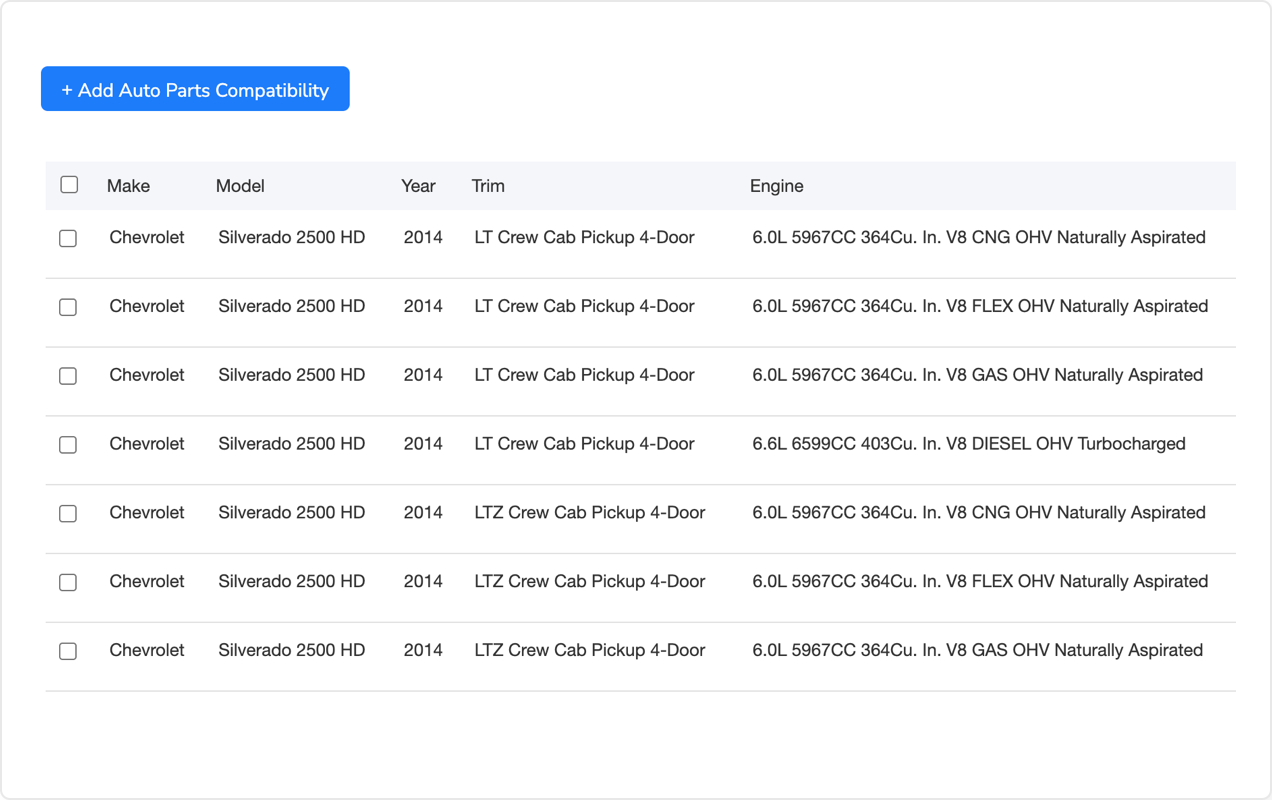
eBay fitment plus auto is a compatibility management system that automatically generates fitment data from eBay’s central vehicle database. Instead of sellers manually entering Year/Make/Model/Engine specifications for each part, the ebay fitment plus auto system pulls compatibility information from its standardized catalog.
Sounds convenient, right? Here’s the catch: eBay’s ebay fitment plus auto database doesn’t contain every vehicle variant, aftermarket modification, or regional specification difference. When you sell universal parts, performance upgrades, or components for modified vehicles, the ebay fitment plus auto system can’t accommodate those nuances.
How eBay Fitment Plus Auto Works (and Where It Breaks)
When eBay enrolls your listings in the ebay fitment plus auto system, FPA matches your part numbers against its internal compatibility database. If a match exists, eBay fitment plus auto replaces your fitment table with its data. If no match exists, your part might show as “Does Not Fit Any Vehicle”—even if you’ve been successfully selling it for years.
The ebay fitment plus auto system assumes eBay’s database is authoritative. It’s not. eBay’s ebay fitment data comes from third-party sources like ACES (Aftermarket Catalog Exchange Standard) and PIES (Product Information Exchange Standard), which contain gaps, outdated information, and errors. When eBay’s ebay fitment plus auto data contradicts your tested, verified fitments, eBay’s data wins.
Why October 20, 2025 eBay Fitment Plus Auto Matters
eBay announced September 15, 2025, that ebay fitment plus auto enrollment begins October 20 for all automotive parts categories. That’s not a lot of time to prepare. Most sellers won’t discover the ebay fitment plus auto change until after it happens—when buyers start messaging “This part doesn’t fit my car” despite your listing clearly showing it should.
Once enrolled in ebay fitment plus auto, reverting to manual compatibility tables requires contacting eBay support and proving your ebay fitment data is more accurate than theirs. That ebay fitment plus auto reversal process takes weeks and doesn’t scale when you’re managing hundreds or thousands of listings.
The Real Cost of Manual Fitment Management
Let’s quantify what “manual fitment verification” actually means in terms of time, money, and opportunity cost. Understanding these numbers helps you evaluate whether automation makes financial sense.
Time Investment Per eBay Fitment Listing
Verifying and correcting ebay fitment data for a single auto parts listing takes between 15-25 minutes, depending on part complexity:
- Simple universal parts: 5-10 minutes (basic oil filters, wiper blades)
- Standard OEM replacements: 15-20 minutes (brake pads, alternators, starters)
- Performance/aftermarket parts: 25-35 minutes (exhaust systems, suspension kits)
- Specialized components: 40-60 minutes (ECU modules, custom turbo kits)
For a 500-product ebay fitment catalog averaging 15 minutes per listing, that’s 125 hours. At 8 hours per day, that’s nearly 16 full workdays—more than three weeks of continuous ebay fitment effort. For sellers with 2,000 SKUs, that number balloons to 500 hours, or about 12.5 weeks of full-time ebay fitment work.
Now multiply those hours by your effective hourly rate (or what you’d pay an employee). At $25/hour, verifying 500 ebay fitment listings costs $3,125 in labor. For 2,000 ebay fitment plus auto listings, you’re looking at $12,500. That’s just the verification—not fixing ebay fitment errors, updating descriptions, or managing the listings afterward.
The Opportunity Cost Nobody Talks About
While you’re spending weeks verifying ebay fitment plus auto data, you’re not sourcing new products, optimizing underperforming listings, or expanding to new marketplaces. Every hour spent on manual ebay fitment data entry is an hour not spent growing revenue.
If your average profit per new listing is $150 annually, and you could add 50 new products instead of fixing fitment errors, you’re sacrificing $7,500 in potential yearly revenue. Over three years, that’s $22,500 in lost opportunity.
Pre-Enrollment Preparation: What to Do Before eBay Fitment Plus Auto October 20
You can’t stop ebay fitment plus auto enrollment, but you can protect your data and minimize post-enrollment damage. Here’s what to do in the weeks leading up to the ebay fitment plus auto October 20, 2025 deadline.
Export and Backup All eBay Fitment Data
Before ebay fitment plus auto overwrites your compatibility tables, you need complete backups of every listing’s ebay fitment information. This isn’t optional—it’s your ebay fitment plus auto insurance policy.
Download all active ebay fitment listings with compatibility data to CSV or Excel format. eBay’s File Exchange allows bulk ebay fitment exports, but the process is clunky and requires multiple steps. You’ll need to export ebay fitment listings by category, then manually combine the files. For sellers with 1,000+ ebay fitment listings spread across multiple categories, this becomes a multi-day project.
Store ebay fitment backups in multiple locations: local drive, cloud storage (Google Drive, Dropbox), and external hard drive. File corruption happens. Cloud services go down. Redundancy saves you when ebay fitment plus auto changes break things.
Here’s where automotive sellers face a massive time drain: exporting ebay fitment data from eBay’s interface is tedious, error-prone, and requires navigating through multiple screens per listing. For a 500-product ebay fitment catalog, you’re looking at 6-10 hours just to download and organize ebay fitment backup files. For 2,000 ebay fitment listings, that stretches to 24-40 hours—a full week of work.
Specialized listing automation platforms tackle this differently. Tools like Maxmerce’s Auto Parts Compatibility Tool can export complete fitment databases—including custom fields, notes, and verification flags—in a single operation. What takes 10 hours manually compresses to 15-20 minutes with the right software.
The system connects directly to eBay’s API, pulls all listing data including compatibility tables, and exports everything to standardized formats you can import later. More importantly, it maintains a master fitment database independent of eBay. When eBay overwrites your data on October 20, you’ve got a clean copy ready to restore.
This isn’t just about time savings (though reducing 10 hours to 20 minutes is significant). It’s about accuracy. Manual exports introduce transcription errors—a mistyped VIN range here, a wrong engine code there. Those mistakes compound when you’re managing thousands of fitments. Automated exports eliminate human error from the backup process.
Plus, these tools maintain version history. If you need to roll back to fitment data from three months ago, it’s there. Manual backups don’t give you that flexibility unless you’re meticulously creating dated copies (which nobody does consistently).
Protect Your Fitment Data Before October 20
Don’t wait until eBay overwrites your compatibility tables. Export and secure your fitment database now with automated backup tools designed for automotive sellers.
Document Custom Fitments and Edge Cases
Beyond raw data exports, you need human-readable documentation for fitments that don’t match eBay’s database. This includes:
- Universal parts: Components that fit multiple vehicles not connected by standard fitment logic
- Aftermarket modifications: Parts for lifted trucks, engine swaps, or performance builds
- Regional variants: European-spec vehicles, Canadian models, or grey-market imports
- Year-range exceptions: Mid-year production changes, running changes, or special editions
Create a spreadsheet listing each edge case with supporting documentation: manufacturer part numbers, installation instructions, forum threads, or customer photos proving fitment. When you contest eBay’s FPA data, this evidence demonstrates your accuracy.
Audit Your Most Profitable Listings First
You don’t have time to verify every listing before the ebay fitment plus auto October 20 deadline. Prioritize based on revenue impact. Use eBay’s Seller Hub Traffic report to identify your top 20% revenue-generating listings. These get first priority for verification and documentation.
Check these high-value listings against eBay’s existing Parts Compatibility tool to preview what ebay fitment plus auto data might look like. If you spot discrepancies now, you can prepare corrections before ebay fitment plus auto enrollment hits.
Post-eBay Fitment Plus Auto Enrollment Damage Control: First 48 Hours
October 20 arrives. eBay fitment plus auto enrolls your listings. Now what? The first 48 hours after ebay fitment plus auto enrollment determine whether you contain the damage or lose weeks fixing errors.
Immediate Audit Checklist
Within 24 hours of enrollment, audit your entire automotive catalog:
- Compare FPA fitments against your backup data: Identify listings where eBay’s compatibility differs from yours
- Test search visibility: Search for your parts using common vehicle queries (e.g., “2018 Honda Civic brake pads”) and verify your listings appear
- Check “Does Not Fit” listings: Find parts eBay marked as incompatible with any vehicle
- Monitor buyer questions: Watch for increased “Will this fit my car?” messages indicating compatibility confusion
- Track return rates: Set up daily monitoring for fitment-related returns
For a 500-listing catalog, this audit takes 12-15 hours manually. You’re clicking through each listing, comparing compatibility tables to your backup spreadsheet, and documenting discrepancies. For sellers with 2,000+ SKUs, this becomes a multi-week nightmare.
This is where many automotive sellers hit a wall: you know something’s wrong, but manually auditing thousands of listings isn’t feasible. Customer complaints pile up. Returns spike. You’re paralyzed by the scale of the problem.
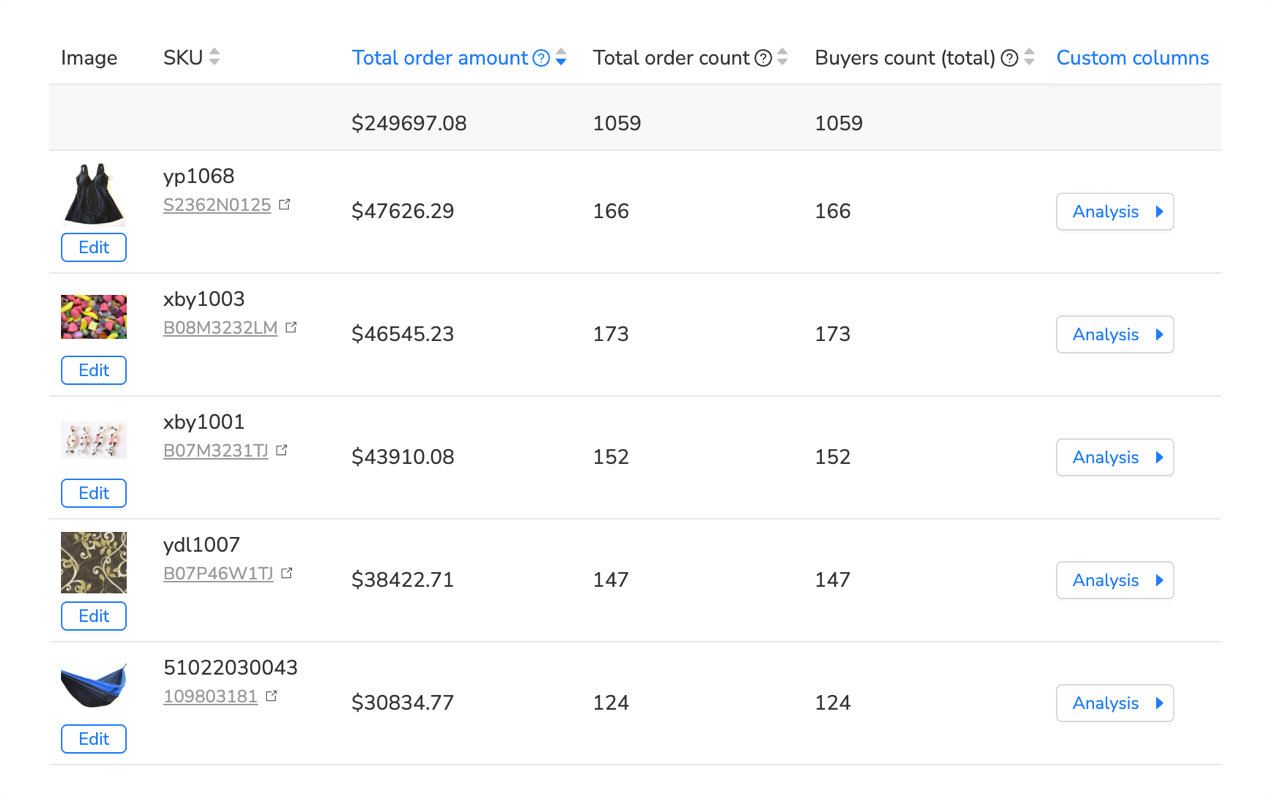
Automated comparison tools change the equation. Maxmerce’s Bulk Product Editing system can compare eBay’s FPA data against your master fitment database automatically. It generates a discrepancy report showing exactly which listings have compatibility mismatches, what changed, and the potential impact on search visibility.
Instead of 15 hours of manual clicking, you run one automated audit that completes in 10-15 minutes. The system flags listings with errors, prioritizes them by revenue impact, and generates a corrective action plan. You see immediately: “127 listings lost critical fitments,” “43 listings marked as universal when they’re vehicle-specific,” “89 listings show incorrect engine compatibility.”
That specificity lets you triage effectively. You fix the 43 listings causing active customer complaints today, schedule the 89 moderate-impact corrections for this week, and queue the remaining 127 low-priority fixes for next month. Without automated auditing, you’re guessing which listings to fix first.
The tool also maintains a change log. You can see exactly what eBay changed on October 20: which fitments were added, which were removed, and which were modified. That history becomes critical when you’re filing support tickets with eBay or disputing INAD (Item Not As Described) cases.
Correcting Fitment Errors at Scale
Once you’ve identified discrepancies, you need to fix them. Fast. Every day incorrect compatibility data remains live, you’re accumulating returns and negative feedback.
Manual correction means editing each listing individually through eBay’s interface: click Edit Listing, scroll to Compatibility, delete incorrect entries, add correct fitments, save, move to next listing. For simple parts, this takes 5-8 minutes per listing. For complex components with 50+ fitments, it’s 15-20 minutes each.
If you’ve got 200 listings with errors, that’s 16-40 hours of mind-numbing data entry. You’ll make mistakes—guaranteed. By hour 10, you’re mistyping VINs, selecting wrong engine codes, and copying fitments to wrong listings. Fatigue-induced errors require even more time to identify and fix later.
Bulk editing capabilities transform this nightmare. With Maxmerce’s Rule-Based Bulk Listing Editing, you upload a corrected fitment file containing all accurate compatibility data. The system matches parts to listings, updates compatibility tables across all affected products, and syncs changes to eBay in batch operations.
That 40-hour manual correction project compresses to 90 minutes: 30 minutes preparing the corrected fitment file, 15 minutes uploading and mapping fields, 30 minutes for the system to process updates, and 15 minutes reviewing confirmation reports. Time savings: 93%.
More importantly, bulk operations ensure consistency. When you’re manually editing 200 listings, you might describe the same fitment three different ways. Bulk updates apply standardized formatting across all listings, which improves search visibility and reduces buyer confusion.
| Task | Manual Approach | Maxmerce Solution | Time Savings |
|---|---|---|---|
| Export fitment data (500 listings) | 8-10 hours clicking through eBay interface | 15-20 minutes with API-based export | 97% reduction |
| Audit compatibility changes | 12-15 hours comparing listings to backups | 10-15 minutes automated comparison report | 95% reduction |
| Correct 200 fitment errors | 16-40 hours editing listings individually | 90 minutes with bulk update upload | 93% reduction |
| Monitor ongoing accuracy | 4-6 hours weekly spot-checking listings | 30 minutes weekly automated alerts | 88% reduction |
| Sync fitments across eBay, Amazon, Walmart | 25-30 hours reformatting for each platform | 45-60 minutes automated cross-platform sync | 96% reduction |
| Total monthly fitment management | 65-101 hours per month | 5-7 hours per month | 92-93% reduction |
Long-Term Strategy: Building eBay Fitment Plus Auto-Proof Fitment Systems
Surviving ebay fitment plus auto October 20 is step one. Thriving long-term requires systems that protect against future ebay fitment plus auto changes, platform inconsistencies, and data corruption.
Maintain Independent Master Fitment Database
The single biggest lesson from FPA auto-enrollment: never rely solely on platform-hosted data. eBay controls what’s on eBay. Amazon controls what’s on Amazon. When platforms change policies (and they will), you need an independent source of truth.
Create a master fitment database outside any marketplace. This could be an Excel spreadsheet, a MySQL database, or (better yet) a specialized automotive catalog system. Your master database contains every part you sell with complete compatibility information—verified, documented, and version-controlled.
When eBay changes requirements, you update your listings from the master database. When you expand to Amazon or Walmart, you export appropriate subsets. When you need historical fitment data, it’s preserved independently of marketplace changes.
The challenge: maintaining manual spreadsheets becomes a nightmare at scale. If you’re managing 2,000 SKUs across three platforms, that’s 6,000 listing records to keep synchronized. Add weekly price updates, inventory changes, and seasonal description tweaks, and manual management becomes impossible.
Implement Cross-Platform Fitment Sync
Most successful automotive parts sellers don’t rely on a single marketplace. You’re selling on eBay, Amazon, Walmart, and maybe a Shopify store. Each platform has different fitment format requirements:
- eBay: Year/Make/Model/Engine/Trim format with compatibility tables
- Amazon: ASIN-based fitment using Amazon’s vehicle database
- Walmart: Item Spec requirements with structured attribute fields
Manually reformatting fitment data for each platform takes 3-5 hours per listing when you’re copying between marketplaces. For a 500-product catalog, that’s 1,500-2,500 hours just to list the same inventory across three channels. Nobody has that kind of time.
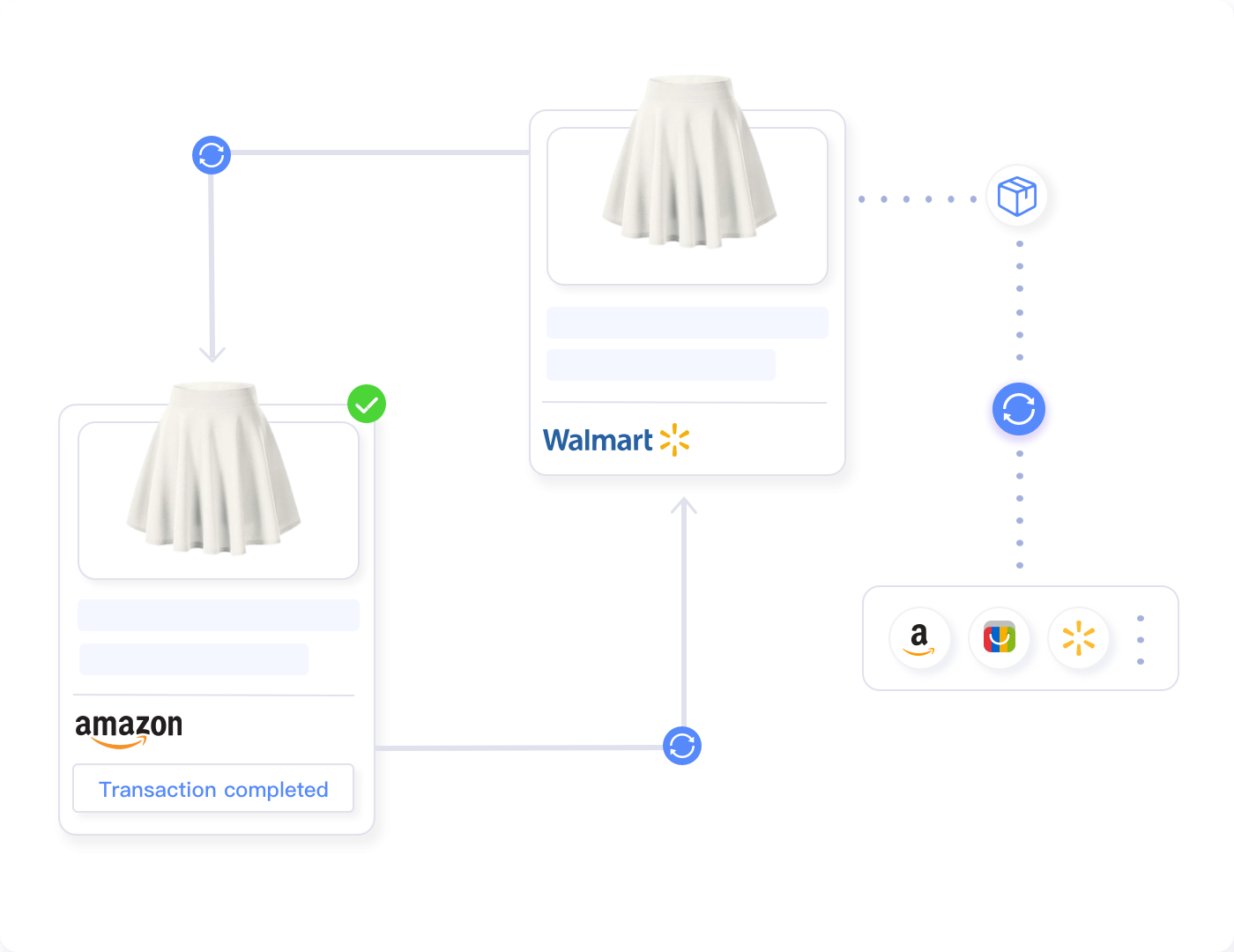
This is where centralized listing management creates massive leverage. Maxmerce’s Multi-Channel Listing system stores fitment data once in a normalized format, then automatically adapts it for each platform’s requirements when publishing.
You enter: “Fits 2015-2020 Ford F-150 with 3.5L EcoBoost engine.” The system translates that to eBay’s Year/Make/Model format, maps it to Amazon’s ASIN-based compatibility, and converts it to Walmart’s Item Spec attributes. One input, three platform-specific outputs, zero manual reformatting.
When eBay changes fitment requirements (like FPA auto-enrollment), you update the eBay output template. Your master data stays untouched. Amazon and Walmart listings remain accurate. You’re insulated from single-platform policy shifts.
This architecture also solves the version control nightmare. When you correct a fitment error, that correction propagates everywhere. You don’t have to remember to update the eBay listing, then the Amazon listing, then the Walmart listing. Fix it once, sync everywhere.
Automate Ongoing Fitment Verification
Fitment data degrades over time. Manufacturers release mid-year production changes. You discover a part fits additional vehicles through customer feedback. eBay updates its FPA database with corrections (or introduces new errors).
Manual monitoring means periodically clicking through your catalog checking for discrepancies. For 500 listings, that’s 4-6 hours weekly. For 2,000 listings, it’s a full-time job.
Automated verification systems monitor fitment accuracy continuously. Maxmerce’s compatibility monitoring compares your master fitment database against live listings across all platforms, flagging discrepancies automatically.
You receive alerts: “eBay listing #123456789 compatibility changed—FPA update detected,” “Amazon ASIN B08XYZ now shows different fitment than master database,” “Walmart listing missing 15 compatible vehicles from master data.” These alerts let you address issues proactively before customers discover them through failed purchases.
The system also tracks buyer questions and return reasons related to fitment. If you start getting “doesn’t fit” returns for a specific part, automated analysis flags that listing for manual review. Maybe eBay’s FPA database changed. Maybe your fitment data needs correction. Either way, you catch the problem within days instead of months.
Alternative Approaches (and Why They Don’t Scale)
Before committing to automation, sellers often try these manual workarounds. They work—barely—for small catalogs, but collapse at scale.
Outsourcing to Virtual Assistants
Many sellers hire VAs to handle fitment data entry and verification. At $8-12/hour for offshore talent, it seems cost-effective initially.
The reality: training VAs to understand automotive compatibility takes weeks. They don’t know a 5.3L V8 from a 6.2L V8. They can’t spot when eBay’s data shows a brake pad fitting a vehicle that uses a different rotor size. Quality control becomes a full-time job.
You end up spending 15-20 hours weekly reviewing VA work, fixing errors, and retraining. For complex automotive applications, VA error rates run 8-15%—meaning you’re paying to introduce mistakes you then pay to fix.
VAs work for repetitive data entry where accuracy is easy to verify. Fitment verification requires automotive knowledge, parts expertise, and judgment. That’s not easily outsourced to non-specialists.
Using eBay’s File Exchange Manually
eBay’s File Exchange lets you upload CSV files for bulk listing updates. It’s free, built-in, and handles large catalogs.
It’s also clunky, error-prone, and requires Excel expertise most sellers don’t have. You’re manually formatting CSVs, debugging cryptic error messages (“Row 247: Invalid item specific value”), and dealing with partial uploads when eBay’s validation rejects half your file.
File Exchange is powerful for sellers who understand its quirks and have clean data. For everyone else, it’s a source of frustration and wasted hours.
Accepting Higher Return Rates
Some sellers decide: “I’ll just handle returns when they happen rather than investing time in perfect fitment data.”
That strategy has costs: eBay charges you 2.35% + $0.30 per transaction even when buyers return items. You pay return shipping. You can’t resell opened parts as new. Your defect rate increases, potentially costing Top Rated Seller status.
A 5% return rate on $100,000 annual sales means $5,000 in returned merchandise. At 30% net margin, you lose $1,500 in profit—plus $1,175 in non-refundable eBay fees. That’s $2,675 annually just from preventable returns.
Investing $500-1,000 in proper fitment management tools eliminates most of those returns. The ROI is obvious.
Specific Fitment Challenges by Auto Parts Category
Not all automotive parts face the same FPA challenges. Understanding category-specific issues helps prioritize your correction efforts.
Engine Components and Performance Parts
Engine parts have the most complex fitment requirements: year ranges, engine codes, horsepower ratings, transmission types, and regional variants all affect compatibility. eBay’s database often lumps similar engines together—showing a part fits “all 2015 F-150s with 5.0L V8” when it actually only fits specific production runs.
Performance parts face additional challenges: eBay’s database focuses on OEM fitments, ignoring aftermarket modifications. Your cold air intake fits modified Mustangs with specific tuning, but eBay’s FPA only shows stock configurations. Those custom fitments disappear post-enrollment unless you manually restore them.
Body Parts and Trim Pieces
Body parts depend on production changes, package options, and regional variations. A front bumper might fit 2018-2020 Honda Accords, but only the Sport and EX-L trims. eBay’s database often misses these trim-level distinctions.
You also face mid-year production changes. Honda might update a headlight design in March 2019, creating two different parts for “2019 Accord.” eBay’s database shows one fitment covering all 2019 models, causing confusion when buyers with early-2019 production receive incompatible parts.
Universal and Multi-Application Parts
Universal parts—LED light bars, seat covers, floor mats—don’t fit eBay’s Year/Make/Model paradigm. FPA enrollment often marks these as “Does Not Fit Any Vehicle” because they don’t match specific vehicle records in eBay’s database.
You need to manually override FPA’s universal part handling, documenting dimensions, mounting specifications, and compatibility ranges in the description. That’s extra work for every universal part in your catalog.
Wheels, Tires, and Suspension Components
Wheels require bolt pattern, offset, diameter, and width specifications. Tires need load rating and speed index. Suspension parts depend on factory ride height and suspension package.
eBay’s FPA handles basic wheel fitments reasonably well, but struggles with staggered setups, aftermarket wheel spacers, and lifted vehicles. If you sell to the truck and off-road market, expect significant FPA discrepancies requiring manual correction.
Multi-Platform Fitment Strategy: Beyond eBay
Smart automotive sellers don’t put all their inventory on one marketplace. You’re likely selling on Amazon, Walmart, and possibly your own Shopify store. Each has different fitment requirements and tools.
Amazon’s ASIN-Based Fitment System
Amazon uses ASINs (Amazon Standard Identification Numbers) linked to their vehicle catalog. Instead of manually entering Year/Make/Model, you select compatible vehicles from Amazon’s database.
Sound familiar? It’s the same concept as eBay’s FPA—Amazon controls the compatibility data, and you’re at the mercy of their database accuracy. Amazon’s automotive catalog is more comprehensive than eBay’s, but still contains gaps for aftermarket and performance applications.
The key difference: Amazon requires fitment data before listing, not retroactively. You deal with compatibility challenges upfront during initial listing creation.
Walmart’s Item Spec Requirements
Walmart Marketplace uses structured Item Specs for automotive parts—mandatory attribute fields that must be populated for listing approval. Fitment is one category of Item Specs, alongside part type, manufacturer, and technical specifications.
Walmart’s validation is stricter than eBay’s. If your Item Specs don’t precisely match Walmart’s catalog structure, your listings get rejected during upload. No retroactive corrections—you fix it before publishing or your listing doesn’t go live.
This creates a different challenge than eBay’s FPA: you need clean, properly formatted fitment data before attempting Walmart listing uploads. Manual CSV editing for Walmart’s format takes 5-8 minutes per listing. For 500 parts, that’s 40-67 hours of formatting work before you even start uploading.
Cross-Platform Fitment Translation
Managing fitment across three platforms manually means reformatting the same data three different ways. That triple-work compounds over time: every new product requires three separate fitment entry sessions. Every correction requires three updates.
You spend roughly 15 minutes per platform per listing on fitment data. For 500 products across eBay, Amazon, and Walmart, that’s 375 hours—nearly 10 full weeks of work. For sellers scaling to 2,000 SKUs, it’s 1,500 hours, or 37.5 weeks. That’s unrealistic without automation.
Maxmerce’s cross-platform listing management normalizes fitment data into a universal format, then translates it for each marketplace’s requirements automatically. You maintain one master compatibility database. The system adapts it for eBay’s compatibility tables, Amazon’s ASIN linking, and Walmart’s Item Specs without manual reformatting.
This architecture works because fitment logic is fundamentally the same across platforms—only the format changes. A brake pad that fits a 2018 Honda Civic EX with a 2.0L engine fits that vehicle whether you’re listing on eBay, Amazon, or Walmart. The underlying compatibility doesn’t change; just how you represent it in each platform’s interface.
The system handles format translation: eBay gets Year/Make/Model tables, Amazon gets ASIN links, Walmart gets Item Spec attributes. More importantly, when you correct an error in your master database—maybe a customer informs you a part also fits the 2019 model year—that correction syncs everywhere. One update, three platforms, zero manual reformatting.
You also avoid the “which version is correct?” nightmare. When managing fitment data manually across platforms, you inevitably create inconsistencies: the eBay listing shows one year range, Amazon shows another, Walmart has a third variant. Centralized data eliminates version conflicts—there’s only one authoritative fitment record.
Manage Fitment Across eBay, Amazon, and Walmart from One Dashboard
Stop reformatting compatibility data for each marketplace. Maintain one master fitment database that syncs everywhere automatically.
Building Your FPA Survival Action Plan
You’ve got the context. Now here’s your concrete action plan for surviving—and thriving—through eBay’s Fitment Plus Auto rollout.
Immediate Actions (Before October 20, 2025)
- Export all fitment data from eBay using File Exchange or API-based tools—complete by October 15
- Create offline backups in multiple locations with clear version dating
- Audit your top 100 revenue-generating listings to identify potential FPA conflicts
- Document edge cases and universal parts that don’t fit standard fitment logic
- Test competitor listings already enrolled in FPA to preview what’s coming
Week of October 20-27, 2025
- Run full catalog audit comparing FPA enrollments against backup data
- Prioritize corrections by revenue impact—fix high-volume listings first
- Monitor return rates and customer messages for fitment-related issues
- Test search visibility for key products to ensure proper category placement
- File eBay support tickets for any listings marked “Does Not Fit Any Vehicle” incorrectly
Long-Term Strategy (November 2025 and Beyond)
- Establish independent master fitment database outside eBay’s control
- Implement cross-platform listing sync for eBay, Amazon, and Walmart
- Set up automated fitment monitoring to catch FPA changes proactively
- Create documentation standards for new products and fitment verification
- Review monthly fitment accuracy metrics and adjust processes as needed
The ROI of Fitment Automation
Let’s talk numbers. Automation costs money upfront. Manual management costs time continuously. Which is more expensive?
Manual Management Annual Costs
For a 500-product automotive parts catalog sold across eBay, Amazon, and Walmart:
- Initial multi-platform listing setup: 375 hours at $25/hour = $9,375
- Monthly fitment verification: 20 hours at $25/hour × 12 months = $6,000
- Quarterly bulk updates: 30 hours at $25/hour × 4 quarters = $3,000
- Error correction and customer service: 10 hours monthly at $25/hour × 12 = $3,000
- Platform policy changes (like FPA): 40 hours at $25/hour = $1,000
Total annual cost: $22,375
That’s just time. Add opportunity cost: what revenue could you generate if those 495 hours went to sourcing new products, optimizing ads, or expanding to new categories?
Automated Management Annual Costs
Using a specialized automotive listing platform like Maxmerce:
- Initial setup and training: 10-15 hours at $25/hour = $250-375
- Monthly monitoring and adjustments: 3 hours at $25/hour × 12 months = $900
- Quarterly bulk updates: 2 hours at $25/hour × 4 quarters = $200
- Platform changes (like FPA): 4 hours at $25/hour = $100
Total annual time cost: $1,450-1,575
That’s 92% less labor than manual management. The time savings—roughly 450 hours annually—equates to $11,250 in recaptured opportunity for revenue-generating activities.
Return Rate Reduction Value
Accurate fitment data reduces returns. If better compatibility management cuts your return rate from 6% to 3% on $100,000 annual sales:
- Prevented returns: $3,000 in merchandise
- Saved eBay fees: $70.50 (2.35% of $3,000)
- Saved return shipping costs: $300 (assuming $10 per return × 30 prevented returns)
- Protected profit margin: $900 (30% margin on $3,000)
Total return prevention value: $4,270.50 annually
When you add time savings ($11,250) plus return prevention ($4,270), automation creates roughly $15,500 in annual value for a 500-product catalog. That’s a 3-4 month ROI on even premium listing management tools.
Common FPA Mistakes to Avoid
Sellers make predictable errors when dealing with Fitment Plus Auto enrollment. Learn from others’ mistakes:
Mistake #1: Waiting Until After October 20 to Prepare
By the time you notice FPA changed your listings, customers are already receiving incompatible parts. Proactive preparation—backups, documentation, audit systems—prevents weeks of reactive firefighting.
Mistake #2: Trusting eBay’s Database Without Verification
eBay’s FPA data is good, not perfect. Always compare auto-generated fitments against your records and manufacturer specifications. eBay won’t refund you for returns caused by their database errors.
Mistake #3: Manually Managing FPA Corrections at Scale
If you’ve got more than 100 automotive listings, manual correction doesn’t scale. You’ll spend weeks fixing errors while new problems accumulate. Invest in bulk management tools before you’re overwhelmed.
Mistake #4: Ignoring Cross-Platform Implications
FPA affects eBay, but you’re probably selling on Amazon and Walmart too. Changes to your eBay fitment data should trigger reviews of other platforms. Inconsistencies between marketplaces confuse buyers and damage credibility.
Mistake #5: Not Documenting Custom Fitments
Universal parts, aftermarket modifications, and edge cases need written documentation explaining why your fitment differs from eBay’s database. Without documentation, customer service and future you won’t understand your reasoning.
Frequently Asked Questions
Your Next Steps
eBay’s Fitment Plus Auto enrollment is happening October 20, 2025, whether you’re ready or not. The sellers who survive—and thrive—are the ones who prepare now, build resilient systems, and refuse to accept platform changes as inevitable obstacles.
You’ve got three options:
- Do nothing and react after October 20: Spend weeks firefighting compatibility errors while returns spike and customers complain
- Manually manage the transition: Invest hundreds of hours backing up data, auditing listings, and making corrections one-by-one
- Automate fitment management: Deploy systems that handle backups, audits, and corrections in minutes instead of hours, freeing you to focus on growing revenue
For sellers with more than 100 automotive listings, option three isn’t luxury—it’s survival. The time savings alone justify automation costs within 3-4 months. The return rate reduction, improved accuracy, and cross-platform scalability create ongoing value measured in thousands of dollars annually.
Maxmerce’s automotive listing tools handle the entire FPA survival workflow: automated data backup before enrollment, compatibility audits detecting discrepancies, bulk correction uploads fixing hundreds of listings simultaneously, ongoing monitoring catching future changes, and cross-platform sync maintaining consistency across eBay, Amazon, and Walmart.
You don’t have to manage fitment data for three separate platforms. You don’t have to spend 20 hours weekly verifying compatibility tables. You don’t have to accept higher return rates because manually maintaining accurate data is impossible at scale.
The October 20 deadline is fixed. Your response isn’t. Choose systems that scale with your catalog, protect against platform changes, and let you focus on what actually grows your business—sourcing better products, optimizing pricing, and expanding into new categories.
Survive eBay’s FPA Rollout with Automated Fitment Management
Don’t let October 20 derail your automotive parts business. Deploy listing automation that backs up your data, audits FPA enrollments, and corrects compatibility errors in minutes—not weeks.
