eBay Customer Service Automation & CRM Tools

eBay customer service automation transforms buyer communication by consolidating messages, automating responses, and enabling team collaboration through specialized CRM tools. Manual message handling consumes 15-30 hours weekly for high-volume sellers, creating response delays that damage seller ratings and lose sales. Automation systems cut response times by 80-93%, maintain 95%+ response rates, and enable sellers to scale support without proportionally scaling headcount.
Key Takeaways:
- eBay customer service automation reduces response time by 80-93% through AI-powered message routing, templates, and automated workflows (Industry benchmarks, 2025)
- Unified inbox consolidation prevents 15-25% of missed messages by centralizing eBay Messages, Resolution Center cases, and returns in one interface (eDesk research, 2025)
- Automated message triggers save 10-25 hours weekly by sending order confirmations, shipping updates, and feedback requests without manual intervention (Seller surveys, 2025)
- AI response assistance reduces typing time by 70-85% through context-aware reply suggestions that maintain professional, policy-compliant communication (CRM platform data, 2025)
- Team collaboration features cut message reassignment time by 60% through automatic routing rules, workload balancing, and expertise-based assignment (Productivity studies, 2025)
This comprehensive guide examines eBay customer service automation strategies, CRM tool capabilities, and implementation approaches that enable sellers to deliver faster, more consistent buyer communication while reducing operational workload. You’ll discover how automation systems integrate with eBay’s messaging infrastructure, what features distinguish effective CRM platforms, and practical workflows for scaling customer support from 50 to 500+ weekly messages without sacrificing quality.
Understanding eBay Customer Service Automation in 2025
eBay customer service automation uses specialized software to manage buyer communication across multiple touchpoints including eBay Messages, Resolution Center cases, return requests, and feedback exchanges. Unlike generic helpdesk systems, eBay-specific CRM tools integrate directly with eBay’s API to automatically pull order context, shipping status, and buyer history into every message thread.
The automation landscape shifted significantly in 2025 with eBay’s continued emphasis on fast response times as a ranking factor. Sellers responding within 24 hours to buyer messages receive preferential treatment in Best Match search rankings. Additionally, eBay’s Top Rated Seller program requires maintaining specific response metrics that manual handling struggles to achieve at scale.
Critical eBay Messaging Challenges Automation Solves
Manual eBay customer service creates four fundamental bottlenecks that directly impact seller performance. First, context switching between eBay Seller Hub, shipping software, and inventory systems consumes 3-5 minutes per message as sellers hunt for order details. A seller handling 200 weekly messages wastes 10-16 hours weekly just gathering context before typing responses.
Second, repetitive inquiries about shipping status, return policies, and order modifications constitute 60-70% of all buyer messages. However, manually typing similar responses 120-140 times weekly leads to inconsistencies, typos, and policy compliance errors. One misworded return policy explanation can trigger an eBay Money Back Guarantee case that costs hundreds of dollars.
Third, message volume spikes during Q4 holiday seasons, product launches, or promotional periods overwhelm manual processes. A seller maintaining 4-hour response times during normal periods might fall to 24-48 hour delays during peak volume, damaging metrics precisely when sales opportunities peak.
Fourth, team-based customer service requires complex coordination when multiple support staff handle the same buyer account. Without unified systems, two team members might send contradictory responses, or critical follow-ups fall through cracks during shift changes.
How eBay CRM Automation Transforms Message Handling
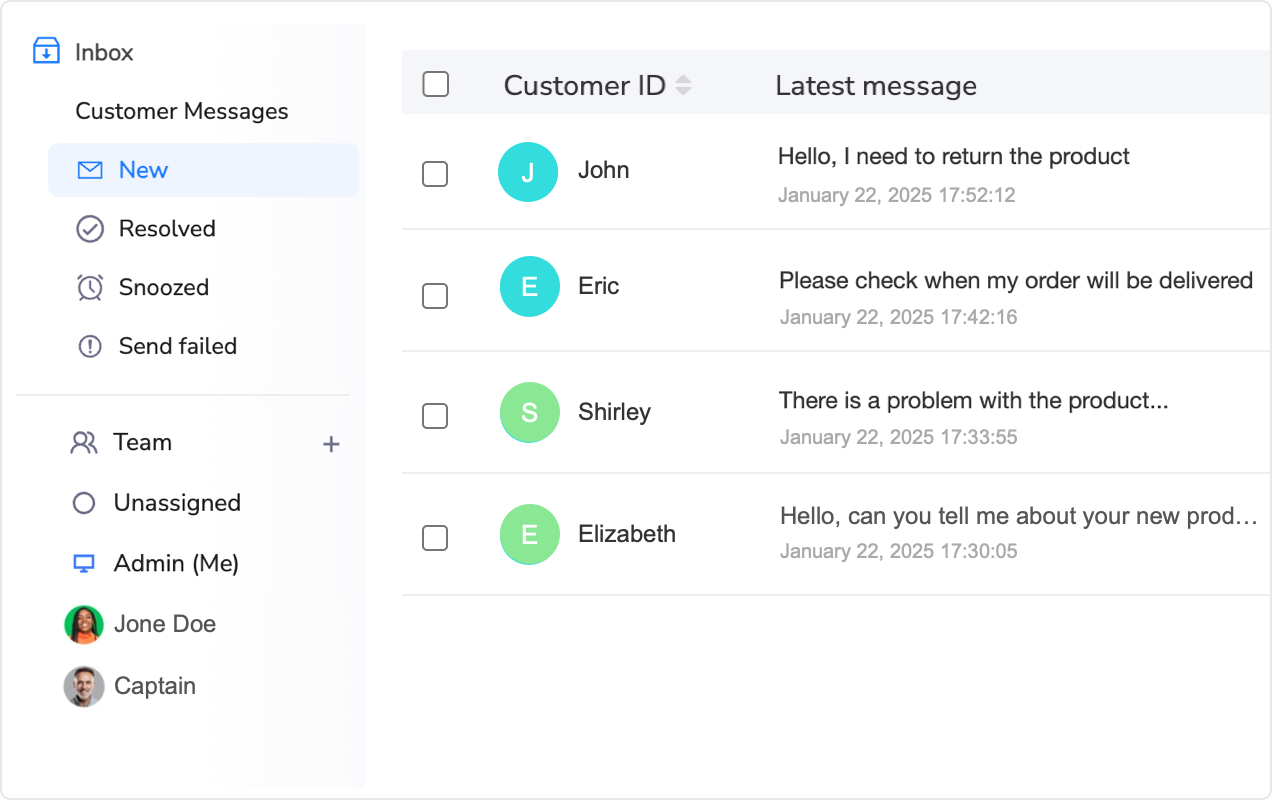
Modern eBay CRM automation solves these challenges through four integrated capabilities. The foundation is a unified inbox that consolidates all eBay Messages, Resolution Center notifications, and return requests into a single interface. Instead of checking three separate eBay systems, sellers see every buyer touchpoint in one chronological thread.
More critically, automation systems attach complete order context to every message automatically. When a buyer asks “Where’s my order?”, the CRM displays shipping carrier, tracking number, current location, estimated delivery date, and order details without requiring the seller to search separate systems. This context attachment reduces response preparation time from 3-5 minutes to 10-15 seconds.
The second capability is intelligent message routing and prioritization. Automation rules analyze incoming messages, categorize them by type (pre-purchase question, shipping inquiry, return request, complaint), assign priority scores, and route them to appropriate team members. A return request from a high-value repeat customer automatically escalates to senior support, while a simple tracking question gets handled by junior staff or pre-approved auto-responses.
Third, response automation uses templates with dynamic variables to generate personalized replies in seconds. A template might read: “Hi {{BUYER_NAME}}, your order {{ORDER_ID}} shipped via {{CARRIER}} on {{SHIP_DATE}}. Tracking shows current location {{TRACKING_LOCATION}} with estimated delivery {{DELIVERY_DATE}}.” The system fills variables automatically, creating a personalized response that would take 2-3 minutes to type manually.
Fourth, AI-powered assistance analyzes message content and buyer history to suggest appropriate response templates, identify sentiment (frustrated, neutral, satisfied), and recommend actions like partial refunds or expedited shipping. This guidance helps less experienced support staff deliver expert-level service consistently.
Core eBay CRM Features for Customer Service Automation
Effective eBay CRM platforms integrate ten essential features that distinguish automation systems from basic helpdesk software. Understanding these capabilities helps sellers evaluate which tools match their operational requirements and growth trajectory.
Unified Multi-Channel Inbox Consolidation
The foundation of eBay customer service automation is inbox consolidation that pulls messages from eBay’s multiple communication channels into a single interface. eBay buyers can contact sellers through eBay Messages, ask questions on product listings, open Resolution Center cases, initiate return requests through eBay’s return system, and leave feedback comments. Manual sellers check four separate eBay interfaces multiple times daily.
Automated CRM systems connect to eBay’s API and continuously sync all communication channels. When a buyer sends an eBay Message, opens a return case, and adds feedback within the same day, the CRM displays all three interactions in one unified timeline. This consolidation prevents the common scenario where a seller responds to an eBay Message without realizing the same buyer just escalated to a Resolution Center case.
Advanced systems extend beyond eBay to consolidate Amazon Buyer-Seller Messages, Walmart customer questions, and Shopify contact forms for multi-channel sellers. This cross-platform view reveals when buyers purchase on multiple channels, enabling personalized service that acknowledges their complete relationship with your business.
Quantifying the manual pain reveals the urgency. A seller managing 300 eBay listings receives approximately 40-60 pre-purchase questions weekly, 80-120 post-purchase messages, 10-20 return inquiries, and 5-10 Resolution Center cases. Checking four separate eBay systems consumes 2-3 hours weekly just monitoring for new messages. Unified inbox consolidation eliminates this waste by presenting everything in one real-time stream.
Multi-channel sellers face exponentially worse complexity. Managing eBay, Amazon, and Walmart simultaneously means checking 9-12 separate message interfaces. For 500 weekly messages across platforms, manual monitoring consumes 8-12 hours weekly—a full business day lost to inbox checking before typing a single response.
Automatic Order Context Integration
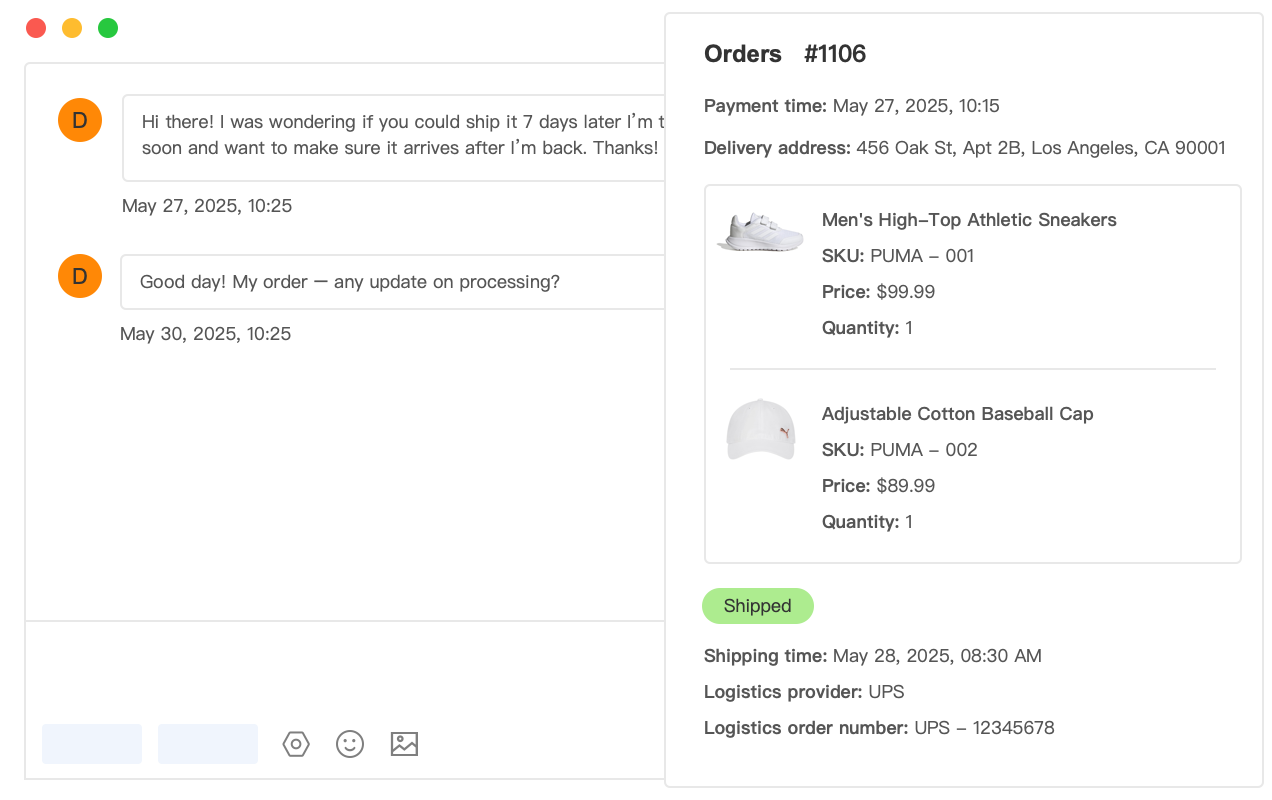
Context integration automatically attaches complete order information to every buyer message, eliminating the need to search separate systems for transaction details. When a buyer asks about delivery timing, the CRM displays order date, shipping carrier, tracking number, current package location, estimated delivery date, ordered items, and payment status without requiring any seller action.
This automation proves transformative for message quality and speed. Manual sellers spend 2-5 minutes per inquiry switching between eBay Messages, Seller Hub orders, shipping software, and carrier tracking pages to gather context before typing responses. For 100 weekly messages, this context gathering consumes 3.3-8.3 hours weekly—before addressing the actual inquiry.
Moreover, manual context gathering introduces errors. Sellers occasionally pull details from the wrong order when managing multiple buyers named “John” or similar product variations. Sending tracking information for Order #123 when the buyer asked about Order #456 creates confusion that escalates to Resolution Center cases.
Automated context integration displays complete purchase history showing all previous orders, messages, returns, and feedback for the buyer. This longitudinal view enables personalized responses acknowledging repeat customers (“Thanks for your third purchase!”) and reveals concerning patterns (buyer has returned 5 of 7 previous orders) that warrant careful handling.
Advanced order context includes real-time inventory status for pre-purchase questions. When a buyer asks “Do you have this in stock?”, the system shows current inventory levels, warehouse locations, and estimated shipping timelines based on buyer location—enabling precise, confident responses instead of vague “usually ships within 3-5 days” messaging.
Intelligent Reply Templates and Personalization
Reply templates transform repetitive message composition into single-click selections, but effective template systems balance efficiency with personalization. Basic templates might save typing time while creating robotic, impersonal responses that damage customer relationships. Advanced template systems use dynamic variables, conditional logic, and AI enhancement to generate responses that read as personally crafted.
Template libraries should cover the 15-20 most common inquiry types constituting 70-80% of message volume. Essential templates include shipping status updates, return policy explanations, order modification confirmations, product specification answers, delayed shipment notifications, out-of-stock alternatives, damaged item resolution, and post-delivery follow-ups.
Dynamic personalization prevents templates from feeling generic. Variables automatically insert buyer name, order number, product title, shipping carrier, tracking number, estimated delivery date, and purchase date. A template reading “Hi {{BUYER_NAME}}, I’ve checked on your order {{ORDER_ID}} for {{PRODUCT_TITLE}}” becomes “Hi Sarah, I’ve checked on your order #7634 for Wireless Bluetooth Headphones”—maintaining efficiency while sounding personal.
Conditional logic enables template variations based on situation specifics. A shipping delay template might automatically include different explanations based on delay reason (weather event, carrier backlog, inventory stockout) and different compensation offers based on order value (free expedited shipping for $100+ orders, 10% refund for $50+ orders, apology for smaller orders).
The time savings compound dramatically. Typing a 100-word response explaining return procedures takes 3-4 minutes manually. Using templates reduces this to 10-15 seconds—selecting template, reviewing personalized output, clicking send. For a seller addressing 30 weekly return inquiries, templates save 87-117 minutes weekly on just this single message type.
However, template overuse creates customer service problems. Buyers recognize impersonal boilerplate responses, especially when templates don’t fully address their specific situation. Effective automation requires human review before sending, particularly for complex issues, frustrated buyers, or high-value customers. Templates should accelerate response drafting, not eliminate human judgment.
AI-Powered Response Assistance and Drafting
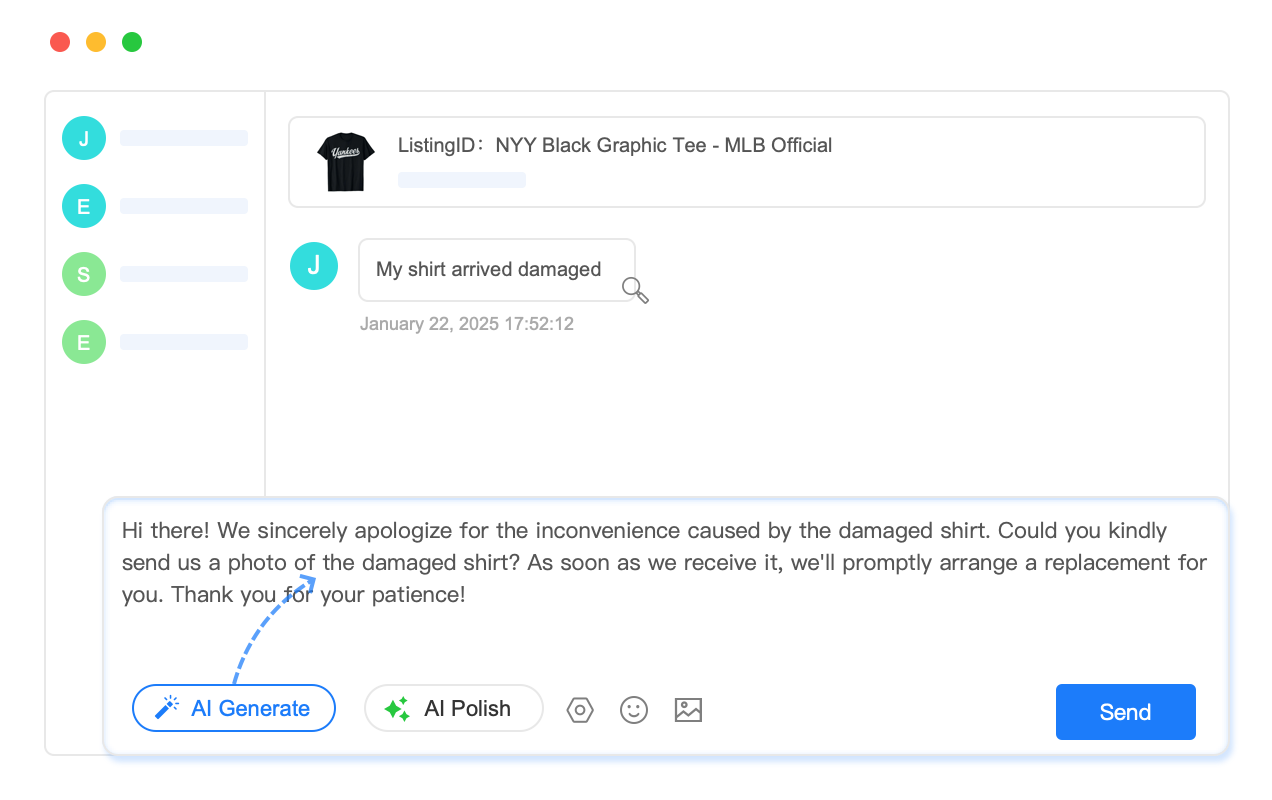
AI response assistance represents the evolution beyond static templates, using machine learning to analyze buyer messages and automatically generate contextually appropriate responses. Instead of selecting from predefined templates, AI systems read the buyer’s question, understand intent, check order context, and compose original responses that address the specific inquiry.
The technology analyzes multiple data points simultaneously. It parses the buyer’s message for key information (tracking inquiry, return request, product question), reviews conversation history for prior context, checks order status for current shipment location, and examines seller policies to ensure response compliance. This analysis happens in 1-2 seconds, producing draft responses that human agents review and send.
AI assistance particularly excels at complex multi-part inquiries. When a buyer writes “I ordered two different colors but only received one. Can I return the one I got and get a refund for the missing item?”, the AI identifies three separate issues (missing item, return inquiry, refund request) and drafts a response addressing all components while following proper eBay procedure (send replacement for missing item, process partial refund if buyer prefers, explain return process if needed).
Response quality improves through continuous learning. The system analyzes which AI-generated responses sellers edit before sending, what changes they make, and buyer reactions (positive reply, no further contact, escalation to case). This feedback loop progressively improves future suggestions, reducing the edit rate from 60-70% initially to 15-25% after 3-6 months of training.
The time savings prove substantial but nuanced. AI assistance doesn’t eliminate work—it reduces response composition time from 3-5 minutes to 30-60 seconds by providing a solid draft requiring minor refinement rather than blank-slate writing. For sellers handling 150 weekly messages, this acceleration saves 7.5-11 hours weekly while maintaining response personalization and quality.
Critically, AI assistance helps less experienced team members deliver expert-level service. Junior support staff armed with AI-generated responses can handle complex inquiries that would previously require senior escalation, enabling more efficient team structures and faster training timelines.
Maxmerce CRM: eBay Customer Service Automation That Scales
The challenges of manual eBay customer service intensify as message volume grows from 50 to 500+ weekly interactions. Sellers face a painful choice: hire additional support staff (increasing costs 50-100%), accept slower response times (damaging seller metrics and losing sales), or implement automation systems designed to scale efficiently.
Manual eBay message handling costs $0.50-$2.00 per message when accounting for labor time, with costs rising to $3-$5 per message for complex issues requiring multiple replies. A seller processing 300 weekly messages spends $150-$600 weekly ($7,800-$31,200 annually) on customer service labor alone. These costs don’t include the revenue lost from slow response times causing abandoned purchases or negative feedback triggering ranking penalties.
Scaling manual processes compounds inefficiencies. Adding a second support team member requires training on eBay policies, product knowledge, and communication standards. However, without unified systems, multiple team members handling the same buyer account create duplicate responses, contradictory information, and dropped follow-ups. One seller reported losing $12,000 in Resolution Center cases during Q4 2024 because two team members sent conflicting return instructions to the same frustrated buyer.
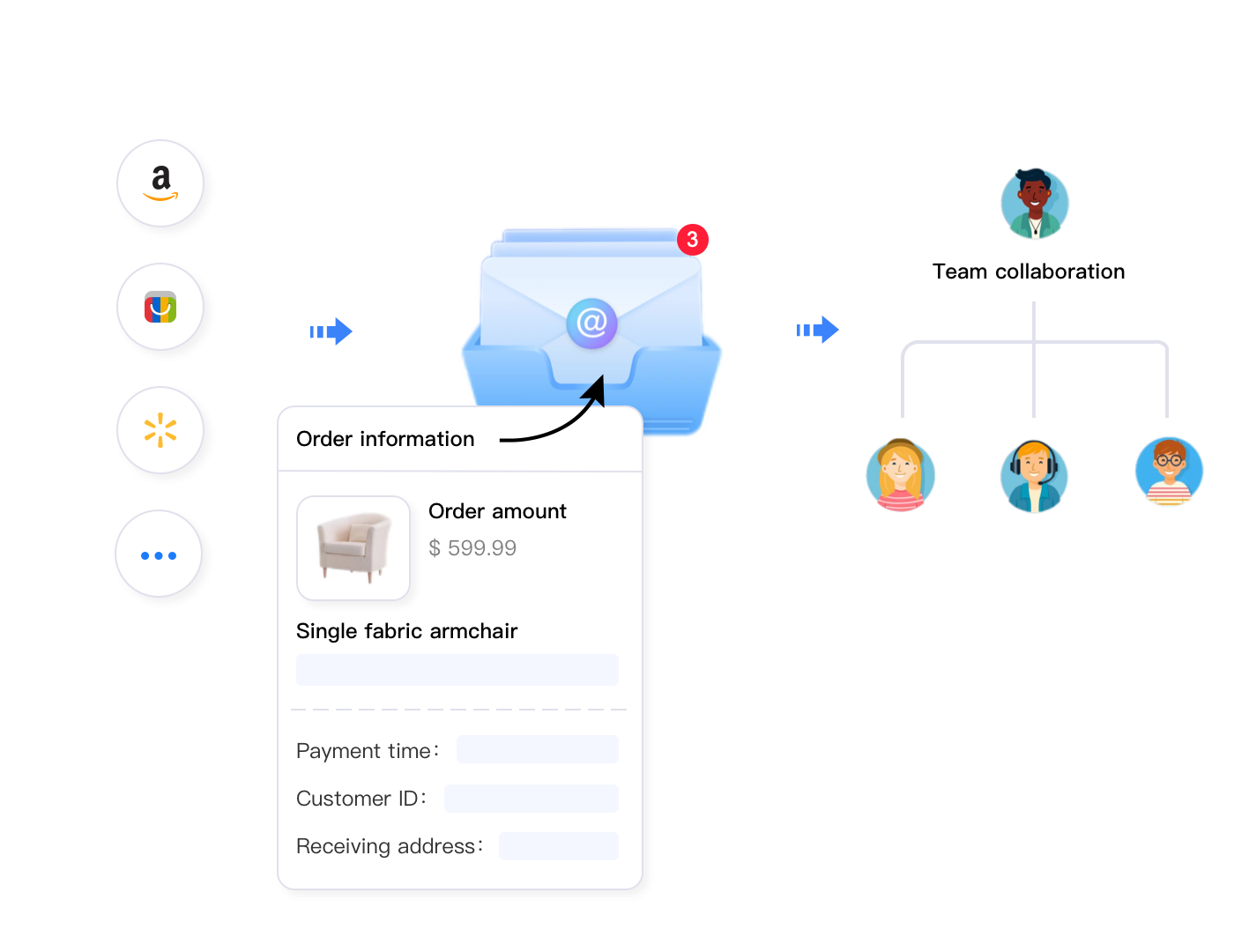
Maxmerce’s CRM module addresses these scaling challenges through comprehensive customer service automation designed specifically for multi-channel e-commerce sellers. The system consolidates eBay Messages, Amazon Buyer-Seller Messages, and Walmart customer questions into a unified inbox while integrating complete order context from all platforms.
The platform works through five integrated layers. First, the Message Management system continuously syncs with eBay’s API to pull new messages every 5 minutes, ensuring no buyer inquiry goes unnoticed. When messages arrive, the system automatically attaches complete order details including purchase date, items ordered, shipping status, tracking information, payment status, and previous message history.
Second, AI Agent Assist analyzes incoming messages to identify inquiry type, determine urgency level, assess buyer sentiment (neutral, frustrated, satisfied), and automatically generate response drafts. A simple tracking inquiry triggers a template-based response with personalized shipping details. A complex multi-issue complaint generates a comprehensive draft addressing all concerns while following eBay’s dispute resolution best practices.
Third, Automated Workflow rules route messages to appropriate team members based on issue type, buyer value, and agent expertise. Pre-purchase questions about technical specifications automatically route to product specialists, while return requests from VIP customers route to senior support with authority to approve instant refunds. This intelligent routing ensures every inquiry reaches the person best equipped to resolve it quickly.
Fourth, Reply Templates provide a library of pre-written, policy-compliant responses for 20+ common scenarios. Templates use dynamic variables to automatically insert buyer name, order numbers, tracking details, and product information—transforming a 3-minute typing task into a 15-second template selection and review.
Fifth, Team Collaboration features prevent duplicate responses and communication gaps through real-time status indicators showing which team member is currently handling each message thread. When one agent opens a message, other team members see it’s “in progress,” preventing two people from drafting simultaneous responses. Internal notes enable agents to document partial resolutions and hand off complex issues to specialists without requiring buyers to re-explain their situation.
The operational impact becomes clear through specific workflows. Consider a high-volume eBay seller receiving 400 weekly buyer messages. Manual handling requires 33-50 hours weekly at 5-7.5 minutes per message including context gathering, response composition, and system updates. At $25/hour labor cost, this represents $825-$1,250 weekly ($42,900-$65,000 annually).
Implementing Maxmerce CRM reduces per-message handling time to 45-90 seconds through automated context display, AI response drafting, and template libraries. The same 400 weekly messages now require 5-10 hours weekly—an 85-88% time reduction. Labor costs drop to $125-$250 weekly ($6,500-$13,000 annually), saving $36,400-$52,000 annually while simultaneously improving response speed and consistency.
Beyond time savings, automation prevents costly escalations. The system’s eBay Resolution Center integration tracks case deadlines, ensures policy-compliant responses, and maintains evidence documentation that helps sellers win disputes. One Maxmerce user reported reducing Resolution Center case losses from $3,200 monthly to $600 monthly by maintaining organized response documentation and meeting all eBay deadlines through automated deadline tracking.
Additionally, faster response times enabled by automation drive revenue growth. eBay research shows sellers responding to pre-purchase questions within 1 hour convert 40-50% of inquiries to sales, versus 15-25% for responses after 24 hours. For a seller receiving 50 weekly pre-purchase questions worth an average $75 order, improving response time from 8 hours to 30 minutes increases weekly revenue by $937-$1,875 ($48,750-$97,500 annually).
Start your 14-day free trial—no credit card required to experience how Maxmerce CRM transforms eBay customer service from a time-consuming burden into a competitive advantage that drives sales while reducing operational costs.
| Customer Service Task | Manual Approach | Maxmerce CRM Solution | Time Savings |
|---|---|---|---|
| Responding to shipping inquiry | 5 min (find order, check tracking, type response) | 30 sec (automated context + template) | 90% reduction |
| Processing return request | 7 min (check eligibility, type instructions, create label) | 1.5 min (AI draft + automated label generation) | 79% reduction |
| Answering product question | 6 min (research specs, find inventory, compose answer) | 45 sec (integrated product data + template) | 87.5% reduction |
| Handling Resolution Center case | 15 min (gather evidence, draft response, upload docs) | 4 min (pre-organized evidence + guided workflow) | 73% reduction |
| Sending order confirmation | 2 min (manual message composition per order) | 0 min (fully automated trigger) | 100% automation |
| Team coordination for complex issue | 10 min (email handoff, repeat explanation, context gathering) | 1 min (real-time assignment + full context transfer) | 90% reduction |
Automated Message Workflows for eBay Seller Efficiency
Proactive automated messaging transforms customer service from reactive problem-solving into strategic relationship building. Instead of waiting for buyers to ask questions, automated workflows send timely updates throughout the order lifecycle—reducing inquiry volume while improving satisfaction.
Order Lifecycle Communication Automation
Effective automated workflows trigger seven key message types aligned with buyer journey stages. First, order confirmation messages immediately after purchase reassure buyers their order was received and provide estimated shipping timeline. This simple communication prevents 15-20% of “Did you get my order?” inquiries that would arrive 24-48 hours later.
Second, payment confirmation messages for orders requiring manual payment review or bank transfers inform buyers when payment processed successfully and order moved to fulfillment queue. Sellers using Buy It Now with immediate payment skip this step, but those accepting offers or international bank transfers need this reassurance message.
Third, shipment notification messages sent when carriers scan packages provide tracking numbers and estimated delivery dates. These messages prevent 30-40% of “Where’s my order?” inquiries that would arrive 3-5 days after purchase. Advanced systems include carrier-specific tracking links and visual shipment progress indicators.
Fourth, in-transit update messages for international shipments or delayed packages keep buyers informed during extended transit periods. A package traveling from California to New York typically arrives within 3-5 days, requiring no interim updates. However, international shipments taking 10-20 days benefit from a mid-transit “Your order is progressing through customs” update that prevents buyer anxiety and premature Item Not Received cases.
Fifth, delivery confirmation messages sent when tracking shows “Delivered” status ask buyers to confirm receipt and report any issues. This proactive outreach catches delivery problems (package stolen, wrong address, damaged box) within hours rather than days, enabling faster resolution before buyers escalate to eBay Resolution Center.
Sixth, feedback request messages sent 3-7 days after confirmed delivery solicit positive reviews while buyers are satisfied but before they’ve forgotten about the transaction. Timing proves critical—requests sent within 24 hours of delivery feel pushy, while those sent after 14+ days suffer low response rates because buyers have moved on mentally.
Seventh, repeat purchase incentive messages sent 30-60 days after delivery for consumable products or complementary items encourage return visits. A buyer who purchased coffee should receive a “Time to restock?” message after 30 days, while someone who bought a laptop should see “Accessory recommendations” for compatible cases, mice, and adapters.
Conditional Logic for Intelligent Message Personalization
Basic automation sends the same message to every buyer at the same journey stage. Advanced automation uses conditional logic to personalize message content, timing, and delivery based on order characteristics, buyer history, and external factors.
Order value thresholds trigger different messaging strategies. Purchases under $25 receive standard automated communication, while orders exceeding $100 include “premium customer” language thanking buyers for their significant purchase and offering priority support. Orders over $500 might receive personal messages from the business owner rather than generic templates, creating VIP experiences that drive repeat purchases and positive reviews.
Buyer history segmentation enables relationship progression. First-time buyers receive welcome messages explaining return policies, shipping timelines, and how to contact support. Repeat customers get personalized greetings acknowledging their return (“Welcome back!”) and possibly loyalty discounts. Buyers on their fifth+ purchase receive VIP treatment including expedited shipping offers or exclusive product previews.
Product category variations require specialized messaging. Apparel orders include size guide links and easy return instructions since clothing has 20-30% return rates. Electronics shipments emphasize careful package inspection upon delivery and include setup support resources. Fragile items like glassware or ceramics highlight special packaging methods and request immediate damage reporting if boxes arrive crushed.
Geographic segmentation accounts for regional variations. International orders include customs clearance expectations and import duty disclaimers. Buyers in areas recently affected by weather events (hurricanes, snowstorms, floods) receive proactive delay notifications explaining carrier disruptions. Rural delivery addresses get longer estimated delivery windows to set appropriate expectations.
Seasonal timing adjustments optimize message relevance. Holiday shipments during November-December include gift messaging options and specific delivery guarantee dates. Back-to-school orders in August emphasize fast shipping for students needing supplies before semester start. Valentine’s Day purchases receive discrete packaging options for surprise gifts.
Implementing Maxmerce Automated Workflow System
Sellers struggling with manual follow-up processes face a quantifiable productivity crisis. Consider a seller processing 200 weekly orders who wants to send order confirmations, shipping notifications, delivery confirmations, and feedback requests. That’s 800 manual messages weekly. At 2 minutes per message, this follow-up communication consumes 26.7 hours weekly—a full-time job just sending order updates.
The opportunity cost compounds when you consider these 26.7 hours could instead focus on sourcing profitable products, optimizing listings, or expanding to new marketplaces. One seller calculated their product research time generates $150/hour in long-term profit through better inventory decisions. Spending 26.7 hours weekly on manual order messages instead of product research costs $4,000 weekly ($208,000 annually) in forgone profit opportunities.
Moreover, manual follow-up suffers from inconsistent timing. Sellers intend to send shipment notifications immediately after dropping packages at carriers, but operational realities intervene. A busy fulfillment day means notifications get batched and sent 6-12 hours late, or forgotten entirely. This inconsistency creates uneven buyer experiences where some customers receive proactive updates while others hear nothing.
Maxmerce’s Automated Workflow system eliminates manual follow-up through event-triggered messaging that executes instantly when order status changes. The platform monitors order events continuously through eBay API integration, detecting when orders are paid, shipped, delivered, or encounter issues.
The system operates through four configuration steps. First, sellers define trigger events that activate automated messages. Common triggers include order payment received, shipping label generated, carrier first scan, tracking shows “Out for Delivery,” tracking shows “Delivered,” and time-based delays (3 days after delivery, 7 days after delivery, 30 days after delivery).
Second, sellers create message templates for each trigger event using dynamic variables that automatically personalize content. A shipping notification template might read: “Hi {{BUYER_NAME}}, great news! Your order {{ORDER_ID}} for {{PRODUCT_TITLE}} just shipped via {{CARRIER}}. Track your package here: {{TRACKING_URL}}. Estimated delivery: {{DELIVERY_DATE}}. Questions? Reply to this message anytime.”
Third, sellers configure conditional rules that modify message behavior based on order characteristics. Rules might specify: “If order_value > $100, use VIP shipping template instead of standard template” or “If international_order = true, add customs clearance information to shipping notification” or “If buyer_orders > 5, include loyalty discount code in delivery confirmation.”
Fourth, sellers set safety guardrails preventing automation errors. Guardrails include maximum messages per buyer per day (preventing spam from multiple-item orders), blacklist conditions where automation pauses (if buyer opened Resolution Center case, disable automated messages until manual review), and manual approval requirements for certain message types (refund offers over $50 require human approval before sending).
Once configured, the system operates autonomously. When eBay’s API reports an order shipped, Maxmerce detects the status change within 5 minutes, evaluates whether the order meets any conditional rule criteria, selects the appropriate template, populates dynamic variables with order-specific data, and sends the personalized message through eBay’s messaging system—all without human intervention.
The transformation proves dramatic. That same seller processing 200 weekly orders previously spending 26.7 hours on manual follow-ups reduces workload to approximately 2 hours weekly for system monitoring, template refinements, and handling any automation exceptions. The 24.7-hour weekly savings equals 1,284 hours annually—equivalent to adding a 0.6 FTE team member without hiring anyone.
Additionally, automated consistency improves buyer satisfaction scores. Every customer receives timely updates regardless of order volume, busy periods, or staffing situations. Feedback request timing optimizes at the proven 3-7 day post-delivery window that generates 40-50% higher review rates than random manual requests sent whenever sellers remember.
The system also handles multi-quantity orders intelligently. When a buyer purchases five items shipping separately, Maxmerce sends individual tracking notifications as each package ships rather than waiting for all items to ship or spamming buyers with five simultaneous messages. This graduated communication keeps buyers informed without creating message fatigue.
Team Collaboration Features for Scaling eBay Support
Solo eBay sellers manage customer service through personal knowledge and individual accountability. However, growing businesses hiring support staff encounter coordination challenges that manual processes can’t solve efficiently. Without proper collaboration systems, team-based customer service creates more problems than it solves.
Multi-Agent Message Management Challenges
Team environments amplify four critical coordination failures. First, duplicate responses occur when two agents simultaneously handle the same buyer inquiry without realizing a colleague already replied. One seller reported a buyer receiving three different return authorization numbers from three team members within 30 minutes—creating confusion that escalated to an eBay Resolution Center case costing $280.
Second, dropped follow-ups happen when one agent partially resolves an issue but forgets to document next steps. The buyer responds two days later with additional questions, gets routed to a different agent who lacks context from the first interaction, and must re-explain the entire situation. This duplicate explanation frustrates buyers and wastes agent time gathering context that should have been documented initially.
Third, inconsistent expertise creates service quality variations. Junior agents might approve return requests that senior staff would identify as buyer’s remorse outside policy, or might deny legitimate claims that experienced agents would resolve proactively. These inconsistencies damage seller metrics when incorrect denials escalate to eBay Resolution Center.
Fourth, workload imbalances develop when message distribution lacks intelligence. One agent might handle 40 messages daily while another handles 15, not because of productivity differences but because messages randomly arrive in different queues. The overloaded agent rushes responses to keep pace, reducing quality. Meanwhile, the underutilized agent could help but doesn’t see messages stuck in a colleague’s queue.
The financial impact compounds quickly. A three-person support team spending 10 hours weekly coordinating handoffs, resolving duplicate response conflicts, and re-gathering context from dropped follow-ups wastes 30 hours weekly ($1,560 weekly at $52/hour blended rate, totaling $81,120 annually). These coordination costs represent pure waste that generates zero customer value.
How Maxmerce Enables Seamless Team Collaboration
The coordination crisis intensifies as teams grow beyond 2-3 members. A five-person support team manually coordinating eBay customer service through email, Slack, and spreadsheet assignments descends into chaos during high-volume periods. Messages get lost, assignments conflict, and escalation paths break down under stress.
Maxmerce’s Team Collaboration system solves coordination challenges through intelligent message assignment, real-time status visibility, and structured escalation workflows. The platform approaches team management as a systematic process rather than hoping individuals coordinate effectively through informal communication.
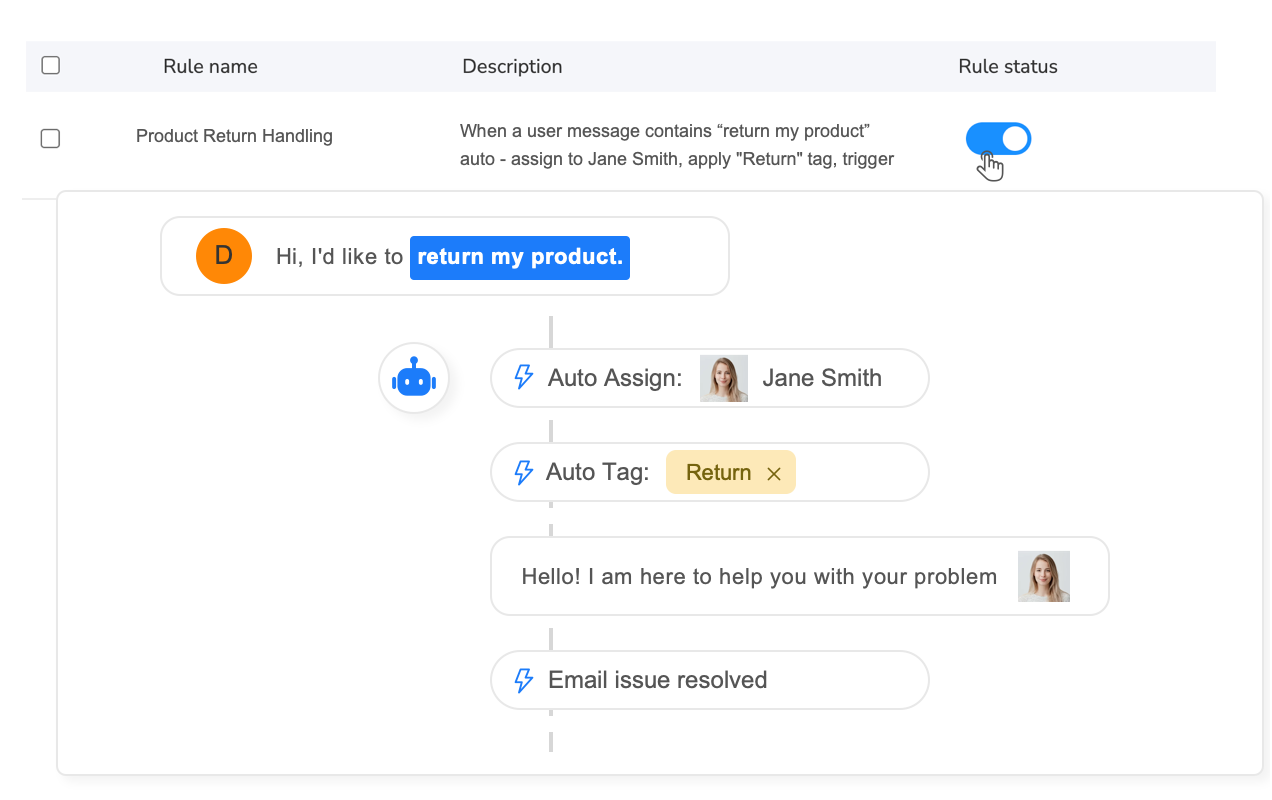
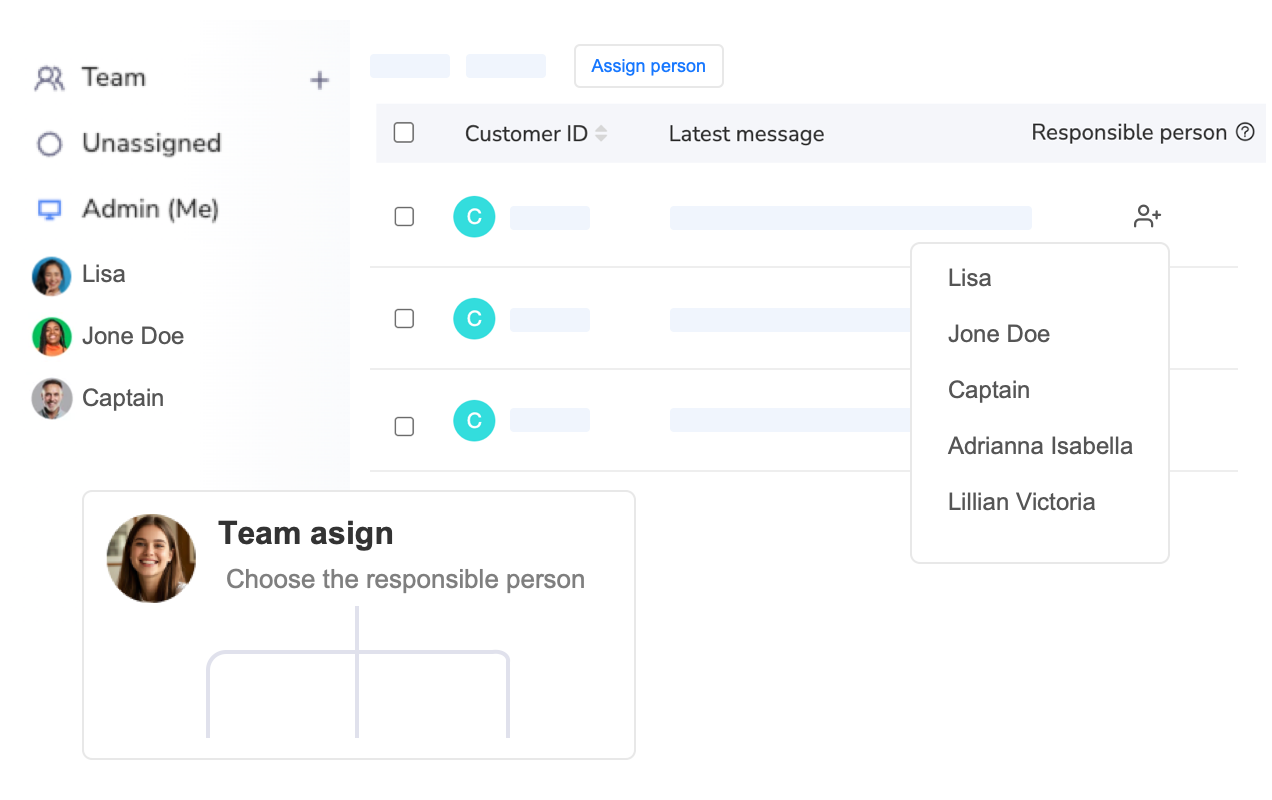
The foundation is automatic message routing using rule-based assignment logic. Instead of messages randomly appearing in individual inboxes, the system analyzes each incoming inquiry and routes it to the most appropriate team member based on workload, expertise, issue type, buyer value, and agent availability.
Routing rules might specify: “Route pre-purchase product questions about electronics to Agent Sarah (electronics specialist),” “Route return requests from buyers with 3+ previous orders to Agent Mike (senior support with refund authority),” “Route complaints mentioning ‘damaged’ or ‘defective’ to Agent Lisa (quality control specialist),” and “Distribute general shipping inquiries evenly across all available agents based on current workload.”
The system tracks real-time workload automatically. When Sarah has 8 active conversations and Mike has 3, the next general inquiry routes to Mike to balance workload. This dynamic distribution prevents the common manual scenario where messages pile up in one person’s queue while teammates sit underutilized.
Second, real-time status indicators prevent duplicate responses through visual coordination. When an agent opens a message, the system immediately marks it “in progress” and displays the agent’s name to all team members. If a colleague views the same message thread, they see “Sarah is currently handling this inquiry” and can focus elsewhere.
Message statuses provide workflow clarity: “New” (unassigned), “Assigned” (routed to specific agent but not yet opened), “In Progress” (agent currently drafting response), “Waiting for Buyer” (agent responded, awaiting buyer reply), “Escalated” (transferred to supervisor), “Resolved” (issue closed), and “Needs Follow-up” (requires action at future date).
Third, internal notes and tagging enable context transfer without requiring buyers to repeat information. When Sarah partially resolves a return request by approving the return but waiting for the package to arrive before refunding, she adds an internal note: “Return approved, label sent. Follow up to process $78 refund when tracking shows package delivered to our warehouse.”
Three days later when the package arrives, Maxmerce automatically creates a follow-up task assigned to Sarah. If Sarah is unavailable, Mike can see the complete context in internal notes and process the refund without contacting the buyer for re-explanation. This documented continuity prevents the frustrating “Can you remind me what this is about?” messages that scream operational dysfunction.
Fourth, escalation workflows provide structured paths for complex issues requiring senior judgment. Junior agents handling routine inquiries encounter situations outside their authority—refund requests exceeding $100, angry buyers threatening negative feedback, or policy gray areas. Rather than guessing, they click “Escalate to Supervisor” which reassigns the message, adds their notes explaining the complexity, and notifies the supervisor.
The supervisor reviews context, makes an authority-backed decision, and either handles the message personally or provides guidance for the junior agent to execute. This structured escalation prevents junior agents from making costly mistakes while building their skills through supervisor coaching on real scenarios.
The efficiency gains prove measurable. A three-person team previously spending 6 hours weekly in coordination meetings, email discussions about message assignments, and “Who’s handling this buyer?” clarifications reduces coordination overhead to approximately 1 hour weekly monitoring the Maxmerce dashboard. The 5-hour weekly savings per person (15 hours team total) equals 780 hours annually—equivalent to adding a 0.4 FTE without hiring.
More importantly, coordination quality improves. Zero duplicate responses occur because the system prevents multiple agents from simultaneously drafting replies to the same inquiry. Dropped follow-ups decrease 85% through automated task creation from internal notes. Workload balancing ensures no agent drowns in 50 active conversations while colleagues are underutilized.
eBay Resolution Center Automation and Dispute Management
eBay Resolution Center cases represent the highest-stakes customer service interactions, with outcomes directly impacting seller metrics, account health, and revenue. Item Not Received cases, Significantly Not as Described disputes, and return escalations require organized evidence documentation, policy-compliant responses, and deadline adherence that manual processes struggle to maintain consistently.
Critical Resolution Center Challenges Manual Processes Create
Manual Resolution Center management suffers from five systematic failures that cost sellers thousands monthly. First, missed response deadlines occur when sellers don’t monitor case status daily. eBay typically gives sellers 3 days to respond to Item Not Received cases and 5 days for SNAD disputes. However, busy sellers checking Resolution Center every 2-3 days occasionally discover expired deadlines resulting in automatic buyer wins costing the full order value plus shipping.
One seller reported losing $2,400 monthly from missed deadlines alone—six cases averaging $400 each that would have been winnable with timely responses and proper evidence. Over a year, this deadline neglect costs $28,800 in preventable losses.
Second, incomplete evidence documentation weakens seller positions. Winning Item Not Received cases requires proof of delivery (tracking showing delivery confirmation to buyer’s zip code). Winning SNAD cases requires proof the item matched listing description (photos, manufacturer specifications, condition notes). However, sellers scrambling to respond within eBay’s deadline often submit partial evidence—tracking numbers without delivery confirmation screenshots, or generic product descriptions without the specific condition notes from the original listing.
Third, policy-noncompliant responses accidentally violate eBay’s communication rules. eBay prohibits certain language in Resolution Center including threats (“I’ll leave negative feedback”), personal insults, or requests for external communication (“Call me at…”). Frustrated sellers occasionally include prohibited language that gives buyers additional ammunition to escalate cases to eBay customer service, who then rule against sellers for policy violations regardless of case merits.
Fourth, inconsistent case strategy leads to preventable escalations. Experienced sellers know when to immediately offer full refunds (buyer claims non-delivery despite tracking showing “Delivered,” but package stolen from porch—seller loses dispute 90% of time, so proactive refund prevents negative feedback). However, less experienced team members might argue cases they can’t win, creating hostile buyer relationships that generate retaliatory negative feedback even after eBay rules in buyer’s favor.
Fifth, poor case documentation prevents pattern analysis. When sellers treat each case as isolated incident rather than data points, they miss systematic issues like specific products generating high SNAD rates (inaccurate descriptions), certain carriers showing elevated non-delivery claims (time to switch carriers), or particular buyer segments repeatedly filing fraudulent cases (block those buyers).
Maxmerce Resolution Center Integration and Case Management
The stakes escalate dramatically for sellers processing $50,000+ monthly revenue. Even a 2% case rate (100 orders = 2 cases) with a 50% loss rate and $200 average order value costs $200 monthly ($2,400 annually). However, case impacts extend beyond direct revenue loss—eBay’s seller performance metrics penalize high defect rates, potentially leading to search ranking suppression or account restrictions.
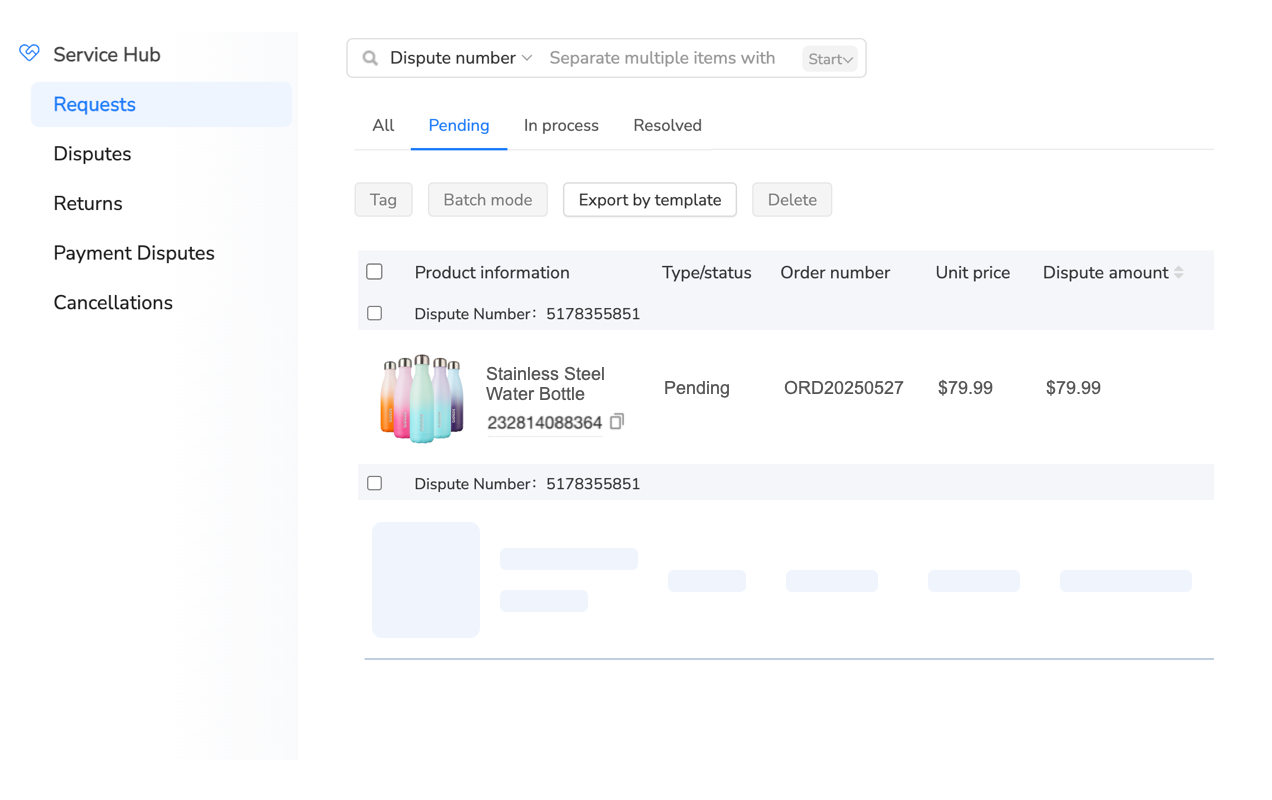
Maxmerce’s Resolution Center integration addresses case management through automated deadline tracking, evidence organization, and response templates designed for eBay compliance. The system treats disputes as high-priority workflows requiring structured processes rather than hoping sellers remember to check manually.
When eBay opens a Resolution Center case, Maxmerce’s API integration detects the new case within 5 minutes and immediately creates a priority task with countdown timer showing remaining response time. The dashboard displays cases sorted by urgency: “Response due in 4 hours,” “Response due in 1 day,” “Response due in 3 days.” This visual prioritization prevents deadline surprises.
The system automatically compiles evidence documentation from integrated order data. For Item Not Received cases, it pulls tracking number, shipping carrier, shipment date, delivery date, delivery confirmation screenshot from carrier API, and the buyer’s confirmed delivery address. This evidence package that would take 10-15 minutes to manually gather assembles automatically in 10 seconds.
For SNAD cases, the system retrieves original listing description, condition notes, photos from the listing, item specifics, and any pre-purchase message threads where the buyer asked questions. This historical context proves critical when buyers claim “Item wasn’t as described” but the listing clearly disclosed the exact characteristic they’re disputing.
Response templates ensure policy compliance while maintaining seller advocacy. Instead of sellers composing freehand responses that might accidentally include prohibited language, templates use eBay-approved phrasing: “I’ve reviewed this case thoroughly. Our records show the item shipped via {{CARRIER}} on {{SHIP_DATE}} and tracking confirms delivery on {{DELIVERY_DATE}} to the confirmed address {{ADDRESS}}. Delivery confirmation is attached.” This neutral, fact-based language presents evidence without inflammatory statements.
The system also recommends case strategies based on historical win rates. If the case type is “Item Not Received” and tracking shows “Delivered” but buyer claims non-receipt, Maxmerce’s historical data might show 85% seller win rate—recommending defending the case. However, if tracking shows “Delivered to agent/front desk” rather than direct delivery confirmation, win rates drop to 40%, recommending proactive resolution to avoid negative feedback.
Case timeline tracking monitors all buyer and seller actions chronologically. When buyers upload photos claiming item damage, those images immediately appear in Maxmerce’s case file with timestamp. When eBay sends deadline extensions or requests additional information, those communications flag in the system. This centralized timeline prevents the “I didn’t see that update” scenarios that cost sellers winnable cases.
Post-resolution, the system stores complete case documentation for pattern analysis. Sellers can generate reports showing: “15% of SNAD cases come from SKU #4782—investigate product description accuracy,” or “Buyer ‘john_smith_97’ has filed 4 cases in 6 months—consider blocking,” or “UPS shipments have 3x higher non-delivery case rate than USPS—evaluate carrier change.”
The financial impact proves substantial. Sellers reducing case loss rates from 50% to 20% through better evidence and deadline adherence save $144 on every $200 disputed order (winning 3 cases instead of 1.5 cases out of 5 disputes = $300 saved). For sellers experiencing 10 monthly disputes, this improvement saves $1,440 monthly ($17,280 annually).
Additionally, proactive case management prevents the worst outcome—account suspension. eBay monitors defect rates including cases closed without seller resolution, SNAD rates, and late shipment rates. Sellers exceeding thresholds face seller level downgrades or account restrictions. Maxmerce’s organized approach keeps metrics within eBay’s acceptable ranges, protecting account standing that took years to build.
Multi-Channel CRM: Managing eBay, Amazon, and Walmart Simultaneously
eBay-focused sellers expanding to Amazon and Walmart encounter exponential customer service complexity. Each platform uses different messaging systems (eBay Messages, Amazon Buyer-Seller Messages, Walmart Customer Questions), separate dispute processes (eBay Resolution Center, Amazon A-to-Z Claims, Walmart Order Issues), and distinct policy requirements.
Multi-Platform Message Management Without Unified Systems
Manual multi-channel customer service creates three critical inefficiencies. First, platform context switching forces sellers to check three separate message interfaces 6-12 times daily. Logging into eBay Seller Hub, Amazon Seller Central, and Walmart Seller Center to monitor messages consumes 30-45 minutes daily just checking for new communications—before typing a single response.
The cognitive switching cost compounds time waste. Each platform uses different interface layouts, terminology, and workflows. Sellers mentally shift from eBay’s “Resolution Center” to Amazon’s “A-to-Z Claims” to Walmart’s “Order Issues”—spending mental energy navigating systems rather than solving customer problems.
Second, inconsistent response quality across platforms damages overall brand reputation. A seller might maintain 2-hour average response time on eBay through focused attention but 24-hour response time on Amazon and Walmart because those platforms get checked less frequently. Buyers don’t care about operational challenges—they simply experience inconsistent service quality and form negative brand perceptions.
Third, fragmented buyer history prevents comprehensive customer understanding. When a buyer purchases on eBay, Amazon, and Walmart, manual systems treat them as three separate customers. However, unified CRM reveals this is a high-value repeat customer across platforms deserving VIP treatment. Without cross-platform visibility, sellers miss relationship-building opportunities and may inadvertently provide better service on one platform than another to the same customer.
The quantification reveals operational crisis. A seller managing 100 weekly eBay messages, 150 Amazon messages, and 50 Walmart messages (300 total) spends 40-50 hours weekly on customer service at 8-10 minutes per message including platform switching time. At $30/hour labor cost, this represents $1,200-$1,500 weekly ($62,400-$78,000 annually).
Maxmerce Multi-Channel CRM Consolidation
Growing beyond single-platform eBay selling amplifies coordination complexity exponentially. Managing three marketplaces manually requires checking 9 different interfaces (eBay Messages + Resolution Center + Returns, Amazon Messages + A-to-Z + Returns, Walmart Questions + Issues + Returns), each with unique workflows and policies.
One seller described their pre-automation workflow: “I’d check eBay messages at 9am, Amazon at 10am, and Walmart at 11am. By the time I finished Walmart, new eBay messages arrived requiring another check cycle. I spent literally 3-4 hours daily just monitoring platforms, leaving minimal time for actually growing the business.”
Maxmerce’s multi-channel CRM consolidates eBay, Amazon, and Walmart customer service into a unified inbox that eliminates platform switching while maintaining platform-specific context and compliance. The system doesn’t just aggregate messages—it intelligently routes, prioritizes, and provides appropriate response tools for each platform’s unique requirements.
The consolidation operates through continuous API connections to all three marketplaces. When a buyer sends an eBay Message, Amazon question, or Walmart inquiry, Maxmerce syncs the communication within 5 minutes and displays it in the unified inbox with clear platform tagging. Sellers see one chronological message stream sorted by urgency and recency rather than fragmenting attention across three separate systems.
However, unified display doesn’t mean generic handling. Each message retains platform-specific context and compliance requirements. eBay messages display eBay order details, shipping policies, and return procedures. Amazon messages show Amazon-specific order information and FBA/FBM status. Walmart messages include Walmart fulfillment details and Item Spec requirements.
Response templates adapt to platform policies automatically. A shipping inquiry template for eBay might say “Your order shipped via {{CARRIER}} on {{SHIP_DATE}}” following eBay’s messaging preferences. The same template for Amazon uses Amazon-compliant language: “Your order has shipped. You can track its progress in Your Orders.” This platform-specific adaptation maintains compliance without requiring sellers to memorize different messaging rules.
Cross-platform customer recognition provides competitive advantage. When a buyer named Sarah Johnson purchases on eBay, then asks a pre-purchase question on Amazon three weeks later, Maxmerce identifies the match through email address correlation and displays her complete history: “Previous eBay purchase $127, positive feedback left, no returns.” This context enables personalized responses: “Hi Sarah, I see you previously purchased from us on eBay—thanks for coming back! To answer your question about sizing…”
The system also enables intelligent workload balancing across platforms. Instead of one team member handling all eBay messages while another handles Amazon, Maxmerce can distribute messages based on actual workload and expertise. A product specialist might handle technical questions from all three platforms, while a junior agent handles basic shipping inquiries across all channels.
Multi-channel dispute management consolidates eBay Resolution Center cases, Amazon A-to-Z claims, and Walmart order issues into one prioritized case queue. Deadline tracking works across platforms: “eBay case response due in 6 hours,” “Amazon A-to-Z response due in 2 days,” “Walmart issue response due tomorrow.” This unified urgency prevents the common failure mode where sellers focus on one platform’s disputes while another platform’s deadlines expire.
The operational transformation proves dramatic. That seller managing 300 weekly multi-platform messages previously spending 40-50 hours weekly reduces workload to 12-18 hours through unified interface, automated context display, and cross-platform templates. The 28-hour weekly savings equals 1,456 hours annually—equivalent to adding a 0.7 FTE employee without hiring.
Additionally, consistent cross-platform response times improve overall seller metrics. Maintaining 2-hour average response across eBay, Amazon, and Walmart creates uniform buyer experiences that build brand trust. When buyers encounter fast, helpful service on eBay and subsequently try the seller on Amazon, the consistently positive experience increases repeat purchase rates 25-35% compared to fragmented service quality.
Performance Analytics and Customer Service Optimization
Manual eBay customer service operates blindly without performance data revealing what’s working, what’s failing, and where to focus improvement efforts. Sellers might sense they’re overwhelmed by messages but lack quantitative insights into response time distributions, message volume trends, or agent productivity variations.
Critical Customer Service Metrics for eBay Sellers
Effective CRM analytics track eight performance indicators that directly impact eBay seller success. First, average response time measures the gap between when buyers send messages and when sellers reply. eBay’s performance standards reward sub-24-hour responses, but top sellers target sub-2-hour averages for competitive advantage.
Response time distributions reveal more than simple averages. A seller with a 4-hour average response time might actually respond to 70% of messages within 1 hour but take 24+ hours on complex inquiries, skewing the average. Distribution analysis shows 50% under 30 minutes, 30% between 1-4 hours, 15% between 4-12 hours, and 5% exceeding 12 hours—revealing that slow-response outliers need process improvements.
Second, message volume trends identify patterns enabling proactive staffing. Volume might spike 40% during weekends, requiring weekend shift coverage. Holiday seasons show 200-300% volume increases demanding temporary staff. Product launches generate inquiry surges needing extra support the first week. Without historical trending, sellers react to volume crises rather than planning ahead.
Third, message category distribution reveals opportunities for better automation or listing improvements. If 40% of messages ask “Does this fit [vehicle/device/application]?” the listing needs better compatibility charts reducing pre-purchase questions. If 30% ask about shipping times, the listing should prominently display estimated delivery dates. Analytics transform reactive message answering into proactive listing optimization.
Fourth, first contact resolution rates measure how often buyer issues get completely resolved in the first response versus requiring multi-message back-and-forth. High FCR rates (70-80%) indicate effective responses providing complete information. Low FCR rates (40-50%) suggest responses are too brief, miss key information, or don’t fully address inquiries—requiring follow-ups that consume extra time.
Fifth, agent performance comparisons identify training needs and recognize top performers. If Agent Sarah maintains 1.5-hour average response time with 80% FCR while Agent Mike shows 6-hour response time with 55% FCR, the data reveals Mike needs training on response templates and comprehensive answer construction. Without metrics, performance variations remain invisible.
Sixth, customer satisfaction scores collected through post-interaction surveys measure service quality from buyer perspective. A simple “Was this response helpful? Yes/No” after issue resolution provides directional feedback. Advanced systems ask buyers to rate response speed, helpfulness, and professionalism on 1-5 scales, creating actionable improvement data.
Seventh, case escalation rates track what percentage of messages escalate to eBay Resolution Center cases, returns, or refund requests. High escalation rates (>5% of total messages become cases) indicate customer service isn’t resolving issues proactively. Low rates (<2%) show effective issue prevention through good communication.
Eighth, repeat contact rates measure how often the same buyers send multiple messages about the same order. High repeat rates suggest initial responses didn’t adequately address concerns, creating frustration that generates additional inquiries. Low repeat rates indicate comprehensive first responses that fully resolve issues.
Maxmerce CRM Analytics for Data-Driven Service Improvement
Operating eBay customer service without analytics resembles driving blindfolded—you might reach your destination eventually, but you’ll crash into obstacles that data-driven navigation would easily avoid. Sellers optimizing based on intuition rather than metrics miss systematic problems and improvement opportunities.
One seller described their pre-analytics approach: “I knew we were really busy and customers sometimes complained about slow responses, but I didn’t know if ‘busy’ meant 50 messages weekly or 500, or whether ‘sometimes’ meant 5% of customers or 40%. We were just reacting constantly without understanding the actual problems.”
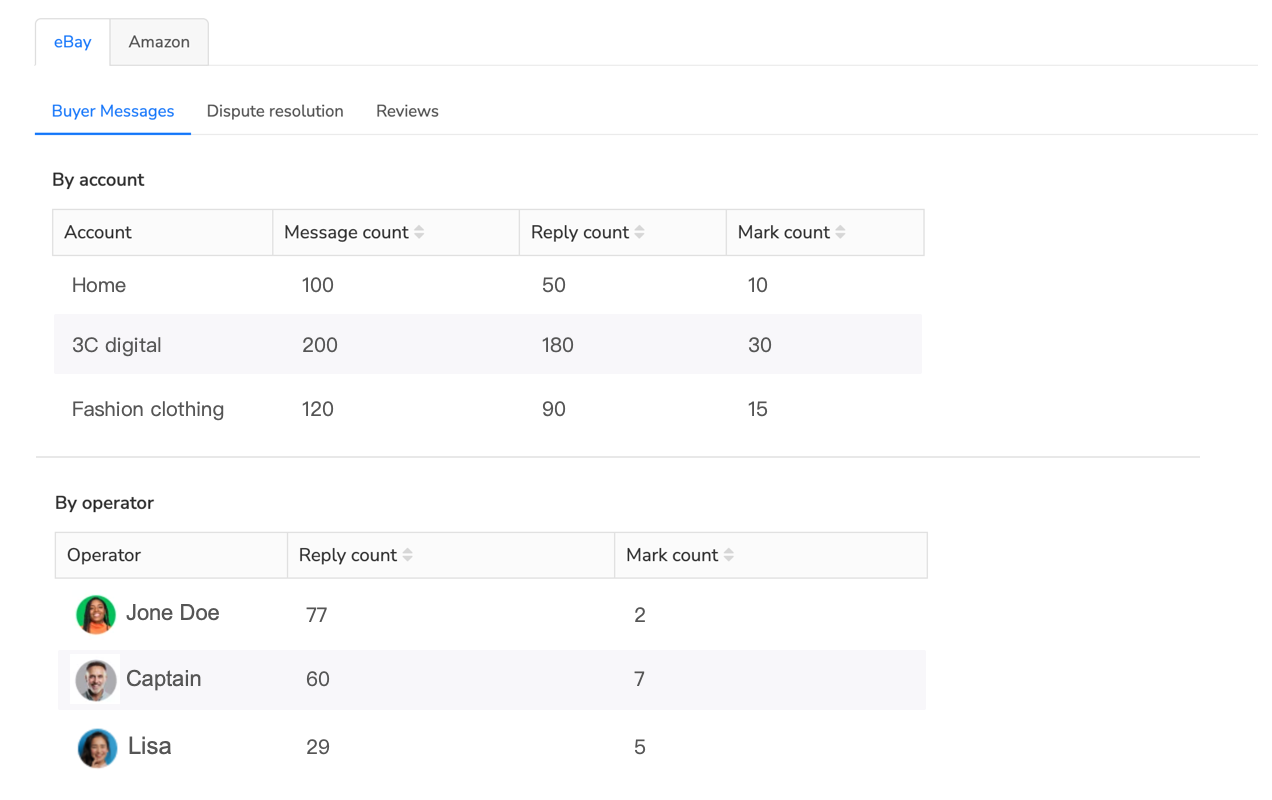
Maxmerce’s Agent Performance Statistics and Customer Insights analytics transform intuitive guessing into data-driven optimization. The platform automatically tracks every message interaction, calculates performance metrics in real-time, and presents insights through visual dashboards requiring no manual data compilation.
The analytics dashboard provides three views. First, team overview displays aggregate metrics including total messages received (weekly and monthly trends), average response time with distribution charts, message category breakdown, case escalation rates, and customer satisfaction averages. This macro view reveals whether the team is improving or declining over time.
Second, individual agent performance shows per-person metrics including messages handled, average response time, first contact resolution rate, customer satisfaction scores, and cases escalated. Managers use these comparisons to identify top performers for recognition and struggling agents needing coaching.
However, Maxmerce presents individual metrics contextually to avoid unfair comparisons. Agent Sarah handling 80% complex return inquiries naturally shows slower response times than Agent Mike handling 80% simple tracking questions. The system accounts for message complexity when benchmarking performance, ensuring accurate comparisons.
Third, trend analysis reveals patterns over weeks and months. Response time might trend down from 6 hours in January to 2 hours in March after implementing new templates—quantifying improvement. Message volume might show strong correlation with promotional campaigns—indicating marketing should coordinate with customer service for staffing.
The platform also identifies specific improvement opportunities. If analytics show 35% of messages ask about return policies, Maxmerce flags this as “Potential listing improvement opportunity—add return policy to description.” If Saturday messages show 8-hour average response versus 2-hour weekday average, the system notes “Consider weekend shift coverage for consistent service.”
Customer insights extend beyond service metrics to reveal buyer behavior patterns. The system tracks repeat purchase rates, lifetime value calculations, geographic distribution, product preference patterns, and satisfaction correlations. These insights enable strategic decisions like “Customers who receive sub-1-hour responses show 42% higher repeat purchase rates—justify weekend staffing through increased retention revenue.”
Advanced analytics predict future volume based on historical patterns. The system might alert “Based on last year’s Q4 trends, expect 240% message volume increase starting November 15th. Recommend hiring 2 temporary agents starting November 1st.” This proactive guidance prevents the common crisis scenario where sellers realize they’re drowning in messages only after falling days behind.
The platform also measures automation effectiveness. After implementing AI response assistance, analytics might show response time decreased 63% while first contact resolution increased 28% and customer satisfaction improved 15%. These metrics quantify ROI that justifies automation investments.
Case study analysis provides actionable insights. The system might reveal “Resolution Center cases related to ‘item not as described’ increased 35% this quarter. Top disputed SKU: #4782. Recommendation: review listing description accuracy for this product.” This specific guidance directs improvement efforts where they’ll generate maximum impact.
eBay Customer Service Automation Best Practices
Implementing automation tools doesn’t automatically guarantee customer service excellence. Effective automation requires strategic configuration, thoughtful template design, and balanced human oversight that leverages technology’s speed while maintaining genuine buyer relationships.
Balancing Automation with Personalization
The most common automation failure is over-automating to the point where buyer communication feels robotic and impersonal. Sellers excited by time savings sometimes configure aggressive auto-reply rules that send generic responses to every message type. However, buyers quickly detect template responses that don’t address their specific situations, leading to frustration and negative perceptions of seller professionalism.
Effective automation follows the 70/30 principle: automate 70% of routine, predictable interactions while dedicating 30% of effort to personalized handling of complex, emotional, or high-value situations. Simple tracking inquiries (“Where’s my order?”), standard return policy questions (“What’s your return window?”), and shipping delay notifications absolutely should be automated. However, angry customers threatening negative feedback, high-value orders with special requests, and ambiguous policy situations require human judgment.
Template design determines whether automation feels helpful or impersonal. Poor templates use obvious placeholders: “Dear Customer, Your order has shipped. Thank you.” Better templates include specific personalization: “Hi Sarah, great news! Your Wireless Bluetooth Headphones just shipped via USPS Priority Mail. Track it here: [link]. You should receive it by Thursday, January 18th.”
The difference is specificity. Generic templates could apply to any order for any customer. Personalized templates reference the buyer by name, mention specific product details, provide exact carrier and timeline information, and maintain conversational tone that sounds like a helpful person rather than an automated system.
Conditional template variations prevent one-size-fits-all messaging. International orders need customs clearance information that domestic orders don’t require. High-value orders deserve “thank you for your significant purchase” acknowledgment that $12 orders don’t need. First-time buyers benefit from extra detail about return policies and contact methods, while repeat customers get streamlined “welcome back” messages assuming familiarity.
Review-before-sending workflows maintain quality control. Instead of automatically sending every AI-generated response or template, configure systems to present drafts for human approval. Agents spend 10-15 seconds reviewing automated drafts, catch any errors or tone issues, and click send. This “automation + human review” approach combines AI speed with human judgment, reducing response composition time by 80% while maintaining quality.
Policy Compliance and Risk Management
eBay’s messaging policies restrict certain communication types that could lead to account warnings or restrictions if violated through automated messages. Sellers must understand these boundaries to configure compliant automation.
First, automated messages cannot request external contact. eBay prohibits sellers from asking buyers to “call me,” “email me directly,” or “message me on WhatsApp.” All buyer communication must flow through eBay Messages to maintain platform transaction security. Automation templates must avoid these prohibited phrases entirely.
Second, promotional messages require explicit buyer consent. Sellers can send order-related messages (confirmations, shipping updates, delivery notifications) automatically. However, marketing messages offering discounts on future purchases or promoting new products require buyers to opt-in to marketing communications. Configure automation to suppress promotional content for buyers who haven’t consented.
Third, feedback solicitation must follow eBay’s timing and frequency limits. Automated feedback requests should send 3-7 days after delivery confirmation, and sellers should only request feedback once per transaction. Aggressive multi-message feedback campaigns violate eBay policy and irritate buyers.
Fourth, retaliatory communication is strictly prohibited. If a buyer leaves negative feedback or opens a Resolution Center case, automated messages must not respond negatively or threaten retaliatory feedback. Configure automation to pause all automated messages when cases open, allowing only manual, carefully-considered responses to sensitive situations.
Template compliance review is essential before activating automation. Submit all templates to policy review checking for prohibited language, appropriate timing, and buyer value focus. Templates should sound helpful and informational rather than pushy or sales-focused.
Continuous Improvement Through Data Analysis
Automation systems should evolve based on performance data rather than remaining static after initial configuration. Monthly analytics review reveals what’s working and what needs refinement.
Track template effectiveness by measuring response rates and subsequent buyer actions. If a shipping delay notification template consistently generates worried follow-up messages (“Is it really going to arrive?”), the template isn’t reassuring buyers effectively—revise it to provide more detail and proactive resolution plans.
Monitor AI suggestion accuracy by calculating how frequently agents edit AI-generated responses before sending. If agents modify 70% of AI drafts significantly, the AI needs retraining with better examples. If agents send 85% of suggestions unchanged, AI is performing well.
Analyze message volume patterns to optimize automation timing. If feedback request messages sent 3 days after delivery generate 22% response rates but those sent 5 days generate 38% responses, adjust timing rules to maximize engagement.
Review customer satisfaction scores by message type to identify weak templates. If automated return policy explanations show 3.2/5 satisfaction versus 4.5/5 for other message types, the return template needs improvement—possibly more empathy, clearer instructions, or proactive label generation.
Test alternative template versions systematically. Create A/B variants of high-volume templates (like shipping confirmations), send version A to 50% of customers and version B to the other 50%, then compare satisfaction scores and follow-up question rates to identify the superior approach.
Frequently Asked Questions
What is eBay customer service automation?
eBay customer service automation uses specialized CRM software to automatically handle buyer messages, order inquiries, returns, and feedback requests. These systems consolidate eBay Messages, Resolution Center cases, and returns into a unified inbox, then use AI-powered tools to draft responses, route messages to team members, and send proactive updates throughout the order lifecycle. This automation reduces response times from hours to minutes while maintaining professional, policy-compliant communication.
How does automated messaging improve eBay seller performance?
Automated messaging directly impacts eBay seller performance metrics including response rate, response time, and customer satisfaction scores. Sellers using automation systems achieve 95%+ response rates within eBay’s 24-hour window, compared to 70-80% for manual handling. Additionally, faster response times reduce order cancellations, prevent negative feedback, and increase repeat purchase rates. eBay’s Best Match algorithm favors sellers with strong communication metrics, translating service improvements into better search visibility and increased sales.
Can I automate eBay messages without violating policies?
Yes, eBay permits automated messages when they provide genuine value and comply with messaging policies. Sellers can automatically send order confirmations, shipping notifications, delivery confirmations, and feedback requests. However, automated messages must be personalized with order-specific details (buyer name, product, tracking number), avoid excessive frequency (one automated message per order stage, not multiple daily messages), and never solicit external contact or sales. Modern CRM systems include built-in policy compliance checks to ensure automated messages meet eBay’s requirements.
What features should eBay CRM software include?
Essential eBay CRM features include unified inbox consolidating all eBay Messages and cases, automatic order context display showing purchase history and shipping status, message templates with personalization variables, AI-powered response suggestions, team collaboration tools for assigning messages, automated workflow rules for routing and prioritization, and eBay Resolution Center integration for managing disputes. Advanced systems also offer sentiment analysis, multilingual translation, performance analytics tracking response times and satisfaction scores, and multi-channel support for sellers managing Amazon and Walmart alongside eBay.
How much time does eBay customer service automation save?
eBay sellers typically save 10-25 hours weekly with customer service automation, depending on message volume. A seller handling 200 buyer messages weekly can reduce response time from 5-10 minutes per message (including context gathering and typing) to 1-2 minutes using templates and AI assistance. This translates to reducing 16.7-33 hours of manual work to 3.3-6.7 hours weekly—an 80-90% time savings. High-volume sellers processing 500+ weekly messages save 40+ hours monthly, equivalent to avoiding a full-time customer service hire.
Does automation reduce eBay customer satisfaction?
When properly implemented, automation actually improves customer satisfaction by providing faster, more consistent responses. The key is using automation to speed up manual processes while maintaining personalization, not replacing human judgment entirely. AI-generated responses should be reviewed before sending for complex issues, and templates should include dynamic variables creating personalized messages (buyer name, specific product, order details). Automated order updates and shipping notifications increase satisfaction because buyers receive proactive communication rather than needing to inquire. Sellers using balanced automation report 15-30% improvements in customer satisfaction scores compared to purely manual handling.
Can eBay CRM tools handle multiple sales channels?
Yes, multi-channel CRM systems consolidate messages from eBay, Amazon, Walmart, Shopify, and other platforms into a single unified inbox. This prevents duplicate responses, maintains consistent messaging across channels, and allows support teams to manage all customer communication from one interface. Cross-channel customer history enables better service by showing complete purchase patterns—when a buyer who previously purchased on eBay asks a question on Amazon, the CRM displays their full relationship history across both platforms. This unified view improves personalization and prevents treating the same customer differently on different marketplaces.
What is the ROI of eBay customer service automation?
eBay sellers typically achieve ROI within 2-4 weeks of implementing customer service automation. Direct time savings from reducing 20 hours weekly of manual messaging work equals $400-$1,000 monthly in labor costs (at $20-$50/hour). Additionally, faster response times prevent an estimated 5-15% of potential negative feedback (each prevented negative saves $100-$500 in lost sales from damaged reputation) and reduce order cancellations by 10-20% (for $50,000 monthly revenue, preventing 5% loss saves $2,500 monthly). For a seller with $50,000 monthly revenue, preventing just 2% revenue loss from service issues saves $1,000 monthly—far exceeding typical CRM software costs of $50-$200 monthly.
How do I set up automated eBay messages?
Setting up automated eBay messages involves five steps: (1) Connect your eBay account to CRM software via API authorization in eBay Seller Hub under Account Settings > Third-party connections, (2) Create message templates for common scenarios like order confirmation (“Thanks for your purchase! Your order will ship within 1-2 business days”), shipping notification (“Your order has shipped! Tracking: {{TRACKING_NUMBER}}”), and delivery follow-up (“Your order should have arrived! Let me know if you have any questions”), (3) Set up automation rules defining when each message triggers based on order status changes (send shipping notification when tracking number uploads to eBay), (4) Personalize templates with dynamic variables pulling order details {{BUYER_NAME}}, {{PRODUCT_TITLE}}, {{TRACKING_URL}} automatically, and (5) Test messages by placing test orders and reviewing automated communications before activating for all real orders.
What’s the difference between eBay message automation and CRM?
eBay message automation focuses specifically on automatically sending triggered messages based on order events, such as shipping confirmations or feedback requests sent when tracking shows delivery. It’s a one-way communication system that proactively sends information but doesn’t handle incoming buyer messages. eBay CRM software provides comprehensive customer relationship management including message automation plus unified inbox consolidation for incoming messages, team collaboration for assigning conversations to support agents, customer history tracking showing all previous orders and interactions, AI response assistance for drafting replies to buyer questions, and performance analytics measuring response times and satisfaction. Think of message automation as one feature within a complete CRM system. Sellers managing high volumes or teams benefit from full CRM capabilities, while solo sellers with simpler needs may start with basic message automation and upgrade as they scale.
Transform Your eBay Customer Service with Automation
Manual message handling limits your growth potential and wastes valuable time that could focus on sourcing profitable products or expanding to new marketplaces. Maxmerce CRM consolidates eBay, Amazon, and Walmart customer service into one intelligent platform that reduces response time by 80-93% while improving buyer satisfaction.
Start your 14-day free trial—no credit card required. Experience how automated workflows, AI response assistance, and unified inbox management transform customer service from overwhelming burden into competitive advantage. Join thousands of multi-channel sellers who’ve eliminated customer service bottlenecks and reclaimed 15-25 hours weekly for strategic business growth.
