eBay AI Listing Tools: Cut Listing Time 90%

AI listing tools can cut your eBay listing creation time by 90% while improving search visibility by 40-60%. Instead of spending 15-20 minutes manually writing titles, descriptions, and filling 80+ Item Specifics fields, automated systems generate complete, optimized listings in 45-90 seconds. For sellers managing 500+ SKUs, this transforms a 125-hour monthly burden into 12-15 hours of review time.
The real advantage isn’t just speed—it’s optimization you’d never achieve manually. AI tools analyze thousands of successful competitor listings, identify high-converting keywords buyers actually search, and auto-populate every attribute that eBay’s Cassini algorithm uses for search ranking. Combined with intelligent repricing that responds to competition in real-time, you’re competing with sophisticated tools, not just manual effort.
Here’s what changes when you adopt AI-powered listing automation. You’ll learn which tools actually deliver ROI, how to configure automated title optimization that ranks, and the repricing strategies that win the Buy Box without destroying margins.
- AI listing generators reduce creation time from 15-20 minutes to 45-90 seconds per listing—turning 125 monthly hours into 12 hours for 500-SKU catalogs
- Automated title optimization front-loads primary keywords in the first 40 characters, using eBay-specific patterns that improve search visibility 50-70%
- Bulk AI tools can optimize 1,000+ existing listings in 2-3 hours, filling missing Item Specifics that unlock hidden search traffic
- Smart repricing engines adjust prices every 15-30 minutes based on competitive data, with floor protection preventing below-cost sales
- Template libraries save 73% of listing creation time by reusing optimized content blocks across similar products
- AI attribute completion fills 80+ Item Specifics fields in seconds, dramatically increasing eBay search algorithm inclusion compared to manual listings
Why Manual eBay Listing Creation Can’t Scale
Creating a single eBay listing manually consumes 15-20 minutes of focused work. You research competitor titles, write a unique description, upload and arrange 8-12 photos, then fill dozens of Item Specifics fields that vary by category. For a part-time seller listing 10 products weekly, that’s 3 hours. For a serious reseller managing 500 active listings with regular updates, you’re looking at 125 hours monthly just maintaining catalog accuracy.
The bigger problem is inconsistency. When you’re manually creating listing #247 at 11 PM, you skip Item Specifics fields, use generic titles, and copy-paste descriptions. eBay’s Cassini search algorithm penalizes incomplete listings—if competitors fill 80 attributes and you fill 40, their products rank higher even with identical photos and pricing. Manual sellers also miss keyword opportunities because they don’t systematically analyze what high-volume buyers are actually searching.
The Hidden Cost of Manual Title Optimization
eBay gives you 80 characters for titles, but most manual sellers waste 30-40 characters on filler words or fail to front-load primary keywords. Here’s the reality: if your main keyword appears in position 45-60, you’re losing 50-60% of potential search traffic compared to titles where it starts in positions 1-10. Manual sellers also struggle with long-tail keyword integration—those 3-4 word phrases that convert at 2-3X higher rates than broad terms.
For sellers managing large inventories, the tedious nature of manual listing becomes a scaling bottleneck. You can’t add 100 new products weekly when each requires 20 minutes of listing work. That’s 33 hours just for listing creation, not including photography, sourcing, or shipping. This workflow limitation is why many eBay sellers plateau at 200-300 active listings—it’s the ceiling of what one person can manually maintain.
Item Specifics: The Manual Seller’s Nightmare
eBay requires 5-15 mandatory Item Specifics per category, but recommends filling 60-100 optional fields for maximum search visibility. A clothing listing might have 80+ attributes: brand, style, material, fit, occasion, season, color family, pattern, neckline, sleeve length, and dozens more. Manually researching and filling these fields takes 8-12 minutes per listing.
When you skip Item Specifics, you’re invisible to filtered searches. A buyer searching for “men’s casual button-down shirts, size large, blue” with filters applied won’t see your listing if those attributes are missing—even if your title says “Men’s Blue Button-Down Shirt L.” eBay’s data shows that listings with 90%+ Item Specifics completion receive 40-50% more impressions than minimally-filled listings in the same category.
This is where AI listing tools fundamentally change the game. They don’t just speed up listing creation—they automatically complete attributes you’d never fill manually, unlocking search traffic you didn’t know existed.
How AI Listing Generators Actually Work
AI listing tools use natural language processing and machine learning trained on millions of successful eBay listings. You provide basic product information—a manufacturer URL, UPC code, or simple description—and the system generates complete listings with optimized titles, detailed descriptions, and all relevant Item Specifics populated.
The process takes 45-90 seconds compared to 15-20 minutes manually. Here’s the workflow: paste a product URL or upload product data via Excel, the AI analyzes the source content and category requirements, it generates title variations ranked by keyword strength, creates bullet-point descriptions highlighting key features, fills 60-100 Item Specifics based on category rules, and presents the complete listing for your review before publishing.
What AI Title Optimization Actually Optimizes
Smart title generators don’t just cram keywords randomly into 80 characters. They follow eBay-specific ranking patterns that Cassini’s algorithm favors. The AI front-loads your primary keyword in the first 10-15 characters because that’s where eBay’s search weighs relevance most heavily. It incorporates 2-3 long-tail variations that match actual buyer search queries, avoids promotional terms like “L@@K” or “FREE SHIP” that eBay penalizes, and ensures brand names, model numbers, and key attributes appear in optimal positions.
For example, manually you might write “Blue Men’s Nike Running Shoes Size 10 Athletic Sports Sneakers.” An AI optimizer restructures this to “Nike Men’s Running Shoes Size 10 Blue Athletic Training Sneakers Air Cushion” because it knows “Nike Men’s Running Shoes Size 10” is the highest-volume search phrase, “Athletic Training” is a converting long-tail modifier, and “Air Cushion” is a differentiating feature buyers filter by.
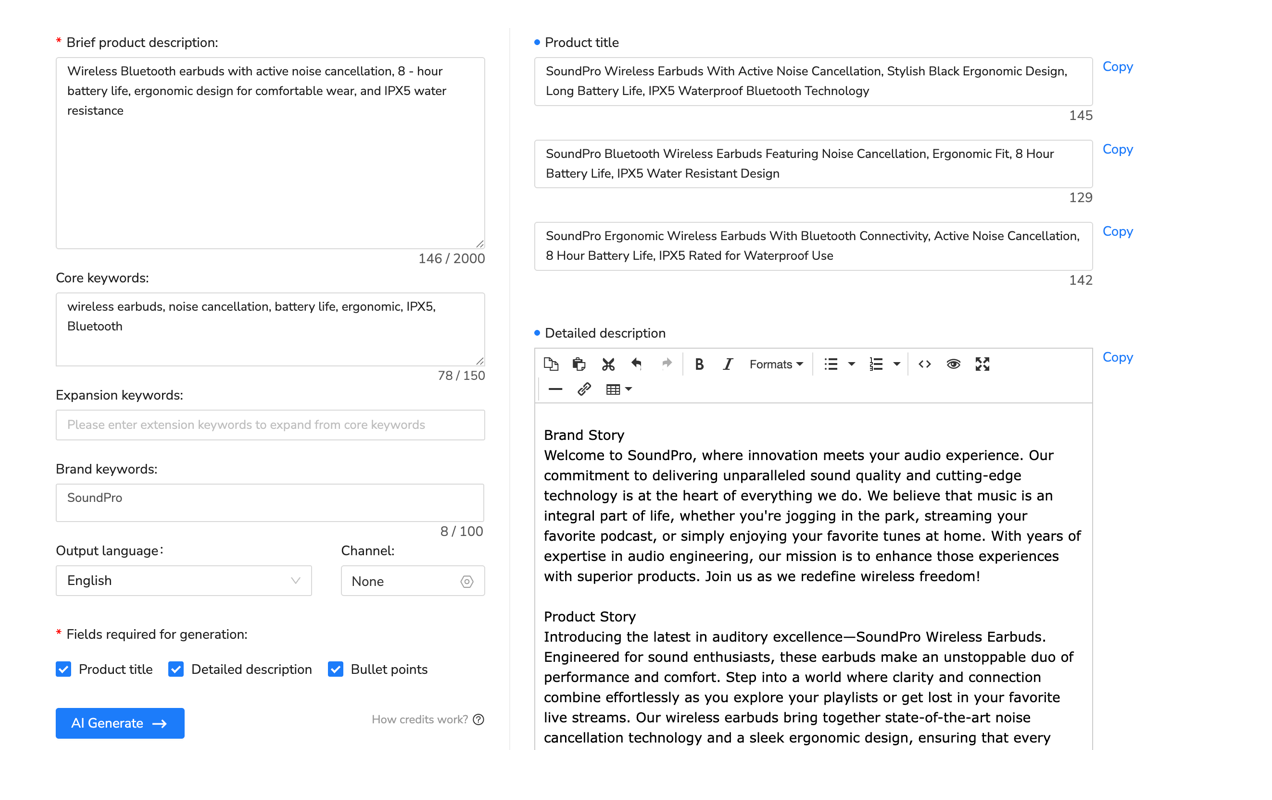
How Maxmerce AI Listing Generator Solves Attribute Completion
The real bottleneck in manual listing isn’t writing descriptions—it’s researching and filling dozens of Item Specifics fields that vary by category. A seller listing electronics must specify brand, model, storage capacity, processor, RAM, screen size, connectivity, color, and 40+ more attributes. Manually, this research takes 8-12 minutes per product because you’re constantly referencing manufacturer specs and eBay’s category requirements.
Platforms like Maxmerce’s AI Listing Generator automate this entirely. The system identifies your product’s category, pulls the complete list of required and optional Item Specifics for that category (typically 60-100 fields), analyzes your product data and any source information you provided, intelligently fills every applicable attribute based on product characteristics, and flags attributes that need manual verification (subjective fields like “condition notes” or “style”).
This workflow transforms attribute completion from a 10-minute research task into a 30-second review process. You scan the pre-filled attributes, correct any errors (typically 2-5% need adjustment), add any brand-specific details the AI can’t infer, and publish. For sellers managing 500+ SKUs, this attribute automation eliminates 73 hours monthly—time previously spent cross-referencing product specs and eBay category rules.
The system works through API connections to eBay’s category structure, product databases, and search data. When you input a product UPC or manufacturer URL, Maxmerce’s AI matches it against millions of known products, extracts verified specifications, maps them to eBay’s Item Specifics taxonomy for your target category, and generates the complete attribute set. The result: listings that appear in filtered searches manual sellers miss entirely because their attributes are incomplete.
Bulk Listing Automation Strategies That Scale
AI listing tools really prove their value when you’re managing hundreds or thousands of SKUs. Bulk automation platforms let you create, update, or optimize entire catalogs in hours instead of weeks. You upload a CSV or Excel file with product data, the AI processes each row and generates complete listings, you review a sample of outputs to verify quality, then bulk-publish 100, 500, or 1,000+ listings simultaneously.
The key is understanding which bulk operations deliver the most ROI. Creating new listings from scratch, optimizing existing underperforming listings by filling missing Item Specifics, bulk-updating prices across your catalog based on competitive data, refreshing titles and descriptions for seasonal relevance, and mass-editing specific attributes (changing shipping templates, updating inventory quantities)—these operations compound when automated.
The Excel-to-eBay Workflow for 1,000+ SKU Catalogs
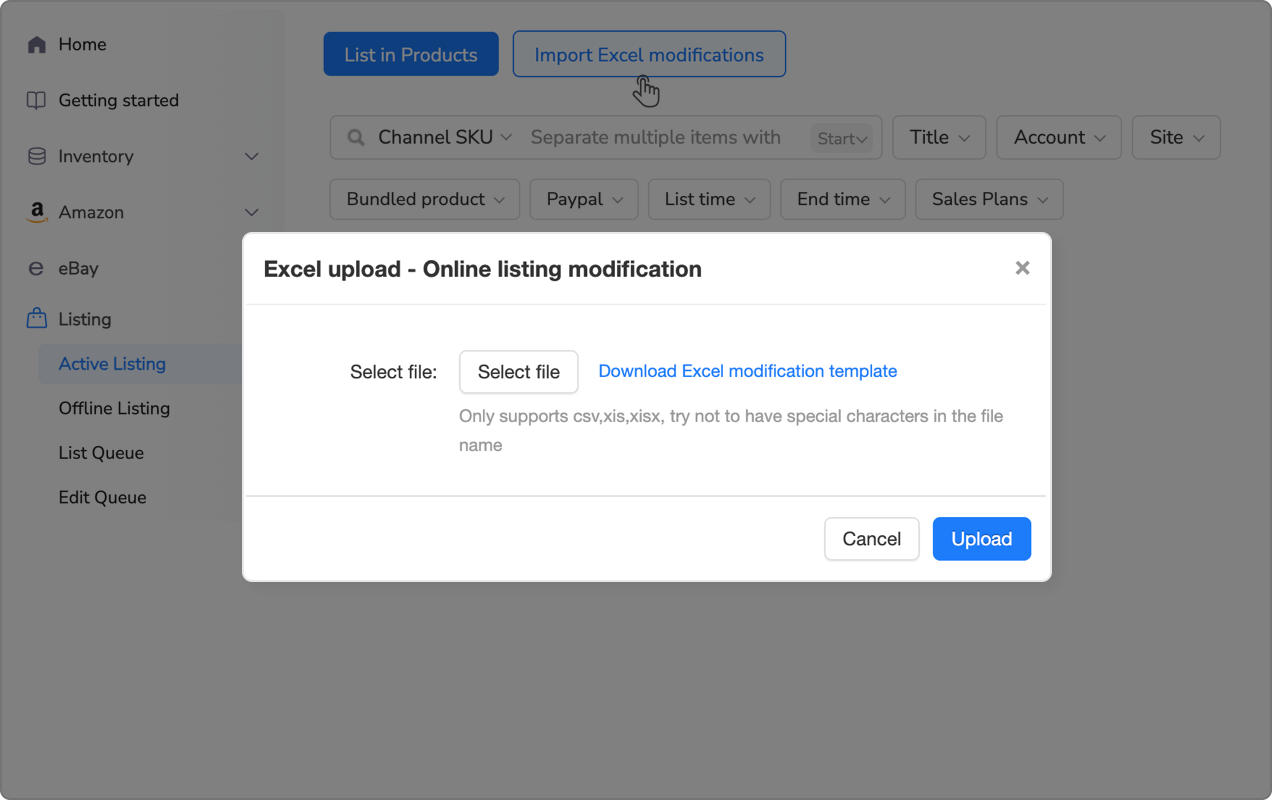
High-volume sellers typically maintain product data in spreadsheets because it’s easier to manage than eBay’s native tools. The Excel-to-eBay bulk workflow works like this: export your current listings or product database to Excel, use AI tools to generate optimized titles, descriptions, and attributes for each row, the AI fills columns you left blank (Item Specifics, keywords, category IDs), you review and make manual edits to 5-10% that need customization, then upload the completed file back to eBay or your listing platform.
For sellers managing large inventories, Maxmerce’s Bulk Product Editing via Excel handles this entire cycle. You export up to 10,000 listings at once, edit offline using familiar spreadsheet tools (find-replace, formulas, conditional formatting), and reimport updates. The system validates your changes against eBay’s requirements before publishing, flagging errors like missing mandatory fields or invalid values. This workflow lets you update 1,000 prices in 10 minutes, refresh 500 titles with new keywords in 30 minutes, or fill missing attributes across your entire catalog in 2-3 hours.

Rule-Based Editing: The Smart Alternative to Manual Bulk Updates
Sometimes you don’t need to export and edit spreadsheets—you just want to apply targeted changes to specific listings. Maybe you need to raise prices 15% on all items in the “Home & Garden” category, update shipping templates for products weighing over 5 pounds, or add a promotional banner to listings priced above $100. Rule-based bulk editors handle these surgical updates without touching your entire catalog.
You create conditional rules using filters: select listings by category, price range, keyword, inventory level, or 30+ other criteria. Then define changes: update prices, modify titles, change descriptions, adjust quantities, or edit attributes. The system shows you a preview of affected listings before applying changes, so you can verify it’s doing what you intended. Then it executes the updates across hundreds or thousands of listings simultaneously.
Platforms like Maxmerce’s Rule-Based Bulk Listing Editing let you save these rules for repeated use. You create a “Seasonal Price Increase” rule in November, apply it to relevant categories, and save it. Next November, you run the same rule with one click instead of recreating the logic. This transforms complex bulk operations that would take hours of manual filtering and editing into 5-minute automated tasks.
Template Libraries: Reusing Optimized Content Across Products
AI listing generators are powerful for creating individual listings, but template libraries multiply that efficiency when you sell similar products. Instead of generating each listing from scratch, you create master templates for product categories—”Men’s Athletic Shoes,” “Kitchen Appliances,” “Auto Parts”—with pre-written description sections, attribute mappings, and optimized formatting. Then you customize variables for each specific product.
A template might include standard sections like “About This Product,” “Key Features,” “Shipping & Returns,” and “Why Buy From Us.” The AI fills product-specific details (brand, model, specifications) while reusing the optimized structure and persuasive copy. This approach is 70-80% faster than generating every listing independently, while maintaining the quality and completeness that AI provides.
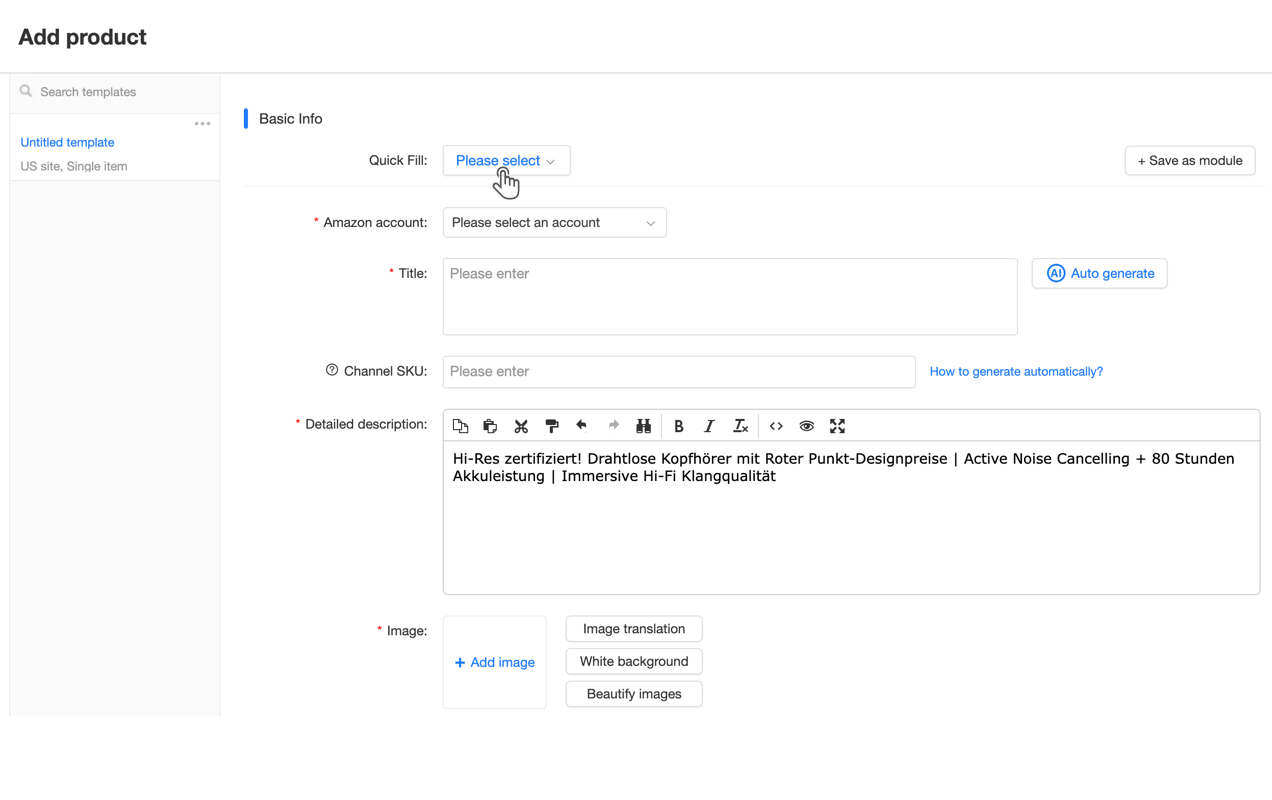
How Reusable Modules Work in Multi-Channel Listing
When you’re selling on eBay, Amazon, and Walmart simultaneously, template consistency becomes even more critical. You don’t want three different versions of your product descriptions, shipping policies, or return terms. Reusable modules let you create content blocks once, then inject them into listings across all platforms with platform-specific adjustments.
For example, your “Shipping Policy” module contains your standard terms. But eBay’s version emphasizes handling time (1 business day), Amazon’s version highlights Prime eligibility, and Walmart’s version mentions WFS options. The core policy is identical, but each platform gets contextually relevant presentation. When you update the master module—say, changing your return window from 30 to 60 days—the change propagates to all platforms automatically.
Maxmerce’s Reusable Modules feature stores these content blocks and handles platform-specific formatting automatically. You create modules for shipping, returns, care instructions, warranty information, and brand stories. When building new listings, you select relevant modules, and the system inserts them with proper formatting for each marketplace. This maintains consistency across your multi-channel presence while eliminating the repetitive work of copying and pasting the same content hundreds of times.
Competitive Pricing Intelligence: How Automated Repricing Wins the Buy Box
eBay’s search algorithm favors competitively priced listings, but manually tracking competitor prices across hundreds of products is impossible. By the time you check 50 products and adjust prices, your first 10 listings are already outdated because competitors changed their prices. Automated repricing solves this by monitoring competitive data every 15-30 minutes and adjusting your prices according to rules you define.
Here’s how smart repricing actually works. The system identifies your competitors for each listing—sellers offering the same or similar products. It tracks their prices, inventory status, and seller ratings in real-time via eBay’s API. When a competitor changes price, the repricing engine evaluates your rules: “Stay within $2 of lowest price,” “Beat lowest price by $0.50 but never go below $45,” or “Match competitors with 98%+ positive feedback, ignore others.” Then it automatically adjusts your price to maintain competitiveness within your profitability constraints.
Price Floor Protection: Never Selling Below Cost
The biggest fear with automated repricing is the race to the bottom—competitors drop prices, your repricer matches, they drop again, and suddenly you’re selling at a loss. Price floor protection prevents this by setting absolute minimum prices the repricer can’t go below, regardless of competition.
You set floors based on your actual costs. If your product costs $30, eBay takes 13.25% in final value fees ($5.58 on a $42 sale), and payment processing is 2.9% + $0.30 ($1.52), your true cost is $37.40. Set your floor at $40 (7% margin) or $42 (12% margin). Now your repricer can compete aggressively but will never accept a sale that loses money.
Advanced repricing platforms let you set percentage-based floors too. “Never discount more than 20% from my list price” or “Maintain minimum 25% gross margin after all fees.” This is especially useful during seasonal promotions when you’re willing to sacrifice some margin for volume, but want guardrails preventing giveaways.
Dynamic Pricing Rules That Respond to Market Conditions
Simple repricing is “always beat competitors by $1.” Sophisticated repricing adapts to market dynamics. Your rules might specify: If inventory is above 50 units, be aggressive (beat competitors by $2), if inventory is 10-50 units, match competitors, and if inventory is below 10 units, price 5% above market (scarcity premium). Or during high-demand periods (Black Friday, back-to-school), maintain premium pricing because buyers prioritize availability over lowest price. During slow periods, be more aggressive to move inventory.
Smart repricing also factors in competitor quality. You don’t want to match a seller with 87% positive feedback and a 30-day return policy when you offer 99% feedback and 60-day returns. Better repricing engines let you filter which competitors to track: “Only compete with Top Rated Sellers” or “Ignore sellers with less than 95% positive feedback.” This prevents racing to the bottom against low-quality competition.

Choosing the Right AI Listing Tool for Your eBay Business
Not all AI listing tools deliver the same results. Some excel at bulk operations but produce generic titles. Others generate beautiful descriptions but struggle with Item Specifics completion. Before committing to a platform, evaluate it against your specific needs and catalog characteristics.
For small sellers (under 200 listings), you need fast individual listing creation with strong title optimization and automatic Item Specifics completion. Bulk tools aren’t critical yet, but you want templates to avoid repetitive work. For medium sellers (200-1,000 listings), bulk editing becomes essential because manually updating hundreds of listings is impractical. You need Excel-based workflows and rule-based editing for targeted changes. For large sellers (1,000+ listings), multi-channel management, automated repricing, and advanced bulk operations are non-negotiable. You’re essentially running a database operation, not manually creating listings.
Must-Have Features vs. Nice-to-Have Features
Every AI listing tool should provide automated title optimization with keyword research, complete Item Specifics filling for your categories, bulk upload and editing capabilities, and template libraries for common product types. These are table stakes. Without them, you’re just getting faster manual listing, not true automation.
Nice-to-have features that separate good tools from great ones include competitor listing analysis showing what top sellers in your niche are doing, multi-channel support if you sell on Amazon, Walmart, or Shopify, automated repricing with floor protection, prohibited words checking to avoid eBay policy violations, and integration with inventory management systems for stock synchronization.
How Maxmerce Handles Multi-Channel AI Listing Management
When you’re selling the same products across eBay, Amazon, and Walmart, creating three separate listings manually triples your work. Multi-channel AI platforms generate platform-specific listings from a single product master. You input product information once, and the AI creates optimized listings for each marketplace, adapting to platform-specific requirements.
For example, eBay allows 80-character titles and prioritizes Item Specifics. Amazon limits titles to 200 characters and emphasizes bullet points. Walmart requires specific schema compliance. Maxmerce’s multi-channel listing system generates format-compliant versions for each platform from your single product input. The eBay title is 80 characters with front-loaded keywords, the Amazon title is 150 characters with brand and key features, and the Walmart title follows their schema requirements.
This multi-channel automation also synchronizes inventory. When you sell a unit on eBay, the system updates your Amazon and Walmart listings instantly to prevent overselling. For sellers managing 500+ SKUs across three platforms, this real-time inventory sync eliminates the 20-30 hours weekly most sellers waste manually adjusting stock levels in three separate seller portals.
| Listing Task | Manual Time (Per Listing) | AI-Automated Time | Time Saved (500 Listings) |
|---|---|---|---|
| Title Creation & Keyword Research | 5-7 minutes | 15 seconds | 48 hours → 2 hours (96% reduction) |
| Description Writing | 3-5 minutes | 10 seconds | 33 hours → 1.4 hours (96% reduction) |
| Item Specifics Completion (60-80 fields) | 8-12 minutes | 20 seconds | 83 hours → 2.8 hours (97% reduction) |
| Competitive Price Research | 2-3 minutes | Automated (real-time repricing) | 20 hours → 0 hours (100% elimination) |
| Multi-Channel Publishing | 15 minutes (3 platforms) | 1 minute (bulk sync) | 125 hours → 8 hours (94% reduction) |
| Total Time for 500 Listings | 309 hours | 14.2 hours | 95% time savings |
Practical Implementation: Your First 30 Days with AI Listing Tools
Adopting AI listing automation isn’t an overnight switch. The sellers who succeed treat it as a 30-day transition, gradually automating workflows while maintaining quality control. Here’s a realistic implementation roadmap.
Week 1: Baseline and Tool Selection
Start by documenting your current workflow. How long does it take to create one listing manually? What’s your average Item Specifics completion rate? How often do you update prices? Track 10-20 listings to establish baseline metrics. This gives you comparison data to measure improvement.
Then evaluate 2-3 AI listing platforms using free trials. Test each with 10 sample products from different categories. Compare title quality, Item Specifics accuracy, and description readability. Don’t just look at speed—verify the output actually sells. The best AI titles aren’t necessarily the fastest; they’re the ones that rank well and convert browsers into buyers.
Week 2-3: Pilot Testing with 50-100 Listings
Choose your platform and commit to testing with real inventory. Start with 50-100 new listings or optimize existing underperformers. Use the AI to generate titles and descriptions, but manually review and edit 100% of outputs initially. You’re learning the tool’s strengths and weaknesses, identifying categories where it excels versus where it needs help, and building confidence before scaling to bulk operations.
Monitor performance closely. Are AI-generated listings getting more views than your manual listings? Is conversion rate comparable or better? Track specific metrics: views per listing, click-through rate from search, conversion rate, and time spent per listing. If AI listings are getting 30-40% more views with similar conversion rates, you’re on the right track.
Week 4: Bulk Operations and Automation
Once you’re confident in output quality, scale to bulk operations. If you have existing inventory, export all listings and run AI optimization to fill missing Item Specifics. You’ll likely uncover 200-500 missing attributes per 100 listings—fields you didn’t even know existed but that eBay’s algorithm uses for filtered searches.
Set up automated repricing if your platform offers it. Start conservatively with tight floor protection, then adjust rules as you see results. Configure template libraries for your most common product types, eliminating repetitive work. And establish review workflows—maybe you manually check every 20th AI-generated listing instead of every single one.

Advanced Optimization: Getting the Most from Your AI Tools
Basic AI listing tools are valuable, but you can multiply their impact through advanced optimization strategies that most sellers never implement.
Seasonal Title Rotation for Maximum Relevance
Buyer search behavior changes seasonally. In November, buyers search “winter coat women” and “holiday gift ideas.” In June, they search “summer dress” and “outdoor grills.” Your product titles should reflect these seasonal search patterns, but manually updating hundreds of titles four times yearly is impractical.
Advanced AI platforms let you create seasonal title templates. Your winter jacket listing uses title variant A from October-March (“Women’s Heavy Winter Parka Insulated Waterproof Coat”) and variant B from April-September (“Women’s Waterproof Windproof Jacket Outdoor Hiking”). The system automatically rotates titles based on calendar rules you define. This keeps your listings aligned with seasonal search trends without manual intervention.
Category-Specific Attribute Prioritization
Not all Item Specifics are equally important. In electronics, brand and model number drive 60-70% of filtered searches. In clothing, size, color, and material dominate. Smart AI tools learn these category patterns and prioritize high-impact attributes.
You can enhance this by analyzing your own sales data. Export your top-performing listings, identify which Item Specifics appear consistently, and configure your AI to emphasize those attributes in titles and descriptions. If “waterproof” appears in 80% of your successful outdoor gear listings, ensure the AI prominently features that attribute in new listings.
How Maxmerce Analytics Informs Listing Optimization
The most sophisticated sellers use performance data to continuously improve AI outputs. They don’t just generate listings and forget them—they analyze which AI-generated elements correlate with higher sales, then refine their templates and rules accordingly.
Platforms like Maxmerce’s Analytics module track listing performance across your catalog. You can see which titles generate the most impressions, which Item Specifics correlate with higher conversion rates, and which description formats reduce return rates. These insights feed back into your AI configuration. If you discover that listings with “Premium Quality” in titles convert 15% better, you add that as a standard element in your templates. If detailed dimension specifications reduce returns by 20%, you configure the AI to emphasize dimensions in descriptions.
This creates a continuous improvement loop: AI generates listings, analytics measure performance, insights refine AI templates, and next-generation listings perform even better. Over 6-12 months, this optimization compounds. Your AI-generated listings gradually evolve from generic automation to highly optimized, category-specific content that outperforms even expert manual listings.
Common Mistakes That Undermine AI Listing Tools
AI listing automation delivers massive efficiency gains, but only if you avoid these common implementation mistakes that reduce effectiveness.
Over-Trusting AI Without Quality Checks
The biggest mistake is treating AI as infallible. Even the best tools generate 5-10% of outputs that need correction—incorrect attributes, nonsensical titles, or hallucinated product features that don’t exist. If you bulk-publish 500 listings without review, you’re uploading 25-50 error-filled listings that damage your seller reputation and violate eBay policies.
Establish review workflows proportional to risk. For high-value items ($100+), manually check every listing. For mid-range items, spot-check every 10th listing. For low-value commodity items, review a random sample of 5-10%. This catches systemic errors while avoiding the time sink of 100% manual review.
Ignoring Category-Specific Requirements
eBay’s requirements vary dramatically by category. Electronics require UPC codes and manufacturer part numbers. Clothing needs size charts and material composition. Auto parts need compatibility tables. Generic AI tools often miss these category-specific requirements, generating listings that get suppressed or delisted for non-compliance.
Choose AI platforms that understand category nuances. They should automatically include required fields for your categories, warn you about missing mandatory information, and format listings according to category-specific rules. This prevents the frustration of generating 100 listings only to discover eBay rejected 30 for missing required attributes.
Setting Repricing Rules That Destroy Margins
Automated repricing is powerful but dangerous if misconfigured. The classic mistake: “always beat competitors by $1” without floor protection. You wake up to discover your $50 product is now listed at $22 because you got into a price war with a liquidator selling below cost.
Always set absolute minimum prices based on your true costs including eBay fees (13.25%), payment processing (2.9% + $0.30), and shipping. Better yet, set desired margin floors—never sell below 20% gross margin. And exclude low-quality competition from your repricing logic. Don’t race to match sellers with 85% feedback when you offer 99% feedback and superior service.
ROI Analysis: When AI Listing Tools Pay for Themselves
AI listing tools range from $20-200 monthly depending on features and scale. The question isn’t whether they’re valuable—it’s how quickly they pay for themselves through time savings and increased sales.
Time Savings ROI
If you’re currently spending 20 hours weekly on listing creation and management, AI tools can cut that to 3-4 hours. That’s 16 hours weekly you can redirect to sourcing, customer service, or business growth. At $25/hour value of your time, that’s $400 weekly or $1,600 monthly in recovered time value. Even a $150/month AI platform delivers 10X ROI on time savings alone.
For sellers who outsource listing creation to VAs at $5-10/hour, the math is even more compelling. If you’re paying VAs 80 hours monthly at $8/hour ($640), switching to AI tools costing $100/month plus 10 hours of your review time ($250 at $25/hour) saves $290 monthly while improving listing quality.
Revenue Impact from Better Listings
Time savings are obvious, but the bigger ROI comes from revenue increase. Complete Item Specifics drive 30-50% more impressions. Optimized titles improve click-through rates 20-40%. Better descriptions reduce returns and negative feedback. These effects compound.
Here’s a realistic scenario: you sell 100 items monthly at $50 average sale price ($5,000 monthly revenue). AI optimization increases your impressions by 35%, your conversion rate improves 15% because titles and descriptions are more compelling, and your return rate drops 20% because Item Specifics set proper expectations. Your sales increase from 100 to 145 items monthly. That’s $2,250 additional monthly revenue. Even after fees, you’re netting $1,500+ extra monthly—a 15X return on a $100 AI platform subscription.
Future-Proofing Your eBay Business with AI
AI listing tools aren’t just about today’s efficiency—they’re about positioning your business for where eBay is heading. eBay continues investing heavily in AI-powered search and recommendations. Listings with complete, structured data will increasingly dominate results as eBay’s algorithm gets smarter at matching buyers with perfect-fit products.
Sellers who master AI listing automation now are building a competitive moat. When you’re generating optimized listings in 90 seconds while competitors take 20 minutes, you can test more products, enter new categories faster, and respond to market trends in days instead of weeks. That agility compounds over time, creating a permanent advantage.
The tools will also improve. Today’s AI listing generators fill 70-80 Item Specifics and create decent titles. Next year’s versions will analyze thousands of search queries to predict emerging trends, automatically A/B test title variations to find optimal phrasing, and use image recognition to extract product attributes from photos without any manual input. Sellers already comfortable with AI workflows will adopt these advances immediately. Manual sellers will fall further behind.
Frequently Asked Questions
Start Automating Your eBay Listings Today
AI listing automation isn’t the future—it’s the present competitive standard. Sellers using these tools are creating 10X more listings in the same time, capturing search traffic manual sellers miss, and maintaining competitive pricing without constant manual monitoring. The gap between automated and manual sellers grows every month.
Start with a clear implementation plan. Document your current workflow baseline, test 2-3 platforms with free trials, pilot with 50-100 listings while monitoring quality, then scale to bulk operations. Within 30 days, you’ll have transformed listing creation from a time-consuming bottleneck into a 90-second automated process.
For sellers managing 500+ SKUs across multiple channels, platforms like Maxmerce’s Listing module provide the complete automation stack: AI listing generation that fills 80+ Item Specifics in seconds, bulk Excel editing for 1,000+ listings, reusable templates that save 73% of creation time, real-time inventory sync across eBay, Amazon, and Walmart, and rule-based editing for surgical catalog updates. The system eliminates 125+ monthly hours most sellers waste on manual listing work.
Your competitors are already automating. Every week you delay is another week they’re capturing search traffic and sales you could be winning. The tools exist, the ROI is proven, and the learning curve is 30 days. Start your 14-day free trial—no credit card required—and see exactly how much time you can recover while improving listing quality.