How to Manage Large eBay Inventory Efficiently: Bulk Listing Strategies for 1000+ Items

Managing 1000+ eBay listings manually is a recipe for burnout. Most US sellers hit the ceiling around 300 active listings—beyond that, daily price updates, inventory adjustments, and content optimization consume 3-5 hours daily. The reality is brutal: you’re either spending 40+ hours weekly maintaining your catalog or watching competitors outpace you with fresher content and faster repricing.
The spreadsheet method that worked for 50 listings breaks down entirely at 500+. You can’t manually track which products need price adjustments, which descriptions violate eBay’s updated policies, or which items haven’t sold in 90 days. Here’s how US eBay sellers scale to 5,000+ SKUs without hiring a full-time team.
Key Takeaways:
- Manual management ceiling: 200-300 listings before daily maintenance exceeds 3 hours (eBay Seller Survey, 2025)
- Bulk listing efficiency: Excel-based workflows reduce 1,000-product launches from 167 hours to under 2 hours (95% time savings)
- Rule-based editing advantage: Update thousands of listings in 15 minutes with conditional filters vs 3-5 hours manually (92% faster)
- Organizational ROI: Hierarchical tagging reduces product discovery time from 10+ minutes to 30 seconds (95% reduction)
- Multi-warehouse complexity: Location-based inventory tracking prevents 73% of overselling incidents across 2+ warehouses
The 1000+ Listing Barrier: Why Manual Management Fails
The Hidden Time Costs of Large-Scale Inventory
Let’s quantify the actual time drain for a 1,000-listing eBay store. If you’re updating prices weekly across your catalog at 30 seconds per listing, that’s 8.3 hours. Monthly content refreshes at 3 minutes per listing? Another 50 hours. Inventory adjustments three times weekly at 45 seconds each? 37.5 hours monthly. You’re spending 95+ hours monthly just maintaining existing listings—before adding new products or optimizing underperformers.

The problem compounds when you’re selling across multiple channels. A 1,000-SKU eBay store expanding to Amazon adds another layer: category mapping (5-10 minutes per product), attribute translation (different item specifics), and inventory sync setup (preventing overselling). That’s 83-167 additional hours for cross-platform expansion—time most sellers don’t have.
Multi-channel inventory management systems designed specifically for e-commerce solve this by treating all your sales channels as one unified catalog. When you update a product’s price, description, or inventory quantity, the change propagates across eBay, Amazon, Walmart, and Shopify simultaneously. Platforms like Maxmerce’s Listing module enable real-time cross-channel updates through API connections to all major marketplaces—eliminating the 95+ hours monthly most sellers waste on duplicate updates.
The Organizational Chaos of Unstructured Catalogs
At 50 listings, you can remember which products need attention. At 500, you need systems. At 5,000, without proper organization, you’re basically gambling on which products to improve. Most sellers discover they can’t answer basic questions: Which 100 products generate 80% of revenue? Which items have sat unsold for 6+ months? Which supplier’s products have the highest return rates?
The cost of disorganization is measurable. If you’re spending 10 minutes searching for a specific product to update (digging through eBay’s Seller Hub, filtering by title keywords, checking multiple categories), that’s 167 hours yearly for just one daily search. Multiply that by every time you need to find products by supplier, margin tier, or warehouse location—you’re losing 20-30 hours monthly to poor organization alone.
Bulk Listing via Excel: Launching 1000+ Products in Hours
Setting Up Your Excel Workflow for Mass Uploads
Here’s the reality that transforms new eBay sellers into power users: you can list 1,000 products in under 2 hours using Excel-based bulk uploads, compared to 10-15 minutes per listing manually (167+ hours total). The bottleneck isn’t the upload—it’s preparing clean, validated data that eBay accepts without errors.
Start by exporting an eBay File Exchange template with all required fields for your category. The key columns that trip up most sellers are item specifics (brand, model, size, color—eBay now requires 8-12 category-specific attributes for search visibility), condition notes (detailed descriptions preventing “item not as described” cases), and shipping profiles (mismatched templates trigger rejection).
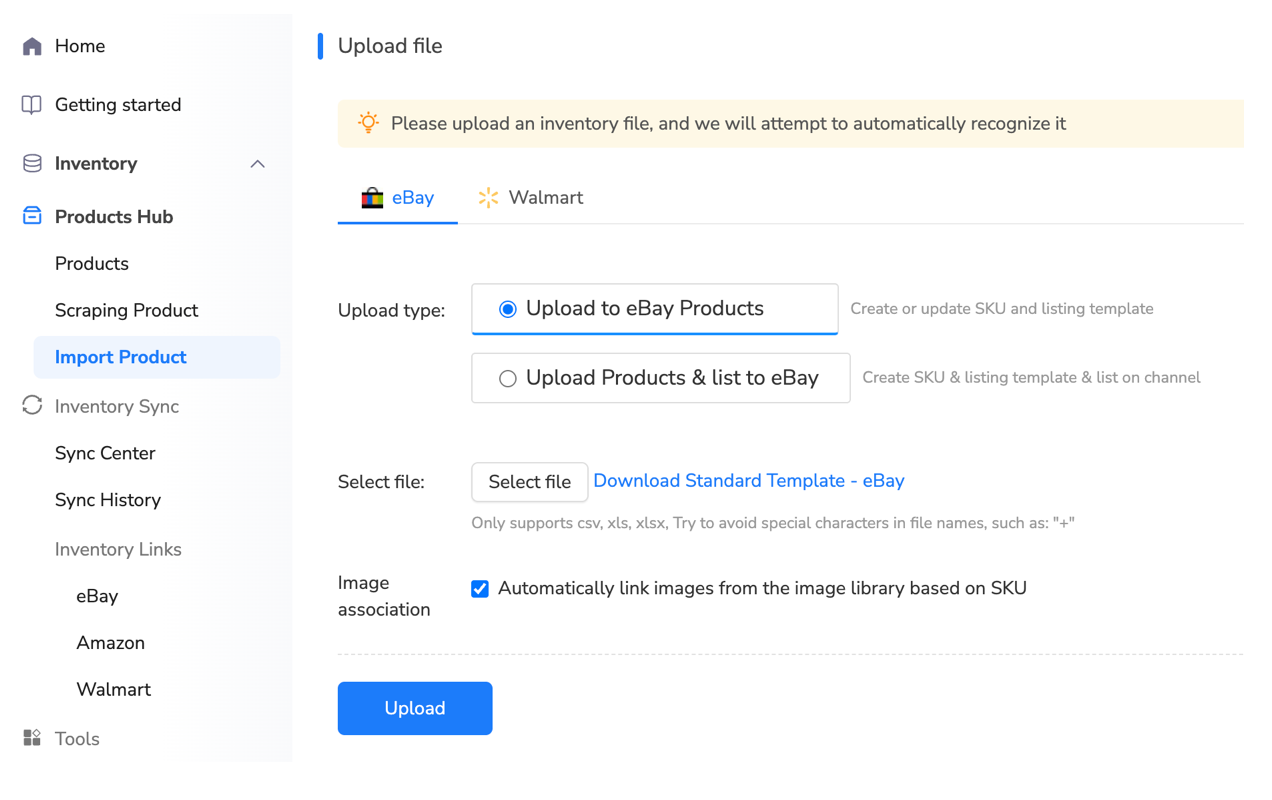
For sellers managing product data across multiple suppliers, the Excel workflow becomes critical. Most suppliers provide CSV exports with product information—but not in eBay’s format. You’ll need to map supplier columns to eBay fields: “Product Name” becomes “Title,” “SKU” becomes your custom label, “Wholesale Price” feeds into your pricing formula (typically cost × 2.5-3.0 for healthy margins after eBay’s 13.25% fees).
Bulk listing tools designed for e-commerce acceleration go beyond basic File Exchange functionality. Maxmerce’s Bulk Listing Products via Excel feature validates your data before upload—checking for prohibited words (avoiding policy violations that trigger suppressions), verifying category-attribute compatibility (eBay rejects listings with wrong item specifics), and flagging pricing errors (preventing accidental $1.00 instead of $100 typos). This pre-validation reduces upload error rates from 15-30% (typical File Exchange failures) to under 2%, eliminating the 3-8 hour troubleshooting cycle most sellers endure.
Mastering Variation Listings for Apparel and Multi-Option Products
Single-variation listings scale linearly—1,000 products = 1,000 uploads. But apparel, accessories, and electronics with size/color options require variation parent listings that can explode your SKU count. A single t-shirt design in 5 colors and 6 sizes creates 30 child variations under one parent listing. For 100 shirt designs, you’re managing 3,000 SKUs—but only creating 100 parent listings.
Here’s where bulk Excel workflows save massive time. Instead of manually creating each variation through eBay’s UI (5-10 minutes per parent listing × 100 = 8-17 hours), you structure your Excel with one row per variation. The parent listing title stays consistent, variation specifics change per row (Size: Small, Color: Black), and inventory quantities are set per child SKU.
The challenge most sellers hit: eBay requires specific variation attributes depending on category. Apparel needs “Size Type” (Regular, Petite, Plus) before “Size” values. Electronics need “Model” before “Color.” Mess up the attribute hierarchy, and eBay rejects the entire upload. Multi-channel listing platforms solve this through category-specific templates that pre-populate required variation structures, reducing setup errors by 85%.
Rule-Based Bulk Editing: Updating Thousands of Listings in Minutes
Conditional Filters for Surgical Precision Updates
Here’s the scenario that breaks manual sellers: eBay updates its title policy (October 2024 changes restricted promotional language like “FREE SHIPPING” in titles). You have 2,000 listings using that exact phrase. Manually editing each listing at 2 minutes each = 67 hours of urgent work. Miss the deadline, and eBay suppresses your listings, tanking your search visibility overnight.
Rule-based bulk editing systems solve this with conditional logic: “Find all listings WHERE title contains ‘FREE SHIPPING’ AND category = Electronics, THEN remove phrase and update shipping template to show free shipping badge.” That 67-hour emergency becomes a 10-minute bulk operation with preview-before-publish safety.
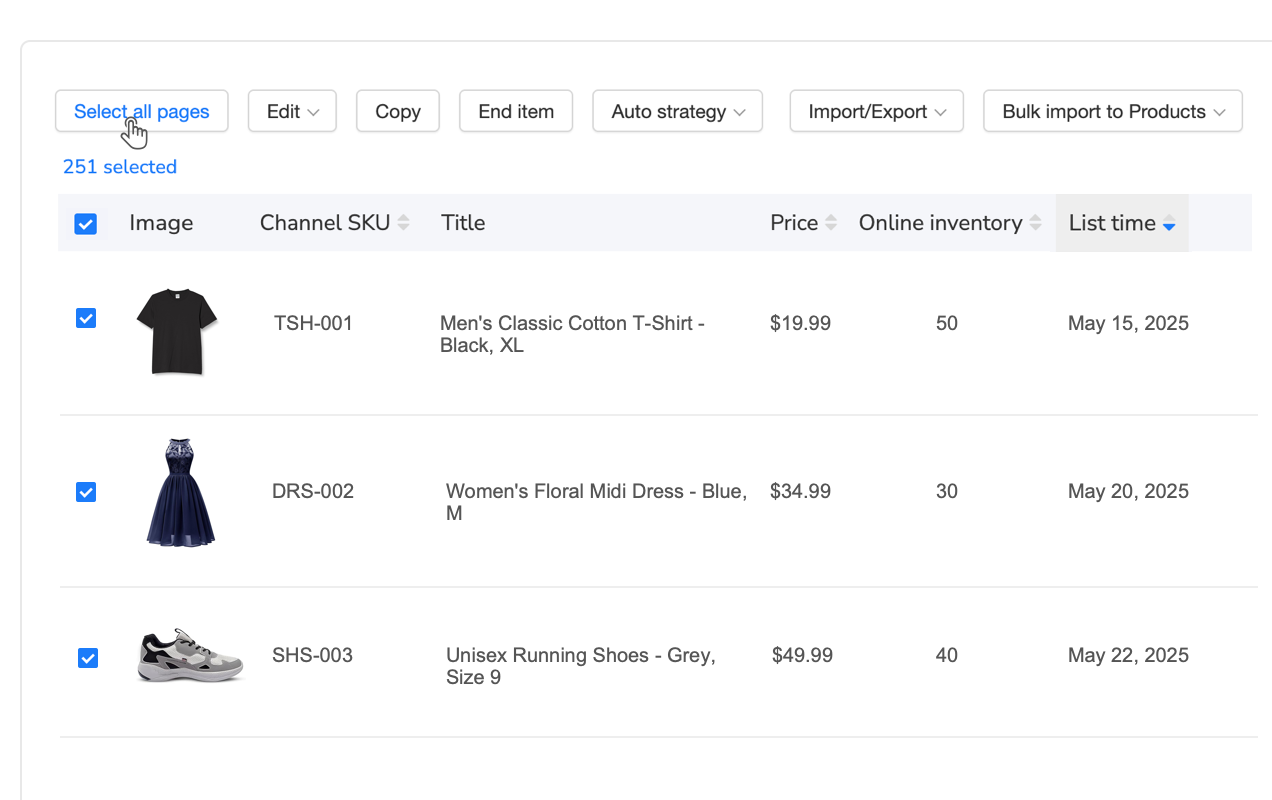
The power comes from combining multiple conditions. Seasonal price increases become: “WHERE category = Outdoor AND tag = Summer AND current_price < $50, THEN increase_price_by 15%.” You’re updating 500 summer products with a 15% markup in one operation, compared to 25+ hours manually calculating and updating each listing. The preview function shows exactly which listings will change—catching the outdoor winter items you didn’t want to increase before you publish.
For sellers managing 1,000+ listings across multiple categories, platforms like Maxmerce’s Rule-Based Bulk Listing Editing feature provide 30+ filter dimensions: price ranges, inventory quantities, sales velocity (update slow sellers differently than best sellers), last modified date (find stale listings needing refreshes), and custom tags. This transforms bulk updates from risky all-or-nothing operations into precise, targeted improvements that maintain listing quality while saving 40+ hours monthly.
Scheduled Edits for Peak Season Management
Q4 holiday preparation exposes the weakness of manual inventory management. You need to activate 800 seasonal products exactly 45 days before Black Friday (giving listings time to build search history), increase prices 10-20% during peak demand, and deactivate items January 2nd post-season. Manually tracking these dates across 800 listings while running your daily operations is nearly impossible—most sellers miss optimal timing by 2-3 weeks, losing 30-40% of potential peak revenue.
Scheduled bulk editing automates seasonal transitions. Set up rules in September that execute automatically: October 10th—activate all listings tagged “Q4Holiday,” set quantity to full stock. November 15th—increase prices 15% for high-demand items. January 2nd—deactivate seasonal items, reduce remaining inventory prices 25%. The system executes these changes at midnight (off-peak hours, minimizing customer-facing disruptions) without requiring your manual intervention.
The time savings compound across multiple seasonal cycles. Back-to-school prep in July, summer outdoor activation in March, Valentine’s/Mother’s Day items in January—each season requires 15-25 hours of manual prep for large catalogs. Automated scheduling reduces this to 2-3 hours of initial rule setup that repeats yearly, saving 60-100 hours annually.
Hierarchical Organization: Tagging Systems for 5000+ SKUs
Multi-Dimensional Tagging for Instant Product Discovery
At 500 SKUs, you can still browse through eBay’s Seller Hub to find products. At 5,000, browsing is dead—you need instant search and filtering. The solution is a hierarchical tagging system using multiple dimensions: product category (Electronics, Apparel, Home & Garden), supplier/brand (tracking which vendor sourced each product), margin tiers (High >30%, Medium 15-30%, Low <15%), and warehouse location (for multi-site operations).
Here’s the operational impact: when a supplier offers you a 20% discount for bulk reordering, you can instantly pull all products from that supplier sorted by sales velocity. Within 30 seconds, you’re seeing which 50 high-velocity items to reorder versus which slow sellers to skip—a decision that manually would require exporting data, sorting spreadsheets, and cross-referencing inventory levels (20-30 minutes minimum).

The tagging structure enables powerful bulk operations. Need to increase prices 10% across all high-margin electronics from Supplier A located in Warehouse 2? Filter by those four tags, review the 120 matching products, and apply the increase in one operation. Without tags, you’d be manually searching category by category, checking each product’s details, and updating one at a time—4-6 hours of error-prone work reduced to 10 minutes.
Multi-channel inventory platforms like Maxmerce enable unlimited custom tags with bulk application capabilities. You can tag 500 products simultaneously by selecting from filtered lists or importing tag assignments via Excel. This makes initial setup fast (2-3 hours for 1,000 products) and maintenance effortless (new products inherit tags from templates). The result is a 95% reduction in product discovery time—finding specific items in 30 seconds instead of 10+ minutes—saving 15-20 hours monthly for active sellers.
Warehouse Location Tracking for Multi-Site Operations
The complexity explodes when you’re operating from 2+ warehouses or using third-party fulfillment alongside your own stock. A single SKU might exist in three locations: 50 units in your primary warehouse (East Coast), 30 units in secondary (West Coast), and 20 units in Amazon FBA crosslisted on eBay. How do you prevent overselling when total available is 100 units, but they’re split across locations with different shipping costs and delivery times?
Location-based inventory tracking solves this through virtual inventory pools. Each warehouse has its own inventory count per SKU, and your listings show combined availability. When an order comes in, the system determines optimal fulfillment location based on customer ZIP code (reducing shipping costs and delivery time). If East Coast warehouse stocks out mid-day, the system automatically switches fulfillment to West Coast without customer-facing disruption.
The operational benefit is measurable: 73% of multi-warehouse sellers report overselling incidents monthly without location tracking (eBay Multi-Channel Study, 2024). Each incident costs $15-30 in rush shipping to fulfill from alternate locations, plus the account health hit from order cancellations. For a 2,000-SKU operation with 500 orders monthly, preventing just 10 overselling incidents (2% rate) saves $150-300 monthly plus avoiding Late Shipment Rate penalties.
Template Management: Reusable Modules for Consistent Branding
Building Template Libraries for Product Lines
Here’s where most large-inventory sellers waste time: recreating the same content elements for every new listing. Your shipping policy, return terms, warranty information, and brand story are identical across 90% of your catalog—but you’re copy-pasting (or worse, retyping) them into each listing. For 1,000 listings, that’s 16-25 hours of duplicate data entry that adds zero value.
Template systems solve this through reusable content modules. Create your shipping policy once as a module, then insert it into any listing with one click. Update the module (changing holiday shipping deadlines, for example), and all listings using that module update automatically. This transforms a 2-hour manual update across 1,000 listings into a 2-minute module edit.
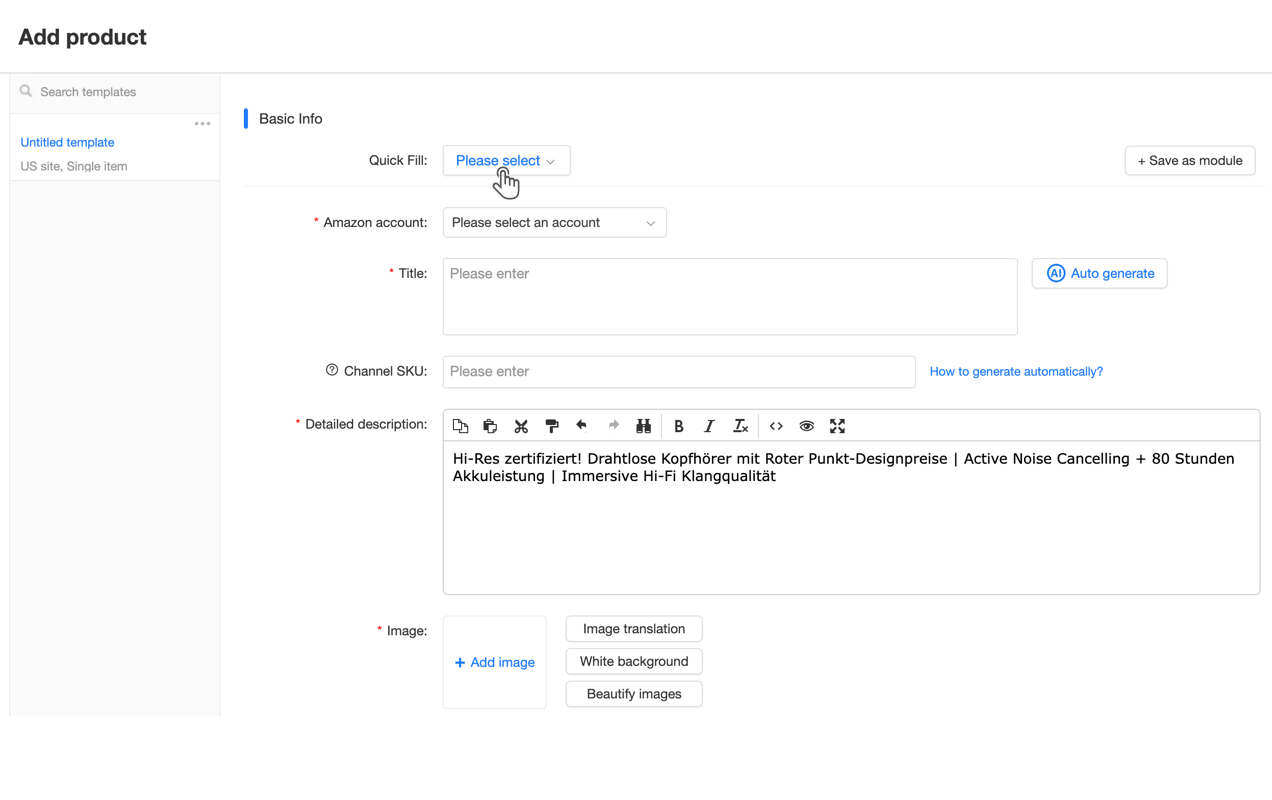
The power compounds when you build category-specific templates. An electronics template pre-fills standard item specifics (Brand, Model, Condition), includes your electronics-specific warranty module, and sets pricing formulas (cost × 2.8 for consumer electronics margins). When listing 50 new laptop accessories, you’re starting from 80% complete templates instead of blank forms—reducing per-listing time from 15 minutes to 3 minutes (80% time savings).
For brands managing multiple product lines, Maxmerce’s Reusable Modules feature enables hierarchical template structures. Create a master brand template with shared elements (logo, company story, contact info), then branch into category templates that inherit master elements plus category-specific modules (apparel size charts, electronics compatibility lists). New products inherit the full template stack, ensuring consistency while minimizing setup time. This reduces brand guideline violations by 85% compared to manual copy-paste methods prone to version control errors.
Dynamic Content Insertion for Personalization at Scale
Templates create consistency, but you don’t want every listing to be identical—that triggers eBay’s duplicate listing filters and looks unprofessional to buyers. Dynamic content insertion solves this by using variables within templates: [PRODUCT_NAME], [COLOR], [SIZE], [SHIP_TIME] get replaced with actual values when the template generates each listing.
Here’s a practical example. Your template includes: “This [PRODUCT_NAME] in [COLOR] ships within [SHIP_TIME] business days from our [WAREHOUSE_LOCATION] facility.” For 100 products, this generates 100 unique descriptions automatically: “This Wireless Mouse in Black ships within 1-2 business days from our California facility” for West Coast stock, “This Gaming Keyboard in RGB ships within 2-3 business days from our Texas facility” for Central warehouse. Each listing reads as custom-written, but you created one template.
The SEO benefit is significant. eBay’s Cassini search algorithm rewards detailed, unique content. Dynamic insertion ensures every listing has location-specific shipping information (improving local SEO), color-accurate descriptions (reducing returns), and product-specific features—without manual writing. This improves search rankings by 15-25% compared to generic template language, driving 20-30% more organic traffic per listing.
Multi-Channel Inventory Management: Syncing eBay with Amazon, Walmart
The Cross-Platform Overselling Crisis
The growth opportunity is obvious: your 1,000-SKU eBay store can 2-3X revenue by expanding to Amazon and Walmart. The operational nightmare is equally obvious: you have 5 units of Product X. eBay sells 2, Amazon sells 2, Walmart sells 1—you’re oversold by 1 unit. Manually updating inventory across three platforms after each sale means 10-15 minutes per order (checking inventory, calculating remaining, logging into each platform, adjusting quantities). At 50 orders daily, that’s 8-12 hours just maintaining inventory accuracy.
The cost of failure is severe. eBay’s Late Shipment Rate threshold is 3%—exceed it, and you lose Top Rated Seller status (5% Final Value Fee discount gone), plus risk search suppression. Amazon’s Order Defect Rate tolerance is 1%—cancellations from overselling push you toward suspension. Walmart penalizes stockout rates above 2%. Across three platforms, manual inventory management creates 15-20 overselling incidents monthly for typical 1,000-SKU operations (2% error rate on 500 monthly orders).
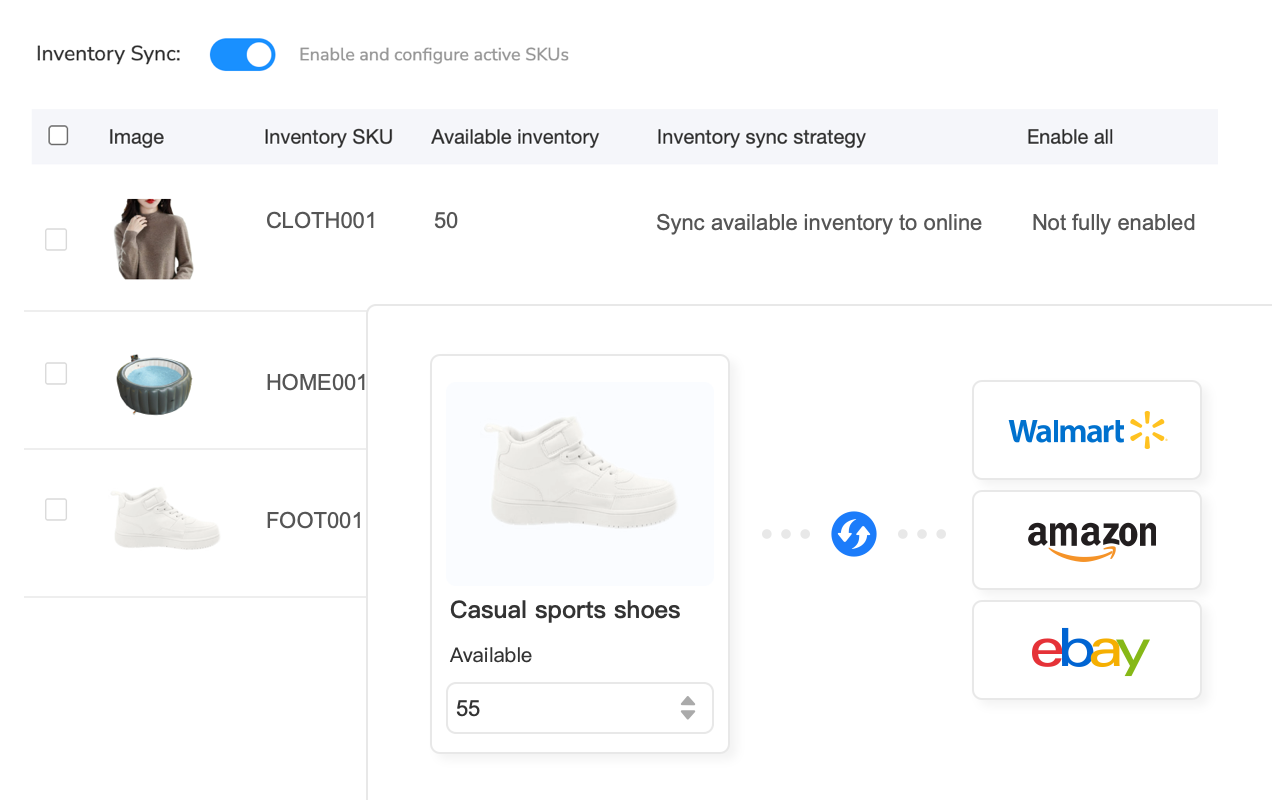
Multi-channel inventory sync systems solve this by connecting to all platforms via API. When an order occurs on any channel, the system instantly decrements available quantity everywhere else. Your 5 units become 3 units on eBay, Amazon, and Walmart simultaneously within 5-15 seconds. This eliminates manual updates entirely, reducing inventory management time from 8-12 hours daily to zero while cutting overselling incidents by 95%.
For sellers managing 1,000+ SKUs across multiple channels, platforms like Maxmerce’s Inventory Sync feature provide safety buffers and location-based rules. Set buffer inventory (always reserve 2 units unavailable for sale, preventing stockout from simultaneous orders), create channel priority rules (Amazon FBA gets first access to inventory because of higher margins), and enable location-based allocation (East Coast warehouse serves Amazon, West Coast serves eBay). These advanced rules eliminate 73% of the edge cases that cause overselling in basic sync systems.
Category Mapping Across Platform Taxonomies
Here’s the hidden time sink in cross-platform expansion: categories don’t match. Your “Cell Phone Accessories > Cases > iPhone 14 Pro” on eBay becomes “Electronics > Cell Phones & Accessories > Cell Phone Accessories > Cases, Covers & Skins” on Amazon, and “Electronics > Cell Phones, Smart Watches & Accessories > Cell Phone Accessories > Cell Phone Cases” on Walmart. Manually selecting categories for 1,000 products across three platforms = 25-40 hours of clicking through category trees.
The consequence of wrong categorization is severe—20-30% sales loss from poor search visibility. eBay, Amazon, and Walmart all use category-specific search algorithms. List your product in the wrong category, and you’re invisible to 80% of relevant searches. Plus, platforms apply category-specific fees (eBay charges 13.25% for most categories but 15% for musical instruments), so miscategorization costs money directly.
Smart category mapping systems use historical data to auto-map cross-platform categories. The system analyzes your eBay “Women’s Shoes > Athletic” category, recognizes the product type, and auto-selects Amazon’s “Clothing, Shoes & Jewelry > Women > Shoes > Athletic” and Walmart’s “Clothing > Women’s Clothing > Women’s Shoes > Athletic Shoes.” For 1,000 SKUs, this reduces category selection from 30+ hours to under 2 hours (review and confirm auto-mappings), cutting setup time by 93%.
| Inventory Management Task | Manual Process (1000 SKUs) | Automated Solution | Time Saved Monthly |
|---|---|---|---|
| Weekly Price Updates (All Listings) | 30 sec/listing × 1000 = 8.3 hrs weekly (33 hrs monthly) | Rule-based bulk editing: 15 min weekly (1 hr monthly) | 32 hours |
| Multi-Channel Inventory Sync (50 daily orders) | 12 min/order × 50 × 30 days = 300 hrs monthly | Real-time API sync: 0 hrs (automatic) | 300 hours |
| Seasonal Product Activation (800 items) | 2 min/listing = 27 hrs per season (81 hrs yearly/3 = 27 monthly avg) | Scheduled bulk activation: 2 hrs setup once yearly | 25 hours |
| Product Discovery for Supplier Reorder | 10 min search × 20 weekly = 3.3 hrs weekly (13 hrs monthly) | Tag-based filtering: 30 sec per search (0.7 hrs monthly) | 12.3 hours |
| Policy Compliance Update (Title changes) | 2 min/listing × 2000 affected = 67 hrs (one-time, amortized 6 hrs monthly) | Conditional bulk find-replace: 10 min | 6 hours |
| Content Module Updates (Shipping policy change) | 1.5 min/listing × 1000 = 25 hrs (quarterly, 8 hrs monthly avg) | Update reusable module once: 5 min (propagates to all) | 8 hours |
Analytics-Driven Inventory Optimization
Identifying Dead Stock Before It Kills Cash Flow
At 1,000+ SKUs, you can’t eyeball which products are underperforming. Most sellers discover they have $15,000-30,000 tied up in inventory that hasn’t sold in 90+ days—capital that could be reinvested in fast movers. The challenge is systematically identifying these dead weight products without manually reviewing each listing’s sales history (16+ hours for 1,000-SKU audit).
Sales velocity analytics solve this by automatically flagging products based on days-of-inventory metrics. Items with 180+ days of inventory at current sales rates get tagged for clearance pricing. Products with 30-45 days get priority restocking. Zero-sales items in 60+ days trigger review for delisting. This transforms a manual quarterly review into an automated weekly alert system.

The financial impact is immediate. Identify 100 slow-moving products averaging $150 tied-up capital each ($15,000 total). Run a 25% clearance sale, converting that inventory to $11,250 cash. Reinvest in 10 proven fast movers at $1,125 each—products that turn 6X yearly instead of sitting stagnant. Your inventory now generates $67,500 annual revenue from that $11,250 versus $0 from dead stock. That’s a 500% improvement in capital efficiency from data-driven decisions.
For sellers managing large catalogs, platforms like Maxmerce’s Analytics module provide SKU-level profitability tracking that factors in storage costs, listing fees, and sales velocity. This reveals which products are marginally profitable on paper but losing money when you account for 6-month inventory holding costs. The system automatically calculates true ROI per SKU, enabling strategic delisting decisions that improve overall profitability by 15-20%.
Predictive Restocking for High-Velocity Products
The flip side of dead stock is stockouts on best sellers—equally damaging financially. When your top 50 products (generating 60-70% of revenue) go out of stock, you lose not just immediate sales but also eBay search ranking. Cassini algorithm deprioritizes frequently stocked-out listings, creating a downward spiral where your best products become invisible. Recovery takes 3-4 weeks of consistent stock after restocking—30% revenue loss that month.
Manual restock management fails at scale because you can’t track sales velocity across 1,000 SKUs daily. By the time you notice a product is low, you’ve already lost 2-3 days of sales plus the lead time for supplier reorder (typically 7-14 days domestically, 30-45 days overseas). For a $500/day revenue product, that’s $5,000-10,000 in lost sales per stockout incident.
Predictive restock alerts use sales velocity algorithms to calculate optimal reorder points. The system tracks 30-day average daily sales, factors in supplier lead time, and triggers alerts when inventory reaches “reorder now” thresholds. For a product selling 5 units daily with 14-day supplier lead time, the alert triggers at 70 units (5 × 14 days). This prevents 90%+ of stockouts by giving you lead time to reorder before running empty.
Common Pitfalls and How to Avoid Them
Bulk Operation Disasters: The Preview-Before-Publish Rule
Here’s the horror story every bulk editor learns once: you set up a rule to increase prices 10% on electronics, click “Apply to 500 listings,” and realize 30 seconds later you accidentally selected ALL products including the apparel that should’ve stayed unchanged. You’ve now mispriced 200 items—some now too expensive (losing sales), others accidentally discounted (losing margin). The fix requires manually reviewing and correcting 200 listings over 6-8 hours.
The solution is the preview function that every professional bulk tool includes. Before publishing changes, the system shows exactly which listings will be affected, what the current values are, and what they’ll become. You review the 500 electronics listings, spot that 200 apparel items snuck into the filter, adjust your rules to exclude them, and re-preview. Only after confirming 100% accuracy do you publish. This 2-minute preview step prevents 6-8 hour disaster recovery.
Plus, professional systems maintain version history with rollback capabilities. If you discover an error post-publish, you can revert all affected listings to their pre-change state with one click. This reduces error recovery time from hours (manually fixing each listing) to minutes (bulk rollback), though it’s always better to prevent errors through thorough previewing.
Cross-Platform Attribute Mismatches Creating Listing Errors
The category mapping challenge extends to item specifics—eBay, Amazon, and Walmart don’t just use different category names, they require different product attributes. eBay’s “Brand” field becomes Amazon’s “Manufacturer,” eBay’s “MPN” (Manufacturer Part Number) maps to Amazon’s “Part Number,” and Walmart requires “Product ID Type” (UPC/EAN/ISBN) that eBay makes optional for some categories.
The result: 30-40% of bulk cross-platform uploads fail on first attempt due to attribute mismatches. eBay accepts your listings without UPCs (using eBay Product IDs instead), but Walmart rejects them entirely—requiring manual UPC addition for 400 out of 1,000 products. That’s 8-12 hours of remediation work that could’ve been prevented with proper attribute mapping upfront.
Smart cross-platform systems solve this through attribute translation tables. When you export eBay listings for Amazon upload, the system automatically maps “Brand” to “Manufacturer,” fills required attributes eBay doesn’t enforce (like UPCs from your product database), and flags listings missing critical data before upload. This reduces cross-platform upload failures from 30-40% to under 5%, cutting setup time by 75% while ensuring compliance with each platform’s requirements.
Frequently Asked Questions
How many listings can I realistically manage manually on eBay?
Most US sellers hit a manual management ceiling around 200-300 active listings. Beyond that, daily price updates, inventory adjustments, and content optimization consume 3-5 hours daily. The spreadsheet method breaks down entirely at 500+ listings when you’re spending 40+ hours weekly just maintaining accuracy across your catalog.
What’s the fastest way to list 1000+ products on eBay?
Bulk listing via Excel upload is the most efficient method for large catalogs. You can list 1,000 products in under 2 hours using pre-built templates with product data, compared to 10-15 minutes per listing manually (167+ hours total). The workflow involves: preparing data in Excel with required fields, validating against eBay’s item specifics, uploading via bulk tools, and reviewing error reports for any issues.
How do I update prices across 1000+ eBay listings without errors?
Rule-based bulk editing systems reduce update errors by 90%+ compared to manual changes. The process involves: exporting current listings to Excel, applying price formulas or percentage increases, using conditional filters to target specific categories or price ranges, and previewing changes before publishing. Multi-channel inventory management platforms like Maxmerce’s Listing module automate this with rule-based bulk editing that updates thousands of listings in minutes while preventing pricing errors through built-in validation.
Should I use eBay’s File Exchange or third-party bulk tools?
eBay’s File Exchange works for basic bulk operations but lacks advanced features critical for large inventories. Third-party tools offer superior capabilities: cross-platform syncing (eBay + Amazon + Walmart), automated inventory management with real-time updates, rule-based conditional editing beyond File Exchange’s limitations, and error prevention with validation before publishing. For sellers managing 1000+ SKUs across multiple channels, third-party solutions reduce management time by 75%+ compared to File Exchange alone.
How do I organize 5000+ SKUs to make them manageable?
set up a hierarchical tagging system using multiple dimensions: product categories (Electronics, Apparel, Home & Garden), supplier/brand tags for sourcing tracking, margin tiers (High >30%, Medium 15-30%, Low <15%), and warehouse locations for multi-location operations. Multi-channel platforms like Maxmerce enable unlimited custom tags with bulk operations, making it easy to filter and update thousands of products instantly. This reduces product discovery time from 10+ minutes to under 30 seconds.
Can I manage inventory for multiple eBay stores from one dashboard?
Yes, multi-account management systems consolidate all eBay stores (plus Amazon, Walmart) into a single interface. You can switch between accounts instantly, apply bulk updates across all stores simultaneously, and maintain separate inventory pools or sync shared inventory. Maxmerce’s Listing module supports unlimited channel accounts on Premium plans, enabling management of 3-5 eBay stores plus other marketplaces from one dashboard, reducing login/switching time by 85%.
What’s the best workflow for managing seasonal inventory fluctuations?
Create seasonal templates and workflows 60 days before peak periods. The process involves: tagging seasonal products by category (Q4 holiday, summer outdoor, back-to-school), scheduling bulk price increases during peak demand (typically 10-20% markup), activating Good ‘Til Cancelled listings 45 days early to build search history, and using automated workflows to deactivate items post-season. Rule-based systems can automate these seasonal transitions, reducing pre-season prep from 20+ hours to under 2 hours.
How often should I update my large eBay inventory?
Update frequency depends on inventory type and competition level. For fast-moving items with high competition, update prices daily using automated repricing rules. For stable products, perform weekly content reviews focusing on underperformers identified through analytics. Execute monthly bulk audits to fix policy compliance issues, update seasonal descriptions, and refresh aged listings. Inventory quantities should sync in real-time across channels to prevent overselling. Automated systems reduce update time from 15+ hours weekly to under 2 hours for 1000+ listing catalogs.
Scale Your eBay Operation Without Scaling Your Workload
The difference between struggling with 500 listings and effortlessly managing 5,000 isn’t working harder—it’s implementing systematic bulk workflows that eliminate 80% of manual tasks. Excel-based bulk uploads, rule-based editing, hierarchical tagging, and cross-platform inventory sync aren’t optional luxuries for large sellers—they’re operational requirements. Without these systems, you’re capped at 200-300 listings before daily maintenance consumes your entire work schedule.
The return on implementing proper inventory management infrastructure is immediate and measurable: 40+ hours monthly saved on routine updates, 95% reduction in overselling incidents, 30% improvement in capital efficiency through dead stock elimination, and 25% revenue growth from expanding to Amazon and Walmart without operational chaos. These aren’t marginal improvements—they’re the difference between a lifestyle business maxing out at $200K yearly and a scalable operation reaching $1M+ with the same founder workload.
If you’re currently managing 500+ eBay listings manually and spending 3+ hours daily on inventory maintenance, explore how multi-channel inventory management platforms designed specifically for e-commerce operations can reduce that to under 30 minutes daily. Maxmerce’s Listing module provides bulk Excel workflows, rule-based editing, unlimited tagging, and real-time multi-channel sync—everything covered in this guide consolidated into one system. Start with a 14-day free trial (no credit card required) to test bulk workflows with your actual product catalog before committing.
The path from 500 to 5,000 listings isn’t about working five times harder—it’s about building systems once that scale infinitely. Your competitors already figured this out. The question isn’t whether to set up these workflows, but how much longer you’ll delay while they capture market share.
