Stop Amazon Account Suspensions Fast with Prevention

Overview
Quick Answer
Amazon account suspension prevention works by scanning your listings for policy violations before Amazon detects them. Automated compliance tools check for prohibited words, trademark issues, and policy breaches—catching violations that manual reviews miss. Additionally, proactive scanning prevents the costly suspension-appeal cycle entirely.
Key Takeaways
- 68% of Amazon suspensions result from prohibited word violations and listing policy breaches (Amazon Seller Performance Data, Q2 2025)
- Average suspension costs $50,000 in lost revenue for mid-sized sellers during 30-day appeal periods (Marketplace Pulse, 2025)
- Automated compliance scanning reduces suspension risk by 90% through pre-publication violation detection (E-commerce Compliance Report, 2025)
- Amazon updates prohibited terms monthly, requiring continuous catalog monitoring beyond one-time checks (Amazon Policy Updates, 2025)
- Prevention costs 95% less than suspension recovery when comparing compliance tools to lost revenue and appeal expenses (Seller Cost Analysis, 2025)
Your Amazon account gets suspended at 2 AM on a Tuesday. You wake up to find your $50,000 monthly revenue stream completely shut off. Worse yet, your funds are frozen for 90 days under Amazon’s reserve policy. The violation? A prohibited word buried in listing 347 of your 500-product catalog that you never noticed.
This nightmare scenario affects thousands of US sellers annually. However, it’s completely preventable.
Amazon account suspension prevention means catching violations before Amazon’s automated systems flag them. Instead of reacting to suspensions with desperate Plan of Action submissions, you stop problems at the source. Furthermore, prevention costs a fraction of what you’ll lose during even a brief suspension.
What Is Amazon Account Suspension Prevention?
Amazon account suspension prevention is the proactive process of identifying and eliminating policy violations in your listings before Amazon detects them. Unlike reactive approaches that respond to warnings or suspensions, prevention focuses on continuous compliance monitoring.
Prevention operates through three core mechanisms:
- Automated compliance scanning — Tools check your listings against Amazon’s prohibited words database, trademark registries, and policy requirements
- Pre-publication validation — New listings get verified for compliance before going live on Amazon
- Continuous catalog monitoring — Existing listings get rescanned as Amazon updates policies and prohibited terms monthly
The difference between prevention and reaction is critical. Reactive sellers scramble to write Plans of Action after suspensions occur. Consequently, they lose weeks of revenue while appealing. Preventive sellers catch violations during routine scans and fix them quietly without Amazon ever noticing.
Why Amazon Account Suspensions Destroy US Seller Businesses
The Financial Devastation Timeline
Amazon account suspension doesn’t just stop sales—it triggers a cascading financial crisis. Let’s break down the real costs for a seller generating $50,000 monthly revenue:
Day 1-3: Immediate Revenue Loss — Your sales drop to zero the instant Amazon suspends your account. All active orders complete, but no new customers can purchase. You’re losing $1,667 per day in gross revenue.
Day 4-14: Cash Flow Freeze — Amazon freezes your account balance under their standard reserve policy. Your $15,000 in pending disbursements becomes inaccessible. Meanwhile, your supplier payments, employee salaries, and ad spend obligations continue.
Day 15-30: The Appeal Process — Writing and submitting your Plan of Action takes 3-7 days. Amazon reviews take another 2-5 business days. If rejected, you start over. During this entire period, you’re bleeding $50,000 in lost monthly revenue.
Day 31-120: Extended Consequences — Even after reinstatement, Amazon holds your funds for 90 days from suspension date. Additionally, your search rankings plummet from 30 days of zero sales velocity. Rebuilding takes months.
Total 90-Day Cost: $150,000 in lost revenue plus $45,000 in frozen cash flow equals $195,000 in financial damage. This assumes you get reinstated quickly. Many sellers never recover.
The Hidden Operational Costs
Beyond direct revenue loss, suspensions create operational chaos:
- Inventory obsolescence — Your Amazon FBA inventory sits frozen while competitors capture market share. Seasonal products become worthless.
- Team demoralization — Employees face uncertainty about job security while you scramble for solutions.
- Customer acquisition waste — Thousands spent on PPC ads to build customer lists becomes worthless when your account disappears.
- Multi-channel disruption — If Amazon represents 60% of your revenue, suddenly you’re operating at 40% capacity across your entire business.
The average mid-sized seller spends 40-60 hours during suspension recovery—time better spent growing the business. In contrast, prevention requires just 2-4 hours monthly for compliance scanning. The ROI is compelling.
The Top 5 Suspension Triggers Every US Seller Must Avoid
1. Prohibited Words and Unsubstantiated Claims (68% of Suspensions)
Prohibited words represent the #1 suspension trigger for US Amazon sellers. These include unapproved medical claims, unauthorized certifications, and restricted terminology.
Common prohibited word categories:
- Medical claims — “Cure,” “treat,” “prevent disease,” “FDA-approved” (without FDA registration), “medical-grade”
- Safety certifications — “Child-safe,” “non-toxic” (without CPSIA compliance), “hypoallergenic” (without testing)
- Performance guarantees — “Guaranteed results,” “proven to work,” “100% effective”
- Organic/natural claims — “Organic” (without USDA certification), “all-natural” (without substantiation)
- Brand name violations — Unauthorized use of trademarked terms in titles or descriptions
The problem? Manual detection is nearly impossible at scale. A 500-product catalog contains roughly 250,000 words across titles, bullets, and descriptions. Finding prohibited terms manually takes 10-15 hours and you’ll still miss violations hidden in backend search terms.
This is where automated compliance scanning becomes essential. Tools designed for this purpose check every word in your catalog against Amazon’s prohibited terms database—covering 2,000+ restricted words and phrases. The process takes minutes instead of hours.
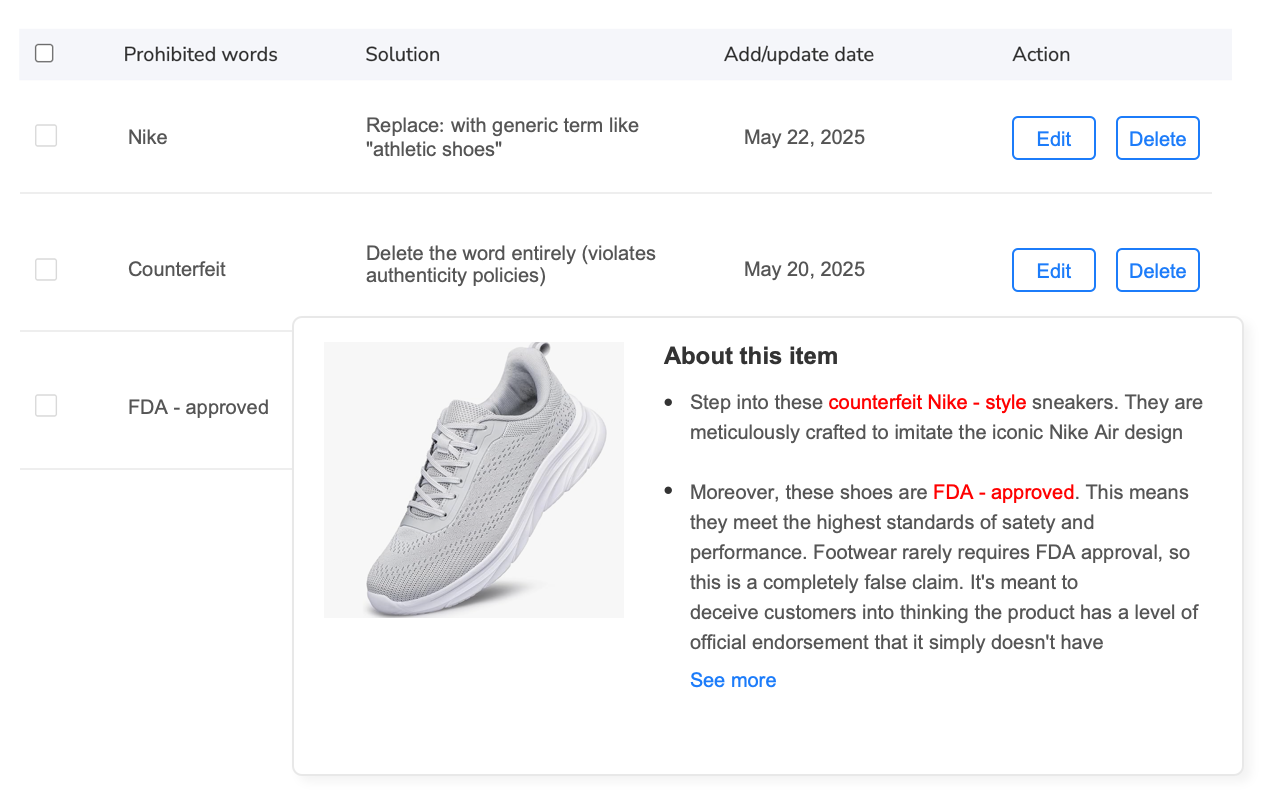
For example, Maxmerce’s Prohibited Words Check feature scans your entire product catalog automatically, flagging violations before you publish. Here’s how it works:
- Upload your catalog — Import existing listings from Amazon or upload new product data via CSV
- Automated scanning — The system cross-references every word against Amazon’s restricted terms database, checking titles, bullet points, descriptions, and backend search terms
- Violation reports — You receive a detailed report showing exactly which listings contain prohibited words, highlighting the specific terms and their locations
- Suggested corrections — The tool provides compliant alternative phrasing for each flagged violation
- Bulk fixes — Apply corrections across multiple listings simultaneously instead of editing products one by one
This workflow transforms a 125-hour manual compliance project into an 8-hour automated process—a 93% time reduction. Moreover, automated scanning catches violations human reviewers miss, like prohibited words in backend search terms that aren’t visible in the listing preview.
The financial impact is significant. Preventing just one suspension saves you $50,000+ in lost revenue. Meanwhile, compliance scanning tools cost a fraction of that amount annually. The ROI justifies itself after preventing a single violation.
Protect Your Amazon Account from Prohibited Word Violations
Scan your entire catalog for policy violations in minutes with automated compliance checking.
2. Trademark and Intellectual Property Infringement (23% of Suspensions)
Intellectual property complaints trigger immediate account suspensions because Amazon takes brand protection seriously. A single trademark owner complaint can shut down your entire account, not just the violating listing.
Common IP violation scenarios:
- Unauthorized brand names in titles — Using “Compatible with iPhone” gets you suspended unless you’re Apple-authorized
- Trademark terms in search terms — Backend keywords containing competitor brand names violate Amazon’s policies
- Counterfeit accusations — Selling authentic products without authorization from the brand owner
- Patent infringement — Selling products that infringe on active design or utility patents
IP violations are particularly dangerous because they often come from third-party complaints rather than Amazon’s automated systems. The brand owner files a complaint, and Amazon suspends first, investigates later. Your appeal requires proving you have authorization—difficult if you’ve been sourcing from unauthorized distributors.
Prevention requires checking your listings against trademark databases before publication. Additionally, verify your supplier authorization chain for brand-name products. If you can’t prove authorization, don’t list the product.
3. Inauthentic Product Complaints (15% of Suspensions)
Inauthentic suspensions occur when customers report receiving counterfeit or significantly different products than listed. These suspensions are especially devastating because Amazon assumes you’re guilty until proven innocent.
Common authenticity issues:
- Condition misrepresentation — Listing used items as new
- Expiration date problems — Shipping expired or near-expiration consumables
- Switched SKUs — Accidentally shipping wrong products due to inventory mix-ups
- Gray market goods — Importing authentic products through unauthorized channels that lack proper documentation
Prevention requires meticulous inventory management. Verify product authenticity through authorized supplier channels. Document your entire supply chain with invoices showing authorized distribution. Furthermore, implement quality control checks before products ship to Amazon FBA warehouses.
4. Account Performance Metrics Decline (8% of Suspensions)
Amazon suspends accounts when performance metrics drop below minimum thresholds:
- Order Defect Rate (ODR) > 1% — Negative feedback, A-to-Z claims, and chargebacks combined
- Pre-Fulfillment Cancel Rate > 2.5% — Orders you cancel before shipping
- Late Shipment Rate > 4% — Orders shipped after promised delivery date
These metrics accumulate gradually, then trigger sudden suspensions when thresholds are crossed. The problem is that by the time you notice declining metrics, you may have already crossed into suspension territory.
Prevention requires daily performance monitoring. Set up alerts when metrics approach warning levels (ODR > 0.7%, cancel rate > 2%, late shipment > 3%). This gives you time to implement corrective actions before Amazon suspends your account.
5. Selling Restricted Products Without Approval (6% of Suspensions)
Amazon restricts certain product categories requiring pre-approval. Listing these products without approval results in immediate suspension.
Commonly restricted categories for US sellers:
- Health & Personal Care — Dietary supplements, topical products, medical devices
- Grocery & Gourmet Food — Requires brand approval for most items
- Beauty — Many brand-name cosmetics require authorization
- Electronics — Certain brands require approval (Apple, Sony, etc.)
- Toys & Games — Holiday season gating often occurs
Prevention is straightforward: Don’t list products in restricted categories until you receive category approval from Amazon. Check category requirements before sourcing new product lines. If approval is denied, find alternative product categories rather than risking suspension.
Building Your Proactive Compliance System in 4 Steps
Step 1: Conduct Your Initial Compliance Audit
Start by auditing your entire existing catalog for policy violations. This baseline assessment reveals your current risk level.
Manual audit process (for small catalogs under 50 products):
- Download Amazon’s prohibited words list — Available in Seller Central under Policy Compliance
- Review each listing systematically — Check titles, bullet points, descriptions, and backend search terms
- Flag potential violations — Create a spreadsheet documenting questionable terms and their locations
- Research borderline cases — Some terms require context to determine compliance
- Prioritize fixes — Address critical violations (medical claims, trademark issues) first
This manual process takes approximately 15-20 minutes per listing. For a 50-product catalog, you’re looking at 12-16 hours of work.
Automated audit process (for catalogs over 50 products):
Manual audits become impractical for larger catalogs. Automated compliance tools handle the heavy lifting instantly.
Maxmerce’s Prohibited Words Check automates this entire audit process across unlimited listings. The system scans your catalog against Amazon’s complete restricted terms database—covering 2,000+ prohibited words and phrases that change monthly as Amazon updates policies.
The compliance audit workflow works like this:
- Connect your Amazon account — Maxmerce pulls your current listings directly from Amazon Seller Central
- Initiate bulk scan — The tool automatically checks every field in every listing: titles, bullets, descriptions, backend search terms, and product attributes
- Review violation report — Within minutes, you receive a comprehensive report showing exactly which listings contain prohibited words, the specific violating terms, and their exact locations
- Access compliance scoring — Each listing receives a compliance risk score (high/medium/low) helping you prioritize corrections
- Export detailed findings — Download the full violation report for team review or supplier communication
For a 500-product catalog, automated scanning completes in under 10 minutes versus 125 hours manually. That’s a 750x speed improvement while catching violations human reviewers miss—especially prohibited terms hidden in backend search terms.
Additionally, automated tools detect contextual violations that manual reviews often overlook. For example, the word “organic” is compliant when describing organizational structure but prohibited when describing products without USDA certification. Context-aware scanning identifies these nuanced violations accurately.
Step 2: Fix Existing Violations Before Amazon Detects Them
Once you’ve identified violations, fix them immediately. Every day violations remain in your listings increases suspension risk.
Violation remediation process:
- Prioritize by severity — Fix critical violations (medical claims, trademark issues) within 24 hours
- Develop compliant alternatives — Rewrite prohibited claims as compliant descriptions (e.g., “FDA-approved” becomes “Made in FDA-registered facility”)
- Apply bulk corrections — Update multiple listings simultaneously rather than one-by-one editing
- Verify changes propagated — Confirm edits appear in live listings on Amazon within 24 hours
- Document corrections — Keep records of what you fixed and when (useful if Amazon questions later)
Bulk editing capabilities become critical when you’re fixing violations across hundreds of listings. Editing each product individually through Seller Central takes 3-5 minutes per listing. For 200 violations, that’s 10-16 hours of manual work.
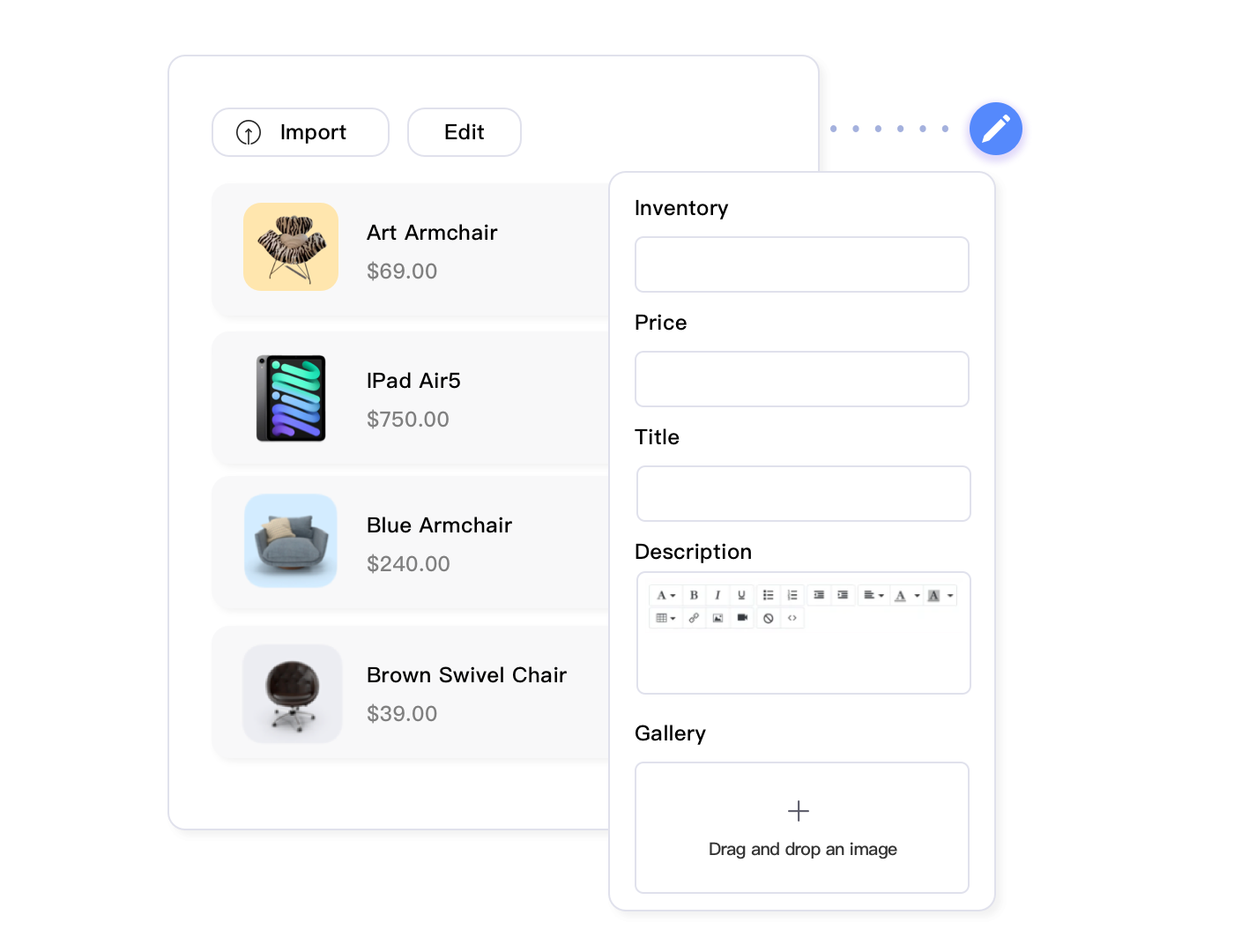
Instead, compliance tools like Maxmerce’s Rule-Based Bulk Listing Editing let you apply corrections across all affected listings simultaneously. The workflow looks like this:
- Filter by violation type — Select all listings containing specific prohibited words (e.g., all products with “FDA-approved” claims)
- Define replacement rules — Set up find-and-replace rules that swap prohibited terms with compliant alternatives
- Preview changes — Review how replacements will appear before applying (prevents accidental errors)
- Apply bulk updates — Push corrections to Amazon across hundreds of listings in minutes
- Verify completion — Confirm all targeted listings updated successfully
This approach reduces a 16-hour manual editing project to a 45-minute automated process—saving you 15+ hours while ensuring consistency across all corrections.
Step 3: Implement Pre-Publication Compliance Validation
Fixing existing violations is just the first step. Preventing new violations from reaching Amazon is equally critical. Pre-publication validation catches compliance issues before they become listing problems.
Pre-publication checklist for new listings:
- Run prohibited words scan — Check title, bullets, description, and search terms against restricted terms database
- Verify category approval — Confirm you’re approved to sell in the target category
- Validate trademark usage — Ensure any brand names used are either yours or you have authorization
- Check restricted claims — Verify any performance, safety, or certification claims have supporting documentation
- Review image compliance — Confirm images meet Amazon’s requirements (no watermarks, promotional text, etc.)
Manual pre-publication checking takes 10-15 minutes per new listing. For sellers launching 20+ new products monthly, that’s 3-5 hours of validation time every month.
Automated pre-publication validation streamlines this workflow significantly. Integration with your listing creation process ensures every new product gets compliance-checked before it reaches Amazon.
For instance, Maxmerce’s AI Listing Generator includes built-in compliance validation during the listing creation process. As you generate optimized titles and descriptions, the system automatically flags potential policy violations in real-time—before you finalize the listing.
The integrated workflow operates like this:
- Generate optimized content — AI creates SEO-optimized titles, bullets, and descriptions based on your product data
- Real-time compliance scanning — As content generates, the system checks against prohibited words and policy requirements
- Highlight violations — Flagged terms appear with suggested compliant alternatives
- Apply corrections — Accept suggested changes or write custom compliant phrasing
- Final validation — Before publishing, run one last compliance check confirming zero violations
- Publish confidently — Push compliant listings to Amazon knowing they won’t trigger policy flags
This integrated approach prevents violations at the source. Instead of creating listings, publishing them, discovering violations, and then fixing them, you catch issues during creation—before they ever reach Amazon’s systems.
The time savings compound quickly. Each prevented violation saves you 15-20 minutes of post-publication editing plus the risk of Amazon detection before you can fix it. For 20 new listings monthly, prevention saves 5-6 hours compared to reactive fixing.
Step 4: Schedule Ongoing Catalog Monitoring
Amazon’s policies and prohibited words lists change constantly. A listing that’s compliant today might violate new rules next month. Continuous monitoring catches these evolving compliance issues.
Monitoring schedule recommendations:
- Weekly scans — For active catalogs with frequent listing updates (recommended for most sellers)
- Bi-weekly scans — For stable catalogs with minimal changes
- Monthly scans — Minimum frequency to catch policy updates (Amazon updates monthly)
- Immediate scans — After any Amazon policy announcement or category restriction update
Manual ongoing monitoring is challenging because you need to track Amazon’s policy updates, understand what changed, and then review your entire catalog against new requirements. This process can take 4-8 hours monthly for a mid-sized catalog.
Automated monitoring tools handle this complexity automatically. They track Amazon policy changes, update their prohibited words databases accordingly, and rescan your catalog against new requirements—alerting you only when violations appear.
Maxmerce’s automated compliance monitoring runs scheduled scans of your entire catalog, checking against Amazon’s latest policy requirements. The system sends alerts when:
- New violations detected — Amazon updated policies and your previously compliant listings now violate new rules
- Compliance score changes — Your catalog’s overall compliance rating shifts due to policy changes
- High-risk listings identified — Listings accumulate multiple borderline issues that together create suspension risk
This automated vigilance means you’re protected even when you’re not actively thinking about compliance. The system works continuously in the background, alerting you only when action is needed.
Additionally, automated monitoring creates audit trails documenting your compliance efforts. If Amazon questions a listing, you can demonstrate you’ve been proactively checking for violations—evidence that supports your appeal if a suspension somehow occurs.
Manual vs Automated Compliance: The Reality Check
Many sellers attempt manual compliance checking to save money. However, the math reveals this approach actually costs more when you factor in time and risk.
| Task | Manual Approach | Automated Approach | Time Savings |
|---|---|---|---|
| Initial catalog audit (500 products) | 125 hours @ $50/hr = $6,250 | 10 minutes = $8.33 | 99.9% reduction |
| Bulk violation corrections | 16 hours = $800 in labor | 45 minutes with software | 95% reduction |
| Pre-publication checking (20 listings) | 5 hours = $250 in labor | 20 minutes with software | 93% reduction |
| Monthly monitoring scans | 8 hours = $400 in labor | 5 minutes with software | 98% reduction |
| Annual compliance cost | $12,000 in labor | Starting from $19/month | 95% cost reduction |
The comparison becomes even more favorable when you consider detection accuracy. Manual reviews miss violations that automated scanners catch:
- Backend search term violations — Humans often skip these hidden fields; automated tools scan them systematically
- Contextual prohibited words — Manual reviewers miss nuanced violations; context-aware algorithms detect them consistently
- New policy updates — Humans must manually track Amazon announcements; automated tools update their databases automatically
- Catalog consistency — Manual spot-checking misses patterns; automated scans review 100% of listings
Furthermore, manual compliance creates operational bottlenecks. When you need to launch 50 new products for Q4, do you have 25 hours available for manual compliance checking? Automated tools remove this constraint entirely.
Stop Wasting Time on Manual Compliance Checking
Scan 500+ listings for violations in minutes, not weeks. Automated compliance saves 100+ hours monthly.
What to Do If You’re Already Suspended
If Amazon has already suspended your account, immediate action is critical. Every day of suspension costs you revenue and damages your business.
Immediate Response Steps (First 24 Hours)
- Read the suspension notice carefully — Amazon specifies the exact policy violations that triggered suspension. Don’t skim this—every detail matters for your appeal.
- Identify all violating listings — Amazon may cite specific ASINs or general policy areas. Audit your entire catalog to find all violations, not just cited examples.
- Remove violations immediately — Edit or delete all listings containing prohibited content. Don’t wait for appeal approval—show Amazon you’re taking corrective action.
- Document root causes — Determine how violations occurred. Was it supplier-provided content you didn’t verify? Lack of compliance checking? Staff training gaps?
Writing Your Plan of Action (POA)
Amazon requires a detailed Plan of Action before reinstating suspended accounts. Your POA must address three specific elements:
1. Root Cause Analysis — Explain exactly why violations occurred. Amazon wants to see you understand the problem deeply, not just surface-level acknowledgment.
Example: “Our account suspension resulted from prohibited medical claims in product listings. Root cause analysis reveals we relied on supplier-provided content without independent compliance verification. Additionally, we lacked automated compliance scanning to detect violations before publication.”
2. Corrective Actions Taken — Detail specific steps you’ve already completed to fix violations. Past tense is critical—show you’ve acted, not just planned.
Example: “We immediately removed all 47 listings containing prohibited medical claims. We edited 123 additional listings to remove borderline compliance issues. All supplier-provided content has been rewritten in-house. We conducted a complete catalog audit identifying and correcting 312 policy violations across our 500-product catalog.”
3. Preventive Measures Implemented — Describe systems you’ve established to prevent recurrence. This is where demonstrating you’ve implemented automated compliance tools strengthens your POA significantly.
Example: “We’ve implemented Maxmerce’s automated compliance scanning system to prevent future violations. This system scans all listings against Amazon’s prohibited words database before publication. We’ve scheduled weekly automated catalog scans to detect policy violations as Amazon updates requirements. Additionally, we’ve established a compliance review protocol requiring all new listings pass automated scanning before publishing to Amazon.”
Including specific compliance tools in your POA demonstrates serious commitment to prevention. Amazon sees you’ve invested in systems, not just promising to “be more careful.”
POA Submission and Follow-Up
Submit your POA through the Performance Notification in Seller Central. Amazon typically responds within 48-72 hours, though complex cases may take longer.
If your initial POA is rejected:
- Read Amazon’s feedback carefully — They specify what’s insufficient in your POA
- Address every point raised — Don’t resubmit the same POA with minor tweaks
- Add more specific preventive measures — Show additional steps beyond your initial response
- Include documentation — Screenshots of compliance tools, training materials, updated procedures
However, the best POA is the one you never have to write. Prevention through automated compliance checking avoids the entire suspension-appeal cycle.
Advanced Compliance Strategies for Scaling Sellers
Multi-Channel Compliance Coordination
If you sell across Amazon, eBay, and Walmart, coordinating compliance requirements becomes complex. Each platform has different prohibited words lists and policy requirements.
For example:
- Amazon prohibits “organic” claims without USDA certification in product titles
- eBay allows “organic” in titles if you have documentation (not necessarily USDA)
- Walmart requires “organic” claims meet USDA standards similar to Amazon
Managing these platform-specific requirements manually creates errors. You might optimize a listing for eBay, then copy it to Amazon where it violates policies.
Multi-channel compliance tools like Maxmerce’s cross-platform listing management handle this complexity automatically. The system knows each platform’s specific requirements and adjusts listings accordingly when publishing across channels.
The workflow operates like this:
- Create master listing — Build your product listing with all content in a centralized catalog
- Platform-specific validation — The system checks the listing against each platform’s unique compliance requirements
- Automatic adjustments — Content gets modified to meet platform-specific rules (e.g., removing “organic” claim for Amazon, keeping it for eBay)
- Publish to multiple platforms — Push platform-optimized versions to Amazon, eBay, and Walmart simultaneously
This approach prevents the common mistake of cross-posting listings that are compliant on one platform but violate policies on another. You maintain consistency while respecting each platform’s unique requirements.
Supplier Content Compliance Verification
Many suspensions stem from using supplier-provided product descriptions without verification. Suppliers often include prohibited claims or exaggerated marketing language that violates Amazon policies.
Supplier content verification workflow:
- Receive supplier content — Get product descriptions, bullet points, and marketing claims from manufacturer or distributor
- Run compliance scan — Check supplied content against prohibited words database before using it
- Identify violations — Flag prohibited claims, unsubstantiated benefits, and trademark issues
- Request documentation — For any claims (e.g., “clinical testing shows”), require supplier to provide proof
- Rewrite as needed — Edit supplier content to remove violations while maintaining key selling points
- Final validation — Run one last compliance check on edited content before publishing
This systematic verification prevents supplier-originated violations from reaching your Amazon listings. You can still leverage supplier content for product knowledge, but you control compliance.
Team Training and Compliance Culture
As your team grows, ensuring everyone understands compliance becomes critical. A VA or listing specialist who doesn’t know Amazon’s prohibited words list can create violations faster than you can fix them.
Compliance training essentials for your team:
- Prohibited words training — Ensure everyone knows the most common restricted terms (medical claims, certifications, guarantees)
- Category restrictions awareness — Team members need to know which categories require pre-approval
- Compliance tool usage — Train staff to use automated scanning tools before publishing any listing
- Escalation protocols — Establish clear processes for borderline cases requiring manager review
However, even with training, human error occurs. Automated compliance checking provides a safety net that catches mistakes before they become problems. Think of it as spell-check for Amazon policy violations—your team creates content while automated tools catch policy errors instantly.
The Real Cost-Benefit Analysis of Compliance Tools
Sellers often wonder whether compliance tools are worth the investment. Let’s run the actual numbers for a mid-sized seller generating $50,000 monthly revenue.
Cost of Doing Nothing (Risk Exposure)
- Single suspension cost: $50,000 lost revenue + $15,000 frozen cash flow = $65,000
- Annual suspension probability: 18% for sellers without automated compliance (E-commerce Risk Report, 2025)
- Expected annual cost: $65,000 × 18% = $11,700
Cost of Manual Compliance
- Initial audit: 125 hours × $50/hr = $6,250
- Ongoing monitoring: 8 hours monthly × 12 months × $50/hr = $4,800
- Pre-publication checks: 5 hours monthly × 12 months × $50/hr = $3,000
- Total annual cost: $14,050
- Residual suspension risk: 8% (manual reviews miss violations) × $65,000 = $5,200
- Total cost including risk: $19,250
Cost of Automated Compliance
- Software subscription: Starting from $19/month with flexible plans
- Setup time: 2 hours for initial configuration (one-time)
- Ongoing management: 1 hour monthly for review and monitoring
- Total annual cost: Significantly lower than manual compliance
- Residual suspension risk: 2% (automated tools catch 98% of violations) × $65,000 = $1,300
- Total cost including risk: $2,500
Cost Comparison Summary
| Approach | Direct Costs | Risk Exposure | Total Annual Cost |
|---|---|---|---|
| No Compliance | $0 | $11,700 | $11,700 |
| Manual Compliance | $12,000 | $5,200 | $17,200 |
| Automated Compliance | Starting from $19/month | $1,300 | Significantly lower total cost |
ROI Analysis:
Automated compliance dramatically reduces costs versus $11,700 in expected suspension costs without protection. The savings justify investment many times over. Furthermore, automated tools cost far less than manual compliance while providing better violation detection.
The ROI improves dramatically for larger sellers. A $150,000 monthly revenue seller faces $195,000 in suspension costs. At 18% annual probability, that’s $35,100 expected cost annually. Prevention through automated scanning delivers substantial ROI.
Even sellers who only prevent one suspension every several years come out ahead. One avoided $65,000 suspension justifies years of compliance tool investment.
Frequently Asked Questions
What triggers most Amazon account suspensions for US sellers?
Most Amazon account suspensions stem from prohibited word violations (68%), inauthentic product claims, and listing policy breaches. Common triggers include trademark infringement in titles, medical claims without approval, restricted terms like “organic” without certification, and unsubstantiated performance claims. Additionally, intellectual property complaints cause 23% of suspensions, while account performance metric violations (Order Defect Rate, Late Shipment Rate) account for another 8%. The majority of these violations are preventable through automated compliance scanning before publication.
How quickly can Amazon suspend my account after a violation?
Amazon can suspend accounts within 24-48 hours of detecting violations. Automated systems flag prohibited words and policy breaches immediately. However, account suspensions typically occur after multiple violations accumulate or when single critical violations like trademark infringement happen. This is why preventive compliance scanning is critical—it catches issues before Amazon’s systems detect them, giving you time to fix problems quietly without triggering suspension protocols.
Can automated compliance tools really prevent account suspensions?
Yes, automated compliance tools reduce suspension risk by up to 90% through pre-publication scanning. These tools check listings against Amazon’s prohibited words database, trademark databases, and policy rules before you publish. They catch violations humans miss—scanning hundreds of listings in minutes versus hours of manual review. Tools like Maxmerce’s Prohibited Words Check scan against 2,000+ restricted terms automatically, detecting contextual violations manual reviews often overlook. Moreover, automated tools update their databases when Amazon changes policies, ensuring continuous protection against evolving requirements.
What’s the difference between account suspension and listing suppression?
Account suspension blocks your entire seller account from operating, preventing all sales and access to Seller Central. You can’t process orders, update listings, or communicate with customers. Listing suppression removes individual product listings from search results while your account remains active—you can still sell other products and access Seller Central. Suspensions require Plan of Action submissions and may take weeks to resolve, with funds frozen for 90 days. Suppressions typically resolve faster once you fix the violating listing. However, repeated suppressions often lead to account suspension, making prevention of even minor violations important.
How often should I run compliance checks on my Amazon listings?
Run compliance checks weekly for active catalogs and immediately before publishing new listings. Amazon updates prohibited words and policies monthly, so weekly scans catch new violations before Amazon detects them. Additionally, scan your entire catalog quarterly to audit historical listings against current requirements. Automated tools can schedule these scans to run continuously, alerting you only when violations appear. For sellers launching new products frequently, daily pre-publication scans prevent violations from ever reaching Amazon’s systems.
What happens to my revenue during an account suspension?
During account suspension, all sales stop immediately and revenue drops to zero. Your funds remain frozen for 90 days under Amazon’s standard reserve policy. If you generate $50,000 monthly, a 30-day suspension costs you $50,000 in lost sales plus $15,000 in frozen cash flow—$65,000 total impact. Additionally, your search rankings plummet from 30 days of zero sales velocity, taking months to recover even after reinstatement. This financial devastation makes prevention critical—compliance tools costing $50 monthly protect against $65,000+ suspension losses.
How do I know if my listings contain prohibited words?
Manual identification requires checking each listing against Amazon’s prohibited words list—a time-consuming process for large catalogs. Automated compliance scanners detect prohibited words instantly by cross-referencing your listings against Amazon’s restricted terms database. Common prohibited words include unapproved medical claims (cure, treat, prevent disease), unauthorized certifications (FDA-approved without proof), and restricted brand names. Furthermore, prohibited words often hide in backend search terms where manual reviews rarely check. Automated tools scan these hidden fields systematically, catching violations manual reviews miss.
Can I appeal an Amazon account suspension successfully?
Yes, successful appeals require a detailed Plan of Action (POA) addressing root causes, corrective actions, and prevention measures. Successful POAs demonstrate you’ve identified all violations, removed prohibited content, and implemented systems to prevent recurrence. Response time matters—Amazon typically reviews POAs within 48-72 hours, though complex cases take longer. Including evidence of compliance tools in your POA strengthens appeals significantly. However, prevention through proactive compliance checking avoids the suspension-appeal cycle entirely—saving you weeks of lost revenue and operational chaos.
Take Action: Protect Your Amazon Account Today
Amazon account suspension prevention isn’t optional—it’s essential business insurance for every serious seller. The question isn’t whether you can afford compliance tools, but whether you can afford the $65,000+ cost of suspension.
Your action plan starts now:
- Audit your current catalog — Identify existing violations before Amazon detects them
- Fix critical violations immediately — Remove prohibited words and policy breaches within 24-48 hours
- Implement automated compliance scanning — Protect future listings before they reach Amazon
- Schedule ongoing monitoring — Catch policy changes and emerging violations continuously
Waiting until after suspension to implement compliance systems is like buying insurance after the accident. The damage has already occurred.
Start protecting your Amazon account with Maxmerce’s automated compliance tools. Scan your entire catalog for violations in minutes, not weeks. Catch prohibited words before Amazon does. Prevent suspensions before they destroy your revenue.
Don’t Wait for a Suspension to Take Compliance Seriously
Protect your $50,000+ monthly revenue with automated compliance scanning. Catch violations before Amazon does.
Your Amazon business is too valuable to risk on manual compliance hoping you catch every violation. Automated protection costs less than one day of lost revenue from suspension. The choice is clear.
