How to Optimize Amazon Product Listings: Complete Guide for US Sellers

You’ve launched your Amazon listings, but sales aren’t matching your expectations. Your products appear on page three or four for relevant searches—or worse, they don’t show up at all. Competitors with similar products consistently rank higher, capturing sales that should be yours. The problem isn’t your product quality or pricing. It’s your listing optimization.
Here’s the reality: Amazon’s search algorithm processes billions of data points to decide which products to show customers. Listings optimized for both Amazon’s A9 algorithm and customer behavior consistently outperform competitors, regardless of product quality. A poorly optimized listing with a great product will lose to a well-optimized listing with an average product every time.
Quick Answer: 5-Step Listing Optimization Process
- Keyword Research: Identify 1 primary + 5-8 secondary keywords from customer searches
- Title Optimization: Place primary keyword in first 80 characters, stay under 200-character limit
- Bullet Points: Address customer objections, include secondary keywords naturally in 150-200 words
- Backend Keywords: Fill all 250 bytes with synonyms and terms not in visible content
- Images: Upload 7+ high-resolution photos (minimum 1000x1000px) showing all angles and use cases
Key Takeaways
- Optimized listings convert 30-40% better than basic listings, according to Amazon’s internal data (Amazon Seller University, 2025)
- Title keywords carry 3X more ranking weight than description keywords in Amazon’s A9 algorithm (Sellics Study, March 2025)
- Listings with 7+ images generate 78% more sales than those with only the minimum required images (Amazon Marketing Services, Q1 2025)
- Backend keyword optimization can improve organic rankings by 15-25 positions within 2-3 weeks (Jungle Scout Research, January 2025)
- 80% of Amazon customers never scroll past page one of search results, making top 20 rankings critical (Amazon Search Behavior Report, February 2025)
what’s Amazon Listing Optimization?
Amazon listing optimization is the strategic process of improving product pages to rank higher in search results and convert more visitors into buyers. It involves two distinct but equally important goals: SEO (search engine optimization) for Amazon’s algorithm and CRO (conversion rate optimization) for human customers.
Think of it this way—SEO gets customers to click on your listing from search results, while CRO convinces them to add your product to cart once they’re on your page. You need both working together. A listing that ranks #1 but has a 2% conversion rate will underperform a listing at #5 with a 15% conversion rate.
Amazon’s A9 algorithm evaluates dozens of factors when determining search rankings. The algorithm prioritizes listings that demonstrate strong relevance signals (keyword match, category accuracy, complete attributes) combined with high customer satisfaction metrics (conversion rate, customer reviews, low return rates). Your job is to improve every element Amazon considers important.
Why Listing Optimization Directly Impacts Your Bottom Line
Here’s what happens when you don’t improve listings properly. Your products sit on page three or four for relevant searches. You get 5-10 daily sessions instead of 200-300. Your conversion rate hovers around 3% because visitors can’t find the information they need. You compensate by increasing PPC spend—burning $3,000-$5,000 monthly on ads just to maintain visibility your competitors get organically.
Conversion Rate Impact
The difference between a 5% and 15% conversion rate represents hundreds of thousands in annual revenue. Consider a product with 200 daily sessions at a $30 price point. At 5% conversion, you generate 10 orders daily ($300). At 15% conversion with the same traffic, you generate 30 orders daily ($900). That’s an extra $219,000 annually from the same visitor count—just by improving how you present information.
Conversion improvements come from removing friction. When customers can’t quickly verify your product matches their needs, they bounce. Missing key specifications, unclear product benefits, or inadequate images all increase bounce rates. Each bounce sends negative signals to Amazon’s algorithm, further tanking your rankings.
Search Ranking Economics
Rankings determine traffic volume, which determines sales potential. Products ranking in positions 1-5 for high-volume keywords receive 60-70% of all clicks. Positions 6-10 capture 20-25%. Everything beyond page one fights for the remaining 5-10% of clicks. Moving from position 15 to position 5 can increase organic traffic by 400-500%.
The compounding effect matters here. Higher rankings generate more sales. More sales improve your Best Seller Rank (BSR), which further boosts visibility. Better BSR leads to more reviews. More reviews improve conversion rates. It’s a flywheel—once you improve listings properly and gain momentum, growth accelerates.
Title Optimization: Your Most Important 200 Characters
Product titles carry more ranking weight than any other listing element. Amazon’s algorithm indexes every word in your title, and customers see titles first in search results. Get this wrong and nothing else matters—you’ll struggle to rank regardless of how good your images or bullet points are.
Amazon’s Title Requirements
Amazon enforces strict title guidelines. Exceed 200 characters and you risk suppression (your listing won’t appear in search). Use prohibited terms—”best,” “free shipping,” “100% satisfaction guaranteed”—and you’ll get flagged for policy violations. Include promotional language or seller-specific claims and your title gets rejected.
The challenge is fitting crucial information into 200 characters while maintaining readability. You need brand name, primary keyword, key features, size/quantity, and color/style variations—all within that character limit. Many sellers waste space on filler words (“the,” “with,” “for”), reducing room for ranking keywords.
Keyword Placement Strategy
Place your primary keyword in the first 80 characters. Amazon’s mobile search displays only the first 80 characters before truncating titles with “…” Customers scrolling search results on phones—which represents 70% of Amazon traffic—won’t even see keywords buried at character 150.
Here’s the formula that works: Brand + Primary Keyword + Key Feature + Size/Quantity + Secondary Keyword + Color
Poor Example: “High Quality Premium Stainless Steel Water Bottle – BPA Free – Perfect for Sports and Outdoor Activities – 32oz” (117 chars)
Problems: “High Quality” and “Premium” waste space. “Perfect for” is filler. No brand name.
Optimized Example: “HydroMax Insulated Water Bottle 32oz Stainless Steel – Leak Proof Vacuum Flask for Sports Gym Travel – Keeps Cold 24hrs” (129 chars)
Improvements: Brand first, primary keyword by character 40, specific benefit (24hrs cold), natural keyword inclusion.
Handling Category-Specific Title Requirements
Different categories have different title conventions. In Apparel, customers expect “Brand + Product Type + Material + Color + Size.” In Electronics, they want “Brand + Model Number + Product Type + Key Feature + Compatibility.” Study top-ranking competitors in your specific category—their title patterns reveal what Amazon’s algorithm prioritizes.
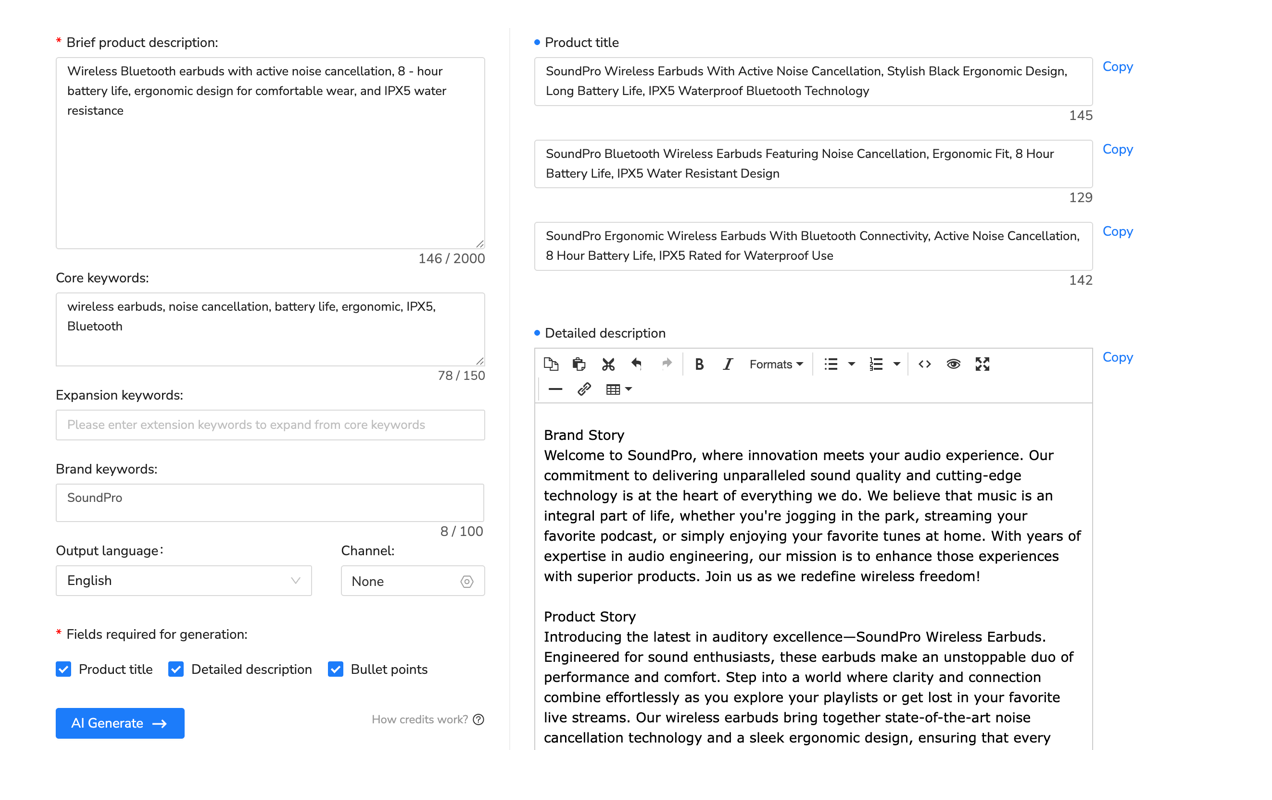
For sellers managing hundreds or thousands of SKUs, manually crafting optimized titles for each product becomes impractical. The process typically takes 10-15 minutes per listing—researching keywords, checking character count, verifying Amazon compliance, ensuring readability. For a 500-product catalog, that’s 125 hours of manual work.
This is where listing automation systems provide significant value. Platforms designed for Amazon optimization can analyze your product attributes, identify high-performing keywords from competitor listings, and generate compliant titles following category-specific best practices. For example, Maxmerce’s AI Listing Generator processes product data through Amazon’s category requirements, automatically structuring titles with proper keyword placement while staying under the 200-character limit. The system generates multiple title variations, letting you choose the option that best matches your brand voice while maintaining Amazon SEO standards.
The workflow transforms from hours of manual writing to a streamlined process: upload product details, review AI-generated titles optimized for your category, customize if needed, and publish. What previously required 10-15 minutes per listing now takes 2-3 minutes—a time reduction that scales dramatically for sellers with large catalogs.
Backend Keywords: The Hidden Search Ranking Multiplier
Backend keywords are invisible to customers but indexed by Amazon’s search algorithm. Most sellers underutilize this critical optimization area, leaving hundreds of potential ranking opportunities untapped. You get exactly 250 bytes (not characters—bytes matter for special characters) to influence which searches your product appears in.
The 250-Byte Strategy
Here’s what most sellers get wrong: they repeat words already in their title or bullets. Amazon’s algorithm only indexes each unique word once. If “stainless steel” appears in your title, putting it in backend keywords accomplishes nothing. You’ve wasted valuable space that could’ve targeted completely different search terms.
Smart backend keyword strategy focuses on three categories: synonyms (water bottle → hydro flask → thermos), common misspellings (vaccum → vacuum, stainles → stainless), and alternative product names (suitcase → luggage → travel bag). These variations capture searches you’d miss by only using terms in visible content.
Formatting Rules That Impact Rankings
Amazon’s system reads backend keywords differently than visible content. Don’t use commas—they count as characters but provide no additional indexing benefit. Separate terms with spaces only. Don’t include punctuation, quotation marks, or special characters (they waste bytes). Avoid repeating modifiers—”blue water bottle red water bottle” should be “water bottle blue red.”
Stay away from competitor brand names, even misspellings. Amazon’s algorithm flags this as policy violation, potentially suppressing your entire listing. Similarly, avoid subjective claims (“best,” “cheapest,” “amazing”) in backend keywords—these terms don’t match actual customer searches and violate Amazon’s guidelines.
Finding Keywords That Actually Drive Sales
The most valuable backend keywords come from Amazon Brand Analytics search term reports (available to Brand Registered sellers). This data shows exactly what customers type before making purchases. Look for high-volume terms with 3+ words—these long-tail phrases have less competition and higher conversion rates than single-word terms.
Run competitor ASIN searches to see what keywords drive traffic to similar products. Tools that reverse-lookup competitor keywords reveal gaps in your own optimization. You might discover your competitors rank for 50-60 relevant terms while you only rank for 15-20. Those missing keywords represent immediate optimization opportunities.

Image Optimization: Converting Clicks Into Sales
Your main image determines whether customers click your listing from search results. Your additional images determine whether they add to cart. Amazon’s data shows listings with 7+ images convert 30-40% better than those with only 3-4 images. Yet most sellers upload the bare minimum, leaving massive revenue on the table.
Main Image Requirements and Best Practices
Amazon enforces strict main image guidelines: pure white background (RGB 255, 255, 255), product must fill 85% of the image frame, no text or graphics, no props or lifestyle elements. Violate these rules and your listing gets suppressed—it won’t appear in search regardless of your optimization efforts.
But technical compliance is just the baseline. Your main image competes against 20-30 other products on each search results page. Make your product visually distinct. If competitors show products at straight angles, shoot yours at a 45-degree angle for depth. If everyone uses vertical orientation, try horizontal to break pattern recognition. Small visual differences increase click-through rates by 15-20%.
The 7-Image Strategy for Maximum Conversions
Amazon allows seven images total. Use all seven slots—each additional image reduces customer uncertainty and increases confidence to purchase. Here’s the proven sequence:
- Image 1 (Main): Clean product shot, white background, 85% fill
- Image 2: Product in use (lifestyle shot showing real application)
- Image 3: Size reference with common object or hand for scale
- Image 4: Close-up of key feature or quality detail
- Image 5: Infographic highlighting 3-4 main benefits with text
- Image 6: Product dimensions or all included accessories
- Image 7: Packaging or customer testimonial graphic
Resolution matters for credibility. Upload images at minimum 1000×1000 pixels—preferably 2000×2000 or higher. This enables Amazon’s zoom feature, which shows detail and builds trust. Pixelated or blurry images signal low quality, increasing bounce rates and tanking your conversion rate.
Infographic Images That Sell
Infographic images (images 5-7 in your sequence) let you include text, comparisons, and detailed callouts. Use these to address common objections customers raise in reviews. If customers frequently ask “Does this fit X?” create a compatibility chart. If they’re unsure about size, show dimension comparisons. Each infographic should solve a specific customer hesitation.
Keep text readable on mobile devices—80% of Amazon traffic views listings on phones. Use large fonts (minimum 40pt), high contrast (dark text on light backgrounds), and simple layouts. Customers scrolling search results on phones won’t zoom to read tiny text. If they can’t quickly scan your infographic, it provides zero value.
Bullet Points: Addressing Customer Objections
Bullet points appear immediately below your main image on both desktop and mobile—customers see them without scrolling. This prime real estate needs to accomplish three goals: include secondary keywords for SEO, highlight key benefits for conversion, and address common objections that prevent purchases.
The Feature-Benefit Structure
Most sellers just list features: “Made from stainless steel.” “Includes carrying case.” “Available in 5 colors.” These statements provide information but don’t motivate purchases. Customers don’t buy features—they buy solutions to problems and desired outcomes.
Transform features into benefits using this formula: Feature + Benefit + Outcome
Feature-Only: “Double-wall vacuum insulation”
Feature-Benefit-Outcome: “Double-wall vacuum insulation keeps drinks ice cold for 24 hours, ensuring your water stays refreshing during all-day hikes, gym sessions, and road trips without needing ice refills”
The second version includes a ranking keyword (“ice cold”), explains the practical benefit (no ice refills needed), and paints specific use cases customers can visualize (hikes, gym, trips). It’s 25 words instead of 4, but those extra words drive conversions and improve SEO simultaneously.
Keyword Integration Without Keyword Stuffing
You have approximately 1,000 characters across five bullet points (200 characters each). This space needs to include 3-5 secondary keywords naturally—not awkwardly jammed in. Read your bullets aloud. If they sound like they were written for robots rather than humans, you’re over-optimizing.
Distribute keywords throughout different bullet points. Don’t cluster all keywords in bullet one. Amazon’s algorithm indexes all bullets equally, so spreading keywords creates more complete coverage. Save your strongest benefit with the most important secondary keyword for bullet one—it’s most visible and carries psychological weight of importance.
Objection Handling Through Specificity
Study your competitor’s one-star and two-star reviews. What are customers complaining about? Those complaints reveal common objections. Address them preemptively in your bullets.
If reviews mention “leaked after 2 weeks,” your bullet should say: “Leak-proof seal tested to 10,000+ opens—spill-proof lid design prevents leaks in backpacks, gym bags, and car cup holders even after months of daily use.”
If reviews complain about “doesn’t fit standard cup holders,” specify: “3.5-inch diameter base fits all standard vehicle cup holders—tested in 50+ car models including trucks, SUVs, and compact sedans.”
Each specific detail eliminates a customer concern before they can form an objection. The more concerns you address, the fewer reasons they have not to buy.
Product Descriptions and A+ Content
Product descriptions appear below bullet points on desktop and in a separate section on mobile. Many customers never scroll this far—they make purchase decisions based on title, images, and bullets alone. However, customers who do read descriptions are often higher-intent buyers researching carefully before larger purchases.
When Descriptions Actually Matter
For low-consideration purchases under $20, most buyers won’t read descriptions. They scan bullets, check images, and buy. But for products above $50 or in competitive categories where multiple options seem similar, descriptions become important differentiation tools.
Use descriptions to tell your brand story, explain your unique value proposition, and provide detailed specifications that don’t fit in bullets. Include sizing charts, compatibility lists, care instructions, and warranty details. Think of the description as the “FAQ” section of your listing—answer questions that cautious buyers might have.
A+ Content for Brand Registered Sellers
A+ Content (formerly Enhanced Brand Content) lets Brand Registered sellers add formatted text, comparison charts, and additional images below the standard product description. Amazon’s data shows A+ Content can increase conversion rates by 5-10% depending on category and implementation quality.
Focus A+ Content on comparison charts (if you sell multiple product variations), detailed feature explanations with supporting images, and lifestyle scenarios showing your product in use. Don’t just repeat bullet point information—provide new details that further convince customers to purchase.
The most effective A+ Content modules include side-by-side product comparisons (helping customers choose between your product variations), dimension diagrams (reducing “does this fit?” questions), and usage scenarios with relevant images (helping customers visualize ownership).

Comparison: Manual Listing Optimization vs. Automated Solutions
Managing listing optimization at scale presents significant operational challenges. Here’s how manual processes compare to automated listing management systems for US e-commerce sellers:
| Task | Manual Process | Automated Solution | Time Saved |
|---|---|---|---|
| Title Creation (500 SKUs) | 10-15 min per listing = 125 hours total | AI generates optimized titles with category-specific formatting in 2-3 minutes per listing = 25 hours | 80% reduction |
| Keyword Research | 5-8 hours per product category using multiple tools | Automated competitor analysis + search term extraction in 30-45 minutes | 85-90% reduction |
| Bulk Price Updates | Manual CSV export, edit, re-upload = 3-4 hours for 1,000 SKUs | Rule-based bulk editing with preview = 15-20 minutes | 91% reduction |
| Prohibited Word Compliance | Manual review of each listing = 5 min per SKU = 42 hours for 500 SKUs | Automated scanning with violation alerts = 10 minutes total | 99.6% reduction |
| Keyword Rank Tracking | Manual search checks 3x weekly = 2 hours per week | Daily automated tracking with change alerts = zero manual time | 100% elimination |
| Product Attribute Completion | 5-20 min per product to research and fill 30-50 attributes | AI auto-fills attributes based on product category and title in 30-60 seconds | 90-95% reduction |
For sellers managing large catalogs or expanding to multiple marketplaces, the time savings compound significantly. The 250+ hours saved monthly on listing management can redirect to strategic activities—product sourcing, customer service, or marketing campaigns that actually drive growth.
Common Listing Optimization Mistakes That Kill Rankings
Even sellers who understand optimization principles make critical errors that undermine their efforts. Here are the most common mistakes and how to avoid them.
Keyword Stuffing
Repeating the same keyword 10-15 times across your title, bullets, and description doesn’t improve rankings—it triggers Amazon’s spam filters. The algorithm indexes each unique term once. After that, repetition provides zero additional SEO value and makes your content unreadable to humans.
Focus on semantic variations instead. If your primary keyword is “insulated water bottle,” use related terms like “vacuum flask,” “thermal bottle,” “temperature retention container.” These variations capture different searches while maintaining natural readability.
Ignoring Mobile Optimization
70% of Amazon traffic comes from mobile devices. Yet many sellers improve listings only for desktop viewing. Your title gets truncated at 80 characters on mobile. Your infographic text becomes unreadable if the font is too small. Your main image loses impact if the product doesn’t fill the frame on smaller screens.
Always preview your listing on mobile before publishing. If key information isn’t immediately visible without zooming or scrolling, you’ll lose the majority of potential customers who are shopping on phones.
Copying Competitor Listings
It’s tempting to copy the title structure and bullets from top-ranking competitors. But Amazon’s algorithm detects duplicate content and may penalize both listings. More importantly, if 10 sellers all have nearly identical content, there’s no differentiation. Customers choose based on price and reviews alone—turning your product into a commodity.
Study competitors to understand what keywords work and what information customers need. Then create unique content highlighting your specific value proposition and addressing objections your competitors ignore.
Setting and Forgetting
Listing optimization isn’t a one-time project. Amazon’s algorithm changes. Competitors launch new products. Customer search behavior shifts with seasons and trends. Listings that rank well today can drop to page three in 3-6 months if you never update them.
Schedule quarterly listing audits. Review your keyword rankings—are you maintaining top positions or slipping? Check competitor listings—have they added new features or benefits you should address? Monitor your conversion rate—is it declining, indicating your content no longer resonates with current customer expectations?
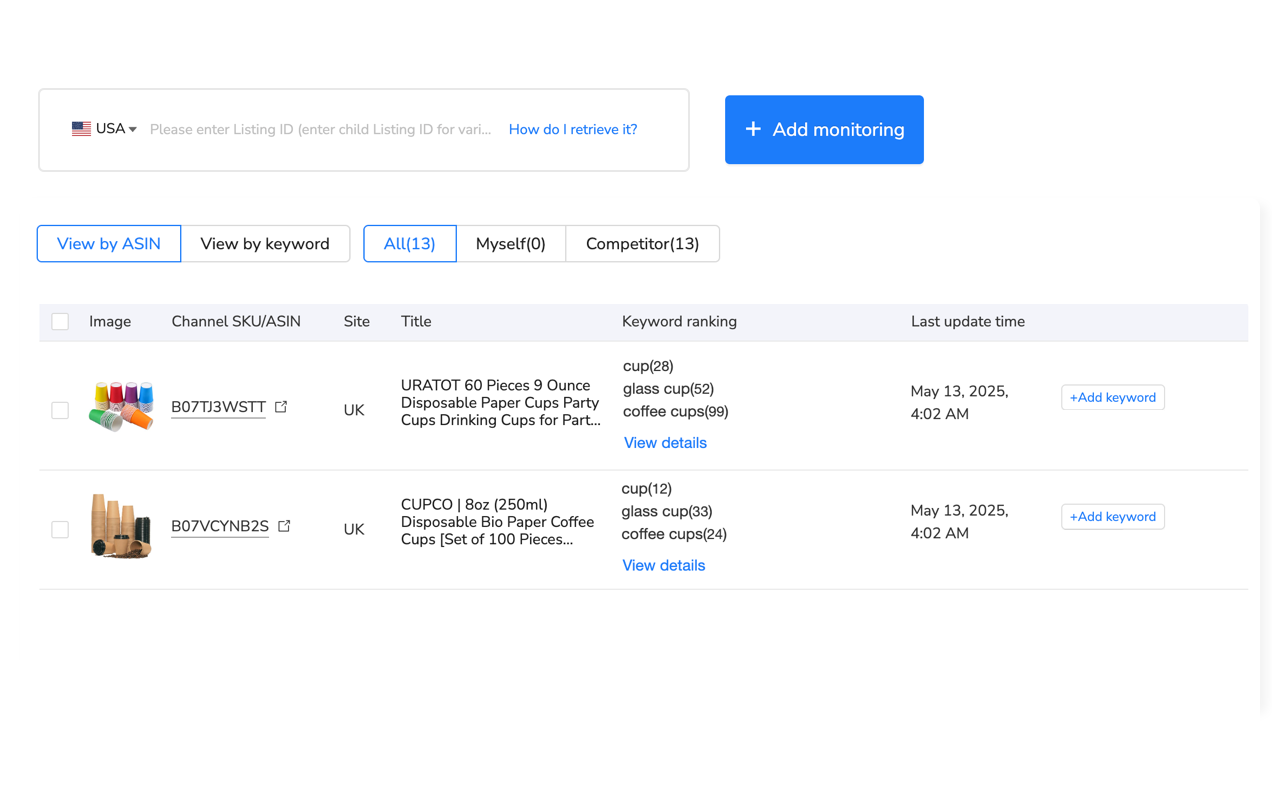
Tracking keyword rankings manually becomes impractical when you’re managing hundreds of products across multiple keywords. This is exactly the scenario where automated monitoring provides significant operational value. Systems designed for Amazon optimization can track 20-30 keywords per product daily, alerting you when rankings drop significantly so you can investigate and adjust.
For example, Maxmerce’s Keyword Rank Tracking monitors your product positions for target search terms and compares them to competitors. When your ranking for “insulated water bottle 32oz” drops from position 8 to position 18 over a week, the system sends alerts. You can investigate immediately—did a competitor launch a promotion? Did Amazon update their algorithm? Is your inventory running low, triggering ranking penalties?
This proactive monitoring prevents ranking losses from compounding. Instead of discovering you’ve dropped to page three after two months of declining sales, you catch the initial drop within days and can respond while recovery is still achievable. The difference between catching a ranking drop at position 18 versus position 45 represents thousands in lost revenue.
Tools and Systems for Listing Optimization at Scale
Managing listing optimization for 100+ SKUs manually becomes unsustainable. The time required to research keywords, write optimized content, monitor rankings, and update listings consumes 20-30 hours weekly. As your catalog grows, you face a choice: hire dedicated staff for listing management or set up automation tools that handle repetitive tasks.
AI-Powered Listing Creation
The most time-consuming aspect of listing optimization is creating compliant, keyword-optimized content that reads naturally. Writing a single listing—title, bullets, description, backend keywords—takes 30-45 minutes when done properly. Multiply this by 500 SKUs and you’re looking at 250-375 hours of work.
Modern listing management systems address this bottleneck through AI-powered content generation. These platforms analyze your product attributes, research relevant keywords from competitor listings and customer searches, and generate optimized content following Amazon’s category-specific requirements.
The workflow transformation is significant. Instead of spending 30-45 minutes per listing researching and writing, you upload product details (or import from existing sources), review AI-generated options, customize if needed, and publish. The time per listing drops to 5-10 minutes—a 70-80% reduction in creation time.
More importantly, AI systems ensure consistency. They don’t forget to include backend keywords, accidentally exceed character limits, or use prohibited terms. Each listing follows proven optimization templates while maintaining natural readability. For new sellers or teams without dedicated copywriters, this removes the learning curve entirely.
Bulk Optimization Workflows
When you need to update prices across 1,000 SKUs, or add a new keyword to all products in a category, or fix a compliance issue affecting 300 listings, manual editing becomes impractical. Amazon’s Seller Central allows bulk operations via CSV upload, but this process is error-prone. One formatting mistake in your spreadsheet can corrupt data for hundreds of listings.
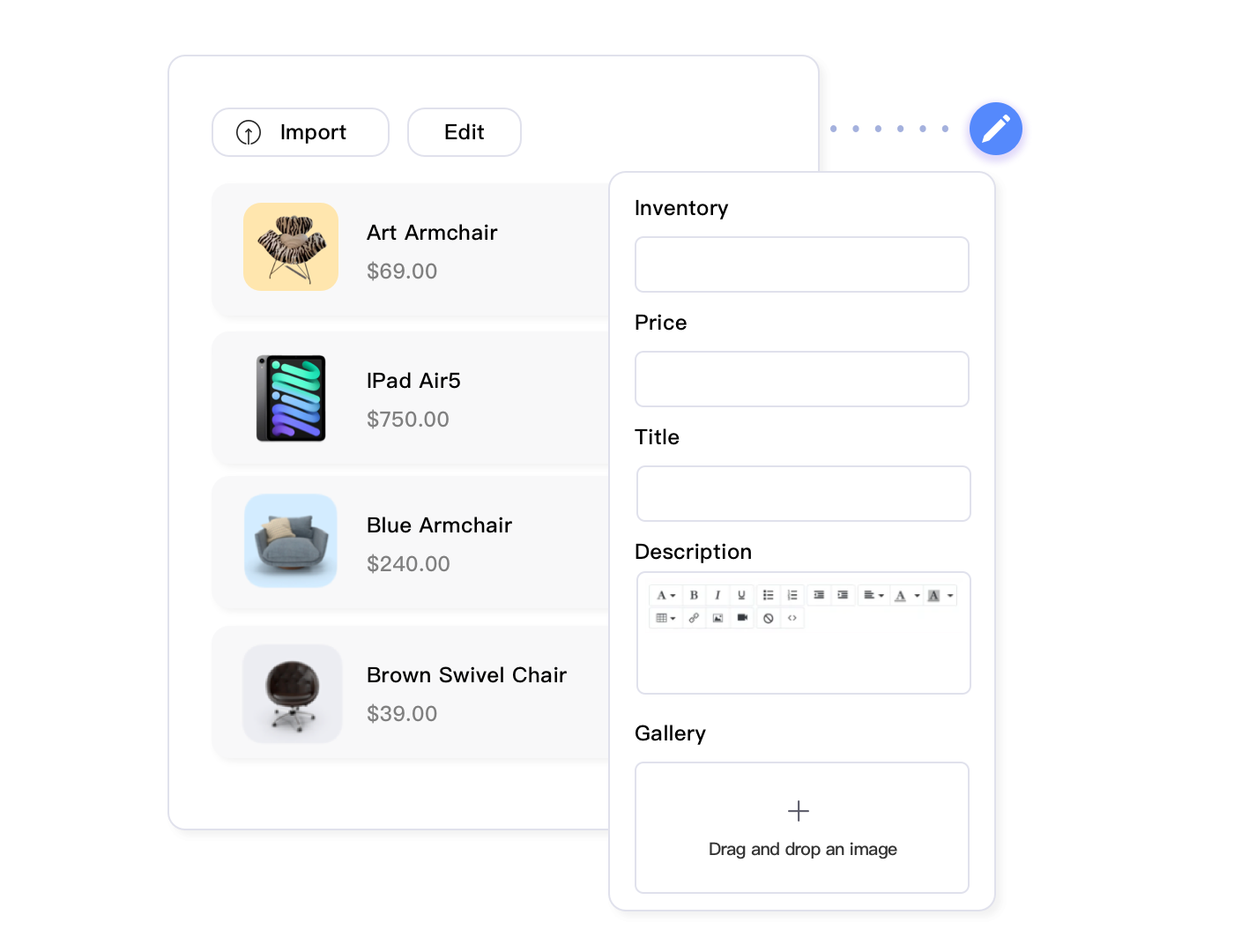
Listing management platforms designed specifically for Amazon provide bulk editing interfaces with built-in validation. You can filter products by category, tag, price range, or custom criteria, then apply changes to all matching listings simultaneously. The system previews changes before applying them, preventing catastrophic errors.
For example, Maxmerce’s Bulk Product Editing lets you filter your catalog to “all products in Kitchen category with price above $30,” then bulk update titles to add a seasonal keyword, adjust prices by a percentage, or update backend keywords—all with a preview showing exactly what will change before committing. What would take 8-10 hours manually through CSV export-edit-import cycles completes in 15-20 minutes.
The risk reduction matters as much as time savings. Bulk operations through validated interfaces prevent accidental data overwrites, ensure field formatting matches Amazon’s requirements, and maintain revision history so you can rollback if changes negatively impact performance.
Compliance and Policy Monitoring
Amazon’s listing policies evolve constantly. Terms that were acceptable six months ago may now trigger suppressions. New prohibited words get added to category-specific blacklists. Title length requirements change. Staying compliant requires continuous monitoring across your entire catalog.
Manual compliance checks—reading through each listing to verify it doesn’t contain prohibited terms or policy violations—takes approximately 5 minutes per listing. For a 500-SKU catalog, that’s 42 hours of review work. And you’d need to repeat this review quarterly to catch new policy changes.
Automated compliance scanning eliminates this entire burden. Systems designed for Amazon listing management maintain updated databases of prohibited terms, restricted claims, and category-specific requirements. They scan your entire catalog in minutes, flagging violations with specific recommendations for fixes.
Maxmerce’s Prohibited Words Check scans your catalog against Amazon’s current policy requirements, identifying terms like “FDA approved,” “cure,” “guaranteed,” or category-specific restricted language. The system generates violation reports showing exactly which listings need attention and suggests compliant alternatives. What would take 40+ hours of manual review completes in 10 minutes, with ongoing monitoring ensuring your catalog stays compliant as Amazon updates policies.
improve your entire Amazon catalog in hours, not weeks. Try Maxmerce’s listing management tools with a 14-day free trial—no credit card required. Start optimizing listings now →
Performance Tracking and Analytics
Optimization efforts only matter if they improve measurable outcomes. You need to track keyword rankings, conversion rates, organic sales, and click-through rates to determine what’s working. But manually monitoring these metrics across hundreds of products requires spreadsheets, manual data exports, and hours of analysis weekly.
Analytics platforms integrated with Amazon’s API provide automated performance tracking. They pull sales data, traffic metrics, and ranking positions daily, presenting trends and anomalies through dashboards. You can identify underperforming listings that need optimization, track the impact of recent changes, and benchmark performance across your catalog.
Maxmerce’s Listing Insights consolidates performance data at the listing level—showing sales trends, conversion rates, return rates, and customer behavior patterns for each ASIN. When you improve a listing’s content, you can track before-and-after conversion rate changes to validate whether the updates improved performance. This data-driven approach replaces guesswork with measurable results, letting you focus optimization efforts on listings with the highest potential impact.
Action Plan: Optimizing Your First Listing Today
Theory only matters if you set up it. Here’s your step-by-step plan to improve one listing in the next 2-3 hours and see measurable results within 7-14 days.
Step 1: Choose Your Target Listing (15 minutes)
Pick a product that gets decent traffic (50+ sessions weekly) but has a conversion rate below 10%. These listings have ranking momentum but are underperforming due to poor optimization. They’ll show results fastest because traffic is already flowing—you’re just converting more of it.
Avoid optimizing your lowest-traffic listings first. If a listing gets five sessions weekly, optimization won’t dramatically change results in the short term. You need sufficient traffic volume to validate whether your changes improve conversion rates.
Step 2: Keyword Research (30-45 minutes)
Start with competitor analysis. Search your primary keyword on Amazon. Open the top five listings. What keywords appear in their titles? What terms show up repeatedly in their bullets? Make a list of 15-20 relevant keywords you’re not currently using.
If you have Brand Registry, check your Search Query Performance report in Brand Analytics. Sort by “Search Frequency Rank” to see high-volume terms customers use before purchasing in your category. Identify 3-5 high-volume terms you’re not currently targeting.
Cross-reference with Amazon’s autocomplete suggestions. Type your main keyword in Amazon’s search bar and note what autocomplete suggestions appear. These represent actual customer searches—if Amazon suggests “insulated water bottle 32oz,” that’s a high-volume term worth targeting.
Step 3: Rewrite Your Title (20 minutes)
Using your keyword research, rewrite your title following the formula: Brand + Primary Keyword + Key Feature + Size/Quantity + Secondary Keyword + Color/Style. Keep it under 200 characters. Place your strongest keyword in the first 80 characters for mobile visibility.
Read it aloud. Does it sound natural or like robot-generated gibberish? If it sounds awkward, revise. Readability affects conversion rates—unclear titles reduce clicks even if they rank well.
Step 4: improve Bullet Points (30 minutes)
Rewrite all five bullets using the feature-benefit-outcome structure. Each bullet should include a secondary keyword naturally, highlight a key benefit, and address a common objection or question.
Check competitor reviews (especially 1-3 star reviews) for objections. If customers frequently complain about sizing, address it: “Universal fit works with standard cup holders—3.5-inch base fits 98% of vehicle cup holders including trucks, SUVs, and compact sedans.”
Step 5: Fill Backend Keywords (15 minutes)
Open your listing in Seller Central. Navigate to Keywords tab. Review what’s currently in your backend keywords. Remove any terms that already appear in your title or bullets—you’re wasting space.
Add synonyms, misspellings, and alternative product names from your keyword research. Use spaces only (no commas or punctuation). Fill all 250 bytes. Prioritize terms with commercial intent that customers actually search.
Step 6: Track Results (Ongoing)
Document your current metrics before publishing changes: conversion rate, sessions, organic sales, keyword rankings for 5-10 target terms. Wait 48-72 hours for Amazon’s algorithm to index changes.
Check keyword rankings after 3 days. Are you moving up for target terms? Monitor conversion rate after 7 days. Did it improve from baseline? Track organic sales after 14 days. Is volume increasing?
If results improve, replicate the optimization process across your next 10 best candidates. If results don’t improve, analyze what might have gone wrong—did rankings actually improve but conversion didn’t? Did conversion improve but rankings dropped? Adjust your approach based on data.
Frequently Asked Questions
How long does it take for Amazon listing optimization to show results?
You’ll typically see initial ranking changes within 48-72 hours after updating titles and backend keywords. Conversion rate improvements from better images and descriptions usually appear within 7-14 days. Full SEO impact—including improved organic rankings—can take 2-4 weeks as Amazon’s algorithm processes the changes and monitors customer behavior metrics.
What’s the most important element of Amazon listing optimization?
Product titles have the highest impact on both search rankings and conversions. Amazon’s algorithm heavily weights title keywords, and customers see titles first in search results. Focus on including your primary keyword in the first 80 characters while maintaining readability. After titles, high-quality main images are the second most critical element, driving click-through rates from search results.
How many keywords should I target in one Amazon listing?
Target 1 primary keyword and 3-5 secondary keywords per listing. Your primary keyword should appear in the title, at least one bullet point, and backend keywords. Secondary keywords should distribute across bullet points, description, and the remaining backend keyword space. Don’t keyword-stuff—Amazon’s algorithm penalizes unnatural repetition. Focus on semantic variations and long-tail phrases that match actual customer searches.
Do I need professional product photography for Amazon listings?
Professional photography dramatically improves conversion rates. Listings with 7+ professional images convert 30-40% better than those with 3-4 basic photos. Your main image must meet Amazon’s requirements—white background, product filling 85% of frame, no text or logos. For lifestyle and detail shots, professional photography ensures proper lighting, focus, and composition that builds buyer confidence.
Can I change my Amazon listing after it’s published?
Yes, you can edit most listing elements anytime through Seller Central. Title, bullet points, description, images, and backend keywords are all editable. However, changes to certain attributes—especially those affecting product categorization or variation relationships—may require Amazon approval and can take 24-48 hours to process. Brand Registered sellers have faster approval times and can make changes more freely.
What are backend keywords and how do I improve them?
Backend keywords are search terms invisible to customers but indexed by Amazon’s algorithm. You get 250 bytes (not characters) of space in Seller Central under ‘Search Terms.’ Use this space for synonyms, common misspellings, and alternative names you couldn’t fit in visible content. Don’t repeat words already in your title or bullets—Amazon only indexes each term once. Avoid punctuation and separate terms with spaces only.
How do I know if my listing optimization is working?
Track four key metrics: organic search ranking for target keywords, click-through rate (CTR) from search results, conversion rate on your listing page, and total organic sales. Use Amazon Brand Analytics (available to Brand Registered sellers) to see search query performance. Monitor keyword rankings weekly—tools like Maxmerce’s Keyword Rank Tracking feature automate this process by tracking 20-30 keywords daily and alerting you to significant changes.
Should I use A+ Content for listing optimization?
Yes, A+ Content (formerly Enhanced Brand Content) can increase conversions by 5-10% for Brand Registered sellers. Use it to tell your brand story, compare product variations, and highlight features with rich images and formatted text. Focus on benefits and use cases rather than just repeating bullet point information. A+ Content appears below bullet points on desktop and in a separate tab on mobile, providing additional conversion opportunities for customers who scroll past initial content.
Conclusion: Optimization Is Continuous, Not One-Time
Here’s what successful Amazon sellers understand: listing optimization isn’t a project you complete once and forget. It’s an ongoing process that adapts to algorithm changes, competitive pressures, and shifting customer behavior. The sellers who consistently rank on page one and maintain high conversion rates are those who treat optimization as a continuous discipline.
Start with your highest-opportunity listings—products with existing traffic but underperforming conversion rates. Apply the optimization strategies outlined in this guide: keyword-optimized titles with primary terms in the first 80 characters, benefit-focused bullet points addressing customer objections, complete backend keywords without repetition, and 7+ high-quality images showing all angles and use cases.
Track your results methodically. Document baseline metrics before making changes. Monitor ranking improvements, conversion rate changes, and sales volume shifts. Use data to determine what’s working and where you need to adjust your approach. What works for water bottles might not work for electronics accessories—category-specific testing reveals your unique optimization formula.
As your catalog grows beyond 50-100 products, manual optimization becomes unsustainable. The time required to research keywords, write content, monitor rankings, and update listings compounds with each new SKU. This is exactly when automation systems provide the most value—handling repetitive tasks while you focus on strategic decisions that genuinely require human judgment.
The difference between an optimized catalog and an unoptimized one isn’t subtle. It’s the difference between fighting for page-three visibility with 5% conversion rates versus maintaining page-one rankings with 15% conversion rates. Over a year, that difference represents hundreds of thousands in additional revenue from the same traffic.
Ready to scale your listing optimization across your entire catalog? Maxmerce’s listing management platform combines AI-powered content generation, bulk editing workflows, compliance monitoring, and performance tracking. Start your 14-day free trial—no credit card required. Transform your catalog optimization →
