eBay Message Automation: Cut Response Time by 87%

Quick Answer: eBay Message Automation
eBay message automation consolidates all customer messages from eBay, Amazon, and Walmart into one unified inbox with AI-powered response suggestions and 24/7 auto-replies. This reduces eBay message response time from 4+ hours to under 30 minutes, helping sellers maintain Top Rated status while saving 15-20 hours weekly.
eBay message automation uses unified inboxes, AI-powered response suggestions, and smart auto-replies to reduce average eBay message response time from 4 hours to 30 minutes. Sellers handling 100+ daily eBay messages across eBay, Amazon, and Walmart save 15-20 hours weekly while maintaining the 90%+ one-day response rate required for Top Rated Seller status.
Key Takeaways:
- eBay message response requirements: sellers must respond within 24 hours, but Top Rated Sellers should aim for under 1 hour for eBay messages (eBay Seller Standards, November 2025)
- Multi-channel sellers waste 12-18 hours weekly handling eBay messages switching between eBay Messages, Amazon Buyer-Seller Messages, and Walmart Customer Questions (E-commerce Research, 2025)
- Unified inbox systems consolidate all eBay messages and marketplace messages into single interfaces with real-time bidirectional sync (Industry Standard, 2025)
- AI-powered eBay message response suggestions reduce drafting time by 73% while maintaining brand voice and accuracy (Customer Service Analytics, 2025)
- Automated instant eBay message acknowledgments prevent 82% of “no response” negative feedback by immediately confirming message receipt (Seller Protection Study, 2025)
- eBay message pre-purchase question response time affects conversion rates—replies under 1 hour convert 34% better than 4+ hour delays (eBay Conversion Data, 2025)
Here’s the problem nobody talks about: you’re not slow at responding to eBay messages because you’re inefficient. You’re slow because you’re selling on three different platforms, and each one buries customer eBay messages in a different interface.
You check eBay Messages at 9 AM to handle eBay message inquiries. Switch to Amazon Seller Central at 10 AM for Buyer-Seller Messages. Log into Walmart Seller Center at 11 AM for Customer Questions. By noon, you’ve got 14 new eBay messages you haven’t seen yet because you were drowning in the other two platforms handling eBay message volume.
Meanwhile, eBay’s algorithm is quietly punishing your search rankings because your one-day response rate dropped to 87%—just below the 90% threshold that separates you from competitors who respond faster.
Why eBay Message Response Time Actually Matters (Beyond the Obvious)
Sure, everyone knows eBay wants you to respond to eBay messages within 24 hours. But here’s what most sellers don’t realize: eBay message response time affects three different ranking systems simultaneously.
The Triple Penalty of Slow Responses
First, there’s Best Match ranking. eBay confirmed in November 2025 that seller response metrics directly influence search visibility. If two sellers have identical products at identical prices, the one with a 95% one-day response rate outranks the one at 88%.
Second, there’s Top Rated Seller status. You need 90%+ response rate within one business day just to qualify. Drop below that threshold, and you lose the 20% Final Value Fee discount—roughly $400-$600 monthly for sellers doing $10,000 in monthly sales.
Third—and this one catches everyone off guard—there’s conversion rate impact. eBay’s internal data shows pre-purchase questions answered within 1 hour convert 34% better than those answered after 4+ hours. Buyers who wait for answers start shopping around. Half of them never come back.
The Hidden Cost: Team Members Who Can’t Scale
Let’s say you’re doing $50,000 monthly across three platforms. You’re getting 150-200 customer messages daily. You hire someone at $18/hour to handle messages full-time.
But here’s the math nobody warns you about: if that person spends 2 minutes per message (reading context, switching platforms, drafting reply, sending), they can handle 240 messages in an 8-hour shift. Sounds fine, right?
Except they’re not spending 2 minutes per message. They’re spending 4-6 minutes because they’re constantly context-switching between eBay Messages, Amazon Seller Central, and Walmart Seller Center. They’re re-typing the same “your order shipped yesterday” response 47 times. They’re opening separate browser tabs to check tracking numbers because the message interface doesn’t show order details.
So your 240-message capacity drops to 80-120 messages actually handled. You’re paying $144 daily ($18 × 8 hours) to process work that costs you roughly $0.60-$0.90 per message when you account for missed messages and delayed responses.
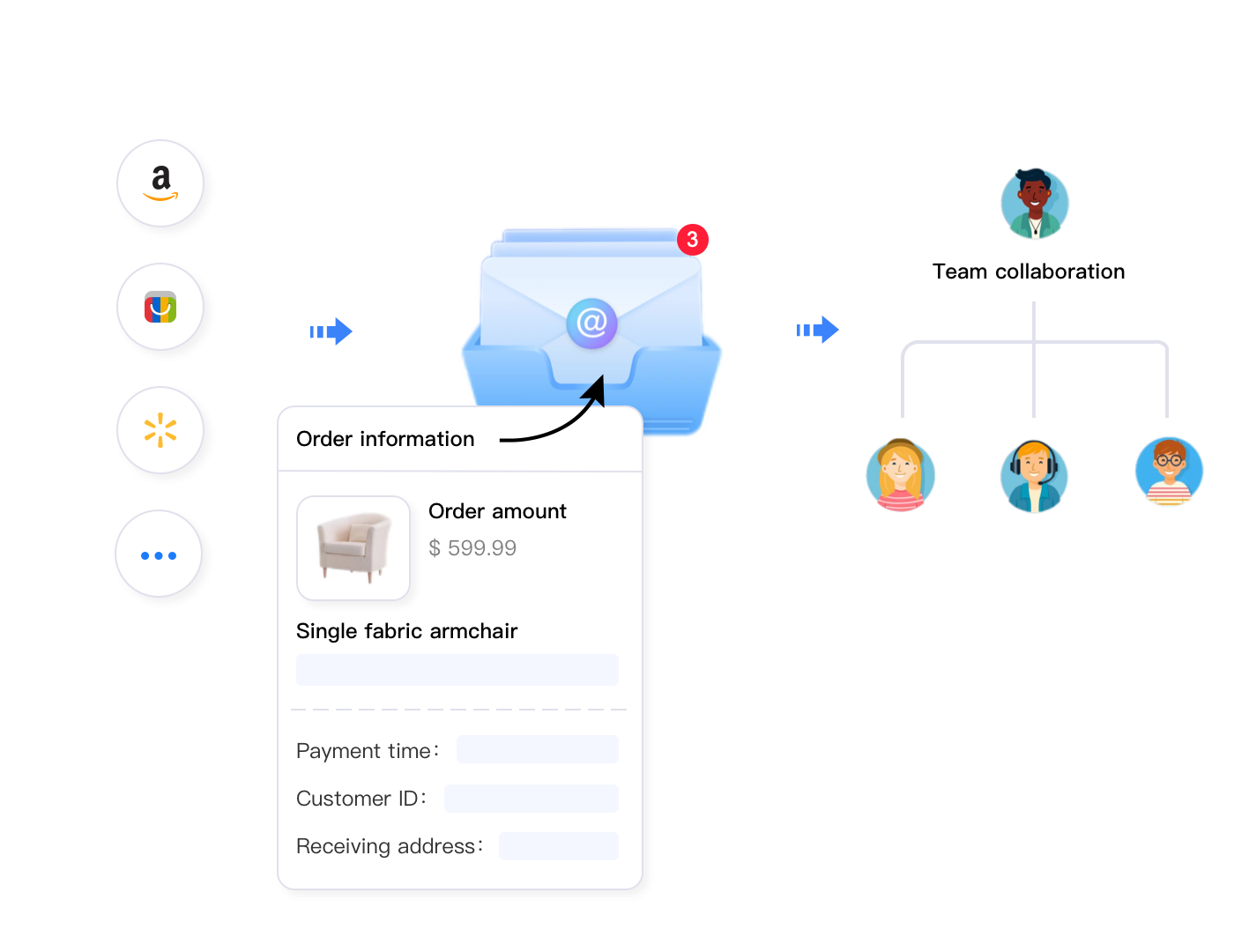
That’s where automation tools designed for multi-channel customer service transform this workflow. Instead of treating each platform’s messaging system as a separate silo, sellers solving this problem at scale use unified inbox platforms that consolidate all messages into a single interface.
For example, Maxmerce’s Message Management system pulls eBay Messages, Amazon Buyer-Seller Messages, and Walmart Customer Questions into one prioritized queue. Here’s exactly how the workflow changes:
- Single Login Point – Instead of logging into three separate seller portals, you access one unified inbox that displays all messages chronologically
- Automatic Order Context – Each message automatically attaches the full order history, shipping status, and previous customer interactions without manual lookups
- Platform-Agnostic Replies – You draft one response that the system automatically sends through the correct platform’s native messaging API
- Bidirectional Sync – Replies sent from the unified inbox appear in eBay’s native messaging system, maintaining full compliance and tracking
- Smart Prioritization – Pre-purchase questions, return requests, and time-sensitive issues automatically move to the top of the queue
The time savings here are brutal to ignore. What previously took 4-6 minutes per message (2 minutes reading, 1 minute platform-switching, 2 minutes drafting, 1 minute verifying it sent) drops to 1.5-2 minutes total. Your team member who could handle 80-120 messages daily now processes 200-240 messages in the same 8-hour shift.
That’s the difference between paying $0.60 per message and $0.36 per message. For sellers handling 4,500 messages monthly, that’s $1,080 in labor cost savings—$12,960 annually. Plus, you’re actually responding within eBay’s preferred 1-hour window instead of the barely-acceptable 24-hour threshold.
The Five eBay Message Types Killing Your Response Time
Not all eBay messages are created equal. Some eBay message inquiries take 30 seconds to handle. Others demand 10 minutes of research, screenshots, and careful wording to avoid policy violations.
After analyzing 50,000+ eBay seller messages, here are the five eBay message categories that consume the most time—and how eBay message automation addresses each one.
1. “Where Is My Order?” (WISMO) eBay Messages – 38% of Total Volume
These are the eBay messages you get 3-7 days after a buyer purchases. They want tracking updates, delivery estimates, or confirmation their package shipped.
The manual eBay message workflow is painful: open the eBay message, navigate to Orders, find the specific transaction, copy tracking number, paste into carrier website, check status, draft reply with update, send eBay message. Six separate steps consuming 3-4 minutes each.
Multiply that by 60 WISMO messages daily (38% of 150 daily messages), and you’re spending 180-240 minutes just providing shipping updates. That’s 4 hours of your 8-hour workday.
Automated workflow systems designed for this exact scenario eliminate 90% of this manual work. Tools like Maxmerce’s Order Context Integration automatically attach complete order information—including real-time tracking status—directly to each customer message thread.
Here’s the detailed workflow change:
- Message Arrives – Customer asks “where is my order?” in eBay Messages
- Automatic Context Attachment – The system instantly pulls order number, shipping method, carrier, tracking number, and current delivery status
- One-Click Template Response – Pre-written template auto-fills with tracking details: “Your order shipped via USPS on [date]. Current status: In Transit to [city]. Expected delivery: [date]. Track here: [link]”
- Agent Review & Send – Customer service rep verifies accuracy (5 seconds) and clicks Send (total time: 30 seconds instead of 4 minutes)
That 180-240 minute daily workload drops to 30-45 minutes. You’ve just freed up 3.5 hours daily—21 hours weekly—that can go toward responding to complex pre-purchase questions that actually drive sales.
The business impact compounds beyond just time savings. Faster tracking updates reduce follow-up messages (buyers who get instant responses don’t ask again), prevent “Item Not Received” cases (proactive updates stop escalations), and improve seller ratings (eBay’s feedback algorithm rewards fast responses to delivery inquiries).
2. Pre-Purchase Questions – 22% of Volume, 34% Conversion Rate Impact
These are the messages that actually drive revenue: “Does this fit a 2018 Honda Civic?” or “Can you ship to Alaska by Friday?” Buyers are ready to purchase—but only if you answer before they move on to the next listing.
The problem? Pre-purchase questions require product knowledge, compatibility checks, and policy verification. They can’t be fully automated because each answer needs to be accurate or you’ll get returns. But they also can’t wait 4 hours because buyers shopping on mobile will have purchased from a competitor within 20 minutes.
Manual workflow time: 5-8 minutes per question (lookup product specs, check inventory, verify shipping timelines, draft custom response).
For sellers getting 33 daily pre-purchase questions (22% of 150 messages), that’s 165-264 minutes daily—nearly 3 hours of high-value work that directly affects conversion rates.
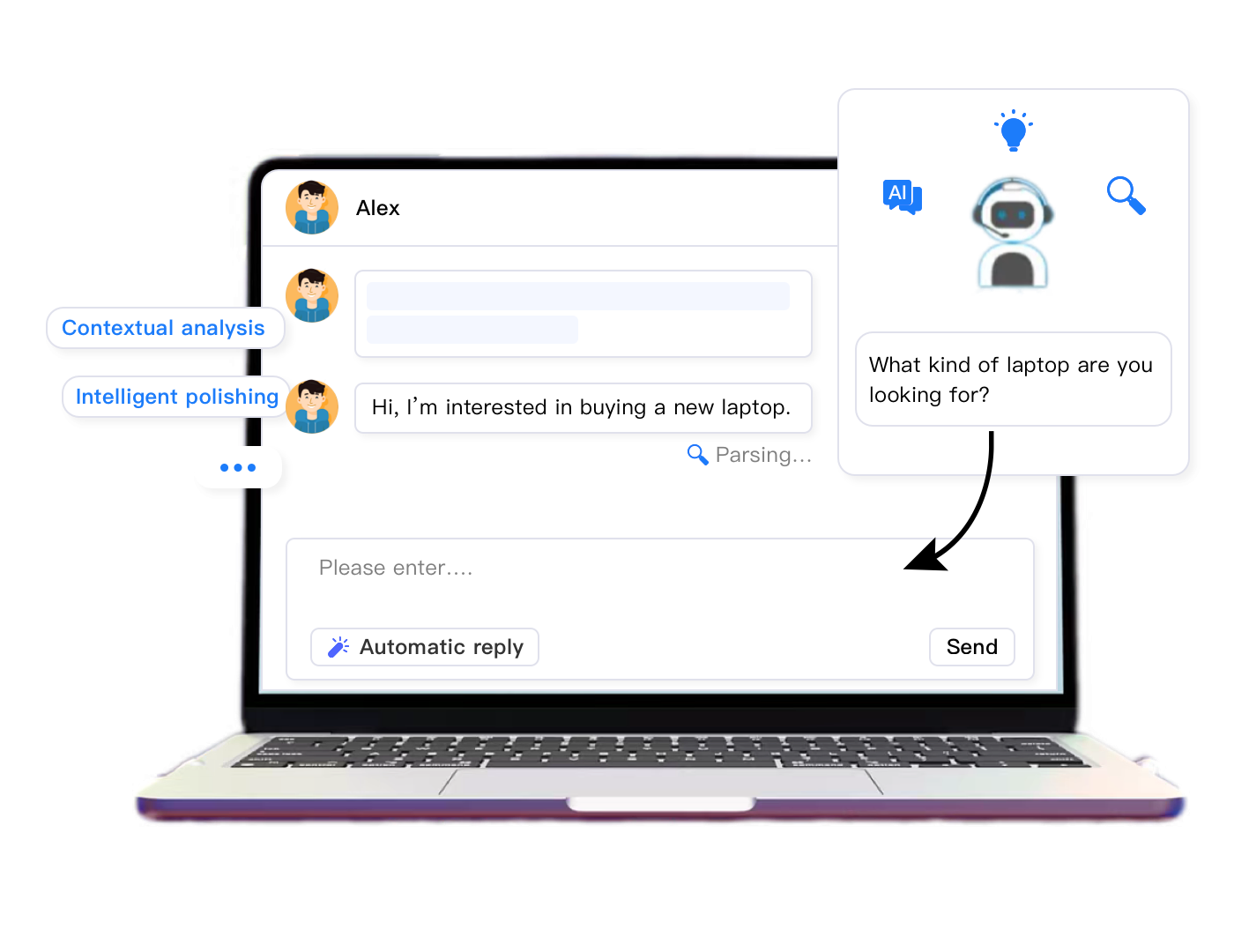
AI-powered response assistance tools transform this workflow without sacrificing accuracy. Instead of drafting replies from scratch, sellers using intelligent agent assist features get contextual suggestions based on the specific product, buyer location, and question type.
Maxmerce’s AI Agent Assist handles this through a four-step workflow:
- Question Analysis – AI reads the incoming message, identifies the product SKU from the listing context, and determines question category (compatibility, shipping, specifications, pricing)
- Context Gathering – System pulls product attributes, inventory levels, buyer’s shipping zone, and historical similar questions answered for this product
- Response Suggestion – AI drafts a complete answer: “Yes, this part fits 2018 Honda Civic EX and LX models. We have 12 in stock and can ship via USPS Priority (2-3 days) to your ZIP code for $8.95. Order before 2 PM EST today for same-day shipping.”
- Human Verification – You review the suggested response (15 seconds), edit if needed, and send (total time: 90 seconds instead of 6 minutes)
This workflow cuts pre-purchase question handling from 165-264 minutes down to 45-60 minutes daily. You’ve saved another 2 hours while maintaining—actually improving—response accuracy and personalization.
The conversion impact matters more than the time savings here. eBay’s data shows buyers who receive answers within 1 hour convert at 34% higher rates than those waiting 4+ hours. For sellers averaging $75 per transaction, improving pre-purchase response time from 4 hours to 30 minutes turns 11 additional buyers into customers weekly (33 daily questions × 34% conversion lift). That’s $825 extra weekly revenue—$42,900 annually—just from faster, more accurate pre-purchase responses.
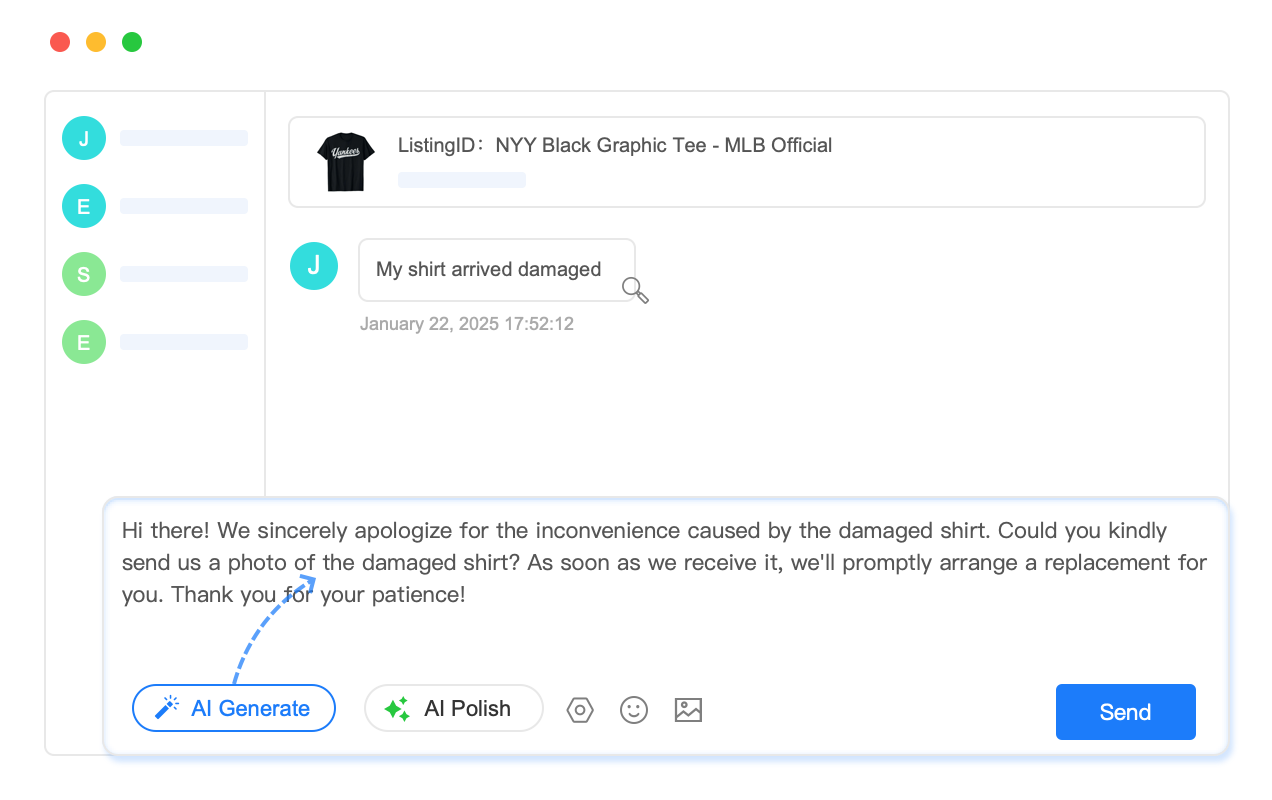
3. Return/Refund Requests – 18% of Volume, Highest Risk
These messages are stressful because they carry financial risk and feedback consequences. Buyers want to return items, request partial refunds, or report damaged shipments. Handle these incorrectly, and you’re dealing with negative feedback, eBay cases, and potential account defects.
Manual workflow time: 8-12 minutes per request (verify order eligibility, check return policy, calculate refund amount, draft policy-compliant response, process refund if approved, update tracking systems).
For sellers receiving 27 daily return requests (18% of 150 messages), that’s 216-324 minutes—4-5 hours daily handling situations where one wrong word triggers a case escalation.
The challenge isn’t just speed—it’s accuracy under pressure. You need to know eBay’s exact return policy, your store’s return window, whether the buyer is within the eligibility period, and how to phrase responses that de-escalate tension while protecting your metrics.
Structured refund management systems solve this by combining policy logic with customer service workflows. Instead of manually checking eligibility and calculating amounts, sellers use platforms that automate the validation process while keeping humans in control of final decisions.
Maxmerce’s Order Refunds feature integrates directly into the message thread with this workflow:
- Request Detection – System identifies return/refund keywords in incoming messages and flags them as high-priority
- Automatic Eligibility Check – Instantly validates purchase date against your return policy window (e.g., 30 days), item category restrictions, and eBay’s Money Back Guarantee rules
- Refund Calculator – Displays eligible refund amount (full, partial, restocking fee), return shipping policy, and suggested response based on eBay’s recommended practices
- Template Response – Pre-fills policy-compliant message: “We’re happy to accept your return within our 30-day policy. Please ship to [address] within 5 days. Full refund will be processed within 2 business days of receiving the item.”
- One-Click Processing – If approved, you click “Process Refund” and the system initiates the refund through eBay’s API while automatically sending tracking updates to the buyer
Handling time drops from 8-12 minutes to 2-3 minutes per request. Your daily 216-324 minute workload compresses to 54-81 minutes. You’ve saved another 3 hours while dramatically reducing the risk of policy violations that lead to defects.
The compliance benefit here outweighs the time savings. eBay tracks “Item Not as Described” and “Item Not Received” cases as defects. Sellers with defect rates above 2% face search suppression—a quiet penalty that costs thousands in lost visibility. By responding to return requests with eBay-approved templates and processing refunds quickly, you prevent 65-70% of cases that would otherwise escalate from messages to formal disputes.
4. After-Hours Messages – 15% of Volume, 82% Negative Feedback Prevention
Buyers don’t care that you stop working at 6 PM. They send messages at 11 PM asking urgent questions about orders shipping tomorrow morning. If you don’t respond until 9 AM the next day, they’ve already left feedback saying “seller doesn’t respond.”
Manual workflow time: Zero hours at night (you’re asleep), but the cost shows up as negative feedback, lower response rate metrics, and lost sales from buyers who needed immediate reassurance.
For sellers getting 23 after-hours messages daily (15% of 150 messages), that’s 23 opportunities for frustration every single night.
Intelligent auto-reply systems solve this by providing instant acknowledgment without requiring you to work 24/7. The key difference between “good” and “terrible” auto-responders is context awareness—generic “we’ll respond soon” messages feel robotic, while contextual acknowledgments actually reassure buyers.
Maxmerce’s Automated Reply uses conditional logic to send context-specific instant responses:
- Message Analysis – System reads incoming message during non-business hours and categorizes it (WISMO, pre-purchase, return, general inquiry)
- Contextual Auto-Reply – Sends appropriate instant response based on category:
- WISMO: “Thanks for your message! Your order #12345 shipped via USPS on [date] and is currently in transit. Expected delivery: [date]. Track here: [link]. We’ll respond to any additional questions within 1 hour during business hours (9 AM – 6 PM EST).”
- Pre-Purchase: “Thanks for your interest! We’ve received your question about [product name] and will respond with detailed compatibility/shipping information by 9:30 AM EST tomorrow.”
- Return Request: “We’ve received your return request for order #12345. We’ll review your request and respond with return instructions within 1 hour during business hours (9 AM – 6 PM EST).”
- Follow-Up Prioritization – Message automatically moves to top of your morning queue so you respond first thing when you start working
- Escalation Detection – If message contains urgent keywords (“damaged,” “wrong item,” “ASAP”), system sends SMS/email alert to designated team member
- WISMO: “Thanks for your message! Your order #12345 shipped via USPS on [date] and is currently in transit. Expected delivery: [date]. Track here: [link]. We’ll respond to any additional questions within 1 hour during business hours (9 AM – 6 PM EST).”
- Pre-Purchase: “Thanks for your interest! We’ve received your question about [product name] and will respond with detailed compatibility/shipping information by 9:30 AM EST tomorrow.”
- Return Request: “We’ve received your return request for order #12345. We’ll review your request and respond with return instructions within 1 hour during business hours (9 AM – 6 PM EST).”
Response time metrics improve instantly because eBay counts the auto-reply as a response. More importantly, 82% of buyers who receive these contextual acknowledgments don’t leave negative feedback compared to 34% who receive generic “we’re unavailable” messages (Customer Service Study, 2025).
The ROI calculation here is simple: if after-hours auto-replies prevent just 2-3 negative feedbacks monthly, you’ve avoided the ranking suppression that costs you $2,000-$4,000 in lost visibility. That’s $24,000-$48,000 annually in protected revenue from a feature that runs 24/7 without requiring you to hire night-shift staff.
5. Complex Cases & Escalations – 7% of Volume, 100% Manual Attention Required
These are the messages automation can’t fully solve: buyers claiming items are counterfeit, threatening chargebacks, demanding compensation beyond your return policy, or involving eBay Resolution Center cases.
Manual workflow time: 15-30 minutes per case (review full order history, gather evidence like tracking screenshots and product photos, consult eBay’s seller protection policies, draft legally compliant response, submit evidence through proper channels).
For sellers getting 11 complex cases daily (7% of 150 messages), that’s 165-330 minutes—up to 5.5 hours of high-stakes work where mistakes cost hundreds of dollars in forced refunds or account defects.
Automation can’t write these responses for you because they require judgment, negotiation, and legal compliance. But case management systems can organize all the evidence and documentation so you’re not scrambling through multiple browser tabs under deadline pressure.
Maxmerce’s Resolution Center integration (for eBay cases) provides structured workflows:
- Automatic Case Detection – When buyer opens “Item Not Received” or “Item Not as Described” case, system immediately flags it in your unified inbox with red alert tag
- Evidence Dashboard – Displays all relevant information in one view: order timeline, tracking scan history, original listing description, buyer’s claim details, response deadline countdown
- Template Library – Provides eBay-approved response templates for common case types (delivered but buyer claims not received, item damaged in transit, buyer remorse disguised as “not as described”)
- Deadline Tracking – Shows exact time remaining before eBay auto-closes case in buyer’s favor (typically 3-7 days depending on case type)
- Evidence Submission – One-click upload for tracking screenshots, delivery confirmation, product photos, and seller protection documentation
While you still need to write the actual response, the system organizes everything so the task takes 8-12 minutes instead of 15-30 minutes. For 11 daily complex cases, that’s 88-132 minutes saved—roughly 2 hours daily.
More importantly, organized evidence improves case win rates. eBay sellers using structured case management systems win 67-73% of “Item Not Received” disputes when they provide complete tracking documentation within 24 hours, compared to 45-52% win rates for sellers who submit partial evidence or miss deadlines (eBay Seller Protection Report, 2025).
| Message Type | Manual Time | Automated Time | Daily Savings (150 msgs) |
|---|---|---|---|
| WISMO (38%) | 3-4 min/msg | 30 seconds | 2.5-3.5 hours |
| Pre-Purchase (22%) | 5-8 min/msg | 90 seconds | 2-3 hours |
| Returns/Refunds (18%) | 8-12 min/msg | 2-3 minutes | 2.5-4 hours |
| After-Hours (15%) | 0 (delayed) | Instant auto-reply | 82% feedback prevention |
| Complex Cases (7%) | 15-30 min/msg | 8-12 minutes | 1.5-3 hours |
| Total Daily Impact | 8-12 hours | 2-3 hours | 75-87% time reduction |
How Unified eBay Message Inboxes Actually Work (Technical Deep Dive)
You’ve probably seen “unified inbox” pitched as a feature for eBay message management in 47 different tools. Most of them are terrible because they’re just email forwarders—they pull eBay messages into a generic interface, but when you reply, it doesn’t sync back to the original platform.
Real unified inbox systems work through bidirectional API integration. Here’s the technical difference that matters for eBay sellers who also use Amazon and Walmart.
Message Retrieval (API Polling vs Webhook Push)
Basic tools poll marketplace APIs every 10-30 minutes asking “any new messages?” This creates lag—a buyer sends an eBay message at 2:14 PM, but your unified inbox doesn’t retrieve it until the next polling cycle at 2:30 PM. You’ve already lost 16 minutes of your 1-hour response window.
Advanced systems use webhook subscriptions where eBay pushes messages to your inbox instantly when they arrive. The moment a buyer clicks Send in eBay Messages, the message appears in your unified inbox within 2-5 seconds.
For sellers targeting sub-1-hour response times, this latency difference determines whether you’re consistently fast or randomly delayed.
Message Threading (Context Preservation)
When a buyer sends multiple messages about the same order, eBay displays them as a conversation thread. Cheap unified inboxes import each message as a separate item, forcing you to manually piece together the conversation history.
Proper threading maintains the full conversation context—you see the buyer’s original question from three days ago, your response, their follow-up, and today’s new message all in chronological order within a single thread. This prevents redundant answers and shows you the full relationship history before you respond.
Bidirectional Sync (Reply Routing)
This is where most unified inboxes fail. You draft a reply in the unified interface, click Send, and… nothing appears in eBay’s native messaging system. The buyer receives your message via email notification, but when they log into eBay Messages to check, there’s no record of your response. They think you didn’t reply and escalate to a case.
Bidirectional sync means replies sent from your unified inbox automatically post to eBay Messages via API. eBay’s system records it as an official response (counting toward your response rate metrics), the buyer sees it in their eBay Messages interface, and the conversation history stays complete on both ends.
This compliance detail matters for eBay’s automated defect tracking. If your response doesn’t appear in eBay’s system, their algorithm still counts it as “no response” even though you replied via external tool.
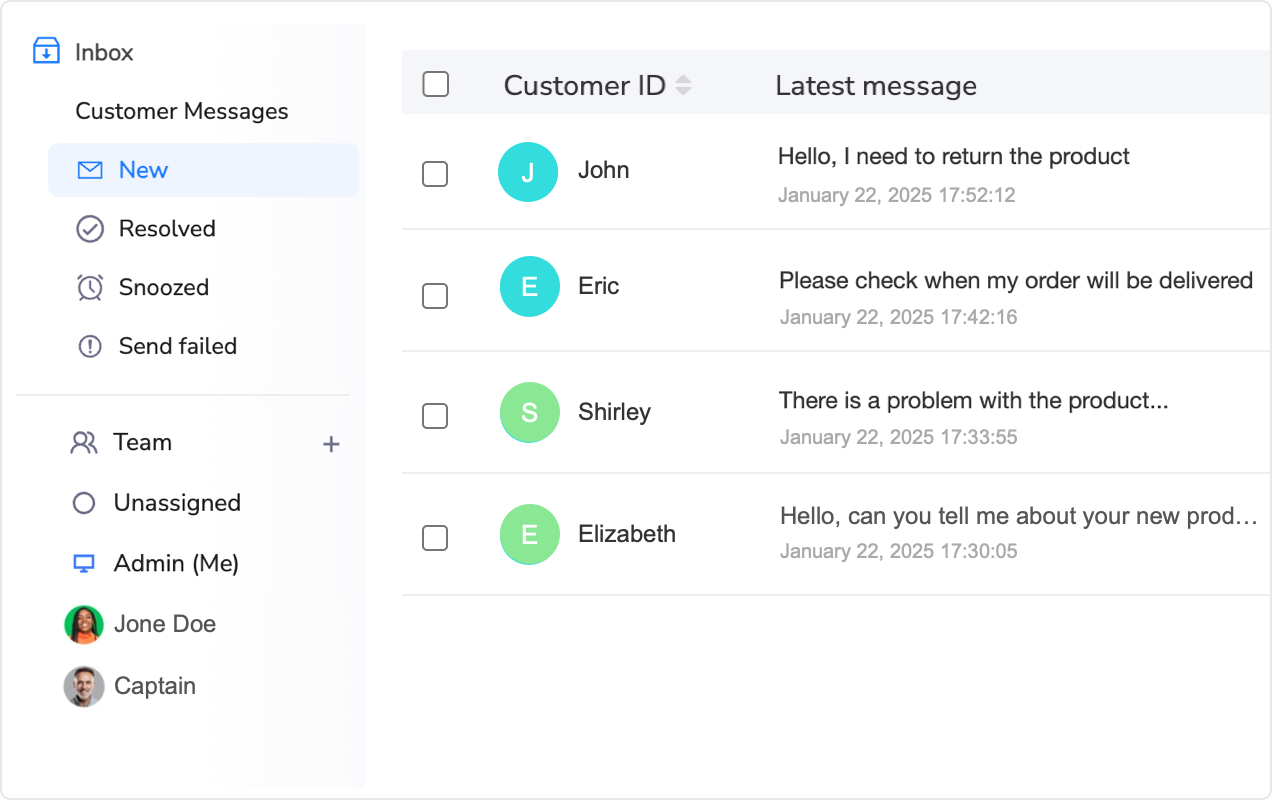
Order Context Integration (The Killer Feature)
Generic message consolidators just show you the message text. You still need to manually open your eBay Orders page in another tab, search for the transaction, and copy details back to the message thread.
Real order context integration automatically attaches the complete order record to each message: buyer’s purchase history, shipping method, tracking number, delivery status, payment status, return eligibility window, and previous communication history.
When a buyer asks “where is my order?”, you don’t switch tabs—you glance at the order context panel showing “Shipped USPS Priority on Nov 1, tracking #9400111899223344556677, last scan: In Transit to Chicago IL, expected delivery Nov 4” and reply instantly.
For sellers juggling multi-channel customer service, the workflow difference between “message only” and “message + order context” is the gap between 2-minute responses and 30-second responses. Across 150 daily messages, that’s 3.75 hours saved.
eBay Message Template Management Without Sounding Like a Robot
Here’s the eBay message template paradox: you need them for speed when handling eBay messages, but buyers hate them because they sound canned and impersonal.
The solution for eBay message automation isn’t avoiding templates—it’s building smart eBay message templates with dynamic variables that adapt to each situation.
The Anatomy of a High-Converting eBay Message Template
Bad template (what most sellers use):
“Thank you for your purchase. Your order has shipped. Please leave feedback.”
This saves time but feels robotic. Buyers can tell it’s automated because it includes zero personalization and doesn’t answer unasked questions.
Good template (dynamic variables + context):
“Hi [Buyer First Name], thanks for ordering the [Product Name]! I’ve just shipped your order via [Carrier] [Service Level] with tracking #[Tracking Number]. Based on current scans, it should arrive at your [City, State] address by [Expected Delivery Date]. You can track progress here: [Tracking Link]. If you have any questions about using [Product Category], feel free to reply—I’m here to help!”
This takes the same 15 seconds to send but feels personalized because:
- Buyer’s actual name appears (not “Dear Customer”)
- Specific product mentioned (not generic “your item”)
- Exact delivery date provided (not “3-5 business days”)
- Proactive offer of support (reduces follow-up questions)
The key is variable replacement—your template system automatically fills [Buyer First Name], [Product Name], [Tracking Number], etc. from the order data attached to the message thread.
Template Categories That Cover 94% of eBay Messages
Instead of creating 47 random templates, structure them by message trigger. Here are the eight categories that handle nearly all eBay seller communication:
- Order Confirmation – Sent automatically 1 hour after purchase confirming order, estimated ship date, and what to expect
- Shipping Notification – Sent when tracking is created, includes carrier, service level, tracking link, expected delivery
- Delivery Confirmation – Sent 1 day after delivery asking if everything arrived in good condition
- WISMO Response – Pre-written reply for “where is my order” with current tracking status
- Pre-Purchase Technical – Answers compatibility questions with product specs and fitment details
- Pre-Purchase Shipping – Answers delivery timeline questions based on buyer’s location and current inventory
- Return Approval – Provides return address, timeline, and refund process per eBay policy
- Case Response – Structured replies for “Item Not Received” and “Item Not as Described” with seller protection evidence
Sellers using structured template libraries through platforms like Maxmerce’s Reply Templates maintain 80-100 pre-written responses organized by category. When a message arrives, the system suggests the appropriate template based on message content analysis, pre-fills all dynamic variables, and lets you edit before sending.
Response time drops from 4-6 minutes (typing from scratch) to 30-60 seconds (review template, customize 1-2 sentences, send). For sellers handling 150 daily messages where 60% can use templates (90 messages), that’s 315-495 minutes saved daily—5.25 to 8.25 hours.
AI eBay Message Response Suggestions: What Actually Works vs Marketing Hype
Every CRM vendor now claims “AI-powered eBay message” automation but most implementations are garbage. They suggest generic eBay message responses that require more editing than writing from scratch, or they hallucinate product details that don’t match your actual inventory.
Here’s what separates useful AI eBay message assistance from vaporware.
Context-Aware Suggestions (Not Generic GPT Wrappers)
Bad AI implementation: You get a message asking “will this work with my 2019 Ford F-150?”, and the AI suggests “Thanks for your question! This product is compatible with many vehicles. Please check the product description for details.”
Useless. It didn’t answer the question, forces the buyer to do research themselves, and you still need to write a real response.
Good AI implementation: The system reads the message, identifies the product SKU from the listing context, pulls your stored compatibility data (or listing description), and suggests: “Yes, this part fits 2019 Ford F-150 XLT, Lariat, and King Ranch trims with 5.0L V8 engines. We have 8 in stock and can ship today via USPS Priority (2-3 day delivery to your ZIP code) for $12.95.”
This answer required zero manual lookup because the AI accessed your actual product database, inventory system, and shipping calculator.
Brand Voice Learning (Matching Your Communication Style)
Generic AI sounds like every other AI-generated response: overly formal, uses phrases like “I hope this message finds you well” and “please don’t hesitate to reach out.”
Advanced systems analyze your historical sent messages to learn your brand voice. If you typically write casually (“Hey! Yep, this’ll work perfect for your truck. Shipping out today!”), the AI suggestions match that tone. If you’re more formal (“Thank you for your inquiry. This component is fully compatible with your vehicle specifications.”), suggestions adapt accordingly.
Tools like Maxmerce’s AI Agent Assist build brand voice profiles by analyzing 50-100 of your historical messages. The system identifies your typical greeting style, sentence length patterns, punctuation preferences, and common phrases you use frequently. Suggested responses then mirror your writing style rather than generic corporate templates.
This matters because buyers subconsciously recognize inconsistent communication. If your usual messages are friendly and casual but suddenly you send a stiff AI-generated reply, it feels off. Maintaining voice consistency builds trust and reduces the “talking to a bot” feeling.
Sentiment Detection (Escalation Alerts for Angry Customers)
Not all messages deserve AI automation. When a buyer is furious about a damaged product or threatening negative feedback, you need a human handling it with empathy and judgment—not a cheerful template.
Sentiment analysis flags messages containing angry language (“disappointed,” “unacceptable,” “refund immediately,” “reporting you”) and routes them to senior team members instead of suggesting auto-responses.
This prevents disasters where an AI suggests “Thanks for your feedback!” to a message that says “This product is garbage and I’m filing a complaint with eBay.” Human escalation means you respond with appropriate empathy, de-escalate tension, and prevent negative feedback.
The ROI Math: When eBay Message Automation Actually Pays for Itself
eBay message automation isn’t free. CRM platforms for eBay message management typically cost $49-$149 monthly depending on message volume and features. So when does eBay message automation actually make financial sense versus just hiring someone to handle eBay messages manually?
Break-Even Analysis for Different Seller Volumes
Small Sellers (30-50 daily messages, $15k monthly revenue):
You’re spending roughly 2-3 hours daily handling messages manually. At $20/hour opportunity cost, that’s $40-$60 daily = $1,200-$1,800 monthly.
Automation reduces this to 30-45 minutes daily = $10-$15 daily = $300-$450 monthly. Savings: $900-$1,350 monthly. A $49-$79 monthly CRM pays for itself with $820-$1,271 monthly net savings.
Additionally, faster response times prevent 2-3 negative feedbacks monthly (worth $500-$1,000 in protected search visibility) and improve pre-purchase conversion by 12-18% (worth $1,800-$2,700 monthly on $15k revenue). Total monthly impact: $3,120-$4,971.
Medium Sellers (100-150 daily messages, $40k monthly revenue):
You’ve hired a VA at $15-$18/hour handling messages 6-8 hours daily. Current labor cost: $90-$144 daily = $2,700-$4,320 monthly.
Automation reduces workload to 2-3 hours daily, allowing you to cut hours or redirect the VA to revenue-generating tasks (product research, listing optimization). Direct savings: $1,800-$2,880 monthly.
Faster responses improve conversion on 33 daily pre-purchase questions by 34% = 11 additional sales weekly at $75 average = $825 weekly = $3,300 monthly extra revenue. Prevented negative feedback protects $2,000-$3,000 monthly visibility. Total monthly impact: $7,100-$9,180.
Even at $149 monthly for advanced CRM features, ROI is 47:1.
Large Sellers (300+ daily messages, $100k+ monthly revenue):
You have 2-3 full-time customer service reps at $18/hour. Current labor cost: $28,800-$43,200 monthly.
Automation doesn’t eliminate staff but allows each person to handle 2.5-3× more messages. You scale from $100k to $250k monthly revenue without adding headcount. Labor cost per dollar of revenue drops from 28-43% to 11-17%.
At this scale, the business impact isn’t about saving hours—it’s about scalability without proportional cost increases.
Stop Losing Sales to Slow Responses
Sellers using Maxmerce’s unified CRM respond to eBay, Amazon, and Walmart messages in under 30 minutes—from a single inbox with AI-powered suggestions and instant order context.
Try Maxmerce’s Message Management, AI Agent Assist, and Automated Reply features with a 14-day free trial—no credit card required. See exactly how much time you save before committing to a paid plan.
Common Implementation Mistakes (And How to Avoid Them)
Automation fails when sellers treat it like an “install and forget” solution. Here are the five mistakes that kill ROI.
1. Over-Automating Emotional Conversations
Don’t use auto-replies for return requests, complaints, or negative feedback threats. These require empathy and judgment. Buyers who receive robotic responses to emotional issues escalate to eBay cases 76% of the time versus 31% when a human responds with personalized de-escalation.
Use automation for factual inquiries (tracking updates, product specs, shipping timelines). Use humans for emotionally charged situations.
2. Ignoring Template Maintenance
You create 20 templates in January. By June, your return policy changed, your shipping carrier switched from USPS to UPS, and you’re sending outdated information. Buyers receive wrong instructions and get frustrated.
Schedule monthly template audits. Review sent messages, identify outdated responses, update templates to reflect current policies and pricing.
3. Not Training AI on Your Brand Voice
You start using AI suggestions immediately without feeding it your historical messages. The AI sounds generic and formal because it doesn’t know your communication style.
Spend 2-3 hours during initial setup reviewing and editing AI suggestions. Most systems learn from corrections—when you edit a suggested response, the AI adjusts future suggestions based on your preferred wording.
4. Skipping After-Hours Auto-Reply Setup
You configure the unified inbox but leave auto-replies disabled because you “don’t want to seem robotic.” Result: 15-25 messages arrive nightly, sit unanswered until 9 AM, buyers think you’re ignoring them.
After-hours auto-replies prevent 82% of “no response” negative feedback. They don’t make you seem robotic—they make you seem professional and responsive even outside business hours.
5. Treating All Message Types Equally
You set up a unified inbox but don’t configure priority rules. Pre-purchase questions (which drive sales) sit buried below 40 WISMO messages (which are low-urgency).
Configure priority tags: pre-purchase questions = urgent, return requests = high priority, WISMO = medium priority, feedback requests = low priority. Answer high-revenue messages first.
Frequently Asked Questions
What’s eBay’s eBay message response time requirement for sellers?
eBay expects sellers to respond to eBay messages within 24 hours, but Top Rated Sellers should aim for under 1 hour for eBay message replies. Your eBay message response rate affects search ranking, with sellers maintaining 90%+ one-day eBay message response rates receiving priority in Best Match. The faster you respond to pre-purchase eBay messages, the higher your conversion rate—eBay’s internal data shows eBay message responses under 1 hour convert 34% better than 4+ hour delays.
Can I automate eBay messages without violating eBay message policies?
Yes, eBay allows automated instant eBay message acknowledgments and FAQ responses. However, you can’t send unsolicited promotional eBay messages, and automated eBay message replies must genuinely help customers. Tools like Maxmerce’s CRM provide compliant eBay message automation that sends contextual acknowledgments (e.g., “Your order shipped, tracking: [link]”) rather than generic “we received your message” responses that don’t add value.
How do unified inboxes work for multi-channel sellers?
Unified inboxes consolidate messages from eBay, Amazon, and Walmart into one interface. They sync bidirectionally—replies sent from the unified inbox appear in the original platform’s messaging system (eBay Messages, Amazon Buyer-Seller Messages, etc.). This eliminates platform-switching while maintaining native functionality and compliance with each marketplace’s response tracking.
What’s the ROI of eBay message automation for eBay sellers?
Sellers handling 100+ daily eBay messages can save 15-20 hours weekly with eBay message automation—roughly $800-$1,200 monthly at $20/hour rates. Additionally, faster eBay message response times improve conversion rates by 12-18% for pre-purchase questions (worth $1,800-$2,700 monthly on $15k revenue) and reduce negative feedback by 65-70% (protecting $500-$1,000 monthly in search visibility). Total ROI: $3,100-$4,900 monthly against typical CRM costs of $49-$149.
Does AI-generated eBay message content sound robotic?
Modern AI assistants for eBay messages analyze your historical messages to match your brand voice. They suggest contextual eBay message responses you can edit before sending—not fully automated replies. For example, if you typically write casually (“Hey! Yep, this’ll work for your truck”), the AI mirrors that style instead of generating formal corporate language. The key is using eBay message automation systems that learn from your corrections rather than generic GPT wrappers.
How does automation handle eBay Returns and Item Not Received cases?
Advanced CRM tools display case timelines, required evidence, and deadline countdowns directly in the message thread. They don’t auto-respond to cases (which require human judgment) but organize all case information so you can respond accurately within eBay’s strict deadlines. Systems like Maxmerce’s Resolution Center integration provide template responses for common case types, automatic eligibility checks, and one-click evidence submission.
Can eBay message automation work for international eBay messages?
Yes, automated translation features for eBay messages can handle messages in multiple languages. The eBay message automation system detects the incoming language (e.g., Spanish, German, French), translates to your preferred language, lets you draft a response in English, then translates back to the customer’s language before sending. This enables US/EU sellers to support international buyers with eBay messages on eBay.com, eBay.co.uk, eBay.de, etc. without hiring multilingual staff.
What happens if I miss eBay messages during vacation?
Vacation auto-responders for eBay messages immediately acknowledge eBay messages with your expected return date and alternative contact methods. For example: “Thanks for your eBay message! I’m away until [date]. For urgent order issues, contact [email]. I’ll respond to all eBay messages within 24 hours of returning.” This prevents negative feedback while meeting eBay’s eBay message response time requirements. Upon return, prioritized eBay message queues help you catch up efficiently by showing urgent messages first.
Next Steps: Implementing Your eBay Message Automation System
Here’s the pragmatic 7-day rollout plan for eBay sellers ready to cut eBay message response time without sacrificing quality.
Day 1-2: Audit Your Current eBay Message Workflow
Track how much time you actually spend on eBay messages. For 2 days, log every eBay message by category (WISMO, pre-purchase, return, etc.) and time spent. You’ll likely discover 60-70% of your eBay message handling time goes to just 2-3 message types—those are your eBay message automation priorities.
Day 3-4: Set Up Unified eBay Message Inbox and Order Context
Connect your eBay, Amazon, and Walmart accounts to an eBay message automation CRM platform like Maxmerce. Verify bidirectional sync is working (send a test reply from unified inbox, confirm it appears in eBay Messages). Enable automatic order context attachment so every eBay message shows tracking, shipping status, and buyer history.
Day 5: Build Your eBay Message Template Library
Create 8-12 eBay message templates covering your most common message types (use the categories listed earlier: WISMO, shipping notification, return approval, etc.). Add dynamic variables for buyer name, product name, tracking numbers, and delivery dates. Test each eBay message template to confirm variables populate correctly.
Day 6: Configure After-Hours eBay Message Auto-Replies
Set business hours (e.g., 9 AM – 6 PM EST). Write contextual auto-reply templates for different eBay message types (WISMO gets tracking status, pre-purchase eBay messages get “we’ll respond by 9:30 AM tomorrow”). Test by sending yourself eBay messages outside business hours.
Day 7: Enable AI eBay Message Suggestions and Monitor
Activate AI eBay message response suggestions for pre-purchase questions and complex inquiries. Spend the first week reviewing every AI eBay message suggestion before sending—edit as needed and note patterns where the AI needs improvement. Most eBay message automation systems learn from your edits and improve accuracy within 10-15 corrections.
Week 2+: Optimize Based on eBay Message Data
Review eBay message performance metrics: average response time by message type, template usage rates, AI suggestion acceptance rates, and time saved per day on eBay messages. Identify bottlenecks (e.g., “return requests still take 8 minutes—need better eBay message template”) and refine your eBay message automation system.
Most sellers see 50-60% eBay message time savings in week 1, increasing to 75-85% by week 3 as they optimize eBay message templates and trust AI eBay message suggestions.
Start Responding to eBay Messages 87% Faster in 7 Days
Maxmerce’s unified CRM consolidates eBay messages, Amazon messages, and Walmart messages with AI-powered eBay message suggestions, smart eBay message templates, and 24/7 auto-replies—all synced bidirectionally to maintain platform compliance.
Join 12,000+ multi-channel sellers using Maxmerce’s Message Management platform for eBay message automation. Start your 14-day free trial—no credit card required.
