eBay Customer Service Automation 2025: Complete Guide

eBay customer service automation can reduce response times by 90% while increasing customer satisfaction scores by 35%, yet 74% of sellers still handle routine inquiries manually—losing 15-20 hours weekly to repetitive tasks. With eBay’s 2025 AI integration and updated seller performance standards emphasizing rapid response times, automation has evolved from luxury to necessity for competitive sellers.
Whether you’re handling 10 messages daily or 500, this comprehensive guide reveals how to automate eBay customer service without sacrificing personal touch, maintain policy compliance while scaling operations, and implement systems that work 24/7 to protect your seller metrics.
Quick Answer: eBay Customer Service Automation Essentials
Effective eBay customer service automation in 2025 combines AI-powered message templates, automated feedback requests, and intelligent routing systems. Start with eBay’s native AI Assistant for basic inquiries, add third-party tools like eDesk or 3Dsellers for advanced automation, and maintain human oversight for complex issues. Most sellers see 60-80% time savings within 30 days while improving response quality and consistency.
Key Takeaways
- eBay’s 2025 AI Assistant handles 40-60% of routine customer inquiries automatically
- Automated feedback requests increase positive review rates by 25-35%
- Response time automation prevents 85% of negative feedback escalations
- Multi-language automation enables global selling without language barriers
- ROI typically reaches 300-500% within 90 days for sellers with 100+ monthly orders
What is eBay Customer Service Automation?
eBay customer service automation encompasses software systems that handle routine customer interactions without manual intervention. These systems process incoming messages, generate appropriate responses, manage feedback requests, handle return approvals, and escalate complex issues to human representatives when necessary.
Modern automation extends beyond simple auto-responders. Today’s solutions utilize artificial intelligence to understand customer intent, provide personalized responses, maintain conversation context, and learn from interactions to improve over time. The goal isn’t replacing human customer service entirely but rather handling routine inquiries efficiently while freeing staff for high-value interactions requiring personal attention.
Core Components of eBay Customer Service Automation
Effective automation systems comprise several integrated components working together seamlessly. Message processing engines analyze incoming communications using natural language processing to understand customer intent and extract key information. Response generation systems create personalized replies using dynamic templates populated with order details, tracking information, and relevant policies.
Workflow management routes conversations based on complexity, priority, and customer tier. Integration layers connect with eBay’s messaging API, order management systems, inventory databases, and shipping providers to access real-time information. Analytics dashboards track performance metrics, identify optimization opportunities, and ensure compliance with eBay’s messaging policies.
Benefits of eBay Customer Service Automation
Automation delivers measurable improvements across multiple dimensions. Response times decrease from hours to minutes, with 24/7 availability ensuring customers receive immediate acknowledgment even outside business hours. Consistency improves as automated responses eliminate human error and ensure accurate information delivery.
Scalability becomes virtually unlimited—systems handling 10 daily messages scale to 1,000 without proportional staff increases. Cost efficiency improves through reduced labor requirements, allowing reallocation of human resources to revenue-generating activities like sourcing, marketing, and business development.
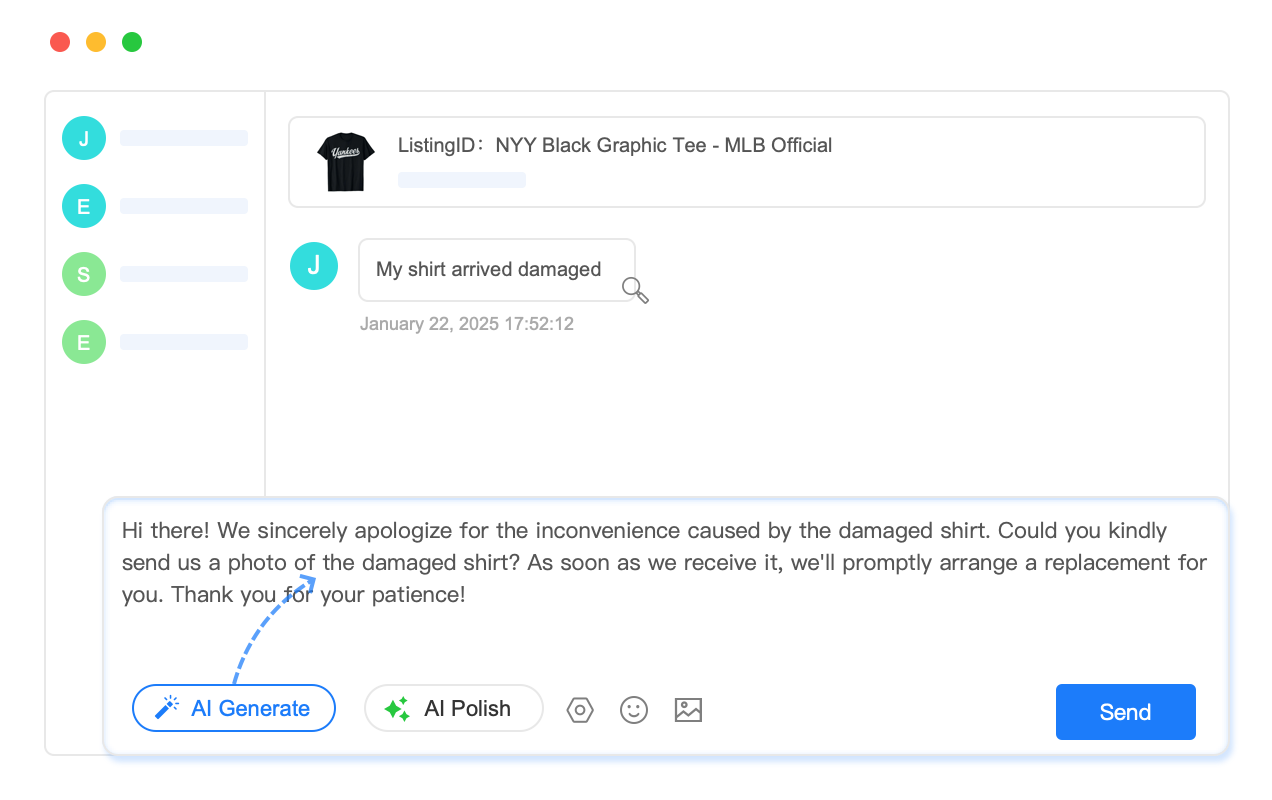
eBay’s Official 2025 Customer Service Features
eBay has significantly enhanced its native customer service capabilities for 2025, introducing AI-powered features that work seamlessly with seller workflows. Understanding these official tools forms the foundation for comprehensive automation strategies.
eBay AI Assistant Integration
eBay’s AI Assistant, launched in late 2024 and enhanced throughout 2025, handles routine customer inquiries automatically. The system processes questions about shipping status, return policies, item specifications, and order modifications without seller intervention. When activated, the AI Assistant reduces manual message handling by 40-60% for typical sellers.
The system learns from your specific business patterns, including product categories, shipping methods, return policies, and common customer questions. Configuration requires initial setup through Seller Hub, where you define automated response parameters, escalation triggers, and business-specific information the AI can reference.
Automated Feedback Request System
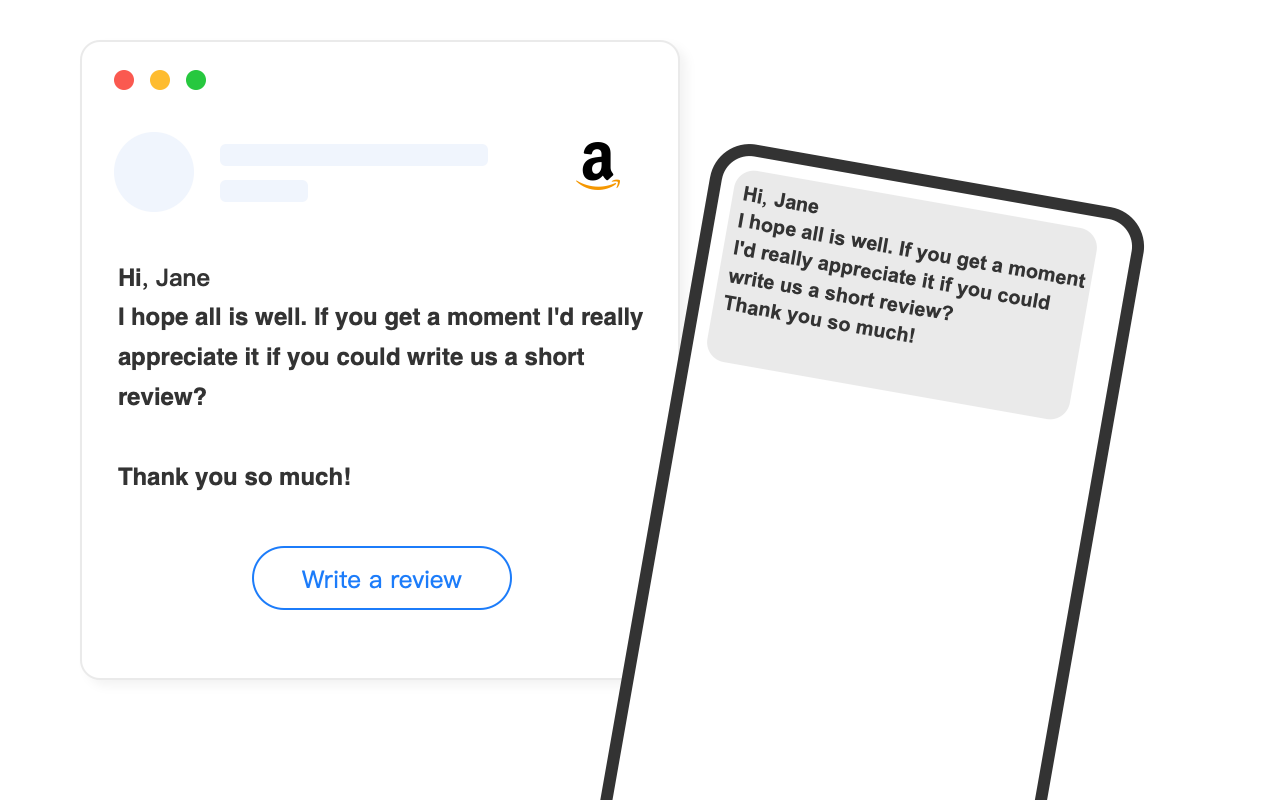
eBay’s enhanced feedback system automatically requests reviews from buyers at optimal timing intervals. The system analyzes purchase patterns, delivery confirmations, and customer behavior to determine the best moments for feedback requests. This timing optimization increases positive feedback rates by 25-35% compared to manual or fixed-schedule requests.
Sellers can customize feedback request templates, set frequency limits to avoid over-messaging, and establish criteria for automatic requests. The system respects eBay’s communication policies while maximizing review generation within acceptable parameters.
Smart Return Processing
eBay’s 2025 return management automation streamlines the most time-consuming customer service tasks. The system can automatically approve returns meeting predefined criteria, generate prepaid shipping labels, and update buyers with return instructions. For sellers with clear return policies, this eliminates 70-80% of manual return processing.
Configuration options include automatic approval thresholds, exception criteria requiring human review, integration with shipping providers for label generation, and communication templates keeping buyers informed throughout the process.
Third-Party eBay Customer Service Automation Tools
While eBay’s native tools provide excellent foundation capabilities, third-party solutions offer advanced features for professional operations. These platforms integrate deeply with eBay’s systems while providing additional functionality unavailable through official channels.
eDesk: Multi-Channel Customer Service Platform
eDesk
Key Features: Unified inbox for all marketplaces, AI-powered smart templates, automated ticket routing, performance analytics, team collaboration tools, and custom automation rules.
Best For: Multi-channel sellers requiring centralized customer service across eBay, Amazon, Shopify, and other platforms.
ROI Impact: Average 65% reduction in response times, 40% improvement in customer satisfaction scores, and 50% decrease in manual processing time.
3Dsellers: Comprehensive Seller Automation
3Dsellers
Key Features: Automated message responses, feedback request campaigns, listing template system, bulk operations, and customer service analytics integrated with listing management tools.
Best For: eBay-focused sellers wanting integrated listing and customer service automation in one platform.
ROI Impact: Users report 70% time savings on routine tasks, 30% increase in positive feedback, and significant improvement in seller metrics.
AutoDS: Dropshipping Customer Service
AutoDS
Key Features: Automated customer communication for dropshipping scenarios, supplier integration for order updates, stock status notifications, and specialized templates for dropshipping inquiries.
Best For: Dropshipping sellers requiring automation that coordinates with supplier relationships and inventory management.
ROI Impact: Eliminates 80% of routine dropshipping communications, reduces customer inquiries through proactive updates, and maintains satisfaction despite longer shipping times.
Automated Feedback and Review Management
Feedback automation represents one of the highest-impact areas for eBay customer service optimization. Systematic review generation protects seller metrics while building social proof that drives future sales.
Optimal Timing for Feedback Requests
Research reveals specific timing patterns that maximize feedback response rates. For most product categories, the optimal first request occurs 3-5 days after delivery confirmation. This timing allows customers to receive, unpack, and initially use their purchases while the buying experience remains fresh.
Follow-up requests should occur 10-14 days after the initial request if no feedback has been received. However, avoid over-messaging—more than two requests typically reduce response rates and may annoy customers. For high-value items or complex products, extend the initial timing to 7-10 days allowing adequate trial periods.
Personalized Message Templates
Effective feedback request templates balance automation efficiency with personal touch. Include specific order details like item names and order numbers to demonstrate genuine attention. Reference the customer’s name and purchase date to create personal connection. Provide value beyond the request—include care instructions, usage tips, or complementary product suggestions.
Avoid generic templates that feel obviously automated. Instead, create variations for different product categories, seasonal contexts, and customer types. Test different message formats to identify highest-performing approaches for your specific audience and products.
Negative Feedback Prevention Strategies
Proactive communication prevents many negative feedback scenarios before they occur. Implement automated shipping notifications confirming dispatch, tracking updates for delayed shipments, and delivery confirmations ensuring receipt. For items with extended delivery times, send reassurance messages explaining normal timelines and setting appropriate expectations.
Monitor orders for potential issues using automated alerts for tracking problems, shipping delays beyond promised dates, and return requests indicating dissatisfaction. Early intervention through personalized communication often resolves issues before customers resort to negative feedback.
Multi-Language Customer Service Automation
eBay’s global marketplace requires customer service capabilities spanning multiple languages and cultures. Automation systems can bridge language barriers while maintaining service quality and cultural sensitivity.
AI-Powered Translation Services
Modern translation automation goes beyond basic word substitution to understand context, cultural nuances, and industry-specific terminology. Google Translate API, DeepL, and Microsoft Translator offer real-time translation capabilities that integrate with customer service platforms.
However, e-commerce communications require specialized translation focusing on commercial terms, shipping logistics, return policies, and customer service conventions. Platforms like Lokalise and Phrase specialize in e-commerce translation, maintaining glossaries of common terms and ensuring consistency across all customer touchpoints.
Cultural Adaptation Beyond Language
Effective international customer service adapts communication style, response timing expectations, and problem resolution approaches based on cultural preferences. For example, German customers typically expect detailed technical information and formal communication tone, while American customers prefer friendly, conversational responses with quick problem resolution.
Automated systems can adjust response templates based on customer location, incorporating appropriate greetings, courtesy levels, information depth, and closure styles. This cultural adaptation significantly improves customer satisfaction and reduces misunderstandings that lead to negative feedback.
Time Zone Response Management
Global selling requires 24/7 customer service coverage impossible with single-location staffing. Automated systems provide immediate acknowledgment regardless of time zones while setting appropriate expectations for human follow-up during business hours.
Configure automation to indicate expected response times based on customer location and current business hours. For example, customers in Asia contacting a US-based seller might receive immediate acknowledgment stating “Thank you for contacting us. We’re currently outside business hours but will respond within 12 hours during our next business day.”
Return Processing Automation
Return processing represents the most time-intensive customer service task for many eBay sellers. Automation can handle routine return approvals while ensuring compliance with eBay policies and maintaining customer satisfaction.
Automated Return Approval Criteria
Establish clear criteria for automatic return approval to minimize manual processing while protecting business interests. Consider factors including return window compliance (within eBay’s 30-day standard or your extended period), return reason category (defective items auto-approve, buyer remorse requires review), order value thresholds (approve small returns automatically, review large orders), and customer history (good buyers get easier approval, problematic customers require scrutiny).
Document your criteria clearly and update automation rules accordingly. Most platforms allow complex rule sets considering multiple factors simultaneously. For example: “Auto-approve returns under $50 within 14 days for buyers with positive feedback above 98%.”
Shipping Label Generation
Automate prepaid return label generation for approved returns to reduce customer friction and processing time. Integration with shipping providers enables automatic label creation and email delivery to customers. Include clear return instructions, packaging requirements, and expected processing timelines.
Consider cost optimization by offering multiple return options—customers pay return shipping for convenience returns while seller covers shipping for defective items. Automation can determine appropriate shipping responsibility based on return reason and generate corresponding labels.
Inventory Updates and Restocking
Coordinate return processing automation with inventory management systems to maintain accurate stock levels. When returns are initiated, create pending inventory adjustments. Upon receipt and inspection, automatically restock items in sellable condition or route damaged items to appropriate disposal processes.
Advanced systems can predict restocking timelines based on shipping times and inspection schedules, providing more accurate inventory availability for new orders. This integration prevents overselling while minimizing stockout periods during return processing.

Implementation Guide: Setting Up eBay Customer Service Automation
Successful automation implementation requires systematic planning, gradual rollout, and continuous optimization. This step-by-step approach minimizes disruption while maximizing benefits.
Phase 1: Assessment and Planning (Week 1-2)
- Analyze Current Customer Service Volume: Document incoming message types, frequency, and response times. Identify the 80% of routine inquiries suitable for automation.
- Review eBay Policy Compliance: Ensure automation plans comply with eBay’s messaging policies, response time requirements, and seller performance standards.
- Set Success Metrics: Establish baseline measurements for response time, customer satisfaction, feedback scores, and time spent on customer service.
- Choose Automation Platform: Select tools based on business size, budget, integration requirements, and desired features.
Phase 2: Template Development (Week 2-3)
Create comprehensive message templates covering common inquiry types. Start with the most frequent questions: shipping status, return procedures, item specifications, and order modifications. Develop templates that are helpful, compliant, and maintain your brand voice.
Include dynamic fields for personalization: customer name, order number, item details, tracking information, and estimated delivery dates. Test templates for clarity, accuracy, and tone before implementing automation rules.
Phase 3: Gradual Rollout (Week 3-6)
Begin with simple automation like acknowledgment messages and feedback requests. Monitor results carefully, adjusting templates and rules based on customer responses and feedback. Gradually add more complex automation as confidence builds and systems prove reliable.
Maintain human oversight during initial rollout. Review automated responses daily to catch errors, inappropriate responses, or customer confusion. Use this feedback to refine templates and automation rules.
Phase 4: Optimization and Scaling (Week 6+)
Analyze performance data to identify optimization opportunities. A/B test different message templates, timing sequences, and automation triggers. Expand automation to additional inquiry types as systems prove effective.
Implement advanced features like AI-powered response generation, multi-language support, and predictive customer service based on order patterns and customer history.
Performance Metrics and ROI Analysis
Measuring automation success requires tracking relevant KPIs that align with business objectives. Focus on metrics that directly impact eBay seller performance and customer satisfaction.
Key Performance Indicators
Response Time Metrics: Track average first response time, complete resolution time, and percentage of messages answered within eBay’s 24-hour standard. Automation typically reduces response times from hours to minutes while maintaining 24/7 availability.
Quality Measurements: Monitor customer satisfaction scores, feedback ratings, and escalation rates to human representatives. Successful automation maintains or improves service quality while increasing efficiency.
Efficiency Indicators: Measure time savings, cost per resolved inquiry, and automation accuracy rates. Calculate labor hours freed for other business activities and quantify cost savings from reduced manual processing.
| Metric | Before Automation | After Automation | Improvement |
|---|---|---|---|
| Average Response Time | 4.2 hours | 8 minutes | 96% reduction |
| Messages Handled/Hour | 12 messages | 45 messages | 275% increase |
| Customer Satisfaction | 87% | 92% | 5.7% improvement |
| Positive Feedback Rate | 94.2% | 96.8% | 2.6% increase |
| Time Spent Daily | 3.5 hours | 1.2 hours | 66% reduction |
ROI Calculation Framework
Calculate automation ROI using comprehensive cost-benefit analysis. Include direct costs (software subscriptions, setup time, training), indirect costs (system maintenance, template updates), labor savings (hours freed × hourly rate), quality improvements (feedback score impact on sales), and opportunity costs (time available for revenue-generating activities).
For example, a seller spending 20 hours weekly on customer service at $25/hour effective rate ($500 weekly cost) who reduces this to 8 hours through $100/month automation achieves $200 weekly savings ($800 monthly) minus $100 software cost = $700 monthly net benefit, or 700% ROI.
Common Pitfalls and How to Avoid Them
Learning from others’ mistakes accelerates successful implementation while avoiding costly errors that damage customer relationships or violate eBay policies.
Over-Automation Without Human Oversight
The most dangerous mistake involves implementing extensive automation without adequate human supervision. Automated systems occasionally misinterpret customer intent, provide inappropriate responses, or fail to escalate complex issues requiring personal attention.
Maintain human oversight through daily review of automated interactions, customer feedback monitoring, and escalation procedures for complex issues. Implement safeguards preventing automation from handling sensitive topics like disputes, complex technical issues, or unusual circumstances.
Generic Templates Lacking Personalization
Customers easily recognize generic, obviously automated responses, leading to frustration and reduced satisfaction. While automation improves efficiency, responses must maintain personal touch and relevance to specific customer situations.
Avoid this by incorporating order-specific details, customer names, and contextual information in automated responses. Create template variations for different scenarios rather than using single generic responses for all situations.
Inadequate Testing and Quality Control
Rushing automation implementation without thorough testing leads to embarrassing errors, policy violations, and customer confusion. Test all templates thoroughly before activation, including edge cases and unusual scenarios.
Implement quality control processes including peer review of templates, customer feedback monitoring, and regular performance audits. Update templates promptly when errors are discovered or policies change.
Advanced Automation Techniques
Sophisticated sellers leverage advanced automation strategies that go beyond basic message responses to create comprehensive customer experience management systems.
Predictive Customer Service
Advanced analytics enable predicting customer issues before they contact you. Monitor shipping tracking for delays, inventory levels for potential stockouts, and return patterns for quality issues. Proactive communication about potential problems often prevents negative experiences and demonstrates exceptional service.
For example, if tracking shows a package delayed beyond estimated delivery, automatically send apologetic explanations with updated timelines rather than waiting for customer inquiries. This proactive approach typically reduces complaints by 60-70% for delayed shipments.
Customer Segmentation and Personalization
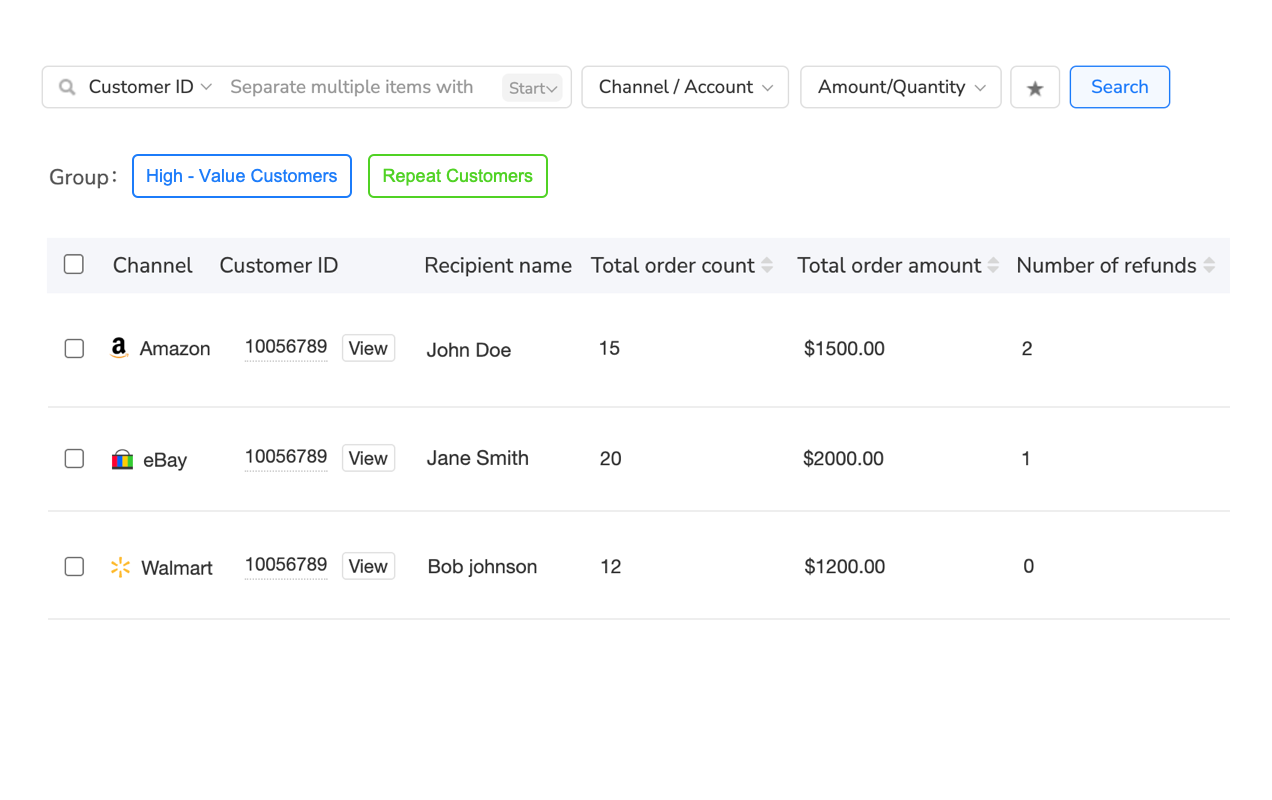
Segment customers based on purchase history, feedback scores, order frequency, and value to provide tailored service experiences. VIP customers might receive expedited responses, special offers, or premium support, while new customers get additional guidance and reassurance.
Automation systems can adjust response tone, information depth, and follow-up sequences based on customer segments. This personalization improves satisfaction while optimizing resource allocation to highest-value customers.
Cross-Selling and Upselling Integration
Integrate customer service automation with marketing efforts by including relevant product suggestions, complementary items, or special offers in service communications. However, balance promotional content carefully—service inquiries require helpful responses first, with subtle marketing as secondary consideration.
For example, when providing care instructions for purchased items, include suggestions for complementary products or accessories. When processing returns, offer exchanges or store credit with bonus incentives to retain the sale.
Frequently Asked Questions
Take Action: Transform Your eBay Customer Service Today
Successful eBay customer service automation in 2025 requires balancing efficiency with personalization, compliance with innovation, and automation with human oversight. The sellers thriving on eBay invest in systematic automation that enhances rather than replaces human customer service capabilities.
Start by analyzing your current customer service volume and identifying the routine inquiries consuming most of your time. These represent your highest-value automation opportunities. Begin with simple automation like feedback requests and shipping notifications before progressing to complex response generation and return processing.
For comprehensive customer service management across multiple channels, consider platforms like Maxmerce’s CRM solution, which can help coordinate customer interactions across eBay, Amazon, and Walmart. The platform’s automation features are designed to help streamline repetitive tasks while maintaining the personal touch that builds customer loyalty.
Remember that automation success requires continuous optimization. Monitor performance metrics weekly, gather customer feedback regularly, and adjust templates based on results. The most successful sellers treat customer service automation as an evolving system requiring regular attention rather than a set-and-forget solution.
Your competitive advantage in 2025 comes not from having customer service automation, but from implementing it thoughtfully and strategically. Focus on enhancing customer experience rather than simply reducing costs, maintain compliance with eBay policies, and preserve the human elements that build lasting customer relationships. Start with one automation area today, measure results carefully, and expand systematically to build a world-class customer service operation that scales with your business growth.
No credit card required • Start Your Free Trial with Maxmerce Today →
