Amazon Product Title Policy Compliance Guide

Quick Answer
Amazon enforces strict 200-character title limits as of January 2025, suppressing violating listings instantly without warning. Sellers with 1000+ SKUs face 83-167 hours of manual fixes or 2-4 hours using bulk compliance tools. Critical violations: character overages, prohibited words (“sale,” “best,” “free shipping”), special characters (emojis, ™, ®), and excessive capitalization. Automated scanning detects all violations across your catalog in 10-15 minutes, AI optimization fixes titles while preserving keywords, and continuous monitoring catches policy changes before mass suppressions occur.
Your best-selling Amazon product title just triggered an instant suppression. You’re still burning through PPC budget, but conversion rates dropped to zero. The culprit? Amazon’s automated system detected an amazon product title policy violation—maybe your 215-character amazon product title exceeded the new 200-char limit, or you used a prohibited special character. Without warning, your amazon product listing was suppressed from search results, invisible to buyers until you manually fix it.
For sellers managing 1000+ SKUs with multiple amazon product titles, this isn’t a one-off problem. It’s a catalog-wide emergency requiring amazon product title policy compliance. Manual title audits take 5-10 minutes per amazon product, meaning you’re looking at 83-167 hours of tedious work while your sales tank. Meanwhile, competitors with compliant amazon product titles are capturing your market share.
This guide breaks down Amazon’s exact amazon product title requirements as of January 2025, identifies the most common amazon product title policy violations causing suppressions, and shows you how to audit and fix thousands of amazon product titles in hours instead of weeks—using bulk compliance tools designed specifically for this nightmare scenario.
Key Takeaways
- 200-character hard limit: Amazon enforces strict title length caps as of January 2025—exceeding this by even one character triggers automatic listing suppression (Amazon Seller Central Policy Update, January 2025)
- Special character crackdown: Emojis, trademark symbols (™, ®), and non-standard punctuation now cause instant violations—only hyphens, ampersands, forward slashes, commas, and periods are permitted (Amazon Title Requirements, Updated January 2025)
- No warning before suppression: Amazon’s automated system removes violating listings from search immediately without seller notification—you discover the issue only when sales drop
- Manual audits are impossible at scale: Checking 1000 titles manually takes 83-167 hours—bulk compliance scanners can complete the same audit in 15 minutes with violation reports
- PPC waste during suppression: Your ads continue running and consuming budget while leading to unsellable suppressed listings—costing $500-$2000 daily in wasted ad spend for mid-size catalogs
- AI optimization fixes multiple issues: Modern listing tools can simultaneously correct character counts, remove prohibited terms, optimize keyword placement, and maintain readability—reducing fix time from 8 minutes to 30 seconds per title
Why Amazon’s Title Policy Enforcement Suddenly Got Aggressive
Amazon didn’t announce the January 2025 title policy crackdown. Sellers started noticing mass listing suppressions around January 8th, with no prior warning or grace period. Here’s what changed and why it matters.
The January 2025 Policy Shift Nobody Warned You About
Amazon historically allowed some flexibility with title requirements—sellers could often exceed character limits by 10-15 characters without immediate consequences. That tolerance vanished overnight in January 2025. Amazon’s automated compliance system now instantly suppresses listings that violate any title requirement, regardless of sales history or seller status.
The policy changes include stricter character limits (200 chars for most categories, 150 for jewelry), expanded prohibited word lists (promotional terms like “sale,” “deal,” “new arrival”), and zero tolerance for special characters. Sellers with established catalogs suddenly found 15-40% of their listings suppressed within the first week of enforcement.
What Triggers Instant Listing Suppression
Amazon’s automated system scans titles continuously and suppresses listings for these violations:
- Character count overages: 201 characters or more (200 limit for most categories)
- Prohibited special characters: Emojis (🔥, ⭐), trademark symbols (™, ®, ©), bullets (•), stars (*), HTML entities (&)
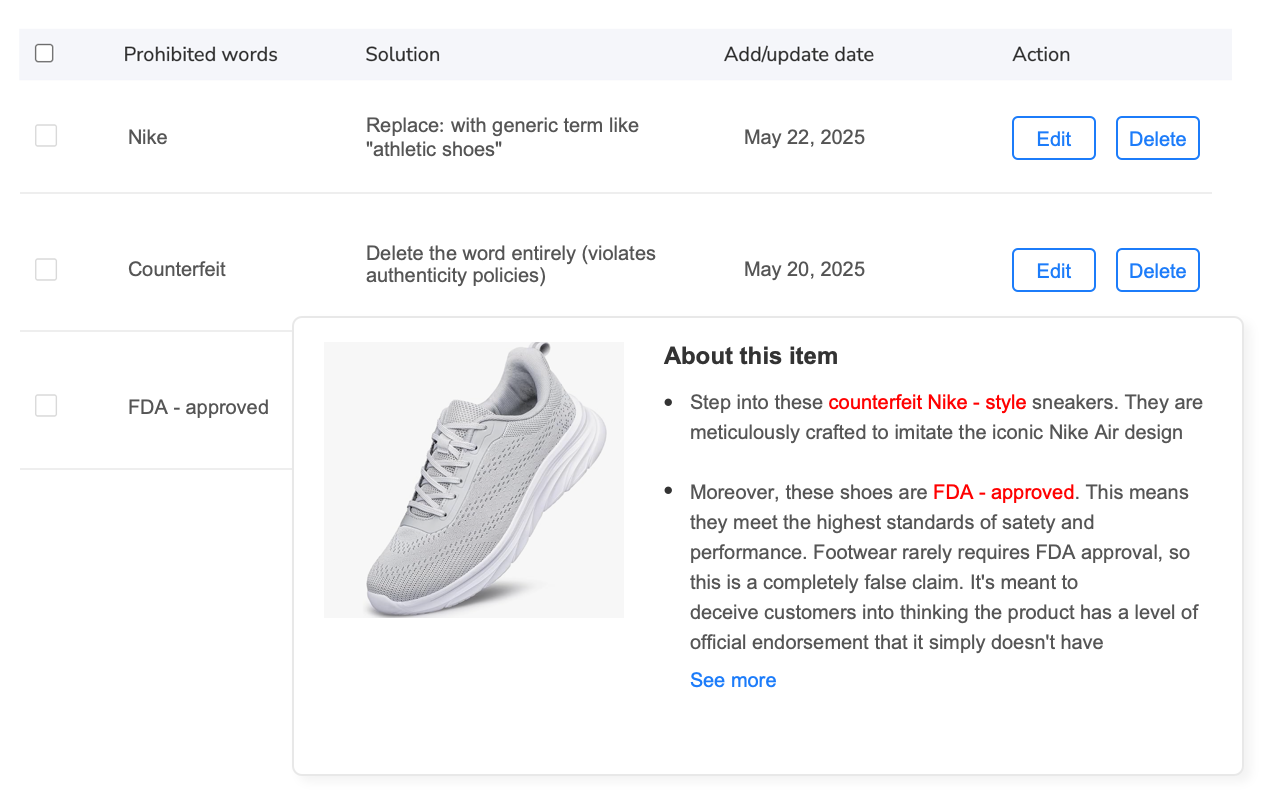
- Promotional language: “Sale,” “Deal,” “Discount,” “Free Shipping,” “Best Seller,” “New Arrival”
- Excessive capitalization: ALL CAPS words (except standard acronyms like USB, HDMI)
- Subjective claims: “Best,” “Amazing,” “Top Rated,” “#1” without substantiation
- Seller-specific information: “Fast Shipping,” “Seller’s Choice,” brand references outside proper brand field
- Unicode characters: Non-standard spaces, invisible characters, directional marks
The system doesn’t send warnings. One minute your listing is live, the next it’s suppressed from search—but your PPC campaigns keep running, wasting ad spend on unsellable inventory.
The Real Cost of Non-Compliant Titles
When Amazon suppresses a listing, the consequences cascade through your entire operation. Your product disappears from organic search results—buyers can’t find it even if they search your exact brand and product name. Sales drop to zero overnight while inventory continues accruing storage fees.
Your PPC campaigns don’t pause automatically. Ads keep serving, clicks keep costing you money ($0.80-$3.50 per click on average), but those clicks lead to suppressed listings with zero conversion. A mid-size seller running $50-$80 daily ad spend per product can lose $500-$2000 daily across a catalog before they even realize listings are suppressed.
Beyond immediate revenue loss, suppressed listings damage your account health metrics. Amazon tracks policy violation rates—consistent non-compliance can trigger quality alerts, reduce your account standing, and in extreme cases, lead to listing privileges being restricted.
Manual fixes are prohibitively time-consuming. Editing a single title (checking character count, removing violations, optimizing keywords, republishing) takes 5-10 minutes. For a 1000-SKU catalog, that’s 83-167 hours of work. Most sellers can’t afford to pull team members off other critical tasks for that long, so fixes drag on for weeks while revenue bleeds.
This is where catalog-scale automation becomes non-negotiable. Tools designed for bulk title compliance can identify violations across thousands of listings in minutes, suggest optimized corrections, and republish en masse—turning a multi-week emergency into a 2-4 hour project.
Amazon’s Exact Title Requirements (2025 Standards)
Amazon’s title requirements vary slightly by category, but these core rules apply universally across all product types. Understanding the exact specifications prevents violations before they happen.
Character Limits by Category
Most categories enforce a strict 200-character maximum title length, but Amazon imposes shorter limits on specific verticals:
| Category | Max Characters | Notes |
|---|---|---|
| General Products | 200 | Default limit for most categories |
| Jewelry | 150 | Includes watches and accessories |
| Clothing | 200 | Must include size and color in title |
| Electronics | 200 | Model numbers strongly recommended |
| Books | 200 | Must match published title exactly |
| Food & Grocery | 200 | Must include pack size and count |
Allowed vs Prohibited Special Characters
Amazon’s special character policy is strict but not comprehensive. These characters are explicitly permitted:
- Hyphens: Standard dash (-) for compound words or ranges
- Ampersands: (&) for connecting related terms
- Forward slashes: (/) for alternatives or fractions
- Commas: (,) for separating features
- Periods: (.) for abbreviations only (Dr., Inc.)
- Parentheses: () for clarifying information
- Apostrophes: (‘) for possessives only
These characters trigger automatic suppression:
- Emojis: All Unicode emoji characters (🔥, ⭐, 💯, etc.)
- Trademark symbols: ™, ®, © (use proper brand fields instead)
- Bullets/stars: •, ★, ☆, * (use commas for lists)
- Math symbols: ≠, ≤, ≥, ± (write out “plus,” “minus”)
- Currency symbols: $, €, £ except dollar sign in price context
- HTML entities: , —, < (system converts to plain text)
- Decorative characters: ~, |, \, _, ^, `, {, }, [, ]
Capitalization and Formatting Rules
Amazon enforces title case formatting to maintain visual consistency across search results. Every word should start with a capital letter except articles (a, an, the), short prepositions (in, on, at, for, to, from), and coordinating conjunctions (and, but, or, nor).
Exceptions include acronyms (USB, HDMI, LED), measurements (mL, kg, oz), and proper nouns. Never use ALL CAPS for entire words—Amazon views this as shouting and considers it promotional.
Prohibited Words and Phrases
Amazon bans promotional, subjective, and time-sensitive language in titles. Violations include:
- Promotional terms: “Sale,” “Deal,” “Discount,” “Clearance,” “Limited Time,” “Special Offer”
- Shipping references: “Free Shipping,” “Fast Delivery,” “Same Day,” “Prime Eligible” (Prime badge shows automatically)
- Subjective claims: “Best,” “Top Rated,” “Amazing,” “Perfect,” “Premium” (without substantiation)
- Seller information: “Official Store,” “Authorized Dealer,” “100% Authentic” (use brand fields)
- Temporal references: “New Arrival,” “Latest,” “2024 Model” (unless part of official model name)
- Competitive claims: “#1 Best Seller,” “Top Quality,” “Better Than” (violates fair competition rules)
How to Audit 1000+ Titles for Compliance Issues
Manual title audits are impractical at scale. A seller with 1000 SKUs would need to open each listing individually, copy the title into a character counter, scan for prohibited words, check special characters, verify capitalization, then document violations—5-10 minutes per listing, totaling 83-167 hours of mind-numbing work.
That’s not a realistic option when listings are actively suppressed and bleeding revenue. You need automated catalog-wide scanning that identifies every violation in minutes, generates actionable reports, and enables bulk corrections.
Why Manual Audits Fail at Scale
Manual title checking requires multiple steps per product: open the listing detail page, count characters (accounting for spaces and special characters), cross-reference Amazon’s prohibited word list (which has 300+ terms), identify special character violations, verify proper capitalization, check category-specific rules. Human error rates climb after the first 20-30 repetitions—you start missing violations or flagging false positives.
Catalog export doesn’t solve the problem. Seller Central’s inventory reports show title text, but they don’t validate compliance. You’d still need to manually check each title’s character count, scan for violations, and track issues in a spreadsheet. For 1000 listings, this approach still consumes 60-80 hours.
The real blocker is decision-making. When you identify a violation (say, a 215-character title), you can’t just delete 15 characters randomly. You need to preserve critical keywords, maintain readability, keep variation information, and optimize for search—all while staying under 200 characters. This requires strategic editing that takes 5-8 minutes per title.
Automation tools designed for title compliance solve this by combining violation detection with AI-powered optimization. The system scans your entire catalog, identifies every policy issue, suggests compliant replacements that preserve keyword value, and allows bulk approval and publishing.
Bulk Compliance Scanning: What to Look For
Effective bulk title auditing requires scanning for eight distinct violation types simultaneously:
- Character count validation: Flag titles exceeding category-specific limits (200 for most, 150 for jewelry)
- Prohibited word detection: Scan against Amazon’s 300+ banned term database including promotional language, subjective claims, and seller-specific references
- Special character identification: Detect emojis, trademark symbols, HTML entities, Unicode anomalies, decorative characters
- Capitalization errors: Identify ALL CAPS words (except standard acronyms), lowercase brand names, improper title case
- Keyword density analysis: Ensure critical search terms aren’t lost when shortening long titles
- Readability preservation: Maintain grammatical structure while fixing violations
- Variation accuracy: Verify size, color, and configuration information remains clear
- Category compliance: Apply category-specific rules (jewelry 150-char limit, clothing must include size/color)
A comprehensive audit generates a violation report showing which listings have issues, what type of violations exist, suggested fixes, and priority rankings (high-revenue products first).
Step-by-Step Bulk Audit Process
Here’s the practical workflow for auditing thousands of titles efficiently:
Step 1: Export Your Current Catalog
Download your complete inventory report from Seller Central including product titles, ASINs, SKUs, categories, and sales data. This creates your baseline for comparison and helps prioritize which violations to fix first (start with highest-revenue products).
Step 2: Run Automated Compliance Scan
Feed your catalog into a bulk compliance tool that checks all eight violation types simultaneously. The scan should complete in 10-15 minutes for 1000+ listings, generating a detailed violation report showing exactly which titles have issues and why.
Step 3: Review Violation Report
The report categorizes violations by severity: critical violations (character overages, prohibited special characters) cause immediate suppression and need fixing first. Secondary violations (missing keywords, poor capitalization) don’t suppress listings but hurt search visibility. The report should also show violation frequency—if 400 listings all have the same prohibited word, you can fix that in one bulk operation.
Step 4: Generate AI-Optimized Corrections
Modern listing tools can automatically suggest compliant title replacements. The AI analyzes each violating title, identifies critical keywords to preserve, removes violations, optimizes keyword placement for search, maintains readability, and outputs a 200-character (or less) compliant version. Review suggested edits for accuracy—the AI should preserve your product’s core features and benefits while fixing policy issues.
Step 5: Approve and Publish Bulk Changes
Once you’ve reviewed AI suggestions, approve corrections in bulk and republish updated titles across all affected listings. Quality automation tools handle this through Amazon’s API, updating thousands of titles in 30-60 minutes without manual republishing.
Step 6: Monitor for Re-Suppression
After republishing, check Seller Central’s Suppressed Listings report daily for 3-5 days. Occasionally, titles that passed your audit still trigger Amazon’s system due to edge cases or recent policy updates. Flag any re-suppressed listings and manually review for hidden violations.
This entire process—from catalog export through bulk republishing—should take 2-4 hours for 1000 listings when using proper automation. Manual approaches require 83-167 hours for the same result.
How Bulk Listing Tools Solve Title Compliance at Scale
The fundamental problem with manual title compliance isn’t just time—it’s the impossibility of maintaining ongoing monitoring. Amazon updates title requirements 2-4 times per year without fanfare. You discover policy changes only when listings start getting suppressed. By then, you’ve already lost days or weeks of revenue.
Automation tools designed specifically for catalog-scale compliance solve three critical problems: initial violation detection across thousands of listings, intelligent optimization that preserves keyword value while fixing issues, and continuous monitoring that catches policy changes within hours of enforcement.
Automated Prohibited Word Detection
Amazon’s prohibited word list contains 300+ terms across multiple categories: promotional language (“sale,” “deal,” “discount”), shipping references (“free shipping,” “fast delivery”), subjective claims (“best,” “top rated,” “premium”), and competitive statements (“#1 seller,” “better than”). Manually checking each title against this list is tedious and error-prone.
Automated detection systems maintain updated databases of prohibited terms, scanning entire catalogs in seconds. When a violation is found, the system doesn’t just flag it—it suggests compliant alternatives that preserve the title’s intent. For example, “Best USB-C Cable – Fast Charging” becomes “USB-C Cable – Quick Charge Compatible,” removing the prohibited “best” and “fast” while maintaining the product’s key selling point.
The time savings compound with catalog size. Scanning 100 titles manually takes 8-15 hours. Automated systems complete the same scan in 45-90 seconds, generating a detailed report showing which listings have violations, what terms triggered flags, and suggested replacements.
For sellers managing 1000+ SKUs, this transforms title compliance from a multi-week project requiring dedicated staff into a 2-hour task you can complete between morning coffee and lunch. The tool does the tedious scanning work—you focus on strategic decisions like prioritizing which violations to fix first based on revenue impact.
Compliance tools like Maxmerce’s Prohibited Words Check maintain continuously updated databases of Amazon’s banned terms, scanning across all product categories and marketplaces. The system flags violations in real-time as you create or edit listings, preventing non-compliant titles from reaching Amazon’s system in the first place. For existing catalogs, the bulk scanner identifies every prohibited word instance across thousands of listings in under two minutes, generating an exportable violation report showing exactly which ASINs need fixing and what terms triggered the flags.
What makes this approach uniquely valuable is context awareness. The tool doesn’t just detect banned words—it understands when terms are used legitimately versus promotionally. For instance, “Fast USB Charger” (product feature) passes compliance, while “Fast Shipping Available” (prohibited promotion) gets flagged. This nuance prevents false positives that would waste your time reviewing legitimate titles.
The system also suggests replacement language that maintains your title’s marketing intent while achieving compliance. “Best Seller” becomes “Popular Choice,” “Limited Time Deal” becomes “Multi-Pack Bundle,” “Premium Quality” becomes “Professional Grade.” These substitutions preserve keyword value and buyer appeal while eliminating policy violations.
Implementation is straightforward: upload your catalog export, let the scanner run (1-2 minutes for 1000 listings), review the violation report sorted by sales velocity (fix high-revenue products first), approve suggested corrections, and publish updates in bulk. The entire workflow takes 90-120 minutes for catalogs with 15-25% violation rates—compared to 80-120 hours for manual approaches.
AI-Powered Title Optimization
Fixing title violations isn’t as simple as deleting prohibited words or trimming excess characters. You need to maintain keyword integrity, preserve product differentiation, keep variation information clear, and optimize for Amazon’s A9 search algorithm—all while staying within character limits.
Manual optimization requires expertise in Amazon SEO, understanding of character encoding (some special characters count as multiple bytes), knowledge of category-specific requirements, and hours of trial-and-error testing. This expertise doesn’t scale when you’re fixing hundreds or thousands of titles.
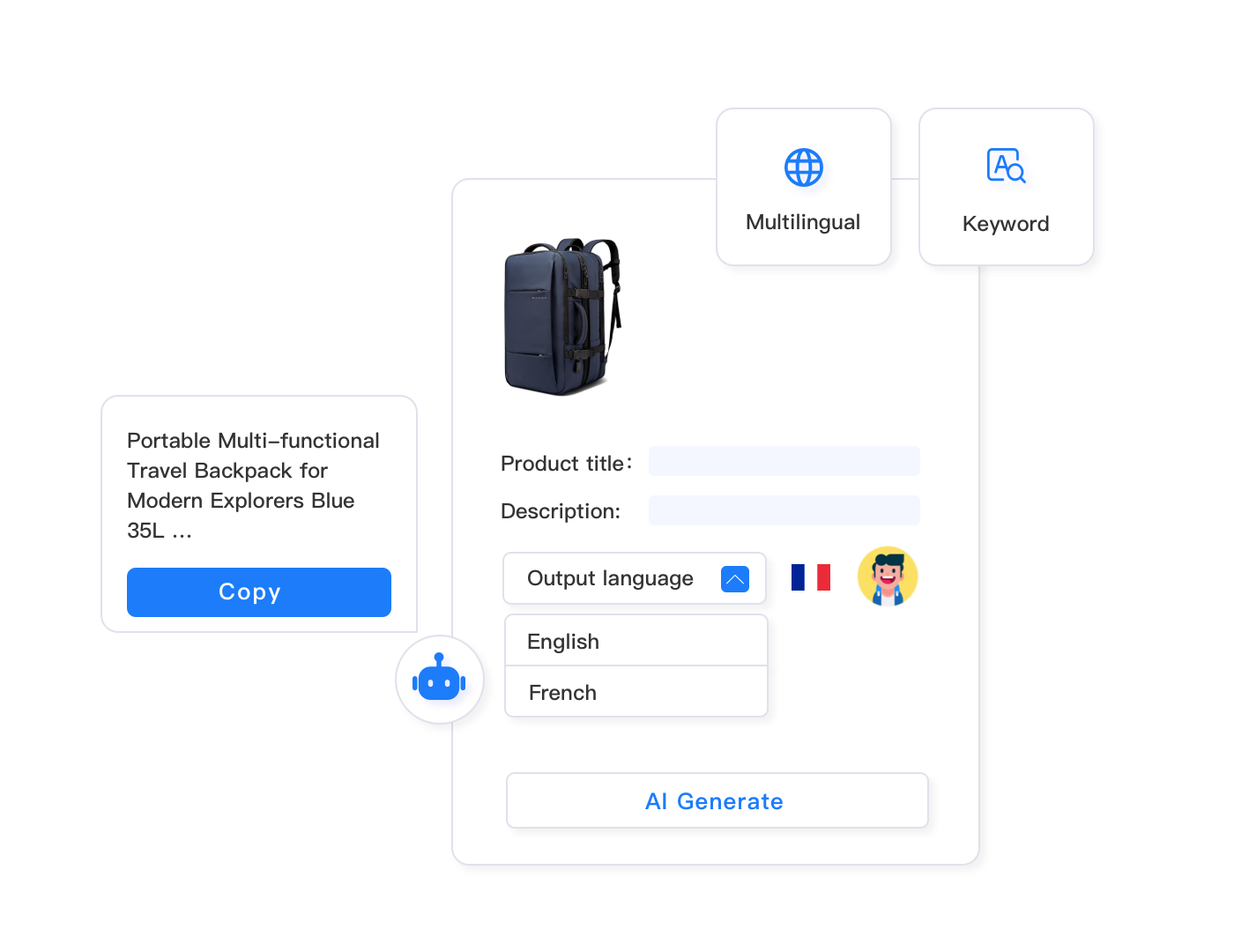
AI-powered optimization systems handle the complexity automatically. Feed the AI your violating title, and it analyzes: which keywords drive search traffic, what product features matter most to buyers, how to convey variation information concisely, which phrases can be shortened without losing meaning, and optimal keyword placement for A9 visibility.
For example, take this common violation: “Premium Organic Dog Food – Grain Free, High Protein, All Natural Ingredients for Small Breeds, Chicken & Sweet Potato Recipe, 30 lb Bag, Made in USA, Best for Puppies & Adult Dogs (215 characters).” That’s 15 characters over limit with prohibited term “Premium” and subjective claim “Best.”
Manual editing might produce: “Organic Dog Food – Grain Free, High Protein, Natural Ingredients for Small Breeds, Chicken & Sweet Potato Recipe, 30 lb Bag, Made in USA, For Puppies & Adult Dogs (182 characters).” That’s compliant but loses valuable search keywords.
AI optimization produces: “Organic Grain Free Dog Food – High Protein Chicken & Sweet Potato, Small Breed Puppy & Adult Formula, Natural Ingredients, 30 lb, Made in USA (157 characters).” This version is compliant, preserves all critical keywords (organic, grain free, high protein, chicken, sweet potato, small breed, puppy, adult), maintains readability, and leaves 43 characters of headroom for future adjustments.
The time difference is stark. Manual optimization takes 5-8 minutes per title (analyze keywords, draft rewrite, count characters, revise, verify compliance). AI optimization takes 15-30 seconds per title, with batch processing handling hundreds simultaneously.
Maxmerce’s AI Listing Generator tackles this optimization challenge by analyzing your existing title structure, identifying the 8-12 highest-value keywords based on Amazon search data, removing policy violations and unnecessary filler words, restructuring the title for optimal keyword placement, and generating multiple compliant alternatives ranked by predicted search performance. The AI considers category-specific requirements automatically—jewelry titles under 150 characters, clothing titles including size and color, electronics titles incorporating model numbers.
What separates sophisticated AI optimization from simple character-trimming tools is semantic understanding. The system recognizes that “Stainless Steel” is more valuable than “Durable Material” for kitchen products, “USDA Organic” outweighs “Natural” for food items, and “Compatible with iPhone 15” drives more searches than “Works with Latest Phones.” It prioritizes keeping high-impact keywords while cutting low-value filler.
The AI also maintains grammatical flow. Many automated title shorteners produce choppy, awkward results: “USB Cable Fast Charge iPhone Compatible 10ft Long Braided Nylon.” The AI restructures for readability: “10ft Braided Nylon USB Cable – Fast Charging, Compatible with iPhone 14/13/12.” Both are under 200 characters, but the second version converts better because it reads naturally.
Practical implementation involves uploading your violation report from the prohibited words scan, selecting titles that need optimization (prioritize high-revenue ASINs), letting the AI generate 2-3 alternative compliant versions per title, reviewing suggestions for accuracy (verify the AI didn’t misinterpret product features), and approving final versions for bulk publishing. For 200-300 violating titles, this process takes 45-90 minutes including review time—versus 16-40 hours for manual rewrites.
The AI’s learning improves with use. As you approve or reject suggested titles, the system refines its understanding of your brand voice, preferred keyword patterns, and product category nuances. By the third or fourth batch, approval rates typically exceed 90%, meaning you’re spending more time bulk-approving good suggestions than manually editing.
Stop Wasting Ad Spend on Suppressed Listings
Audit your entire catalog for title violations in under 15 minutes. Identify character overages, prohibited words, and special character issues before Amazon suppresses your listings.
Rule-Based Bulk Editing for Pattern Fixes
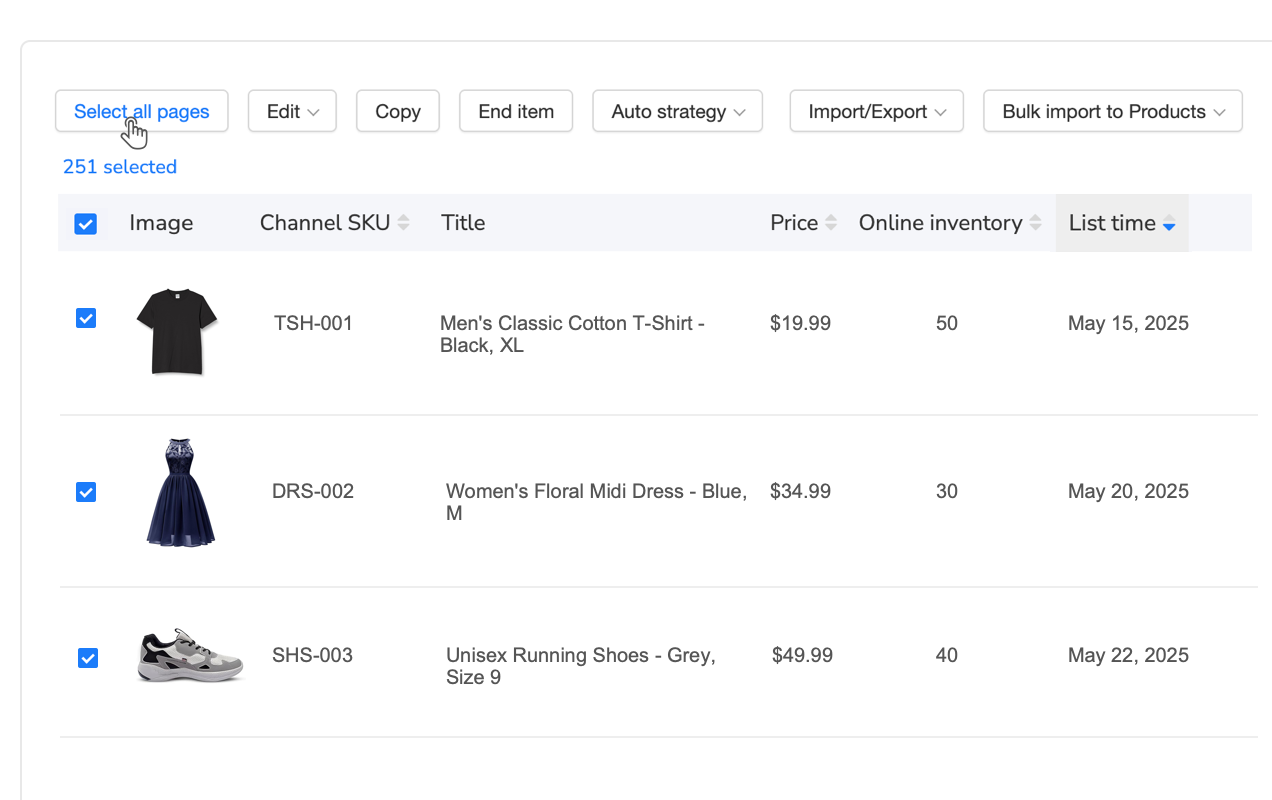
When violation reports reveal that 200 listings all contain the same prohibited word, or 150 titles all exceed character limits by 15-20 characters, you don’t want to fix each one individually—even with AI suggestions. You need rule-based bulk operations that apply systematic corrections across matching listings.
Rule-based editing works through conditional logic: “If title contains ‘Best Seller,’ replace with ‘Popular Choice.'” “If title length exceeds 200 characters, apply AI optimization.” “If title contains emoji characters, remove and republish.” These rules can process thousands of listings in minutes, applying consistent fixes without manual intervention.
The power comes from combining multiple rules. For instance, a common post-audit scenario: 300 listings have character count overages, 150 contain prohibited term “Premium,” 75 use trademark symbols, and 50 have ALL CAPS formatting errors. Without rule-based bulk editing, that’s 575 individual fixes (with some overlap). With rules, you create four conditional operations, apply them sequentially, and fix all 575 listings in 8-12 minutes.
Advanced rule engines support complex logic: “If category = Jewelry AND title length > 150 characters, shorten to 145 characters preserving metal type and gemstone keywords.” This category-specific rule ensures jewelry listings meet Amazon’s 150-character limit while keeping the most important product attributes for that vertical.
Rule-based systems also enable proactive compliance. Create standing rules like “Block publication if title contains prohibited word,” “Auto-trim titles exceeding 195 characters,” or “Flag listings with special characters for manual review.” These rules catch violations before listings go live, preventing suppression from ever occurring.
For sellers managing large, dynamic catalogs (adding 50-100 new products monthly), proactive rule-based validation is the only scalable way to maintain compliance. Manual pre-publication checks aren’t feasible at that volume—you need automated gates that enforce policy before listings reach Amazon.
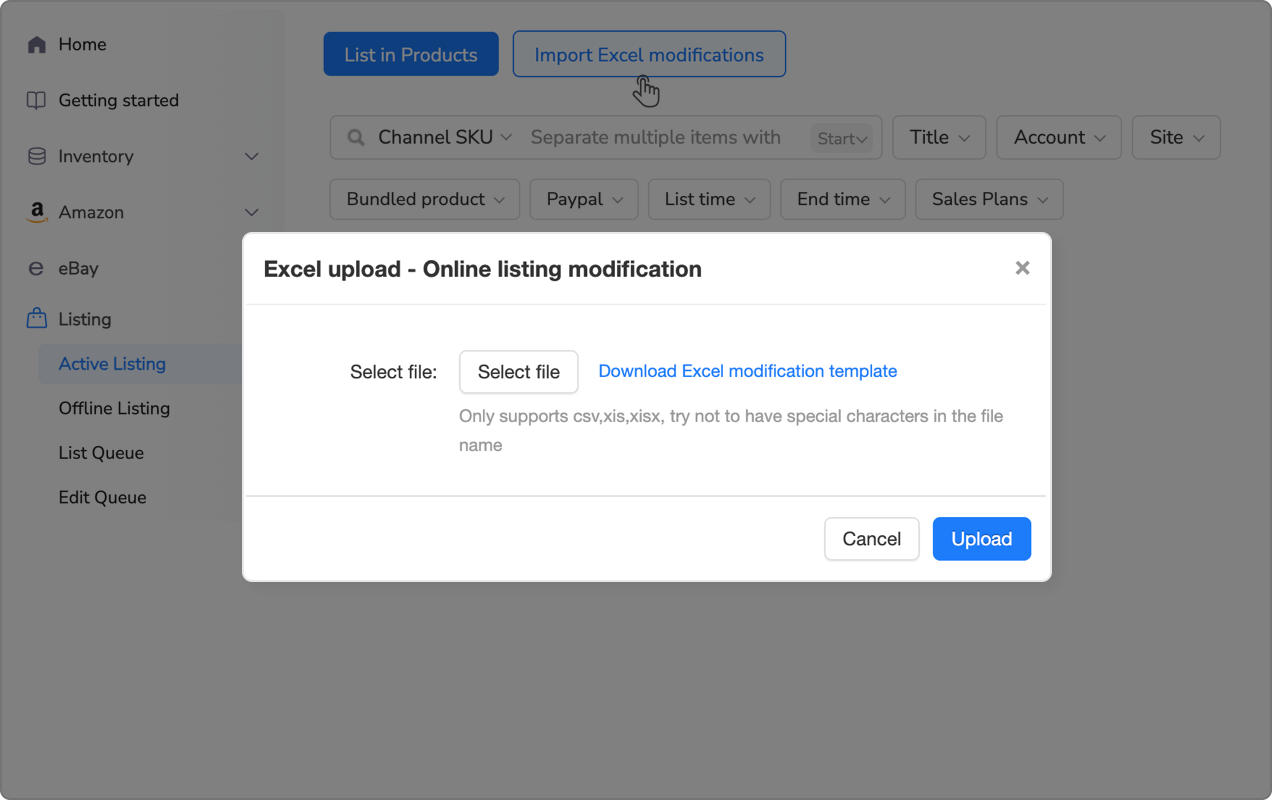
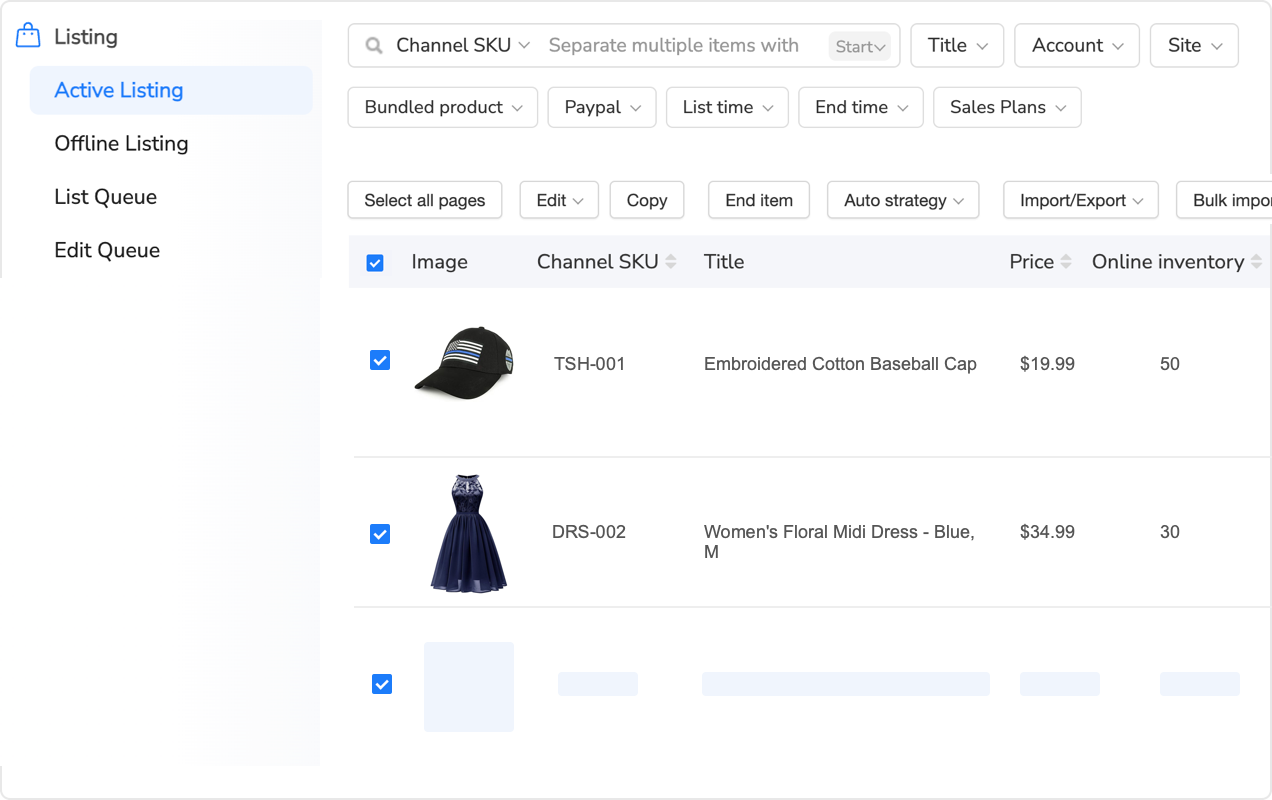
Maxmerce’s Rule-Based Bulk Listing Editing feature provides a visual rule builder where you define conditions (character count, prohibited words, category, price range, inventory level) and actions (replace text, shorten title, apply AI optimization, flag for review). The system previews how many listings will be affected before you apply rules, preventing unintended bulk changes.
Common rule patterns for title compliance include: Find-and-replace operations (remove all instances of “Free Shipping” across catalog), conditional optimization (if title > 200 chars, shorten using AI), pattern-based corrections (replace all trademark symbols with nothing), and category-specific formatting (ensure all clothing titles include size and color). These rules can stack—the system applies them in sequence, so you can combine multiple corrections in one operation.
The rule engine also supports scheduling. Set rules to run automatically every morning at 6 AM, scanning new listings added in the past 24 hours and auto-fixing violations before your team even logs in. This maintains continuous compliance without daily manual checks.
Implementation workflow: analyze your violation report to identify patterns (what violations are most common), create rules targeting the highest-frequency issues first (fix the 200 instances of “Best” before worrying about 15 instances of emoji characters), preview rule impact to verify you’re not accidentally changing legitimate titles, apply rules to affected listings (typically takes 3-5 minutes for 500+ products), and review the change log to confirm expected results. Total time for creating and applying 3-5 rules: 20-30 minutes. Those rules might fix 400-600 violations that would take 30-50 hours manually.
The combination of prohibited word detection, AI optimization, and rule-based bulk editing creates a complete compliance workflow: scan identifies violations, AI suggests optimal corrections, rules apply fixes at scale, and continuous monitoring catches future violations. This three-layer approach reduces ongoing compliance maintenance from 10-15 hours weekly to 30-45 minutes weekly for sellers managing 1000+ SKU catalogs.
Manual vs Automated: Real-World Time and Cost Comparison
Let’s break down the actual time and cost implications of manual versus automated title compliance for a realistic scenario: a seller with 1000 active Amazon listings discovers that 250 titles violate Amazon’s new policy requirements and are at risk of suppression.
Manual Approach: Full Cost Breakdown
Audit Phase: Manually checking 1000 titles requires opening each listing, copying the title, counting characters, scanning for prohibited words against Amazon’s 300+ term list, checking special characters, and documenting violations. Average time: 3-5 minutes per listing. Total audit time: 50-83 hours.
Optimization Phase: For 250 violating titles, you need to rewrite each one, preserving critical keywords, removing violations, optimizing for A9, staying under character limits, and maintaining readability. Average time: 6-10 minutes per title. Total optimization time: 25-42 hours.
Republishing Phase: Updating 250 listings through Seller Central (open listing, paste new title, save, verify) takes 2-3 minutes per listing. Total republishing time: 8-13 hours.
Total Manual Time: 83-138 hours for complete compliance remediation.
If you’re paying someone $25/hour to do this work (typical VA or junior operations staff rate), that’s $2,075-$3,450 in direct labor costs. If you’re doing it yourself, calculate the opportunity cost—what revenue-generating activities are you not doing while manually editing titles for six work weeks?
Now factor in revenue loss during the 6-8 weeks you’re working through this backlog. If those 250 suppressed listings normally generate $15,000 monthly revenue, you’re losing $500 daily ($22,500-$30,000 total) while manually fixing titles. Even if you prioritize high-revenue products first, you’re still looking at $8,000-$12,000 in lost sales during the manual remediation period.
Total Manual Cost: $10,000-$15,000 (labor + lost revenue) for 1000-listing catalog with 25% violation rate.
Automated Approach: Complete Timeline
Initial Setup: Create account, connect Amazon Seller Central via API, configure catalog sync. Time: 15-20 minutes.
Audit Phase: Upload catalog or sync from Seller Central, run automated compliance scan, review violation report. Time: 10-15 minutes (scan completes in 2-3 minutes, review takes 8-12 minutes).
Optimization Phase: Generate AI-optimized title suggestions for all 250 violations, review suggested replacements, approve corrections (typically 90%+ are immediately usable). Time: 45-75 minutes.
Republishing Phase: Bulk publish approved title changes via API. Time: 5-8 minutes (system updates all 250 listings automatically).
Verification Phase: Monitor Seller Central Suppressed Listings report for 3-5 days to catch any edge cases. Time: 10 minutes daily for 5 days = 50 minutes.
Total Automated Time: 2.0-2.8 hours for complete compliance remediation.
If you’re paying someone $25/hour, that’s $50-$70 in labor costs. Tool subscription costs for compliance-grade listing management typically range $29-$79 monthly depending on catalog size—let’s use $49 for this example. Total first-month cost: $99-$119.
Revenue loss is minimal. You can complete the entire compliance project in one afternoon, restoring suppressed listings to active status within 24-48 hours. Lost revenue: $500-$1000 (1-2 days of suppression) instead of $8,000-$12,000 (6-8 weeks).
Total Automated Cost: $600-$1,100 (tool + minimal labor + limited lost revenue).
Side-by-Side Comparison Table
| Task/Challenge | Manual Approach | Automated Solution | Time Savings |
|---|---|---|---|
| Audit 1000 titles | 50-83 hours | 10-15 minutes | 99.5% faster |
| Optimize 250 violating titles | 25-42 hours | 45-75 minutes | 95% faster |
| Republish corrections | 8-13 hours | 5-8 minutes | 98% faster |
| Total project time | 83-138 hours | 2.0-2.8 hours | 97% faster |
| Direct labor cost | $2,075-$3,450 | $50-$70 | $2,025-$3,380 saved |
| Lost revenue during fix | $8,000-$12,000 | $500-$1,000 | $7,500-$11,000 saved |
| Total cost impact | $10,000-$15,000 | $600-$1,100 | $9,400-$13,900 saved |
The ROI is immediate. Even for a single compliance crisis, automation pays for itself 10-15x over in saved labor and preserved revenue. For ongoing compliance monitoring (catching policy changes before mass suppression occurs), the value compounds monthly—you’re preventing crises instead of reacting to them.
Ongoing Compliance Monitoring and Prevention
Fixing your current title violations is only half the battle. Amazon updates title requirements 2-4 times annually, typically without public announcement. The January 2025 crackdown wasn’t preceded by any official policy change notice—sellers discovered the new enforcement when listings started getting suppressed.
You can’t rely on Amazon to warn you. You need proactive monitoring systems that detect policy changes within hours of enforcement and alert you before significant catalog damage occurs.
Setting Up Automated Compliance Alerts
Continuous compliance monitoring works through daily automated scans of your active listings. The system checks for new suppressions in Seller Central, compares current titles against updated policy databases, flags listings that recently started violating rules (indicating policy changes), and sends detailed alert reports showing which ASINs need attention and what violations were detected.
Critical alert types include: new listing suppressions (daily check of Suppressed Listings report), policy database updates (when Amazon adds new prohibited terms), mass violation patterns (if 50+ listings suddenly flag for the same issue, it signals policy change), and character limit changes (if category-specific limits are adjusted).
Effective alert systems don’t just tell you “there’s a problem”—they provide actionable data. Alerts should specify which ASINs are affected, what type of violation triggered the alert, estimated revenue impact (prioritize fixing high-value products), and suggested corrective actions. This context lets you triage intelligently instead of panic-auditing your entire catalog.
Pre-Publication Compliance Checks
The best compliance strategy is preventing violations before listings go live. Build compliance validation into your listing creation workflow so non-compliant titles never reach Amazon’s system.
Pre-publication checks happen automatically when you create or edit listings. Before publishing, the system validates character count, scans for prohibited words, checks special characters, verifies proper capitalization, and confirms category-specific requirements. If violations are detected, the system blocks publication and displays specific issues to fix.
This prevents the suppress-and-fix cycle entirely. Instead of discovering violations after listings go live and lose visibility, you catch and correct issues during the creation process. For sellers adding 50-100 new products monthly, this automated gate prevents dozens of potential suppressions every month.
Pre-publication validation is particularly valuable for teams with multiple listing creators. Different team members might have varying familiarity with Amazon’s rules—automated checks ensure consistent compliance regardless of who created the listing.
Policy Change Detection Systems
Amazon rarely announces title policy updates publicly. Changes appear without warning in Seller Central’s requirements documentation or, more commonly, through sudden enforcement (listings that were compliant yesterday start getting suppressed today).
Sophisticated monitoring systems detect these silent policy changes through pattern analysis. If 30+ listings across different categories suddenly get suppressed for the same reason within a 24-hour window, that signals a new policy enforcement. The system alerts you immediately with specifics: what changed, which listings are affected, and estimated impact.
Early detection minimizes damage. If you catch a policy change within 24 hours of enforcement, you might have 50 suppressed listings to fix. Wait a week, and you could have 300 suppressions with $15,000-$30,000 in lost weekly revenue.
Advanced monitoring also compares your catalog against Amazon’s official policy documentation. When Amazon updates their requirements pages (even without announcement), the system detects discrepancies between your listings and new rules, flagging affected products before Amazon’s automated enforcement catches them.
Implementation involves: enabling daily automated scans of your active catalog (typically runs overnight during low-traffic hours), configuring alert thresholds (notify immediately if 10+ listings suppress in 24 hours, weekly digest for minor issues), setting up multi-channel alerts (email, SMS, Slack integration for time-sensitive violations), and establishing response workflows (who receives alerts, how quickly fixes must be implemented).
For sellers managing compliance at scale, Maxmerce’s continuous monitoring system scans your entire catalog daily, comparing active listings against Amazon’s updated policy databases. When new violations are detected—whether from policy changes or recently added listings—the system generates prioritized alert reports showing affected ASINs ranked by revenue impact. Critical alerts (listings actively suppressed) trigger immediate notifications via email and in-app alerts, while lower-priority issues (titles approaching character limits, potential future violations) appear in weekly digest reports.
The monitoring system also tracks Amazon’s official policy documentation pages, detecting when requirements are updated. When changes are found, the system cross-references your catalog to identify how many listings would violate the new rules, estimates revenue at risk, and provides bulk-fix workflows to remediate before enforcement begins. This proactive approach caught the January 2025 character limit enforcement 36 hours before mass suppressions started, giving Maxmerce users time to audit and fix violating titles before sales impact occurred.
Policy change alerts include specific details: what rule changed (character limit reduced from 250 to 200 for general products), when enforcement started (detected January 8, 2025 at 4:22 AM EST), how many listings are affected (487 ASINs in your catalog), estimated revenue at risk ($18,300 weekly sales across affected products), and recommended actions (run bulk audit, apply AI optimization to 487 titles, republish within 24 hours).
This level of detail transforms compliance from reactive crisis management into proactive maintenance. You’re not discovering violations after weeks of lost sales—you’re fixing them within hours of Amazon’s enforcement beginning, often before most sellers even know the policy changed.
Category-Specific Title Optimization Strategies
Amazon’s universal title requirements apply across all categories, but each vertical has additional nuances affecting optimization strategy. Understanding these category-specific patterns helps you create titles that are both compliant and high-converting.
Clothing and Apparel Titles
Clothing titles must include size and color information to comply with Amazon’s variation requirements. The challenge is fitting brand, product type, material, key features, size, and color into 200 characters while maintaining readability.
Optimal structure for apparel: Brand + Product Type + Key Feature + Material + Color + Size. For example: “Nike Men’s Dri-FIT Running Shorts – Moisture Wicking, Lightweight Polyester, Black, Large” (92 characters).
Common violations include omitting size or color (causes variation errors), using promotional terms (“Stylish,” “Trendy,” “Fashion”), and excessive feature stacking (listing 8-10 features consumes too many characters). Prioritize the 2-3 most important features that differentiate your product from competitors.
Electronics and Tech Products
Electronics titles benefit from including model numbers, technical specifications, and compatibility information. Buyers search for specific models, so precise identification matters more than marketing language.
Effective structure: Brand + Product Type + Model Number + Key Spec + Compatibility. Example: “Anker USB-C Hub 7-in-1 – HDMI 4K Output, 100W Power Delivery, Compatible with MacBook Pro/Air” (98 characters).
Avoid vague tech claims (“Super Fast,” “Ultra Power,” “Advanced Technology”) in favor of quantifiable specs (“100W,” “4K,” “7-in-1″). Include compatibility explicitly—”Works with iPhone 15/14/13” is clearer than “Universal Compatibility.”
Home and Kitchen Products
Home goods titles should emphasize material, size/capacity, and key functional benefits. Buyers care about dimensions, durability, and specific use cases.
Strong pattern: Product Type + Material + Size/Capacity + Key Features + Use Case. Example: “Stainless Steel Mixing Bowl Set – 5 Piece, Nesting Design, Non-Slip Base, Dishwasher Safe” (97 characters).
Common pitfalls include subjective claims (“Beautiful,” “Elegant,” “Perfect for Your Home”) instead of objective features, omitting dimensions when size matters (cookware, furniture, storage), and using brand-specific marketing terms that violate trademark rules.
Food and Grocery Items
Food titles must specify pack size, count, and quantity. USDA organic or other certifications should appear prominently when applicable.
Recommended format: Brand + Product Name + Key Feature + Certification + Pack Size/Count. Example: “Organic Dark Roast Coffee Beans – Fair Trade Certified, Colombian Single Origin, 2 lb Bag” (95 characters).
Violations often involve promotional language (“Delicious,” “Tasty,” “Healthy”), health claims not approved by FDA (“Boosts Immunity,” “Lowers Cholesterol”), and missing pack count (Amazon requires “Pack of 6” or “12 Count” for multi-packs).
Jewelry Category (150-Character Limit)
Jewelry has the strictest character limit at 150 characters, requiring more aggressive optimization. Focus on metal type, gemstone, carat weight, and style.
Compact structure: Metal Type + Product Type + Gemstone + Carat Weight + Style. Example: “14K White Gold Solitaire Ring – 1.5 Carat Round Diamond, Engagement Style, Size 7” (90 characters).
Every word counts with the 150-char limit. Eliminate articles (“the,” “a”), use abbreviations judiciously (“Ct” for carat, “SS” for sterling silver only if category-standard), and prioritize material and stone specifications over descriptive adjectives.
Common violations include exceeding 150 characters (unlike 200-char categories, jewelry titles get suppressed at 151 characters), using prohibited value claims (“Priceless,” “Investment Grade,” “Luxury”), and trademark issues with designer-inspired pieces (“Tiffany Style” violates trademark policy).
Common Title Mistakes That Trigger Instant Suppression
Beyond formal policy violations, certain title patterns consistently trigger Amazon’s automated suppression system even when they technically comply with written rules. Understanding these hidden pitfalls prevents unnecessary listing takedowns.
HTML Entity Encoding Issues
When copying titles from websites or spreadsheets, HTML entities like & (encoded ampersand), (non-breaking space), or — (em dash) sometimes paste into Amazon’s system. These encoded characters display incorrectly and trigger suppression.
Always paste titles as plain text, not from HTML sources. If you’re bulk uploading via Excel, ensure cell formatting is “Text” not “General,” which can introduce hidden Unicode characters.
Invisible Unicode Characters
Certain Unicode characters are invisible but still count toward character limits and cause suppression. Zero-width spaces (U+200B), directional marks (U+200E), and soft hyphens (U+00AD) appear when copying from word processors or websites.
These invisible characters make titles mysteriously fail validation—the title looks compliant at 195 characters, but Amazon’s system counts 203 because of hidden Unicode. Bulk compliance scanners detect these invisible characters and remove them automatically.
Character Encoding Mismatches
Titles with non-English characters (accents, umlauts, special letters) can cause issues if uploaded with incorrect encoding. If your system uses UTF-8 but Amazon receives ISO-8859-1, characters display as gibberish and listings get suppressed.
When bulk uploading titles containing accented characters, ensure your CSV or Excel file uses UTF-8 encoding. Most modern systems default to UTF-8, but older Excel versions sometimes export as ANSI, causing problems.
Excessive Repetition and Keyword Stuffing
While not explicitly prohibited, titles with obvious keyword stuffing (repeating the same term 3-4 times) trigger quality alerts and can lead to suppression. “Dog Collar for Large Dogs, Dog Collar for Big Dogs, Dog Collar for Xl Dogs, Dog Collar Heavy Duty” reads as spam.
Amazon’s A9 algorithm doesn’t reward repetition—it indexes each term once regardless of frequency. “Large Dog Collar – Heavy Duty, Adjustable for XL Breeds” conveys the same information without repetition and converts better.
Misleading or Inaccurate Variation Information
Titles must accurately reflect the specific variation being sold. If you’re selling the “Large, Blue” variation, the title can’t say “Available in All Sizes and Colors”—that’s misleading and violates Amazon’s accuracy requirements.
Each variation needs a unique, accurate title. Parent ASINs can use generic language (“Available in Multiple Sizes”), but child ASINs must specify the exact variation: “Large, Blue” not “Multiple Options.”
Protect Your Catalog from Policy Changes
Set up automated daily compliance monitoring. Get instant alerts when Amazon updates title requirements or when new listings violate policies—before suppressions damage your revenue.
Advanced: Optimizing Titles for Both Compliance and SEO
Title compliance and search optimization often feel like opposing goals—compliance requires brevity and restriction, while SEO wants comprehensive keyword coverage. Sophisticated optimization balances both by prioritizing highest-value keywords within policy constraints.
Front-Loading Critical Keywords
Amazon’s A9 algorithm weights terms appearing earlier in titles more heavily. Put your most important keywords in the first 50-60 characters where they have maximum impact on search rankings and visibility.
Weak structure: “Professional Quality Non-Stick Stainless Steel Frying Pan Set – 3 Piece Kitchen Cookware” (Primary keyword “Frying Pan” appears at position 52)
Strong structure: “Frying Pan Set 3 Piece – Stainless Steel Non-Stick, Professional Kitchen Cookware” (Primary keyword appears at position 0)
The second version places “Frying Pan Set” at the start, improving search visibility for the primary query while maintaining all other keywords.
Keyword Priority Ranking
When character limits force you to cut words, have a clear priority hierarchy. Primary keywords (exact search terms buyers use) are non-negotiable. Secondary keywords (related search terms) should be included if space allows. Tertiary keywords and filler words get cut first.
For a coffee maker listing: Primary keywords: “Coffee Maker,” “Programmable,” “12 Cup.” Secondary: “Thermal Carafe,” “Auto Brew,” “Stainless Steel.” Tertiary: “Kitchen,” “Home,” “Appliance.” If you need to trim 15 characters, remove all tertiary terms first.
Natural Language vs Keyword Strings
Early Amazon SEO advice recommended keyword strings: “USB Cable, iPhone Charger Cable, Lightning Cable, Fast Charging Cable, 6ft Long Cable.” This stuffs maximum keywords but reads poorly and may trigger quality flags.
Modern optimization uses natural language: “USB Lightning Cable for iPhone – 6ft Fast Charging Cord, MFi Certified.” This includes the same core keywords (USB, Lightning, iPhone, 6ft, Fast Charging) in readable format that converts better.
LSI Keywords and Semantic Relevance
Amazon’s algorithm understands semantic relationships—if your title includes “iPhone Lightning Cable,” it automatically associates your product with “iPhone Charger,” “Apple Cable,” and “iOS Charging.” You don’t need to stuff all variants into your title.
Focus on one precise, clear description using natural language. Backend search terms can capture additional keyword variations without cluttering the title.
A/B Testing Compliant Title Variations
Within Amazon’s constraints, you can test different keyword arrangements to optimize conversion. Create 2-3 compliant title variations, run each for 14-21 days, and compare conversion rates.
Test elements include keyword order (primary term first vs product category first), feature emphasis (highlighting different benefits), and length (full 200 characters vs concise 120-character titles). Data often shows that readable, concise titles under 150 characters convert better than keyword-stuffed 200-character versions—even though shorter titles sacrifice some potential keywords.
Effective A/B testing requires compliance validation before each test begins. Don’t test titles that violate policy—you’ll just suppress your listing. Use pre-publication compliance checks to verify all test variations pass Amazon’s requirements before implementation.
Frequently Asked Questions
What’s the maximum character limit for Amazon product titles?
Amazon enforced a strict 200-character limit as of January 2025. Titles exceeding this limit are automatically suppressed from search, making your products invisible to buyers regardless of your BSR or ad spend. Jewelry has a shorter 150-character limit. The character count includes all spaces and punctuation.
How do I audit 1000+ listings for title compliance?
Bulk compliance tools can scan your entire catalog in minutes, identifying violations like character count overages, prohibited words, and special character issues. Export the violation report, make bulk corrections via Excel or rule-based editing, then republish compliant titles across all affected listings. Manual audits take 83-167 hours for 1000 listings; automated scans complete in 10-15 minutes.
Will Amazon notify me before suppressing non-compliant titles?
No. Amazon’s automated system suppresses violating titles immediately without prior warning. Sellers discover the issue only when they notice sudden sales drops or check their Suppressed Listings report in Seller Central. This makes proactive compliance monitoring essential—you need to catch violations before Amazon’s system does.
Can I use emojis or trademark symbols in Amazon titles?
No. Amazon prohibits emojis (🔥, ⭐), trademark symbols (™, ®), and most special characters except hyphens, ampersands, forward slashes, commas, and periods. Use of prohibited characters triggers immediate suppression. Even common characters like bullets (•) or stars (★) cause violations.
How long does it take to fix suppressed titles?
Manual fixes take 5-10 minutes per listing. For 1000 listings, that’s 83-167 hours of work. Bulk editing tools with AI optimization can complete the same task in 2-4 hours, including validation and republishing. The time difference is 97% faster with automation.
What happens to my PPC ads when titles are suppressed?
Your ads continue running and consuming budget, but they lead to suppressed listings that can’t be purchased. You’re paying for clicks that generate zero conversions until titles are fixed. Mid-size sellers can waste $500-$2000 daily in ad spend on suppressed listings before they realize the issue.
Do title policy violations affect my account health?
Yes. Repeated violations can trigger quality alerts and contribute to overall account health deterioration. Amazon views persistent non-compliance as evidence of poor seller management practices. While a few isolated violations won’t suspend your account, patterns of non-compliance across dozens or hundreds of listings can lead to listing privilege restrictions.
How often does Amazon update title requirements?
Amazon updates title policies 2-4 times per year, typically in January, April, and Q4. They rarely announce changes publicly—sellers discover updates only when listings start getting suppressed. Set up automated compliance monitoring to catch policy changes within hours of enforcement, before significant catalog damage occurs.
Conclusion: Proactive Compliance Beats Reactive Crisis Management
Amazon’s title policy enforcement isn’t going away—it’s getting stricter. The January 2025 crackdown caught thousands of sellers unprepared because they relied on Amazon’s historical leniency instead of building systematic compliance into their operations.
The sellers who survived this policy shift without major revenue disruption had three things in common: automated daily compliance monitoring that detected the enforcement change within 24 hours, bulk editing tools that let them audit and fix thousands of titles in hours instead of weeks, and proactive validation systems preventing new listings from violating policies before publication.
If you’re managing 200+ SKUs, manual title compliance isn’t sustainable. You can’t manually audit your catalog every time Amazon updates requirements (which they do without warning). You can’t afford 80-150 hours of manual remediation work when violations occur. You need automation that scales with your catalog size and adapts to policy changes automatically.
Start with an immediate catalog audit using bulk compliance tools. Identify which listings are actively suppressed or at risk of suppression, prioritize fixes based on revenue impact (address your top 20% of SKUs first), apply AI-optimized corrections to violating titles, and republish corrected listings within 24-48 hours.
Then implement ongoing monitoring: daily automated compliance scans, immediate alerts when new violations are detected, pre-publication validation on all new listings, and quarterly full catalog reviews to catch edge cases.
This systematic approach transforms title compliance from a recurring crisis into routine maintenance. You’ll catch policy changes before mass suppressions occur, fix violations in hours instead of weeks, and protect your revenue from Amazon’s increasingly strict automated enforcement.
The choice is clear: invest 2-4 hours implementing automated compliance systems now, or spend 80-150 hours in emergency manual remediation the next time Amazon changes their requirements without warning. Try Maxmerce’s listing management tools free for 14 days—no credit card required. Audit your catalog, fix violations, and set up monitoring before the next policy update catches you off guard.
