Amazon Product Bundling Strategy: Optimize Profit Margins

Your competitor’s $19.99 single item sits there losing money while your $34.99 bundle wins the Buy Box and triples their profit margin. That’s the power of Amazon product bundling strategy—but only when you navigate October 2024’s compliance changes, calculate true profitability after FBA fees, and manage inventory across multiple channels without the 73 hours monthly most sellers waste on spreadsheets.
Product bundling isn’t just about throwing random items together. It’s about combining complementary products that solve specific customer problems while expanding your margins 15-40%. However, recent policy updates affecting consumable bundles, virtual vs physical bundle trade-offs, and multi-channel inventory complexity make this strategy more nuanced than ever.
In this guide, you’ll learn the exact formulas to calculate bundle profitability accounting for per-component FBA fees, how to avoid $500-$2,000 policy violations from the October 2024 consumables update, and how to scale bundles across Amazon, eBay, and Walmart using real-time inventory synchronization. Whether you’re testing your first bundle or optimizing 100+ bundle ASINs, you’ll walk away with actionable workflows that protect margins while preventing costly overselling.
Quick Answer
Amazon product bundling strategy involves combining complementary products into single listings to increase average order value and profit margins by 15-40%. Success requires navigating Amazon’s October 2024 consumables policy update (identical expiration dates mandatory), choosing between virtual (inventory-linked) vs physical (pre-packaged) bundles, calculating true profitability after FBA fees, and managing inventory across multiple sales channels. The most profitable bundles solve specific customer problems with 3-5 complementary items priced 20-30% below individual purchase totals.
Key Takeaways: Amazon Product Bundling Strategy
- October 2024 policy change: Consumable bundles must now have identical expiration dates across all units or risk suppression within 48 hours
- Profit margin advantage: Properly structured bundles achieve 15-40% higher margins vs single-item sales when fees are calculated correctly
- Virtual bundles: Zero prep costs, 5-15 second inventory sync across channels vs 48-72 hour physical bundle prep time
- Buy Box lifecycle: First-mover advantage lasts 90-120 days before competitors copy successful bundles
- Multi-channel impact: Sellers save 73 hours monthly through automated bundle inventory synchronization across Amazon, eBay, Walmart
Understanding Amazon Product Bundling: Definition & Types
Product Bundle Definition
Amazon product bundling combines two or more complementary products sold together as a single ASIN. This differs from multi-packs (same item in quantity) and variations (size/color options of one product). The customer value proposition is straightforward: convenience plus cost savings plus curated solutions. Instead of buying a dog shampoo, then searching for a matching brush, then finding a towel—all separately—they get a complete grooming kit in one click.
The key distinction Amazon enforces: bundled products must be complementary. A laptop case paired with a cleaning kit makes sense. A laptop case bundled with dog treats doesn’t. This “themed connection” requirement protects customers from random assortments while giving sellers clear guidelines for compliant bundle creation.
Virtual Bundles vs Physical Bundles Decision Framework
Virtual bundles are inventory-linked listings where Amazon combines items from separate warehouse locations during fulfillment. When a customer orders your virtual bundle, Amazon picks each component from its individual storage location and ships them together. The critical advantages: zero prep costs (no labor to package bundles) and instant inventory updates across channels (5-15 seconds via API). However, virtual bundles cannot use FBA—they’re Fulfillment by Merchant only, meaning no Prime badge.
Virtual bundles work best for testing bundle concepts without upfront investment. If you’re unsure whether customers want your shampoo-brush-towel combination, create it as a virtual bundle first. You’ll see sales data within 2-3 weeks without spending $50-$200 on prep labor for 100 units that might not sell.
Physical bundles are pre-packaged units you prepare and ship as single packages. You assemble the shampoo, brush, and towel into poly bags or boxes, label them with a new bundle ASIN, and send them to FBA. The trade-offs: prep costs ($0.50-$2.00 per unit labor plus $0.30-$1.50 packaging materials) and inventory complexity (tracking bundle as separate SKU), but you gain FBA eligibility with the crucial Prime badge.
Physical bundles make sense for high-volume sellers. Once you’ve validated demand with 20-30 virtual bundle sales, convert to physical FBA bundles. The Prime badge typically lifts conversion rates 15-25%, more than offsetting the 2-3% margin reduction from prep costs.
Bundle Category Restrictions
Most Amazon categories permit bundling—electronics, home goods, pet supplies, sports equipment—but critical restrictions apply. You cannot bundle medical devices with non-medical items (FDA compliance issues). Random assortments without themed connections violate Amazon’s customer experience standards. And as of October 2024, consumables face new expiration date requirements we’ll detail in the next section.
Geographic considerations matter for US-based sellers. These bundling rules apply specifically to Amazon.com (US marketplace). If you’re selling domestically in the US or European markets (UK, Germany, France), focus on those marketplace dynamics rather than international import/export scenarios. Our guidance targets US/EU domestic selling operations, not cross-border logistics.
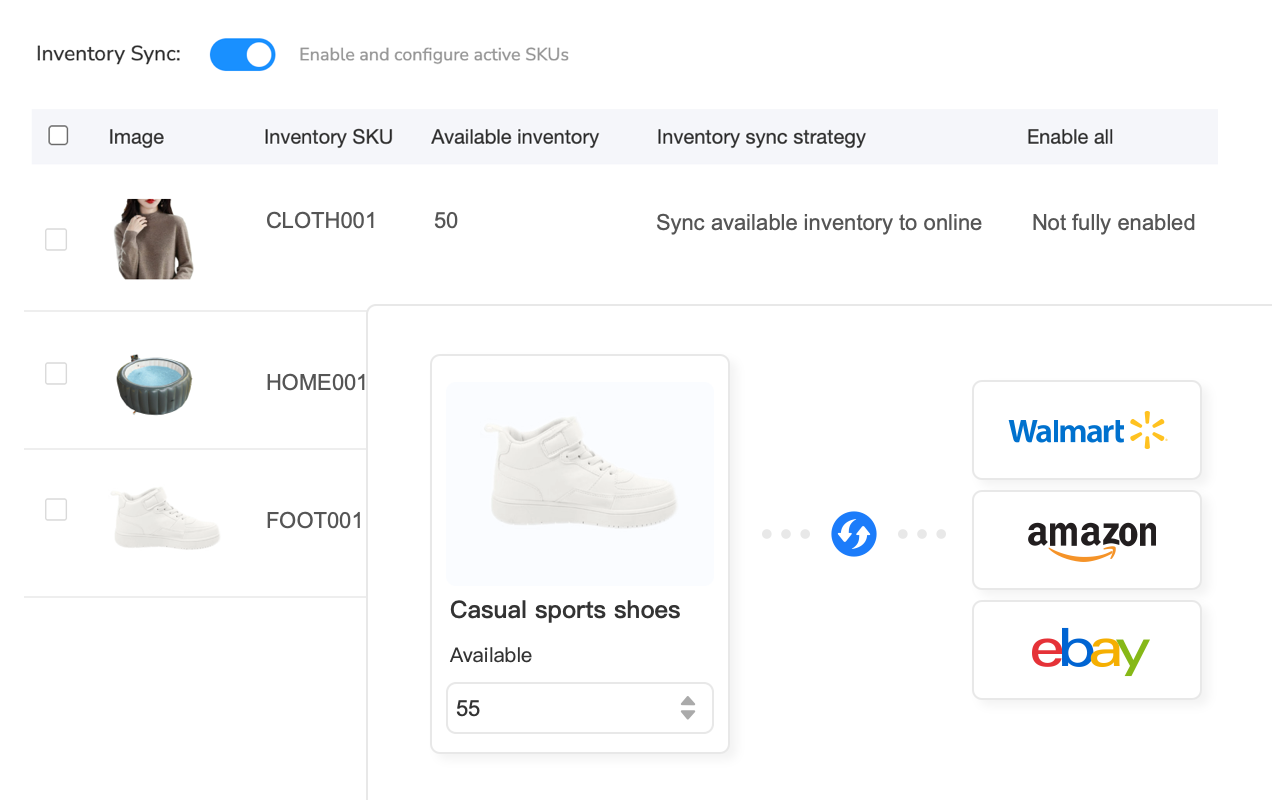
Virtual bundle inventory tracking becomes exponentially complex when selling the same individual components across Amazon, eBay, and Walmart. Selling a 3-item bundle on Amazon means decrementing 3 separate SKUs simultaneously—do this manually across platforms and you’re looking at 10-15 minutes per order, 125+ hours monthly for 500 orders. One Amazon bundle sale must instantly update eBay and Walmart component availability. Miss this sync, and your Walmart customer orders a bundle you can’t fulfill because Amazon sold the last component 30 seconds ago.
Multi-channel inventory management systems solve this by treating bundle components as linked inventory pools. When a bundle sells on any platform, the system automatically adjusts quantities everywhere else. Platforms like Maxmerce’s Listing module handle virtual bundle inventory sync automatically. When a bundle sells on Amazon, the system connects via API to update component quantities across eBay and Walmart within 5-15 seconds, preventing the overselling that triggers account warnings.
For sellers managing 500+ SKUs across multiple fulfillment methods, this automation eliminates the 125 hours monthly most sellers waste on manual inventory spreadsheets. One seller managing 800 SKUs across 4 platforms reported reducing daily inventory management from 3.5 hours to 15 minutes—a 93% time reduction that allowed them to focus on sourcing and growth instead of spreadsheet maintenance.
Navigate Amazon’s October 2024 Bundle Compliance Changes
What Changed in October 2024
Amazon implemented a critical policy change affecting consumable bundles effective October 15, 2024. All units in consumable bundles must now have identical expiration dates—not similar dates, but the exact same month and year. This affects four major categories: Food & Beverage bundles, Health & Personal Care multi-packs, Beauty & Cosmetics sets, and Vitamins & Supplements combos.
The enforcement is immediate. If Amazon detects different expiration dates during warehouse receiving (they scan every unit), your listing gets suppressed—not removed, but suspended from Buy Box until fixed. Consequences hit fast: sellers report 48-72 hour suppression periods costing $500-$2,000 in lost sales per ASIN depending on daily velocity. For high-volume bundles moving 50+ units daily, that’s $1,500-$3,000 in lost revenue before you even notice the suppression.
Why the change? Customer complaints about receiving 6-month-old expiring products bundled with fresh items drove the policy update. Amazon’s solution: enforce batch consistency. If you’re bundling 3 bottles of vitamins, all 3 must expire in the same month. One bottle expiring June 2026 and two expiring September 2026? Suppression within 48 hours of FBA receiving your shipment.
Compliance Verification Checklist
Protecting your account requires proactive compliance verification before sending inventory to FBA. Use this checklist for every consumable bundle shipment:
- All units sourced from same production batch (verify batch codes match)
- Expiration dates verified at your receiving dock—match within same month/year before bundling
- Supplier provides guarantees for expiration date consistency (get this in writing)
- Listing updated with expiration date handling policy in product description
- Photos show expiration date area if required by category (supplements often require this)
- Virtual bundles use component date matching—the oldest component’s date sets the bundle’s date
The last point is critical for virtual bundles. Since Amazon pulls components from different warehouse locations, you must ensure all component inventory has matching expiration dates before creating the virtual bundle listing. If your shampoo inventory expires December 2025 but your conditioner expires March 2026, Amazon will suppress the bundle when it attempts to fulfill an order combining them.
Non-Consumable Bundle Requirements
If you’re bundling electronics, home goods, pet toys, or other non-consumables, standard bundle rules still apply. All items must be new condition unless clearly stated as refurbished bundles. Products must be complementary—not random assortments. Single brand bundles are preferred; multi-brand requires authorization from all brand owners. And you cannot bundle Amazon-branded items (like Amazon Basics or Ring products) without explicit approval from those brands.
The authorization requirement is strict. If you bundle a third-party phone case with a third-party screen protector, you need authorization from both brands. Without it, you risk trademark violation claims that lead to immediate listing removal and potential account suspension. Many sellers assume “I bought the products, so I can bundle them”—but Amazon’s IP protection policies don’t work that way.
| Bundle Type | Compliance Requirement | Violation Risk | Enforcement Action |
|---|---|---|---|
| Consumable Bundle | Identical expiration dates (same month/year) | High | Listing suppression within 48 hours |
| Non-Consumable Bundle | Complementary products, new condition | Medium | Customer complaints trigger review |
| Virtual Bundle | Component ASINs must be seller-owned | Low | Requires re-linking if components change |
| Multi-Brand Bundle | Authorization from all brands required | Very High | Immediate removal + potential account suspension |

Calculate True Bundle Profit Margins (Include FBA Fees)
Bundle Profitability Formula
Most sellers calculate bundle profitability wrong by ignoring per-component FBA fees for virtual bundles or underestimating size tier increases for physical bundles. The accurate formula accounts for five cost components:
- Bundle Selling Price: Customer-facing price on Amazon
- Individual Component Costs: Sum of COGS (Cost of Goods Sold) for all items
- Amazon Fees: Referral fee (8-15% depending on category), FBA fee (size tier-based, $3.22-$8.40+ for standard bundles), plus monthly storage fees
- Prep & Packaging Costs (physical bundles only): Labor at $0.50-$2.00 per unit, materials at $0.30-$1.50 per unit (poly bags, inserts, tape)
- Advertising Cost (optional): PPC spend to launch bundle, typically 15-25% of sales in first 60 days
The formula that shows true profit margin:
True Profit Margin = (Bundle Price – Component COGS – Amazon Fees – Prep Costs – Ad Spend) / Bundle Price × 100
Let’s break this down with a real example most sellers can relate to.
Real Bundle Example: Pet Care Kit
Imagine you’re selling a dog grooming bundle combining shampoo, brush, and towel—three products dog owners typically buy together anyway.
Component Breakdown:
- Dog shampoo (16 oz): COGS $3.20
- Slicker brush: COGS $2.80
- Microfiber towel: COGS $1.50
- Total Component COGS: $7.50
Pricing Analysis: If customers bought these items separately on Amazon, they’d pay $12.99 + $9.99 + $7.99 = $30.97 total. Your bundle selling price: $24.99 (19% discount to incentivize). Perceived savings: $5.98—enough to attract buyers without destroying your margin.
Cost Calculation:
- Bundle price: $24.99
- Amazon referral (15% for pet supplies): -$3.75
- FBA fee (standard size tier): -$4.58
- Prep labor (10 minutes at $15/hr): -$2.50
- Packaging materials (poly bag, insert, tape): -$0.80
- Total costs: $7.50 + $11.63 = $19.13
- Net profit: $24.99 – $19.13 = $5.86
- Profit margin: 23.4%
Comparison vs Single Item: If you sold just the shampoo at $12.99, your costs would be: $3.20 COGS + $1.95 referral + $3.22 FBA = $8.37 total. Net profit: $12.99 – $8.37 = $4.62 (35.5% margin).
The bundle advantage becomes clear: higher absolute profit ($5.86 vs $4.62) even with lower margin percentage. Bundles optimize for absolute profit and average order value, not always margin percentage. One bundle sale equals 1.27x the profit of one shampoo sale—and you only fulfilled one order instead of three separate transactions.
These numbers shift dramatically when you factor in multi-channel selling. Calculating bundle profitability across Amazon, eBay, and Walmart requires tracking different fee structures—15% Amazon referral vs 12.9% eBay vs 15% Walmart, varying fulfillment costs (FBA vs eBay Managed Delivery vs WFS), and channel-specific advertising spend. Most sellers use spreadsheets, but when you’re managing 50-100 bundles across 3 platforms, that’s 150-300 profit calculations to update monthly as fees change.
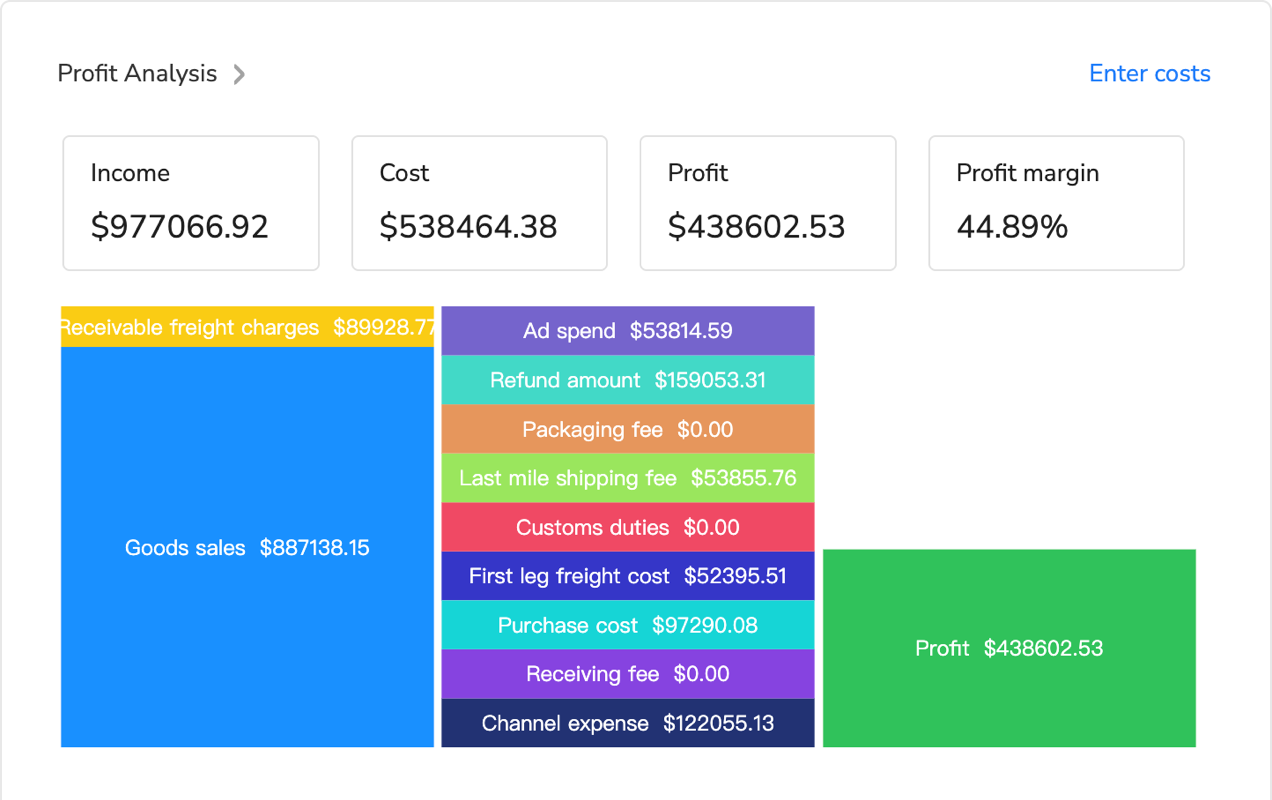
Profit analytics tools designed for multi-channel sellers automate fee tracking across marketplace APIs. For example, Maxmerce’s Analytics module tracks bundle profitability in real-time across all channels. The Profit Analyzer automatically pulls current fee schedules from Amazon, eBay, and Walmart APIs, factors in FBA/WFS/shipping costs per bundle, and shows true margins by channel. The system updates calculations daily as marketplace fees change—Amazon adjusts FBA fees quarterly, eBay updates final value fees monthly, and Walmart modifies referral percentages periodically.
This automation turns a 6-hour monthly spreadsheet maintenance task into a 5-minute dashboard review. One seller managing 80 bundle ASINs across 3 platforms reported discovering that 12 bundles were unprofitable on Walmart (higher referral fees + WFS costs exceeded margins) but highly profitable on Amazon and eBay. They discontinued those 12 Walmart listings, reallocating inventory to profitable channels—increasing overall bundle contribution margin by 8% without changing products.
| Cost Component | Single Item (Shampoo) | 3-Item Bundle | Impact |
|---|---|---|---|
| Selling Price | $12.99 | $24.99 | +92% AOV |
| COGS | $3.20 | $7.50 | +134% |
| Amazon Fees | $5.17 (referral + FBA) | $8.33 | +61% |
| Prep/Packaging | $0 | $3.30 | +$3.30 |
| Net Profit | $4.62 | $5.86 | +27% absolute profit |
| Profit Margin | 35.5% | 23.4% | Lower %, higher $ |

Manage Bundle Inventory Across Amazon, eBay, Walmart
The Multi-Channel Bundle Challenge
Here’s the scenario that breaks most sellers’ inventory systems: you’re selling the same 3-item bundle across Amazon (as a virtual bundle), eBay (as a physical bundle), and Walmart (as a physical bundle). Sounds straightforward—until you realize component inventory must decrement correctly on ALL platforms when the bundle sells on ANY platform.
The math reveals the complexity. One bundle sale equals 3 component decrements multiplied by 3 platforms—that’s 9 inventory updates per order. Scale this to 100 bundle orders daily, and you’re looking at 900 manual updates without automation. At 10-15 minutes per order to update spreadsheets across three seller portals, that’s 16-25 hours daily just on inventory maintenance. No one can sustain that.
Consequences hit from two directions. Overselling triggers cancellations—hit 8+ cancellations in a month and you’ve reached Amazon’s 2% threshold that generates account warnings. But underselling isn’t better. Setting artificial 15-20% safety buffers to avoid overselling means 15-20% of your inventory sits idle, tying up capital and losing sales to competitors who can fulfill orders you’re hiding from availability.
Inventory Synchronization Strategies
Strategy 1: Channel Separation (Manual) dedicates specific inventory to each channel with no overlap. If you have 300 units of Product A, you allocate 100 to Amazon, 100 to eBay, 100 to Walmart—and never let them touch. Pros: simple, no sync needed, impossible to oversell. Cons: 30-40% of inventory sits idle on slow-moving channels while fast channels stock out. Suboptimal capital usage. Best for small catalogs under 50 SKUs where you’re primarily focused on one channel.
Strategy 2: Safety Stock Buffers (Semi-Manual) sets 10-15% inventory buffers on each platform and requires daily manual updates. You check inventory once daily, adjust quantities, and hope nothing sells out between checks. Pros: reduces overselling risk compared to no strategy. Cons: still loses 10-15% potential sales to artificial buffers, requires daily manual work (30-60 minutes), and same-day overselling can still occur during high-volume periods. Best for medium catalogs (50-200 SKUs) where you’re willing to accept moderate inefficiency for simplicity.
Strategy 3: Real-Time API Synchronization (Automated) connects all platforms via API—Amazon MWS, eBay API, Walmart Marketplace API—updating component quantities in real-time within 5-15 seconds. A centralized inventory pool with automated allocation across channels. Pros: zero overselling, maximum inventory efficiency (100% utilization), no manual work. Cons: requires multi-channel management platform. Best for large catalogs (200+ SKUs) and serious multi-channel operations where 70+ hours monthly of manual work justifies the platform cost.
The challenge intensifies when you’re selling 500+ bundle SKUs across three marketplaces. That’s potentially 500 bundles × 3 components each × 3 platforms = 4,500 inventory records to keep synchronized. One Amazon bundle sale must instantly update eBay and Walmart component availability—miss this sync, and your Walmart customer orders a bundle you can’t fulfill because Amazon sold the last component 30 seconds ago. That’s a cancellation, a refund, potentially a negative review, and one step closer to performance warnings.
Enterprise-grade multi-channel inventory systems handle this through real-time API synchronization. Platforms like Maxmerce’s Listing module manage bundle inventory across Amazon, eBay, and Walmart through this exact workflow:
- Centralized Inventory Pool: All component SKUs tracked in a single database—not separate spreadsheets per channel
- Bundle Linking: Define bundle composition once (e.g., Bundle-A = 1× SKU-001 + 1× SKU-002 + 1× SKU-003), and the system understands every Bundle-A sale decrements those three components
- Real-Time Decrements: When a bundle sells on any platform, the system receives the order via marketplace API (Amazon MWS, eBay, Walmart), automatically decrements component quantities in the central pool, then pushes updated quantities to ALL platforms within 5-15 seconds
- Safety Thresholds: Optional buffer reserves (e.g., keep 10 units off-limits for safety) if you want extra protection
- Restock Alerts: Triggers notification when any bundle component drops below your defined threshold—so you reorder before stockouts occur
The technical execution matters: API connections refresh every 5-15 seconds during high-volume periods (versus 15-30 minutes during overnight hours to reduce API load). The system handles virtual bundles on Amazon and physical bundles on eBay/Walmart simultaneously—understanding that Amazon’s virtual bundle decrements 3 separate component ASINs while eBay’s physical bundle decrements 1 bundle SKU plus 3 underlying components. It also maintains separate FBA/WFS allocation versus merchant-fulfilled inventory, ensuring Amazon FBA inventory doesn’t accidentally get promised to an eBay order you’re self-fulfilling.
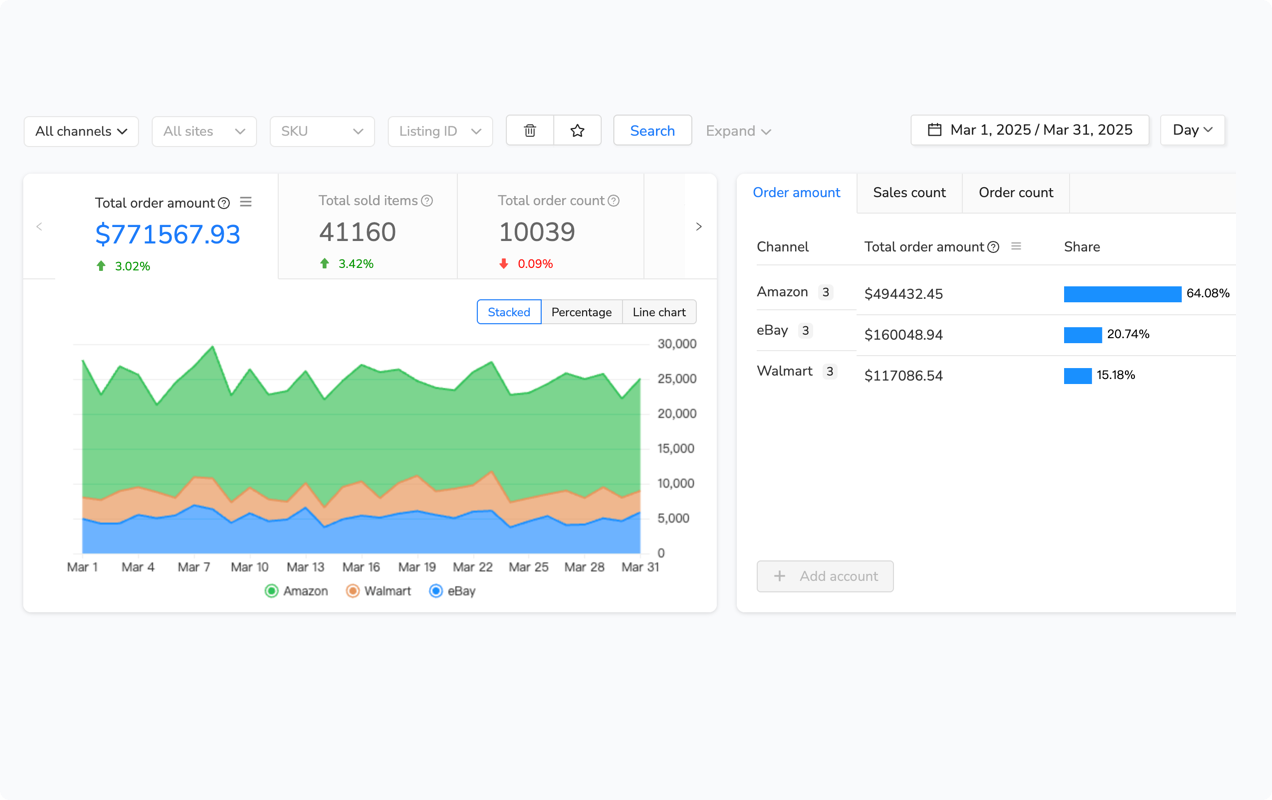
For a seller managing 500 bundles with 100 daily orders, this eliminates approximately 73 hours monthly (16.5 hours weekly) previously spent on manual spreadsheet inventory updates. That’s nearly two full work weeks per month freed up to focus on sourcing better products, negotiating with suppliers, optimizing listings, or simply having work-life balance.
Secondary benefits compound over time. The automation prevents 8-12 monthly cancellations that would otherwise trigger Amazon’s 2% threshold. It enables 100% inventory utilization versus the 70-85% you’d achieve with safety buffers. And it provides real-time visibility—at any moment, you can see exactly which bundles can be fulfilled, which components are running low, and which channels are driving the most bundle velocity.
Virtual vs Physical Bundle Inventory Comparison
Decision factors boil down to your channel mix and volume. Virtual bundles work best for multi-channel sellers because they offer zero prep costs and instant sync capabilities. No labor expense, no packaging materials, no warehouse prep time—just link existing component ASINs and start selling. However, you sacrifice the Prime badge on Amazon, which typically reduces conversion rates 15-25% compared to FBA listings.
Physical bundles work best for FBA-focused sellers who prioritize Amazon over other channels. The Prime badge advantage frequently offsets the 2-3% margin reduction from prep costs when conversion lift exceeds 15%. But physical bundles are simpler for Amazon-only operations—you don’t need complex component tracking since you’re shipping pre-made bundles as individual units.
The hybrid approach offers the best of both worlds but requires robust sync systems: use virtual bundles on Amazon for testing new combinations (zero risk if they don’t sell), then convert high-performers to physical FBA bundles once you’ve validated 20-30 sales. Simultaneously, list physical bundles on eBay and Walmart. This maximizes flexibility—test fast, scale winners, diversify channels—but demands real-time inventory synchronization to prevent the “Amazon virtual sale + eBay physical sale = oversold component” scenario.
Win and Defend the Bundle Buy Box (Lifecycle Strategy)
Bundle Buy Box Lifecycle (3 Phases)
Phase 1: First-Mover Advantage (Days 1-90) represents your golden period. You’re the only seller of this specific bundle combination, owning 100% Buy Box with no competition. Pricing strategy during this phase: premium pricing at 15-25% above cost plus fees. Focus on building sales velocity (signals Amazon that this bundle converts), accumulating reviews (aim for 10+ reviews before competitors arrive), and optimizing the listing (title, bullets, images, A+ content). First-mover advantage typically lasts 90-120 days before copycats emerge—use this window to maximize profit margins while unchallenged.
Phase 2: Competitor Entry (Days 91-180) begins when 2-5 competitors copy your successful bundle. Buy Box ownership drops to shared rotation—you’ll see 50-70% ownership if priced competitively. Competitors typically undercut by $1-$3 to steal Buy Box share. Your focus shifts to defending with better metrics: faster fulfillment speed (FBA beats FBM), higher seller rating (maintain 95%+), and consistent stock levels (Amazon favors sellers with 30+ days inventory). The decision point arrives: lower price 5-10% to maintain share OR differentiate your bundle (add a fourth component, upgrade packaging quality, include exclusive bonuses). Choose based on whether you can sustain margins after price cuts.
Phase 3: Price War Commoditization (Days 181+) hits when 6+ sellers compete and margins compress to near-break-even. Buy Box ownership becomes highly competitive at 20-40%. Pricing reaches near-break-even for many sellers racing to the bottom. At this stage, evaluate three options: Exit (discontinue this bundle, launch new exclusive bundles to restart Phase 1 elsewhere), Differentiate (add unique component, upgrade to premium version, rebrand as deluxe edition), or Cost Optimization (negotiate better COGS from suppliers, reduce prep costs, streamline operations). Calculate whether profit still justifies effort—if margin drops below 15%, consider exit strategies rather than fighting for unprofitable sales.
Buy Box Optimization Tactics
Amazon’s Buy Box algorithm evaluates five primary factors in priority order. Competitive pricing matters most—stay within 5% of the lowest FBA offer. Fulfillment method is second—FBA strongly preferred over FBM for bundles because Amazon trusts its own fulfillment reliability. Seller metrics require greater than 95% positive feedback and less than 1% ODR (order defect rate). Stock levels favor sellers maintaining 30+ days inventory—Amazon won’t award Buy Box to sellers who might stock out tomorrow. Shipping speed demands 1-2 day delivery, which FBA auto-qualifies.
Automated repricing strategy protects margins while staying competitive. Set a floor price equal to Cost + Fees + 15% minimum margin—never go below this even if competitors do. Reprice every 15-30 minutes during business hours to respond to competitor changes. Match the lowest FBA offer but ignore FBM offers that are $2+ cheaper (Amazon’s algorithm does the same). However, never reprice below true profitability just to “win” unprofitable sales—better to lose Buy Box than lose money on every order.
Manual repricing for bundles becomes impractical at scale. Checking 50 bundle listings every 30 minutes across Amazon, eBay, and Walmart equals 800+ price checks daily. Miss one competitor price drop for 4 hours, and you lose Buy Box during peak shopping hours—costing $50-$200 in lost sales per ASIN. Multiply that across 50 bundles, and manual repricing failures cost thousands weekly.
Automated repricing tools monitor competitor prices 24/7 and adjust within your rules. Tools like Maxmerce’s Analytics module offer Smart Buy Box Optimizer that tracks competitor bundle prices across all channels, adjusting your prices automatically within margin protection rules. The system reprices every 15 minutes, maintaining competitiveness while never dropping below your 15% margin floor. For bundles specifically, you can set bundle-specific rules—like “maintain minimum $5 profit per bundle regardless of competitor prices” to prevent race-to-bottom scenarios where absolute profit becomes negligible.

Optimize Bundle Listings for Amazon Search (SEO Keywords)
Bundle Title Formula
Bundle titles follow a specific structure that balances keyword inclusion with readability: [Brand] [Product Type] Bundle – [Components Listed] – [Key Benefit] – [Size/Quantity]. This formula front-loads searchable terms while clearly communicating bundle contents.
Examples of well-optimized bundle titles:
- ✅ “PetCare Pro Dog Grooming Bundle – Shampoo, Brush, Towel – Complete Bathing Kit – 3 Pieces”
- ✅ “TechGuard Phone Protection Bundle – Case, Screen Protector, Camera Lens Cover – Drop Protection Set – iPhone 15”
- ✅ “HomeChef Kitchen Essentials Bundle – Chef Knife, Cutting Board, Sharpener – Professional Cooking Kit – 3-Piece Set”
Bad examples that hurt discoverability:
- ❌ “Dog Bundle” (too vague, no component keywords, no search value)
- ❌ “Amazing PetCare Super Premium Ultimate Dog Grooming Deluxe Bundle Set Kit Pack Combo” (keyword stuffing, violates Amazon’s title policy, poor readability)
Title optimization rules: Include primary component keywords because buyers search for individual items (“dog shampoo,” “slicker brush”) not generic “dog bundle.” Add “bundle,” “kit,” or “set” to clarify listing type and capture those specific searches. Mention piece count (3-piece, 5-piece) for clarity—customers want to know exactly what they’re getting. Stay under 200 characters (Amazon’s limit as of January 2025). Front-load the most important keywords in the first 80 characters since that’s what’s visible in mobile search results where 70% of shoppers browse.
Keyword research should target how customers actually search. They search for “dog grooming kit,” “dog shampoo and brush bundle,” “pet bathing supplies set”—not “canine hygiene product assortment.” Use Amazon’s search bar autocomplete to see real search terms, then prioritize those with commercial intent.
Bullet Points Strategy
Five bullet points communicate value proposition, savings, problem solved, quality features, and trust signals. Format each bullet starting with a CAPITALIZED BENEFIT or FEATURE, followed by specific details:
- Bundle contents: “COMPLETE GROOMING KIT: Includes 16oz hypoallergenic dog shampoo, professional slicker brush, and ultra-absorbent microfiber towel—everything needed for salon-quality grooming at home”
- Value proposition: “SAVE 20%: Buying separately costs $30.97—get the complete bundle for $24.99 with FREE Prime shipping, saving you $5.98 plus the hassle of multiple purchases”
- Problem solved: “ELIMINATE GROOMING HASSLES: Stop buying items separately or forgetting essential supplies—this curated kit handles shedding, bathing, and drying in one convenient package”
- Quality/features: “PREMIUM QUALITY: Salon-grade slicker brush removes mats and tangles, pH-balanced shampoo safe for sensitive skin, lint-free microfiber towel absorbs 5x its weight in water”
- Trust/guarantee: “SATISFACTION GUARANTEED: Amazon FBA fulfillment ensures fast delivery, 30-day returns accepted no questions asked, backed by 4.8-star reviews from 500+ satisfied pet owners”
Bullet best practices: Start each with capitalized benefit to catch scanners’ eyes. Include component specifications so customers understand quality. Emphasize bundle value—the percentage savings versus buying separately. Address customer objections proactively (quality concerns, compatibility questions, return policies).
Main Image Requirements
Main images must show all bundle components clearly visible on white background (Amazon’s requirement for main slot). Minimum 1000×1000 pixel resolution enables zoom functionality—critical since customers can’t physically touch products. Arrange items aesthetically, not as a random pile—think catalog-quality product photography. Avoid text overlays on the main image (Amazon prohibits this), but use text in secondary images (slots 2-7) to call out benefits.
Additional images in slots 2-7 should include individual product close-ups showing detail and quality, lifestyle images showing the bundle in use (someone grooming their dog with your kit), size comparison images if products are unusually small or large, benefit callout images with text overlays permitted (“Saves $5.98 vs Buying Separately”), and packaging images if you’ve invested in premium presentation that adds perceived value.
Creating 50 bundle listings with unique titles, bullet points, and keyword optimization takes 15-20 minutes per listing—that’s 12.5-16.5 hours for 50 bundles. Then when Amazon updates category requirements (like the January 2025 title policy reducing max length to 200 characters) or you want to add a new keyword across all bundles (“2024 updated formula” → “2025 new formula”), you’re manually editing 50 listings again. Another 8-10 hours of repetitive work.
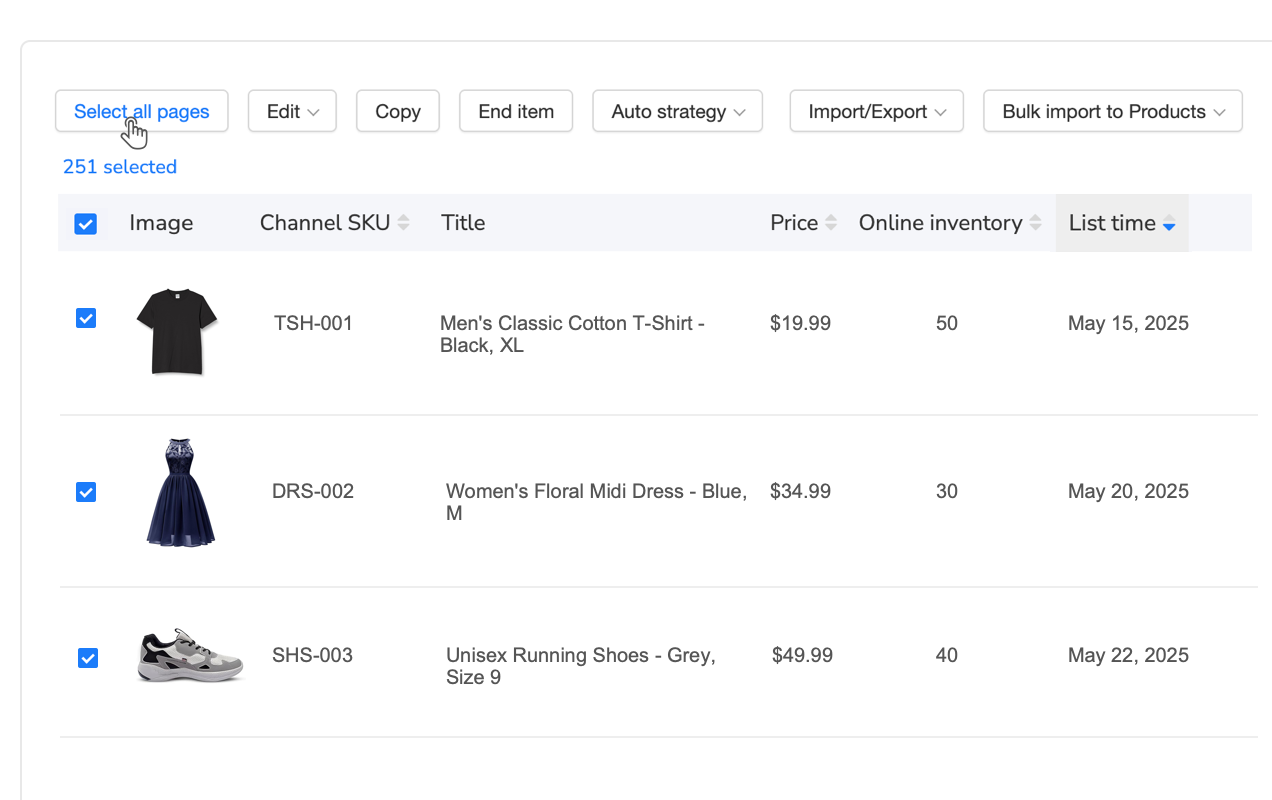
Bulk listing management tools handle template-based creation and mass updates. For example, Maxmerce’s Listing module offers Rule-Based Bulk Listing Editing that applies changes across hundreds of bundle listings simultaneously. Create a template with your title formula and bullet structure, define variables for component names and specs, then the system auto-populates component-specific details for each bundle. Need to add “Prime Eligible” to all 200 bundle titles? Update the template once, click apply, and the system propagates changes to 200 listings in 2 minutes—versus 5+ hours of manual copy-paste-save clicking.
The time savings compound when you’re testing title variations for conversion optimization. Want to A/B test “Complete Grooming Kit” versus “Professional Grooming Set” across 50 bundles? With bulk tools, that’s a 5-minute template change. Manually, that’s another 12-hour weekend project you’ll probably skip because the effort seems excessive.
7 Costly Bundle Mistakes (And How to Avoid Them)
1. Random Product Combinations (No Theme)
Mistake: Bundling unrelated items like “flashlight + dog toy + notebook” hoping someone needs all three.
Consequence: Confuses customers (why are these together?), low conversion rates, potential policy violations for non-complementary items.
Solution: Bundle complementary items solving a single use case—camping gear together, dog care together, office supplies together. Ask “Would a customer logically buy these together?”
2. Ignoring Expiration Date Compliance (Consumables)
Mistake: Bundling consumables with different expiration dates—June 2026 vitamins mixed with September 2026 vitamins.
Consequence: Listing suppression within 48 hours under October 2024 policy, $500-$2,000 lost sales, potential customer complaints about receiving near-expiration products.
Solution: Source same production batch, verify dates match at your receiving dock before bundling, get supplier guarantees in writing.
3. Overpricing Bundle vs Individual Items
Mistake: Bundle priced at $32 when individual items total $28 separately.
Consequence: Zero sales, negative reviews complaining about price gouging, customers just buy items separately.
Solution: Offer 15-25% savings versus individual purchase to incentivize bundle. The convenience should cost less, not more.
4. Underestimating FBA Fees for Larger Bundles
Mistake: Bundling large or heavy items without calculating dimensional weight fees first.
Consequence: $8-$15 FBA fees eat entire margin, bundle becomes unprofitable despite decent COGS.
Solution: Calculate size tier fees BEFORE creating bundles using Amazon’s FBA Revenue Calculator. Favor lightweight items—3 small items often stay in standard size tier ($4-$5 fee) while 3 large items jump to large bulky tier ($8-$15 fee).
5. No Inventory Buffer for Bundle Components
Mistake: Selling bundles with components allocated at 100%—if one component stocks out, entire bundle becomes unavailable.
Consequence: Bundle out-of-stock even though you have inventory of 2 out of 3 components, lost sales, Buy Box suppression.
Solution: Maintain 10-15% component buffer OR use real-time multi-channel sync that reallocates inventory dynamically as orders flow through.
6. Copying Competitor Bundles Without Differentiation
Mistake: Creating identical bundle as 5 existing competitors—same components, same price range, no unique value.
Consequence: Enter Phase 3 price war immediately, no first-mover advantage, margin compression from day one.
Solution: Add unique component (include a fourth item competitors don’t), improve quality (upgrade from basic to premium version), or find uncrowded bundle niches where competition is minimal.
7. Neglecting Bundle-Specific PPC Campaigns
Mistake: Only running PPC for individual items, not bundles, assuming organic traffic will find bundles.
Consequence: Bundle listings get zero traffic, rely entirely on organic search which takes 60-90 days to build, bundles never gain traction.
Solution: Create separate campaigns targeting “kit,” “bundle,” “set,” “combo,” “package” keywords. Budget split: 60% individual items (defensive), 40% bundles (offensive for high-AOV buyers).
Frequently Asked Questions: Amazon Product Bundling Strategy
Q: Can I create bundles with products from different brands?
A: Amazon permits multi-brand bundles ONLY if you have explicit authorization from all brand owners. Without authorization, multi-brand bundles risk immediate removal and potential account suspension. Single-brand bundles (your own brand OR authorized reseller of one brand) are safest. If you private label some components and source others, ensure you have resale rights documented. The authorization requirement is strict—assume you need written permission unless you own all brands in the bundle.
Q: What’s the difference between virtual bundles and physical bundles on Amazon?
A: Virtual bundles are inventory-linked listings where Amazon combines items from separate locations at fulfillment (FBM only, no FBA). Physical bundles are pre-packaged units you ship as single items (FBA eligible). Virtual bundles cost $0 in prep but require complex inventory tracking and cannot use Prime badge. Physical bundles cost $0.80-$3.50 per unit to prep but qualify for Prime badge and typically convert 15-25% better. Most high-volume sellers use physical FBA bundles for competitive advantage, but virtual bundles work well for testing concepts before committing to prep investment.
Q: How do I handle bundle inventory across Amazon, eBay, and Walmart simultaneously?
A: Multi-channel bundle inventory requires real-time synchronization because one bundle sale decrements multiple component SKUs across all platforms. Manual management via spreadsheets takes 10-15 minutes per order (16+ hours daily for 100 orders). Automated systems like Maxmerce’s Listing module connect via API to update component quantities across all marketplaces within 5-15 seconds, preventing overselling while maximizing inventory efficiency. For 500+ bundle SKUs, automation becomes essential—manual tracking becomes mathematically impossible at that scale.
Q: Are bundles subject to the same Amazon fees as individual products?
A: Yes, bundles pay standard referral fees (8-15% based on category) and FBA fees based on the bundle’s total size/weight. The fee difference matters: a small item might be $3.22 FBA fee, but bundling 3 small items creates a “large standard” package at $5.20+ FBA fee—not 3× the small fee, but still significantly more. Always calculate fees using Amazon’s FBA Revenue Calculator BEFORE creating bundles. Some bundles lose money due to size tier increases that sellers didn’t anticipate.
Q: Can I use FBA for virtual bundles?
A: No. Amazon restricts virtual bundles to Fulfillment by Merchant (FBM) only. If you want FBA eligibility (Prime badge, Amazon fulfillment, better conversion rates), you must create physical pre-packaged bundles. This trade-off is why most sellers test concepts as virtual bundles (zero prep investment, validate demand), then convert successful bundles to physical FBA versions once they’ve proven 20-30 sales demonstrate consistent demand.
Q: What’s the October 2024 consumables bundle policy change?
A: Effective October 15, 2024, Amazon requires all consumable bundles (food, supplements, personal care, beauty) to have identical expiration dates across every unit in the bundle. Different expiration dates trigger automatic listing suppression within 48-72 hours. Sellers must source same-batch inventory and verify dates at receiving. This applies to both virtual and physical consumable bundles. Enforcement is immediate—Amazon scans dates during FBA receiving and suppresses non-compliant listings automatically.
Q: How long does first-mover advantage last for new bundles?
A: Typically 90-120 days. Once you create a unique profitable bundle, competitors analyze Best Sellers Rank, estimate sales velocity, and copy successful combinations. During first-mover phase, maintain premium pricing (20-30% margins) while building reviews and sales history. When competitors enter Phase 2 (days 91-180), expect margin compression to 15-20% as they undercut pricing. By Phase 3 (180+ days), bundles often become commoditized with 10-15% margins, requiring exit strategies or differentiation to maintain profitability.
Q: Should I run separate PPC campaigns for bundles vs individual items?
A: Yes. Bundle-specific campaigns targeting “kit,” “set,” “bundle,” “combo,” and “package” keywords capture different search intent than individual product searches. Shoppers searching “dog grooming kit” want comprehensive solutions and typically have higher average order value than shoppers searching just “dog shampoo.” Typical strategy: run both individual product PPC (defensive, maintain rank for single-item searches) and bundle PPC (offensive, capture high-AOV buyers seeking complete solutions). Budget allocation: 60% individual items, 40% bundles for most sellers. Bundles often show higher ACOS initially (20-30%) but deliver higher absolute profit per conversion, making them worthwhile despite lower ROAS.
Action Plan: Launch Profitable Bundles in 30 Days
Week 1: Research & Planning
Start by analyzing your best-selling products—focus on the top 20% by sales velocity since these have proven demand. Identify complementary product combinations customers buy together by reviewing “Frequently Bought Together” and “Customers Also Bought” on your product pages and competitor listings. Research competitor bundles to find gaps and opportunities—look for categories where no one’s bundling yet or where existing bundles have poor reviews indicating room for improvement.
Calculate preliminary profitability using the formula from earlier: Bundle Price – Component COGS – Amazon Fees – Prep Costs = Net Profit. Select 3-5 bundle concepts to test based on highest estimated margins. Verify compliance especially for consumables under October 2024 policy—confirm you can source components with matching expiration dates if applicable.
Week 2: Create & List Test Bundles
Start with virtual bundles to minimize upfront investment—zero prep costs means if bundles don’t sell, you haven’t wasted money on labor and materials. Create optimized listings using the title formula and keyword-rich bullets from earlier sections. Set pricing at 20-25% below what customers would pay buying items individually—this discount sweet spot incentivizes purchases without destroying margins.
Launch with 20-30 units inventory per bundle to test demand without over-committing. Set up basic PPC campaigns with $5-10 daily budgets targeting bundle keywords (“kit,” “set,” “bundle” plus your product category). Monitor for 14-21 days to see which bundles gain traction.
Week 3-4: Monitor & Optimize
Track sales velocity—aim for 1-2 sales per day minimum to validate demand. Bundles selling less than 5 units in 14 days probably aren’t worth scaling. Monitor Buy Box percentage which should be 90%+ since you’re the sole seller initially. Use Amazon’s “Request a Review” button to collect early reviews—target 5-10 reviews before competitors discover your bundle.
Calculate actual profitability by comparing initial projections to real Amazon fees charged. Sometimes dimensional weight or unexpected fee tiers surprise sellers. Convert your top 2-3 performing bundles to physical FBA bundles to capture the Prime badge conversion lift. Discontinue bottom performers to avoid tying up inventory in slow-moving bundles.
Scaling Multi-Channel Bundles
Once you’ve validated bundles on Amazon, expand successful combinations to eBay and Walmart to diversify revenue and reduce platform dependency. Implement inventory sync systems to prevent overselling across channels—critical when the same components feed bundles on 3 platforms. Create channel-specific pricing strategies since eBay fees (12.9% final value fee) differ from Amazon (15% referral) and Walmart (15% referral plus potential WFS costs). Monitor cross-platform profitability because bundles profitable on Amazon aren’t always profitable on Walmart due to fee structure differences.
Managing bundle inventory across Amazon, eBay, and Walmart requires real-time synchronization to prevent costly overselling. Multi-channel sellers handling 100+ bundle SKUs save 70+ hours monthly with automated inventory sync. Explore Maxmerce’s Listing and Analytics modules designed specifically for multi-platform bundle management—start your 14-day free trial, no credit card required.
Master Amazon Product Bundling Strategy for Maximum Margins
Amazon product bundling strategy offers 15-40% margin advantages when executed correctly, but success requires navigating compliance landmines, calculating true costs, and managing multi-channel complexity. Virtual bundles minimize testing risk with zero prep costs while physical FBA bundles maximize sales with Prime badge authority. The October 2024 consumables policy requiring identical expiration dates isn’t optional—verify compliance immediately if you’re bundling food, supplements, beauty, or health products.
True profitability calculation must include ALL fees: referral fees, per-component FBA fees for virtual bundles or size tier fees for physical bundles, prep and packaging costs, and initial PPC investment to launch. The bundle that looks profitable at 30% margin on paper often shrinks to 18% when you account for the $4.58 FBA fee on the now-larger package size. Multi-channel bundle selling demands real-time inventory synchronization to prevent overselling—one Amazon sale must instantly update eBay and Walmart component availability within 5-15 seconds, not hours or days.
The Buy Box lifecycle follows a predictable pattern across virtually all bundles: first-mover advantage for 90-120 days at premium pricing, then competitor entry compressing margins 5-10%, then eventual commoditization requiring exit or differentiation strategies. Successful bundlers launch 3-5 test bundles monthly, convert top performers to FBA for Prime badge advantages, and exit poor performers quickly to avoid capital trapped in slow inventory.
The biggest operational challenge isn’t creating bundles—it’s managing component inventory across Amazon, eBay, and Walmart without the 73 hours monthly most sellers waste on spreadsheets. Multi-channel inventory systems eliminate this manual work by connecting to all your seller accounts via API, updating quantities in real-time as orders flow through each platform, preventing the overselling that triggers account warnings while maximizing inventory efficiency to 100% utilization.
If you’re managing 500+ orders monthly across multiple channels, explore tools designed specifically for this workflow. Start your 14-day free trial of Maxmerce—no credit card required—and see how automated bundle inventory sync transforms your operations from reactive firefighting to proactive growth.
