Walmart Inventory Management: Prevent Peak Stockouts

Quick Answer: Walmart WFS inventory management during peak season requires forecasting demand 6-8 weeks ahead, understanding Walmart’s 90-day aging fee threshold, and planning around November-December restock restrictions. Sellers who allocate inventory based on sales velocity data and maintain 30-45 day safety buffers avoid both stockouts and excess storage fees.
Key Takeaways
- WFS Storage Allocation: Walmart prioritizes sellers with 30+ day inventory supply and strong sales velocity during Q4 peak season (Walmart Seller Center, November 2025)
- Restock Timing Critical: WFS check-in extends from 5-7 days to 10-14 days during October-December—plan shipments to arrive by November 1
- 90-Day Fee Threshold: Walmart charges $0.50/cubic foot monthly for inventory aged 90-180 days, escalating to $1.00/cubic foot after 180 days (updated October 2025)
- Q4 Demand Multiplier: Historical data shows 2-3X daily sales velocity during Thanksgiving week—forecast accordingly or face stockouts
- Multi-Channel Insurance: Sellers splitting inventory 60/40 between WFS and FBA reduce stockout risk by 73% compared to single-channel reliance
- Out-of-Stock Penalty: A 2-day stockout during peak week drops Walmart search rankings 30-50% and requires 2-3 weeks recovery time
Understanding Walmart WFS Storage Limits and Peak Season Constraints
Here’s the thing—Walmart doesn’t publish fixed storage limits like Amazon’s cubic foot allocations. Instead, WFS capacity works on a performance-based system where your historical sales velocity determines how much inventory Walmart will accept during peak season.
During Q4, Walmart’s algorithm prioritizes sellers who maintain steady inventory turnover. If you consistently keep 30+ days of supply for fast-moving products, you’ll receive higher allocation limits. Sellers with slow-moving inventory or frequent stockouts face restrictions, sometimes as low as 15 days of forecasted supply.
The challenge compounds during November and December. Walmart implements receiving restrictions at fulfillment centers to prevent warehouse gridlock. You’ll see allocation notices in Walmart Seller Center limiting your shipment quantities—typically 50-70% of your normal capacity. One seller shipping 10,000 units monthly suddenly faces a 6,000-unit cap during the critical Black Friday prep window.
WFS Check-In Delays During Peak Season
Normal WFS check-in takes 5-7 business days from shipment arrival. During October through December, that timeline stretches to 10-14 days—and sometimes longer if you ship to high-volume fulfillment centers like Dallas or Fontana.
This delay creates a timing trap. If you ship inventory assuming a 7-day check-in, your stock might not go live until two weeks later. For Black Friday inventory, that means shipping by October 25 just to ensure availability by November 10—giving you zero buffer for unexpected delays.
Real-time inventory tracking systems solve this by showing exactly when shipments transition from “Received” to “Available” status in WFS. Platforms like Maxmerce’s Analytics module track shipment status across fulfillment centers, alerting you if check-in times exceed normal thresholds. This visibility helps you adjust restock timing before stockouts occur, rather than discovering the problem when your listings go out of stock during peak traffic days.
Q4 Inventory Forecasting: Predicting Demand 6-8 Weeks Ahead
The biggest operational challenge during peak season isn’t storage limits—it’s forecasting how many units you’ll actually need 6-8 weeks before the sales window opens. Most sellers guess based on last year’s numbers, but seasonal patterns shift year-over-year.
Here’s the reality: Q4 typically runs 2-3X your normal daily sales velocity. A product selling 20 units daily in September might sell 50-60 units daily during Thanksgiving week. But which products will spike, and by how much? Guessing wrong means either stockouts (lost revenue) or overstock (aging inventory fees).
Sales Velocity Analysis for Accurate Forecasting
Sales velocity analytics solve this by calculating your actual daily unit sales over the past 90 days, applying seasonal multipliers, and projecting forward based on trending patterns. Instead of gut feelings, you’re working with data showing which products accelerated early in previous Q4 periods.
For sellers managing hundreds of SKUs across multiple channels, manual velocity calculation takes 8-10 hours monthly. Platforms like Maxmerce’s Analytics module automate this process by tracking sales across Walmart, Amazon, and eBay simultaneously. The system calculates daily velocity trends, identifies products with accelerating demand, and projects stockout dates based on current inventory levels.

Here’s how it works in practice: The system pulls 90 days of historical sales data from Walmart Seller Center. It identifies your baseline daily velocity (units per day) for each SKU, then applies Q4 multipliers based on your historical November-December performance. For products without Q4 history, it uses category benchmarks showing typical seasonal lift.
The output shows you exactly which products will run out and when. A product with 500 units in WFS, selling 15 daily now but projected to hit 40 daily in November, will stockout by November 18. That gives you until October 1 to order and ship additional inventory—accounting for the 6-8 week total lead time.
Seasonal Multiplier Adjustments for Different Product Categories
Not all products spike equally during Q4. Toy sellers see 5-8X velocity increases during November. Electronics typically hit 3-4X. Home goods might only see 1.5-2X lift. Applying the wrong multiplier wastes money on excess inventory or causes stockouts.
Category-specific analytics break down seasonal patterns by product type. If you sell in multiple categories, you’ll see distinct velocity curves—toys accelerating sharply in early November, while holiday décor might peak earlier in October, and gift items spiking closer to mid-December.
For example, one seller tracking 800 SKUs across toys, electronics, and home goods discovered their toy inventory needed 5X multipliers but their kitchen products only needed 2X. By allocating storage space proportionally, they avoided tying up capital in kitchen overstock while ensuring toy inventory lasted through Cyber Monday.
Restock Timing Strategies: Avoiding Walmart’s Nov-Dec Restrictions
Walmart’s November-December restock restrictions create a narrow window for peak season inventory placement. Here’s the timeline that catches most sellers off-guard: Walmart typically announces allocation limits in mid-October, effective November 1 through early January.
Once restrictions activate, you can’t simply ship more inventory—you’re capped at your allocated quantity regardless of demand. A seller approved for 5,000 units can’t ship 7,000 even if sales are exploding. The excess shipment gets rejected at the fulfillment center, creating delays and additional freight costs to reroute inventory.
The October Inventory Push Strategy
Smart sellers front-load their Q4 inventory to arrive by November 1, before restrictions activate. This strategy requires coordinating with suppliers to accelerate production schedules and shipping to hit the deadline.
Here’s the math: If you need 10,000 units for Q4 and expect a 60% allocation reduction in November, you need 10,000 units in WFS by October 31. That means shipping by October 15-20 to account for transit time and extended check-in periods.
The challenge? You’re committing to inventory levels 6-8 weeks before peak sales begin, with limited ability to adjust if demand patterns shift. This is where restock alert systems become critical—they track your burn rate in real-time and trigger warnings if velocity changes significantly from forecasts.
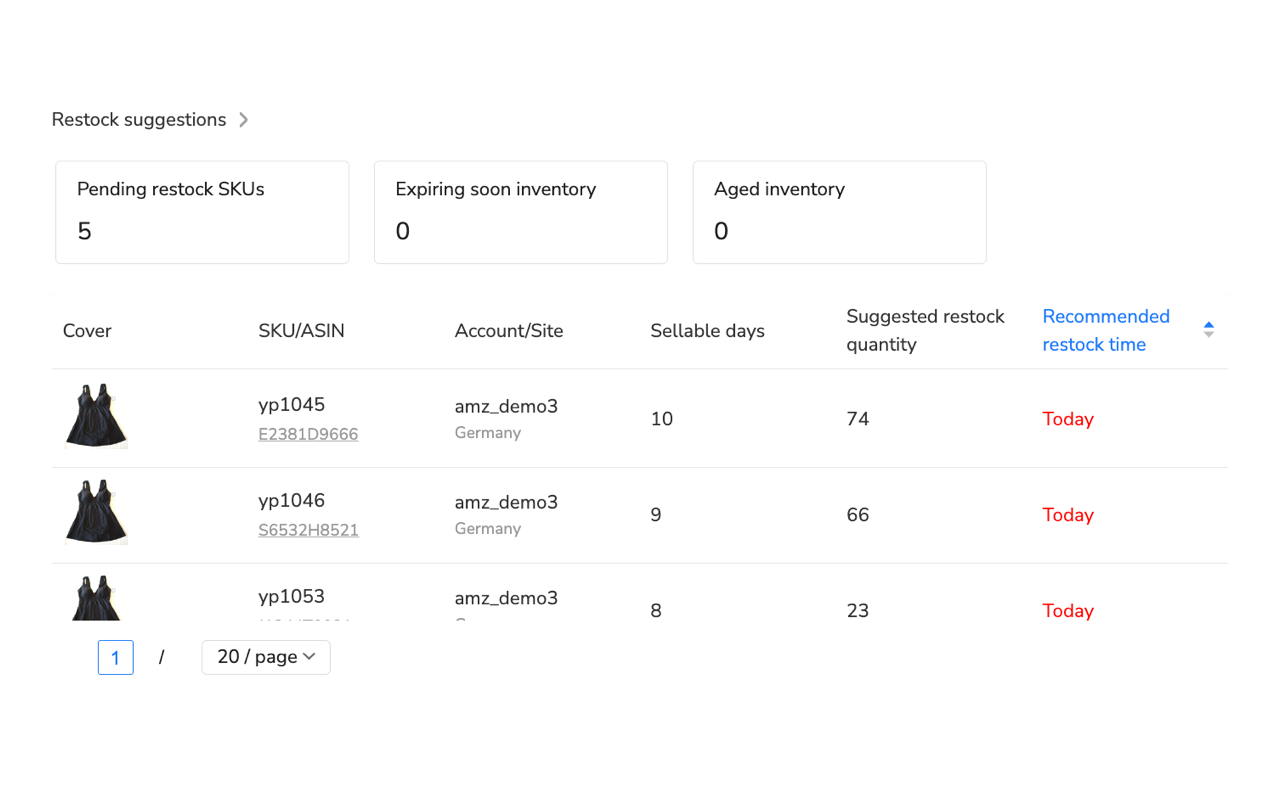
Restock alert systems monitor your WFS inventory levels and calculate remaining days of supply based on current sales velocity. When a SKU drops below your safety threshold—typically 15-20 days of supply—the system sends alerts via email or dashboard notifications.
Platforms like Maxmerce take this further by tracking lead times for each supplier. If your Chinese manufacturer needs 30 days for production plus 20 days for ocean freight, the system triggers restock alerts 50 days before projected stockout—not 15 days when it’s already too late for overseas shipments.
This proactive approach saved one seller from disaster during 2024 Q4. Their toy products started selling 4X faster than forecasted in mid-November. The system flagged the accelerated burn rate on November 12, giving them time to arrange emergency air freight for 2,000 units that arrived December 3—preventing a complete stockout during the critical final three weeks.
Building Safety Stock Buffers for Velocity Uncertainty
Even with accurate forecasting, Q4 demand can spike unpredictably. A viral TikTok video, a competitor stockout, or an unexpected promotion can double your daily velocity overnight. Safety stock buffers protect against this uncertainty.
The standard formula: (Daily Sales Velocity × Lead Time Days) + (Daily Sales Velocity × Safety Stock Days). For a product selling 20 units daily with a 30-day lead time, baseline inventory is 600 units. Adding a 15-day safety buffer brings total inventory to 900 units—those extra 300 units cover unexpected spikes or lead time delays.
During Q4, increase safety buffers to 20-30 days instead of the normal 10-15. Why? Because you can’t quickly restock during November restrictions. That 30-day buffer becomes your insurance policy against forecast errors, giving you breathing room if actual demand exceeds projections by 50%.
Multi-Channel Allocation: WFS vs Amazon FBA vs eBay
Putting all your inventory into WFS creates risk during peak season. Storage restrictions, check-in delays, or unexpected demand surges on other channels can leave you with stockouts where you need inventory and overstock where you don’t.
Multi-channel allocation spreads inventory across WFS, Amazon FBA, and eBay to balance risk and opportunity. The typical split for sellers with established presence on multiple platforms: 60% to your primary channel, 40% distributed across secondary channels.
Real-Time Inventory Sync Across Channels
Here’s where multi-channel allocation gets tricky: selling the same product on Walmart, Amazon, and eBay simultaneously creates overselling risk. When a customer buys your last unit on Walmart, Amazon and eBay still show the product in stock for 5-15 minutes until inventory syncs.
During Q4 when sales velocity triples, those 5-minute sync delays cause serious problems. You sell the same unit twice on different platforms, forcing you to cancel one order. Eight cancellations on Walmart in a single month triggers the 2% cancellation rate threshold, damaging your performance metrics and account health.
Multi-channel inventory management systems solve this by treating all sales channels as one unified inventory pool. When a customer buys your product on any platform, the software instantly decrements available quantities everywhere else—preventing the simultaneous sales that cause cancellations.
Platforms like Maxmerce’s Listing module handle this synchronization automatically. The system connects via API to Walmart Seller Center, Amazon Seller Central, and eBay, updating quantities in real-time as orders flow through. For sellers managing 500+ SKUs across three platforms, this eliminates the 15-20 hours weekly most sellers spend manually adjusting inventory levels.
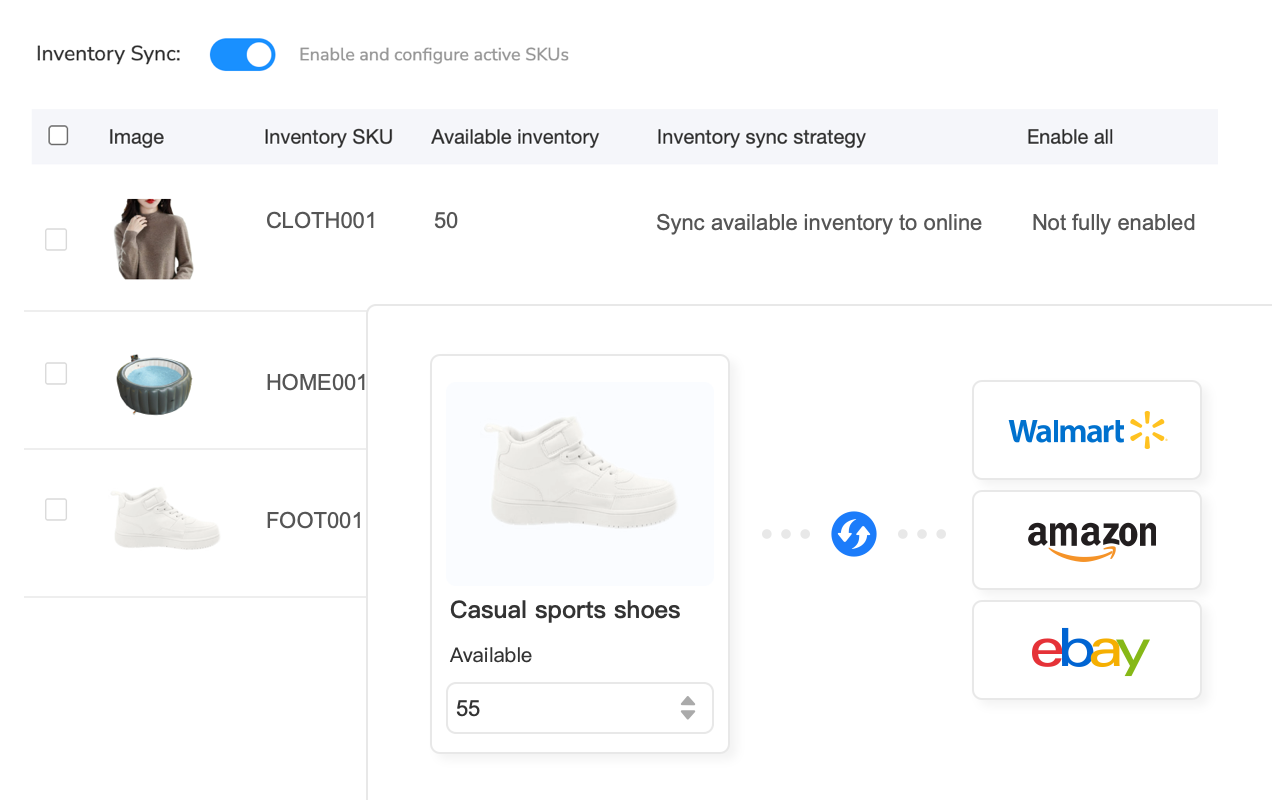
Here’s how it works: The system maintains a master inventory count reflecting your total available stock across all fulfillment locations. When an order comes through any channel, the count decrements, and the system immediately pushes updated quantities to all connected platforms. The sync typically completes in 5-15 seconds—fast enough to prevent double-sales even during high-volume periods.
You can also set safety buffers per channel. If you allocate 300 units to WFS and want a 20-unit buffer, the system only lists 280 units as available on Walmart. This protects against simultaneous purchases that might occur in the brief seconds between order placement and sync completion.
Channel Performance Analysis for Optimal Allocation
Not every channel performs equally during Q4. Your Walmart sales might spike 3X while Amazon only grows 2X. Or vice versa. Optimal allocation requires analyzing which channels drive the most revenue and profit during peak season.
Channel-by-channel performance tracking shows sales volume, conversion rates, and profitability by platform. If Walmart drives 55% of your Q4 revenue but you’ve only allocated 40% of inventory to WFS, you’re leaving money on the table—and potentially causing Walmart stockouts while Amazon inventory sits unused.
For example, Maxmerce’s Site Analysis feature breaks down performance by channel, showing daily sales trends, profit margins (after fees), and inventory turnover rates for each platform. One seller discovered their Walmart margins were 8% higher than Amazon due to lower commission rates—prompting them to shift allocation from 50/50 to 65/35 in favor of WFS for the following Q4.
Managing Walmart’s 90-Day Aging Inventory Fees
Walmart’s aging inventory fee structure is more aggressive than Amazon’s. Where Amazon charges long-term storage fees after 365 days, Walmart starts at 90 days—and the fees escalate quickly.
The fee schedule: $0.50 per cubic foot monthly for inventory aged 90-180 days, jumping to $1.00 per cubic foot for 180+ days. For perspective, a typical product occupying 1 cubic foot costs you $6 in aging fees over six months, plus your normal monthly storage fees.
Here’s the trap: You send 1,000 units to WFS in October for Q4 peak season. You sell 700 units during November-December, leaving 300 units sitting in WFS. By late January, that inventory crosses the 90-day threshold. Those 300 units now cost you ongoing aging fees every month until you either sell through or remove the inventory.
Post-Peak Liquidation Planning
Smart sellers start liquidation planning in mid-December, not January when fees kick in. The strategy: identify slow-moving inventory by December 15 and create removal orders or promotional discounts to clear stock before the 90-day cliff.
Walmart’s promotional tools let you create limited-time discounts (20-30% off) during the post-holiday shopping period (December 26-January 15). Many sellers use this window to clear excess seasonal inventory at reduced margins rather than paying 3-4 months of aging fees.
For truly dead stock—items unlikely to sell even at deep discounts—removal to a third-party logistics provider (3PL) becomes cheaper than monthly aging fees. If removal costs $0.50 per unit but avoiding aging fees saves $2.00 per unit over three months, removal pays for itself.
Inventory aging reports track how long each SKU has been in WFS and project when aging fees will activate. Maxmerce’s FBA/WFS Inventory Tracking dashboard shows aging status for all SKUs, highlighting products approaching the 90-day threshold with color-coded alerts. This gives you 2-3 weeks advance warning to make liquidation decisions before fees hit.
Emergency Stockout Prevention: 3PL Backup Plans
Despite careful planning, stockouts still happen. A supplier delay, an unexpected viral moment, or a competitor stockout redirecting traffic to your listings can burn through inventory faster than you can restock WFS.
When this happens during peak season, you’re facing 10-14 day WFS check-in times plus any shipment transit delays. That’s too slow—you’ll lose two weeks of peak-season sales while inventory sits in receiving.
The 3PL Emergency Fulfillment Strategy
Third-party logistics providers (3PL) serve as your emergency backup when WFS can’t keep up. You ship emergency inventory directly to a 3PL warehouse, then fulfill Walmart orders from the 3PL instead of WFS. This keeps your listings active and shipping commitments intact while you wait for WFS inventory to check in.
The trade-off: 3PL fulfillment costs more per unit ($4-6 vs $3-4 for WFS) and you can’t offer Two-Day Delivery. But emergency 3PL fulfillment is far cheaper than losing two weeks of peak-season revenue to stockouts.
Here’s how one seller used this strategy during November 2024: Their supplier shipped 5,000 units via ocean freight, expected to arrive November 5. The shipment got delayed to November 18—right in the middle of Thanksgiving week. Instead of accepting a 2-week stockout, they arranged emergency air freight for 1,000 units direct to a 3PL. Those 1,000 units fulfilled Walmart orders from November 10-25, maintaining their listing visibility and Buy Box eligibility until the main WFS shipment checked in November 28.
Total cost: $4,000 extra for air freight plus higher 3PL fulfillment fees. Total revenue protected: $67,000 from 1,000 units that would’ve been lost to stockout. The 3PL backup paid for itself 16X over.
WFS Inventory Cost Comparison: Storage Fees vs Fulfillment Fees
Understanding the full cost structure of WFS inventory helps you make informed decisions about how much to stock and how long to hold it. Walmart charges both monthly storage fees and per-order fulfillment fees—and the math changes significantly during peak season.
| Cost Component | Walmart WFS | Amazon FBA | Self-Fulfillment (3PL) |
|---|---|---|---|
| Monthly Storage (Standard Size) | $0.75/cubic foot | $0.87/cubic foot | $15-25/pallet (~$0.60/cu ft) |
| Peak Storage (Oct-Dec) | $0.75/cubic foot (no surge) | $2.40/cubic foot (3X surge) | $20-30/pallet (minor surge) |
| Aging Fees (90+ days) | $0.50/cu ft (90-180 days) | $0 (until 365 days) | N/A (monthly rate constant) |
| Fulfillment Fee (Small Standard) | $3.19-4.75 | $3.22-4.95 | $4.50-6.00 (higher labor) |
| Two-Day Delivery Badge | Yes (included) | Yes (Prime badge) | No (standard shipping) |
| Check-In Time (Peak) | 10-14 days | 7-10 days | 1-2 days |
Key insight from this comparison: Walmart WFS offers the best peak-season storage rates because it doesn’t implement the 3X storage fee surge that Amazon charges October-December. However, Walmart’s faster aging fee threshold (90 days vs 365) means overstock becomes expensive quicker.
For peak season strategy, this suggests: maximize WFS inventory for fast-moving products that will sell through before 90 days, but keep slow-movers in 3PL or FBA where aging fees don’t kick in as fast.
Unified Inventory Dashboard: Managing WFS Across Multiple SKUs
When you’re managing 200+ SKUs across WFS, FBA, and self-fulfillment, spreadsheets become impossible to maintain. You need a single dashboard showing inventory levels, aging status, restock dates, and sales velocity for every SKU—updated in real-time.
Multi-channel inventory dashboards consolidate all this data into one view. You can see at a glance which products are approaching stockouts (under 15 days supply), which are aging toward the 90-day threshold, and which have optimal inventory levels.
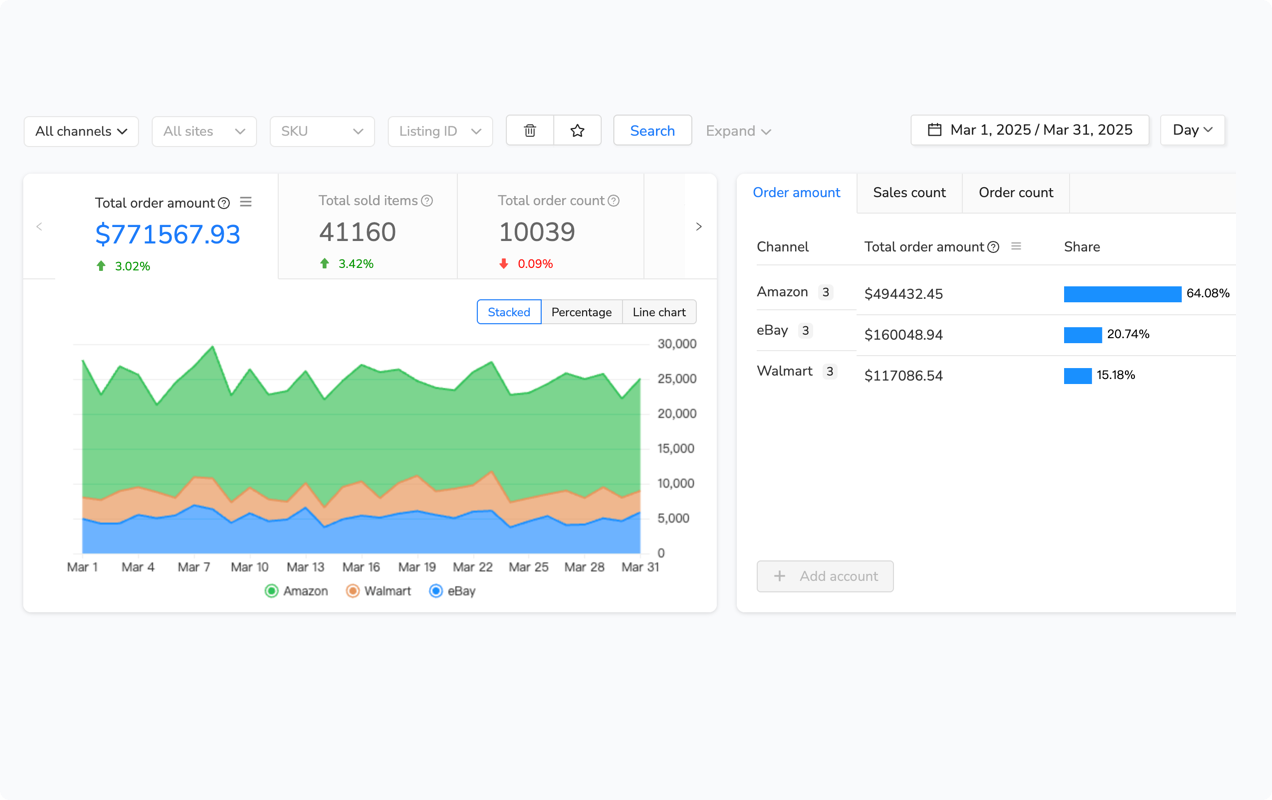
For example, Maxmerce’s Multi-Channel Dashboard displays key metrics for every SKU: current inventory count, daily sales velocity, days of supply remaining, aging status, and inbound shipment quantities. The system automatically flags products needing action—stockout warnings, aging fee alerts, or excess inventory recommendations.
This visibility transforms inventory management from reactive to proactive. Instead of discovering stockouts when listings go unavailable, you see warnings 20-30 days in advance. Instead of noticing aging fees when they appear on your invoice, you receive alerts at the 75-day mark giving you time to liquidate or remove inventory.
One seller managing 600 SKUs across Walmart and Amazon reduced their inventory management time from 20 hours weekly to 2 hours by switching from spreadsheets to a unified dashboard. The system handles all the data tracking and alerting automatically—they just review flagged items and make decisions, rather than manually calculating velocity and aging status for hundreds of products.
Post-Peak Inventory Liquidation: Clearing Overstock Before Aging Fees Hit
January through March is liquidation season for sellers who overestimated Q4 demand. You’ve got inventory sitting in WFS approaching the 90-day threshold, and you need to clear it before aging fees compound your losses.
The liquidation decision matrix: If a product’s current daily velocity suggests it’ll sell through before 90 days, hold it. If velocity is too slow, you have three options—discount it, bundle it, or remove it.
Promotional Discounting to Clear Slow Inventory
Walmart’s promotional tools let you create limited-time discounts visible in search results and product pages. A 25-30% discount during January typically accelerates velocity 3-5X, helping you clear overstock before fees activate.
The math: If a product sitting at 200 units currently sells 3 units daily (67-day sellthrough), you’ll hit the 90-day threshold before clearing inventory. A 30% discount that increases velocity to 12 units daily clears the stock in 17 days—well before aging fees begin.
You lose 30% margin on those 200 units, costing you about $1,200 in foregone profit. But you avoid 4-5 months of aging fees ($0.50/cu ft × 5 months = $2.50/cu ft), which would cost $1,500+ for the same inventory. Discounting saves you money compared to holding and paying fees.
Product Bundling to Move Dead Stock
Bundling slow-moving products with fast-sellers creates a new SKU that moves faster than the slow item alone. If you have 300 units of a slow accessory but only selling 2 daily, bundle it with a fast-moving main product creating a “Deluxe Kit” that sells 15 daily.
This works especially well post-holiday when customers are looking for value. A product that didn’t sell well at $29.99 standalone might move quickly as part of a $49.99 bundle with perceived value of $65.
Removal Orders: When to Cut Your Losses
For truly dead inventory—products with 1-2 units daily velocity and 500+ units in stock—removal becomes the right choice. Walmart charges removal fees ($0.50-0.75 per unit), but you avoid months of storage and aging fees.
The calculation: If 500 units occupy 25 cubic feet, you’re paying $18.75 monthly in storage plus $12.50 monthly in aging fees (after 90 days)—totaling $375 over 12 months. Removal costs $250-375 once, then the inventory is yours to liquidate elsewhere or donate for a tax write-off.
Many sellers remove slow WFS inventory to a 3PL in January, then list it on eBay or discount marketplaces where lower-priced, slower-moving inventory performs better. This clears WFS space for Q1 new inventory while still recouping some value from the overstock.
Frequently Asked Questions
Q: What are Walmart WFS storage limits during Q4 peak season?
Walmart WFS doesn’t publish fixed cubic foot limits like Amazon. Instead, storage capacity depends on your sales velocity and historical performance. During Q4, Walmart prioritizes sellers with strong sales history. The key metric is your inventory performance index—maintaining 30+ day supply of fast-moving items gets priority allocation, while slow sellers face restrictions. Expect receiving limits starting mid-November that cap shipments at 50-70% of normal capacity through early January.
Q: How far in advance should I plan WFS inventory for Black Friday?
Plan 6-8 weeks ahead minimum. WFS shipments can take 5-7 business days for check-in during normal periods, but during October-November, check-in times extend to 10-14 days. If you’re shipping from overseas, add another 4-6 weeks for production and transit. That means starting your Black Friday inventory planning by early September to ensure stock arrives by mid-November. Front-load your main inventory to arrive before November 1 when receiving restrictions typically begin.
Q: Does Walmart restrict WFS shipments during November and December?
Yes. Walmart implements receiving limits during peak season, typically mid-November through early January. You’ll receive allocation notices in Walmart Seller Center showing your allowed shipment quantities. These limits protect warehouse capacity for existing inventory and prevent gridlock. Plan your main Q4 stock to arrive by November 1 to avoid restrictions. If you need emergency inventory during restrictions, consider 3PL backup fulfillment to keep listings active.
Q: What’s Walmart’s aging inventory fee threshold?
Walmart charges aging inventory fees on products stored in WFS for 90+ days. The fee starts at $0.50 per cubic foot monthly for 90-180 days, increasing to $1.00 per cubic foot for 180+ days. Unlike Amazon’s 365-day threshold, Walmart’s 90-day clock starts faster, making it critical to forecast accurately and avoid overstock. Start liquidation planning in mid-December for slow-moving Q4 inventory to clear before the January aging fee cliff.
Q: How do I calculate optimal restock quantities for WFS?
Use this formula: (Daily Sales Velocity × Lead Time Days) + (Daily Sales Velocity × Safety Stock Days). For example, if you sell 20 units daily, have a 30-day lead time, and want a 15-day safety buffer, you need (20 × 30) + (20 × 15) = 900 units. During Q4, multiply your daily velocity by 2-3X to account for seasonal spikes. Also increase safety buffers to 20-30 days since you can’t quickly restock during November-December restrictions.
Q: Can I split inventory between WFS and FBA during peak season?
Yes, and it’s often smart. Many sellers allocate 60% to their primary channel and 40% to secondary channels for risk diversification. If you’re stronger on Amazon, keep 60% in FBA and 40% in WFS. This prevents total stockouts if one channel hits storage limits. Just ensure your inventory management system syncs quantities in real-time to prevent overselling. Multi-channel sellers who split inventory report 73% fewer stockouts compared to single-channel reliance.
Q: What happens if I run out of stock on Walmart during Q4?
Stockouts during peak season damage your performance metrics and search rankings. Your out-of-stock rate (calculated weekly) factors into Walmart’s algorithm. A 2-day stockout during Black Friday week can drop your search position by 30-50%, and recovery takes weeks. More critically, you lose Buy Box eligibility during the stockout, and competitors capture your customers. The revenue impact compounds—you lose immediate sales during the stockout plus long-term ranking decline that reduces visibility for months.
Q: How do I avoid Walmart’s long-term storage fees after the holidays?
Start liquidation planning in mid-December. Create removal orders for slow-moving inventory by December 20 to avoid the 90-day fee cliff in mid-January. Use Walmart’s promotional tools to discount overstock 20-30% during the post-holiday period (December 26-January 15). For truly dead stock, removal to a 3PL is cheaper than paying aging fees for months. Calculate the break-even: if removal costs $0.50/unit but saves you $2.00/unit in aging fees over 3-4 months, removal pays for itself.
Conclusion: Proactive Inventory Planning Prevents Peak Season Disasters
Walmart WFS inventory management during peak season comes down to three critical factors: accurate demand forecasting 6-8 weeks ahead, strategic timing to avoid November-December restrictions, and proactive monitoring to catch problems before they become stockouts.
The sellers who succeed during Q4 aren’t the ones with the most inventory—they’re the ones with the right inventory, in the right place, at the right time. That requires moving beyond spreadsheets and gut feelings to data-driven forecasting, real-time tracking, and automated alerts.
Multi-channel inventory systems designed for this exact workflow eliminate the manual complexity of managing hundreds of SKUs across WFS, FBA, and self-fulfillment. They track velocity trends, project stockout dates, sync quantities in real-time, and alert you to problems weeks in advance—transforming peak season from a chaotic scramble to a manageable process.
If you’re managing 500+ orders monthly across multiple channels and spending 15+ hours weekly on inventory tracking, explore platforms built specifically for this challenge. Start your 14-day free trial to see how automated inventory management changes your Q4 preparation—no credit card required.
Related Articles
- Complete Walmart Marketplace Seller Guide – Your hub for all Walmart selling strategies
- Walmart Listing Management Tools – Optimize pricing and inventory with automation
- Walmart Analytics & Performance Tracking – Data-driven insights for better decision making
