How to Improve Amazon PPC Performance: Campaign Optimization Guide

You’re spending $3,000 monthly on Amazon PPC but watching your ACoS climb above 40% while competitors seem to thrive with half your ad spend. The culprit? Most sellers manage campaigns reactively—adjusting bids after noticing poor performance rather than implementing systematic optimization strategies that prevent waste before it happens.
Improving Amazon PPC performance isn’t about spending more—it’s about spending smarter. The difference between profitable and unprofitable campaigns comes down to campaign structure, timing strategies, keyword targeting precision, and continuous optimization. This guide shows you exactly how to reduce ACoS by 20-35%, increase ROAS, and build campaigns that consistently deliver results.
Key Takeaways
- Campaign structure matters more than budget—Three-tier structure (automatic/broad/exact) outperforms single-campaign approaches by 30-45% (Amazon Advertising, 2025)
- Dayparting cuts wasted spend fast—Adjusting bids by time-of-day can reduce ACoS by 15-25% within 14 days (Q4 2024 advertising data)
- Negative keywords provide immediate ROI—Adding 20-30 high-spend non-converters saves $400-800 monthly for most sellers (Based on $2,000 monthly ad spend)
- Automatic campaigns aren’t set-and-forget—Mine search term reports weekly to discover profitable exact match targets (Best practice, Amazon Seller Central)
- Budget allocation determines efficiency—50% budget on proven exact match keywords delivers 2-3X better ROAS than equal distribution (Industry benchmark, 2025)
- Automation saves 10+ hours weekly—PPC management platforms handle bid adjustments, budget pacing, and keyword harvesting automatically (Time study data)
Why Most Amazon PPC Campaigns Underperform
The average Amazon seller wastes 30-40% of their advertising budget on non-converting clicks. Here’s why: You launch a Sponsored Products campaign, set daily budgets, choose automatic targeting, and wait. Within days, your campaign exhausts its budget by 2pm—missing the 7pm-10pm peak shopping window when conversion rates run 2-3X higher. Meanwhile, your ads show for search terms like “cheap alternatives to [your brand]” and “[competitor name] reviews,” burning through budget on shoppers who’ll never buy from you.
The real problem isn’t Amazon’s ad platform—it’s the lack of strategic optimization. Most sellers treat PPC like a lever: turn it on, adjust the budget up or down, and hope for results. But high-performing campaigns require structured approaches across five critical areas.
The Five Performance Killers
- Poor campaign architecture—Mixing automatic and manual targeting in single campaigns prevents granular optimization
- Timing blindness—Running ads 24/7 without accounting for hourly conversion rate fluctuations wastes 20-30% of budget
- Keyword bloat—Automatic campaigns accumulate hundreds of irrelevant search terms that drain budgets over time
- Budget misallocation—Spreading budget equally across discovery and proven keywords dilutes performance
- Manual management overhead—Checking 10-15 campaigns daily takes 2-3 hours, making optimization unsustainable

The solution starts with campaign structure—the foundation that enables all other optimizations.
Build a High-Performance Campaign Structure
Campaign structure determines how effectively you can improve. Sellers running “one campaign per product” can’t isolate what’s working vs. what’s wasting money. The three-tier architecture solves this by separating discovery from efficiency.
The Three-Tier Campaign Framework
Tier 1: Automatic Discovery Campaigns (20% of budget)
These campaigns identify converting keywords you haven’t thought of. Set them to “close match” targeting to balance discovery with relevance. Run for 14-30 days, then harvest top performers into manual campaigns. Don’t pause automatic campaigns—they continuously discover new search terms as market trends shift.
Tier 2: Manual Broad/Phrase Match (30% of budget)
Take keywords that generated 3+ conversions in automatic campaigns and create manual broad or phrase match campaigns. These capture search volume variations while maintaining relevance. Broad match for high-volume terms (e.g., “wireless headphones”), phrase match for modifier-heavy terms (e.g., “noise cancelling headphones for travel”).
Tier 3: Manual Exact Match (50% of budget)
Allocate half your budget here—these are proven converters with known costs. Bid aggressively on exact match keywords that deliver ACoS below your target. These campaigns provide consistent, predictable results that fund discovery efforts in Tiers 1 and 2.
Campaign Naming for Scalability
Use a consistent naming convention that makes performance analysis instant:
- Auto-[ASIN]-[Date]—”Auto-B08XYZ-Nov2025″
- Manual-Broad-[Theme]—”Manual-Broad-Wireless”
- Exact-[Keyword]-[ASIN]—”Exact-NoiseCancel-B08XYZ”
When you’re managing 30+ campaigns across multiple products, this naming system lets you filter and analyze performance by campaign type, ASIN, or keyword theme in seconds.
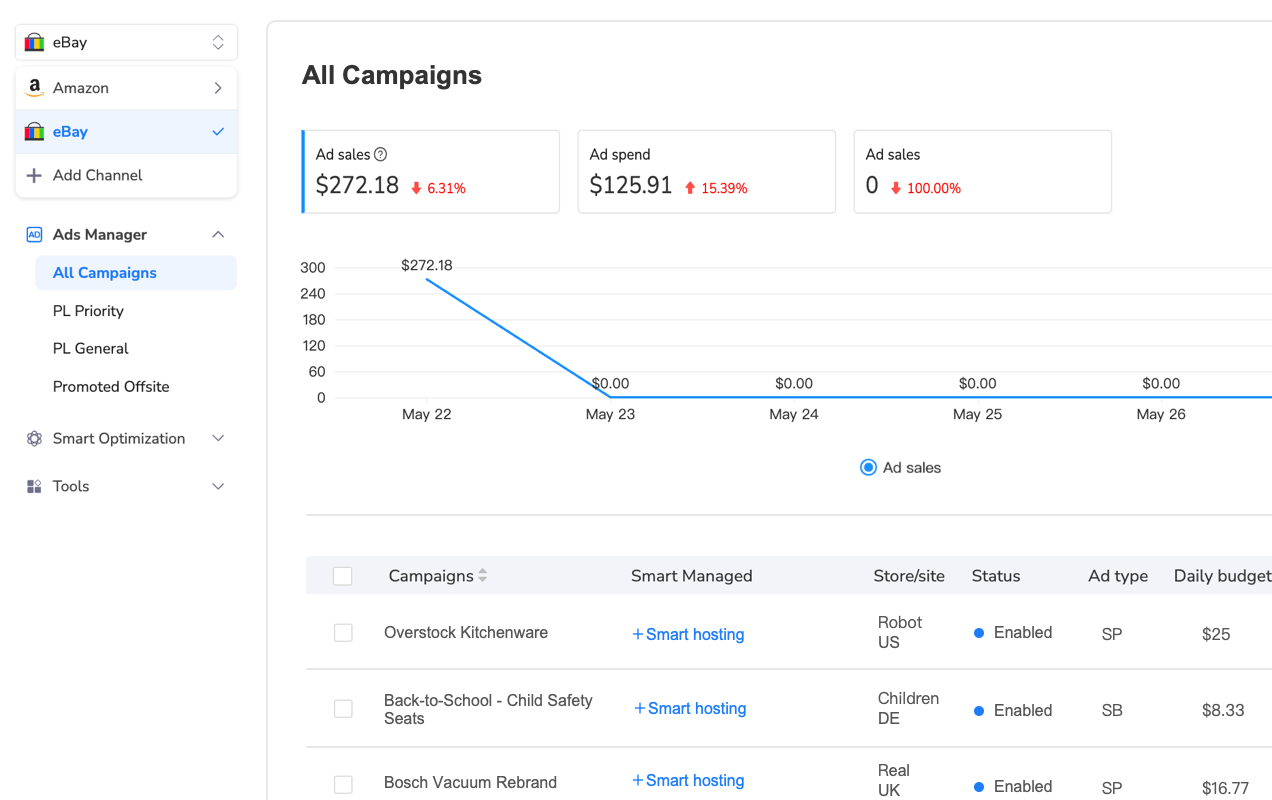
Managing this structure manually becomes overwhelming fast. Most sellers spend 10-15 hours weekly just reviewing campaigns—before making any optimizations. Multi-channel advertising platforms solve this by aggregating performance data across all campaign tiers into unified dashboards.
For sellers running 20+ campaigns simultaneously, platforms like Maxmerce’s Advertising module consolidate automatic, broad, and exact match campaign data into single views. You see which discovery keywords are ready for graduation to manual campaigns, which exact match terms need bid increases, and which broad match campaigns are accumulating wasted spend—all without opening 15 separate campaign reports. This reduces daily management time from 2-3 hours to 20-30 minutes while ensuring you never miss optimization opportunities.
set up Dayparting for Immediate ACoS Reduction
Your ads run 24/7, but your customers don’t shop evenly throughout the day. The typical Amazon seller sees conversion rates peak between 7pm-10pm (when people browse after work) and crater between 2am-6am (when clicks come from accidental taps or international traffic). Running the same bid at 3am as you do at 8pm wastes 20-30% of your daily budget.
Dayparting solves this by adjusting bids based on hourly performance patterns. Here’s the reality: That $1.50 bid that delivers 8% conversion rate at 8pm generates 2% conversion rate at 3am—raising your effective CPA from $18.75 to $75.00 for the same click cost. Dayparting reduces bids during low-conversion hours and increases them during peak periods, optimizing every dollar spent.
How to Build a Dayparting Strategy
Step 1: Analyze Your Hourly Conversion Patterns
Pull your last 30 days of campaign data and segment by hour. Most sellers discover three distinct patterns:
- Peak Hours (7pm-10pm)—Conversion rates 2-3X baseline, often delivering 40-50% of daily sales
- Normal Hours (10am-7pm)—Consistent baseline performance
- Dead Hours (12am-6am)—Conversion rates drop 40-60%, clicks often from non-US traffic
Step 2: Set Bid Adjustment Rules
Don’t just pause campaigns during off-hours—you’ll miss the occasional late-night buyer. Instead, scale bids proportionally:
- Peak hours—Increase bids 30-50% to maximize visibility when buyers are ready
- Normal hours—Maintain baseline bids
- Dead hours—Decrease bids 50-80% to preserve budget without going dark
Step 3: Account for Day-of-Week Patterns
Weekends often show different patterns than weekdays. B2B products may see 70% of conversions Monday-Friday, while consumer electronics peak Saturday-Sunday. Apply separate dayparting rules for weekday vs. weekend performance.
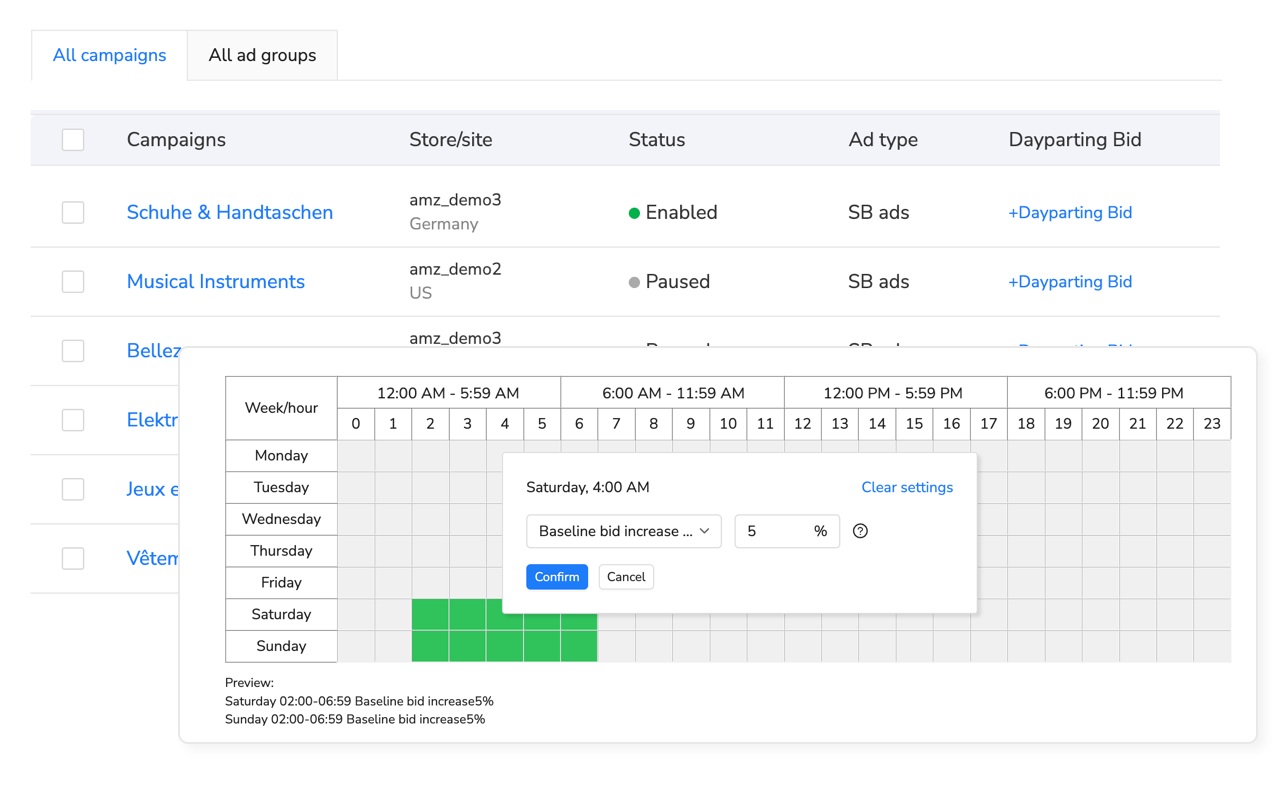
The challenge? Amazon doesn’t offer native dayparting—you’d need to manually adjust hundreds of keyword bids twice daily (increasing before peak hours, decreasing after). That’s 14+ hours weekly of pure mechanical work.
Automation platforms eliminate this overhead entirely. For example, Maxmerce’s Dayparting Bid Optimizer analyzes your historical performance data to identify peak conversion windows, then automatically increases bids 30-50% during high-converting periods and decreases 50-80% during low-activity times. The system works continuously—adjusting bids every hour based on real-time performance patterns rather than requiring you to remember to increase bids at 6:30pm every evening. Sellers implementing automated dayparting typically see 15-25% ACoS reduction within two weeks as budget shifts from off-peak waste to peak-hour opportunity.
Dayparting Budget Optimization
Beyond bid adjustments, consider budget pacing. If your $100 daily budget exhausts by 2pm, you’re missing the 7pm-10pm peak entirely. Budget pacing tools allocate spend throughout the day to ensure sufficient budget remains during peak conversion hours. This prevents the common scenario where aggressive morning bidding captures low-converting clicks, leaving no budget for high-converting evening traffic.
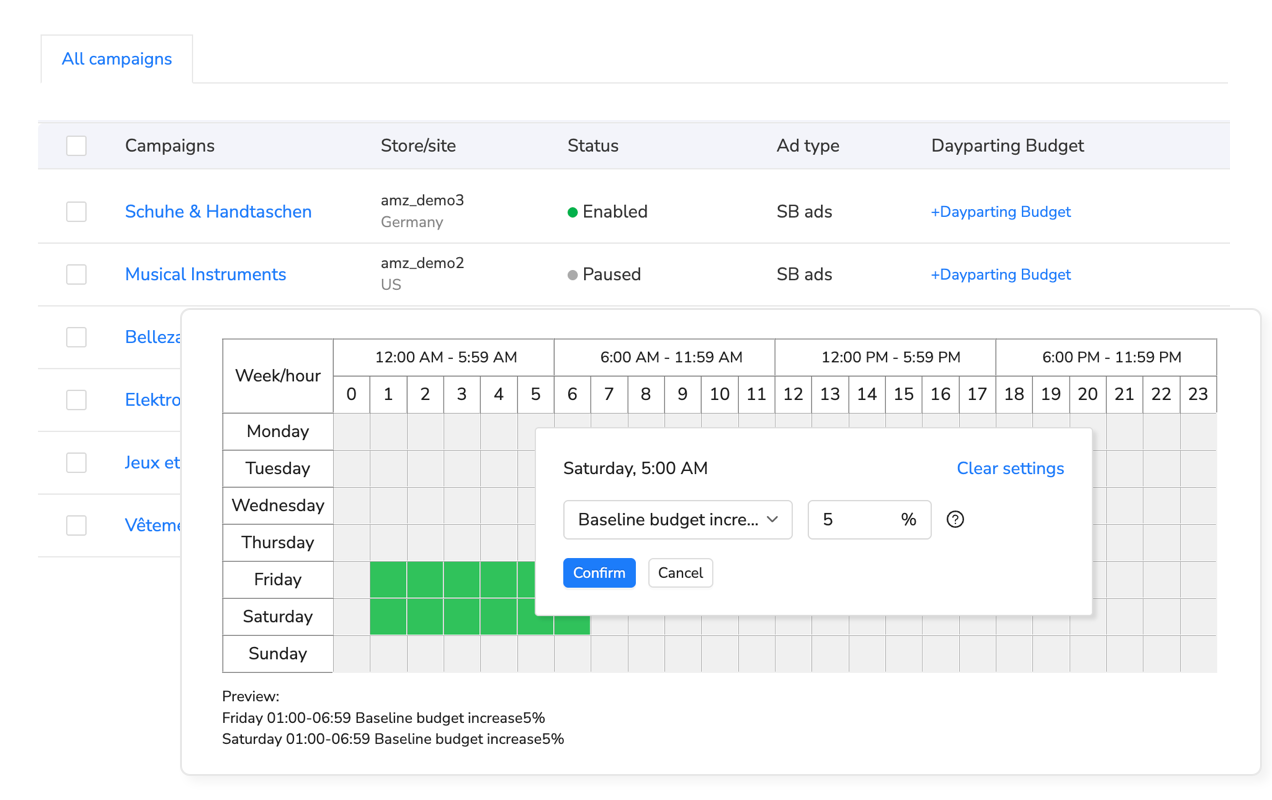
Advanced advertising platforms provide budget pacing alongside bid optimization. Maxmerce’s Dayparting Budget Optimizer works in conjunction with the bid optimizer—it allocates larger portions of your daily budget to profitable time slots while maintaining minimum presence during off-hours. If your data shows 50% of conversions happen between 7pm-10pm (3 hours), the system reserves 40-50% of your daily budget for that window rather than letting morning clicks consume everything. This prevents mid-day budget exhaustion and ensures your ads remain visible when buyers are actually ready to purchase.
Master Negative Keyword Strategy
Every automatic campaign accumulates junk traffic—searches that trigger your ads but never convert. A seller advertising “premium leather wallet” will show for “cheap wallet,” “vegan wallet,” and “wallet free shipping”—none of which represent buyers seeking premium leather products. Without continuous negative keyword harvesting, these irrelevant clicks can consume 30-40% of your automatic campaign budgets.
The Weekly Negative Keyword Ritual
Step 1: Download Search Term Reports
Pull the last 7-14 days of search term data for all automatic and broad match campaigns. Sort by spend descending—you’re looking for high-spend, zero-conversion terms.
Step 2: Identify Negative Keyword Patterns
Don’t just negate individual terms—identify patterns:
- Price qualifiers—”cheap,” “budget,” “affordable” (if you’re premium priced)
- Competitor brands—”[competitor] alternative,” “[competitor] vs”
- Wrong product types—If you sell wallets, negate “purse,” “handbag,” “clutch”
- Informational queries—”how to,” “best,” “review,” “tutorial”
Step 3: Apply Negatives Strategically
Add negatives at the campaign level for broad exclusions (so they apply to all ad groups) and at the ad group level for specific exclusions. Use phrase and exact match negatives—negative broad match can be too aggressive.
The 3X Rule for Negative Keywords
Don’t negate too early. If your average cost-per-sale is $20, let a keyword spend up to $60 before negating (3X your CPA). Some keywords convert slowly—especially higher-priced products where buyers research extensively. Negating after just $10-15 spend might eliminate keywords that would eventually convert.

Manual negative keyword harvesting requires downloading search term reports weekly, sorting through hundreds of rows, identifying patterns, and applying negatives across multiple campaigns. For sellers managing 10+ campaigns, this process takes 2-3 hours weekly—and it’s easy to miss high-spend terms buried in campaign-specific reports.
Automated keyword optimization tools continuously analyze search term performance across all campaigns simultaneously. Platforms like Maxmerce’s Dynamic Keyword Optimizer monitor search term reports daily, automatically identifying poor-performing queries based on your threshold settings (spend limit, minimum impressions, max ACoS). When a search term hits $60 spend with zero conversions (your 3X CPA threshold), the system automatically adds it as a campaign-level negative keyword—preventing future wasted clicks without requiring you to manually review reports. This automated harvesting saves 2-3 hours weekly while ensuring you never miss budget-draining terms hiding in automatic campaign reports.
Positive Keyword Harvesting
The flip side of negative keywords? Discovering winners. Your automatic campaigns continuously reveal high-converting search terms that aren’t in your manual campaigns yet. When you spot a search term that’s generated 3-5 conversions at acceptable ACoS in automatic campaigns, promote it to a manual exact match campaign with higher bids.
This graduation process—automatically discovering keywords, then promoting winners to manual campaigns—is how you systematically expand your keyword portfolio while maintaining efficiency. The Dynamic Keyword Optimizer handles both sides: automatically negating poor performers and flagging high-converting terms for promotion to manual campaigns, creating a continuous optimization cycle.
improve Budget Allocation Across Campaigns
Budget allocation determines your overall advertising efficiency more than any other factor. Most sellers split budgets evenly: $50/day for automatic, $50/day for broad, $50/day for exact. This equal distribution ignores a critical reality—your exact match campaigns probably deliver 3-5X better ROAS than automatic campaigns.
The 50-30-20 Budget Framework
Allocate budget based on proven performance, not equal distribution:
- 50% to exact match campaigns—These are proven converters. Pour budget into what’s working
- 30% to broad/phrase match—These capture volume around proven themes
- 20% to automatic campaigns—Fund discovery, but don’t overspend on unproven keywords
This allocation ensures the majority of your budget flows to keywords with known performance while maintaining enough discovery budget to find new opportunities.
Campaign-Level Budget Adjustments
Beyond the 50-30-20 framework, adjust individual campaign budgets based on performance. If an exact match campaign consistently exhausts its daily budget by noon while delivering 15% ACoS (well below your target), increase that campaign’s budget. Meanwhile, if an automatic campaign runs all day but rarely exhausts budget while delivering 45% ACoS, decrease allocation.
The challenge? Budget adjustments require constant monitoring. A campaign performing well today might exhaust its budget early tomorrow if a competitor lowers prices or Amazon features your product. You’d need to check every campaign daily to improve budget allocation effectively.
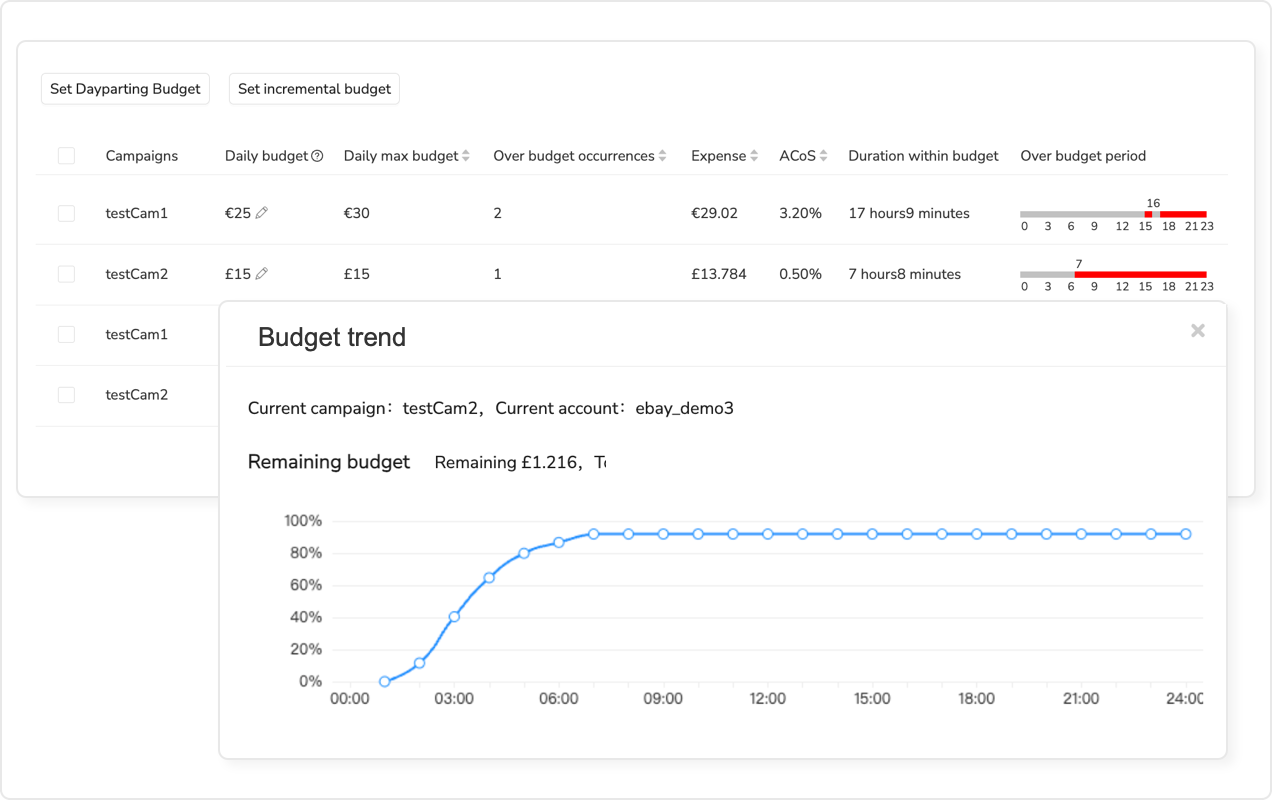
Real-time budget monitoring systems solve this by alerting you to budget anomalies as they happen. For example, Maxmerce’s Budget Overspend Analysis tracks daily spend patterns across all campaigns, identifying when campaigns exceed threshold levels before they consume excessive budget. If a campaign that normally spends $80 daily suddenly hits $120 by 2pm, the system alerts you immediately—letting you investigate whether the spike represents opportunity (unexpected high-converting traffic) or problem (bid war with competitor). This real-time visibility helps you identify overspend within 1 hour vs. discovering budget exhaustion at day’s end when you’ve already burned through funds.
Seasonal Budget Scaling
Don’t set budgets once and forget them. Q4 requires 2-3X normal budgets to maintain visibility during competitive holiday periods. New product launches need aggressive budgets for the first 30-60 days to build organic ranking momentum. Mature products with strong organic presence can scale back PPC budgets once they consistently rank on page one organically.
Mark your calendar for quarterly budget reviews—adjusting overall allocation based on seasonal patterns, competitive dynamics, and product lifecycle stage.
Balance Automatic vs. Manual Campaign Strategy
The automatic vs. manual debate misses the point—you need both, working together. Automatic campaigns discover, manual campaigns execute. But knowing when to transition keywords from automatic to manual (and which match type to use) separates efficient campaigns from mediocre ones.
When to Promote Keywords to Manual Campaigns
Use these criteria to identify graduation-ready keywords:
- 3+ conversions—Enough data to confirm it’s not a fluke
- ACoS below your target—If your target is 25%, promote terms below 25%
- Consistent clicks—At least 20 clicks to verify the conversion rate is stable
When promoting keywords, choose match type strategically:
- Exact match—For specific, high-converting terms with clear intent
- Phrase match—For modifier-heavy terms where word order matters (“waterproof hiking boots women”)
- Broad match—For short, generic terms where you want volume (“headphones”)
Keep Automatic Campaigns Running
Don’t pause automatic campaigns once you’ve harvested initial keywords. Consumer search behavior evolves—new terms emerge as trends shift, competitors launch products, and seasonal language changes (“Christmas gifts” in December, “New Year’s resolutions” in January). Automatic campaigns continuously discover these emerging terms.
Run automatic campaigns indefinitely at 20% of total budget. Harvest top performers monthly, add negatives weekly, and let them keep discovering while your manual campaigns handle proven terms.
Comparison: Manual PPC Management vs. Automated Optimization
Managing Amazon PPC manually is feasible for 1-2 products. Beyond that, the time investment becomes unsustainable while optimization opportunities slip through the cracks. Here’s the reality check:
| Task/Activity | Manual Management | Automated Platform | Time Saved |
|---|---|---|---|
| Daily campaign review (15 campaigns) | 45-60 minutes opening reports | 5 minutes viewing unified dashboard | 40-55 min/day (4.7-6.4 hrs/week) |
| Dayparting bid adjustments | 2 hours daily (morning/evening adjustments) | Automatic hourly adjustments | 14 hrs/week |
| Negative keyword harvesting | 2-3 hours weekly reviewing search terms | 15 minutes approving auto-flagged terms | 2.5 hrs/week |
| Budget overspend monitoring | Discover at day’s end (too late) | Real-time alerts within 1 hour | Prevents wasted spend |
| Performance analysis & reporting | 3-4 hours monthly compiling data | Instant visual analytics and exports | 3.5 hrs/month |
| Keyword promotion (auto to manual) | 1-2 hours weekly reviewing and migrating | Flagged automatically for one-click promotion | 1.5 hrs/week |
| Total Weekly Time Investment | 24-27 hours/week | 2-3 hours/week | 22-24 hours/week (91-92%) |
The time savings matter, but they’re not the only advantage. Automation enables optimizations that manual management simply can’t achieve—like hourly dayparting adjustments across 100+ keywords or real-time budget overspend detection. These capabilities don’t just save time; they improve performance beyond what’s manually possible.
Advanced PPC Optimization Techniques
Once you’ve mastered campaign structure, dayparting, and negative keywords, these advanced tactics can push performance even further.
Competitive Conquest Campaigns
Target competitor brand names in manual campaigns. When shoppers search “[competitor name],” your ads appear as alternatives. This works especially well if you offer better pricing, faster shipping, or superior features. Be cautious—if the competitor has brand registry and trademarks, they might report your ads. Focus on generic competitor categories (“alternative to [category leader]”) rather than direct brand targeting when legal concerns exist.
Product Targeting Campaigns
Beyond keyword targeting, use product targeting to show ads on specific competitor product detail pages. If you sell premium leather wallets, target your ads to appear on cheaper wallet listings—intercepting buyers who might prefer higher quality once they see it. Product targeting typically delivers higher conversion rates (shoppers are already viewing similar products) but requires careful competitor selection to avoid wasting impressions on irrelevant audiences.
Sponsored Brand Video Campaigns
Video ads deliver 2-3X higher engagement rates than static Sponsored Products ads. Create 15-30 second videos demonstrating your product’s key features, then run Sponsored Brand Video campaigns targeting your top-performing keywords. Video production requires upfront investment, but the engagement boost can significantly improve brand awareness and consideration metrics.
Attribution and Customer Journey Analysis
Not all clicks convert immediately. Many shoppers click your ad, browse multiple products, then return later to purchase. Amazon’s attribution window (7 days for Sponsored Products, 14 days for Sponsored Brands) captures these delayed conversions. When evaluating keyword performance, don’t just look at same-day conversion rates—analyze how keywords contribute to sales throughout the full attribution window.
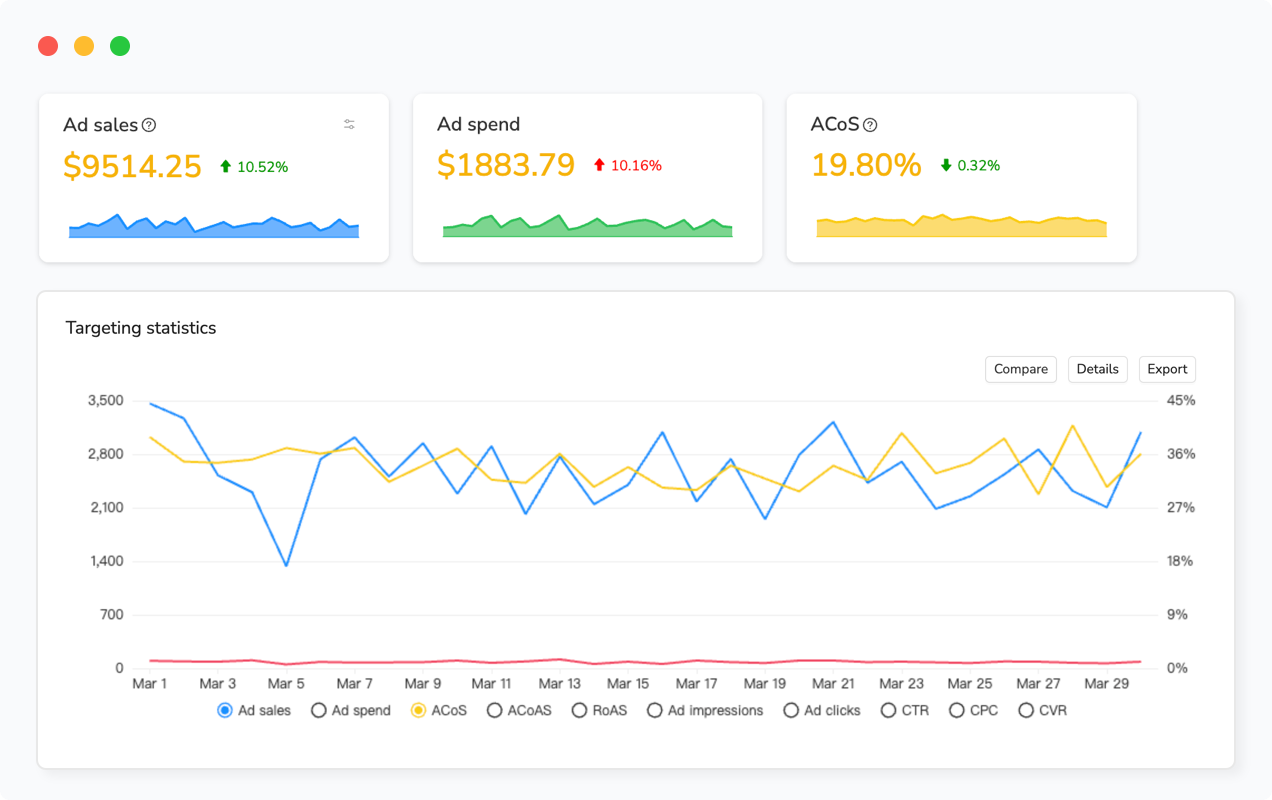
Advanced advertising platforms provide attribution modeling that shows which keywords assist conversions even when they don’t get direct credit. Maxmerce’s Advanced Advertising Charts include attribution analysis showing how automatic campaigns discover keywords, broad campaigns drive awareness, and exact campaigns close sales—revealing the full customer journey across your campaign structure. This helps you avoid pausing “non-converting” discovery keywords that actually play critical roles in introducing customers to your products.
Measuring Success: KPIs That Actually Matter
Most sellers obsess over ACoS—but ACoS alone doesn’t tell the full story. Here are the five metrics that actually predict advertising profitability.
1. Total Advertising Cost of Sale (TACoS)
TACoS = Total Ad Spend ÷ Total Sales (not just ad-attributed sales). This shows your advertising efficiency relative to overall business, not just PPC-driven revenue. You want TACoS trending down over time as organic sales grow—indicating your PPC is building sustainable organic ranking rather than just renting visibility.
2. Return on Ad Spend (ROAS)
ROAS = Revenue ÷ Ad Spend. If you spend $1,000 and generate $5,000 in ad-attributed sales, your ROAS is 5.0 (or 500%). ROAS above 3.0 typically indicates profitable campaigns, though target ROAS depends on your profit margins.
3. Impression Share
What percentage of available impressions are your ads capturing? Low impression share indicates you’re losing visibility to competitors—either because your bids are too low or your budgets cap out early. Target 50-70% impression share for critical keywords to maintain competitive visibility.
4. Click-Through Rate (CTR)
CTR = Clicks ÷ Impressions. Low CTR (below 0.3-0.5%) suggests your main image, title, or pricing isn’t compelling enough to drive clicks. High CTR with low conversion rate indicates your product page isn’t delivering on the promises your ads make—misalignment between ad creative and product reality.
5. Conversion Rate by Campaign Tier
Compare conversion rates across automatic, broad, and exact campaigns. Exact should deliver highest conversion rates (you’re targeting proven terms). If broad campaigns outperform exact, you’re likely missing important keyword variations in your exact campaigns. If automatic campaigns underperform dramatically, your negative keyword strategy needs work.
Tracking all these metrics manually requires pulling data from multiple Amazon reports, then calculating metrics in spreadsheets. For sellers managing multiple products or marketplaces, this reporting process alone takes 3-4 hours monthly.
Advertising platforms consolidate these metrics into unified dashboards with real-time updates. Maxmerce’s Advertising module tracks ACoS, TACoS, ROAS, impression share, CTR, and conversion rates across all campaigns automatically—providing instant visibility into performance trends without manual data compilation. The platform also correlates advertising metrics with organic ranking improvements, showing you which PPC investments are building long-term organic visibility versus just renting temporary placements.
Common PPC Mistakes to Avoid
Even experienced sellers make these optimization mistakes that quietly drain budgets.
Mistake #1: Pausing Campaigns During Slow Periods
When sales slow down, the instinct is to pause PPC to save money. But pausing campaigns tanks your organic ranking as conversion velocity drops. Instead, reduce daily budgets by 40-50% to maintain presence without overspending. This keeps your products visible while preserving the ranking momentum you’ve built.
Mistake #2: Ignoring Match Type Overlap
If you’re running broad, phrase, and exact campaigns for the same keyword, they compete against each other in auctions. This self-competition drives up your costs. Use negative keywords to prevent overlap—add exact match terms as negative phrase to your broad campaigns, preventing them from triggering when the exact campaign should match.
Mistake #3: Setting Bids Too Low “To Be Safe”
Low bids seem conservative, but they prevent you from learning. If your bids are so low you never win auctions, you get zero data about conversion rates. Start with recommended bids from Amazon, then improve down based on actual performance data. You can’t improve what you can’t measure.
Mistake #4: Optimizing Too Frequently
Changing bids daily based on yesterday’s performance creates volatility. Amazon’s algorithms need 3-7 days to stabilize after bid changes. Make bid adjustments weekly (not daily) unless you’re seeing dramatic overspend or underdelivery. The exception: automated platforms that use larger data sets across all campaigns to make optimization decisions—they can adjust more frequently because they’re working with more statistical significance.
Mistake #5: Focusing Only on ACoS
ACoS doesn’t account for lifetime customer value, organic ranking benefits, or brand awareness. A 35% ACoS on a new product launch might be profitable if those sales boost organic ranking enough to generate future organic sales at 0% advertising cost. Evaluate campaigns holistically, not just on immediate ACoS.
Building Sustainable PPC Success
Amazon PPC isn’t a set-it-and-forget-it channel. Markets shift, competitors adjust strategies, and seasonal patterns change conversion rates. Sustainable success requires systematic optimization—not occasional tweaks when performance tanks, but continuous refinement as part of your regular operations.
The sellers who thrive don’t spend more on advertising—they improve smarter. That means structured campaigns that separate discovery from efficiency, dayparting strategies that match bid aggressiveness to conversion likelihood, negative keyword harvesting that eliminates waste before it accumulates, and budget allocation that funds proven performers while maintaining discovery.
Manual management can achieve these optimizations for small catalogs (1-3 products, 5-7 campaigns). Beyond that scale, automation becomes essential—not just for time savings, but for optimizations that manual management simply can’t sustain. Hourly dayparting adjustments, real-time budget overspend detection, continuous negative keyword harvesting, and cross-campaign performance correlation require automation to execute consistently.
For sellers running 10+ campaigns across multiple products, platforms designed specifically for advertising optimization solve the scalability challenge. Maxmerce’s Advertising module combines all the optimization tools discussed in this guide—dayparting bid and budget optimization, dynamic keyword harvesting, budget overspend monitoring, and advanced analytics—into unified workflows that reduce daily management time from 2-3 hours to 20-30 minutes while improving performance through optimizations manual management can’t achieve. Start a 14-day free trial—no credit card required—to see how automated optimization handles the mechanical work while you focus on strategy.
The path to profitable PPC isn’t mysterious—structure your campaigns for granular optimization, eliminate waste systematically, allocate budget to proven performers, and use automation where it multiplies your effectiveness. Every seller faces the same auction dynamics; the difference lies in who optimizes systematically versus reactively.
Frequently Asked Questions
