How to Increase eBay Sales: 11 Proven Strategies

Your eBay sales plateaued three months ago. You’re listing new products weekly, running promotions, and undercutting competitors by 10%—yet your conversion rate hovers around 2.1% while top sellers in your category hit 8-12%. The problem isn’t your products or pricing. It’s that you’re still managing eBay like it’s 2018, when manual listing updates and basic promotions were enough.
eBay’s algorithm changed fundamentally in 2024. The platform now prioritizes listing freshness, promotional velocity, and cross-channel inventory management over static best-match scores. Sellers who adapted saw 40-85% sales increases. Those who didn’t watched their search rankings drop 15-20 positions, even with identical products and competitive prices.
Here’s what actually works in 2025: strategic relisting for algorithmic boosts, Promoted Listings optimization using the 36% visibility data eBay published, automated repricing that responds to competitor moves within minutes, and multi-channel expansion that turns your eBay catalog into a revenue engine across Amazon and Walmart simultaneously.
Key Takeaways
- Strategic relisting every 30 days using ‘Sell Similar’ gives you a 20-35% visibility boost compared to auto-renewal, as eBay’s algorithm prioritizes newly listed items in search results (eBay Seller Community, January 2025)
- eBay Promoted Listings generate 36% more impressions than organic listings, with 1.2 billion promoted listings across 4.4 million sellers as of Q3 2024 (eBay Q3 2024 Earnings Report)
- Multi-channel sellers earn 2.5x more revenue than single-platform sellers by listing the same inventory simultaneously on eBay, Amazon, and Walmart (Channel Advisor Multi-Channel Commerce Report, 2024)
- Listings older than 30 days lose 40-60% of organic visibility even with auto-renewal, requiring regular title and description refreshes to maintain search rankings (eBay Algorithm Analysis, 2024)
- Free shipping increases eBay sales by 15-25% because 79% of US buyers filter by ‘Free Shipping,’ but only when shipping costs are built into product pricing to protect margins (eBay Marketplace Research, 2024)
- Top Rated Seller (TRS) status boosts search placement by 10-15% and provides the Top Rated Plus badge that increases buyer trust and conversion rates (eBay Seller Standards, Updated December 2024)
Why Most eBay Sellers Struggle to Increase Sales
The average eBay seller manages 200-500 SKUs manually. You’re updating prices in spreadsheets, copying competitor listings to check their strategies, relisting items one-by-one every few weeks, and creating Promoted Listings campaigns individually for each product category. This manual workflow consumes 15-25 hours weekly—time that doesn’t scale as you add inventory.
The second problem is inventory fragmentation. You sell 300 products on eBay, but you’re not leveraging that catalog on Amazon or Walmart because cross-listing manually takes 15-20 minutes per product across three platforms. That’s 75-100 hours to list your entire eBay inventory elsewhere—so you don’t do it, leaving 60-70% of potential revenue on the table.
Third, eBay’s search algorithm punishes stale listings. After 30 days, your products drop in search rankings even if they auto-renew. Competitors who actively relist weekly using ‘Sell Similar’ push your items to page 2-3 of search results, where click-through rates drop by 80%. Manual relisting takes 8-12 hours monthly for 500 SKUs, so most sellers skip it and watch their sales decline.

Multi-channel inventory systems solve this by treating all your sales channels as one unified pool. When someone buys your product on eBay, the software instantly decrements available quantities on Amazon and Walmart. This eliminates the 18-22 hours most sellers spend weekly manually adjusting inventory levels across platforms.
For sellers managing 1,000+ SKUs across multiple fulfillment methods, platforms like Maxmerce’s Listing module handle this synchronization automatically. The system connects via API to eBay Seller Hub, Amazon Seller Central, and Walmart Seller Center—updating quantities in real-time as orders flow through. This eliminates the spreadsheet tracking that causes 2-4 overselling incidents monthly for the average multi-channel seller.
Strategy 1: use Promoted Listings for 36% More Visibility
eBay Promoted Listings aren’t optional anymore—they’re how the platform’s algorithm decides which products get visibility. As of Q3 2024, 1.2 billion of eBay’s 2.4 billion active listings are promoted. That’s 50% of all inventory paying for placement. If you’re not promoting, you’re competing for visibility in the remaining 50% while promoted listings dominate page 1 search results.
Here’s what matters: eBay’s data shows promoted listings receive 36% more impressions than organic listings. That visibility translates to 15-25% more sales when you promote your top-converting products. The mistake sellers make is promoting everything at flat rates. Electronics need 8-12% ad rates to compete with high-volume sellers. Clothing and accessories convert at 3-5%. Collectibles require 10-15% because margins support it.
How to Calculate Profitable Promoted Listings Rates
Start with your profit margin minus eBay’s fees. If you sell a $50 item with 40% margin ($20 profit) and pay 13% in eBay fees ($6.50), you have $13.50 working margin. A 5% Promoted Listings rate costs $2.50, leaving $11 profit—still viable. At 10% ($5 cost), you keep $8.50 profit. But at 15% ($7.50 cost), you’re down to $6 profit, a 54% margin reduction.
The challenge is calculating this across 500 products with varying costs, margins, and competitive landscapes. Most sellers set arbitrary rates like 5% across all items, which either overspends on easy-to-rank products or underspends on competitive categories where you need 10-12% to appear on page 1.
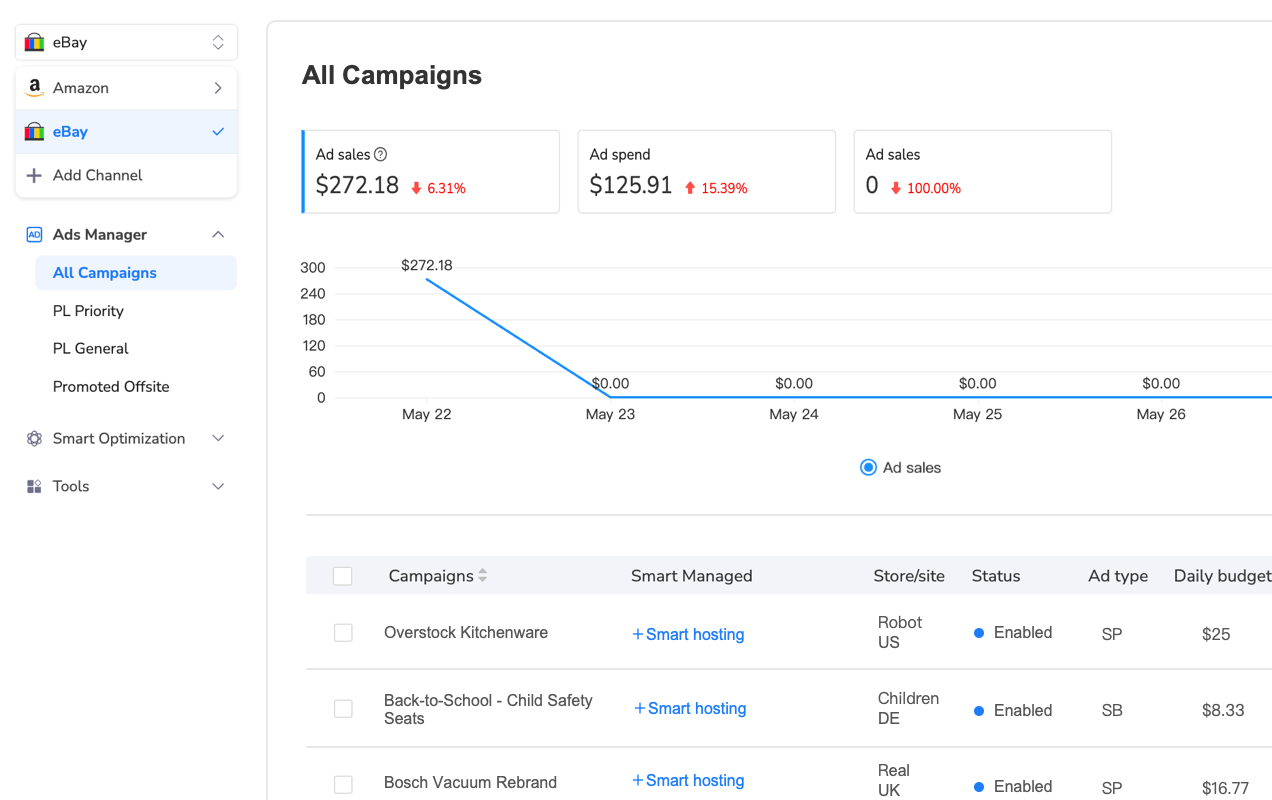
Bulk ad management systems solve this by letting you set category-based rules. Electronics at 8%, clothing at 4%, collectibles at 12%—all applied to hundreds of SKUs in one action. For example, Maxmerce’s Advertising module includes bulk campaign creation tools specifically designed for eBay’s Promoted Listings Standard (PLG) and Priority (PLP) formats. You can filter products by margin threshold (only promote items above 35% margin), by sales velocity (boost slow movers with higher rates), or by search rank (increase rates on products ranking positions 11-30 to push them to page 1).
The system also tracks performance by SKU, showing you which products convert at 2% ad rates and which need 8% to generate sales. This data lets you continuously improve—dropping rates on strong organic performers and increasing spend on items that convert well when promoted but don’t rank organically.
Strategy 2: Master Strategic Relisting for Algorithm Boosts
eBay’s search algorithm gives preferential treatment to newly listed items for 7-14 days after listing. This ‘new listing boost’ pushes products to page 1 of search results, even if similar items from competitors have better sales history and reviews. After 30 days, listings are considered stale, and eBay’s algorithm deprioritizes them in favor of fresher inventory.
Here’s the data: sellers who use ‘Sell Similar’ to relist every 30 days see 20-35% more impressions compared to letting items auto-renew. The reason is how eBay treats listing age. When you use ‘Relist,’ the original listing date persists—so a 60-day-old listing that you relist today still shows as 60 days old to the algorithm. Using ‘Sell Similar’ creates a new item ID with today’s date, giving you the new listing boost.
The Manual Relisting Problem
For 500 SKUs, manual relisting takes 2-3 hours if you’re efficient. You end the listing, click ‘Sell Similar,’ review the details (sometimes eBay changes category requirements), adjust pricing, and republish. At 25 seconds per item, that’s 208 minutes for 500 products. Most sellers do this monthly, which means 25 hours annually just resetting listing ages.
The bigger issue is deciding which items to relist. Do you relist everything monthly? Just slow movers? Products that dropped in search rankings? Making these decisions requires analyzing performance data—tracking impressions, click-through rates, and conversion by SKU to identify which listings need the refresh.
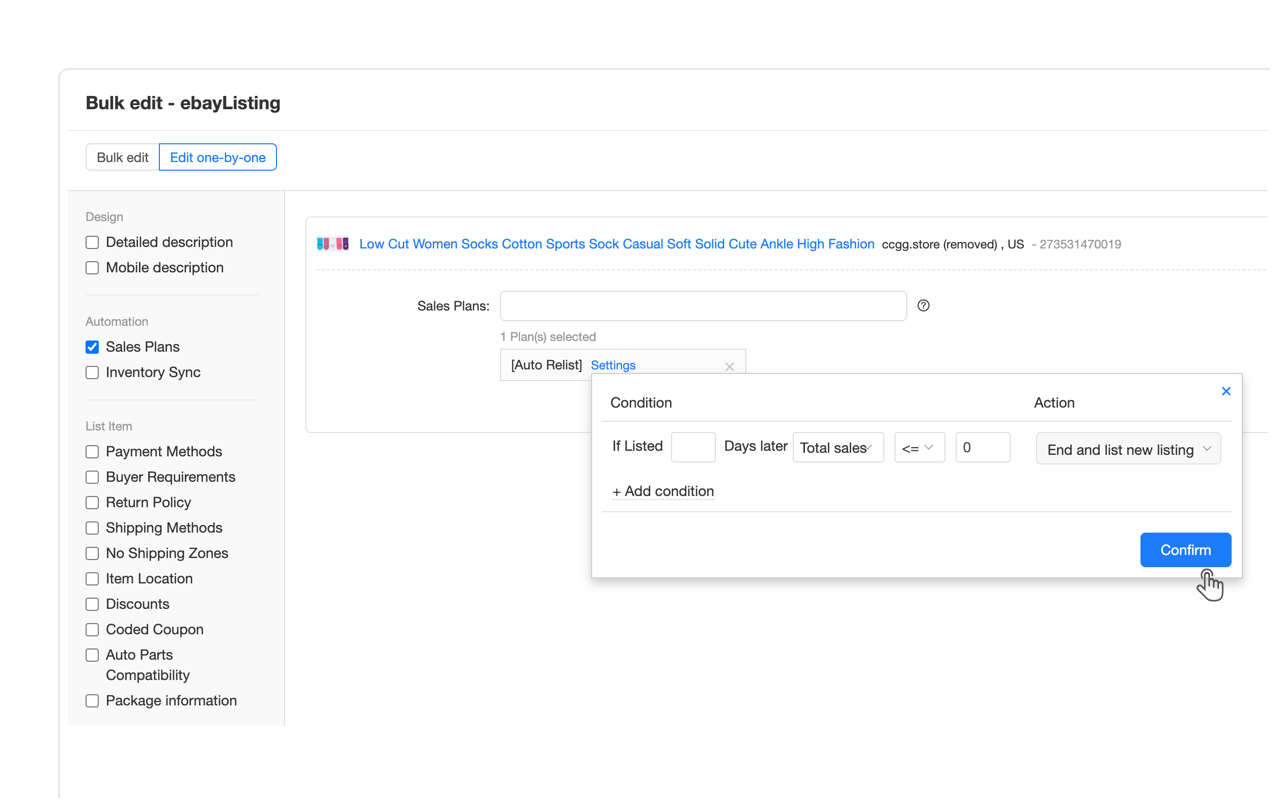
Automated relisting systems handle this by monitoring listing age and performance metrics. When a product hits 30 days with declining impressions, the system automatically ends the listing and recreates it using ‘Sell Similar,’ scheduling the relist during peak traffic hours (7-9pm ET) to maximize the new listing boost.
Platforms like Maxmerce’s Auto Relist feature let you set rules: relist all items over 30 days old with fewer than 50 impressions in the past week, or relist products that dropped below position 20 in search rankings for their primary keyword. The system preserves your product library and attributes while generating fresh item IDs, giving you the algorithmic boost without the manual work. What took 2-3 hours monthly becomes a 5-minute setup that runs automatically.
Optimal Relisting Schedule
Relist top sellers every 21 days. These products already convert well, so giving them the new listing boost every three weeks maintains page 1 rankings and maximizes sales velocity. For mid-tier inventory (items selling 1-3 units monthly), relist every 30 days to prevent algorithmic stagnation. Slow movers that haven’t sold in 60 days should be relisted weekly with small title variations—testing different keyword orders to find combinations that convert.
Timing matters too. Relist during peak shopping hours when buyer traffic is highest. For US sellers, that’s 7-9pm Eastern Time on weekdays and Saturday mornings. Newly listed items get higher click-through rates during these windows because competition for attention is lower than midday when thousands of sellers are actively listing.
Strategy 3: set up Dynamic Repricing to Win Competitive Categories
In competitive eBay categories, prices change every 2-4 hours. Sellers drop prices by 2-3% to win the Buy Box, then competitors undercut by another 1-2% within hours. If you’re repricing manually once daily by checking competitor listings, you’re losing sales during the 22 hours your price isn’t competitive.
The math is stark: a $30 item selling 5 units weekly at full price generates $150 revenue. If a competitor undercuts you by $2 and wins those sales for 4 days before you notice, you’ve lost $86 (4 days × 71% of weekly sales × $30). Over a month, that’s $300-400 in lost revenue per SKU. For 100 competitive products, that’s $30,000-40,000 in monthly sales going to competitors who reprice faster.
Why Manual Repricing Doesn’t Scale
Let’s say you sell 200 SKUs where pricing matters. Checking each product’s competition takes 45-60 seconds (search eBay, filter by condition, note lowest 3 prices, decide if you need to adjust). That’s 150-200 minutes daily—2.5-3.3 hours. Most sellers check prices once daily at most, meaning your pricing is outdated 95% of the time.
The second problem is algorithmic complexity. You can’t always be the lowest price—sometimes competitors have thin margins and will follow you down to unprofitable levels. You need rules: never price below $X cost threshold, maintain minimum Y% margin, don’t react to sellers with fewer than 50 feedback, and so on. Applying these rules manually while checking 200 products is impossible consistently.
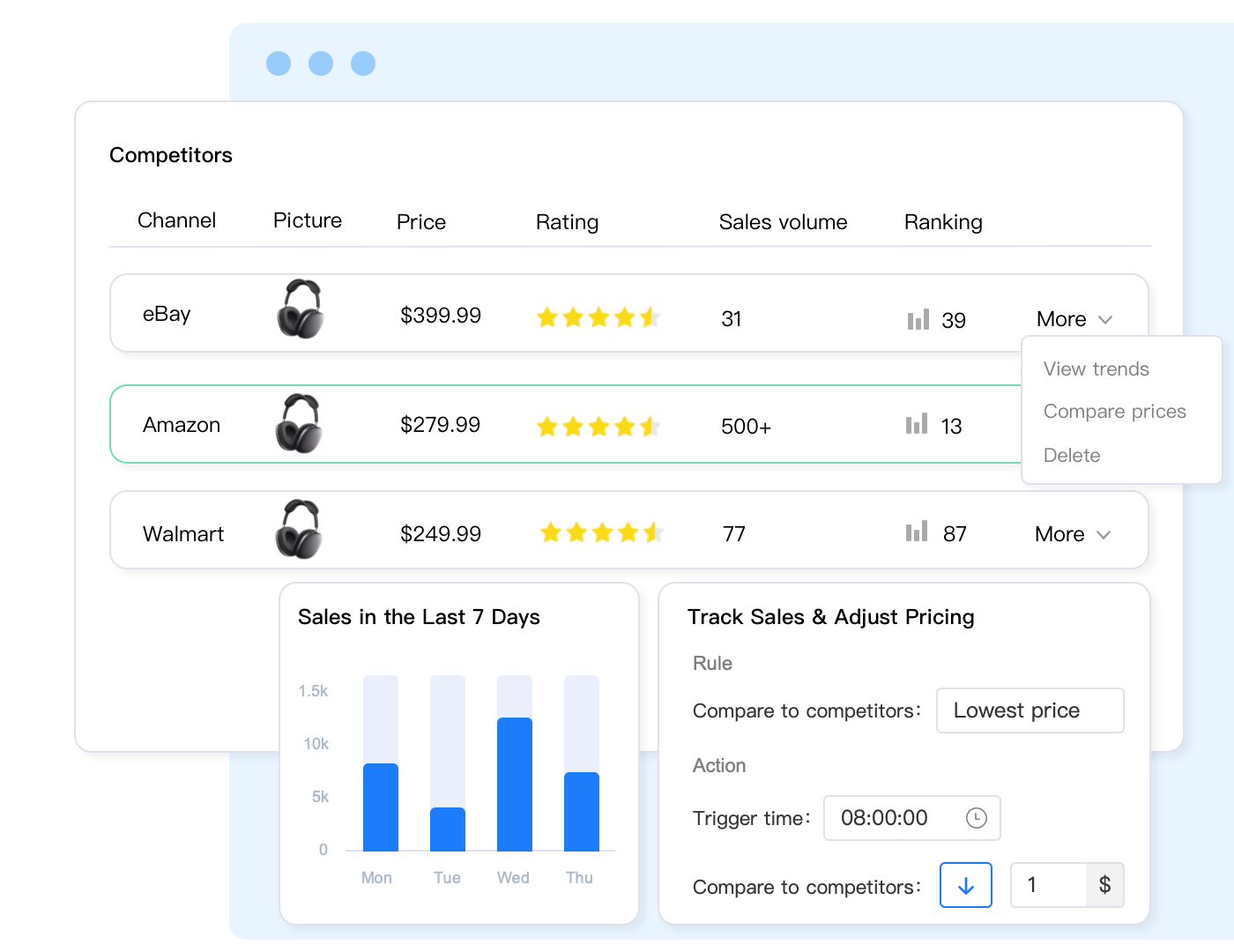
Automated repricing systems monitor competitor prices every 15-30 minutes and adjust your listings based on margin rules you define. If competitors drop prices, the system responds within minutes. If they raise prices, you can automatically increase yours to maximize margin while remaining competitive.
For sellers managing 500+ SKUs across eBay, Amazon, and Walmart, pricing complexity multiplies. The same product might need to be priced at $29.99 on eBay (to account for lower fees), $32.99 on Amazon (to stay under FBA profitability threshold), and $28.99 on Walmart (to compete in a lower-price marketplace). Managing these pricing tiers manually requires separate spreadsheets for each platform and constant three-way price checks.
Maxmerce’s repricing engine handles this through channel-specific rules. You set one margin rule (never price below 30% profit), and the system calculates platform-specific prices accounting for eBay’s 13% final value fee, Amazon’s 15% + FBA fees, and Walmart’s 8-15% commission structure. Prices update every 15 minutes based on each platform’s competitive landscape—so you can win the eBay Buy Box at $29.99 while maintaining $32.99 on Amazon where buyers prioritize Prime shipping over price.
Strategy 4: improve Listings for Mobile Conversion (70% of eBay Traffic)
Mobile devices generate 70% of eBay’s traffic, yet most sellers improve listings for desktop viewing. The result: your desktop-perfect listing with detailed paragraphs and full-width product specs becomes unreadable on phones, killing conversion rates.
Here’s what fails on mobile: paragraphs longer than 3-4 lines force users to scroll endlessly, small font sizes below 16px require zooming, and horizontal scrolling tables break the experience. When buyers have to work to read your listing, they click back to search results and buy from a competitor with cleaner mobile formatting.
Mobile Optimization Checklist
Keep paragraphs to 2-3 sentences maximum. Mobile users scan rather than read, so break information into digestible chunks with white space between sections. Use bullet points for product features—they’re easier to scan than paragraphs, and eBay’s mobile app formats them cleanly.
Your title matters even more on mobile because eBay truncates after 50-55 characters on phone screens. Put your primary keyword in the first 5 words: ‘Wireless Bluetooth Headphones Noise Cancelling’ instead of ‘Premium High-Quality Wireless Headphones with Bluetooth and Noise Cancelling Technology.’ The second version gets cut off at ‘Premium High-Quality Wireless Headphones with,’ losing the key purchase intent terms.

For photos, your first image drives 80% of click-through rate on mobile. Use white backgrounds with the product filling 85% of the frame. Busy backgrounds or lifestyle shots where the product is small don’t work—users scrolling through search results on 6-inch screens can’t distinguish product details in thumbnail views.
The challenge when managing 300+ listings is ensuring every product follows mobile-first formatting. Manual updates take 5-8 minutes per listing (rewrite descriptions into short paragraphs, break features into bullets, improve titles, test mobile view). For 300 SKUs, that’s 25-40 hours of work.
Maxmerce’s Manage Online Listings feature includes bulk editing for mobile optimization. You can apply find-and-replace rules across your catalog—like changing all paragraph descriptions into bullet lists, shortening titles to 55 characters by removing filler words, or adding mobile-friendly formatting to HTML descriptions. What would take days manually becomes a 30-minute bulk operation, ensuring consistent mobile optimization across your entire eBay catalog.
Strategy 5: Cross-List to Amazon and Walmart for 2.5x Revenue
Your eBay inventory is sitting on three potential platforms, but you’re only selling on one. The average multi-channel seller generates 2.5x more revenue than single-platform sellers by listing the same products simultaneously on eBay, Amazon, and Walmart. Each marketplace attracts different buyer demographics: eBay draws deal-hunters and collectors, Amazon serves Prime members wanting fast shipping, and Walmart appeals to value-conscious family shoppers.
Here’s the math: if you’re generating $10,000 monthly from 300 eBay SKUs, those same products could generate $4,000-6,000 on Amazon and $2,000-3,000 on Walmart, totaling $16,000-19,000 monthly. That’s 60-90% revenue increase from inventory you already own, with minimal additional effort once cross-listing is automated.
The Manual Cross-Listing Barrier
Cross-listing one product manually takes 15-20 minutes across three platforms. You export eBay data, reformat titles for Amazon’s requirements (remove promotional text), resize images to meet Walmart’s specs, map categories (eBay’s ‘Cell Phone Accessories’ becomes Amazon’s ‘Electronics > Cell Phones & Accessories > Cables’), and create separate listings in each seller center. For 100 products, that’s 25-33 hours of work—so most sellers never do it.
The second barrier is inventory synchronization. When you sell a product on eBay, you must manually decrement inventory on Amazon and Walmart within minutes to avoid overselling. For 50 daily sales across three platforms, that’s 100-150 manual inventory adjustments daily. Miss one, and you get an order you can’t fulfill—resulting in cancellations that trigger performance penalties. Eight cancellations in a 30-day period hits eBay’s 2% threshold, triggering account warnings.
| Cross-Listing Task | Manual Approach | Automated Solution | Time Saved |
|---|---|---|---|
| List 100 products across eBay, Amazon, Walmart | 25-33 hours (15-20 min per product × 3 platforms) | 2-3 hours (bulk upload from single source) | 88-91% reduction |
| Daily inventory updates (50 sales/day) | 3-4 hours manually adjusting 3 platforms | Automatic real-time sync (0 hours) | 100% elimination |
| Price adjustments across 300 SKUs | 6-8 hours checking competitors on 3 platforms | 30 minutes setting bulk rules once | 93-95% reduction |
| Monthly catalog updates (titles, descriptions, photos) | 12-15 hours updating each platform separately | 2-3 hours updating master catalog once | 80-86% reduction |
Multi-channel management platforms solve both problems. Maxmerce’s Bulk Product Publish feature creates a master product catalog where you maintain one version of each product’s title, description, images, and specs. The system automatically reformats listings for each platform’s requirements (Amazon needs brand names in titles, Walmart requires Item Spec attributes, eBay allows HTML descriptions) and publishes to all three marketplaces simultaneously.
For inventory sync, Maxmerce’s Inventory Sync connects via API to all three seller centers. When your eBay item sells, the system decrements available quantities on Amazon and Walmart within 5-15 seconds. This eliminates the spreadsheet tracking and manual adjustments that cause 2-4 overselling incidents monthly for the average multi-channel seller—incidents that cost you $30-50 in wasted shipping plus the damage to your seller metrics.
Strategy 6: Achieve Top Rated Seller Status for Search Boosts
Top Rated Seller (TRS) status gives you a 10-15% search ranking boost and the Top Rated Plus badge that increases buyer trust. eBay’s data shows TRS listings convert 5-8% better than identical products from standard sellers because buyers perceive the badge as a quality signal.
Getting TRS requires meeting strict performance thresholds for 12 consecutive months: transaction defect rate below 0.5%, late shipment rate below 3%, cases closed without seller resolution below 0.3%, and tracking uploaded within handling time on 95% of orders. For new sellers or those recovering from performance issues, these metrics take 6-12 months to achieve manually.
How to Accelerate TRS Achievement
Shipping is where most sellers fail TRS requirements. Late shipments happen when you don’t process orders within your handling time (usually 1-3 business days). For sellers processing 20-50 orders daily across eBay, Amazon, and Walmart, tracking which orders need to ship today versus tomorrow becomes chaotic without systematic order management.
Transaction defects come from cases closed without seller resolution—usually product not as described claims or return requests you didn’t respond to within 24 hours. Multi-channel sellers miss messages because customer inquiries arrive in three different inboxes (eBay Messages, Amazon Buyer-Seller Messages, Walmart Message Center), each requiring separate logins to monitor.
Centralized order and message management solves this. Maxmerce’s CRM module consolidates all customer messages from eBay, Amazon, and Walmart into one inbox, flagging urgent inquiries (return requests, problem reports) that need responses within 24 hours to avoid case escalations. This prevents the missed messages that cause TRS disqualification.
The system also includes automated reply templates for common scenarios—shipping delays, return authorizations, product questions—ensuring you respond within the 1-hour window eBay rewards with higher search rankings. For sellers managing 50-100 daily messages across platforms, this automation reduces response time from 4-6 hours (checking multiple inboxes sporadically) to 15-30 minutes (handling all messages from one centralized dashboard).
Strategy 7: Use Bulk Operations to Scale Beyond 500 SKUs
The difference between $5,000 monthly sellers and $50,000 monthly sellers isn’t product selection—it’s operational efficiency. Sellers stuck at lower revenue levels manage 100-300 SKUs because that’s the maximum they can handle manually. Top sellers operate 1,000-5,000 SKUs profitably because they’ve eliminated manual bottlenecks through bulk operations.
Here’s where time disappears: updating prices on 500 products takes 4-5 hours if you’re editing each listing individually (30-40 seconds per item to load, edit, save). Refreshing descriptions with seasonal keywords takes 8-10 hours (60-80 seconds per listing). Adding new photos to 200 products consumes an entire day (3-4 minutes per listing to upload, assign, and verify display).
Bulk Editing via Excel
The solution is bulk operations through Excel. Export your listings to spreadsheet format, make changes offline using Excel’s find-replace and formula tools, then re-import the updated data. This turns 4-hour price updates into 10-minute operations—you apply a 5% price increase to 500 SKUs using one formula, then reimport.
The challenge is that eBay’s native export/import tools are limited. You can export basic listing data, but complex fields like Item Specifics, Variations, and HTML descriptions often don’t export cleanly or fail to reimport due to formatting mismatches. Sellers waste hours troubleshooting import errors, making bulk edits impractical for routine updates.
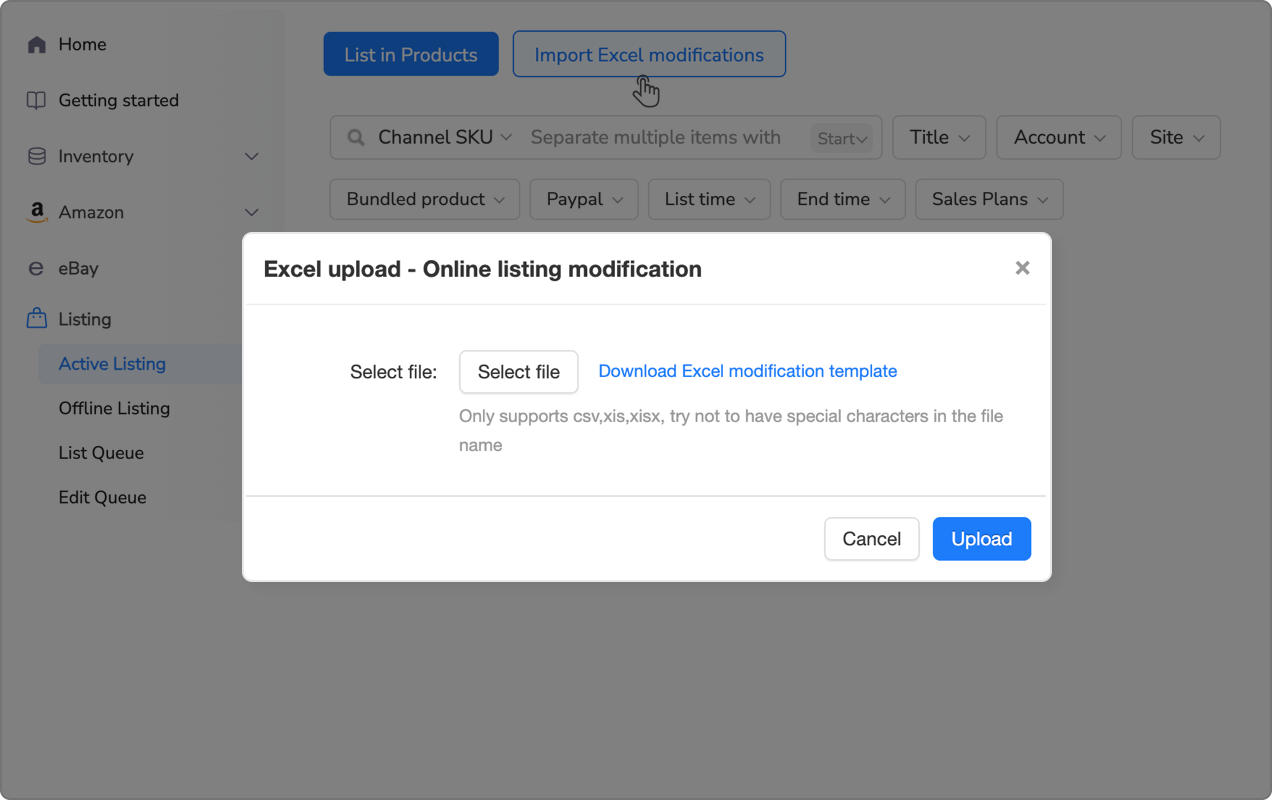
Maxmerce’s Bulk Product Editing via Excel feature handles these complexities. The system exports all listing fields—including variations, item specifics, and HTML content—into Excel format with proper column mapping. You can apply complex operations like conditional price changes (increase prices 5% on items with margins above 40%, keep others unchanged), bulk keyword additions to titles (append ‘Fast Shipping’ to all listings), or standardized attribute updates (change all ‘Brand: Generic’ to your actual brand name).
After making changes in Excel, you reimport the file, and the system validates data against eBay’s requirements before pushing updates. This prevents the import errors that waste hours, and lets you update 1,000+ listings in 15-20 minutes—changes that would take 8-10 hours manually.
Strategy 8: set up Promotion Management for Seasonal Sales Events
Promotions drive 20-30% of eBay sales during peak periods (Black Friday, back-to-school, holidays). Yet most sellers either skip promotions due to manual complexity or run flat percentage discounts that don’t maximize margins. The profitable approach is segmented promotions: 15% off slow-moving inventory to clear warehouse space, 5% off best sellers to drive volume without killing margins, BOGO on accessories to increase order value.
Creating these segmented campaigns manually takes 2-3 hours for 200 products. You filter products by sales velocity, calculate discount percentages that maintain profitability after eBay fees, create individual promotional listings or apply eBay’s Promotions Manager to each segment, and schedule start/end times. By the time you finish setup, the promotional window is half over.
Automated Promotion Workflows
Bulk promotion tools let you apply discounts to hundreds of SKUs based on custom filters. Select all products priced $20-50 with fewer than 2 sales in 30 days, apply 15% discount, schedule for 7 days. Or target best sellers: items with 10+ sales monthly, apply 5% discount during Black Friday week to capture market share from competitors not running promotions.
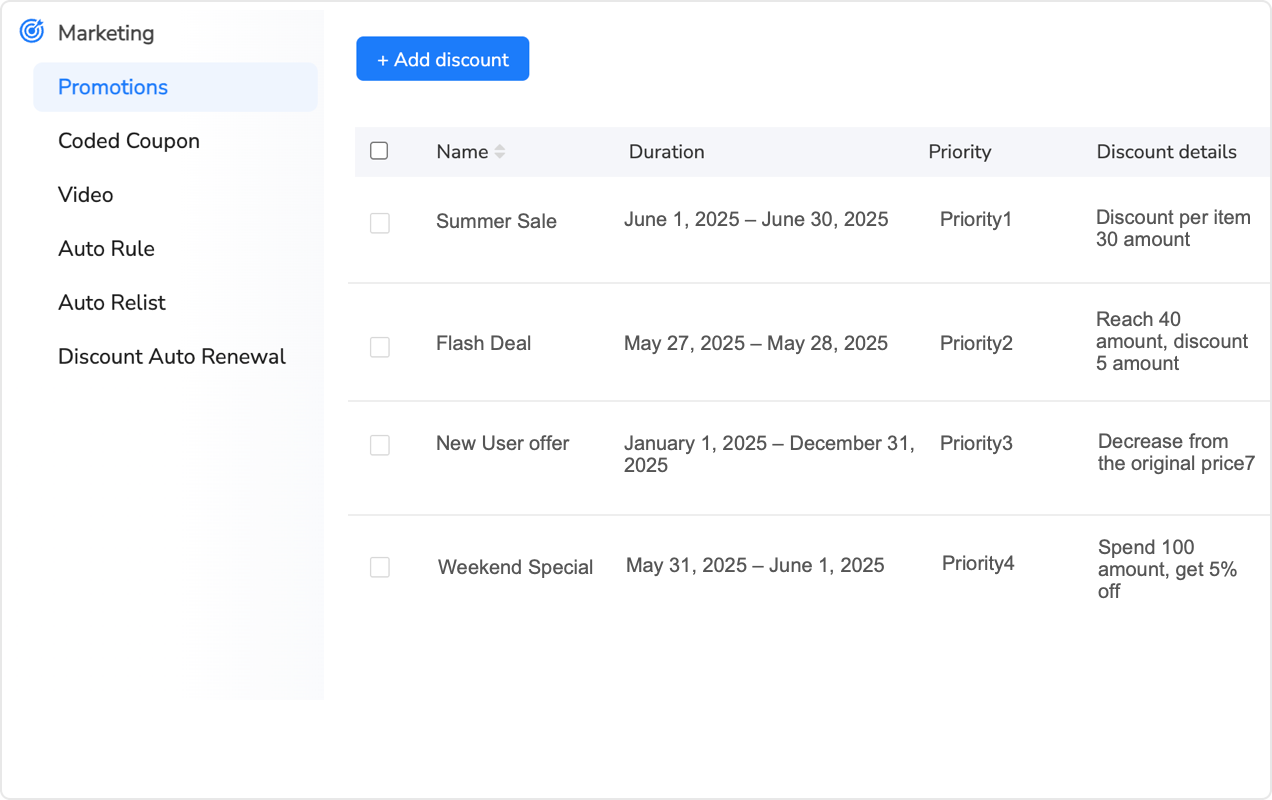
Maxmerce’s Promotion Management feature supports eBay’s promotional formats: percentage off, BOGO (buy one get one), volume discounts (buy 3+ get 10% off), and flash sales. You define rules once—like ‘Apply 10% discount to all items with inventory above 20 units to move excess stock’—and the system creates promotional listings across your filtered catalog in minutes.
The system also tracks promotion performance by SKU, showing which discounts drove sales and which cannibalized full-price revenue. This data prevents the mistake of discounting products that would sell at full price anyway—like running 15% off on trending items that already convert at 8-10%, when you could maintain full margins and still sell the same volume.
Strategy 9: Master Title Optimization for Search Visibility
Your title is the single most important ranking factor in eBay search. Get it wrong, and your product never appears in buyer searches, regardless of price or photos. eBay allows 80 characters, but only 50-55 display on mobile (70% of traffic), so keyword placement in the first half of your title determines visibility.
The mistake sellers make is stuffing titles with synonyms: ‘Wireless Bluetooth Headphones Over-Ear Headset with Microphone Mic Earphones.’ This wastes characters on duplicate concepts (headphones/headset/earphones, microphone/mic). The algorithm doesn’t reward redundancy—it rewards relevance. Better: ‘Wireless Bluetooth Headphones Noise Cancelling Over-Ear Microphone’ (58 characters, includes all unique keywords).
Primary vs. Secondary Keyword Placement
Your primary keyword (the phrase buyers search most often) goes first: ‘Sony WH-1000XM4 Headphones’ for that specific model, or ‘Wireless Bluetooth Headphones’ for generic listings. Secondary keywords (features, use cases) follow: ‘Noise Cancelling, Over-Ear, 30H Battery.’ This structure ensures your primary keyword appears in both desktop and mobile views, while secondary terms catch additional search queries.
For 500 products, analyzing which keywords rank highest and restructuring titles takes 8-12 hours manually. You research each product’s category, identify top-ranking competitor titles, extract common keyword patterns, then rewrite your titles to match successful structures. Most sellers do this once when listing products, then never revisit titles even as search trends change seasonally.
Maxmerce’s Rule-Based Bulk Listing Editing includes title optimization templates. You can apply formulas like ‘Move Brand Name to front of all titles’ or ‘Add trending keyword “Fast Shipping” to all titles under 60 characters.’ The system preserves existing content while applying optimization rules, letting you update 1,000 titles in 10-15 minutes based on seasonal trends or competitive analysis.
Strategy 10: Build Social Proof Through Review Management
Buyers filter search results by ‘Highest Rated’ and avoid sellers with fewer than 50 feedback or ratings below 98%. Your product might be identical to competitors’, but if they have 500 reviews and you have 30, most buyers choose them. Building review volume fast requires systematic review requests—but eBay restricts how you can ask for feedback.
The compliant approach is automated review requests sent 3-5 days after delivery (enough time for buyers to receive and test products, but before they forget about the purchase). The message must provide value: ‘Hi [Name], your [Product] was delivered on [Date]. If you’re satisfied, we’d appreciate your feedback. If there are any issues, please contact us first so we can make it right.’
Why Manual Review Requests Don’t Scale
For 20-30 daily orders, sending individual review request messages takes 30-45 minutes (find delivered orders, copy buyer names, personalize messages, send through eBay interface). That’s 3-4 hours weekly most sellers skip, leaving 80-90% of buyers who never leave feedback even when satisfied. The result: you gain 3-5 reviews monthly when you could be gaining 15-20 by systematically requesting feedback.
Maxmerce’s Automated Review Requests feature monitors order tracking and triggers personalized review request messages 3-5 days after delivery confirmation. The system includes eBay-compliant templates that encourage feedback while offering issue resolution if buyers are unsatisfied, preventing negative reviews by addressing problems proactively.
This automation turns 3-4 weekly hours into zero hours while increasing review request volume from 20-30% of orders (the fraction you remember to message manually) to 95-100% of orders (systematic automation). The result: 3-4x more reviews monthly, faster feedback score growth, and higher search rankings from improved seller ratings.
Strategy 11: use Data Analytics to Identify Growth Opportunities
Top sellers don’t guess what’s working—they track metrics. Which products have the highest sell-through rate? Which categories generate the best margins? What’s your average order value by product price tier? These insights guide inventory decisions: double down on winners, cut losers, test adjacent categories where you have proven success.
eBay’s Seller Hub provides basic analytics, but data is siloed by platform. If you’re selling on Amazon and Walmart too, you’re manually compiling sales reports from three sources, trying to identify which products perform best across channels. This cross-platform analysis takes 2-3 hours weekly and relies on spreadsheet accuracy—miss one export, and your decisions are based on incomplete data.
Multi-Channel Performance Tracking
The actionable insight isn’t ‘eBay sales up 12% last month.’ It’s ‘Product X sells 8 units monthly on eBay at $30, 15 units on Amazon at $35, and 3 units on Walmart at $28. Amazon’s higher price and volume suggests we should promote it more there and potentially raise eBay pricing.’ This kind of cross-platform comparison reveals pricing opportunities, inventory allocation strategies, and which channels to prioritize for specific products.
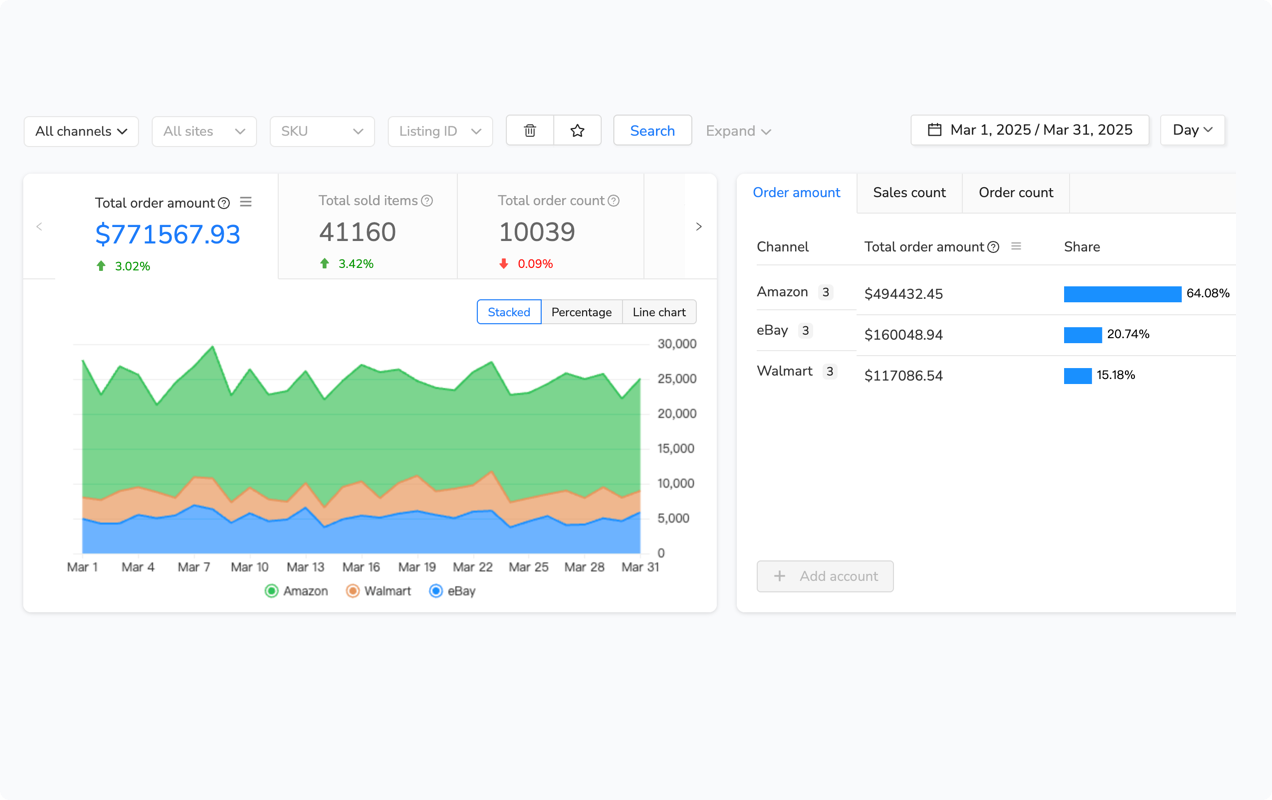
Maxmerce’s Analytics module provides unified dashboards showing sales, margins, and conversion rates across all channels. You can filter by time period, product category, or SKU to identify patterns: products that convert well on eBay but not Amazon might need Amazon-specific optimization (better images, A+ Content), while items selling better on Amazon could be underpriced on eBay.
The system also tracks inventory turnover rates—how many days it takes to sell through your stock. This metric reveals which products tie up capital too long. If an item takes 90 days to sell on average, you’re better off reallocating that inventory budget to faster-moving SKUs that turn every 20-30 days, generating 3x more revenue from the same capital investment.
Common Pitfalls When Trying to Increase eBay Sales
Most sellers fail not from wrong strategies, but from inconsistent execution. They relist products for two weeks, see modest gains, then stop because it’s tedious. They launch Promoted Listings, overspend on low-margin items, get discouraged by poor ROI, and abandon advertising entirely. The problem isn’t the tactics—it’s the manual effort required to sustain them.
Chasing Volume Instead of Profitability
You can increase eBay sales by dropping prices 20% across your catalog. You’ll sell more units, but generate less profit than before because you’re paying eBay fees and shipping costs on lower margins. The goal isn’t more sales—it’s more profitable sales. That requires understanding which products have margins to discount strategically (clear slow-movers at breakeven to free capital) and which should maintain full price (trending items that sell without discounts).
Ignoring Multi-Channel Opportunities
Focusing exclusively on eBay leaves 60-70% of potential revenue on the table. Your eBay inventory could simultaneously list on Amazon (where buyers pay 10-15% more for Prime shipping) and Walmart (where less competition often means better search rankings for niche products). The barrier is manual cross-listing work—but once automated, you’re multiplying revenue from inventory you already own without significant additional costs.
Over-Reliance on One Strategy
Relisting boosts visibility for 7-14 days, then wears off. Promoted Listings increase impressions, but don’t fix poor conversion rates from bad photos or weak descriptions. Repricing wins the Buy Box, but loses money if you have no margin protection rules. The effective approach combines strategies: improve listings for conversion first, then use relisting for visibility boosts, Promoted Listings for competitive categories, and repricing to maintain competitiveness without sacrificing margins.
Frequently Asked Questions
What’s the fastest way to increase eBay sales without spending on ads?
Strategic relisting gives you immediate visibility boosts at zero cost. eBay’s algorithm prioritizes newly listed items in search results, pushing them above 30-day-old listings. Using the ‘Sell Similar’ method (ending and recreating listings) treats your products as brand new. Sellers who relist weekly see 20-35% more impressions compared to letting items auto-renew. The key is timing: relist during peak shopping hours (7-9pm ET weekdays) when most buyers browse. For 500 SKUs, this takes 2-3 hours manually—or 15 minutes with automation tools like Maxmerce’s Auto Relist feature, which schedules relisting across your catalog without losing product history or SEO value.
How much should I spend on eBay Promoted Listings to see results?
Start with 5-8% of your product’s selling price for Promoted Listings Standard (PLG), testing on your top 20 best-sellers first. The platform’s data shows promoted items get 36% more visibility than organic listings, but success depends on category competition. Electronics and collectibles often need 8-12% to compete, while clothing can convert at 3-5%. Run campaigns for 14 days minimum before adjusting rates—eBay’s algorithm takes time to improve placement. For sellers managing 100+ SKUs, bulk campaign management becomes critical. Platforms like Maxmerce’s Advertising module let you launch campaigns across your catalog in minutes and adjust rates by category performance, preventing the hours spent manually creating individual promotions.
Does offering free shipping actually increase eBay sales?
Yes, but only if you price it correctly. eBay’s search algorithm boosts listings with free shipping, and 79% of US buyers filter search results by ‘Free Shipping.’ However, simply absorbing shipping costs kills your margins. The profitable approach: calculate your average shipping cost by zone, add it to your product price, then enable free shipping. For example, if you sell $25 items with $6 average shipping, price at $31 with free shipping instead of $25 + $6 shipping. You’ll rank higher in search and avoid cart abandonment from shipping sticker shock. For multi-channel sellers, managing different pricing strategies across eBay, Amazon, and Walmart gets complex fast. Maxmerce’s repricing engine automatically adjusts prices by channel, factoring in platform fees and shipping strategies, so you maintain margins while offering free shipping on eBay.
How often should I update my eBay listings to maintain visibility?
Your listings start losing visibility after 30 days, even with auto-renewal. eBay’s algorithm treats stale listings as less relevant, dropping them in search rankings. Best practice: refresh titles and descriptions every 30 days, and relist top performers weekly using ‘Sell Similar’ to reset listing age. Even small changes—swapping keyword order, adding seasonal terms, or updating the first sentence—signal freshness to the algorithm. For large catalogs (500+ SKUs), manual updates aren’t sustainable. Maxmerce’s Rule-Based Bulk Listing Editing feature lets you apply scheduled updates across filtered segments—like automatically refreshing all items over 30 days old or updating titles for products with declining views—turning an 8-hour weekly task into a 10-minute automated workflow.
What’s the difference between relisting and using ‘Sell Similar’ on eBay?
This matters more than most sellers realize. ‘Relist’ keeps your original listing date, so it doesn’t appear at the top of ‘Newly Listed’ searches—you gain no visibility boost. ‘Sell Similar’ creates a new item ID with today’s date, giving you prime placement in ‘Newly Listed’ filters where buyers sort to find fresh inventory. The tradeoff: you lose watchers and view history. However, if your listing has been active 30+ days with no sales, those metrics aren’t helping anyway. ‘Sell Similar’ essentially resets your listing’s algorithmic scoring. For sellers with 200+ slow-moving SKUs, manually clicking ‘Sell Similar’ for each takes hours. Maxmerce’s Auto Relist feature automates this process, scheduling ‘Sell Similar’ relists for underperforming items every 30 days while preserving your product library and attributes—turning a 4-hour monthly task into a set-and-forget automation.
Can I increase eBay sales by cross-listing to Amazon and Walmart?
Absolutely—multi-channel sellers average 2.5x revenue compared to single-platform sellers. Your eBay inventory can simultaneously list on Amazon and Walmart, accessing different buyer demographics. eBay attracts deal-hunters and collectors; Amazon serves Prime members wanting fast shipping; Walmart draws value-conscious families. The challenge: manual cross-listing takes 15-20 minutes per product across three platforms, and inventory sync becomes a nightmare. Sell one unit on eBay, you must manually decrement Amazon and Walmart to prevent overselling. For 100 SKUs, that’s 25+ hours weekly. Maxmerce’s Bulk Product Publish feature lists products to all three platforms simultaneously from one interface, while Inventory Sync updates quantities in real-time across channels—so when your eBay item sells, Amazon and Walmart quantities adjust within 5-15 seconds, preventing the cancellations that tank seller ratings.
How do I compete with Chinese sellers offering lower prices on eBay?
You can’t win on price against overseas sellers with 70% lower costs, but you can win on speed and service. Promote ‘US-based fast shipping’ in titles and descriptions—68% of American buyers pay extra for 2-3 day delivery versus 3-week China shipping. Offer easy returns with US return addresses. Respond to messages within 2 hours. These advantages justify 15-20% higher prices for domestic buyers who value reliability. The challenge is communicating this value in your listings. Maxmerce’s Listing Design Tool (eBay-specific) lets you create branded HTML templates highlighting ‘Ships from California—2-Day Delivery’ with trust badges and service guarantees, making your listings visually stand out from text-only overseas competitors. For customer service, Maxmerce’s CRM module consolidates eBay messages with your Amazon and Walmart channels, ensuring you never miss a buyer question that could close a sale.
What eBay listing optimization actually impacts sales conversion?
Three elements drive 80% of conversion: title keyword placement, first photo quality, and mobile optimization. Your title’s first 5 words matter most—buyers scan left-to-right, and eBay’s mobile app truncates titles after 50 characters. Put your primary keyword first: ‘Wireless Bluetooth Headphones Noise Cancelling’ beats ‘Headphones Wireless with Noise Cancelling Bluetooth.’ For photos, your first image determines click-through rate—use white backgrounds with the product filling 85% of the frame. eBay’s data shows professional photos increase sales by 5-10%. For mobile, 70% of eBay traffic comes from phones, so test your listings on a smartphone—long paragraphs and small text kill conversions. Maxmerce’s Manage Online Listings feature includes bulk title optimization and image management, letting you update titles across 1,000 SKUs in minutes and ensuring consistent photo quality without manually editing each listing.
Take Action: Start with These Three Changes Today
Don’t try implementing all 11 strategies simultaneously—that’s overwhelming and leads to nothing getting done. Start with the three highest-impact changes that require minimal setup:
Week 1: Enable Promoted Listings on your top 20 best-selling products at 5-8% ad rates. eBay’s algorithm takes 7-10 days to improve placement, so start now. Monitor performance after 14 days—if a product’s ad spend exceeds 15% of profit, lower the rate or pause. If it’s generating profitable sales at 3% ACoS, you’re leaving money on the table by not promoting more products.
Week 2: Relist your 50 slowest-moving SKUs using ‘Sell Similar’ to gain the new listing boost. These are products that haven’t sold in 45-60+ days—they’re not going to sell organically without intervention. The visibility boost from fresh listing age gives them a second chance at page 1 rankings. Track which ones sell within 14 days, then relist them again monthly to maintain algorithmic favor.
Week 3: Cross-list your top 10 eBay products to Amazon or Walmart. Start small to learn the workflow without overwhelming yourself. These should be products with good margins (40%+) and proven demand on eBay. If they’re selling 10+ units monthly on eBay, they’ll likely sell 3-6 units on Amazon or Walmart—extra revenue from inventory you already own.
These three changes take 4-6 hours total to set up manually, but generate 15-30% revenue increases within 30-60 days for most sellers. Once you see results, expand: promote more products, relist more frequently, cross-list more of your catalog.
The sellers earning $50,000-100,000 monthly on eBay aren’t working harder—they’re automating the repetitive tasks that consume 15-25 hours weekly for manual sellers. That time savings scales their catalogs from 200 SKUs to 2,000 SKUs without hiring teams. Ready to scale beyond manual management? Try Maxmerce’s 14-day free trial—no credit card required. Connect your eBay account and see how automation transforms your workflow from hours of daily busywork into strategic growth execution.
