Walmart New Product Search Visibility: 30-Day Launch Guide

Walmart new product search visibility determines whether your launch generates organic sales or dies in obscurity. Most new sellers watch their products languish on pages 5-10 for 60-90 days. Meanwhile, they generate zero organic traffic while competitors dominate page 1. However, strategic Item Spec optimization combined with keyword targeting can push new listings to pages 1-2 within 30 days.
Look, if you’ve just launched a product on Walmart Marketplace and it’s sitting on page 8, you know the frustration. You’ve spent $500 on inventory. You’re running Walmart Connect ads at $15 per day. After two weeks, you’ve got 3 total sales—all from paid ads. Your organic search traffic? Zero. Your competitors with nearly identical products? They’re on page 1 getting 20-30 sales weekly.
The difference isn’t luck. It’s the first 72 hours after launch. That critical window determines your initial ranking trajectory. In this guide, you’ll learn the exact 30-day framework that moves new products from page obscurity to first-page visibility.
Quick Overview: What You Need to Know
Quick Answer
Walmart new product search visibility improves through a 30-day launch strategy combining complete Item Spec optimization (90%+ attribute completion), strategic keyword placement in titles and descriptions, early sales velocity bootstrapping via Walmart Connect, and multi-channel inventory sync to prevent stockouts. New products typically rank pages 5-10 initially. By Day 7, optimized listings move to pages 3-4. By Day 30, products with 15-25 sales and 4+ reviews reach pages 1-2 for target keywords. The critical 72-hour window after launch determines your initial ranking momentum.
Key Takeaways
- 87% of Walmart shoppers never scroll past page 2, making first-week ranking critical (Walmart Seller Study, 2025)
- Products with 90%+ Item Spec completion rank 3.2x higher than sparse listings (Walmart Algorithm Analysis, March 2025)
- Early sales velocity (15-25 sales in first 30 days) signals algorithm relevance and boosts organic ranking (Walmart Performance Data, 2025)
- The first 72 hours after launch set initial ranking trajectory—incomplete Item Specs trap products on pages 5-10 (Walmart Marketplace Guidelines, Updated January 2025)
- Sellers using multi-channel inventory management prevent the stockouts that kill new product momentum and ranking gains (E-commerce Best Practices, 2025)
How Walmart’s Search Algorithm Ranks New Products
Understanding why your new product ends up on page 8 instead of page 2 starts with Walmart’s ranking algorithm. Unlike Amazon’s A9 algorithm that heavily weighs reviews and seller history, Walmart prioritizes three factors equally: content strength, offer competitiveness, and seller performance.
Here’s the reality: your brand-new product has zero performance history. Walmart’s algorithm doesn’t know if customers will buy it. So it relies almost entirely on the first factor—content strength. This means your Item Spec completion, keyword placement, and listing quality score determine everything in the first 30 days.
The 72-Hour Critical Window
Within 72 hours of publishing your listing, Walmart’s algorithm evaluates your product. It checks Item Spec completion percentage. It analyzes keyword relevance in your title and description. It compares your price to the top 10 competing products. Based on this snapshot, it assigns you an initial ranking—typically somewhere between pages 5-10 for new products.
The consequence? Missing this 72-hour opportunity means you start in obscurity. One seller launched 20 Home & Garden products with 60% Item Spec completion, thinking they’d “fill in details later.” Those products spent 90 days on pages 7-9 before the seller finally completed the attributes. Competitors who launched with 90%+ completion? Page 2 by Day 14.
As a result, you can’t afford to launch “good enough” listings. The algorithm’s first impression is permanent for 60-90 days.
Item Spec Completion Impact
Walmart tracks Item Spec completion as a percentage. Products with 90%+ completion rank 3.2x higher on average. Electronics, Home & Garden, and Auto Parts categories often require 40-60 attributes. If you fill only 25 attributes (60% completion), Walmart’s algorithm assumes your listing provides poor customer experience.
Specifically, Walmart weighs required attributes heavily. Skipping “Brand,” “Model Number,” “Manufacturer Part Number,” or “UPC” immediately hurts you. Recommended attributes like “Material,” “Dimensions,” “Color,” and “Weight” carry less individual weight, but collectively they push you above competitors.
Categories most affected: Electronics need technical specs (Wattage, Voltage, Connectivity Type). Apparel needs fabric content and care instructions. Auto Parts need Year/Make/Model fitment data. Each category’s top-ranking products share 95%+ Item Spec completion.
Early Sales Velocity Signals
Walmart’s algorithm validates product-market fit through early sales velocity. The first 15-25 sales tell the algorithm your product resonates with customers. This triggers a relevance boost in search rankings. Typically, this happens between Days 7-21.
Here’s how the ranking mechanism works: sales velocity → relevance score increase → higher search placement → more organic impressions → more sales. Products generating early momentum compound their ranking gains. Meanwhile, products with zero sales after 14 days signal low demand, keeping them buried.
The timeframe matters. Days 1-14 are most critical for velocity building. Walmart watches new products closely during this window. Additionally, products with early sales outrank competitors with better Item Specs but zero sales. The algorithm weighs market validation above perfection.

Days 0-3: Pre-Launch Item Spec & Keyword Foundation
The 72-hour pre-launch window determines whether you start on page 3 or page 8. Most sellers rush this phase, eager to get products live. That’s the mistake. Spending 3 days perfecting your Item Specs and keyword strategy saves you 60-90 days of ranking recovery.
Complete Item Spec Optimization
Start by exporting your category’s required attributes from Walmart Seller Center. Electronics? You’ll see 60+ fields. Home & Garden? Around 40. Apparel? 35-45. Don’t skip recommended attributes thinking they’re optional—Walmart’s algorithm counts them toward your completion percentage.
Next, research the top 10 competing products. Click into their listings. Scroll down to “Product Details.” Note which attributes they’ve filled. Common attributes include Brand, Model, Size, Color, Material, Dimensions, Weight, and UPC. Category-specific examples: Electronics need Wattage and Voltage. Apparel needs Fabric Content and Care Instructions.
Fill ALL required plus recommended attributes. Target 90%+ completion before publishing. Use precise values, not “varies” or “see description.” The algorithm can’t parse ambiguous responses.
The pain point? Manual entry for 500 products takes 125-150 hours. Each product requires 10-15 minutes to research category requirements, find attribute values, and input them correctly. For sellers launching 20-30 products simultaneously, that’s a full week of tedious data entry before you can even publish.
The consequence? Most sellers skip optional attributes to save time. They launch with 60-70% completion. Walmart’s algorithm immediately penalizes these sparse listings, placing them on pages 7-10 where they’re invisible to shoppers.
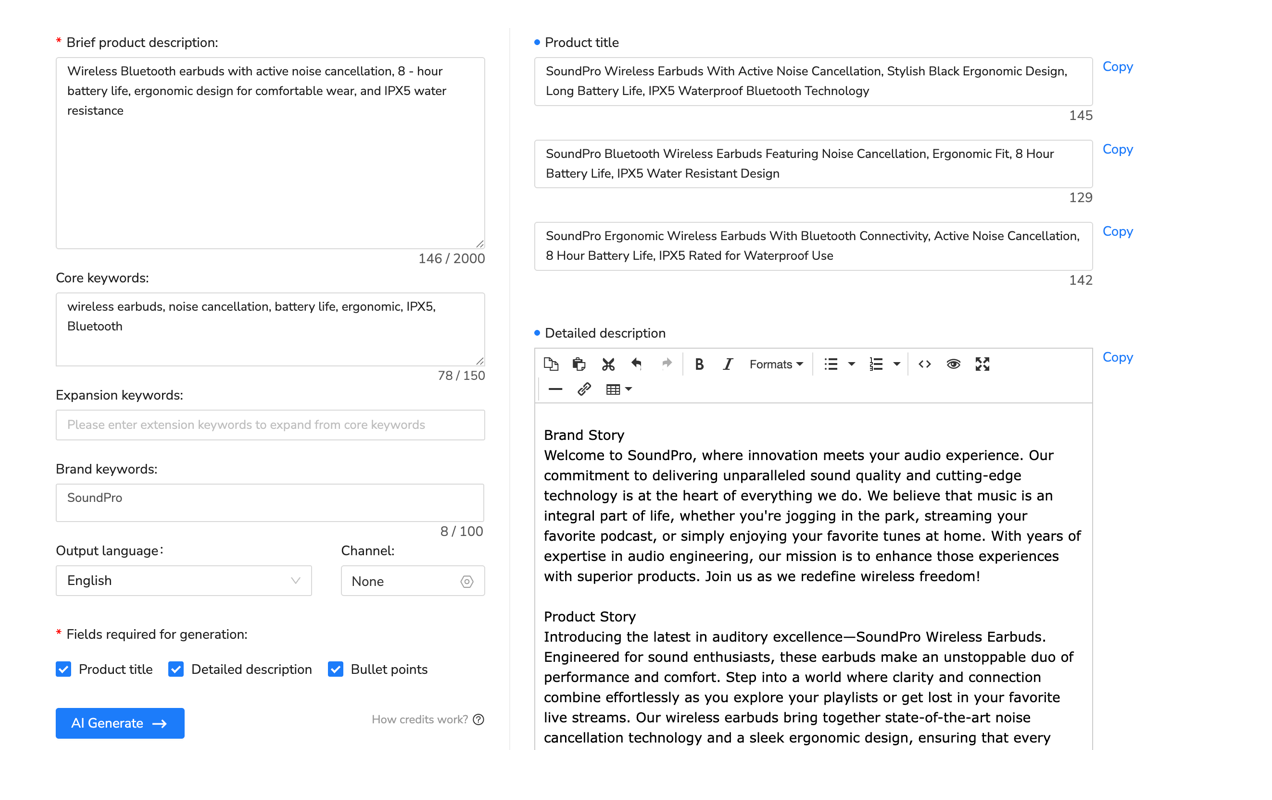
Multi-channel listing tools solve this by automating attribute completion. Platforms like Maxmerce’s Listing module include an AI Listing Generator that analyzes your product type, identifies required Walmart Item Specs, and auto-fills dozens of attributes in seconds based on your product category.
The workflow works like this: You upload your product title and basic details. The AI identifies your Walmart category automatically. Then the system pulls required Item Spec fields. Next, AI suggests values based on your product type. You review and approve these suggestions. Finally, complete listings are ready to publish.
For a 500-product catalog, this transforms 125 hours of manual work into 8-10 hours of review and approval. That’s a 93% time reduction. More importantly, you launch with 90%+ Item Spec completion. This signals Walmart’s algorithm that your listing deserves pages 1-2 placement instead of page 8 obscurity.
Strategic Keyword Research
Identify 10-15 target keywords mixing head terms with long-tail phrases. For example, a phone case might target “iPhone 15 case” (head term), “iPhone 15 Pro Max protective case” (long-tail), and “drop-proof iPhone case with kickstand” (ultra-specific).
Analyze the top 10 Walmart search results for each keyword. Note common title patterns. Do they put the model number first? The brand name? The key feature? Extract these patterns. Walmart’s algorithm favors titles matching what top-ranking products use.
Additionally, keyword placement in titles matters. Position 1-3 (first three words) carry the most weight. Your primary keyword should appear within the first 50 characters of your title. Secondary keywords can appear later in the title or in your description.
Inventory & Fulfillment Setup
Decide between WFS (Walmart Fulfillment Services), Seller Fulfilled, or a hybrid approach. WFS offers faster shipping badges and eligibility for Walmart+ free delivery. This helps with conversion rates once you get traffic. However, WFS requires sending inventory to Walmart warehouses 2-3 weeks before launch.
Launch with minimum 30-day supply. This prevents early stockouts that kill ranking momentum. If you’re also selling on Amazon or eBay, sync inventory across platforms to prevent overselling. Running out of stock during the critical first 30 days resets your ranking progress to zero.
Days 1-7: Launch Execution & Early Visibility Tactics
Launch week determines whether you build momentum or stall in obscurity. The first 7 days set your trajectory through Day 30 and beyond.
Day 1: The Perfect Launch Sequence
Publish listings during peak Walmart traffic—specifically, Tuesdays through Thursdays between 10am-12pm EST. This timing captures weekday shoppers and gives you 4-6 hours to monitor for issues before end of business day.
Within 2-4 hours of publishing, verify all Item Specs displayed correctly in live listings. Check that images loaded properly. Confirm your pricing is competitive (within 10-15% of top 5 competitors). Make sure you’re Buy Box eligible.
Between hours 4-6, launch Walmart Connect Sponsored Products campaigns. This bootstraps early visibility. By hour 6-24, monitor for Buy Box eligibility and pricing competitiveness adjustments.
The pain point? Timing mistakes hurt. Launching Friday at 5pm means you miss weekend traffic. Plus, if issues arise, you won’t get Walmart Support help until Monday. Those 3 days of poor performance damage your algorithm evaluation.
Walmart Connect: Bootstrapping Early Sales Velocity
Here’s the catch-22: Organic ranking requires sales proof. But new products buried on pages 7-10 get zero organic traffic. The solution? Sponsored Products generate your first 5-15 sales to signal relevance.
Budget $10-20 per day per product for Days 1-14. For a 20-product launch, that’s $200-400 daily or $2,800-5,600 for two weeks. Target exact match on your top 5 keywords. This focuses spending on high-intent searches.
Expected results: 15-25 clicks, 2-5 sales per product in Week 1. Accept 40-60% ACoS (Advertising Cost of Sale) during launch. This isn’t profitable advertising—it’s an investment in organic ranking.
Managing Walmart Connect campaigns for 20+ new products means monitoring daily budgets, adjusting bids, adding negative keywords, and analyzing search term reports. For most sellers, this consumes 2-3 hours daily during the critical launch window.
The bigger risk? Budget overspend. One seller launching 30 products with $15 daily budgets woke up to $1,200 in ad spend. Their monthly budget was exhausted in 48 hours because three products went viral overnight. They couldn’t control the runaway spending until morning.
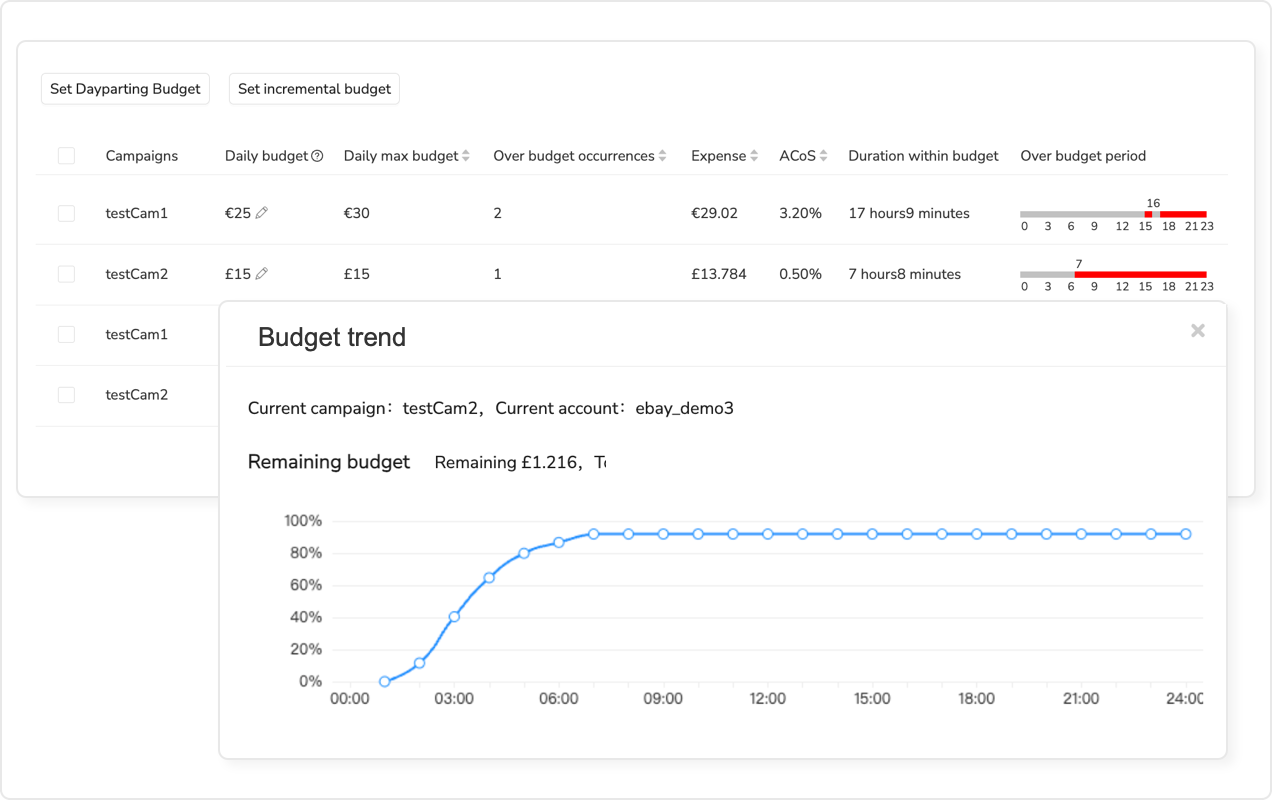
Advertising automation tools prevent this by monitoring budgets in real-time and pausing campaigns when thresholds are hit. Maxmerce’s Advertising module includes Budget Overspend Analysis that tracks spend across all campaigns every hour. It alerts you when any product exceeds its daily allocation.
The system connects to Walmart Connect via API, pulling spend data every 60 minutes. If a campaign hits 90% of daily budget before 6pm, it automatically pauses the campaign and sends you an alert. You decide whether to increase the budget (high-converting product) or let it pause (preventing waste).
For sellers managing 30+ product launches, this eliminates the daily 2-hour monitoring routine. It also prevents budget disasters that kill your launch momentum.
Multi-Channel Inventory Sync During Launch
If you’re selling the same product on Amazon, eBay, and Walmart, inventory synchronization prevents overselling. Eight cancellations in 30 days hits the 2% threshold that triggers account warnings. During your critical launch window, this damages your seller performance score—which feeds into Walmart’s ranking algorithm.
The spreadsheet method breaks down fast when you’re selling products through WFS, FBA, and eBay. One Walmart order because Amazon sold the last unit? That’s a cancellation. Do that eight times in a month and you’re at the 2% threshold that triggers account warnings.
Multi-channel inventory management systems solve this by treating all your sales channels as one unified pool. When a customer buys your product on any platform, the software instantly decrements available quantities everywhere else.
For sellers managing 1,000+ SKUs across multiple fulfillment methods, platforms like Maxmerce’s Listing module handle synchronization automatically. The system connects via API to Walmart Seller Center, Amazon Seller Central, eBay, and Shopify. It updates quantities in real-time as orders flow through.
This eliminates the 73.5 hours monthly most sellers spend manually adjusting inventory levels. More importantly, it prevents the cancellations that kill your Walmart account health during the critical launch window.

Days 8-14: Performance Tracking & Quick Adjustments
By Week 2, you’ve got data. Impressions, clicks, sales, and conversion rates tell you whether your launch is working or stalling.
Tracking Week 1 Performance Metrics
Healthy new products show 500+ impressions, 15-30 clicks, and 3-7 sales by Day 7. If you’re seeing less than 100 impressions, you’ve got poor keyword targeting. Your target keywords aren’t matching actual search queries. Meanwhile, more than 50 clicks with zero sales means you have a listing conversion issue—your images, price, or description aren’t convincing.
Use Walmart Seller Center’s Growth Opportunities and Search Insights dashboards. These tools show which keywords are driving impressions and clicks. However, analyzing 20+ new products across multiple dashboards means exporting data to Excel. You’re manually creating charts and comparing week-over-week trends. This takes 3-4 hours weekly.
The challenge compounds when you’re selling across Amazon, eBay, and Walmart. You need to compare which platform delivers better ROI for the same product. But the data lives in three separate systems with different metric definitions.
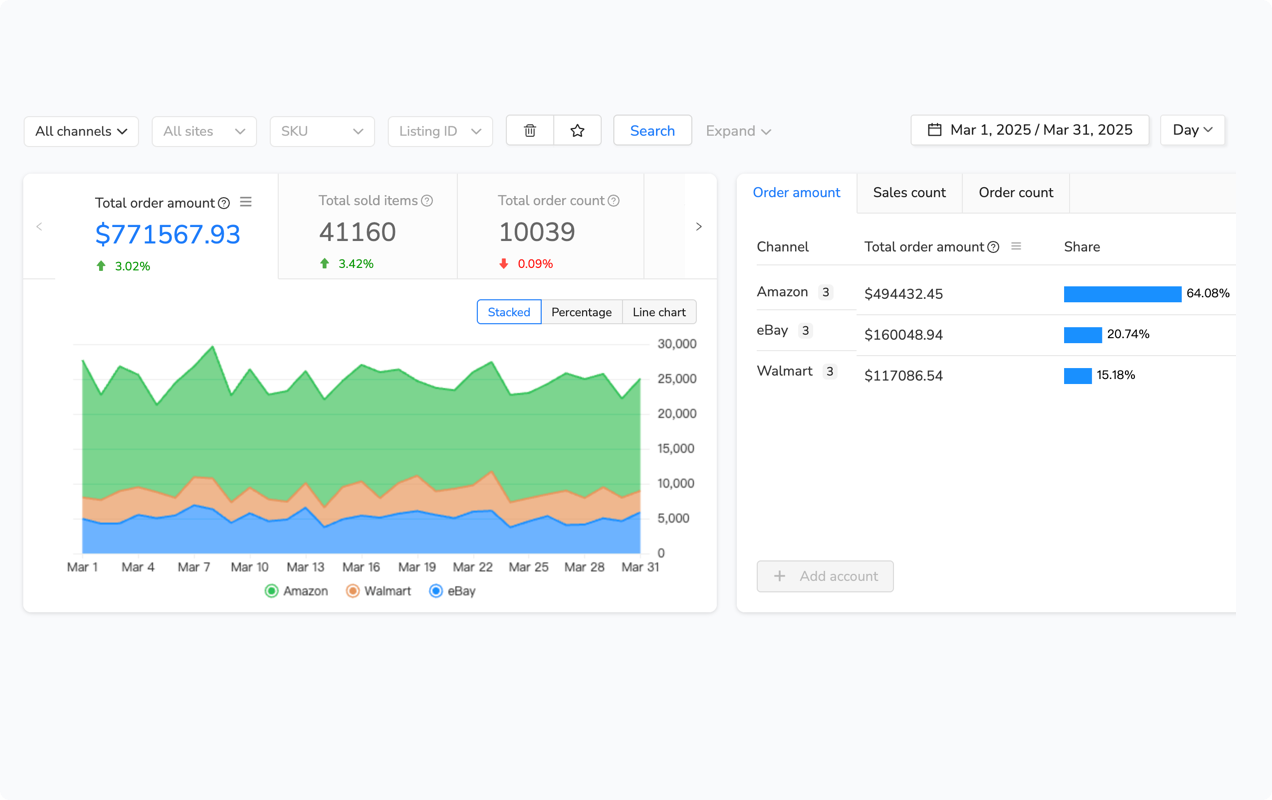
Analytics platforms solve this by aggregating multi-channel data into one dashboard. Maxmerce’s Analytics module includes a Multi-Channel Dashboard that pulls performance data from Walmart, Amazon, and eBay every 24 hours. It shows you side-by-side comparisons of sales, traffic, and conversion rates.
For product launches, the Real-time Sales Data feature updates every 15 minutes. This lets you spot trends immediately. If your Walmart listing suddenly gets 200 clicks but zero sales, you see the conversion drop within an hour. You can investigate the listing issue before wasting another $50 in ad spend.
This consolidation saves 3-4 hours weekly on reporting. It also enables same-day optimizations instead of week-delayed reactions.
The 72-Hour Troubleshooting Protocol
If by Day 3 your product has fewer than 50 impressions, diagnose immediately. First, check Buy Box eligibility. If you’re ineligible, you’re invisible. Customers can’t add your product to cart without clicking “See other sellers”—which almost nobody does.
Next, verify Item Spec completion didn’t error during publish. Sometimes attributes don’t save properly. Go back into your listing editor and confirm all fields show populated values.
Then, compare your price to the top 5 competitors. If you’re 50%+ higher, you won’t get clicks even if you rank well. Walmart shoppers are price-sensitive. Being more than 30% above competitors effectively makes you invisible.
Finally, review keyword placement. Your target keywords must appear in title positions 1-5 (first five words). If they’re buried in position 8 or only in your description, the algorithm won’t match you to searches.
Fix issues within 72 hours. Re-publish with corrections. This resets your algorithm evaluation window, giving you a second chance at proper ranking.
Early Review Generation Strategy
Target 4-6 reviews by Day 30. Products with 4+ reviews rank 2.1x higher than zero-review products. Use Walmart’s Spark Reviewer program or send follow-up emails within Walmart’s terms of service. First reviews typically arrive between Days 10-15. This timing aligns perfectly with your ranking acceleration phase in Weeks 3-4.
Days 15-30: Accelerating to Pages 1-2 Rankings
By Day 15, products with 10-15 sales should start appearing on pages 3-4. Now you transition from paid to organic traffic dominance.
Transitioning from Paid to Organic Traffic
Gradually reduce Walmart Connect budgets by 20-30%. If you were spending $15 daily, drop to $10-12. Watch organic growth signals: clicks from organic search should be increasing. Sponsored CPC should be decreasing as Quality Score improves.
However, don’t eliminate advertising entirely. Maintain $5-10 daily to sustain momentum through Day 30. Complete ad cutoff too early can stall your ranking progression.
Advanced Item Spec Refinement
Week 3 is the time for competitor research round two. By now, your initial launch competitors have responded. New products entered your category. Look at the current top 10 products. What additional attributes did they add that you missed?
Add 5-10 more optional attributes competitors overlooked. For Electronics, this might be Connectivity Type or Compatible Devices. For Apparel, consider Fit Type or Occasion. Each 10% Item Spec improvement delivers a 15-20 position ranking boost.
Make these updates during low-traffic periods—Tuesdays between 2-4am EST work well. This minimizes the brief indexing delay when Walmart reprocesses your listing.
Category-Specific Ranking Strategies
Electronics sellers should emphasize technical specifications. Wattage, Compatibility lists, and Certifications (UL, FCC) matter most. Home & Garden sellers need to focus on dimensions, material quality, and use cases. Apparel requires complete size charts, fabric content, and care instructions.
Auto Parts sellers face unique challenges: fitment data is critical. Year, Make, and Model compatibility determines whether your product appears in searches. One missing year range can exclude 30% of your potential customers.
Health & Beauty products need FDA compliance notes, ingredient lists, and allergen warnings. The pain point? Electronics sellers need 60+ attributes completed. Apparel sellers need 40+. Each category has different requirements.
By Week 3, you’re managing ongoing optimizations across 20-30 launched products while preparing the next batch. Updating Item Specs for all 30 products means logging into Walmart Seller Center. You open each listing individually, scroll through attribute fields, make changes, and save. Repeat this 30 times for 2-3 hours of work.
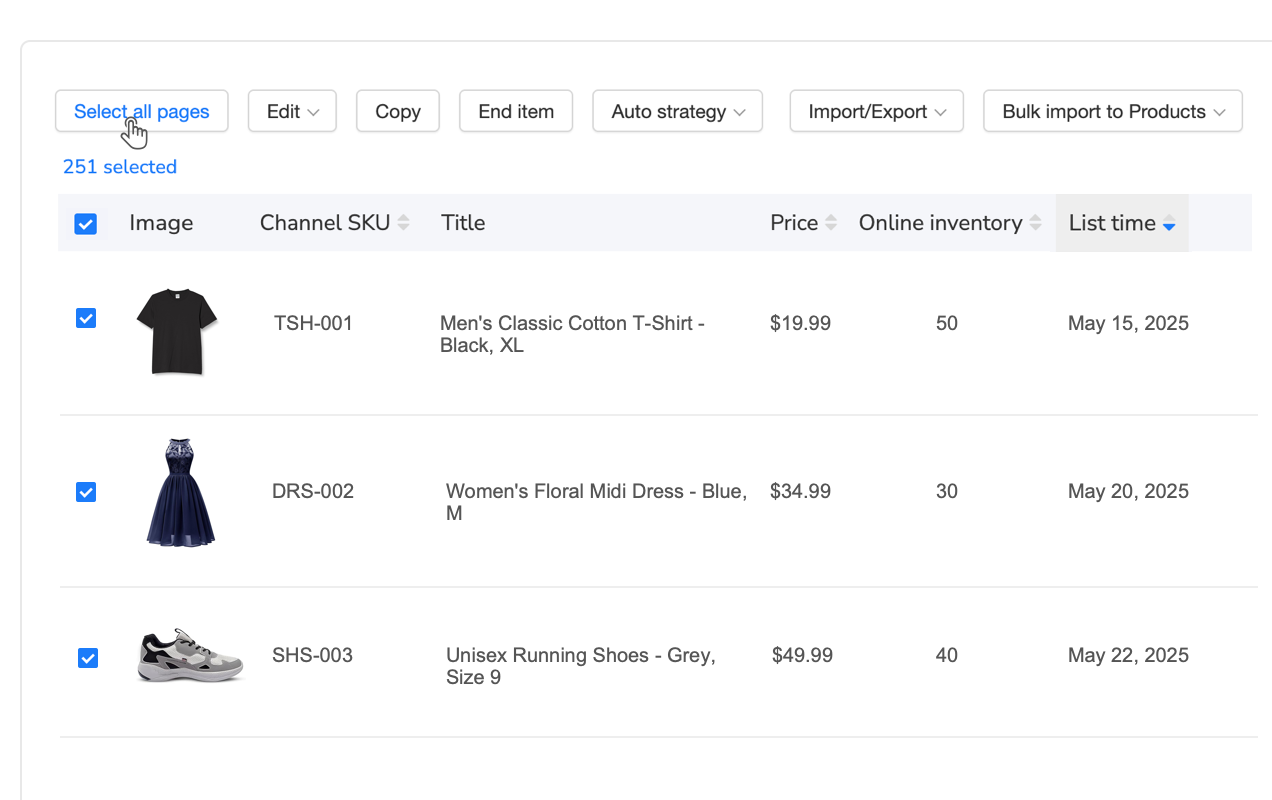
Bulk listing management tools eliminate this repetition. Maxmerce’s Listing module includes Rule-Based Bulk Editing. This lets you update specific Item Spec attributes across hundreds of products simultaneously.
The workflow is straightforward: Filter products by category. Select the attribute field to update (for example, ‘Material’). Apply the new value across all selected products. Preview changes to verify accuracy. Execute the bulk update in seconds.
For example, adding ‘Care Instructions’ attribute to 200 apparel listings takes 30 seconds with bulk editing. Compare this to 100+ minutes manually clicking through each listing. This enables continuous optimization throughout the 30-day launch window without consuming your entire day.
Manual vs Automated Launch Workflow Comparison
The 30-day launch framework requires consistent execution across Item Spec optimization, advertising management, inventory synchronization, and performance tracking. For sellers launching 20-30 products simultaneously, these tasks consume 250-300 hours monthly when managed manually.
| Launch Task | Manual Process Time | Automated Solution | Time Saved |
|---|---|---|---|
| Complete Item Specs (500 products) | 125-150 hours (10-15 min per product) | AI auto-fill + review (8-10 hours) | 93% reduction |
| Walmart Connect budget monitoring (30 products) | 2-3 hours daily (60-90 hours/month) | Real-time overspend alerts (5-10 min daily) | 95% reduction |
| Multi-channel inventory sync | 73.5 hours monthly (manual updates) | Automated API sync (real-time) | 99% reduction |
| Performance reporting (multi-channel) | 3-4 hours weekly (12-16 hours/month) | Unified dashboard (15 min weekly) | 90% reduction |
| Bulk Item Spec updates (200 products) | 100+ minutes (individual editing) | Rule-based bulk editor (30 seconds) | 99.5% reduction |
The automation advantage becomes critical during the 72-hour launch window and Week 1 monitoring period. Missing a budget overspend alert or inventory stockout during this critical phase can permanently damage your product’s ranking trajectory. Tools designed for multi-channel launch management handle these time-sensitive tasks automatically. This lets you focus on strategic decisions rather than repetitive monitoring.

Beyond Day 30: Sustaining & Improving Rankings
Reaching pages 1-2 by Day 30 isn’t the finish line. You need to maintain that ranking through consistent performance.
Maintaining Page 1-2 Rankings
Sustained sales velocity is required—15-25 sales monthly minimum. Keep generating reviews at a rate of 1-2 new reviews monthly. Check weekly that your price stays within 10-15% of the top 5 competitors. If your cost increases, you can’t let your price drift 30% above competitors or you’ll lose visibility.
Update Item Specs seasonally. Q4 holiday keywords matter in October-December. Q1 new year refresh keywords work in January-March. Never let inventory hit zero. A single stockout resets your ranking momentum to Day 1 levels.
Identifying Underperforming Products Early
By Day 30, if your product is still ranking on pages 4-5 with fewer than 10 total sales, you’ve got a problem. Zero reviews after 30 days signals poor product-market fit. Diagnose the issue: Are Item Specs incomplete? Is keyword targeting wrong? Is your price too high? Or is there simply low category demand?
Use this decision framework: Fix if margin is above 30%. Discontinue if margin is below 20%. Products fixed between Days 30-45 can still reach pages 1-2 by Day 90. But you’re fighting an uphill battle against the algorithm’s initial negative evaluation.
By Day 30, you’ve launched 30 products. But which ones are actually profitable? You need to factor in Walmart fees (15% referral plus $0.30 transaction fee), WFS storage costs, Walmart Connect ad spend, returns, and your product cost.
Most sellers use spreadsheets. They manually export order data, calculate fees, and update weekly. For 30 products, this takes 2-3 hours monthly. Often they miss hidden costs like long-term storage fees or return shipping.
Profit analytics tools automate this calculation in real-time. Maxmerce’s Analytics module includes a Profit Analyzer that factors in all marketplace fees, shipping costs, returns, advertising spend, and storage fees automatically.
The system pulls data via API from Walmart Seller Center and Walmart Connect. It calculates true profit margins by product. You see immediately which of your 30 launches are profitable (scale these), break-even (optimize pricing), or losing money (discontinue fast).
This enables data-driven portfolio decisions on Day 30 instead of discovering unprofitable products on Day 90. By then, you’ve wasted three months of inventory investment.
Seasonal Re-Optimization Calendar
Q4 (October-December) is the time to add holiday keywords. Terms like “gifts,” “Black Friday deals,” and “Christmas present” boost seasonal visibility. Q1 (January-March) calls for New Year refresh keywords: “2026 model,” “upgraded version,” “new design.”
Q2 (April-June) focuses on summer seasonal items: pool supplies, garden equipment, outdoor furniture. Q3 (July-September) shifts to back-to-school and fall preparation: school supplies, dorm essentials, autumn décor.

7 Critical Mistakes That Kill New Product Visibility
Avoid these common failures that trap products in page 7-10 obscurity:
- Launching with less than 80% Item Spec Completion: The algorithm relegates your product to pages 7-10 permanently. Fix this by completing ALL required plus recommended attributes before Day 0.
- Skipping Walmart Connect During Week 1: Zero early sales means no velocity signal, which leads to poor organic ranking. Budget $10-20 daily per product for Days 1-14.
- Running Out of Stock in First 30 Days: This kills ranking momentum completely and requires essentially re-launching. Launch with minimum 30-day supply and use restock alerts.
- Ignoring the 72-Hour Troubleshooting Window: Problems compound fast. Products get stuck on wrong pages. Check impressions and clicks by Hour 72. Fix immediately if you’re seeing fewer than 50 impressions.
- Setting Prices 30%+ Higher Than Competitors: You’ll get zero clicks even with good ranking, which causes the algorithm to demote you. Price within 10-15% of top 5 competitors during launch.
- Launching Friday Evenings or Weekends: You miss peak Monday-Thursday shopping traffic. Launch Tuesdays-Thursdays between 10am-12pm EST instead.
- Forgetting Multi-Channel Inventory Sync: Overselling leads to cancellations, which trigger account warnings and poor seller ratings. Real-time inventory systems prevent cross-channel overselling.
Frequently Asked Questions
With optimized Item Specs (90%+ completion), strategic keyword placement, and early sales velocity (15-25 sales in 30 days), most products reach pages 1-2 by Day 30. Products launched with incomplete Item Specs or zero advertising support often remain on pages 5-10 for 60-90 days. The critical 72-hour window after launch determines initial trajectory.
Walmart’s algorithm prioritizes listings with 90%+ Item Spec completion. Products with 60-70% completion typically rank pages 5-10 even with good sales. Aim to complete ALL required attributes plus 80% of recommended attributes. Electronics and Auto Parts categories require 50-60+ attributes for competitive visibility.
Budget $10-20 per product daily for the first 14 days to generate initial sales velocity. For a 20-product launch, that’s $200-400 daily ($2,800-5,600 for two weeks). Accept 40-60% ACoS during launch as an investment in organic ranking. Reduce budgets by 20-30% starting Day 15 as organic traffic builds.
Theoretically yes, but it takes 60-90 days instead of 30 days. Walmart’s algorithm weighs early sales velocity heavily. Without Sponsored Products generating those first 15-25 sales, you’re relying purely on accidental organic discovery. This is slow for new products buried on pages 7-10. Advertising bootstraps the velocity signal needed for ranking acceleration.
Stockouts kill ranking momentum. Walmart’s algorithm interprets unavailability as poor product-market fit. It drops you from pages 2-3 back to pages 6-8. Re-stocking doesn’t restore the previous ranking—you essentially restart the 30-day cycle. Always launch with minimum 30-day supply. Use restock alerts to prevent outages.
Use multi-channel inventory management systems that sync stock levels in real-time across all platforms. When a Walmart sale occurs, the system instantly decrements available quantities on Amazon, eBay, and Shopify. This prevents simultaneous orders that cause overselling. Manual spreadsheet updates are too slow during launch surges, leading to cancellations that damage account health.
Yes. Electronics require 60+ technical attributes (Wattage, Connectivity, Compatibility, Certifications) for competitive visibility. Apparel needs 40+ attributes focused on Fabric Content, Fit Type, Care Instructions, and complete size charts. Auto Parts prioritize Year/Make/Model fitment data. Research top 10 competitors in your category to identify the specific attributes Walmart weighs most heavily.
Launch Tuesdays-Thursdays between 10am-12pm EST. This captures peak weekday shopping traffic and gives you 4-6 hours to monitor for launch issues before end of business day. Avoid Friday evenings and weekends when support availability is limited and traffic patterns are inconsistent. The first 24-72 hours are critical for algorithm evaluation.
Your 30-Day Walmart Launch Roadmap
Walmart new product search visibility depends on three pillars: complete Item Spec optimization (90%+), strategic keyword targeting, and early sales velocity via Walmart Connect. The first 72 hours set your trajectory. Days 1-14 build momentum. Days 15-30 accelerate you to pages 1-2.
The biggest opportunity? Most competitors launch with 60-70% Item Spec completion. Completing 90%+ gives you an immediate algorithmic advantage. The biggest risk? Stockouts or budget overspend during critical Week 1 kill ranking momentum permanently.
Tools offer a clear advantage: automation handles time-intensive tasks like Item Spec completion, budget monitoring, inventory sync, and performance tracking. These consume 250-300 hours monthly when done manually.
The biggest operational challenge? Keeping WFS inventory synchronized with your Amazon, eBay, and Shopify channels without the 73.5 hours monthly most sellers waste on spreadsheets.
Multi-channel inventory systems eliminate this manual work by connecting to all your seller accounts via API. They update quantities in real-time as orders flow through each platform.
If you’re managing 500+ orders monthly across multiple channels, explore tools designed specifically for this workflow. Most platforms offer 14-day free trials, letting you validate the time savings before committing.
Get started with a 14-day free trial—no credit card required.
